Cardio Comfort Trail - Exercise bike Bremshey - Free user manual and instructions
Find the device manual for free Cardio Comfort Trail Bremshey in PDF.



| Product type | Exercise bike |
| Brand | Bremshey |
| Model | Cardio Comfort Trail |
| Dimensions (L x W x H) | 164 x 63 x 122 cm |
| Weight | 50 kg |
| Maximum user weight | 120 kg |
| Resistance | 8 electronic levels, adjustment by +/- keys |
| Power supply | Mains adapter |
| Display | Electronic meter: speed, time, distance, calories, RPM, pulse |
| Programs | Manual (8 levels) and 10 training profiles |
| Heart rate measurement | Hand grip sensors, ear clip (wired), wireless chest strap (optional) |
| Recovery function | RECOVERY: recovery pulse measurement (result F1 to F6) |
| Other functions | Calendar, clock, ambient temperature, intermittent SCAN display |
| Usage | Indoors only, temperature 10-35°C, max humidity 90% |
| Required space | At least 100 cm free space around the device |
| Assembly | Requires 2 people, tools provided |
| Maintenance | Dry with a soft absorbent cloth, check screws periodically, no detergent |
| Transport | Transport wheels, tilt from the rear |
| Safety | Do not use with side guards removed, do not stand on it, do not lean on the meter |
| Spare parts | Available via distributor, refer to list at end of manual |
| Standards | CE compliant, EN 957-1 and EN 957-5 class HB |
| Warranty | 24 months domestic use (covers manufacturing defects) |
Frequently Asked Questions - Cardio Comfort Trail Bremshey
User questions about Cardio Comfort Trail Bremshey
0 question about this device. Answer the ones you know or ask your own.
Ask a new question about this device
Download the instructions for your Exercise bike in PDF format for free! Find your manual Cardio Comfort Trail - Bremshey and take your electronic device back in hand. On this page are published all the documents necessary for the use of your device. Cardio Comfort Trail by Bremshey.
USER MANUAL Cardio Comfort Trail Bremshey
OWNER'S MANUAL P. 2-9
IMPORTANT SAFETY INSTRUCTIONS
Read this guide carefully before assembling, using or servicing your fitness equipment. Please keep the guide somewhere safe; it will provide you now and in the future with the information you need to use and maintain your equipment. Always follow these instructions with care. Please note that the warranty does not cover damage due to transportation or not following of adjustment or maintenance instructions described in this manual.
NOTE ABOUT YOUR HEALTH
- Before you start any training, consult a physician to check your health condition.
- If you experience nausea, dizziness or other abnormal symptoms while exercising, stop your workout immediately and consult a physician.
- To avoid muscular pain and strain, begin each workout by warming up and end it by cooling down (slow pedalling at low resistance). Don't forget to stretch at the end of the workout.
NOTE ABOUT THE EXERCISE ENVIRONMENT
The equipment is not to be used outdoors.
- Place the equipment on a firm, level surface. Place the equipment on a protective base to avoid any damages to
the floor beneath the equipment.
- Make sure that the exercise environment has adequate ventilation. To avoid catching cold, do not exercise in a draughty place.
- Make sure that there is enough free space around the equipment so that getting onto the equipment, exercising and getting off the equipment is safe.
- In training, the equipment tolerates an environment measuring +10^ to +35^ . The equipment can be stored in temperatures ranging between -15^ and +40^ . Air humidity in the training or storage environment must never exceed 90% .
NOTE ABOUT USING THE EQUIPMENT
- If children are allowed to use the equipment, they should be supervised and taught how to use the equipment properly, keeping in mind the child's physical and mental development and their personality. Also make sure that pet animals keep a safe distance to the product when it is transporting or used for training.
- Before you start using the equipment, make sure that it functions correctly in every way. Do not use a defective piece of equipment.
- Press the keys with the tip of the finger; your nails may damage the key membrane.
- Never lean on the meter.
- Never remove the side covers. Do not step on the frame casing.
- Only one person may use the equipment at a time.
- Wear appropriate clothing and shoes when exercising.
- Protect the meter from sunlight and always dry the surface of the meter if there are drops of sweat on it.
-
The equipment must not be used by persons weighing over 120kg/264 lbs.
-
The equipment has been designed for home use. The Bremshey warranty applies only to defects and malfunctions in home use (24 months). Further information on warranty terms can be obtained from your national Bremshey distributor. Please note that the warranty terms may vary from one country to another. Please note also that the warranty does not cover any damage caused by failure to observe the installation, adjustment or maintenance instructions included in this owner's manual.
-
Do not attempt any servicing or adjustments other than those described in this guide. Everything else must be left to someone familiar with the maintenance of electromechanical equipments and authorised under the laws of the country in question to carry out maintenance and repair work.
SAVE THIS INSTRUCTION MANUAL
ASSEMBLY
Start by unpacking the equipment. Two people are needed for the assembly. Assembly kit (contents marked with * in the spare part list): keep the assembly tools, as you may need them e.g. for adjusting the equipment If necessary, please contact your dealer with the model, equipment serial no. and spare part no. of the missing part. You'll find a spare part list at the back of this guide. The packaging includes a silicate bag for absorbing moisture during storage and transportation. Please dispose of the bag once you have unpacked the equipment. The directions left, right, front and back are defined as seen from the exercising position. Allow at least 100~cm of clearance around the equipment. We also recommend opening the package and assembling the product on a protective base.
REAR AND FRONT SUPPORT
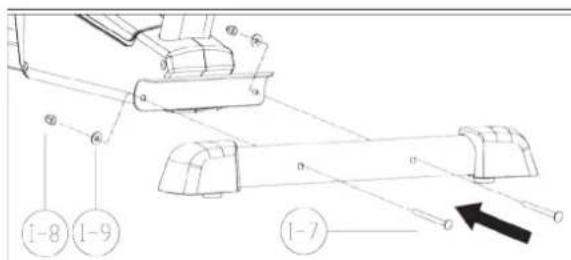
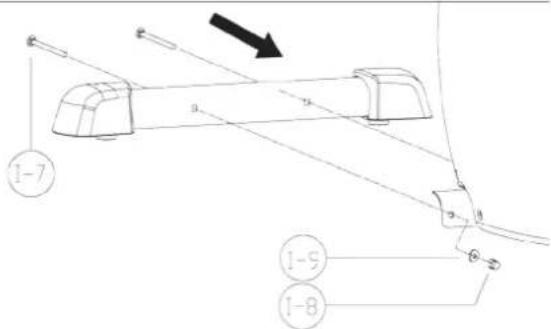
Mount the rear foot tube to the base frame using the screws, the washers and the cap nuts. Mount the front foot tube to the base frame in the same way. Make sure that the rollers for the foot caps face forward and down during assembly
PEDALS
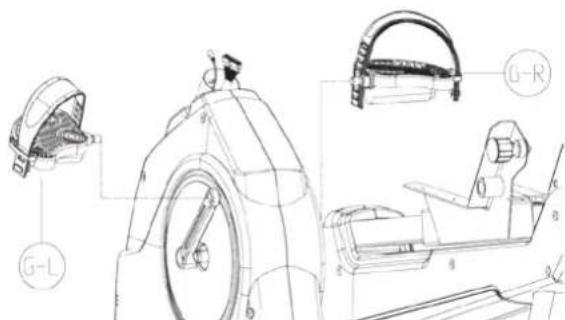
Screw the pedals into the threads of the crank arms. Screw the left pedal (marked L for left-hand thread) into the left crank arms. Use the wrench and rotate it counterclockwise. Screw the right pedal (marked R for right-hand thread) tightly clockwise into the right crank arm. Now attach the pedal straps to the pedals.
SEAT HANDLEBAR
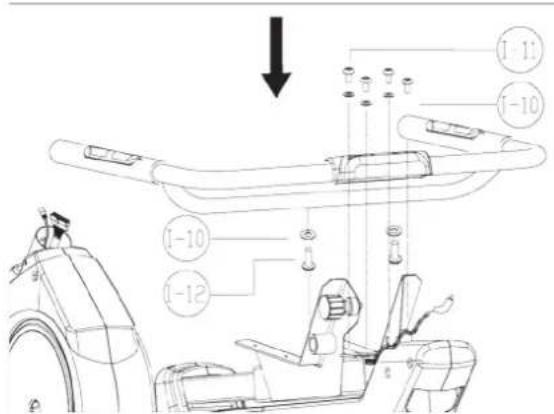
Attach the seat handlebar to the seat frame with six mounting screws and washers. Connect the cable from the handlebar to the cable coming from the seat frame. Caution: Do not pinch the cable!
SEAT
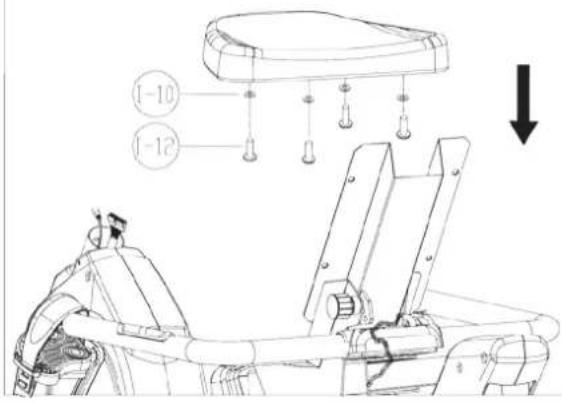
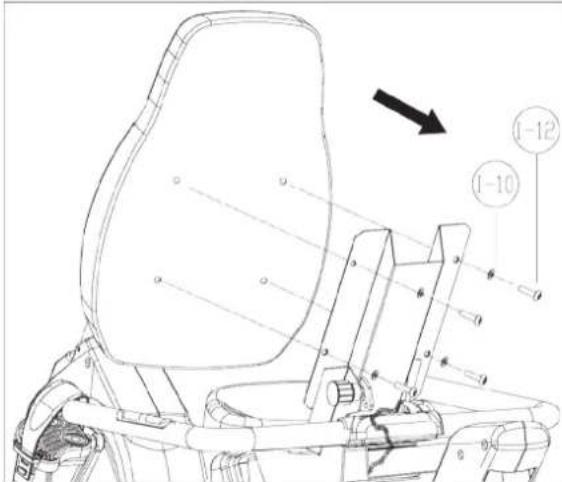
Turn the seat backrest frame to an upward position. Lock the backrest to the desired inclination using the locking knob. Tighten the locking knob. Attach the seat to the seat frame with four mounting screws and washers. Attach the backrest to the backrest frame with four mounting screws and washers.
METER TUBE
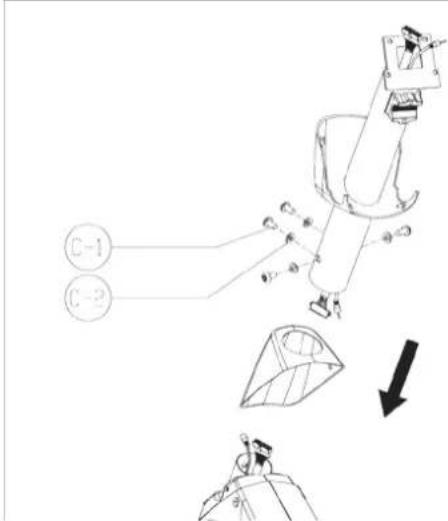
Fit the frame sleeve around the meter tube from below. Connect the cables coming from the frame
tube and the meter tube. Insert the meter tube into place inside the frame tube and attach it to the frame tube using mounting screws and washers. Caution: Do not pinch the cable! Lower the frame sleeve into place at the bottom of the meter tube.
HANDLEBAR
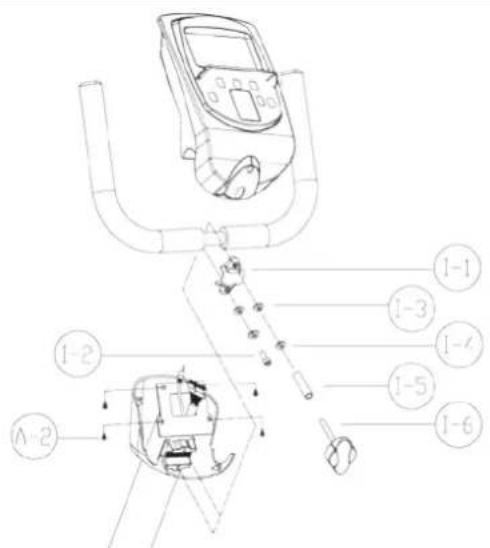
Place the handlebar tube into the holding fixture on the handlebar shaft. Caution: The pin must be inserted into the groove! Push the handlebar clamp over the handlebar tubc and loosely insert the screw with the washer. The handlebar clamp should wrap around the tube uniformly. Insert the hand wheel for adjusting the handlebars together with the washer and the spacer sleeve into the upper hole and tighten. Push the cable from the hand pulse sensors through the opening beneath the mounting plate and thread it upward out of the handlebar shaft. Caution: Do not pinch the cable!
CONSOLE
Connect the cables from the console tube to the corresponding connectors on the console. Insert the connected cables into the console tube, but make sure they are not damaged when the console is attached. Position the console in place at the end of the console tube and attach the console using mounting screws.
EXERCISING
If the product is not stable, adjust the stabilizing screws under the rear support appropriately.
ADJUSTING RESISTANCE
You can increase or decrease the resistance by using the + / - buttons. Increase resistance using the + button and decrease resistance using the - button. The lower display on the meter shows the selected resistance level (1-8). The profile display also illustrates the resistance.
EXERCISE LEVEL
Working out using your fitness equipment is excellent aerobic exercise, the principle being that the exercise should be suitably light, but of long duration. Aerobic exercise is based on improving the body's maximum oxygen uptake, which in turn improves endurance and vness. The ability of the body to burn fat as a fuel is directly dependent on its oxygen uptake capacity. Aerobic exercise should above all be pleasant. You should perspire, but you should not get out of breath during the workout. You must, for example, be able to speak and not just pant while pedaling. You should exercise at least three times a week, 30 minutes at a time, to reach a basic fitness level. Maintaining this level requires a few exercise sessions each week. Once the basic condition has been reached, it is easily improved, simply by increasing the number of exercise sessions.
Exercise is always rewarding for weight loss, because it is the only way of increasing the energy spent by the body. This is why it is always worthwhile to combine regular exercise with a healthy diet. A dieter should exercise daily - at first 30 minutes or less at a time, gradually increasing the daily workout time to one hour. You should start slowly at a low pedaling speed and low resistance, because strenuous exercise may subject the heart and circulatory system to excessive strain. As fitness improves, resistance and pedaling speed can be increased gradually. Exercise efficiency can be measured by monitoring the pulse. The pulse meter helps you monitor your pulse easily during exercise, and thus to ensure that the exercise is sufficiently effective but not overstrenuous.
CORRECT EXERCISE POSITION
In order to find a suitable exercise position, you can adjust the distance of the seat from the pedals. Always make sure before beginning exercising that your exercise position is correct.
- Place your feet on the pedals.
- Turn the seat adjustment knob anti-clockwise and pull the knob outwards so that the seat can be moved freely.
- Push the seat to a suitable distance; the ball of your foot should reach the pedal when your leg is almost fully extended and when the pedal is at its furthermost position from the seat. Check the suitability of the distance by pedalling anticlockwise.
- Release the knob when the distance is correct; the seat will click into position.
- Tighten the locking knob by turning it clockwise.
You can select the inclination of the backrest to suit your own preferences as follows:
- Go behind the equipment.
- Pull the backrest inclination adjustment knob outwards so that the backrest can be moved freely.
- Select the desired inclination.
- Release the knob when the inclination is correct; the backrest will click into position.
IMPORTANT: Always make sure before beginning exercising that the adjustment knobs are tightened.
HEART RATE
No matter what your goal, you'll get the best results by training at the right level of effort, and the best measure is your own heart rate. First find your maximum heart rate i.e. where the rate doesn't increase with added effort. The meter of your fitness equipment calculates an approximate maximum pulse rate level using the following formula:
220-AGE
The maximum varies from person to person. The maximum heart-rate diminishes on average by one point per year. If you belong to a risk group, ask a doctor to measure your maximum heart rate for you. We have defined three different heart-rate zones to help you with targeted training.
BEGINNER · 50 - 60% of maximum heart-rate.
Also suitable for weight-watchers, convalescents and those who haven't exercised for a long time. Three sessions a week of at least a half-hour each is recommended. Regular exercise considerably improves beginners' respiratory and circulatory performance and you will quickly feel your improvement.
TRAINER · 60 - 70% of maximum heart-rate.
Perfect for improving and maintaining fitness. Even reasonable effort develops the heart and lungs effectively, training for a minimum of 30 minutes at least three times a week. To improve your condition still further, increase either frequency or effort, but not both at the same time!
ACTIVE TRAINER · 70 - 80% of maximum heartrate.
Exercise at this level suits only the fittest and presupposes long-endurance workouts.
The heart rate is measured in three ways:
a) Using the handgrip heart rate sensors
b) Using an ear clip with cable
c) Using a chest strap (wireless, telemetric), optional
The chest strap and receiver/adapter are available as optional extras.
Do not use more than one measuring system at the same time.
PULSE MEASUREMENT WITH HANDGRIP SENSORS
Hand pulse is measured using the sensors located on the handlebars. The sensors measure electric impulses, which are formed when the person's heart is beating. Measurement is started by touching both handlebar sensors simultaneously. To ensure reliable pulse measurement, skin must be slightly moist and skin contact with the sensors must be continuous. If skin is too dry or too wet, the hand pulse measurement operation is less reliable. Try to keep your upper body and palms relaxed and still.
EAR PULSE MEASUREMENT
- Fit the ear sensor wire plug into the connecting point of the meter.
- Attach the car sensor to the carlobe.
If the sensor does not immediately start measuring your pulse or if the earlobe is cold, rub the earlobe with the fingers to speed up circulation. Physiological differences between different people may also cause disturbances in pulse measurement. In these cases, try measuring on the inside surface of the car or on the tip of your finger. If measuring disturbances appear while training, test the functioning of the sensor while stationary. Strong, unintentional swaying while training may also disturb measurement. If pulse values rise above 150 beats/min., earlobe measurement may be affected by the speeding up of circulation. Sometimes a strong light source, e.g. a fluorescent tube, in the immediate vicinity of the user may cause disturbances in pulse measurement. In this case, test the functioning of the sensor by turning the ear sensor the other way round on the earlobe. Pulse reading can also be affected, if the battery power of the meter is too low. Clean the ear sensor after use with a damp cloth.
TELEMETRIC HEART RATE MEASUREMENT
Your pulse can be measured wirelessly using the Bremshey Pro Check pulse transmitter and receiver.
NOTE! If you are fitted with a pacemaker, please consult a physician before using a wireless heart rate monitor.
If you want to measure your heart rate this way during your workout, moisten the grooved electrodes on the transmitter belt with water. Fasten the transmitter just below the chest with the elastic belt, firmly enough so that the electrodes remain in contact with the skin while training, but not so tight that normal breathing is prevented. If you wear the transmitter and belt over a light shirt, moisten the shirt slightly at the points where the electrodes touch the shirt. The transmitter automatically transmits the heart-rate reading to the meter up to a distance of about 1 meter. The heart-rate value is displayed in the meter. Follow your heart rate during the training.
REMARKS ON TELEMETRIC MEASUREMENT
If the electrode surfaces are not moist, the heart rate reading will not appear on the display. If the electrodes are dry, they must be moistened again. Allow the electrodes to warm up properly to ensure accurate heart-rate measurement. If there are several telemetric heart rate measurement equipments next to each other, the distance between them should be at least 1,5m . Similarly, if there is only one receiver and several transmitters in use, only one person with a transmitter should be within transmission range. The transmitter is switched to an active state only when it is being used for measurement. Sweat and other moisture can, however, keep the transmitter in an active state and waste battery energy. Therefore it is important to dry the electrodes carefully after use.
When selecting training attire, please note that some fibers used in clothes (e.g. polyester, polyamide) create static electricity, which may prevent reliable heart rate measurement. Please note that a mobile phone, television and other electrical appliances form an electro-magnetic field around them, which will cause problems in heart rate measurement.
CONSOLE
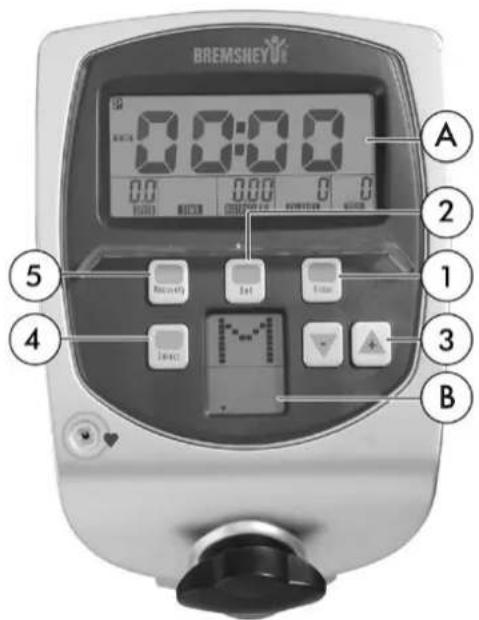
BUTTONS
1. ENTER
Selects console functions and resets the training data to zero. Longer pressing will treset the console to the date and time entry mode.
2. SET
Changes values when setting Time etc.
- +1-
Adjusts the training intensity (Level), training values and profile selection, selects the M (manual) or P (program) mode.
4. SELECT
Select training mode (Manual / Program), select desired program
5. RECOVERY
After finishing your training session, press this button to start recovery pulse measurement
FUNCTIONS
- Calendar, time of day and room tempera ture
If you are not training and you have not pressed a button, the control panel switches into the Sleep mode after about four minutes. The time of day, date, day of the week and room temperature are shown on the display.
- Display change (SCAN)
The display changes every 6 seconds: The main display A shows: Speed -- Time --
Distance -- Calories -- Pulse. Press ENTER to display each parameter.
While you are exercising, display B shows: RPM (revolutions), resistance (level) and the program profile.
3.Time
The training time counts up, starting at 00:00, and runs to 99:59 minutes. Then the time begins again at 00:00. The colon (:) blinks once per second.
4. Speed
The speed is displayed up to 99.9km / h
5. Revolutions
The crank arm revolutions are displayed in rpm (revolutions per minute).
6. Distance
The distance is displayed in kilometers (km) and, if not preset, counts upward from 0.01 to 99.99. If the distance is preset, this function counts down to 0.00km .
7. Calories
Calories are calculated during training. A maximum of 9999 calories are displayed per
training session. In this unit, energy consumption is calculated based on average values. Only the revolutions are used to calculate the values. The meter of this equipment calculates energy consumption on the basis of average values. Different people have a different ability to use up energy. The energy consumption displayed can, by necessity, only be an approximation of the actual consumption and cannot be used for therapeutic purposes. The energy consumption during a training session is displayed in kcal (kilocalories). To convert this into joules, use this formula: 1 kcal = 4.187 kJ.
8. Pulse rate ranges
While training using pulse rates, the control panel computes three pulse rate ranges in accordance with your maximum pulse rate based on your personal data. When you begin your training session, the display switches from the preset pulse to the actual pulse rate. The % number of the heart rate range in which you are currently training blinks next to the pulse rate.
Example: If you wish to train in the 75% range, but the currently displayed range is lower or higher, you must decrease or increase your performance appropriately so that your pulse decreases or increases. You achieve this by changing the resistance or the pedaling speed. To adjust the resistance, please use the +/- buttons on the control panel. If you wish to train using values other than the preset values, ignore the % numbers and concentrate only on your actual pulse rate.
Note: Before the control panel can display the pulse rate or the pulse ranges, it needs at least 10 seconds for calculation purposes.
- Intensity (Level)
The training intensity is shown on Display B as a bar diagram (levels 1 - 8) during training.
- Programs
The control panel contains the following:
M: A manual program (8 levels)
P: A program with profiles in levels (10 different profiles)
Switching on and programming
When you switch on the control panel, the Calendar mode is displayed.
Data entry
If you do not wish to make any changes to, for example, the time or date, press the ENTER button until the training time of 00:00 appears on Display A. At the same time, M for the manual program appears on Display B.
You can switch to the programming selection of P = program profiles using the ^+ button.
A. Training with the manual program (M)
Press the SELECT button.
Display B then shows the intensity as a flat bar diagram and a number (1 -- 8). Alternately, the speed and intensity (1 -- 8) are displayed.
Without entering training data such as Time / Distance, you may now start training. Select the intensity levels using the +/- buttons.
For training using the manual program with preset data, select the range using the ENTER button.
Set the values using the SET button.
The values are always adjusted upward.
Press the ENTER button until the time display is selected again. Select the time. Then start training.
B. Training using program profiles (P)
After changing from M to P, press the SELECT button. Using the +/- buttons, select the program 1 -- 10.
Confirm using the SELECT button. The level profile is shown on Display B.
You can now increase the base intensity (Level) using the +/- buttons. If desired, use the
ENTER button to switch to training value entry mode. If you do not wish to enter values, you may begin training immediately.
Setting the time of day time and calendar
After plugging the unit in, or by pedaling and pressing the ENTER button, you can set these values.
The year 2005 will blink.
Set the year using the SET button.
Confirm by pressing the ENTER button.
The number for the month M will blink.
Set the month using the SET button.
Press the ENTER button.
The time of day (hours) D will blink.
Set the time using the SET button.
Press the ENTER button.
The minutes will blink.
Set using the SET button.
Press the ENTER button.
You can now enter the training data.
Additional no tes :
QUICK START
With the transformer connected, start pedaling to switch the control panel from the Sleep mode into the input mode.
You can enter values on Display A when one of the
bars is displayed on the left edge.
Adjustment (Target Setting) is only possible if the Park symbol P is visible on Display A.
The resistance (Level) can be adjusted using the +/- buttons during training.
If you have set several functions to count down, a signal sounds when the first function reaches zero. Press the + button to switch the sound off. If you continue training, the function automatically begins counting upward from zero.
RECOVERY PULSE MEASUREMENT
Measure your recovery pulse after training. The measurement can only be started if the pulse measurement is activated and the pulse value is shown on the display. Start the recovery pulse measurement by pressing RECOVERY. The measurement takes 60 seconds. After the measurement is finished, the display shows the test B1-B6 (B1 and B6).
Please note that your results are in a relation to the pulse level in the beginning of the measurement, and that your results are personal and cannot directly be compared with any other person's results. In order to improve the reliability of recovery pulse measurement, always try to standardize the measurement situation as accurately as possible; start measuring at the same heart rate level as precisely as possible. To switch back to the main display by pressing RECOVERY.
TRANSPORT AND STORAGE
Please follow these instructions when carrying and moving the equipment, because lifting it incorrectly may strain your back or risk other accidents: The device is easy to move by pushing along on the integrated transport wheels.
Go behind the equipment. By holding onto the back part of the frame and the seat handlebar, incline the equipment forward. We recommend that you use a protective base when transporting the equipment.
To prevent the equipment malfunctioning, store in a dry place with as little temperature variation as possible and protected from dust.
MAINTENANCE
The equipment requires very little maintenance. Check, however, from time-to-time that all screws and nuts are tight.
After exercising, clean the equipment with a soft, absorbent cloth. Do not use solvents.
- Never remove the equipment's protective casing.
MALFUNCTIONS
NOTE! Despite continuous quality control, defects and malfunctions caused by individual components may occur in the equipment. In most cases it's unnecessary to take the whole device in for repair, as it's usually sufficient to replace the defective part. Always give the model, serial number of your equipment and in case of malfunctions also conditions of use, nature of malfunction and any error code.
When you encounter unusual behavior from the device, contact your local Bremshey dealer for service.
If you require spare parts, always give the model, serial number of your equipment and the spare part number for the part you need. The spare part list is at the back of this manual. Use only spare parts mentioned in the spare part list.
TECHNICAL SPECIFICATIONS
Length 164 cm
Width 63 cm
Height 122 cm
Weight .50 kg
This product meets the requirements of the EU's EMC Directives on electromagnetic compatibility (89/336/EEC). This product therefore carries the CE label. This product meets EN precision and safety standards (EN 957-1 and EN 957-5, class HB). The equipment is not suitable for exercise therapy. Due to our continuous policy of product development, Bremshey reserves the right to change specifications without notice.
NOTE! The instructions must be followed carefully in the assembly, use and maintenance of your equipment. The warranty does not cover damage due to negligence of the assembly, adjustment and maintenance instructions described herein.
Changes or modifications not expressly approved by Bremshey will void the user's authority to operate the equipment, and any warranty.
We wish you many enjoyable trainings!
INHALT
MONTAGE 11
BENUTZUNG 13
TRAINIEREN MIT BREMSHEY 13
HERZFREQUENZ 14
COCKPIT 15
B. Training met profielprogramma "P"
TRANSPORT OCH FÖRVARING 62
UNDERHALL 62
STÖRNINGAR VID ANVÄNDNING 62
TEKNISKA DATA 62
BRUKSANVISNING
- Displayen andras (SCAN)
Displayen andras var 6 sekund:
Accell fitness North America Inc.
130 Hayward Ave, Suite 2
N2C 2E4
Kitchener, ON Canada
Tel. 1-888-388-6887
Fax: 1-519-576-2521
www.accellfitness.com