EasyManual
 F3 Fazer - Effect machine Antari - Free user manual and instructions
Find the device manual for free F3 Fazer Antari in PDF.


Frequently Asked Questions - F3 Fazer Antari
User questions about F3 Fazer Antari
0 question about this device. Answer the ones you know or ask your own.
Ask a new question about this device
Download the instructions for your Effect machine in PDF format for free! Find your manual F3 Fazer - Antari and take your electronic device back in hand. On this page are published all the documents necessary for the use of your device. F3 Fazer by Antari.
USER MANUAL F3 Fazer Antari
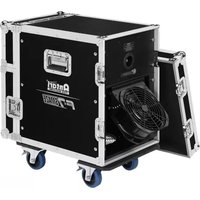
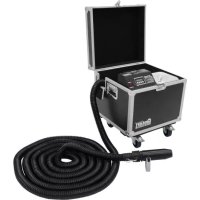
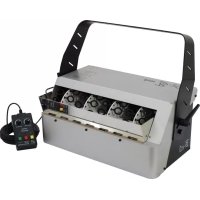
Thank you for choosing the Antari F-3 Fazer Machine. The F-3 Fazer comes in a rugged and stackable flight case, which makes it durable and easy to transport. The machine is ergonomic and easy to operate. It produces the finest and driest fog and is completely silent during operation.
Prior to use, we suggest that you carefully read all of the instructions. Following the instructions found in this user manual will ensure your safety while operating the machine, easily achieve the most satisfactory light and thin fog effect, and will make you understand how to care for and maintain the machine in order to extend the product life cycle.

Attention! Pay attention to all warning labels and instructions printed on the exterior of your Antari Fog Machine, particularly before initial use and from time to time whenever necessary.
Danger of Electric Shock
- Keep this device dry.
Use a grounded electrical outlet. Prior to use, take care to determine that the unit is installed at the rated voltage.
Unplug the machine when not in use.
This machine is not water-proof. If moisture, water, or fog fluid gets inside the housing, immediately unplug the unit and contact a service technician or your Antari dealer before using it again.
Danger of Burns
No user serviceable and modifiable parts inside. Do not disassemble the housing and do any modification; otherwise damage of the device or danger of burn may be caused.
For adult use only. The machine must be installed out of the reach of children. Never leave the unit running unattended.
Position the machine in a well-ventilated area. Please leave at least 50cm space around the machine.
Never add flammable liquids of any kind (such as oil, gas, perfume) to the fog liquid.
- Only use dealer-recommended Antari high-quality liquid FLG Heavy Fog Liquid. Please do not use any other liquid which may cause erosion of inner parts.
If your Antari F-3 Fazer fails to work properly, discontinue use immediately. Drain all fog liquid from the tank, pack the unit securely (preferably in the original packing material), and return it to your Antari dealer for service.
Before transporting the machine, make sure the tank is completely drained of all liquid.
- Never drink fog liquid. If it is ingested, call a doctor immediately. If fog liquid comes in contact with skin or eyes, rinse thoroughly with water.

Pay attention to all warning labels and instructions printed on the exterior of your Antari machine.
Unpacking and inspection
Open the shipping carton and verify that all equipment necessary to operate the system has arrived intact. If any equipment is missing contact your Antari dealer immediately. Before beginning your initial setup on your fog machine, make sure that there is no evident damage caused by transportation. In the event that the unit's housing or cable is damaged, do not plug it in and do not attempt to use it until after contacting your Antari dealer for assistance.
The shipping carton should contain the following items:
- F-3 Fazer machine with flight case
- 2-meter power cord
- 2.7-liter fluid tank
- User manual
Assembly
- Open the carton and carefully remove all packing materials.
- Place the fog machine on a flat surface and make sure that no foreign objects or dust can enter the air vents at the bottom of the machine.
Operation
- Open the flight case at the front of the machine.
- Remove the silver cap from the fluid tank and pour in Antari FLG Heavy Fog Fluid. Replace the tank cap. Verify that the liquid pipe is porperly connected and not loose due to transportation.

Attention! Only use Antari FLG Heavy Fog Liquid. Any other types of fog fluid may cause unsatisfactory results, pose a health hazard to humans and animals, cause environmental pollution, or corrosion of inner parts of the machine. Damage caused by the use of other fluids is not subject to warranty.
- The machine is equipped with a lockable power input connector. Plug in the power cord and turn it to the right until it locks. Plug the power cord into a grounded electrical outlet that matches the rated voltage of the machine.
- The design of this machine does not include an additional power switch. When connecting the machine to a power outlet it is powered on. The machine starts with the warm-up process and the display indicates »Warming Up«.
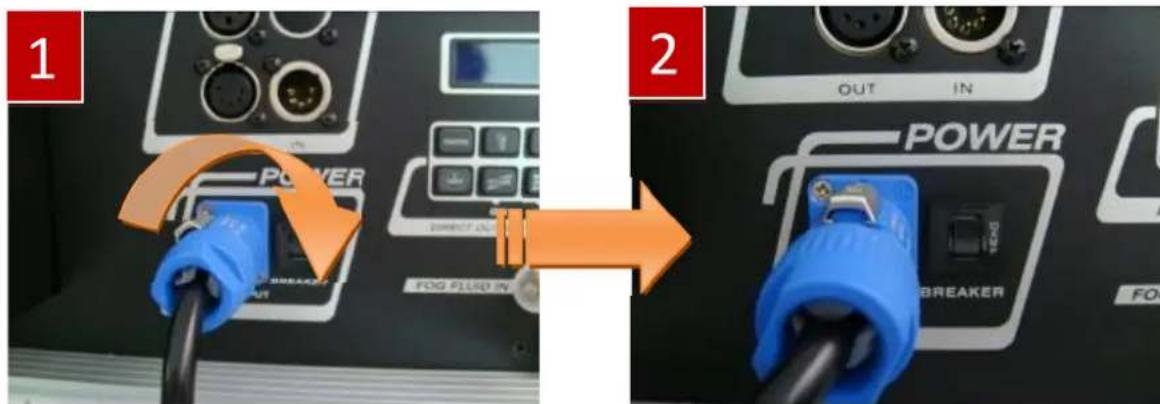
- The warm-up time takes around 100 seconds. While the unit is warming up, fog output will not be possible yet. After warming up, the display will indicate Ready To Fazer
- With the initial start-up of the machine, keep the button VOLUME at the control panel pressed for a longer period of time in order to reach maximum fog output volume at 100% , and also to immediately fill the liquid pipe with fog fluid from the tank. Once full fog output is reached, press the button VOLUME again to stop the fog output. It is important to repeat this procedure when initializing the machine after transportation or fluid refills.
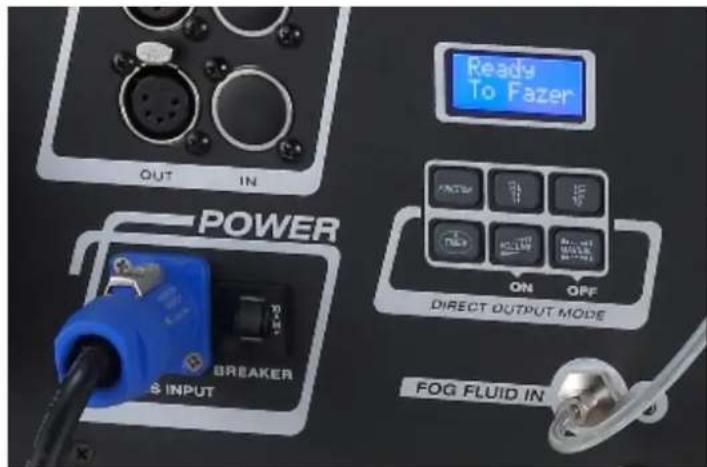
Control Panel
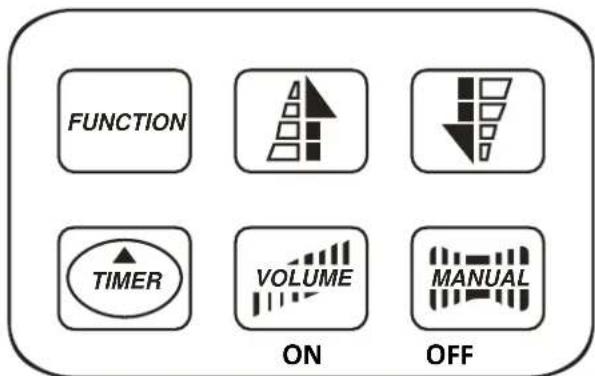
The built-in control panel of the machine features an LCD panel displaying all operation statuses of the fog machine. The control panel allows the user to customize fog machine functions by adjusting the fogging duration, interval, and volume as well as the DMX address and the pump sensor. There are six buttons on the control board. All current operating
parameters are automatically stored in non-volatile memory, allowing the machine to be powered down without losing function settings.
The control buttons are: FUNCTION、Up、Down、TIMER、VOLUME and MANUAL. You can program the necessary menu settings with the control panel when the display indicates Ready To Fazer.
1. Menu settings with the button FUNCTION
Setting time intervals for timer operation
Press the button FUNCTION until the display indicates Interval Set. Use the buttons UP and DOWN to adjust the intervals between the individual fog outputs in timer mode within the range of 5 and 200 seconds.
Setting the output duration for timer operation
Press the button FUNCTION until the display indicates >Duration Set. Use the buttons UP and DOWN to adjust the duration of the fog outputs in timer mode within the range of 5 and 200 seconds.
Setting the fog output volume for timer operation
Press the button FUNCTION until the display indicates Timer Out. Use the buttons UP and DOWN to adjust the fog output volume in timer mode within the range of 2 % and 100% .
Setting the fog output volume for continuous operation
Press the button FUNCTION until the display indicates >Volume Output<. Use the buttons UP and DOWN to adjust the fog output volume in continuous mode within the range of 2% and 100%.
Please note that in standby mode, the machine resets the fan speed to 20% in order to recduce the noise production to a minimum.
Setting the DMX512 address
Press the button FUNCTION until the display indicates DMX 512 . Use the buttons UP and DOWN to adjust the DMX512 start address. Please refer to chapter DMX512 settings for more information on DMX operation.
2. Timer operation
In the timer mode, the fog machine will automatically emit fog. The time intervals, duration and fog volume depend on the corresponding menu settings. Press the button TIMER to activate the timer mode. The display indicates the set time interval. The unit counts down to 0 seconds and emits fog. To deactivate the timer mode, press the button MANUAL. The unit is able to continuously produce fog without the need to reheat.
3. Continuous operation
Press the button VOLUME, to activate continuous fog output. The display indicates Volume followed by the value that was set in menu item Volume Output . To stop the fog output, press the button MANUAL. The unit is able to continuously produce fog without the need to reheat.
4. Quick Start mode
If the "Quick Start" mode is activated, the F-3 will call the operating mode of the previous operation when it is turned on. For instance, if timer mode was selected last, the machine will be directly in timer mode after the warm-up process is completed.
Press the button FUNCTION until the display indicates Quick Start On. Use the buttons UP and DOWN to deactivate the quick start mode (indication Quick Start Off) and to reactivate it (indication Quick Start On).
5. Switching the air pump sensor on and off
There is an air pump sensor inside F-3. Keep pressing MANUAL button and power on F-3 machine, until LCD screen indicates "AirPump Sensor On". At this point, use Up or Down buttons to switch this sensor on or off. Please note the sensor is a very important protection device. Under normal operation mode, please assure the sensor is activated on. After above setting is completed, press VOLUME button can memorize the final setting and leave setting mode.
6. Power off the machine
Keeping the button MANUAL pressed for 3 seconds when the display indicates Ready to Fazer « can power off the machine. If the machine is switched off this way, the display will start to count down for 3 minutes. Afterwards, the machine will discontinue to warm up and the fan operation and the air pump will stop. The diplay indicates Power Off «. Note:
During the 3-minute count down, pressing the button volume exits this mode and makes heater and fan work again. Once the air pump has stopped working, it cannot be reactivated. If the air pump is still working, it will stop once the auto cleaning process is completed.
B、When the machine is in Power Off mode, pressing the button VOLUME can reactivate the unit and make heater and fan work. However, the air pump will not resume working.
c. If the machine is controlled by DMX, disconnecting the DMX connection causes the unit to enter the Power Off mode and it will start to count down 3 minutes to shutdown.
DMX Connector Pin Assignment
The machine provide 3 or 5 pin XLR connector for DMX connection. Diagram below indicate pin assignment information
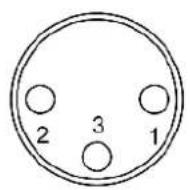
3 pin XLR
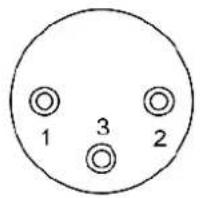
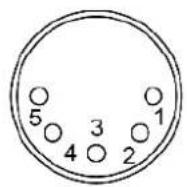
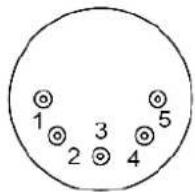
5 pin XLR
| Pin | Function |
| 1 | Ground |
| 2 | Data- |
| 3 | Data+ |
DMX512 Settings
The F-3 is equipped with a DMX512 system. For connecting a DMX controller, 3-pin and 5-pin male-female XLR connections are provided. The machine uses two control channels for adjusting the output volume and the fan speed. Each channel has a DMX value range of 0 to 255. After connecting a DMX controller, timer functions such as output duration and interval can be programmed using the DMX controller or the DMX control software. In DMX mode, the machine cannot be controlled via the built-in control panel anymore. By using the DMX protocol, fog machines, lighting effects, and other special effects machines can be interconnected and easily controlled.
Channel A Channel B
Output volume Fan speed

255
6-255 = output volume control (2%-100%)
0-5 = off (no output)

255
0-255=Speed Control (20% - 100%)
0 = 20% speed
Fog Liquid
Please use the Antari FLG water-based fog liquid in order to ensure a satisfactory performance with thin fog.
Very Important Notes
- The F-3 Fazer features a self-cleaning liquid pipe function. After operation, keep the machine connected to the mains until all liquid is drained from the liquid pipe. The cleaning takes about 3 minutes.
- Please clean the ventilation filter at the bottom of the machine regularly. Always make sure there are no foreign objects nor dust at the bottom that could prevent proper ventilation.
Technical Specifications
| Model | F-3 |
| Power supply | AC 100~120 V, 50/60 Hz or AC 220~240 V, 50/60 Hz |
| Heater | 800 W |
| Output volume | 3,000 cu.ft/ min (approx. 85 m³/min.) |
| Fluid consumption | 5 hrs./liter |
| Warm-up time | 100 seconds |
| Tank capacity | 2.7 liters |
| Weight | 20.5 kg |
| Dimensions (LxWxH) | L 550 W 508 H 236 mm |
| DMX | On-board |
| Control | Blue LCD screen, Timer mode, Volume mode |
Please read and save these instructions.
FAZER
Antari F-3 Fazer Machine
For current product information visit Antari at:www.antari.com For information requests please contact us at:sales@antari.com