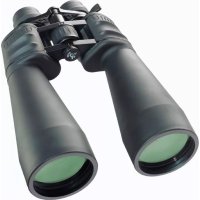
SPEZIAL ZOOMAR 1236X70 - Binoculars BRESSER - Free user manual and instructions
Find the device manual for free SPEZIAL ZOOMAR 1236X70 BRESSER in PDF.


Frequently Asked Questions - SPEZIAL ZOOMAR 1236X70 BRESSER
User questions about SPEZIAL ZOOMAR 1236X70 BRESSER
0 question about this device. Answer the ones you know or ask your own.
Ask a new question about this device
Download the instructions for your Binoculars in PDF format for free! Find your manual SPEZIAL ZOOMAR 1236X70 - BRESSER and take your electronic device back in hand. On this page are published all the documents necessary for the use of your device. SPEZIAL ZOOMAR 1236X70 by BRESSER.
USER MANUAL SPEZIAL ZOOMAR 1236X70 BRESSER
P = Porro-Zoomfernglas
C = Kompaktes Zoomfernglas
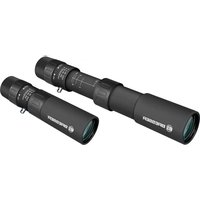
This instruction manual was created for various models in our series of binoculars. Pages 2-4 present the relevant features in pictures. Depending on the model you have purchased, this chapter of the manual covers the binoculars in full or in part. As a result, please pay attention to the letters (P or C) to make sure that a chapter applies to your model.
Please read this manual carefully and completely before using the binoculars.
Your BRESSER Team
P = Porro prism model
C = Compact model
General Safety Informations!
RISK of physical injury!
Never look through this device directly at or near the sun. There is a risk of BLINDING YOURSELF!
Children should only use this device under supervision. Keep packaging materials (plastic bags, rubber bands, etc.) away from children. There is a risk of SUFFOCATION.
! Fire/Burning RISK!
Never subject the device - especially the lenses - to direct sunlight. Light ray concentration can cause fires and/or burns.
RISK of material damage!
Never take the device apart. Please consult your dealer if there are any defects. The dealer will contact our service centre and send the device in for repair if needed.
BINOCULARS
Do not subject the device to temperatures exceeding 60^
List of Parts
1 Centre axle
a Twist-up eyecups or
2b Rubber eyecups
3 Diopetre adjustment
Body of the binoculars
5 Lens tube
Central focussing wheel
Eyepiece
8 Objective lens
Threaded tripod connection
10 Zoom lever
Magnification scale
Image circle with correctly set eye distance
Eyepieces for spectacle wearers P C
Depending on the model, your binoculars are equipped with either twist-up eyecups (2a) or rubber eyecups (2b). Since there is a larger dis
tance between the binocular eyepiece and the pupil for those wearing glasses, both eyecup varieties can be adjusted individually.
Twist-up Eyecups (2a)
Screw in the twist-up eyecups (2a) to use the binoculars while wearing glasses. If you are not wearing glasses, unscrew the eyecups to achieve the required distance from the pupils.
OR
Rubber Eyecups (2b)
To use the binoculars while wearing glasses, turn the rubber eyecups (2b) towards the sides and down. If you are not wearing glasses, leave the eyecups in the upright position to achieve the required distance from the pupils.
Adjusting the eyepiece distance P C
The distance between the eyes differs between individuals. To achieve perfect interaction between your eyes and the eyepieces of your binoculars set the angle at the centre of the binoculars (1) so that you see a circular image (12).
Note this setting for later use.
Adjusting the focus P C
Look through your binoculars with your right eye closed. Now adjust the image for your left eye using the centre wheel (6) until it is sharp and clear. Close your left eye and adjust the image for your right eye using the dioptre ring (3) until it too is sharp and clear.
Using the Zoom Function P C
You can use the zoom lever (10) to select various levels of magnification (11); in general, the zoom is continuous. Simply move the lever back or forth to zoom.
Please note: When changing the magnification setting, it is necessary to re-adjust the image sharpness using the centre focussing wheel (6).
Mounting the binoculars on a tripod P
Your binoculars have a threaded tripod connection (9) built in. The required tripod adapter is available as an optional accessory (Art. No. 19-16000 or 19-16500). With this accessory, you are able to mount your binoculars on a tri
pod with a DIN mounting thread (e.g. Art. No. 49-22100).
TIPS on cleaning
Lenses (eyepieces and object lenses) should be cleaned with a soft, lint-free cloth (e.g. microfibre) only. Do not use excessive pressure - this may scratch the lens.
Dampen the cleaning cloth with a spectacle cleaning fluid and use it on very dirty lenses.
Protect the device against dirt and dust. Leave it to dry properly after use at room temperature. Then put the dust caps on and store the device in the case provided.
JUMELLES
Chere clientele, cher client,
P = Modely shranoly porro
c = Kompaktni modely
P=MOeNc npn3MoN Poppo C =KOMNaKTHbIe MOeN
O6uine npeynpeKdennr!

ONACHOCTb TpaBMnpoBaHna!
HnB Koem Cnyae He CMOTpnte uepe3 3TOT npnbop npma H a coHne n Hn B hnapaBlenn coHua. Onachocb IOTEPN 3PEHNA! DeTN DOJXHBi NCNoB3OBaTB npnbop TOnbKO NO npncMOTpOM B3PocNbIX. NckIIOHTe DoCTyn DeTeK ynpaKOBouHbIM MaTePnaIam (PiNACTIKOBbie naKeTb, pe3INHOBBie JeHTb n T.D.)! ONACHOCTb YdUShb!

ONACHOCTb IOKAPA!
He np6op-B OOC6eHHoCTN IINH3bI - NOI npMbIMn COJIHeuHbIMn lyuAMn! H3-3a FOkycnpOBKn COJIHeuHbIX Iyue M0KeT BO3HNKHyTb NOxap!

ONACHOCTb npnHHeHnaMbHoro yuepe6a!
He pa3bnpaIte np6op! B cnyae HencnpaB-HocTn o6paauTeCb K dInlepy. Oh CBJKeTcA C
cepBnCHbIM ueHTpOM N MOKeT nepeCnaTb npu-6op DJIy BblONHeHn peMOHTa.
He donyckaTe harpeBaHnna npnbopa Do BbicoKoTemnpaTypbl!
IpeueHb KOMnoHeHToB
1 LcHTpaJIbHaI ocB 6HOKJIA
aHaBnHnBaIOuIeScOkyIpaI nn
b Pe3nHOBbie OkyIaIpbI
3 MexaHn3M dnoonTpnuyeckoHaBOdkn
Kopnyc 6nHOKJN
Ty6yc o6bektnBa
6 ΚeHTpaJIbHbI npINBOd (yCTaHOBka Ha pe3KoCTb)
OkyIap
8 尼H3a 06bekTnBa
9 Pe3b6aДЯ yCTaHOBKN Ha 7tTaTHB
10 YBeHnUHTb pbUcara
11kaJa yBelenueHn
12 OTo6paKaHouaŋ OkpyKHoCTb npn npaBnIbHO HaCTpoEHo rna3HO 6a3e
OkyIaR dIra NoJIb3OBaTeJeB OcKaX P C
B 3aBnCHMOCTN OT MOdenn 6HOKlb OCHaUaETcra HbHbNHbAHOUMNCs OKyIpaMn (2a), Nbo pe3INHObIMN OKyIpaMn (2b).Tak KaK y noJIb3OBA -TeJe B OChkax pacCToHHe Mekdy OKyIpaMn 6HNOKIA I 3paKaMn yBeJInueHo, oBa HABINHbAIOUxxCs OKyIpa MoYr peYInpOBaTbcra NO OTdJIbHOCTN.
HabnHyBaIOuIeCeOkyIapbI (2a)
EcnBbI cmOpnte uepe3 6nHoklb B Ouykax, BKpyTte HABINHcNAOuNecr OkyIrpbl (2a). EcnBbI He Hocnte oUKN, BbIKpyTte HaBNHnBaIOuNecr OKyIrpbl dnn oBeCneueHn HEOxO-dmOro pacctOarHn Do 3paQKOB. IIN
Pe3nHOBblc OkyIaIpbI (2b)
EcnBbI cmOpnte uepe3 6HOKlb B OUKkax,OTBepHnTe pe3HHOBblte OKyApbl (2b) c60ky BHN3.EcnBbI He Hocnte OUYK, OCTaBBte OKyApbl BBePTnKaJIbHOM NIOJKeHHN DJI OBeCneueHHN Heo6xOdMOro paCCTOARHn DO 3paQKOB.
HactpoKa rJa3HO6a3bI P C
PacctoHHe MeKdy rnaamn RbneTc nHn-
BnDyalbHbIM nla KaKdOrO yeNoBeka. Ina oBeCneueHHaJeAHLBOcRlacOBAHnra3 COKyIpaMn 6HOKn erO Heo6xOJHMo cORHyTbOTHOCTeJIbHO CEHTpaIbHoi OCN (1) TaKIM o6pa3OM, UTObI uepe3 HrO bIa BnDa OTo6paKaHOUaIa OKpyKHOCTb (12). 3anOMHte HaCTpoKy DnI NCNOB3OBAHnB 6dyuem.
YctaHObKa Ha pe3KoCTb P C
IocmOTpnte uepe3 6nHOKnb n 3aKpoTe npabBn rna3. Otperynpyte n3o6paKeHne dJa IeBOrO rna3a c NOMOuTO ceHTpaJbHOrO npVBoda (6). 3akpoTe JEBN rna3 n Otperynpyte pe3KoCTb n3o6paKeHnA dJa npABoro rna3a C NOMOuBo DNONTPnHORO KOBua (3).
IcnoIb3OBAHHe yHKuIN yBEnHcHnP C
C nomoIbO pbIyara yBelenueHn (10) moKHO 3aIaBaTb pa3NHyIe CTypeHn yBelenueHn (KaK npabInlo, 6ecctyneHcuTo).ДЯ 3TOrO npocTo nepemeuaIte pbUar Bpepei nn Ha3aJ. Ha shkane (11) yBelenueHn MOxHo Bndetb Tekyuee 3HaueHne yBelenueHn.
6paTe BHMaHne: npn n3MeHeHH NaCTpOHN yBEnuHHe HEOxOIMo 3aHOBO HaCTpoNTb pe3KoCTb N3O6paXeHHc NOMOUsbU cHTpaIb-Horo npNbOda (6).
YcTaHOBKa 6HHOKJI Ha 7TAtNB P
Ha 6HOKJIe HMeETcpe3b6a dIy yCTaHOBKn Ha 5TATNB (9). Heo6xOIMbI dIy 3TOrO aIaNTep 5TATNBA NOCTABnETCB KauEcTBe OIuIN ((NO no Katalory 19-16000 nIi 19-16500). Cero noMoUbIO MOXHO yCTaHbINBaTb 6HOKNb Ha 5TATNB c npCoeDInHtBHo pe3b6oB DIN (Hanp., No no Katalory 49-22100).
YKA3AHn no nctke
HcnoIb3yIe dIy IuctKn IINH3 (OKyIaRbI N O6bEKTINBbl) TOnbKO MfKyIO caIfoTKy I3 HeTKaHOrOMatepnaIa (HaNPmEp, MInKpoBOJokHo).He HaXIMaIte Ha caIoETky CnIIKOM CInbHO, YTObI NCKJIIOHTb BepoTHOCTb 6pa3OBaHHaapanIH Ha JINH3ax.
Дя удаленя 60лee сиьньix 3aря3нeн CMочITE yHCTAуTO caIФETky B JxNДКОCTN ДЯ ChNTK OYKOB I npOTpTe LInH3bl C He6OЛbшm YcNilnem.
3aunuate npn6op ot nbin n Bna! Nocne HcnoIb30BaHnra - B Oco6eHHoCTn npn BbICOKO BlaXHOCTN BO3dyxa - noepKHTe np6op HeKOtOpoe Bpemn KOMHaTHOH TEMepaType, UTObl DaTb Icnapntbcra ocTaToHoiBnare. HaDeHbTe nbIe3aunthbIe KOJIpaKn n NOMeCTHepnp6op B Cymky, BXODAUYU B KOMPNeKT NOCTABKN.
DE Garantie & Service
GB Warranty & Service
The regular guarantee period is 2 years and begins on the day of purchase. To benefit from an extended voluntary guarantee period as stated on the gift box, registration on our website is required.
You can consult the full guarantee terms as well as information on extending the gua
rantee period and details of our services at www.bresser.de/warranty_terms.