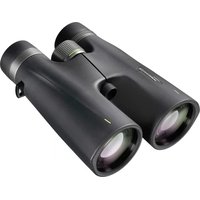
Primax 8x56 - Binoculars BRESSER - Free user manual and instructions
Find the device manual for free Primax 8x56 BRESSER in PDF.


| Brand | Bresser |
| Model | Primax 8x56 |
| Product type | Binoculars |
| Magnification | 8x |
| Objective lens diameter | 56 mm |
| Focus | Central knob |
| Diopter adjustment | Yes, on the right eyepiece |
| Eyecups | Twist-up or rubber depending on version |
| Interpupillary distance | Adjustable by folding on the central axis |
| Tripod thread | Yes (adapter optional) |
| Power supply | None (passive optical binoculars) |
| Warranty | 5 years |
| Cleaning | Microfiber cloth, lens cleaning liquid |
| Precautions | Do not look at the sun, avoid temperatures > 60°C, do not disassemble |
| Recommended use | Terrestrial observation, nature, sports |
| Included accessories | Pouch, protective caps |
| Service and repairs | Contact the dealer or manufacturer |
Frequently Asked Questions - Primax 8x56 BRESSER
User questions about Primax 8x56 BRESSER
0 question about this device. Answer the ones you know or ask your own.
Ask a new question about this device
Download the instructions for your Binoculars in PDF format for free! Find your manual Primax 8x56 - BRESSER and take your electronic device back in hand. On this page are published all the documents necessary for the use of your device. Primax 8x56 by BRESSER.
USER MANUAL Primax 8x56 BRESSER
natural_image
3D rendering of a binoculars with multiple lenses (no text or symbols visible)FERNGLÄSER · BINOCULARS

BRANDGEFAHR!
This instruction manual was created for various models in our series of binoculars. Pages 2-7 present the relevant features in pictures. Depending on the model you have purchased, this chapter of the manual covers the binoculars in full or in part. As a result, please pay attention to the letters (P, R or C) to make sure that a chapter applies to your model.
Please read this manual carefully and completely before using the binoculars.
Your
BRESSER Team
P = Porro prism model · R = Roof prism model · C = Compact model
General Safety Informations!
RISK of physical injury!
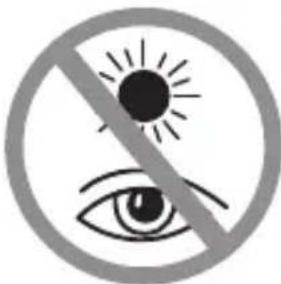
Never look through this device directly at or near the sun. There is a risk of BLINDING YOURSELF!
Children should only use this device under supervision. Keep packaging materials (plastic bags, rubber bands, etc.) away from children. There is a risk of SUFFOCATION.
Fire/Burning RISK!
Never subject the device - especially the lenses - to direct sunlight. Light ray concentration can cause fires and/or burns.
RISK of material damage!
Never take the device apart. Please consult your dealer if there are any defects. The dealer will contact our service centre and send the device in for repair if needed.
Do not subject the device to temperatures exceeding 60°C!
Warranty & Service
You will find information on this on p. 60.
BINOCULARS
List of Parts
1 Centre axle
②a Twist-up eyecups or
②b Rubber eyecups
3 Dioptre adjustment
4 Body of the binoculars
5 Lens tube
6 Central focussing wheel
⑦ Eyepiece
8 Objective lens
9 Threaded tripod connection
10 Image circle with correctly set eye distance
Eyepieces for spectacle wearers P R C
Depending on the model, your binoculars are equipped with either twist-up eyecups (2a) or rubber eyecups (2b). Since there is a larger distance between the binocular eyepiece and the pupil for those wearing glasses, both eyecup varieties can be adjusted individually.
Twist-up Eyecups (2a)
Screw in the twist-up eyecups (2a) to use the binoculars while wearing glasses. If you are not wearing glasses, unscrew the eye-cups to achieve the required distance from the pupils.
OR
Rubber Eyecups (2b)
To use the binoculars while wearing glasses, turn the rubber eyecups (2b) towards the sides and down. If you are not wearing glasses, leave the eyecups in the upright position to achieve the required distance from the pupils.
Adjusting the eyepiece distance P R C
The distance between the eyes differs between individuals. To achieve perfect interaction between your eyes and the eyepieces of your binoculars set the angle at the centre of the binoculars (1) so that you see a circular image (10). Note this setting for later use.
Adjusting the focus P R C
Look through your binoculars with your right eye closed. Now adjust the image for your left eye using the centre wheel (6) until it is sharp and clear. Close your left eye and adjust the image for your right eye using the dioptre ring (3) until it too is sharp and clear.
Mounting the binoculars on a tripod P R
Your binoculars have a threaded tripod connection (9) built in. The required tripod adapter is available as an optional accessory (Art. No. 1916001). With this accessory, you are able to mount your binoculars on all BRESSER tripods with a DIN mounting thread (e.g. Art. No. 4922100).
TIPS on cleaning
Lenses (eyepieces and/or object lenses) should be cleaned with a soft, lint-free cloth (e.g. microfibre) only. Do not use excessive pressure - this may scratch the lens.
Dampen the cleaning cloth with a spectacle cleaning fluid and use it on very dirty lenses
Protect the device against dirt and dust. Leave it to dry properly after use at room temperature. Then put the dust caps on and store the device in the case provided.
JUMELLES
Chère cliente, cher client,
DANGER D'INCENDIE!
GEVAAR voor brand!
PERICOLO DI INCENDIO!
RISCO DE INCÊNDIO!
ΚΙΝΔΥΝΟΣ ΠΥΡΚΑΓΙΑΣ!
BRANDFARE!
TULIPALON VAARA!
NEBEZPEČÍ POŽÁRU!
NIEBEZPIECZEŃSTWO POŻARU!
ОПАСНОСТЬ ПОЖАРА!
GB Warranty & Service
The guarantee period is 5 years and begins on the day of purchase.
You can consult the full guarantee terms as well as information on details of our services at www.bresser.de/warranty_terms.