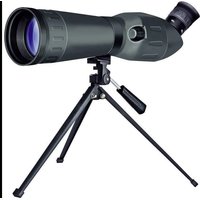
Spotty - Binoculars BRESSER - Free user manual and instructions
Find the device manual for free Spotty BRESSER in PDF.


| Product Type | Spotting scope for children |
| Brand | Bresser |
| Model | Spotty |
| Category | Binoculars (optical instrument) |
| Target audience | Children (use under adult supervision) |
| Dimensions (approx.) | 20 cm length (optical tube) |
| Weight (approx.) | 300 g |
| Power supply | None (pure optical operation) |
| Magnification | Variable (built-in zoom) |
| Focusing | Central focusing wheel |
| Tripod adaptation | Standard screw thread (5) under the tube |
| Lens hood | Extensible (elastic) |
| Included accessories | Dust cap, soft case with strap, tripod (depending on version) |
| Maintenance and cleaning | Microfiber cloth, glasses cleaning liquid, avoid moisture and dust |
| Safety | Never look at the sun - risk of blindness; do not leave unsupervised |
| Storage temperature | Do not exceed 60°C |
| Disposal | Sort packaging; contact local waste service for the product |
| Repairability | Do not disassemble; contact the dealer in case of damage |
Frequently Asked Questions - Spotty BRESSER
User questions about Spotty BRESSER
0 question about this device. Answer the ones you know or ask your own.
Ask a new question about this device
Download the instructions for your Binoculars in PDF format for free! Find your manual Spotty - BRESSER and take your electronic device back in hand. On this page are published all the documents necessary for the use of your device. Spotty by BRESSER.
USER MANUAL Spotty BRESSER
natural_image
Illustration of a dark-colored surveying instrument mounted on a tripod against a blue background (no text or symbols visible)DE dienungsanleitung
GB Operating Instructions
FR de d'emploi
NLandleiding
IT ruzioni per l'uso
ES
strucciones de uso

DE Bedienungsanleitung 4
GB Operating Instructions ....10
FR Mode d'emploi 16
NL Handleiding 22
IT Istruzioni per l'uso 28
ES Instrucciones de uso ....34

Liebe Eltern,
natural_image
Simple circular arrow symbol pointing right, enclosed in a rectangular border (no text or labels)This product is ideal for children wanting to explore their world in a completely new way. The device is as such, easy to use and care for, rugged and good-looking.
More important to you and of course to us is that it is safe to use. During manufacture, we made sure that this product is as safe it can be for children to use. Some residual risk is, however, unavoidable. This product, after all, is not a toy in the usual sense but rather an optical instrument that children can use to experiment, research and discover their world.
That's why we request your cooperation here. These operating instructions were written for children but please read them through together with your child or children and answer his/her/their questions. Don't
forget to explain possible risks. These are summarised under the heading „warnings“. Please adjust/set up the device together with your child or children and never allow any child to use any of our optical products unsupervised.
We hope all users and their parents will enjoy our products.
Your Bresser team

Dear junior researcher,
Congratulations on becoming the proud owner of this product.
You'll be amazed when reading these instructions just how much can be done and explored with your new device.
Take a look and emerge yourself into the adventurous world of nature and discovery.
It really is exciting and a lot of fun discovering the world with this product.
Before you get started, read the operating instructions fully, as there are a few things you need to know to get the best out of your new device.
The „Warnings“ should be read carefully. Use the product exactly as per the operating instructions to avoid any risk or injury. Keep these instruc-
tions in a safe place for later reference. If you give the device away or make a present of it make sure these instructions accompany it.
And now it just remains to say, „Have loads of fun researching and discovering“
Pia

RISK to your child! RISK of physical injury!

Never look through this device directly at or near the sun.
There is a risk of BLINDING YOUR-SELF!
Children should only use this device under supervision. Keep packaging materials (plastic bags, rubber bands, etc.) away from children. There is a risk of SUFFOCATION.
Fire/Burning RISK!

Never subject the device - especially the lenses - to direct
sunlight. Light ray concentration can cause fires and/or burns.
RISK of material damage!

Never take the device apart. Please consult your dealer if
there are any defects. The dealer will contact our service centre and send the device in for repair if needed.
Do not subject the device to temperatures exceeding 60 C.
RESPECT privacy!

This device is meant for private use. Respect others privacy - do not use the
device to look into other peoples homes, for example.

TIPS on cleaning

Lenses (eyepieces and/or object lenses) should be cleaned with a soft, lint-free
cloth (e.g. microfibre) only. Do not use excessive pressure - this may scratch the lens.
Dampen the cleaning cloth with a spectacle cleaning fluid and use it on very dirty lenses.
Protect the device against dirt and dust. Leave it to dry properly after use at room temperature. Then put the dust caps on and store the device in the case provided.
DISPOSAL

Dispose of the packaging material/s as legally required.
Consult the local authority on the matter if necessary.

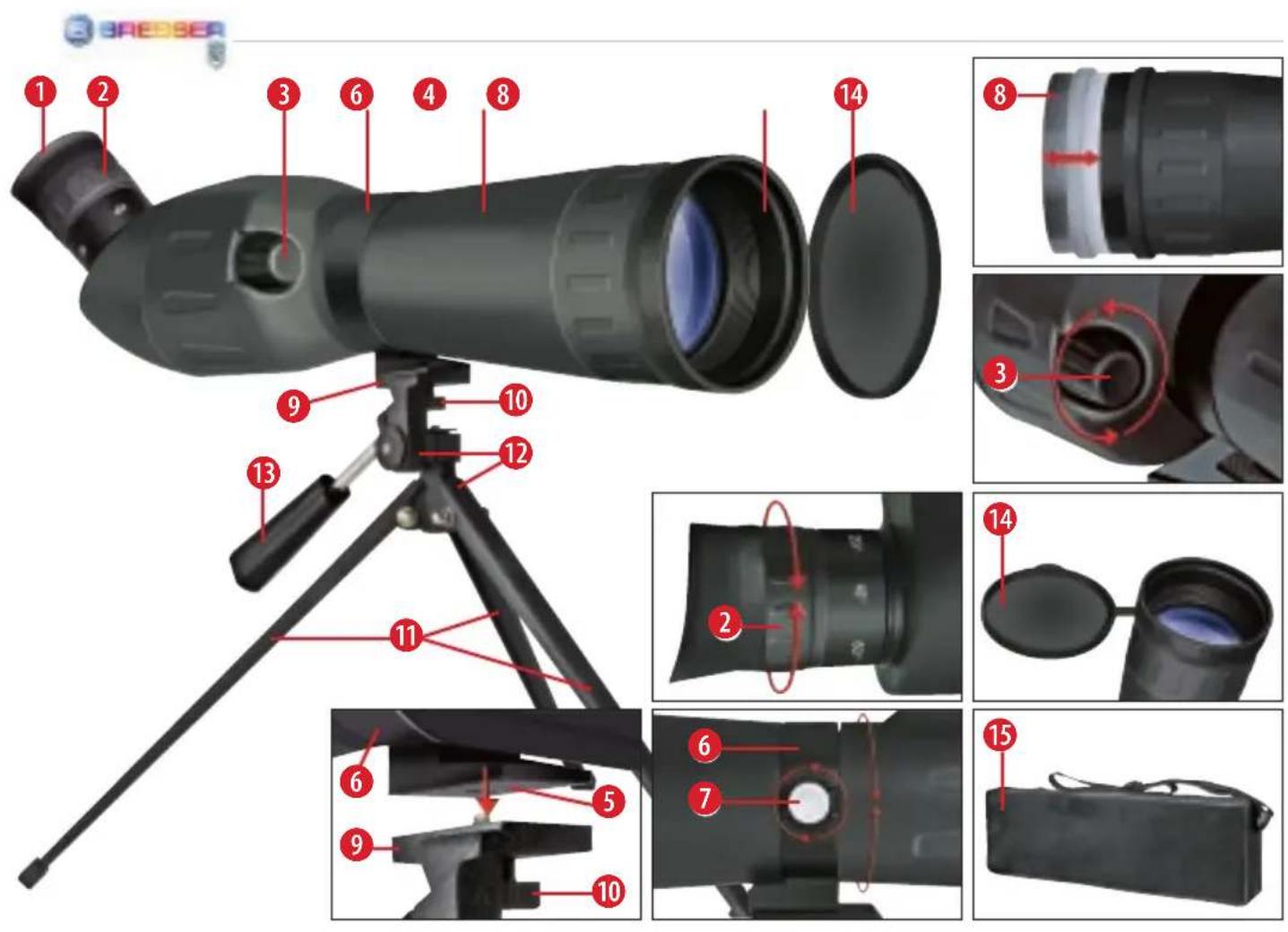
Please take a moment to look at the photo below and get to know the correct terms. This will help you to better understand the instruction manual.

natural_image
Simple circular arrow symbol pointing right, enclosed in a rectangular border (no text or labels)counter clockwise
natural_image
Simple circular arrow symbol pointing left, enclosed in a rectangular border (no text or labels)clockwise
Parts Overview
- Eyepiece / Rubber eyecups
- Zoom
- Focus wheel, focus ring
- Optical tube
- Tripod adapter thread
- Main tube clamp
-
Fastening screw
-
Sunshield
- Tripod head with thread screw
- Fixing screw for tripod head
- Tripod legs
- Axes for vertical and horizontal movement
- Panhandle with locking function
- Attached Dust cap
- Soft Carry Case with carrying strap
Fastening the scope on the tripod
Take the scope out of the packaging and pull out the tripod legs (11) as far as they con go. Place the tripod on an even and stable base (like a table).
Your scope has a normed tripod adaptor thread (5), which can be screwed precisely on the tripod adaptor thread screw (9) of the tripod.
Please tighten the fixing screw (10) beneath the tripod head.
Moving the scope together with the tripod
Unlock the vertical (up and down) and horizontal (left and right) axes (12) by turning the
panhandle (13) counter clockwise. Now you can move the tripod head with the fastened scope on both axes (up/down and left/right).
When you have reached the desired observing position, the scope can be locked by turning the panhandle (13) the other way as before (clockwise).
Controls
- Focus Wheel:
Look into the eyepiece (1) and rotate the focus wheel (3) in either direction to focus on an object. Keep turning the wheel until you can clearly see an image.
- Zoom:
Rotate the zoom control (2) to zoom in or out on an object; then use the focus knob (3) to refocus.

- Moving the main tube:
These spotting scopes have a main tube clamp (6) and fastening screw (7). Turn screw (7)
counter-clockwise to undo the main tube clamp. You can then turn the entire main tube (4) about its own axis and thus vary the eyepiece (1) position. To fasten the main tube in the desired position turn the fastening screw (7) clockwise.
- Indoor Viewing vs. Outdoor Viewing:
Although you may casually observe through an open or closed window, the best observing is always done outdoors. Temperature differences between indoor and outdoor air, and the low quality of window glass can blur images through the spotting scope.
- Sun shield:
Extend the sun shield (8) in strong sunshine affecting visibility. Put your
hand around the spotting scope aperture ring and simply push the shield out. But you should never look at or near the sun! To find out more read the warnings in this manuals.
Observing land objects
When viewing land objects, you will be observing through heat waves on the earth surface. You may have noticed these heat waves when driving down a highway with mom and dad during the summer. Heat waves cause a loss of image quality.
If heat waves interfere with your viewing, try focusing at low power to see a steadier, higher quality image. Observe in early morning hours, before the earth has built up too much internal heat.

Chers parents,
natural_image
Simple circular arrow icon pointing right, no text or symbols presentnatural_image
Simple circular arrow icon pointing left, no text or symbols presentnatural_image
Simple circular arrow symbol pointing right, no text or labels presenttegen de klok in
natural_image
Simple circular arrow symbol pointing left, enclosed in a rectangular border (no text or labels)met de klok mee
natural_image
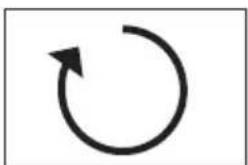
Simple circular arrow symbol pointing right, no text or labels presentin senso antiorario
natural_image
Simple circular arrow symbol pointing left, enclosed in a rectangular border (no text or labels)in senso orario
natural_image
Simple circular arrow symbol pointing right, enclosed in a rectangular border (no text or labels)Meade Instruments Europe
GmbH & Co. KG
Gutenbergstr. 2
DE-46414 Rhede
Germany
www.bresser.de

- Liebe Eltern,
- Dear junior researcher,
- RISK to your child! RISK of physical injury!
- Fire/Burning RISK!
- RISK of material damage!
- RESPECT privacy!
- TIPS on cleaning
- DISPOSAL
- Parts Overview
- Fastening the scope on the tripod
- Moving the scope together with the tripod
- Controls
- - Focus Wheel:
- - Zoom:
- - Moving the main tube:
- - Indoor Viewing vs. Outdoor Viewing:
- - Sun shield:
- Observing land objects
- Chers parents,
Brand : BRESSER
Model : Spotty
Category : Binoculars