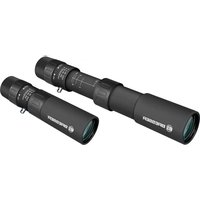
Zoomar Mono 8-25x25 - Binoculars BRESSER - Free user manual and instructions
Find the device manual for free Zoomar Mono 8-25x25 BRESSER in PDF.


| Brand | Bresser |
| Model | Zoomar Mono 8-25x25 |
| Product type | Zoom monocular |
| Magnification | 8x to 25x (continuous zoom) |
| Objective diameter | 25 mm |
| Focus | Focus ring + macro function |
| Minimum focusing distance | 0.5 m (macro mode) |
| Eyecup | Roll-down rubber |
| Weight | Approx. 200 g |
| Dimensions | Approx. 150 x 50 mm |
| Wrist strap | Included |
| Carrying bag | Waist bag included |
| Cleaning cloth | Included |
| Power supply | None (optical instrument) |
| Use | Nature observation, private use |
| Safety | Never look at the sun; risk of blindness and fire |
| Cleaning | Soft microfiber cloth, possibly lens cleaner |
| Warranty | 2 years (extendable via online registration) |
| Included accessories | Wrist strap, waist bag, cleaning cloth, instruction manual |
Frequently Asked Questions - Zoomar Mono 8-25x25 BRESSER
User questions about Zoomar Mono 8-25x25 BRESSER
0 question about this device. Answer the ones you know or ask your own.
Ask a new question about this device
Download the instructions for your Binoculars in PDF format for free! Find your manual Zoomar Mono 8-25x25 - BRESSER and take your electronic device back in hand. On this page are published all the documents necessary for the use of your device. Zoomar Mono 8-25x25 by BRESSER.
USER MANUAL Zoomar Mono 8-25x25 BRESSER
natural_image
Black BRASSERA 2023 LSR light bulb with visible lens and adjustment knobs (no text or symbols on body)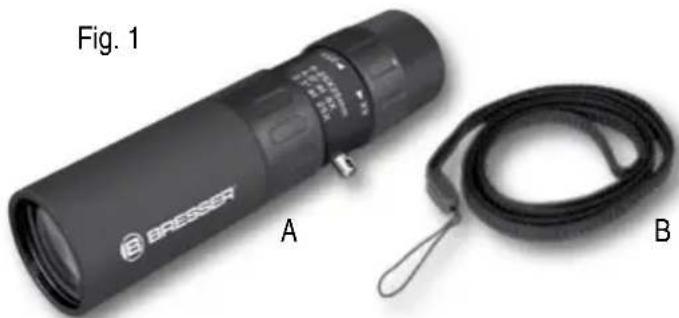
natural_image
Black Bresset flashlight labeled A and a black strap with cable B, shown as Figure 1 (no text or symbols on the device itself)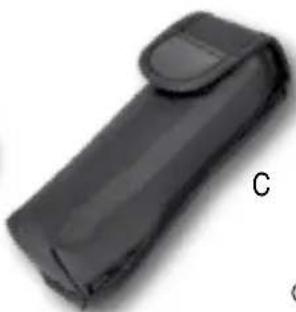
natural_image
Black rectangular object with a curved top and label 'C' on the side (no other text or symbols visible)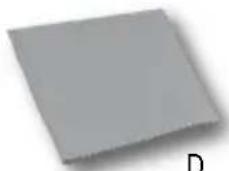
natural_image
Plain gray square with no visible text, symbols, or markingsD


About this Instruction Manual
These operating instructions are to be considered a component of the device. Please read the safety instructions and the operating instructions carefully before use.
Keep these instructions for renewed use at a later date. When the device is sold or given to someone else, the instruction manual must be provided to the new owner/user of the product.
Intended Use
This product is intended only for private use. It was developed for the magnified display of things in nature.
RISK of bodily injury!
Never use this device to look directly at the sun or in the direct proximity of the sun. Doing so may result in a risk of blindness. Children should only use the device under adult supervision. Keep packaging material, like plastic
bags and rubber bands, out of the reach of children, as these materials pose a choking hazard.
contact the Service Centre and can send the device in to be repaired, if necessary. Do not shake the device.

FIRE RISK!
Do not place the device, particularly the lenses, in direct sunlight. The concentration of light could cause a fire.
! RISK of property damage!
Do not disassemble the device. In the event of a defect, please contact your dealer. The dealer will
Scope of supply (Fig. 1)
Monocular (A), carrying strap (B), belt case (C), cleaning cloth (D), operating instructions
1. Parts overview (Fig. 2+3)
- Monocular
- Eyepiece
- Foldable rubber eyecups
- Zoom setting
- Zoom scale
-
Focus setting
-
Scale for the object distance
- Proximity focusing / macro
- Object lens
- Carrying strap holder
2. Focusing
Configuring an observation object with this monocular sharply, is basically dependent on the distance to the object. Thanks to the integrated macro function, you are able to focus the image not only at a long range, but also in the close range of less than half a meter.
2.1 Conventional focus setting
Set the lowest magnification (8x) on the zoom scale (5) using the zoom setting (4). Turn the focus setting (6) till the calibration mark on the scale for the object distance (7) is detected. Look through the eyepiece (2) at a distant object (e.g. a church spire). Set the sharpness of the image by further turning the focus setting (6) to the right or left.
2.2 Near focus setting (< 0.5 m distance)
For observation distances of under a half meter (macro setting or near focus) initially proceed as described in Section 2.1. Subsequently, slowly extract the refocusing (8) until you get a sharp image.
i Note: The visual field is only very small in the close-focus range. Therefore, a pinpoint focusing is required.
3. Zoom setting
After you have sharply set the image in the smallest level of magnification, you can further increase the magnification as much as you want. Turn the zoom set-
ting (4) towards the right until you reach the desired magnification. Adjust the sharpness of the image by slowly turning the focus setting (6).
i Note: In the close-focus range, the magnification setting is not recommended over 8 times out. The visual field would be thus greatly reduced that a focus would no longer be given on the observation object.
NOTES on Cleaning
Clean the eyepieces and/or lenses only with a soft, lintfree cloth, (e.g. microfibre cloth). To avoid scratching the lenses, use only gentle pressure with the cleaning cloth. To remove more stubborn dirt, moisten the cleaning cloth with an eyeglass-cleaning solution and wipe the lenses gently. Protect the device from dust and moisture. High humidity can cause the (acrylic) glass to fog up. This is not a defect! In this case let the device acclimatise for a short period of time at room temperature, so that the residual moisture can dissipate.
DISPOSAL
Dispose of the packaging materials properly, according to their type, such as paper or cardboard. Please take the current legal regulations into account when disposing of your device. You can get more information on the proper disposal from your local waste-disposal service or environmental authority.
Warranty & Service
The regular warranty period is 2 years and begins on the day of purchase. To benefit from an extended voluntary warranty period as stated on the gift box, registration on our website is required.
You can consult the full warranty terms as well as information on extending the warranty period and details of our services at www.bresser.de/warranty_terms
Please contact the service centre first for any questions regarding the product or claims, preferably by e-mail.
E-Mail: service@bresseruk.com · Phone*: +44 1342 837 098
BRESSER UK Ltd.
Eden House · Enterprise Way · Edenbridge, Kent TN8 6HF · GB
*Number charged at local rates in the UK (the amount you will be charged per phone call will depend on the tariff of your phone provider); calls from abroad will involve higher costs.
FR BE

Brand : BRESSER
Model : Zoomar Mono 8-25x25
Category : Binoculars