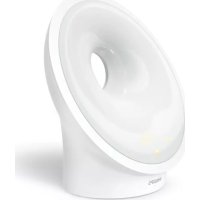
Somneo Sleep & Wakeup Light - Light therapy PHILIPS - Free user manual and instructions
Find the device manual for free Somneo Sleep & Wakeup Light PHILIPS in PDF.



| Product type | Light therapy lamp with alarm clock |
| Brand | Philips |
| Model | Somneo Sleep & Wakeup Light (HF36xx) |
| Dimensions (H x W x D) | Approx. 225 x 220 x 120 mm |
| Weight | Approx. 0.79 kg |
| Power supply | Mains adapter 100-240 V AC, 50/60 Hz, output 24 V DC, 0.75 A |
| Standby power consumption | < 0.5 W (display on), < 0.25 W (display off) |
| Main functions | Dawn simulation (wake-up light), bedside lamp, FM radio (except HF3653), night light, relaxation programs (sunset, RelaxBreathe), USB charging (5 V, 1 A), AUX input, 2 alarm profiles |
| Light intensity | 25 levels, from approx. 1 to 350 lux at 45 cm (depending on model) |
| Color temperature | Approximately 1500 K to 2800 K |
| FM band | 87.5 MHz - 108.0 MHz (except HF3653) |
| Ports | 1 USB port (charging only), 1 AUX 3.5 mm input |
| Operating conditions | Temperature 5°C to 35°C, humidity 20-90% RH |
| Care and cleaning | Clean with a soft, dry cloth. Do not use abrasive products, alcohol or acetone. |
| Safety | Do not use in a humid environment. Do not immerse. Use only the provided adapter. Consult a doctor in case of depression. |
| Spare parts and repairability | Replaceable adapter (same type). Non-replaceable LED light source. |
| Warranty and support | International warranty, support at www.philips.com/support |
| General information | Product intended for indoor use, not intended for general lighting. Energy efficiency class E for the light source. |
Frequently Asked Questions - Somneo Sleep & Wakeup Light PHILIPS
User questions about Somneo Sleep & Wakeup Light PHILIPS
0 question about this device. Answer the ones you know or ask your own.
Ask a new question about this device
Download the instructions for your Light therapy in PDF format for free! Find your manual Somneo Sleep & Wakeup Light - PHILIPS and take your electronic device back in hand. On this page are published all the documents necessary for the use of your device. Somneo Sleep & Wakeup Light by PHILIPS.
USER MANUAL Somneo Sleep & Wakeup Light PHILIPS
Introduction 6
General description 6
Intended use 7
The effects of the Sleep & Wake-Up Light 7
Important safety information 7
Safety and compliance 9
Electromagnetic fields (EMF) 9
Interactive menu icons 10
Navigating the menu 11
Setting wake-up profiles 11
Time ^+ alarm back-up 12
Snoozing 12
Dismissing the alarm 12
Using the Sleep & Wake-Up Light as a bedside lamp 13
Midnight Light 13
Settings 13
Music 15
Wind-down programs 16
Charging your mobile phone 17
Cleaning and storage 17
Recycling 18
Warranty and support 18
Troubleshooting 18
Open-source and third-party software 20
Specifications 20
Introduction
Congratulations on your purchase and welcome to Philips! To fully benefit from the support that Philips offers, register your product at
www.philips.com/welcome.
The Philips Sleep & Wake-Up Light helps you wake up more pleasantly. If the Sunrise Simulation is active, the light intensity of the lamp gradually increases to the set level and the light color changes from deep morning red to bright daylight. The light gently prepares your body for waking up at the set time. To make waking up an even more pleasant experience, you can use natural wake-up sounds or the FM radio* to wake up to.
*HF3653 does not feature a radio.
General description
1 Lamp housing
2 Display
3 USB charging port
4 Reset button
5 Radio antenna*
6 Adapter DC socket
7 Auxiliary (AUX) input
8 Speaker
9 Snooze/Midnight Light button
10 Adapter
11 Small plug
*HF3653 does not feature a radio.
Intended use
The Philips Sleep & Wake-Up Light is intended to give you a more natural and refreshed wake up and a relaxed feeling before falling asleep.
This is not a general illumination product.
The effects of the Sleep & Wake-Up Light
The Philips Sleep & Wake-Up Light gently prepares your body for waking up during the last 30 minutes of sleep. In the early morning hours our eyes are more sensitive to light than when we are awake. During that period the relatively low light levels of a simulated natural sunrise prepare our body for waking up and getting alert.
People who use the Sleep & Wake-Up Light wake up more easily, have a better overall mood in the morning and feel more energetic. Because the sensitivity to light differs per person, you can set the light intensity of your Sleep & Wake-Up Light to a level that matches your light sensitivity for an optimal start of the day.
To fully experience the effects of the Sleep & Wake-Up Light, place the appliance at approximately 16 in. - 20 in. / 40 cm - 50 cm from your head, on a flat stable surface of your bedside table.
For more information about the Sleep & Wake-Up Light, see www.philips.com.
Important safety information
Read this important information carefully before you use the appliance and save it for future reference.
Danger

- Water and electricity are a dangerous combination. Do not use this appliance in wet surroundings (e.g. in the bathroom or near a shower or swimming pool).
- Keep the adapter dry.
- Do not let water run into the appliance or spill water onto the appliance.
- Do not immerse the appliance in water or rinse under the tap.
- Do not place anything close to the appliance that could cause water or any other liquid to drip or splash onto the appliance.
This appliance is for indoor use only. - The adapter contains a transformer, which converts an unsafe 100V - 240V AC mains voltage to a safe 24V DC low voltage. Do not cut off the adapter to replace it with another plug, as this causes a hazardous situation.
Warning
- Never use the appliance if the lamp housing is damaged, broken or missing.
- If the adapter, cord or appliance has been damaged in any way, liquid has spilled or objects have fallen into and/or onto the appliance, the appliance has been exposed to rain or moisture, does not operate normally or has been dropped or damaged, it should not be operated.
- If you feel uncomfortable at any point while using RelaxBreathe in the breathing exercise, just go back to breathing normally.
Only use the appliance in combination with the adapter supplied.
If the adapter is damaged, always have it replaced with one of the original type in order to avoid a hazard. - This appliance is not intended for use by persons (including children) with reduced physical, sensory or mental capabilities, or lack of experience and knowledge, unless they have been given supervision or instruction concerning use of the appliance by a person responsible for their safety.
- Consult your doctor before you start using the appliance if you have suffered from or are suffering from depression.
- Do not use this appliance as a means to reduce your hours of sleep. The purpose of this appliance is to help you wake up more easily. It does not diminish your need for sleep.
Caution
- Check if the voltage indicated on the appliance corresponds to the local voltage before you connect the appliance.
- Protect the power cord from being walked on or pinched, particularly at plugs, wall sockets and points where it exits from the lamp.
- Do not use the adapter in or near wall sockets that contain an electric air freshener to prevent irreparable damage to the adapter.
- Do not drop the appliance on the floor, hit it hard or expose it to other heavy shocks.
- Place the appliance on a stable, level and non-slippery surface.
- Do not impair the cooling of the appliance by covering the appliance with items such as blankets, curtains, clothes, papers, etc.
- Do not use the appliance at room temperatures lower than 5^ C or higher than 35^ C .
- The appliance has no on/off switch. To disconnect the appliance, remove the adapter from the socket-outlet. The adapter and socket-outlet shall remain easily accessible at all times.
- This appliance is only intended for household use, including similar use for instance in hotels.
- No naked flame sources, such as lighted candles, should be placed on the appliance.
- Adapter is replaceable, LED light source is not replaceable.
General
-
If you often wake up too early or with a headache, reduce the set light intensity level and/or the set sunrise simulation time.
-
If you often wake up by the alarm sound, increase the set light intensity level or the set sunrise simulation time.
- If you share a bedroom with someone else, this person may unintentionally wake up from the light of the appliance, even though this person is further removed from the appliance. This phenomenon is the result of differences in light sensitivity between people.
- The power consumption of the appliance is lowest if no device is connected to the USB port and the lamp, radio and display are turned off.
- This is not a general illumination product. This product contains a light source of energy efficiency class E.
Safety and compliance
This appliance meets the safety requirements in the EU for:
IEC 60598:Luminaires.
- IEC 62368: Audio/video, information and communication technology equipment.
- IEC 62471: Photobiological safety of lamps and lamp systems.
Electromagnetic fields (EMF)
This Philips appliance complies with all applicable standards and regulations regarding exposure to electromagnetic fields.
Interactive menu icons
| Wake-up profile/Alarm Light intensity and light on/off | Enable shortcuts |
| Settings Sounds Confirm and save | setting |
| Wind-down program AUX inlet clock time | |
| Select natural sound Select radio preset Change alarm settings | |
| Display settings Display brightness Keep light on | |
| Enable display timeout Disable display timeout Keep light off | |
| Enable audio feedback Disable audio feedback Alarm toggle on/off | |
| Sunset simulation Duration of the wake-up profile | Dismiss alarm |
| Light or sound guidance RelaxBreathe Edit wake-up profile | |
| RelaxBreathe pace Duration of relaxation program | Deactivate alarm |
| Return to a higher level in the menu |
Navigating the menu
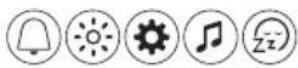
On the display you can select and set the wake-up profile, bedside light, settings, sound (source) or the unwind program.
You can change all personalized settings and profiles at any time. After you have completed a desired setting or profile, don't forget to press the check mark button to store it permanently in the memory.

Note: The personalized settings and profiles will not be lost if the adapter is removed from the electrical outlet.
Note: If the display is blank, move your hand towards the lower part of the Sleep & Wake-Up Light to show the display menu. You will see the menu buttons.
Setting wake-up profiles


Press the Wake-up/Alarm icon to start setting a wake-up profile.


Note: Press and hold the alarm button for 1 second to deactivate all set alarms at once.
You can set two different wake-up profiles. For each profile you can set the alarm time, the light intensity, the wake-up curve duration, and the type of wake-up sound and its volume.
Note: The set alarm will automatically go off at the same time every day until you deactivate the alarm by first pressing the alarm toggle icon and then the deactivate alarm icon to deactivate the alarm.
Light intensity of the wake-up profile


The lamp of the appliance simulates a sunrise. Like a sunrise, the brightness of the lamp increases gradually. During this wake-up curve, the color of the light changes from soft red to warm orange to bright yellow.
Press icon on the display to choose one of the 25 light intensity levels.
Note: The main display of the appliance shows if the alarm has been set.
Duration of the wake-up profile

Press this icon to open the menu.

The default duration of the wake-up curve (brightness increase to the set maximum light intensity) is 30 minutes. Press icon to change the duration of the wake-up profile to your preference.
Press + or - to increase or decrease the brightness of the light in the wake-up curve.
Type of sound

Press this icon to open the sounds menu to set the sound of the wake-up profile.

1 Press the toggle icon to choose one of the three sounds options: a natural sound, radio* or no sound.
2 Press the natural sound icon to select one of the natural sounds or press the radio icon to select one of the radio presets.
3 You can set the volume with the loudspeaker icon
*HF3653 does not feature a radio.
Time + alarm back-up
In the event of a power failure, all functions of the appliance, including the display, do not work. However, the internal clock and a back-up alarm remain active for at least 8 more hours.
If during the power failure the set alarm time is due, a back-up alarm goes off generating a beeping sound for approximately 30 seconds.
Snoozing
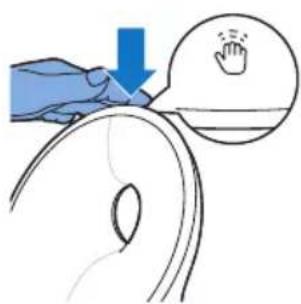
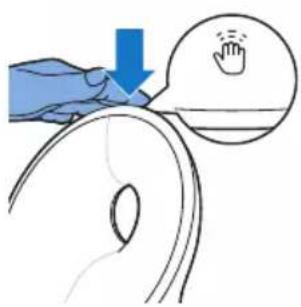
When the wake-up curve has ended (when the set maximum light intensity has been reached) and the alarm sound is playing, you can tap the top of the appliance to snooze.
The lamp stays on, but the sound is muted. After 9 minutes, the alarm sound starts playing again.
Note: The light and sound automatically turn off 60 minutes after the alarm has gone off or 60 minutes after the last snooze action.
Dismissing the alarm

When the wake-up curve is active or the alarm goes off, you can dismiss it by pressing this icon on the appliance. If you dismiss the alarm, the alarm profile is deactivated for that day.
Using the Sleep & Wake-Up Light as a bedside lamp

You can use the Sleep & Wake-Up Light as a bedside lamp.
Press this icon on the display to switch on the bedside lamp.

Note: Long-press the lamp icon to switch off the bedside lamp.
You can increase and decrease the brightness of the light. You can select a brightness level between 1 (low) and 25 (high). The default brightness level is 20.
Note: To switch off the bedside lamp, press the cross button in the menu.
Tip: When the light is on, you can also turn off the light with a single tap on top of the Sleep & Wake-Up Light. All active programs will stop. Set alarms are still active.
Midnight Light
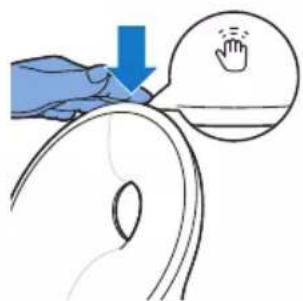
If you wake up during the night, you can tap the top of the appliance to activate a dim light. This dim, subtle orange light provides you with just enough light to find your way in the dark. Switch off the Midnight Light by tapping the top of the appliance again.
Note: The Midnight Light cannot be activated directly when the main light is already on. In that case, first tap the top of the appliance to deactivate the main light. Then tap again to activate the Midnight Light.
Settings

Press the settings icon to open the settings menu.

In the settings menu, you can adjust the clock time, the display settings and the alarm settings.
Time
Press this icon to open the time menu.

In this menu you can change the time by pressing + or -
Press the time notation icon to toggle between the 12-hour clock and 24-hour clock.
Display settings

Press the display settings button in the settings menu to set the display settings.

In the display settings menu, you can deactivate and reactivate the audio feedback, adjust the display brightness, switch the display on or off and select shortcuts.
Audio feedback
If you do not want to hear clicks when you press an icon, press the audio feedback icon to turn off the audio feedback. You hear one click as a confirmation.
To reactivate the audio feedback, press this icon

Display brightness
You can adjust the display brightness from level 1 to level 6. Choose a level that is optimal for you to see the display at night. The appliance automatically adjusts the display brightness when the light in your bedroom changes.

Display timeout
If you do not want the appliance to produce any light, not even from the time indication, press the display timeout icon.
Normally, if you do not touch the display for some time in any menu, the display reverts to time and status indication only. When the display timeout is activated, no time indication is shown.
Press the display timeout icon to turn on the display again.
Tip: If you want to check the time or select a function while the display timeout is activated, just place your hand near the display to turn it on for a few seconds.

Shortcuts
Press the shortcuts icon to get quick access to five key functions right from the main screen, so you can immediately turn on the light, have access to alarm and sound menus as well as the wind-down programs.
Alarm settings

The light switches off when you dismiss the alarm.
If you do not want this, press this icon in the alarm settings menu and save the setting to ensure that the light stays on after you dismiss the alarm.
Music

Tip: When the radio or music is on, you can turn off the sound with a single tap on top of the Sleep & Wake-Up Light. All active programs will stop. Set alarms are still active.
Listening to radio*

You can listen to the FM radio with the Sleep & Wake-Up Light. If you selected the radio function in the sounds menu, it shows the selected radio station. You can manually change the radio station by selecting the FM frequency of another radio station.

Tip: Make sure to unwind the antenna fully and move it around until you receive the best reception.
You can preset 5 radio stations. First, select a radio station by setting the FM frequency. Press and hold the double arrow button to automatically search for the next radio station.
After setting a radio station, you can easily add another preset radio station by selecting the toggle button. With this process, you can preset 5 radio stations.
Music via Auxiliary (AUX) inlet

You can use the Sleep & Wake-Up Light as a speaker for music by connecting a music playing device (for instance your mobile phone) to the AUX inlet.
Note: You cannot wake up to music from a device connected to the AUX inlet.
If the sound is not loud enough when you have set the Sleep & Wake-Up Light to maximum volume, increase the volume of your music playing device.
If the sound is too loud or distorted when you have set the Sleep & Wake-Up Light to a low volume setting, decrease the volume of your music playing device.

Note: Press and hold the music note icon to activate/deactivate the sound via the menu. You can also deactivate the sound by tapping the top of the appliance.
Note: You need an AUX cable to connect the Sleep & Wake-Up Light to a music playing device.
Wind-down programs

The appliance features two wind-down programs to help you relax before you fall asleep.
Note: You can deactivate the active wind-down program by tapping the top of the appliance.
Sunset Simulation

During the Sunset Simulation, the brightness of the light decreases gradually with colors changing from bright yellow to warm orange to soft red. You can set the duration of the sunset simulation and the initial light intensity of the sunset simulation.
You can also select a sound that fades away during the sunset simulation. You can set the sound source and the initial volume. You can either choose a natural sound, radio* or no sound. You can also play your own music by connecting a music playing device to the AUX socket.
*HF3653 does not feature a radio.
RelaxBreathe

RelaxBreathe uses the belly breathing technique as a basis for the breathing program. You can choose one of the breathing programs, guided by light or sound. The combination of the belly breathing exercise and the guidance of the Sleep & Wake-Up Light helps you slow down and feel relaxed.

You can select one of seven relaxation programs with preset breathing pace. Each relaxation program has a different breathing pace. The '4 breaths' program is preset to 4 breaths per minute. The '5 breaths' program is preset to 5 breaths per minute. Each next program has one additional breath per minute. The last program (10 breaths) is preset to 10 breaths per minute.

You can select light or sound to guide you during the selected relaxation program. Follow the light or sound when you inhale and exhale.
- For guidance with light, inhale when the light intensity increases. In between the two subtle light flashes, hold your breath. Exhale slowly when the light intensity decreases.
- For guidance with sound, inhale when the intensity of the sound of the waves increases. When the intensity of the sound pauses, hold your breath. Slowly exhale when the intensity of the sound of the waves decreases.
Follow your preferred pace with the help of light or sound for a more relaxed feeling. You can even do this with your eyes closed.
Press this icon to set the duration of the relaxation program. You can select a duration of 5, 10 or 15 minutes.
Belly breathing for relaxation
Belly breathing is the most recognized breathing exercise technique to help people relax. When you breathe from your belly, your diaphragm pulls down automatically. This pulls down your lungs and allows you to inhale fully and deeply.
Caution: If you feel uncomfortable at any point during this breathing exercise, just go back to breathing normally.

1 Lie down comfortably on your back.
2 Inhale through your nose, exhale through your nose or mouth.
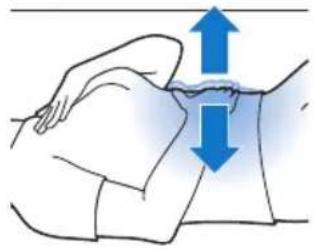
3 Place one hand on your stomach and your other hand on your chest. You should see your hand on your stomach move up with each inhale and move down with each exhale. The hand on your chest should only move slightly.
4 Your breath should only come from your belly. Try to make your exhale longer than your inhale as this will quickly make you feel more relaxed. Note: The RelaxBreathe function of the appliance can guide you during belly breathing.
Charging your mobile phone
You can use the USB port (see 'General description') to charge your mobile phone (max 1 A).
Cleaning and storage
Clean the appliance with a soft cloth.
- Do not use abrasive cleaning agents, pads or cleaning solvents like alcohol, acetone, etc., as this may damage the surface of the appliance.
- If you are not going to use the appliance for an extended period of time, remove the adapter from the wall socket and store the appliance in a safe, dry location where it will not be crushed, banged, or subjected to damage.
- Do not wrap the power cord around the appliance when storing it.
Recycling
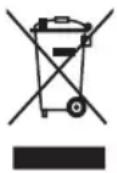
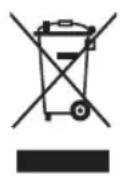
- This symbol means that this product shall not be disposed of with normal household waste (2012/19/EU).
- Follow your country's rules for the separate collection of electrical and electronic products. Correct disposal helps prevent negative consequences for the environment and human health.
Warranty and support
If you need information or support, please visit www.philips.com/support or go to your Philips dealer. You can also contact the philips Consumer Care Center in your country (see the international warranty leaflet for contact details).
Troubleshooting
This chapter summarizes the most common problems you could encounter with the appliance. If you are unable to solve the problem with the information below, visit www.philips.com/support for a list of frequently asked questions or contact the Consumer Care Center in your country.
Problem Solution
| The appliance does not work at all. | Perhaps the adapter is not inserted properly in the wall socket. Insert the adapter properly in the wall socket. |
| Perhaps the plug is not inserted properly in the appliance. Insert the plug properly in the appliance. | |
| Perhaps there is a power failure. Check if the power supply works by connecting another appliance. | |
| The appliance functions properly, but the lamp does not work anymore. | The appliance uses durable LED technology. The lamp should last a long time. However, if the lamp stops working, go to www.philips.com/support or contact the Consumer Care Center. |
| The appliance does not respond when I try to set different functions. | If you want to go back to factory settings, press the reset button on the back of the appliance (see 'General description'). If you press the reset button, the setup wizard needs to be set again. |
| The lamp does not go on when the alarm goes off. | Perhaps you set a light intensity level that is too low. Increase the light intensity level in your wake-up profile. |
| Perhaps you turned off the alarm function. The alarm icon is visible on the display when the alarm function is active. | |
| The lamp does not go on right away when I switch it on. | It may take between 1 to 5 seconds for the lamp to switch on, depending on the set light intensity level. |
Problem Solution
| I do not hear the alarm sound when the alarm goes off. | Perhaps you set a sound level that is too low. To set a higher sound level, increase the volume level of the wake-up sound in your wake-up profile. |
| When you have set an alarm, you will first see the light of the wake up curve. The alarm sound only starts playing when the set alarm time is reached. You can change the duration of the wake up light curve. | |
| Perhaps you turned off the alarm function. The alarm icon is visible on the display when the alarm function is active. | |
| If you selected the FM radio* as the alarm sound, turn on the FM radio* after you turn off the alarm to check if the FM radio* works. Check if your FM radio* is correctly tuned to a radio station. If necessary, adjust the frequency. If it does not work, contact the Consumer Care Center in your country. | |
| The FM radio* does not work. | Perhaps you set the volume too low. Increase the volume level. |
| Check if your FM radio* is correctly tuned to a radio station. If necessary, adjust the frequency. | |
| Change the position of the antenna by moving it around. Make sure you have unwound the antenna completely. | |
| Contact the Consumer Care Center in your country. | |
| The FM radio* produces a crackling sound. | Perhaps the broadcast signal is weak. Adjust the frequency and/or change the position of the antenna by moving it around. Make sure you have unwound the antenna completely. |
| The alarm went off yesterday, but it did not go off today. | Perhaps you turned off the alarm function. The alarm icon is visible on the display when the alarm function is active. |
| Perhaps you set a volume level and/or light intensity level that is too low. Set a higher volume and/or light intensity level in your wake-up profile. | |
| When there has been a power failure, the clock time will keep on running up to 8 hours. Perhaps the power failure lasted longer. In this case, you have to set the clock time again. | |
| I wanted to snooze, but the alarm did not go off again after 9 minutes. | Tap on the top of the Sleep & Wake-Up Light to snooze. If you press the button to dismiss the alarm, the alarm profile is deactivated for that day. |
| The light wakes me too early. | Perhaps the light intensity level you have set is not appropriate for you. Try a lower light intensity level if you wake up too early. You can also change the duration of the wake-up curve. If light intensity 1 is not low enough, move the appliance further away from the bed. |
Problem Solution
| The light wakes me too late. | Perhaps the light intensity you have set is too low. Select a higher light intensity. Perhaps the appliance is positioned at a lower level than your head. Make sure the appliance is located at a height at which the light is not blocked by your bed, comforter, blanket or pillow. Also make sure the appliance is not placed too far away. |
| I am unable to turn the Midnight Light function on/off. | Make sure you tap on the correct position (top/back) of the appliance. |
| I am unable to stream music via USB. | The USB connection is only for charging your mobile phone. You are not able to stream music to the Sleep & Wake-Up Light. |
| The AUX inlet doesn't work properly. | Try to set the volume on your mobile phone either higher or lower. If necessary, adjust the volume level on the appliance as well. |
| Suddenly the device makes a beeping sound. | The backup alarm went off. The internal clock and the back-up alarm remain active for at least 8 hours. If an alarm is due during this back-up period, it will go off. The alarm sound stops automatically after approximately 30 seconds. You also can stop the alarm sound immediately by connecting the appliance to the power briefly. To prevent the back-up alarm from going off when the power is disconnected (e.g. during storage), disable the alarms before you disconnect the appliance from the power. |
*HF3653 does not feature a radio.
Open-source and third-party software
A copy of the open-source software and third-party commercial software license agreement can be found on the website www.philips.com/support Search for the device number HF3670 / HF3671 / HF3672 / HF3650 / HF3651 / HF3652 / HF3653 / HF3654 on the technical documentation page of the product.
Specifications
Adapter
Manufacturer PHILIPS
| Type number HF20 |
| Rated input voltage 100 V – 240 V AC |
| Rated input frequency 50 / 60 Hz |
| Rated output voltage 24.0 V DC |
| Rated output current 0.75 A |
| Rated output power 18.0 W |
No-load power < 0.1W
Efficiency class VI
Safety classification Class II power supply

Dimensions
35 × 78 × 66 ~mm (1.38 × 3.07 × 2.6 in.) for EU version
height x width x depth)
50 × 78 × 56 ~mm (1.97 × 3.07 × 2.2 in.) for UK version
Weight Approx. 0.12kg (4.2 oz.) for EU version
Approx. 0.13kg 4.6 oz.) for UK version
Cord length Approx. 150 cm (4.9 ft)
Main unit
Manufacturer
PHILIPS
Type number HF3650, HF3651, HF3653, HF3654
Rated input voltage 24 V DC
Rated input current 0.75 A
Rated input power 18 W
Standby power appliance
< 0.5 W (display at maximum brightness)
(main unit + adapter)
< 0.25 W (display off)
Conditions: night (12 h / 0 lux), day (12 h / 500 lux), all functions
suspended
Safety classification Class III luminaire

Dimensions
Approx. 225 × 220 × 120 ~mm (8.86 × 8.66 × 4.72 in.)
height x width x depth)
Weight Approx. 0.79kg (27.9 oz.)
Ports
USB charging 5 V DC, 1 A
AUX sensitivity 280mV
Light
Light output (level 1 - 25) Approx. 1 lux - 350 lux at 45 cm (approx. 1 lux - 350 lux at 17.7 in.)
*depending on model
Light color (level 1-25) Approx. 1500 K - 2800 K
FM
22 English
FM-radio frequency band (HF3653 does not have a radio)
87.5 MHz - 108.0 MHz
| Operating conditions |
| Temperature 5 °C to 35 °C (41 °F to 95 °F) |
| Relative humidity 20 % to 90 % (no condensation) |
| Atmospheric pressure 86 kPa to 106 kPa |
| Storage conditions |
| Temperature -20 °C to 50 °C (-4 °F to 122 °F) |
| Relative humidity 20 % to 90 % (no condensation) |
| Atmospheric pressure 86 kPa to 106 kPa |
Indhold
Introduktion 23
Gearned-programmer 33
Backup for tid + alarm
- Hvis du ikke skal bruge apparatet i en længere期内e, skal adapteren tages ud af stikkontakten. Opbevar apparatet på et sikkert,XXXXXXXXXXXXXXXXXXXXXXXXXXXXXXXXXXXXXXXXXXXXXXXXXXXXXXXXXXXXXXXXXXXXXXXXXXXXXXXXXXXXXXXXXXXXXXXXXXXXXXXXXXXXXXXXXXXXXXXXXXXXXXXXXXXXXXXXXXXXXXXXXXXXXXXXXXXXXXXXXXXXXXXXXXXXXXXXXXXXXXXXXXXXXXXXXXXXXXXXXXXXXXXXXXXXXXXXXXXXXXXXXXXXXXXXXXXXXXXXXXXXXXXXXXXXXXXXXXXXXXXXXXXXXXXXXXXXXXXXXXXXXXXXXXXXXXXXXXXXXXXXXXXXXXXXXXXXXXXXXXXXXXXXXXXXXXXXXXXXXXXXXXXXXXXXXXXXXXXXXXXXXXXXXXXXXXXXXXXXXXXXXXXXXXXXXXXXXXXXXXXXXXXXXXXXXXXXXXXXXXXXXXXXXXXXXXXXXXXXXXXXXXXXXXXXXXXXXXXXXXXXXXXXXXXXXXXXXXXXXXXXXXXXXXXXXXXXXXXXXXXXXXXXXXXXXXXXXXXXXXXXXXXXXXXXXXXXXXXXXXXXXXXXXXXXXXXXXXXXXXXXXXXXXXXXXXXXXXXXXXXXXXXXXXXXXXXXXXXXXXXXXXXXXXXXXXXXXXXXXXXXXXXXXXXXXXXXXXXXXXXXXXXXXXXXXXXXXXXXXXXXXXXXXXXXXXXXXXXXXXXXXXXXXXXXXXXXXXXXXXXXXXXXXXXXXXXXXXXXXXXXXXXXXXXXXXXXXXXXXXXXXXXXXXXXXXXXXXXXXXXXXXXXXXXXXXXXXXXXXXXXXXXXXXXXXXXXXXXXXXXXXXXXXXXXXXXXXXXXXXXXXXXXXXXXXXXXXXXXXXXXXXXXXXXXXXXXXXXXXXXXXXXXXXXXXXXXXXXXXXXXXXXXXXXXXXXXXXXXXXXXXXXXXXXXXXXXXXXXXXXXXXXXXXXXXXXXXXXXXXXXXXXXXXXXXXXXXXXXXXXXXXXXXXXXXXXXXXXXXXXXXXXXXXXXXXXXXXXXXXXXXXXXXXXXXXXXXXXXXXXXXXXXXXXXXXXXXXXXXXXXXXXXXXXXXXXXXXXXXXXXXXXXXXXXXXXXXXXXXXXXXXXXXXXXXXXXXXXXXXXXXXXXXXXXXXXXXXXXXXXXXXXXXXXXXXXXXXXXXXXXXXXXXXXXXXXXXXXXXXXXXXXXXXXXXXXXXXXXXXXXXXXXXXXXXXXXXXXXXXXXXXXXxxxxxxxx
- Lysnetledningen må ikke vikles om apparatet under opbevaring.
Genanvendelse
87,5 MHz - 108,0 MHz
www.philips.com/support
87,5 MHz - 108,0 MHz
Alternatively, you can choose to select a sound for your sonido. You can also choose to select a sound for your sonido's own. Alternatively, you can choose to select a sound from the sound list provided by the sound list. Alternatively, you can choose to select a sound from the sound list provided by the sound list of the sonido. Alternatively, you can choose to select a sound from the sound list provided by the sound list of the sonido. Alternatively, you can choose to select a sound from the sound list provided by the sound list of the sonido. Alternatively, you can choose to select a sound from the sound list provided by the sound list of the sonido. Alternatively, you can choose to select a sound from the sound list provided by the sound list of the sonido. Alternatively, you can choose to use a different sound for your sonido. Alternatively, you can choose to use a different sound for your sonido's mate. Alternatively, you can choose to use a different sound for your sonido's mate's mate. Alternatively, you can choose to use a different sound for your sonido's mate's mate's mate. Alternatively, you can choose to use a different sound for your sonido's mate's mate's mate. Alternatively, you can choose to use a different sound for your sonido's mate's mate's mate. Alternatively, you can choose to use a different sound for your sonido's mate's mate's mate. Alternatively, you can choose to use a different sound for your sonido's mate's mate's mate. Alternatively, you can choose to use a different sound or other type of sound for your sonido. Alternatively, you can choose to use a different sound or other type of sound for your sonido. Alternatively, you can choose to use a different sound or other type of sound for your sonido. Alternatively, you can choose to use a different sound or other type of sound for your sonido. Alternatively, you can choose to use a different sound or other type of sound for your sonido. Alternatively, you can choose to use a different sound or other type of sound for your sonIDO. Alternatively, you can choose to use a different sound or other type of sound for your sonido. Alternatively, you can choose to use a different sound or other type of sound for your sonido. Alternatively, you can choose to use a different sound or other type of sound for your sonido. Alternatively, you can choose to use a different sound or other type of sound for your sonido. Alternatively, you can choose to use a different sound or other type of sound for your sonid. Alternatively, you can choose to use a different sound or other type of sound for your sonido. Alternatively, you can choose to use a different sound or other type of sound for your sonido. Alternatively, you can choose to use a different sound or other type of sound for your sonido. Alternatively, you can choose to use a different sound or other type of sound for your sonido. Alternatively, you can choose to use a different sound or other type of sound for your sonida. Alternatively, you can choose to use a different sound or other type of sound for your sonido. Alternatively, you can choose to use a different sound or other type of sound for your sonido. Alternatively, you can choose to use a different sound or other type of sound for your sonido. Alternatively, you can choose to use a different sound or other type of sound for your sonido. Alternatively, you can choose to use a different sound or other type of sound for your sonidon. Alternatively, you can choose to use a different sound or other type of sound for your sonido. Alternatively, you can choose to use a different sound or other type of sound for your sonido. Alternatively, you can choose to use a different sound or other type of sound for your sonido. Alternatively, you can choose to use a different sound or other type of sound for your sonido. Alternatively, you can choose to use a different sound or other type of sound for your sonidos. Alternatively, you can choose to use a different sound or other type of sound for your sonido. Alternatively, you can choose to use a different sound or other type of sound for your sonido. Alternatively, you can choose to use a different sound or other type of sound for your sonido. Alternatively, you can choose to use a different sound or other type of sound for your sonido. Alternatively, you can choose to use a different sound or other type of sound for your sonidad. Alternatively, you can choose to use a different sound or other type of sound for your sonido. Alternatively, you can choose to use a different sound or other type of sound for your sonido. Alternatively, you can choose to use a different sound or other type of sound for your sonido. Alternatively, you can choose to use a different sound or other type of sound for your sonido. Alternatively, you can choose to use a different sound or other type of sound for your sonismo. Alternatively, you can choose to use a different sound or other type of sound for your sonido. Alternatively, you can choose to use a different sound or other type of sound for your sonido. Alternatively, you can choose to use a different sound or other type of sound for your sonido. Alternatively, you can choose to use a different sound or other type of sound for your sonido. Alternatively, you can choose to use a different sound or other type of sound for your sondo. Alternatively, you can choose to use a different sound or other type of sound for your sonido. Alternatively, you can choose to use a different sound or other type of sound for your sonido. Alternatively, you can choose to use a different sound or other type of sound for your sonido. Alternatively, you can choose to use a different sound or other type of sound for your sonido. Alternatively, you can choose to use a different sound or other type of sound for your sondio. Alternatively, you can choose to use a different sound or other type of sound for your sonido. Alternatively, you can choose to use a different sound or other type of sound for your sonido. Alternatively, you can choose to use a different sound or other type of sound for your sonido. Alternatively, you can choose to use a different sound or other type of sound for your sonido. Alternatively, you can choose to use a different sound or other type of sound for your sonicio. Alternatively, you can choose to use a different sound or other type of sound for your sonido. Alternatively, you can choose to use a different sound or other type of sound for your sonido. Alternatively, you can choose to use a different sound or other type of sound for your sonido. Alternatively, you can choose to use a different sound or other type of sound for your sonido. Alternatively, you can choose to use a different sound or other type of sound for your sonio. Alternatively, you can choose to use a different solido y el volumen iniciales del sonido. Puede selec tionar un sonido natural, la radio* o ningun sonido. Internacionalmente,你可以选择使用任何一种或几种 audiovisual media (incluindo el uso de multimedia) para darose su reproduccir su musica conectando un dispositivo de reproducciona al toma AUX.
87,5 MHz - 108,0 MHz
(EI modelo HF3653 no tien radio)
Musikk via Auxiliary (AUX)-inngangen

Nominell utgangsspenning 24,0 V dc
Hora + alarmede reserves
Nimellislahtojannite 24,0 V DC
87,5 MHz - 108,0 MHz
Käytöolosuhteet
Lampotila 5^ - 35^
Tid + larm-backup 184
Snoopze 184
Avvisalarmet 184
Anvanda Sleep & Wake-Up Light som sanglampa. 185
Nattbelysning 185
Inställingar 185
Musik 187
Avkopplingsprogram 188
Ladda mobiltelefonen 189
Nominell utspanning 24,0 V DC
Typnummer HF3650, HF3651, HF3653, HF3654
Nominell ingaende spanning 24 V DC
Nominell ingangsström 0,75 A
Ingaende markeffekt: 18 W

- Introduction
- General description
- Intended use
- The effects of the Sleep & Wake-Up Light
- Important safety information
- Danger
- Warning
- Caution
- General
- Safety and compliance
- Electromagnetic fields (EMF)
- Interactive menu icons
- Navigating the menu
- Setting wake-up profiles
- Light intensity of the wake-up profile
- Duration of the wake-up profile
- Type of sound
- Time + alarm back-up
- Snoozing
- Dismissing the alarm
- Using the Sleep & Wake-Up Light as a bedside lamp
- Midnight Light
- Settings
- Time
- Display settings
- Audio feedback
- Display brightness
- Display timeout
- Shortcuts
- Alarm settings
- Music
- Listening to radio*
- Music via Auxiliary (AUX) inlet
- Wind-down programs
- Sunset Simulation
- RelaxBreathe
- Belly breathing for relaxation
- Charging your mobile phone
- Cleaning and storage
- Recycling
- Warranty and support
- Troubleshooting
- Open-source and third-party software
- Specifications
- Adapter
- Main unit
- Ports
- Light
- FM
- English
- Indhold
- Backup for tid + alarm
- Genanvendelse
- Musikk via Auxiliary (AUX)-inngangen
- Hora + alarmede reserves
- Käytöolosuhteet
Brand : PHILIPS
Model : Somneo Sleep & Wakeup Light
Category : Light therapy