LD166 - Baby monitors Lindam - Free user manual and instructions
Find the device manual for free LD166 Lindam in PDF.




| Product Type | Digital Baby Monitor |
| Brand | Lindam |
| Model | LD166 |
| Baby unit power supply | Mains adapter (included) or 4 AA alkaline batteries (not included) |
| Parent unit power supply | 2 AAA rechargeable batteries (included) via charging station |
| Baby unit battery life (AA 1800 mAh) | Up to 15 h (night light off), 8 to 10 h (night light on) |
| Parent unit battery life | 8 to 10 h after full charge |
| Initial charging time | 10 to 12 h |
| Maximum range | Up to 300 m in open field (reduced by obstacles) |
| Main features | Night light, talk-back function (walkie-talkie), mute (5 levels), volume control (6 levels), LED link and sound indicators |
| Included accessories | 1 baby unit, 1 parent unit, 2 mains adapters, 2 AAA rechargeable batteries, 1 charging station, 1 belt clip |
| Care | Clean with a dry, soft cloth. Do not use water or chemicals. |
| Safety | Keep cables out of reach (more than 1 m away). Do not place in the crib. Do not cover. Risk of strangulation. |
| Recycling | Dispose of the product and used batteries at an official collection point. |
| Intended use | Monitoring aid, does not replace adult supervision. |
Frequently Asked Questions - LD166 Lindam
User questions about LD166 Lindam
0 question about this device. Answer the ones you know or ask your own.
Ask a new question about this device
Download the instructions for your Baby monitors in PDF format for free! Find your manual LD166 - Lindam and take your electronic device back in hand. On this page are published all the documents necessary for the use of your device. LD166 by Lindam.
USER MANUAL LD166 Lindam
Lindam clarity digital audio monitor
IMPORTANT! KEEP FOR FUTURE REFERENCE
Lindam Limited Hornbeam Park Harrogate HG2 8PA England www.lindam.com
Model: LD166 Product Code: 44488 Customer careline: 0871 702 1000*
*Mon-Fri, 10am - 4pm, UK Only. Calls cost 10 pence per minute from a BT Landline. Calls from other networks and mobiles may cost more.)
IMPORTANT INFORMATION
Please read this user's manual carefully before using your baby monitor and keep it for future reference. This baby monitor is designed as an aid and should not be used as a substitute for responsible and proper adult supervision
- Make sure the Baby Unit and Adapter Cable are always out of reach of the baby (at least 1 metre/3 feet away).
- Never place the Baby Unit inside your baby's bed, cot or playpen
- Never cover the baby monitor (e.g. with clothes, towels or blankets etc)
- Never place or use the baby monitor in moist places or close to water
- If travelling abroad, make sure that the voltage shown on the mains power adapter corresponds to the local mains power before connecting to the power supply
- To prevent electric shock, do not open the case of the Baby Unit and Parent Unit (except battery compartment covers)
- There is a risk of explosion if batteries are replaced with an incorrect type. For the Parent Unit you must always use rechargeable batteries. For replacement batteries please contact the Lindam careline on 0871 702 1000.
- If you do not expect to use your monitor for a prolonged period of time you should turn off the Units and remove the batteries to avoid the risk of leakage.
- WARNING: STRANGULATION HAZARD!-Keep out of reach of children. Do not use with extension cords.
DECLARATION OF CONFORMITY
Lindam Limited declares that the Lindam Baby Talk Digital Monitor is in compliance with the essential requirements and other relevant provisions of directive 1999/5/EC
The Clarity Digital Audio Monitor complies with all current standards on electromagnetic fields (EMF). Ensure the safest possible use of your monitor by following the directions set out in these instructions. All testing and advice is in line with the latest scientific evidence available today.
YOU SHOULD HAVE
1 x Baby Unit
1 x Parent Unit
2 x Power Adapters
2 x AAA Rechargeable Batteries for Parent Unit
1 x Parent Unit Charging Dock
1 x Belt clip for Parent Unit

YOU MAY NEED
If you would prefer to power your Baby Unit with batteries you will require 4 x AA Standard Alkaline Batteries.
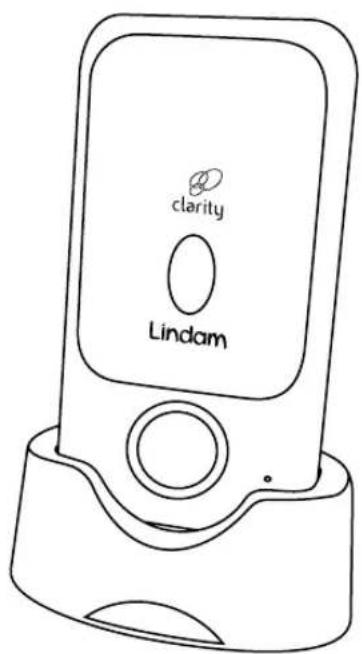
PARENT UNIT
1 Mute ON/OFF button
2 Link indicator LED
3 Talk-back button
4 Sound level lights / Mute level indicator
5 Volume control
6 Power / Charging LED
7 ON/OFF button
8 Belt clip
9 Battery compartment
10 Power ON Light
11 Power Adapter Socket
12 Mute active LED

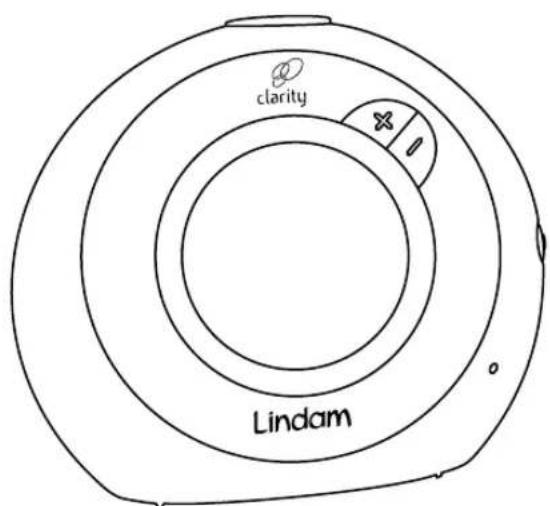
BABY UNIT
1 Link Indicator LED
2 Night Light
3 Night Light ON/OFF
4 Volume Control
5 Power / Battery Low LED
6 ON/OFF button
7 Power Adapter Socket
8 Battery Lock
9 Battery Compartment

SETTING UP THE BABY UNIT
You can power your Baby Unit using either the Mains Power Adapter supplied or 4 x AA Standard Alkaline Batteries (not supplied).
MAINS OPERATION
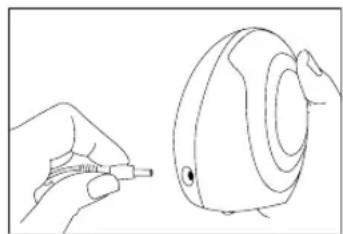
- Plug the power cable into Power Adapter Socket of your Baby Unit.
- Plug the Adapter into the mains socket and switch on the Baby Unit using the ON/OFF button.
- The green power Indicator LED should light.
- Position the Baby Unit in a suitable position more than 1m from the cot
Warning! Only use the Power Adapters supplied with your product. Using an incorrect adapter may permanently damage the Baby Unit and will invalidate your warranty.
BATTERY OPERATION
If you do not have suitable access to a mains socket in your baby's nursery you may wish to use batteries to power your Baby Unit. Lindam recommend that you use a well known brand to ensure the best operating performance.
Good quality batteries (AA 1800mAh) will last up to 15 hours with the night light off, and 8-10 hours with the night light on.
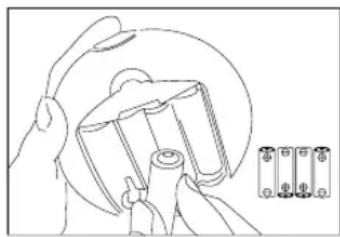
- Using a coin turn the Battery Lock anti clockwise and remove the Battery Cover
- Insert 4 x AA Standard Alkaline Batteries (not supplied) ensuring correct polarity (indicated inside the Battery Compartment).
- Replace the Battery Cover and turn the Battery Lock clockwise to secure.
- When battery power is running low the Power Indicator LED on the Baby Unit flashes.
NOTE: The Baby Unit will only operate from batteries if the mains power is disconnected. You may use mains power when batteries are inserted, but it is good practice to remove them if you intend to use mains power for a prolonged period.
Please switch off the Baby Unit before removing the mains power or the batteries.

SETTING UP THE PARENT UNIT
Your Parent Unit should be fitted with the 2 Rechargeable AAA Batteries supplied. The Unit can then be charged by placing it in the Charging Dock. It may also be powered continuously by mains electricity by simply keeping it in the Charging Dock.
Warning! Ensure the rechargeable AAA batteries are in the Parent Unit at all times, even when using mains power. If the mains power is lost the Unit will continue to work using battery power.
INSERTING BATTERIES
- Rotate the Belt Clip 90^ and remove. Slide down the Battery Cover. Insert the 2 AAA Rechargeable Batteries supplied ensuring correct polarity and replace the cover.

- Sit the Parent Unit into it's Recharging Dock.
- Plug the Mains Adapter into the Charging Dock's Adapter Socket.

- Plug the Adapter into your mains socket and switch on the power. The Power Light will illuminate on the Charging Dock.
- Look at the colour of the Power / Charging LED on the parent unit. Whilst the unit is switched off you will see that the Power / Charging LED will flash Amber showing that the unit is charging. When the batteries are fully charged the Amber Charging light will switch off.
- You can use your monitor immediately as long as your Unit remains in the Charging Dock for its initial charge (10-12 hours). To switch ON press and hold the ON/OFF button for 3 seconds.
- Look at the colour of the Power / Charging LED on the Parent Unit. When the batteries are charging and the unit is ON the power LED will flash green and Amber, and will stay green when fully charged. When battery power is running low the power light will flash green and you'll hear an intermittent "beep beep", please place the unit on the charging base immediately.
Refer to the LED REFERENCE TABLE for a quick guide to the different LED settings.
IMPORTANT: The batteries require a continuous initial charge of 10-12 hours, subsequent charges should take 6 hours. Fully charged batteries should last 8-10 hours.
Warning! Using an incorrect adapter may permanently damage the charger and invalidates your warranty.
BATTERY CARE - BOTH UNITS
Please pay careful attention to the following.
- Dispose of exhausted batteries safely and never dispose of batteries in a fire.
- Do not mix new and old batteries or batteries of different types.
- Rechargeable batteries are only to be charged under adult supervision.
- The supply terminals are not to be short circuited.
- If the Power Light flashes or does not light your batteries need to be charged.
- Warning! You should never operate your Parent Unit without the batteries inserted - even when using mains electricity!
- Warning! Never use non-rechargeable batteries in your Parent Unit. Use only the recommended type 2 x AAA rechargeable batteries.
For new or replacement AAA batteries call the Lindam careline on 0871 702 1000
TESTING YOUR CONNECTION
A good way to test your monitor is to place the Baby Unit next to a sound source (eg television or radio) and take your Parent Unit into another room. If you are testing your monitor with both Units in the same room you should ensure the Units are at opposite sides of the room (at least 2 metres apart) to avoid feedback.
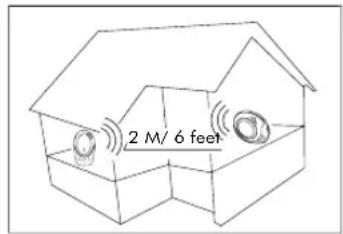
When both Units are switched on and transmitting successfully the Link
Indicator LEDs on each unit will be glowing green. If the link between the Units is broken at any time Link Indicator LEDs will glow red, and the Parent Unit will sound an alert signal "beep beep beep". If this occurs check that there is power to both Units, and that they are within range of one another. If this does not re-establish the link please follow the RESET PROCEDURE on the following page.
NOTE: You may wish to familiarise yourself with the broken link sound by deliberately breaking the link. To do this simply turn off the Baby Unit while the monitor is in use.
NOTE: When checking on your baby either leave the parent unit in the charging dock or turn down the volume to minimum. This will ensure that there will be no audio feedback between the two units when entering the nursery, which may wake your sleeping baby.
LED REFERENCE TABLE
| Light | Colour Pattern | Diagnosis |
| Baby Unit | Solid Green | Link established |
| Link LED | Solid Red | Link broken |
| Flashing Green & Red | Link resetting | |
| Baby Unit | Solid Green | Unit on and power level good |
| Power LED | Flashing Green | Unit on and batteries needs replacing |
| Parent Unit | Solid Green | Link established |
| Link LED | Solid Red | Link broken |
| Flashing Green and Red | Link resetting | |
| Parent Unit | Solid Green | Batteries charged |
| Power LED | Flashing Green | Unit on and power is low. Recharge batteries. |
| Flashing Green and Amber | Unit is switched on and charging | |
| Flashing Amber | Unit is switched off and charging |
RESET PROCEDURE - IF YOU CANNOT ESTABLISH A 'LINK'
If the link between the Units is broken at any time Link Indicator LEDs will glow red, and the Parent Unit will sound an alert signal. If this occurs check that there is power to both Units, and that they are within range of one another. If you still cannot establish a link use the following reset procedure.
NOTE: The reset procedure cannot be carried out if either Unit has a low battery.
- Switch both of your units off (buttons (B) and (D)) and position next to each other.
- Starting with the nursery unit, switch it on and press and hold the (+) and (-) buttons (A) simultaneously until you hear "beep beep" and the link light starts to flash green and red. Release all buttons.
- Press the (-) key 7 times until the link light turns solid red and you hear 'beep'.
- Next turn on the parent unit. Simultaneously press and hold the (+) and (-) buttons (C) together until the red link light starts flashing green and red and you hear "beep beep".
- Finally repeat step 2 by pressing and holding the (+) and (-) keys on the Baby Unit until you hear "beep beep". The units will now search for each other. Allow a few seconds for the link to reestablish and the link lights to turn green again. Both units are now linked together.

USING THE BABY MONITOR
Setting up the monitor is important to ensure it fits your home environment and child.
The Sound Indicator LEDs will show you the sound level in the nursery, the current volume setting of the Parent Unit and the MUTE setting. Understanding these settings will help you get the most from your monitor.
ADJUSTING THE VOLUME
The parent unit has 6 volume settings and you can press (+) to increase the volume and (-) to decrease the volume. Additional LEDs will light as the volume increases.
The lowest volume setting (no sound level lights) puts the parent monitor into 'silent' mode. No sound can be heard from the parent unit, but sounds from the nursery cause the LED sound level lights to illuminate.

MANUAL MUTE MODE
The MUTE function allows you to cut out low level noises up to a level set by yourself (eg traffic noise or background static). When a louder noise is heard, such as your baby crying, the monitor will begin to transmit continuously as normal. There are 5 MUTE sensitivity levels to select from.

-
Press the MUTE button once on the Parent unit. You will hear a short 'Beep' and the current MUTE level will be indicated by the LED lights.
-
Within 2 seconds of pressing the mute button use the (-) button to filter more sound or the (+) button to filter less sound. The level will be indicted by the LEDs.
-
The MUTE Active LED will remain lit and only sounds greater than your preset level will be transmitted.
-
When a sound above your MUTE level is detected in your nursery the monitor will transmit all sounds. To reactivate the MUTE simply press the MUTE Button once.
NOTE: The MUTE function can be turned off at any time by pressing the MUTE button again.
NOTE: The MUTE mode is different to the 'Silent' mode that can be achieved by fully reducing the volume.
NOTE: The MUTE mode will not activate if the sounds from the nursery are already above the MUTE level.
TALK BACK
Simply press and hold the Talk Back Button (like a walkie talkie) to speak back to your baby. Hold the Unit 15cm from your mouth to prevent your voice distorting. Use the (+) and (-) buttons on the Baby Unit to adjust the volume of your voice when using Talk back.

NIGHT LIGHT
The night light provides a soft and comforting glow for your nursery. Simply press the Night Light Button once to switch the light on, and again to switch it off. The night light is also useful when feeding your baby at night when you may want to avoid switching on the main nursery light.

BELTCLIP
There is a belt clip on the rear of your Parent Unit to allow hands free portability.
TROUBLESHOOTING
Power Lights do not illuminate
- If using the mains power adapters make sure they are plugged in and switched on
- If using batteries, check they are correctly installed and not discharged
Link light does not come on
- Check that both the Baby Unit and Parent Units have power and are switched on
Link light is red
- The link between your units is broken. The Parent Unit will also sound an alert. Check that both the Baby Unit and Parent Units have power and are switched on.
- Ensure that the Units are within range of one another. Large objects and structures in some buildings will reduce the effective range of the monitors. Refer to TESTING YOUR CONNECTION for further information.
Parent Unit is silent or very quiet
The volume setting may be too low - increase using the (+) Button
You can hear a high pitched noise
- Move the Parent Unit away from the Baby Unit (at least 1 metre/3 feet).
- Decrease Volume on the Parent Unit.
The MUTE function won't set.
- Increase the MUTE level to above the ambient sound level in the Nursery.
FAQs
Q. The monitor doesn't pick up my baby crying soon enough.
A. Reduce the MUTE level or switch MUTE to OFF to have all sounds transmitted from the nursery.
Q. Why doesn't my monitor work at 300m?
A. The distance the monitor will operate at is dependant on your home. The signal can be reduce by home decor, walls etc.
Q. Why is the link between my monitors occasionally lost?
A. You may be approaching the outer limits of the transmission range. Try a different location for your Parent Unit. Please note that it will take 5 seconds before a new link is established.
Q. Where can I find out more about Lindam products?
A. Visit the lindam website at www.lindam.com
ENVIRONMENT
When the product and batteries come to the end of their lives please hand them in to an official collection point for recycling. Your local council will be able to provide you with further information about recycling and disposal.
TECHNICAL SPECIFICATION
POWER SUPPLY
Parent Unit
- 1 x charging base with 1 x AC power adapter DC 6.0V / 400mA for Parent Unit (supplied)
- 2 × 1.2V AAA rechargeable batteries for Parent Unit (supplied)
Baby Unit
- 1 x AC power adapter DC 6.0V / 400mA for Baby Unit (supplied)
- 4 × 1.5 ~V AA non rechargeable batteries for Baby Unit (not supplied)
FREQUENCY
DECT: 1.88 to 1.90 GHz US DECT 6.0: 1.92 to 1.93 GHz
OPERATING RANGE
Up to 300 metres / 900 feet in open air
DIMENSIONS
Parent Unit: W: 55mm H: 105mm D: 34mm
Baby Unit: W: 112mm H: 100mm D: 50mm
WEIGHT
Parent Unit: 90g
Baby Unit: 135g
From 0^ to 40^