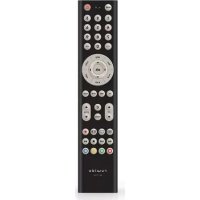
Easytip S4 - Remote control Ruwido - Free user manual and instructions
Find the device manual for free Easytip S4 Ruwido in PDF.


| Brand | Ruwido |
| Model | Easytip S4 |
| Product type | Universal infrared remote control |
| Power supply | 2 AAA alkaline batteries 1.5 V (LR03) |
| Compatible devices | TV, satellite (SAT), VCR, AUX (second device) |
| Main functions | Power on/off, volume, channels, menu, teletext, VCR controls (stop, play, pause, forward, rewind), picture/sound adjustments (via Shift), AV input, info |
| Programming | By 3-digit code (manual) or automatic/manual code search |
| LED indicator | Light-emitting diode (LED) for confirmation |
| Infrared range | Approximately 10 meters (estimate) |
| Batteries | 2x AAA, alkaline recommended |
| Maintenance | Clean with a soft, dry cloth. Do not use solvents. |
| Safety | Do not open the device, avoid moisture, dispose of used batteries according to environmental regulations |
| Temporary memory | Retains settings during battery change |
| Copyright year | 2001 |
Frequently Asked Questions - Easytip S4 Ruwido
User questions about Easytip S4 Ruwido
0 question about this device. Answer the ones you know or ask your own.
Ask a new question about this device
Download the instructions for your Remote control in PDF format for free! Find your manual Easytip S4 - Ruwido and take your electronic device back in hand. On this page are published all the documents necessary for the use of your device. Easytip S4 by Ruwido.
USER MANUAL Easytip S4 Ruwido
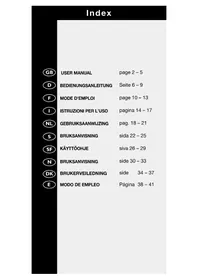
USER MANUAL page 2-5

BEDIENUNGSANLEITUNG

MODE D'EMPLOI page 10-13

The Next Generation of Universal Remote Control
Congratulations purchasing easytip S4, the universal infrared remote control for your TV set SAT-Receiver and VCR.
easytip S4 is a product of high quality
All information on this product is published with no consideration for possible patent rights. Trademarks are mentioned without guarantee of their free use.
Although a lot of care was taken when creating this manual with its text and graphic images, errors can never be completely eliminated.
Therefore, the manufacturer cannot be made liable for faulty statements and their possible consequences.
You are very welcome to contact the manufacturer for report errors and to make suggestions for improvement.
© 2001 by ruwido
All rights reserved, including rights of photomechanical reproduction and electronic storage.
Printed in EU.
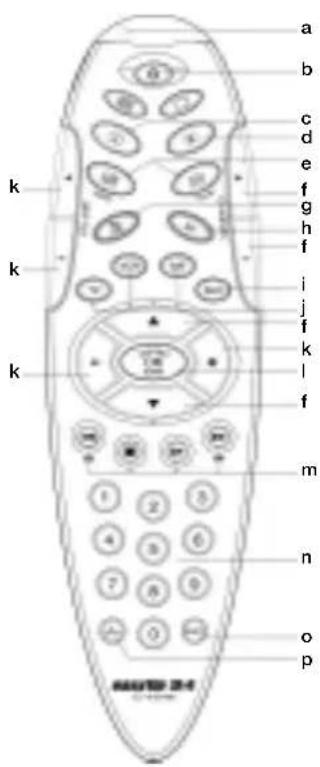
Description of keys
a Light-emitting diode (LED)
b Power/Standby on/off
c Info: calls the Info-function, Index, S 100
d Menu: calls the menu-function for TV and SAT
For TV:Text keys For SAT: Radio: Radio operation TV/SAT: Switch between TV/SAT
f switch to next or previous channel
g Mute: Sound on/off
h AV: switch to the AV-channel (e.g: VCR. SAT)
i AUX
j Level key to switch to device level (TV, SAT, VCR)
k +/--blume control
OK/Norm: For TV: Reset TV set to basic settings and confirmation-key for TV-menu For SAT: Confirmation-key for menu of receiver For VCR: Recording (press twice
m For TV: Text and Fastext keys. For VCR: Rewind, Stop, Play and Fast forward
n Number keys: 0-9
Shift: preselection key for adjustment of brightness, colour, contrast, treble, bass, and balance.)
p----: single/double digit enter, 10, 1-
Inserting and changing the batteries
Your easytip S4 is powered by two (alkaline) 1.5 V batteries (IEC LR 03, AAA)
Insert the batteries following the markings in the battery compartment.
After inserting the batteries, your easytip S4 is adjusted for TV-operation.
If the LED does not blink as usual when pressing the keys or if the device you are controlling fails to respond from the usual distance then the batteries must be changed.
Your easytip S4 includes a intermediate memory which prevents the easytip S4 from losing its memory during the battery changing.
Please dispose batteries carefully.
Programming easytip S4
Programming by Code entering
- Switch on the device you want to use your easytip S4 with.
- Turn to the TV code list (other manual) and look for the name of your device manufacturer.
- Choose your device by using the Level key and press the key (for about 5 seconds) until the LED blinks twice.
NOTE: The AUX-mode can be programmed any way (alternate TV set, alternate SAT-receiver).
After the LED flashing twice, press either TV or SAT, depending on which advice you want to have on the AUX-mode.
4. Enter the first 3-digit code from the list with the number keys on your remote control.
ATTENTION!
The first figure of the 3-digit cod must be entered within 5 seconds of the LED blinking twice.
Otherwise the LED will flash once and you will have to repeat the procedure from step 3.
- After the 3-digit code has been entered the LED will blink twice to indicate that the code has been accepted.
ATTENTION!
If you entered the first digit within 5 seconds but still see one long flash from the LED after you have entered the code, this means the code you entered is invalid.
In this case, repeat the procedure from step 3.
- Now point your easytip S4 at your device and try to operate your device with your easy-tip S4.
- If your device does not react to the device code number you entered or if it operates incorrectly, enter the next number listed against the device manufacturer's name.
The code list shows the most common codes first.
- If none of the code numbers listed in the code list work properly use the Code search function.
Make a note of your 3-digit code numbers.
| TV | |||
| SAT | |||
| VCR | |||
| AUX |
NOTE: By entering code 000 you can restore the basic settings of your easytip S4. You can then program easytip S4 newly.
Code Search
If none of the codes listed for your device work or if a previously entered code number no longer works or works unsatisfactorily, use the code search.
- Switch on chosen device.
- Choose your device by using the Level key and press the key (for about 5 seconds) until the LED flashes twice.
NOTE: In the AUX mode, no code search is possible.
-
Enter code 001 (code search) with the number keys. The LED blinks twice.
-
Manual operation: Keep pressing the Power/Standby-key at short intervals until your device shows reaction.
Automatic operation: Press the Power/Standby-key until your device shows reaction. Every 1.5 seconds the TV code is continued automatically and the appropriate standby command is sent.
When your easytip S4 has found the right code your device switches off and you can then release the Power/Standby-key.
- Now press the Level key again until the LED blinks twice.
This shows you that your easytip S4 has stored the appropriate code number.
- Now check the function of your remote control. If your easytip S4 does not react to the code number it has found, repeat steps 1 to 5 until you have found a optimal code number.
ATTENTION!
A new code search begins with the last code number found in the previous search. When the end of the code list is reached the LED will blink three times. The search is then repeated from the beginning. Please be patient. There may be many codes to search through before the code for your equipment is found.
Changing the direction or the search:
It is possible, particularly in automatic search mode, to skip over the relevant code by mistake. In this case, you can reverse the direction of the search for a maximum of 5 codes by pressing the Vol-key.
ATTENTION!
After 5 codes the search direction changes back automatically.
If you want, you can press the Vol+key to change back to the original search direction.
Adjusting color, contrast, bass, treble... for your TV set
- Press the Level key.
- Briefly press the Shift-key.
- Press the chosen key within 5 seconds.
Numberkey 1 = Brightness
Numberkey 2 = Color
Numberkey 3 = Contrast
Numberkey 4 = Treble
Numberkey 5 = Bass
Numberkey 6 = Balance
- You can adjust your device by using keys Vol- and Vol+.
- After the end of adjusting, wait for about 5 seconds until the keys get back their normal function.
Querying the Code Numbers
You will need this function to query the code found by the automatic code search, so that you can note it down in this operating manual.
- Press the chosen Level key (TV, SAT, AUX) until the LED blinks twice.
- Now enter code 002 for query mode.
ATTENTION!
The first figure of the 3-digit code must be entered within 5 seconds of the LED blinking twice.
Otherwise the LED will flash once and you will have to repeat the procedure from step 1.
- Now press key 1 and count the number of times the LED blinks. (For example, if the LED blinks twice the first number in your code is 2).
Now press key 2 and count the times the times the LED blinks. (For example, if the LED does not blink, the second number in your code is 0).
Now press key 3 and count the times the LED
blinks. (For example, if the LED blinks seven times, the third number in your code is 7).
Your code number would therefore be 207.
If you made a mistake you can repeat the procedure any number of times.
ATTENTION!
Query mode is terminated if you press any key other than 1, 2 or 3 or if you do not press any of these keys within 5 seconds.
NOTE: If the LED does not blink when querying one of the digits then the corresponding code number is 0.
ruwido-austria
Kostendorfer Straße 8
A-5202 Neumarkt am Wallersee
tel. +43(0)6216/4571
fax +43(0)6216/7291
e-mail: service.easytip@ruwido.com
Internet: http://www.ruwido.com
Einleitung
tel. +43(0)6216/4571
fax +43(0)6216/7291
e-mail: service.easytip@ruwido.com
Internet: http://www.ruwido.com
François
Introduction
tel. +43(0)6216/4571
fax +43(0)6216/7291
e-mail: service.easytip@ruwido.com
Internet: http://www.ruwido.com
Introduzione
tel. +43(0)6216/4571
fax +43(0)6216/7291
e-mail: service.easytip@ruwido.com
Internet: http://www.ruwido.com
Inleiding
tel. +43(0)6216/4571
fax +43(0)6216/7291
e-mail: service.easytip@ruwido.com
Internet: http://www.ruwido.com
Inledning
Den nya generationen av universella fjarrkontrollsystem.
Hjartlig gratulation till kopet av din easytip S4, den universella infrarod-fjarrkontrollen for din TV, din satellitmottagare och din videorecorder.
Med easytip S4 har du köpt en avancerad produit.
All information om denna produkt publiceras utan hansiyn till eventuella patentskydd.
TV/SAT: omkoppling TV/SAT
f P+/P:- Omkoppling till nasta/foregaardene program
tel. +43(0)6216/4571
fax +43(0)6216/7291
e-mail: service.easytip@ruwido.com
Internet: http://www.ruwido.com
Suomi
Johdanto
tel. +43(0)6216/4571
fax +43(0)6216/7291
e-mail: service.easytip@ruwido.com
Internet: http://www.ruwido.com
Innledning
tel. +43(0)6216/4571
fax +43(0)6216/7291
e-mail: service.easytip@ruwido.com
Internet: http://www.ruwido.com
Brukerveiledning
Gradulerer med ditt valg av donne easytip S4 universale fjernkontroll av meget hoy kvalitet. Det er lagt stor vekt pa bade design og brukervennliget, og under normal bruk vil den gi mange ar med tilfredsstellende betjening. De nestside vil beskrive hvordan du far utnytet din fjernkontroll best, men skulle du vaere i tvil om noe, vennligst icike nol med a ringe var supporttelefon (Helpline).
Om din easytip S4
Trinn for trinn hurtigmanual (TV Programmering)
Trinn 1 Sett i batterier.
tel. +43(0)6216/4571
fax +43(0)6216/7291
e-mail: service.easytip@ruwido.com
Internet: http://www.ruwido.com