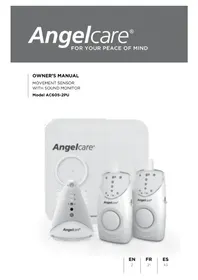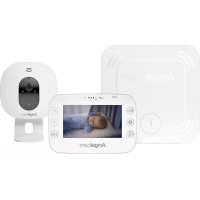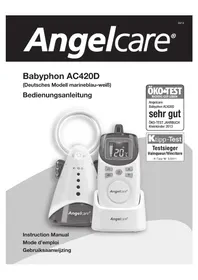
AC420D - Baby monitors ANGELCARE - Free user manual and instructions
Find the device manual for free AC420D ANGELCARE in PDF.



| Product Type | Audio Baby Monitor |
| Brand | Angelcare |
| Model | AC420D |
| Power Supply Baby Unit (Transmitter) | 4 AAA non-rechargeable batteries (not included) or 7.5V AC adapter (model T07505F002) |
| Power Supply Parent Unit (Receiver) | 4 AAA rechargeable NiMH batteries included or 7.5V AC adapter/charger |
| Transmission Range | Up to 250 m outdoors, 80-100 m indoors |
| Operating Frequency | 927 MHz (USA/Canada) or 864 MHz (Europe, Asia, Africa, Oceania) |
| Nightlight Function | Built-in nightlight on baby unit, button-operated |
| Voice Activation | Voice-activated transmission (energy-saving mode) or continuous |
| Microphone Sensitivity Adjustment | Adjustment dial on the back of baby unit |
| Channel Selector | 3 channels available to avoid interference |
| Temperature Display | Digital display of baby room ambient temperature on parent unit |
| Sound Level Indicator | Light bars on parent unit indicating sound intensity |
| Out-of-Range Detection | Visual and audible alert when distance between units is too large |
| Temporary Mute Function | Allows muting the receiver sound for 2 minutes |
| Low Battery Indicator | Light indicator and icon on screen for both units |
| Maintenance | Unplug before cleaning, wipe with a dry cloth, do not immerse |
| Safety | Does not replace direct supervision, keep out of baby's reach, use only provided adapters |
| Spare Parts / Repairability | No user-serviceable parts, contact customer service |
| Certification | Complies with FCC Rules Part 15 (Class B) |
Frequently Asked Questions - AC420D ANGELCARE
User questions about AC420D ANGELCARE
0 question about this device. Answer the ones you know or ask your own.
Ask a new question about this device
Download the instructions for your Baby monitors in PDF format for free! Find your manual AC420D - ANGELCARE and take your electronic device back in hand. On this page are published all the documents necessary for the use of your device. AC420D by ANGELCARE.
USER MANUAL AC420D ANGELCARE
Your Angelcare Monitor's components and special features 10
4 easy steps to operate your Angelcare Monitor 11
Description of the icons 12
Testing your Angelcare Monitor 14
Warnings 14
Care of your Angelcare Monitor 14
Troubleshooting 15
EU Declaration of Conformity 17
your angeLcare ^ monitor'S componentS
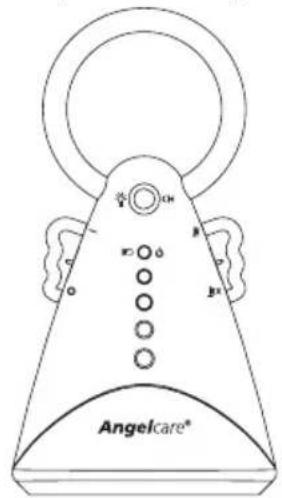
NURSERY UNIT (TRANSMITTER)
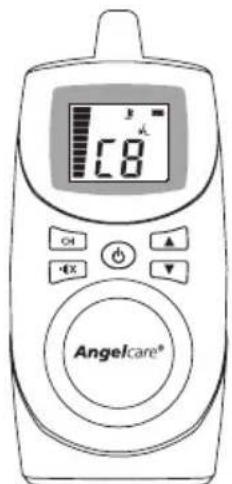
RECHARGEABLE PARENTS UNIT (RECEIVER) & CHARGER

4 AAA RECHARGEABLE BATTERIES FOR PARENTS UNIT

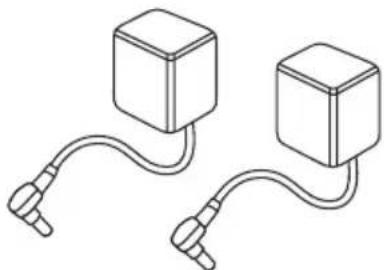
YOU WILL ALSO NEED:
4 AAA non-rechargeable batteries for the back-up power supply in the nursery unit (not included).
2 (TWO) 7.5 VOLT AC ADAPTERS
MODEL NO. T07505F002
Special featureS

Practical soothing night light.

activated or continuous sound reception modes.


Convenient belt clip. Choice of Maturity room temperature display on the parents unit.
4 EASY STEPS TO OPERATE YOUR ANGELCARE® MONITOR
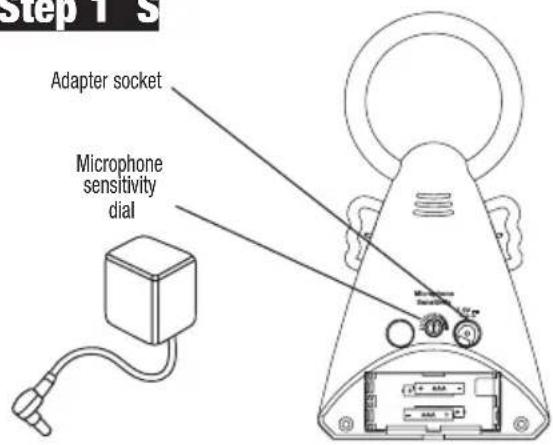
Step 1 S
NURSERY UNIT (TRANSMITTER)
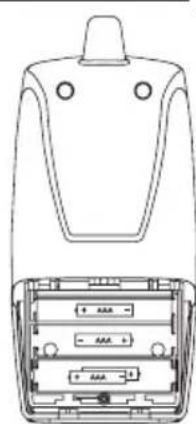
- Insert 4 AAA regular batteries (not included) into nursery unit (for battery backup in case of power failure).
- Connect AC adapter to nursery unit and plug adapter into an electrical outlet in the baby's room.
- After both units are properly installed (step1 them ON and then adjust microphone sensitivity level (if necessary).

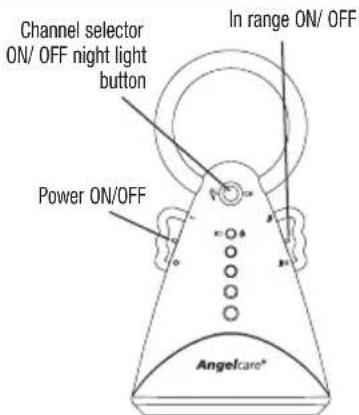
HOW TO USE YOUR MONITOR
To be warned if your units are "out of range", switch the In Range Notification ON (optional).
If reception is not clear, switch to another channel. (see instructions for changing channel in the "ICON" section).
- To avoid feedback (whistling sound), keep both units at least 3 meters apart (10 feet).
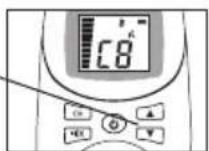
Volume controls (up & down)
PARENTS UNIT (RECEIVER)
- Insert 4 AAA NIMH rechargeable batteries (included) parents unit.
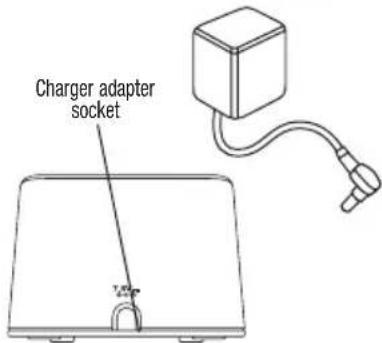
- Connect AC adapter to parents unit charger and plug adapter into an electrical outlet. Let charge for 15 continuous hours before using the monitor for the first time.
- After both units are properly installed (step1) them ON and then adjust the volume control to the desired level.

Step 4Std
USING THE BATTERY MODE
- The monitor will revert to battery mode during a power failure only if batteries are inserted in both units.
- When the nursery unit's green light flashes, need to be replaced. On the parents unit screen, the clear battery icon flashes and the nursery unit icon appears. A beep sound is also heard.
- Parents unit should be recharged when icon is clear (does not flash) and a beep sound is heard. Note: Do not use Alkaline batteries in the parents unit.
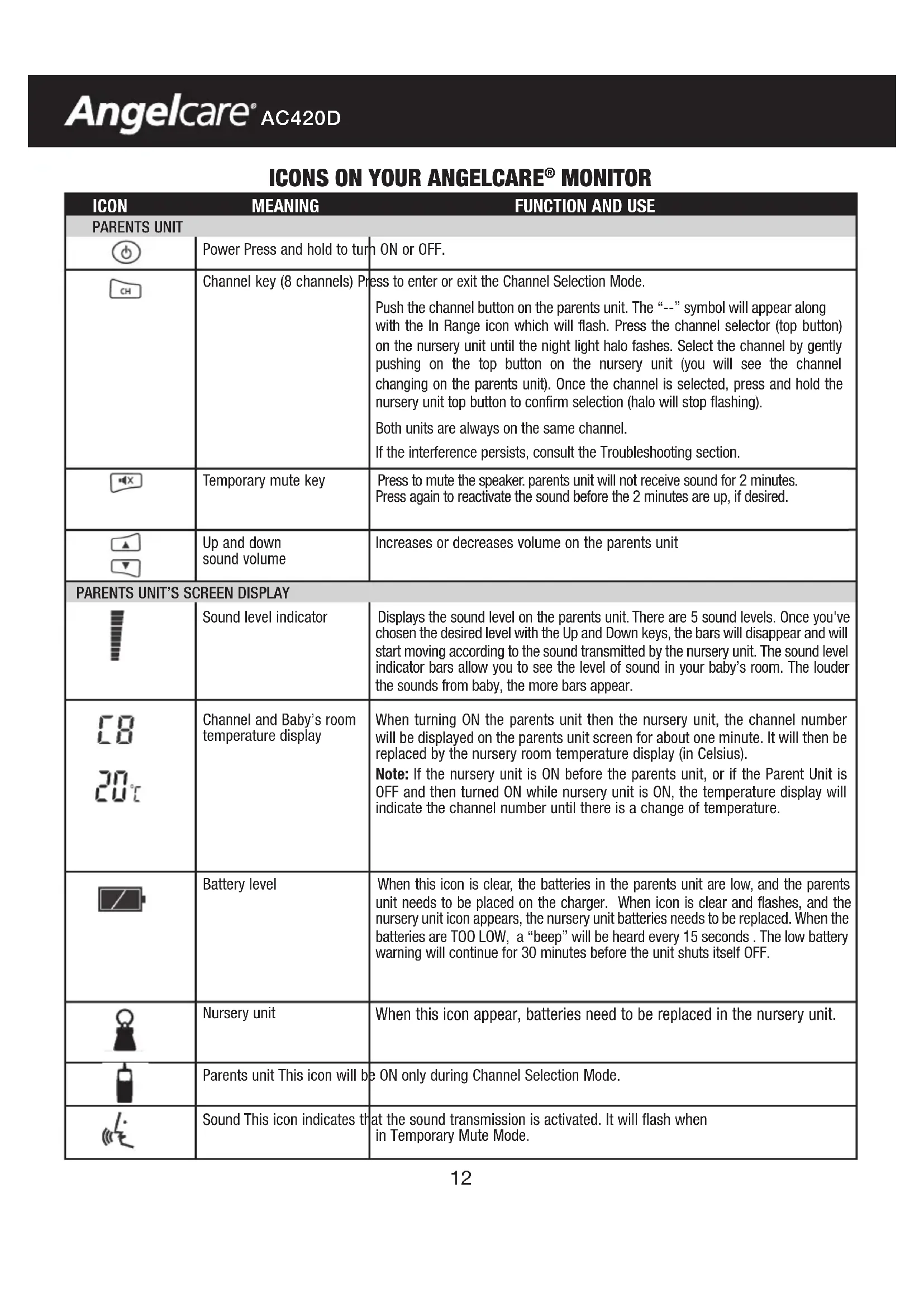
ICONS ON YOUR ANGELCARE® MONITOR
| ICON MEANING FUNCTION AND USE | ||
| PARENTS UNIT | ||
| Power Press and hold to turn ON or OFF. | ||
| Channel key (8 channels) Press to enter or exit the Channel Selection Mode. Push the channel button on the parents unit. The “--” symbol will appear along with the In Range icon which will flash. Press the channel selector (top button) on the nursery unit until the night light halo fashes. Select the channel by gently pushing on the top button on the nursery unit (you will see the channel changing on the parents unit). Once the channel is selected, press and hold the nursery unit top button to confirm selection (halo will stop flashing). Both units are always on the same channel. If the interference persists, consult the Troubleshooting section. | ||
| Temporary mute key Press to mute the speaker. parents unit will not receive sound for 2 minutes. Press again to reactivate the sound before the 2 minutes are up, if desired. | ||
| Up and down sound volume Increases or decreases volume on the parents unit | ||
| PARENTS UNIT'S SCREEN DISPLAY | ||
| Sound level indicator Displays the sound level on the parents unit. There are 5 sound levels. Once you've chosen the desired level with the Up and Down keys, the bars will disappear and will start moving according to the sound transmitted by the nursery unit. The sound level indicator bars allow you to see the level of sound in your baby's room. The louder the sounds from baby, the more bars appear. | ||
| Channel and Baby's room temperature display When turning ON the parents unit then the nursery unit, the channel number will be displayed on the parents unit screen for about one minute. It will then be replaced by the nursery room temperature display (in Celsius). Note: If the nursery unit is ON before the parents unit, or if the Parent Unit is OFF and then turned ON while nursery unit is ON, the temperature display will indicate the channel number until there is a change of temperature. | ||
| Battery level When this icon is clear, the batteries in the parents unit are low, and the parents unit needs to be placed on the charger. When icon is clear and flashes, and the nursery unit icon appears, the nursery unit batteries needs to be replaced. When the batteries are too LOW, a “beep” will be heard every 15 seconds. The low battery warning will continue for 30 minutes before the unit shuts itself OFF. | ||
| Nursery unit When this icon appear, batteries need to be replaced in the nursery unit. | ||
| Parents unit This icon will be ON only during Channel Selection Mode. | ||
| Sound This icon indicates that the sound transmission is activated. It will flash when in Temporary Mute Mode. | ||
| ICON | MEANING | FUNCTION AND USE |
| In Range icon | 1) This icon will start flashing on the parents unit when the distance between the units is over the maximum range. A beep will also be heard. To activate this function, slide the right wing switch up. This option informs you when the distance between the nursery unit and the parents unit is over the maximum range of transmission. To deactivate the In Range function, slide the right wing down. NOTE: Range: up to 250 meters/820 ft (open field); between 80 meters/262 ft and 100 meters/328 ft (indoors). 2) This icon will also flash with the channel number on the parents unit screen when in channel selection mode. | |
| NURSERY UNIT | ||
| Power switch on the left wing. Power ON = -Power OFF = o | ||
| Power ON (green light) and Low-battery indicator (Flashing green light) | 1) When the power is ON and the left wing button at the “-” position, the green light will appear. 2) If the back-up batteries are low, the green light will flash. Note: The green light will flash for 45 minutes before unit shuts itself OFF. | |
| Night light button and channel selector | 1) Press ON/OFF for night light. 2) Push to change channel when the parents unit is on Channel Selection Mode. (See the Channel Key section.). | |
| In range selector on the right wing | Slide switch Up to be notified when the nursery unit signal does not reach the parents unit. (See the “In Range” icon section.). | |
| Microphone Sensitivity | Microphone sensitivity dial (Back of the Unit) | Increases and decreases the voice activation sensitivity. Your Angelcare® monitor is equipped with a voice-activated system. The nursery unit will be activated and transmit sounds to the parents unit only when it captures sounds. The sensitivity dial allows controlling the level of sound picked up and transmitted by the nursery unit. |
Testing Your Angelcare® Monitor
Note: Test your Angelcare® Monitor BEFORE first-time use and then periodically.
Step 1) Have someone else speak into the nursery unit or place a radio near nursery unit. You should hear sound from the parents unit. If there is no sound, refer to the Troubleshooting section.
If reception is not clear, switch to another channel (see channel key in the Icon section).
Step 2) Verify that the battery mode is functional by operating the nursery unit without the AC adaptors. The green Power light should appear on the Nursery unit and the digital screen should light up on the parents unit.
Parents unit: When the Low Battery indicator icon is almost clear, place the unit on the charger.
Nursery unit: When the green Low Battery indicator light flashes replace batteries promptly. On the parents unit screen, the low battery icon will flash and the nursery icon will appear.
Warnings
- This product is NOT a substitute for direct supervision of your baby. Check your baby's activities at regular intervals. Monitoring of premature babies, or those considered to be at risk, should be carried out only under the supervision of a doctor or health professional.
- Make sure you DON'T put the parents unit near wireless devices and microwave ovens. This may disrupt the transmission.
- ALWAYS place both units on a flat surface in an upright position, away from baby's reach.
- Make sure to plug the adapter to the socket outlet nearest to the equipment and that is easily accessible.
- DO NOT touch the end of the adapter cord when plugged into an electrical outlet.
- The Angelcafe Monitor uses public airwaves to transmit signals. The parents unit may pick up signals or interference from other nursery monitors in your area. Your monitor may even be picked up by other households. To protect your privacy, make sure both units are turned OFF when not in use.
- This product should be serviced by qualified personnel. There are no user serviceable parts inside the monitor. Refer all service questions to our customer service (see page 32).
Care of you Angelcare® Monitor
REtain Instructions: Keep the user's manual for future reference.
WATER, MOISTURE AND HEAT DAMAGE: Keep all components away from water (sink, bath tub, swimming pool) and places that emit heat (stove, radiator).
VENTILATION: ALWAYS place both units on a flat surface in an upright position so that air can flow freely around them.
AC POWER SOURCE: Use only the AC adaptors supplied with the Angelcare Monitor.
CORD PROTECTION: Avoid damage to the adapter cords. Route cords so that they are not likely to be walked on or pinched by items placed on or against them.
CLEANING: Disconnect all units before cleaning. DO NOT immerse in water. Use a dry cloth to keep monitor free from dust. DO NOT spray with cleaning products or solvents. Wipe with a very slightly damp cloth with an antiseptic or mild detergent.
OBJECT AND LIQUID ENTRY: Care should be taken so that objects do not fall onto units and that liquids are not spilled into either unit through openings.
NON-USE PERIODS: When not using the monitor for a short period, make sure to turn the units OFF before disconnecting them, otherwise the units will revert to the battery mode. When not using monitor for long periods, remove the batteries from both units and disconnect the AC adapters from electrical outlet.
TROUBLESHOOTING
| Problem Possible Cause Solution | ||
| No sound is being transmitted. | 1) Units are too far apart.2) Batteries are low or improperly installed.3) AC adaptors are not connected properly or electrical outlet is out of order.4) One of the units is OFF. | 1) Bring parents unit closer to nursery unit.2) Check/replace batteries or recharge parents unit.3) Check connections or change to another electrical outlet.4) Ensure both units are ON.5) Check the microphone sensitivity dial. |
| Power ON indicator (green light) does not light up.Display is not activated on the parents unit. | · Batteries are low or improperly installed.· AC adapters are not connected properly or electrical outlet is out of order.· The nursery unit is at OFF position ("0"). | · Check/replace batteries or recharge parents unit· Check connections or change to another electrical outlet.· Make sure nursery unit is ON (Left wing on " - " position). |
| Night light does not light. | · Night light is not turned ON· Night light LED is burned | · Press on the top clear button on the nursery unit· Contact your distributor (see page 32). |
| Very weak reception. | · Units are too far apart (out of range indicator will flash and beep on the parents unit).· One or both units are placed near a large metal mass.· One or both units are not in the upright position.· Batteries are low. | · Bring units closer together.· Change the position of one or both units.· Place units on flat surface away from baby's reach.· Replace the batteries in the nursery unit or recharge the parents unit. |
| Static, distortion, interference (interference from other monitors, wireless phones, walkie-talkies, etc...). | · Parents unit is out of range.· Parents unit is located near motorized devices, fluorescent lights, television, etc... | · Bring units closer together.· Activate the out of range indicator on the nursery unit (left wing up).· Rotate parents unit or move it away from source of interference. |
| Feedback (loud noises emitted from parents unit). | · Units are too close to each other.· Volume is too high on the parents unit. | · Move units farther apart (at least 3 meters/10 feet apart).· Decrease volume on parents unit. |
This device complies with Part 15 of the FCC Rules. Operation is subject to the following two conditions: (1) this device may not cause harmful interference, and (2) this device must accept any interference received, including interference that may cause undesired operation.
Warning: Changes or modifications to this equipment not expressly approved by the party responsible for compliance could void the user's authority to operate the equipment.
NOTE: This equipment has been tested and found to comply with the limits for a Class B digital device, pursuant to Part 15 of the FCC Rules. These limits are designed to provide reasonable protection against harmful interference in a residential installation. This equipment generates, uses and can radiate radio frequency energy and, if not installed and used in accordance with the instructions, may cause harmful interference to radio communications. However, there is no guarantee that interference will not occur in a particular installation. If this equipment does cause harmful interference to radio or television reception, which can be determined by turning the equipment off and on, the user is encouraged to try to correct the interference by one or more of the following measures:
- Reorient or relocate the receiving antenna.
- Increase the separation between the equipment and receiver.
- Connect the equipment into an outlet on a circuit different from that to which the receiver is needed.
- Consult the dealer or an experienced radio/TV technician for help.
CAUTION:
- To reduce the risk of electric shock, do not expose this appliance to rain or moisture.
- Danger of explosion if battery is incorrectly replaced. The included batteries are 4 AAA NIMH recheargable batteries manufactured by Sanik Battery Co. Ltd. SN-AAA60HJ 1.2V and GPI International Limited, GN60AAAHC, 1.2V 600 mAh. They may only be replaced by 4 AAA NIMH rechearchable batteries.
Transmission:
927 MHz (USA & Canada)
864 MHz (Europe, Asia, Africa, Oceania)
Batteries are not part of normal domestic waste:
After use, the batteries you need to run this product are not to be thrown into your rubbish container; please give them to your local shops or dispose of them at the appropriate collection points. (You can obtain information about a collection point close to you from the local authorities.) Use only batteries and power supplies listed in the user instructions - Angelcare® brand; model number Typ T07505F002 power supply
IMPORTANT! Please do not return this product to the retailer!
If you have any problems or questions regarding the use of this product please contact us directly. This is the most convenient and timesaving way because many questions may already be answered on the phone. Our reliable customer service team will be happy to help you with detailed advice and with fast and efficient complaint processing procedures from Monday to Friday, 8:30 AM 5:00 PM, or by e-mail.
+49 (0)211 / 44 03 16 -13
+49 (0)211 / 44 03 16 -0
Protect the environment!
This electronic equipment contains reusable material and must not be disposed in domestic waste. Please take it to a collecting point for electric and electronic equipment (ask your local authorities for details).

EU Declaration of Conformity
Issue Date: March 23 rd, 2011
Device(s):Angelcare Model AC420D
Description: Baby Monitor
Manufacturer:
Angelcare Monitors Inc.
Authorised EU Representative:
Axminster Electronics Ltd.
Millwey Rise Industrial Estate
Weycroft Avenue
Axminster
Devon
England
In accordance with the following Directives:
R&TTE directive - 1999/5/EC
EMC directive - 2004/108/EC
LVD directive - 2006/95/EC
RoHS Directive - 2002/95/EC
WEEE directive - 2002/96/EC
Batteries directive 2006/66/EC
Eco Design Directive 2009/125/EC
Standards Applied:
EN 301-357-2 (V1.4.1)
EN 301-489-3 (V1.4.1)
EN60950-1:2006+A11:2009
Declaration:
We certify that the apparatus to which this declaration relates conforms to the relevant requirements set out in the above referenced EC directive(s) and standards.
Signatory:

D Dredge BENG (Hons)
taBLe DeS matiEreS
EU Declaration of Conformity 17
IMPORTANT! Please do not return this product to the retailer!
If you have any problems or questions regarding the use of this product please contact us directly. This is the most convenient and timesaving way because many questions may already be answered on the phone. Our reliable customer service team will be happy to help you with detailed advice and with fast and efficient complaint processing procedures from Monday to Friday, 8:30 AM 5:00 PM, or by e-mail.
Servicenummer/customer service:
+49 (0)211 / 44 03 16 -13
+49 (0)211 / 44 03 16 -0