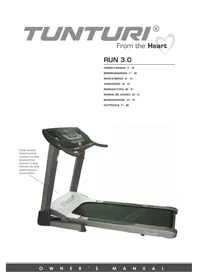
Run 3.0 - Treadmills TUNTURI - Free user manual and instructions
Find the device manual for free Run 3.0 TUNTURI in PDF.


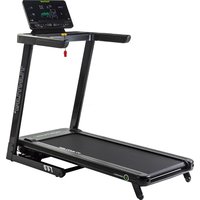
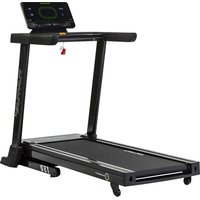
| Product Type | Treadmill |
| Brand | Tunturi |
| Model | Run 3.0 |
| Dimensions (L × W × H) | 193 × 91 × 140 cm (folded: 93 × 91 × 181 cm) |
| Weight | 101 kg |
| Running Surface | 51 × 150 cm |
| Motor | 3.0 hp |
| Speed | 0.8 to 20 km/h (0.5 to 12 mph) |
| Incline | 0 to 12% |
| Max User Weight | 135 kg |
| Power Supply | 220-240 V, 10 A, grounded outlet |
| Training Programs | 23 programs (manual, incline, speed, combined, goals, heart rate, body fat) |
| Display | DOT Matrix graphic screen + digital windows |
| Heart Rate Measurement | Hand grips + chest strap (optional) |
| Quick Access Keys | 10 for speed, 10 for incline |
| Safety | Safety key with cord, automatic stop after 5 minutes of inactivity |
| Lubrication | Use only T-Lube S silicone lubricant |
| Cleaning | Damp cloth, vacuum for dust |
| Operating Temperature | +10 °C to +35 °C, max humidity 80% |
| Temperature Range | +10 °C to +35 °C |
| Certification | CE (compliant with EMC and Low Voltage directives) |
| Warranty | Refer to the included warranty brochure |
Frequently Asked Questions - Run 3.0 TUNTURI
User questions about Run 3.0 TUNTURI
0 question about this device. Answer the ones you know or ask your own.
Ask a new question about this device
Download the instructions for your Treadmills in PDF format for free! Find your manual Run 3.0 - TUNTURI and take your electronic device back in hand. On this page are published all the documents necessary for the use of your device. Run 3.0 by TUNTURI.
USER MANUAL Run 3.0 TUNTURI
TUNTURI® From the Heart
RUN 3.0
OWNER'S MANUAL 2-10
Your choice shows that you really want to invest in your well-being and condition; it also shows you really value high quality and style. With Tunturi Fitness Equipment, you've chosen a high-quality, safe and motivating product as your training partner. Whatever your goal in training, we are certain this is the training equipment to get you there. You'll find information about using your exercise equipment and what makes for efficient training at Tunturi's website at www.TUNTURI.COM.
IMPORTANT SAFETY INSTRUCTIONS
This Owner's Manual is an essential part of your training equipment: reading all instructions in this manual before you start using this appliance. The following precautions must always be followed:

WARNING
- Never use extension cords between the treadmill and your wall outlet. The device's maximum power consumption is 10 A. Outlets with fluctuating voltage of more than 10% may result in erratic performance or cause damage to treadmill electronics. Using electrical power other than that, which has been specified in this manual will ultimately void any warranty, implied or otherwise.

WARNING: To reduce any risk to persons:
- Keep hands clear of any moving parts. Never place hands, feet or any other objects into any opening or under the treadmill.
- Never leave the treadmill unattended when plugged in. Unplug from outlet when not in use, before putting on or taking off parts. To disconnect, turn all controls to the off position, then remove plug from outlet.
- Close supervision is necessary when the treadmill used by, on, or near children, invalids, or disabled persons.
- Use the treadmill only for its intended use as described in this manual. Do not use attachments not recommended by Tunturi.
- Before you start using the treadmill, make sure that it functions correctly in every way. Do not use a faulty device.
-
Keep the cord away from heated surfaces.
-
Run 3.0 must not be used outdoors. Run 3.0 tolerates an environment measuring +10^ to +35^ . Air humidity must never exceed 80% .
- Do not attempt any servicing or adjustment other than those described in this manual. The given instructions must be followed carefully.
- Never operate this treadmill if it has a damaged cord or plug, if it has been dropped or damaged, or dropped into water. Return the treadmill to a service center for repair.
- Never operate the appliance with the air opening blocked. Keep the air openings free of lint, hair, and the like.
- Do not operate where aerosol (spray) products are being used or where oxygen is being administered.
The device must not be used by persons weighing over 135 kg (298 lbs).
SAVE THESE INSTRUCTIONS!
ASSEMBLY
As for the assembly of the device, we recommend two grown-up persons. Do not take the treadmill out of the box: use the packing material to cover the floor on the assembly site.
Before assembling the device, insure all parts are present:
- Frame
- Power cord
- Assembly kit (contents are marked with an * in the spare part list): keep the assembly tools, as you may need them e.g. for adjusting the equipment.
In case of problems contact your Tunturi dealer. The directions left, right, front and back are defined as seen from the exercising position. To avoid injury, you must fold up the deck prior to lifting the treadmill out of the box.
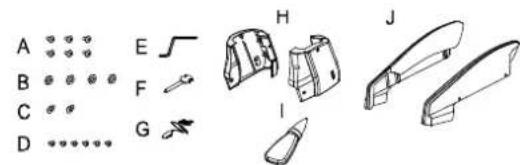
Locate the hardware bag and parts that are listed in the chart below.
Part# Description
Q'TY
| A | Screw M8x20L | 6 | |
| B | Washer Ø8xØ18 | 2 | |
| C | Washer Ø10xØ25 | 4 | |
| D | Screw M4x6L | 6 | |
| E | Allen Key 1 | ||
| F | Screwdriver | 1 | |
| G | Safety Key | 1 | |
| H | Side Cap | 2 | |
| Lube | |||
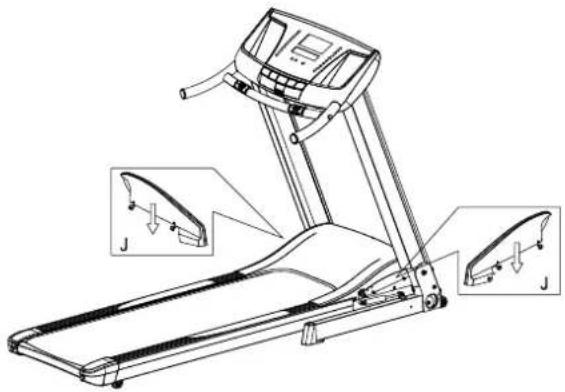
| J | Incline Bracket Cover | 2 |
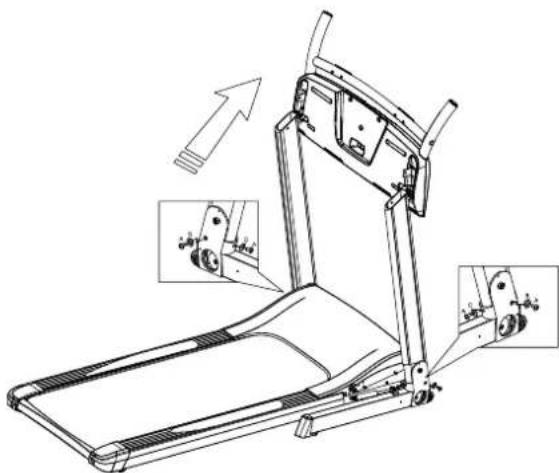
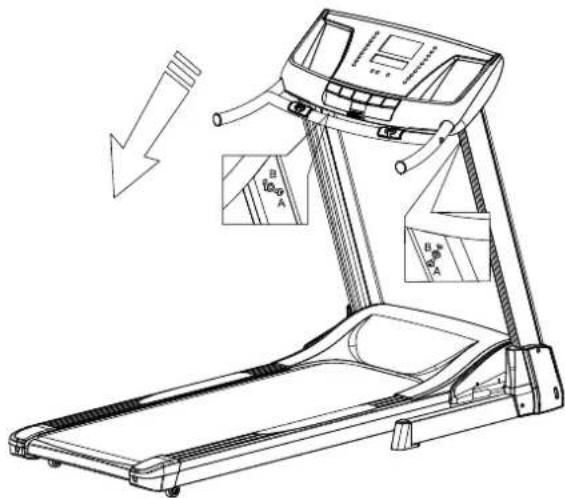
Lift up the upright, then place the screws (A) and washers (B, C) inside holes at the bottom of the upright. Use the screwdriver (F) to tighten them well.
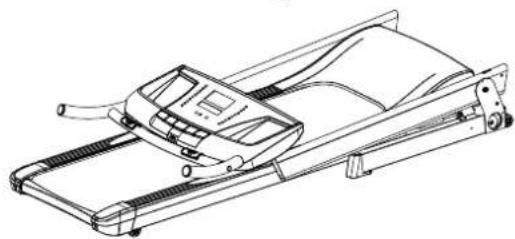
Put the console to the correct position. Use the allen key (E) to tighten the screws (A) and washers (B) inside holes at the top of the upright.
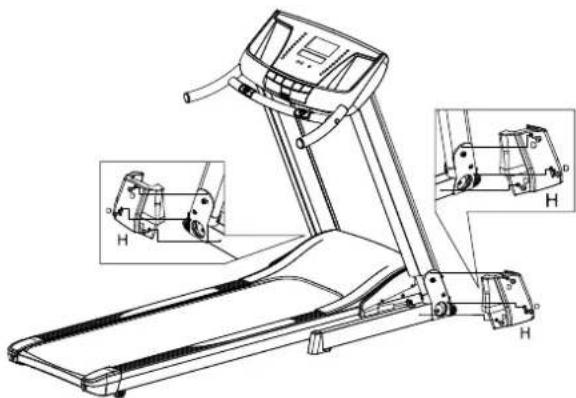
Attach side cap (H) with the screws (D) at the bottom of the upright, and tighten them well.
POWER CORD AND GROUNDING INSTRUCTIONS
Plug the socket end of the power cord into the treadmill at the left front corner. Before connecting the device to a power source, make sure that local voltage matches that indicated on the type plate. The treadmill operates at 110V or 230V .
This treadmill must be grounded. If it should malfunction or breakdown, grounding provides a path of least resistance for electrical current to reduce the risk of electrical shock. This product is equipped with a cord having an equipmentgrounded conductor and a grounding plug.
The plug must be plugged into an appropriate outlet that is properly installed and grounded in accordance with all local codes and ordinances. Do not use extension cables when connecting the equipment to the power source.

DANGER! Improper connection of the
equipment grounding conductor can result in a risk of electric shock. Check with a qualified electrician or serviceman, if you are in doubt as to whether the product is properly grounded. Do not modify the plug provided with the product - if it will not fit the outlet, have a proper outlet installed by a qualified electrician.
SAFETY TETHER KEY
The treadmill cannot be used if the tether key is not properly installed on the console; if the key is removed from its place, the treadmill will immediately stop. Place the safety tether key in its place on the console. Ensure that the clip of the safety tether key is properly attached to your clothing; as the cord tightens, make sure the clip does not detach itself from your clothing before the safety tether key disconnects from the console.
CONSOLE
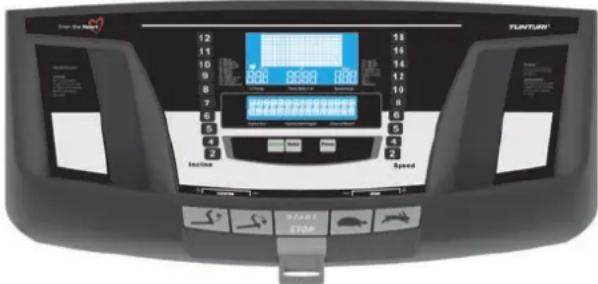
KEY FUNCTIONS
Major Function Keys:
1. ELEVATION CONTROL KEYS
Click the elevation + (up) key to increase elevation in 1 % increments, and the elevation down key to decrease it in 1% increments. Pressing these keys longer makes the incline change faster. Track elevation ranges from 0% (horizontal) to 12% .
2. POWER:
Press this button to turn on or turn off the power.
3. START/STOP:
Starts or stops the program.
4. SELECT:
Switches from one to one another programs in an order of the 23 programs.
5. ENTER:
Press this button to confirm your desired program or setting value.
6. SPEED CONTROL KEYS (Rabbit / Turtle)
Rabbit key increases the belt speed in 0.2km / h 0.1 mph increments, the turtle key decreases it in 0.2km / h0.1mph) increments. Pressing these keys longer makes the speed change faster. Track speed ranges from 0.8 - 20km / h /0.5- 12 mph.
7. SPEED HOT KEYS:
10 Speed Hot Keys are set as 2, 4, 5, 6, 8, 10, 12, 14, 16 and 18 KPH or set as 1, 2, 3, 4, 5, 6, 7, 8, 9 and 11 MPH. For example, the speed changes from any speed to 8 KPH by pressing the Speed Hot Key 8.
8. ELEVATION HOT KEYS:
10 Incline Hot Keys are set 1, 2, 3, 4, 5, 6, 7, 8, 9 and 12% For example, the elevation level changes from any level to 4 % by pressing the Elevation Hot Key 4.
DISPLAYS AND OPERATING RANGES
The Run 3.0 model is equipped with a separate graphic display for detailed information on your workout profile, while the text field provides instructions both when you switch to an exercise and during the exercise itself.
A. TIME/ BODY FAT DISPLAY:
Shows the exercising time with counting up or down. When using Body Fat program, it shows Body Fat result in percentage.
B. SPEED/ AGE DISPLAY:
Shows the speed that the treadmill is providing. When using HRC and Body Fat program, it shows the age value.
C. DISTANCE/WEIGHT DISPLAY:
Shows the distance with counting up or down. When using Body Fat program, it shows the weight value.
D. INLINE / SEX:
Shows the incline 0 - 12% .When using Body Fat program, it shows the sex option. (0 represents Male; 1 represents Female)
E. CAL / ELEVATION GAIN / HEIGHT DISPLAY:
Shows the calories consumed. Press Select key to show the Elevation Gain during this workout.
When using Body Fat program, it shows the height value.
F.PULSE:
Displays pulse rate except when setting incline level in Speed programs (Program 6-9) and the User Programs program 20-22). To get a pulse rate, place both of your hands on the pulse grip bars or use a heart rate chest strap. It is recommended to straddle the walking belt to get an accurate reading. If you are walking or jogging, it is difficult for the monitor to accurately read your pulse rate. Using a chest strap gives the user a much more accurate heart rate reading. A chest strap is available for purchase separately. When using the HRC programs, it shows the Target Heart Rate (THR) value.
OPERATION INSTRUCTIONS
(Pleases Read Carefully before Using)
A. SAFETY TIPS:
To start, turn on the power and attach the Safety Key to the monitor. Notice that the machine does not work and off the LED display without the Safety Key attached. Please clip the other end of the Safety Key to the user before exercising to ensure the machine will stop in case the user accidentally runs off the treadmill. Should that happen, the Safety Key will be off the monitor and the treadmill will stop at once to avoid further injury.
B. PRESS POWER:
This turns the electric power on, The treadmill will not start unless Power is pressed first.
C. ENTER WEIGHT:
After pressing the Power key, "INPUT WEIGHT" will appear on the prompt text bar and "WT" will appear on the dot matrix along with the preset user weight 60kgs. Adjust the user weight by using the SPEED & ELVATION +/- keys. Press Enter to confirm the weight.
D.PROGRAM SELECTION:
There are 23 programs including P1 Manual program, P2-P12 preset programs, P13-P16 Target programs, P17-P19
Heart Rate Control programs, P20-P22 User Setting programs and P23 Body Fat program. After pressing the Power key, you can use Select key or Incline & Speed +/- keys to choose one of these programs.
E. PULSE RATE:
There are two ways to measure your heart rate. One is using the hand-pulse sensor. Another is using chest belt. The handgrip sensors in the handrails take a pulse measurement when the user is touching both sensors simultaneously. Reliable pulse measurement requires that the skin is constantly touching the sensors and that the skin is slightly moist. Skin which is too dry or moist will interfere with the pulse measurement. Please also note that heavy pounding of feet on the running belt during exercise can cause interference that may affect the accuracy of the handgrip pulse measurement. To ensure safe operation, we recommend that you use pulse measurement only when training at a walking pace or standing on the landing rails located on each side of the running belt, or when the treadmill has come to a stop.
F.PROGRAM MODE:
After input the weight, press the desired program by using the SPEED & ELVATION +/- keys or press Select to choose one of the 23 programs. Note the program profile appears in the dot matrix display. Press Enter to verify the selection. Press Start to begin the program. All programs have ten one-minute segments. The program repeats the ten one-minute segments until the user presses Stop.
H.METRIC/IMPERIAL:
The user can switch from Metric values (Kilometer) to Imperial values (Mile) or from Imperial values to Metric values. When the LCD power is off, press Enter until it beeps to switch the distance and speed from Metric to Imperial or from Imperial to Metric.
I.ODOMETER:
An odometer shows accumulated distance which will appear in the Time and Speed displays for three seconds after the Safety key is placed on the monitor.
J. TOTAL HOURS :
The HrS shows the accumulated time which will appear in the prompt text display for three seconds after the Safety key is placed on the monitor.
K. TIME-OUT:
If the treadmill is turned on, and the belt is not moving, the monitor will shut-off after five minutes.
L. RE-START:
You can restart the interrupted exercise by pressing the START key within 5 minutes.
BASICS ON EXERCISING
ABOUT YOUR HEALTH
Before you start any training, consult a physician to check your state of health.
- If you experience nausea, dizziness or other abnormal symptoms while exercising, stop your workout at once and consult a physician.
- To avoid muscular pain and strain, begin and end each workout by stretching.
ABOUT THE EXERCISE ENVIRONMENT
- Make sure the exercise environment has adequate ventilation. To avoid catching cold, do not exercise in a draughty place.
- Place the treadmill on a firm, level surface. Allow 120cm or 4 feet of clearance behind the treadmill and 60cm or 2 feet on either side and in front of the treadmill.
- We recommend that the equipment is placed on a protective base.
ABOUT USING THE EQUIPMENT
- Always unplug the treadmill from the electrical outlet after each training session.
- Only one person may use the equipment at a time.
- Keep hands clear of any moving parts. Never place hands, feet or any other objects under the treadmill.
- Wear appropriate clothing and shoes when exercising. Make sure your shoelaces are properly tied. To avoid injury and unnecessary wear on your treadmill, be sure your shoes are free of any debris such as gravel and small pebbles.
BEGINNING AN EXERCISE SESSION
- To avoid muscular pain and strain, begin and end each workout by stretching.
- Stand on the landing rails to the left and right of the running belt. Do not stand on the running belt.
- Always hold the handrail for support when getting on or off the treadmill and when changing the speed during exercise. Do not jump off the running belt while it is moving!
- If you experience nausea, dizziness or other abnormal symptoms while exercising, stop your workout at once and consult a physician.
FINISHING AN EXERCISE SESSION
- Never leave the safety tether key in the treadmill.
- Use the main power switch to turn the unit off.
- Unplug the electrical cord from the wall outlet and from the treadmill.
- If necessary clean the treadmill from sweat with a damp cloth. Do not use solvents.
- Store the electrical cord where it is clear from all pathways and out of children's reach.
HOW TO MOTIVATE YOURSELF TO CONTINUE
In order to reach the goals you have set, you'll need to keep finding the motivation to continue so you achieve your ultimate goal: life-long health and a new quality of living.
- Set yourself realistic targets.
- Progress step-by-step according to your schedule.
- Keep a fitness diary and write down your progress.
- Change your way of exercising from time to time.
Use your imagination. - Learn self-discipline.
One important aspect of your training is versatility. Varying your training exercises different muscle groups and helps maintain motivation.
HEART RATE
No matter what your goal, you'll get the best results by training at the right level of effort, and the best measure is your own heart rate. First find your maximum heart rate i.e. where the rate doesn't increase with added effort. If you don't know your maximum heart rate, please use the following formula as a guide:
220-AGE
The maximum varies from person to person. The maximum heart rate diminishes on average by one point per year. If you belong to one of the risk groups mentioned earlier, ask a doctor to measure your maximum heart rate for you. We have defined three different heart-rate zones to help you with targeted training.
BEGINNER: 50-60 % of maximum heart rate
Also suitable for weight-watchers, convalescents and those who haven't exercised for a long time. Three sessions a week of at least a half-hour each is recommended. Regular exercise considerably improves beginners' respiratory and circulatory performance and you will quickly feel your improvement.
TRAINER: 60-70 % of maximum heart rate
Perfect for improving and maintaining fitness. Even reasonable effort develops the heart and lungs effectively, training for a minimum of 30 minutes at least three times a week. To improve your condition still further, increase either frequency or effort, but not both at the same time!
ACTIVE TRAINER: 70-80 % of maximum heart rate
Exercise at this level suits only the fittest and presupposes long-endurance workouts.
OPERATIONS
- Insert the Safety key.
- Press the power button. The monitor will turn on. The program window will display ENTER WEIGHT. Press the SPEED +/- or ELVATION +/- buttons to input your weight.
- Press ENTER to confirm your setting value. The program window will display SELECT PROGRAM OR PRESS START.
- Press SELECT button to select the desired program P1-P23 or U1-U3 with the SPEED +/- or ELVATION +/- buttons.
PROGRAMS 1-23
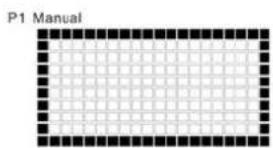
P1 MANUAL: If you select to operate the treadmill in manual mode, press Start directly. The treadmill will start at 0.8KPH (0.5MPH) after a 3, 2, 1 countdown. You may then adjust the speed and incline using the quick keys or the SPEED & ELVATION +/- keys.
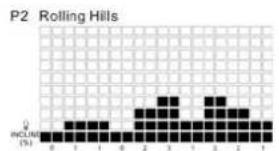
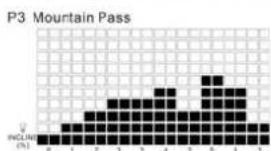
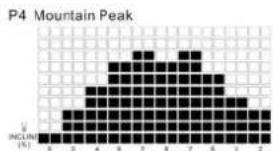
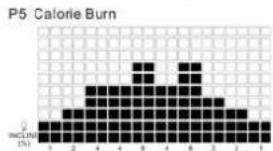
These are incline programs. The incline is preset in each segment, and the speed is controlled by the user. The incline changes in each minute.
During these programs, the user can increase or decrease the level of the preset incline value by pressing the ELVATION +/- keys. Press the ELVATION +/- keys once to raise/lower every segment of the incline by 1% , you will see all the segments of the program raise or lower together. It stops raising or lowering when one of the segments has reached the maximum or minimum incline level.
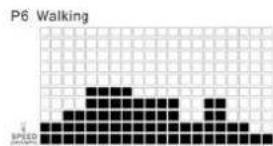
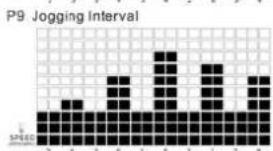
P6-P9 SPEED PROGRAMS:
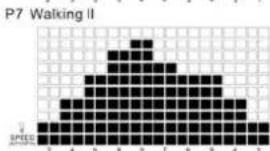
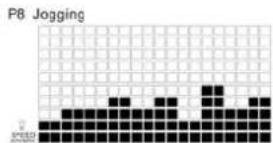
These are speed programs. The speed is preset in each segment, and the incline is controlled by the user. The speed changes in each minute.
During these programs, the user can increase or decrease the level of the preset speed value by pressing the Speed +/- keys. Press the Speed +/- keys once to raise/ lower every segment of the speed 0.2KPH (0.1MPH), you will see all the segments of the program raise or lower together. It stops raising or lowering when one of the segments has reached the maximum or minimum speed level.
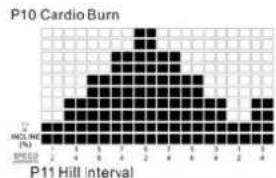
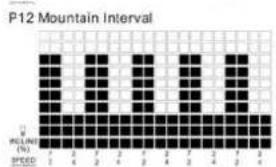
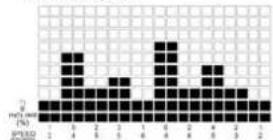
P10-P12 SPEED & ELEVATION COMBINATION PROGRAMS:
These are SPEED & ELEVATION combination programs. The SPEED & ELEVATION are preset in each segment.
During these programs, the user can increase or decrease the level of the preset speed and incline values by pressing the SPEED & ELVATION +/- keys. The dot matrix only shows the incline level and the speed level only shows on Speed display. The incline & speed stop raising or lowering when one of the segment (speed or incline level) has reached the maximum or minimum level.
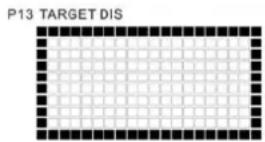
P13 TARGET DISTANCE :
This program counts down the distance goal that the user sets before exercising. After confirming the program, the user enters the distance goal from 0.50 99.50 ~km/mile by using the SPEED & ELVATION +/- keys. Increments are 0.5 kilometers or miles. Press Enter to confirm and then press Start, the treadmill belt starts and the user controls the speed and incline. The distance will count down in the Distance display and until the goal has been reached, "END" will appear on dot matrix and the treadmill will stop. If the user doesn't set any goal, it will perform the same function as Manual program.
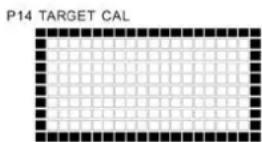
P14 TARGET CALORIES :
This program counts down the calorie goal that the user sets before exercising. After confirming the program, the user enters the calorie goal from 10 9990 kcal by using the SPEED & ELVATION +/- keys. Increments are 10 kcal. Press Enter to confirm and then press Start, the treadmill starts and the user controls the speed and incline. The calorie goal will count down in the Calories display and until the goal has been reached, "END" will appear on dot matrix and the treadmill will stop. If the user doesn't set any goal, it will perform the same function as Manual program.
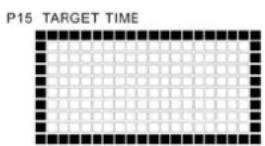
P15 TARGET TIME :
This program counts down the time goal that the user sets before exercising. After confirming the program, the user enters the time goal from 10:00 ~ 99:00 by using the SPEED & ELVATION +/- keys. Increments are 10 minutes. Press Enter to confirm and then press Start, the treadmill starts and the user controls the speed and incline. The time goal will count down in the Time display and until the goal has been reached, "END" will appear on dot matrix and the treadmill will stop. If the user doesn't set any goal, it will perform the same function as Manual program.
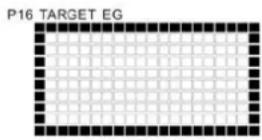
P16 TARGET ELEVATION GAIN :
This program counts down the elevation gain goal that the user sets before exercising. After confirming the program, the user enters the elevation gain goal from 10 ~ 9990 meters by using the SPEED & ELVATION +/- keys, the increments are 10 meters. Press Enter to confirm and then press Start, the treadmill starts and the user controls the speed and incline. The elevation gain goal will count down in the Elevation Gain display and until the goal has been reached, "END" will appear on dot matrix and the treadmill will stop. If the user doesn't set any goal, it will perform the same function as Manual program.
NOTE: The machine will stop at the first achieved goal if more than one goal is set.
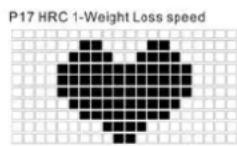
P17 HRC1 - WEIGHT LOSS PROGRAM (SPEED) :
The user must wear the heart rate chest strap or grip the hand pulse sensor to use this program. After the program is confirmed, the prompt text will show "INPUT AGE", Age display shows 40 as a preset age. Use the SPEED & ELVATION +/- keys to input user's age, press Enter to confirm. Target heart rate (THR) is computed at 60% of maximum (220 - AGE) and appears in the Pulse display. It can be changed while using the SPEED & ELVATION +/- keys, then presses Enter to confirm. Press Start and the treadmill starts at 0.8KPH (0.5MPH) speed and 0% incline, the user controls the incline. After three minutes of warm-up, the speed will adjust at a rate of 1.0KPH/MPH every 40 seconds until the target heart rate zone is reached (THR +/- 5BPM). The dot matrix shows "?" when there is no heart rate input in 10 seconds, then shows "END" and the treadmill stops when there is no heart rate input in 30 seconds.
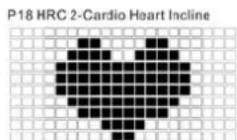
P18 HRC2 - CARDIO HEART PROGRAM (INCLINE) :
The user must wear the heart rate chest strap or grip the hand pulse sensor to use this program. After the program is confirmed, the prompt text will show "INPUT AGE", Age display shows 40 as a preset age. Use the SPEED & ELVATION +/- keys to input user's age, press Enter to confirm. Target heart rate (THR) is computed at 60% of maximum (220 - AGE) and appears in the Pulse display. It can be changed while using the SPEED & ELVATION +/- keys, then presses Enter to confirm. Press Start and the treadmill starts at 0.8KPH (0.5MPH) speed and 0% incline, the user controls the speed. After three minutes of warm-up, the incline will adjust at a rate of 1% every 30 seconds until the target heart rate zone is reached (THR +/- 5BPM). The dot matrix shows "?" when there is no heart rate input in 10 seconds, then shows "END" and the treadmill stops when there is no heart rate input in 30 seconds.
P19 HRC3 -INTERVAL FATBURN PROGRAM (SPEED & ELEVATION):
The user must wear the heart rate chest strap or grip the hand pulse sensor to use this program. After the program is confirmed, the prompt text will show "Input AGE", Age display shows 40 as a preset age. Use the SPEED & ELVATION +/- keys to input user's age, press Enter to confirm. Target heart rate (THR) is computed at 60% of maximum (220 - AGE) and appears in the Pulse display. It can be changed while using the SPEED & ELVATION
+/- keys, then presses Enter to confirm. Press Start and the treadmill starts at 0.8KPH (0.5MPH) speed and 0% incline. After three minutes of warm-up, the incline & speed will adjust at a rate of 1% and 1.0KPH/MPH every 30 seconds until the target heart rate zone is reached (THR + - 5BPM) . The dot matrix shows "?" when there is no heart rate input in 10 seconds, then shows "END" and the treadmill stops when there is no heart rate input in 30 seconds.
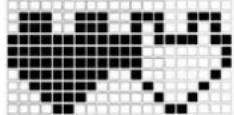
P19 HRC 3-Interval Fatburn Speed+Incline
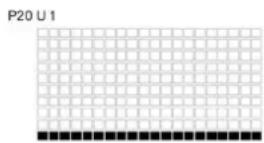
P20-P22USERPROGRAMS:(U1,U2,U3)
After selecting one of the user programs, press Enter to confirm. Adjust the speed and incline for each segment and press Enter to confirm each setting. Press Start to begin the workout. If a speed or incline value is changed during usage, the monitor will retain the value of the speed and incline at the end of each segment. When the LCD power is off, press Select until it beeps twice to clear the value set by user.
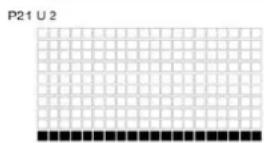
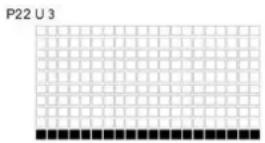
P23 BODY FAT PROGRAM : F001
The Body Fat program is to calculate the body fat percentage from the value you put in the computer for your reference, so that you can plan your training. When selecting this program, the user can follow the steps showed on the dot matrix and LCD prompt text as below: a. Input Age : Press Speed or Incline + / - keys to adjust the age, press Enter to confirm. (preset : 40, range : 10 ~ 99 years old)
b. Input Sex : Press Speed or Incline + / - keys to choose,
1 represents Female and 0 represents Male, press Enter to confirm. (preset : 0)
c. Input Height: Press Speed or Incline + / - keys to adjust the height, press Enter to confirm. (preset: 160 cm, range: 100 ~ 240 cm)
d. Input Weight : Press Speed or Incline + / - keys to adjust the weight, press Enter to confirm. (preset : 60 kgs, range : 10 250 kgs)
e. After finishing the input, the dot matrix shows "Check Pulse", please hold the heart rate sensor with two hands for a while, when the computer received the heart rate value, the LCD shows "BODYFAT RESULT" and shows the Bodyfat value within 10 seconds.
If the computer received no signal of heart rate for 20 seconds, the LCD will show "END" & "E5" with beeps at the same time.
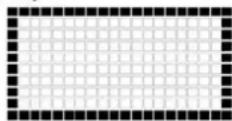
P23 Body Fat
MAINTENANCE
The equipment is safe to use only when periodically maintained and inspected for faults and wear.
CAUTION! Do not attempt any servicing or adjustment other than those described in this manual. Any other servicing must be performed by an authorized service representative. Check the tightness of all fixing screws once a year. Do not overfighten.
CLEANING AND LUBRICATING THE TREADMILL Failure to lubricate your treadmill may invalidate the product's warranty!
Wipe the treadmill surfaces, especially the handlebars and console from dust with a damp cloth or towel. Do not use solvents. Use a small vacuum nozzle to carefully vacuum around all visible components (belt, running deck, side rails etc.). Also keep the area near the treadmill clean. While in use, the treadmill gathers dust that may cause problems in the operation of the equipment. In average domestic use (a maximum of 60 minutes a day), you should check the lubrication once a month - however, lubricate the belt only if needed. In more demanding use, the lubrication needs be checked at shorter intervals. This is best done before you begin a training session. Check the lubrication as follows:
- Ensure the treadmill is powered off! Step on the treadmill belt and stand steadily where you normally run on the belt.
- Take hold of the horizontal handlebar and push the belt with your feet so that it slides back and forth. The belt should move softly and evenly, without a sound.
- If you notice jerky movement or if the belt will not slide check for lubrication by sliding your hand under the belt.
Lubricate the running deck according to the following instructions:
- Attach the nozzle of the lubrication tube to the T-Lube S container.
- Lift the running deck and lock it.
- Position the nozzle between the belt and the board. Try to reach the spray as far into the center of the running deck as possible.
- Spray the lubricant for 2-3 seconds.
- Lower the running deck into its normal position. Use treadmill for your training session. Or allow the treadmill to run for at least 5 minutes.
! NOTE! Lubricate your treadmill only with T-Lube S silicon lubricant. Contact your local Tunturi distributor for further supplies of T-Lube or further information on lubrication and maintenance.
ALIGNING THE RUNNING BELT
Monitor belt tracking during exercise and make adjustments as needed. The belt should run in the center of the treadmill. Alignment is not usually needed, provided
- the treadmill is placed on an even, solid and horizontal surface and the belt is correctly tensioned
the alignment of the belt is correct It is, however, possible for the belt to be pushed to one side due to the user's running style (e.g. more weight on one foot). The alignment of the belt is adjusted by turning the two bolts at the back of the treadmill.
ALIGN THE BELT ACCORDING TO THE FOLLOWING INSTRUCTIONS:
- Turn the power switch on and increase the treadmill's speed to 5km / h (3 mph).
- If the belt drifts to the left, turn the left adjustment bolt
1/4 turn clockwise and the right adjustment bolt 1/8 turn anti-clockwise. If the belt drifts to the right, turn the right adjustment bolt 1/4 turn clockwise and the left adjustment bolt 14 turn anti-clockwise. - If the belt remains centered the adjustment is correct. If not, continue to make small adjustments as above until the belt is correctly aligned. If the belt is allowed run across to one side for long periods of time the edges of the belt may be damaged and the treadmill may not continue to operate correctly. Any damage to the belt caused by the lack of necessary adjustment will not be covered by the warranty.
ADJUSTING THE BELT TENSION
The belt must be tensioned if it begins to slip on the rollers. In normal use, however, keep the belt as loose as possible! The belt tension is adjusted by turning the same screws as used for aligning the running belt. If turning the screws will not effect the belt tension, please contact your local Tunturi dealer.
- Increase the treadmill's speed to 5km / h (3 mph). 2. Turn both adjustment screws an equal amount, 14 turn clockwise.
- Try to slow the belt down by holding onto the handrails and braking as you walk (as if you were walking downhill). If the belt slips, turn another 1/4 turn and repeat the test. When braking heavily the belt may slip. If the belt keeps slipping despite repeated adjustments, please contact your local Tunturi dealer.
MALFUNCTIONS
NOTE! Despite continuous quality control, defects and malfunctions caused by individual components may occur in the equipment. In most cases it's unnecessary to take the whole device in for repair, as it's usually sufficient to replace the defective part. Always give the model, serial number of your equipment and in case of malfunctions also conditions of use, nature of malfunction and any error code.
When you encounter unusual behavior from the treadmill, simply turn the power switch off, wait 1 minute and turn the power switch on to reset the treadmill. This should clear incidental errors and ready the treadmill for normal operation again. If after you have reset the treadmill by turning the power switch off and on again, and the treadmill is still not operational, contact your local Tunturi dealer for service.
If you require spare parts, always give the model, serial number of your equipment and the spare part number for the part you need. The spare part list is at the back of this manual. Use only spare parts mentioned in the spare part list.
ERROR CODES
The user interface will display information about operational faults.
E1: Speed sensor error. Unplug the electrical cord from the wall outlet and from the treadmill, wait 1 minute and turn the power switch on again. If treadmill recovers to normal operation, you may continue to use the treadmill. Otherwise, call the dealer for service.
E3: Lift motor error. Unplug the electrical cord from the wall outlet and from the treadmill, wait 1 minute and turn the power switch on again. If treadmill recovers to normal operation, you may continue to use the treadmill. Otherwise, call the dealer for service.
MOVING AND STORAGE
After assembly is complete, you may fold the machine into the upright position for storage. To hold the machine, raise the desk until it locks in to position.
NOTE! Make sure you hear the click sound of the deck locking into position. This is to ensure the deck is locked in place and will not drop back down.
NOTE! Make sure the treadmill's elevation is at 0 before folding the deck. If the elevation is not at 0, folding will damage the mechanism.
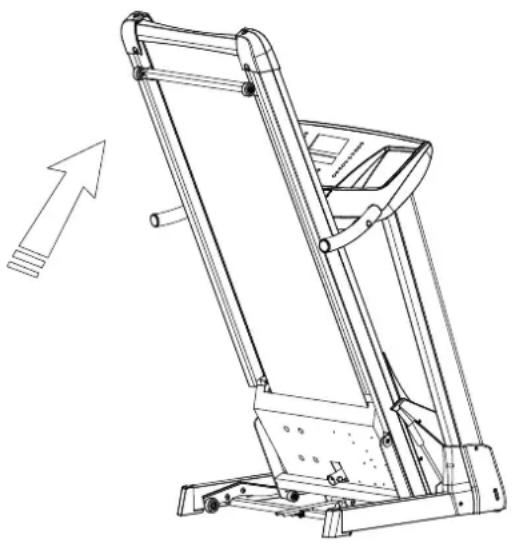
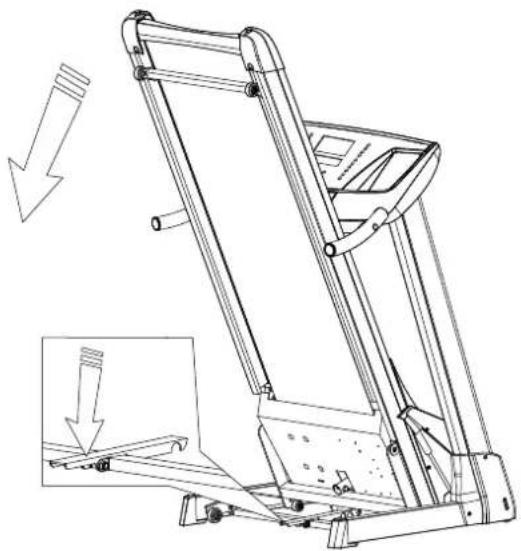
First to step on the pedal, second push the frame toward the console then leave the deck lower to the floor.
NOTE! This machine has a built-in safety unfolding feature to help the deck lower slowly. Please make sure there are no children or other things under the deck when you lower it.
TO MOVE THE TREADMILL
Before moving the Run 3.0, be sure the power cord is unplugged from the wall and the treadmill. Fold up the running deck until it is locked and push the equipment on the transportation wheels. Lower the treadmill carefully onto the floor. Hold the handlebar to move forward the treadmill.
NOTE! Transport the treadmill with extreme caution over uneven surfaces, for example over a step. The treadmill should never be transported upstairs using the wheels over the steps, instead it must be carried. We recommend that you use a protective base when transporting the equipment.
NOTE! The running belt needs to be realigned and centered after moving.
To prevent malfunctioning of the treadmill, store it in a dry place with as little temperature variation as possible, protected against dust. Always unplug the treadmill from the electrical outlet when not in use.
TECHNICAL DATA
Length (storage position) 193 cm (93 cm)
Height (storage position) 140 cm (181 cm)
Width 91 cm
Weight 101 kg
Running surface 51 x 150 cm
Speed 0.8-20.0 km/h
Elevation range 0-12%
Motor 3.0 HP
The Run 3.0 treadmill meets the requirements of the EU's EMC Directives on electromagnetic compatibility (89/336/ EEC) and electrical equipment designed for use within certain voltage limits (73/23/EEC). This product therefore carries the CE label.
The Run 3.0 treadmill meets EN precision and safety standards (EN-957).
Due to our continuous policy of product development, Tunturi reserves the right to change specifications without notice.
CAUTION! The instructions must be followed carefully in the assembly, use and maintenance of your equipment. The warranty does not cover damage due to negligence of the assembly, adjustment and maintenance instructions described herein. Changes or modifications not expressly approved by Tunturi-Fitness will void the user's authority to operate the equipment!
We wish you many enjoyable trainings with your new Tunturi training partner!
DEUTSCH
INHALT
MONTAGE 11
COCKPIT 13
ALLGEMEINES ZUM TRAINING 14
BEDIENUNG 15
WARTUNG 18
Part# Description
Q'TY
| A | Screw M8x20L | 6 | |||
| B | Washer Ø8xØ18 | 2 | |||
| C | Washer Ø10xØ25 | 4 | |||
| D | Screw M4x6L | 6 | |||
| E | Allen Key 1 | ||||
| F | Screwdriver | 1 | |||
| G | Safety Key | 1 | |||
| H | Side Cap | 2 | |||
| Lube | 1 | ||||
| J | Incline Bracket Cover | 2 |
SCHRITT 2
E. CAL/ELEVATION GAIN / HEIGHT DISPLAY:
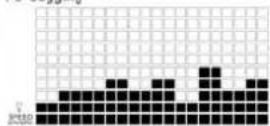
P8 Jogging
P9 Jogging Interval
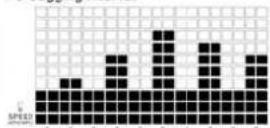
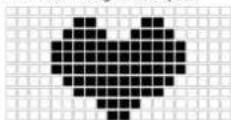
P17 HRC 1-Weight Loss speed
P18 HRC2 - CARDIO HEART PROGRAM (INCLINE) :
CONSERVEZ CES INSTRUCTIONS!
ASSEMBLAGE
The user can switch from Metric values (Kilometer) to
Imperial values (Mile) or from Imperial values to Metric values. When the LCD power is off, press Enter until it beeps to switch the distance and speed from Metric to Imperial or from Imperial to Metric.
I.ODOMETER:
P6-P9 SPEED PROGRAMS:
Vifesse 0.8-20.0 km/h
B. SPEED / AGE DISPLAY:
C. DISTANCE / WEIGHT DISPLAY:
P6-P9 SPEED PROGRAMS:
P20-P22 USER PROGRAMS: (U1, U2, U3)
A. TIME/BODYFAT DISPLAY:
D. INCLINE / SEX DISPLAY:
P6-P9 SPEED PROGRAMS:
IMPORTANT: Anything that is found in this deposit should be properly managed by the depositors. This deposit will be used for the purposes of the following activities:
B. SPEED/ AGE DISPLAY:
LIMPieZA Y LUBRICATION
TRANSPORT OCH FÖRVARING
TEKNISKA DATA
62
65
Part# Description
Q'TY
| A | Screw M8x20L | 6 | ||
| B | Washer Ø8xØ18 | 2 | ||
| C | Washer Ø10xØ25 | 4 | ||
| D | Screw M4x6L | 6 | ||
| E | Allen Key | 1 | ||
| F | Screwdriver | 1 | ||
| G | Safety Key | 1 | ||
| H | Side Cap | 2 | ||
| I | Lube | 1 | ||
| J | Incline Bracket Cover | 2 |
STEG 2
B. SPEED/ AGE DISPLAY:
Displayen for hastighet (SPEED): Visar lopbandets aktuella hastighet. Hastigheten kan justeras frän 0,5 till 12MPH erller frän 0,8 till 20 KPH,
D. INCLINE / SEX DISPLAY:
Visar klättring i procent frän 0% till 12%.
I Body Fat-programmet anges kon. (0 representative Man; 1 representative Kvinna)
P6-P9 SPEED PROGRAMS:
Part# Description
Q'TY
| A | Screw M8x20L | 6 | ||
| B | 2 | |||
| C | Washer Ø10xØ25 | 4 | ||
| D | Screw M4x6L | 6 | ||
| E | Allen Key | 1 | ||
| F | Screwdriver | 1 | ||
| G | Safety Key | 1 | ||
| H | Side Cap | 2 | ||
| I | Lube | 1 | ||
| J | Incline Bracket Cover | 2 |
P6-P9 SPEED PROGRAMS:
6 Upright tube, LH 1
7 Upright tube. RH 1
8 Frame 1
9 Incline structure frame 1
10 Front support frame 1
11 Front roller 1
12 Rear roller 1
13 Side landings, LH+RH 1
14 Anti-slip mats, LH+RH 1
15 Running deck 1
16 Running belt (1.8mm black)
17 Motor, 230V
Motor, 110V
18 Lift motor, 230V
- Lift motor, 110V
19 Drive belt 1
20 Rear end cap, LH
21 Rear end cap, RH 1
22 Side cover, LH
23 Side cover, RH 1
24 Gas spring, LH
25 Gas spring, RH 1
26 Motor cover 1
27 Power board, 230V
- Power board, 110V
28 Incline bracket 2
29 Locking lever 1
30 Wheel bracket, LH
31 Wheelbracket, RH 1
32 Horizontal bar grip foam 1
33 Handle grip foam 2
34 End cap 2
35 Front support end cap, LH 1
36 Front support end cap, RH 1
37 Plastic washer 25x14x1,5 2
38 Plastic washer 6x9,3x1,8
39 Plastic washer 4.5x9,7 2
Plastic washer 19x8x10 2
41* Washer 10x25x1,8 2
42* Washer 8x18x1,5 11
43 Washer 8x16x1,5 4
44 Washer 10x20x2 2
45 Star Washer M4 4
46 Star Washer M10 2
47 Horizontal bar (Incl. in No. 01)
48 Hand pulse LH+RH 2
49 Wire holder 1
50 Wire holder 2
51 Motor cover bracket 4
52 Through-leading rubber 1
53 Wire holder 5
54 Plastic fixer, 4x200mm 2
55 Plastic fixer, 2.5x100mm 3
56 Ferrite 2
57 Rubber bumper 25x22x6mm 6
58 Overcurrent protector, 10A 1
Overcurrent protector, 13A 1
59 Power socket 1
60 Power cable (EU) 1
61 ON/OFF Switch 1
62 Wheel 50mm 4
63 Wheel 60mm 2
64 Wheel 50mm 2
65 Incline bracket cover, LH 1
66Inclinebracketcover,RH 1
67 Transformer, EUR 1
68 Filter, EUR 1
- Wire set (incl. part 69,70)
69 Upper wire 1
70 Lower wire 1
71 Speed sensor 1
Power wire set (incl. part 72,73,74,75,76)
72 Wire 130mm
73 Wire 110mm
74 Wire 70mm 2
75 Wire 53mm 1
76 Wire 45mm
77 Grounding wire 90mm
78 Grounding wire 65cm
79Screw 28
80 Hex. socket cap screw 2
81 Screw 2
82* Screw 15
83 Hexagon screw 10
84 Countersunk head screw 6
85 Hexagon socket cap screw 3
86 Screw 1
87Screw 12
88 Hexagon socket cap screw 2
89 Screw 2
90 Screw 2
91 Screw 2
92 Screw 2
93 Screw 2
94 Hexagon socket cap screw 2
95 Screw 2
96 Hexagon socket cap screw 1
97 Hexagon socket cap screw 8
98Screw 25
99 Screw 4
100 Screw 2
101 Screw 4
102 Screw 2
103 Screw 1
104 Screw 4
105 Screw 4
106 Hexagon socket cap screw 2
107 Nylock nut 11
108 Locking nut 11
109 Fixing tube 2
Fixing tube 2
Fixing tube 2
112 Spring 1
113 Z-plate 2
114 Leaf spring, front 2
115 Leaf spring, rear 2
116 Incline structure frame axle 1
117 Switchbracket 1
118 Side inner cover, LH(Incl. in No. 22)
119 Side inner cover, RH(Incl. in No. 23)
120 Bumper 2
121 Horizontal bar end cap 2
122 Safety bar (incl. 123)
123 Safety edge 1
124 Upright profile, LH
125 Upright profile, RH
Membrane set
Label set
Screw set
Assembly kit
Owner's manual
Wireless heart rate receiver
Tunturi Fitness B.V.
P.O.Box 60001
1320 AA Almere
The Netherlands
Tel: +31 36 5460050
Fax: +31 36 5460055
www.tunturi.com

- TUNTURI® From the Heart
- RUN 3.0
- IMPORTANT SAFETY INSTRUCTIONS
- WARNING
- WARNING: To reduce any risk to persons:
- SAVE THESE INSTRUCTIONS!
- ASSEMBLY
- Part# Description
- Q'TY
- POWER CORD AND GROUNDING INSTRUCTIONS
- SAFETY TETHER KEY
- CONSOLE
- KEY FUNCTIONS
- Major Function Keys:
- ELEVATION CONTROL KEYS
- POWER:
- START/STOP:
- SELECT:
- ENTER:
- SPEED CONTROL KEYS (Rabbit / Turtle)
- SPEED HOT KEYS:
- ELEVATION HOT KEYS:
- DISPLAYS AND OPERATING RANGES
- TIME/ BODY FAT DISPLAY:
- SPEED/ AGE DISPLAY:
- DISTANCE/WEIGHT DISPLAY:
- INLINE / SEX:
- CAL / ELEVATION GAIN / HEIGHT DISPLAY:
- F.PULSE:
- OPERATION INSTRUCTIONS
- (Pleases Read Carefully before Using)
- SAFETY TIPS:
- PRESS POWER:
- ENTER WEIGHT:
- D.PROGRAM SELECTION:
- PULSE RATE:
- F.PROGRAM MODE:
- H.METRIC/IMPERIAL:
- I.ODOMETER:
- TOTAL HOURS :
- TIME-OUT:
- RE-START:
- BASICS ON EXERCISING
- ABOUT YOUR HEALTH
- ABOUT THE EXERCISE ENVIRONMENT
- ABOUT USING THE EQUIPMENT
- BEGINNING AN EXERCISE SESSION
- FINISHING AN EXERCISE SESSION
- HOW TO MOTIVATE YOURSELF TO CONTINUE
- HEART RATE
- 220-AGE
- BEGINNER: 50-60 % of maximum heart rate
- TRAINER: 60-70 % of maximum heart rate
- ACTIVE TRAINER: 70-80 % of maximum heart rate
- OPERATIONS
- PROGRAMS 1-23
- P6-P9 SPEED PROGRAMS:
- P10-P12 SPEED & ELEVATION COMBINATION PROGRAMS:
- P13 TARGET DISTANCE :
- P14 TARGET CALORIES :
- P15 TARGET TIME :
- P16 TARGET ELEVATION GAIN :
- P17 HRC1 - WEIGHT LOSS PROGRAM (SPEED) :
- P18 HRC2 - CARDIO HEART PROGRAM (INCLINE) :
- P19 HRC3 -INTERVAL FATBURN PROGRAM (SPEED & ELEVATION):
- P20-P22USERPROGRAMS:(U1,U2,U3)
- P23 BODY FAT PROGRAM : F001
- MAINTENANCE
- CLEANING AND LUBRICATING THE TREADMILL Failure to lubricate your treadmill may invalidate the product's warranty!
- ALIGNING THE RUNNING BELT
- ALIGN THE BELT ACCORDING TO THE FOLLOWING INSTRUCTIONS:
- ADJUSTING THE BELT TENSION
- MALFUNCTIONS
- ERROR CODES
- MOVING AND STORAGE
- TO MOVE THE TREADMILL
- TECHNICAL DATA
- DEUTSCH
- INHALT
- SCHRITT 2
- CAL/ELEVATION GAIN / HEIGHT DISPLAY:
- CONSERVEZ CES INSTRUCTIONS!
- ASSEMBLAGE
- I.ODOMETER:
- SPEED / AGE DISPLAY:
- DISTANCE / WEIGHT DISPLAY:
- P20-P22 USER PROGRAMS: (U1, U2, U3)
- TIME/BODYFAT DISPLAY:
- INCLINE / SEX DISPLAY:
- LIMPieZA Y LUBRICATION
- STEG 2
Brand : TUNTURI
Model : Run 3.0
Category : Treadmills