Trio LP - Turntable ION - Free user manual and instructions
Find the device manual for free Trio LP ION in PDF.



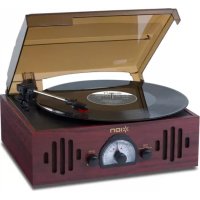
| Brand | ION |
| Model | Trio LP |
| Product type | All-in-one turntable with built-in speakers and AM/FM radio |
| Speeds | 33, 45 and 78 RPM |
| Main functions | Vinyl playback, AM/FM radio, 3.5 mm auxiliary input, RCA line output, autostop |
| Speakers | Built-in stereo speakers |
| Nominal power | Approximately 20 W (estimated) |
| Power supply | Mains, built-in power cable |
| Connectivity | 3.5 mm auxiliary input, RCA line output, FM antenna |
| Dimensions (approx.) | 420 x 350 x 150 mm |
| Weight (approx.) | 3.5 kg |
| Maintenance and cleaning | Clean with a dry cloth; replace the stylus if worn |
| Safety | Remove the stylus guard before use; lock the tonearm when not in use |
| Spare parts and repairability | Replaceable stylus (standard model) |
| Box contents | Trio LP, 45 RPM adapter, quick start guide, safety instructions |
Frequently Asked Questions - Trio LP ION
User questions about Trio LP ION
0 question about this device. Answer the ones you know or ask your own.
Ask a new question about this device
Download the instructions for your Turntable in PDF format for free! Find your manual Trio LP - ION and take your electronic device back in hand. On this page are published all the documents necessary for the use of your device. Trio LP by ION.
USER MANUAL Trio LP ION
Quickstart Guide English (3-6)
Guía de inizio=rápido Espanol (7-10)
Snelstartgids Netherlands (23-26)
Appendix English (27)
Quickstart Guide (English)
Introduction
Box Contents
Trio LP
45 RPM Adapter
Quickstart Guide
Safety & Warranty Manual
Support
For the latest information about this product (system requirements, compatibility information, etc.) and product registration, visit ionaudio.com.
Quick Setup
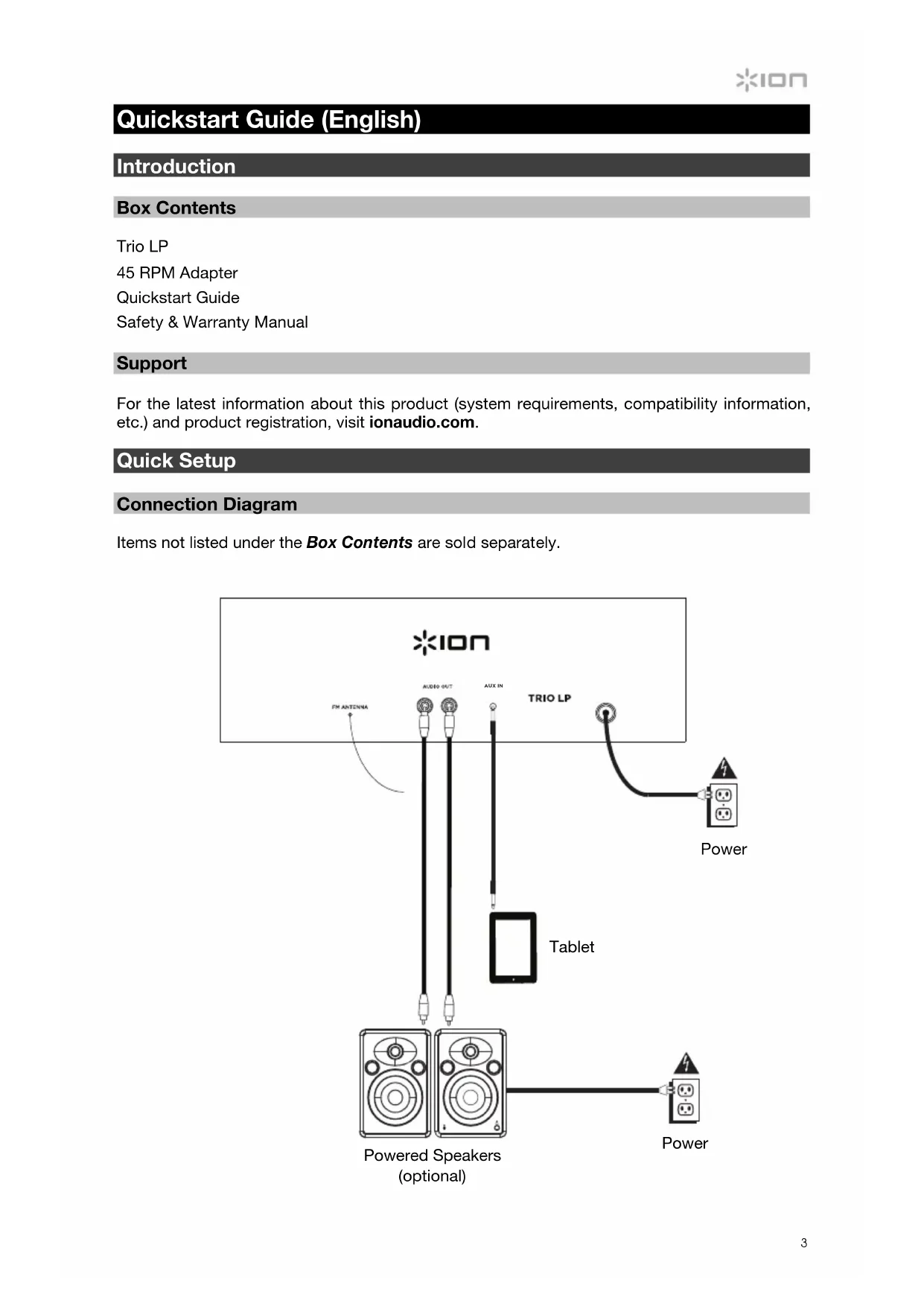
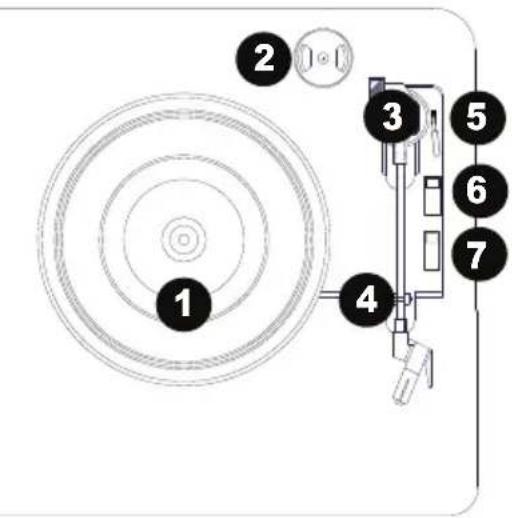
Connection Diagram
Items not listed under the Box Contents are sold separately.
Features
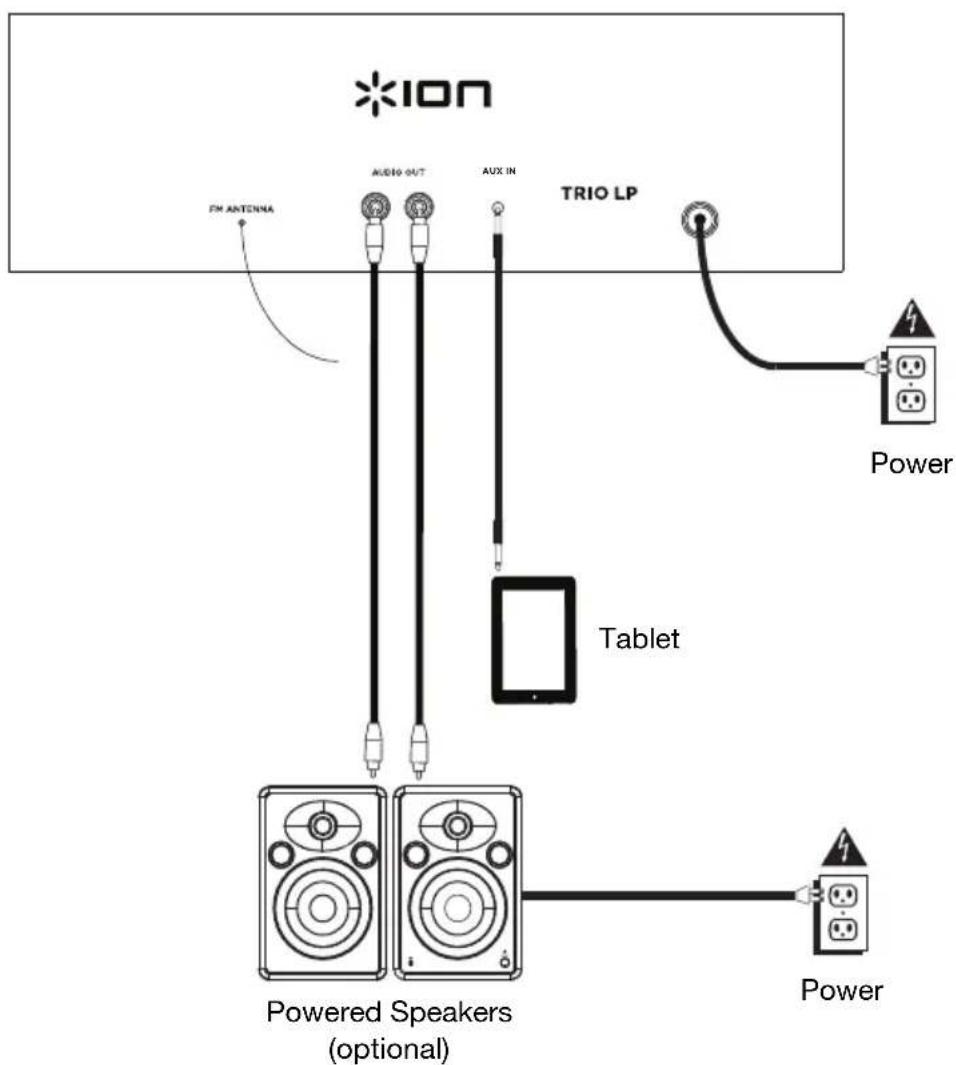
Top Panel
- Platter: Place your record here.
- 45 RPM Adapter Holder: Holds the included 45 RPM adapter. When not using the adapter, please place it in this holder.
- Tonearm: The fixed tonearm can be raised and lowered by hand, or by pressing the raise / lower lever.
- Arm Clip: This specially designed arm clip secures the tonearm while at rest or when not in use. The arm clip has been designed to remain in the up position while unlocked.
- Raise / Lower Lever: Raises and lowers the tonearm.
- Autostop switch: This switch turns autostop on or off. When autostop is on, the platter will start spinning when the tonearm is placed over the record and stop spinning when the record has reached the end. When Autostop is off, the platter will always spin regardless of the position of the tonearm.
Note: If your vinyl record stops before it reaches the end of the music, turn Autostop to the off position for this particular record. This is generally recommended for 45 RPM records.
IMPORTANT: Remove the plastic cartridge cover (needle cover) before operating the turntable.
*WARNING: The RCA outputs are LINE level. Please only connect these to LINE level inputs. You may damage your receiver if you plug in a LINE level device into a PHONO level input.
- 33/45/78 RPM Switch: This switch controls the speed of the turntable platter.
Note: For best results when playing 78 RPM vinyl records, use a 78 RPM stylus (sold separately). Only use a 78 RPM stylus with 78 RPM vinyl records.
Front Panel
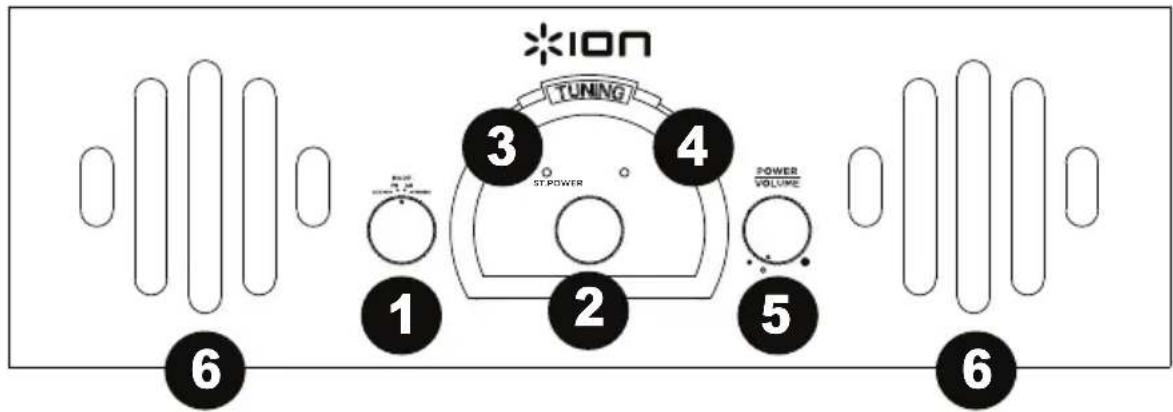
- Mode: Turn this dial to select which source to use: FM, AM, Phono, or Aux In.
- Radio Frequency Selector (Tuning): Turn this dial to select the AM or FM radio station frequency.
- ST. (Stereo) LED: This LED illuminates when a stereo radio station has been selected.
- Power LED: This LED illuminates when the power is turned on.
- Volume: Adjusts the sound level for the internal speakers.
- Speakers: These internal speakers output the sound of the selected source.
Rear Panel
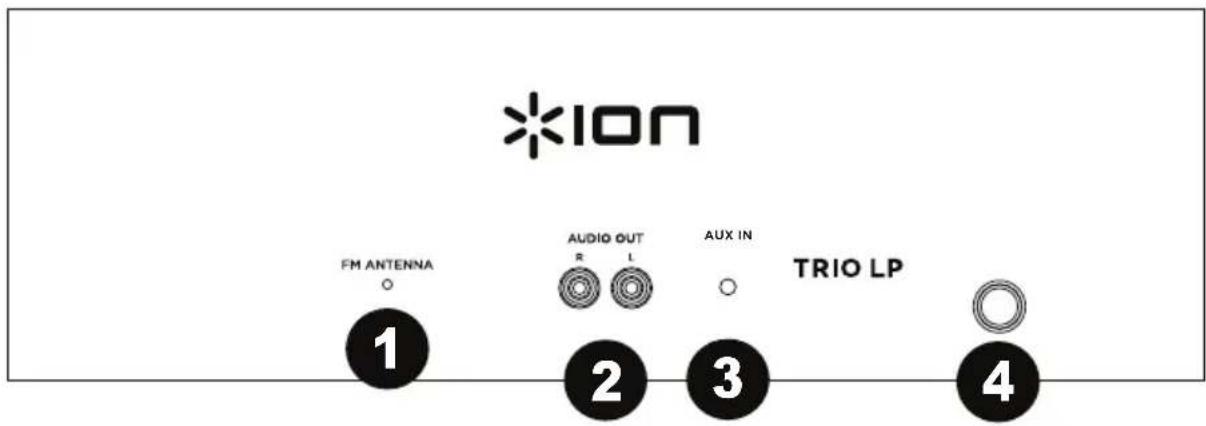
- FM Antenna: Adjust this wire for better FM radio reception. For AM reception, rotate the unit until the best reception is found.
- Line Output: Connect this output to a receiver, amplifier, or powered speakers.
- Aux Input: Connect a media player, smartphone, or other audio source to this stereo 1/8" (3.5 mm) input.
- Power Input: The integrated power cable is connected here.
Turntable Playback
Before use, please make sure to:
- Remove the stylus protector. Reconnect the protective cap on the stylus when not in use.
-
Ensure the tonearm is free to move from the tonearm rest. Lock the tonearm in place again when not in use.
-
Set the Mode selector to Phono and lift the turntable dust cover.
- Place a record on the turntable, over the central spindle on the slipmat.
- Set the Speed selector to 33, 45, or 78 RPM depending on the record.
- Lift the tonearm from the tonearm rest by using the Raise Lever and slowly move it over the record. The turntable platter will start turning.
- Place the tonearm on the desired location of the record.
- Gently lower the tonearm onto the record to start playing.
- When the record is finished playing, the tonearm will automatically stop. Lift the tonearm from the record and put it back on the rest.
- To manually stop the record, lift the tonearm from the record and return it to the rest.
Note: Do not stop or turn the platter manually. Moving or jarring the turntable without securing the tonearm clamp could result in damage to the tonearm.
Autostop Switch Operation
Certain types of records may have an autopost area outside the pre-set limit, so the turntable may stop before the last track finishes. If this occurs, set the Autostop switch to the Off position. This allows the record to play to the end, but it will not stop automatically. You must manually raise the tonearm and place it back in the rest and then turn the power off to stop the turntable from spinning.
Aux InPlayback
- Set the Mode selector to Aux In.
- Connect an 1/8'' (3.5 mm) stereo audio cable (not included) from the Aux In of Trio LP to the line output or headphone output of your external audio device to be able to listen to the external source through Trio LP's internal speakers.
- Adjust the volume on Trio LP to the desired level.
Note: If the line output of your external device is connected, you only need to adjust the system's volume control. If your external device's headphone output is connected, you may need to adjust the volume control on both your external device and Trio LP to achieve the desired volume.
Listening to the Radio
- Set the Mode selector to the FM or AM position.
- Select the desired radio station by turning the Tuning knob.
- Adjust the volume to the desired level.
- When finished listening to the radio, set the Mode selector to the Phono position to turn off the radio.
Note: The receiver has a built-in FM antenna hanging at the rear cabinet. This wire should be fully uncoiled and extended for best reception.
Assistance technique
Technical Specifications
| Speaker Output Power | 4Ω 3W |
| Drive System | Belt-driven |
| Speed | 33½, 45, 78 RPM |
| Output Level | 450 mV |
| Cartridge Type | Ceramic type with diamond-tip stylus |
| Voltage | EU/UK 220-240V~ 50/60Hz |
| Power Consumption 8W | |
| Dimensions (width x depth x height) | 10.6" x 12.6" x 4.3" 270 x 320 x 110mm |
| Weight | 5 lbs. 2.26 kg |
Specifications are subject to change without notice.
Trademarks and Licenses
ION Audio is a trademark of ION Audio, LLC, registered in the U.S. and other countries.
All other product or company names are trademarks or registered trademarks of their respective owners.