
EXD25DN3W - Humidifier ELECTROLUX - Free user manual and instructions
Find the device manual for free EXD25DN3W ELECTROLUX in PDF.
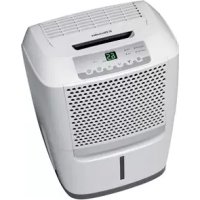

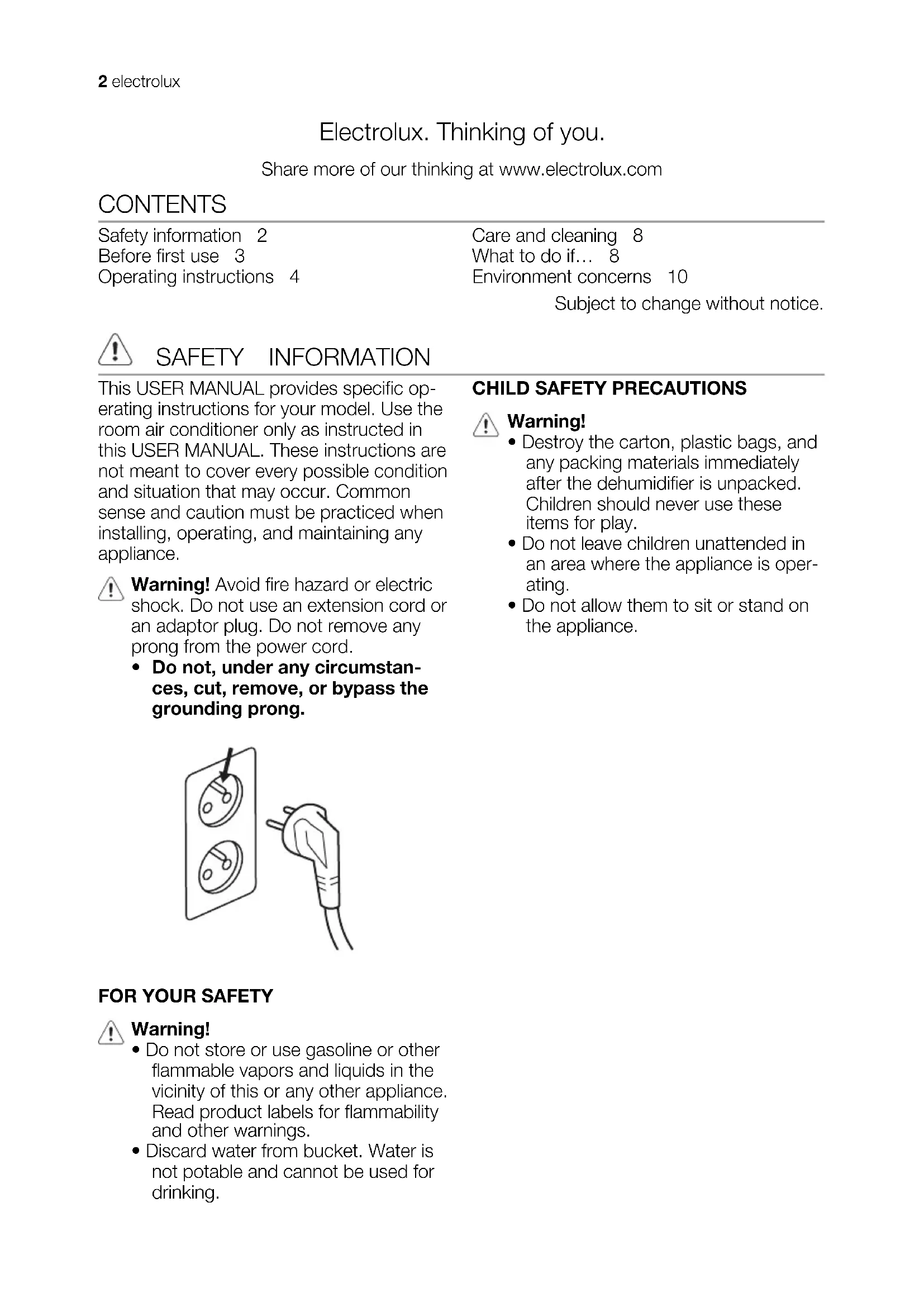


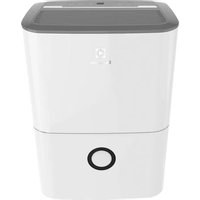
| Product type | Dehumidifier |
| Brand | Electrolux |
| Model | EXD25DN3W |
| Dehumidification capacity | 25 liters per day (estimated) |
| Dimensions (H x W x D) | 55 x 38 x 25 cm (estimated) |
| Net weight | 13 kg (estimated) |
| Power supply | 220 V AC, 50 Hz |
| Power consumption | 350 W (estimated) |
| Operating temperature range | 5 °C to 35 °C |
| Humidity setting | 35% to 85% RH in 5% increments |
| Continuous mode | Yes |
| Timer | Delayed start/stop from 0.5 to 24 hours |
| Fan speed | High (HIGH) and Low (LOW) |
| Water tank capacity | Approximately 5 liters (estimated) |
| Continuous drainage | Yes (via drainage hose) |
| Full tank indicator | BUCKET FULL indicator |
| Filter cleaning indicator | CLEAN FILTER indicator (every 250 hours) |
| Filter type | Washable filter with clean water |
| Maintenance | Clean filter every 2 weeks, clean tank with warm water and detergent |
| Refrigerant | R134a, GWP 1300 |
| Repairability | Repairs exclusively by an Electrolux authorized repairer |
| Safety | Grounding mandatory, do not use extension cord |
Frequently Asked Questions - EXD25DN3W ELECTROLUX
User questions about EXD25DN3W ELECTROLUX
0 question about this device. Answer the ones you know or ask your own.
Ask a new question about this device
Download the instructions for your Humidifier in PDF format for free! Find your manual EXD25DN3W - ELECTROLUX and take your electronic device back in hand. On this page are published all the documents necessary for the use of your device. EXD25DN3W by ELECTROLUX.
USER MANUAL EXD25DN3W ELECTROLUX
Electrolux. Thinking of you.
Share more of our thinking at www.electrolux.com
CONTENTS
Safety information 2
Before first use 3
Operating instructions 4
Care and cleaning 8
What to do if... 8
Environment concerns 10
Subject to change without notice.

SAFETY INFORMATION
This USER MANUAL provides specific operating instructions for your model. Use the room air conditioner only as instructed in this USER MANUAL. These instructions are not meant to cover every possible condition and situation that may occur. Common sense and caution must be practiced when installing, operating, and maintaining any appliance.

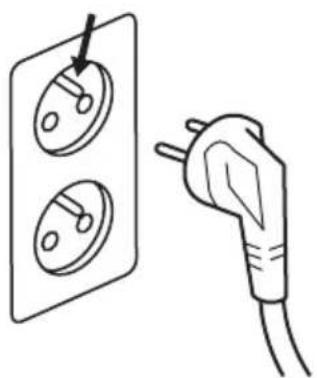
Warning! Avoid fire hazard or electric shock. Do not use an extension cord or an adaptor plug. Do not remove any prong from the power cord.
- Do not, under any circumstances, cut, remove, or bypass the grounding prong.
CHILD SAFETY PRECAUTIONS

Warning!
- Destroy the carton, plastic bags, and any packing materials immediately after the dehumidifier is unpacked. Children should never use these items for play.
- Do not leave children unattended in an area where the appliance is operating.
- Do not allow them to sit or stand on the appliance.
FOR YOUR SAFETY

Warning!
- Do not store or use gasoline or other flammable vapors and liquids in the vicinity of this or any other appliance. Read product labels for flammability and other warnings.
- Discard water from bucket. Water is not potable and cannot be used for drinking.
ELECTRICAL INFORMATION
Warning!
- For your safety and protection, this dehumidifier is equipped with a three-prong grounding plug on the power cord. Do not, under any circumstances, cut or remove the round ground prong from the plug.
- Your dehumidifier must be plugged directly into a properly grounded and polarized three-prong receptacle. If the wall receptacle you intend to use will not accept a three-prong plug, or if you are not sure the outlet is adequately grounded or protected by a time delay fuse or circuit breaker, have a qualified electrician install the proper outlet according to the National Electrical Code and applicable local codes and ordinances. Do not use an extension cord or an adapter plug.
- Never unplug the dehumidifier by pulling on the power cord. Always grip the plug firmly and pull straight out from the receptacle.
- Do not pinch, bend, or knot the power cord.
SAFETY PRECAUTIONS
Caution!
Avoid Serious Injury or Death
- This dehumidifier contains no user-serviceable parts. Always call an authorized Electrolux servicer for repairs.
- Do not insert or place fingers or objects into the air discharge area or front grille of the unit.
- Do not start or stop the dehumidifier by unplugging the power cord or
BEFORE FIRST USE
SELECTING A LOCATION
Important!
turning off the power at the electrical box.
- Do not cut or damage the power cord.
- If the power cord is damaged, it should only be replaced by an authorized Electrolux servicer.
- In the event of a malfunction (sparks, burning smell, etc.), immediately stop the operation, disconnect the power cord, and call an authorized Electrolux servicer.
- Do not operate the dehumidifier with wet hands.
- Do not pull on the power cord.
- Do not drink any water from the dehumidifier.
Caution!
Avoid injury or damage to the unit or other property.
- Do not direct airflow at fireplaces or other heat related sources as this could cause flare ups.
- Do not climb on or place objects on the unit.
- Do not hang objects off the unit.
- Do not place containers with liquids on the unit.
- Turn off the dehumidifier at the power source when it will not be used for an extended period of time.
- Operate the unit with air filter in place.
- Do not block or cover the intake grille, discharge area and outlet ports.
- Ensure that any electrical/electronic equipment is one yard away from the unit.
- Do not use or store flammable gases near the unit.
- Dehumidifier must be operated in an enclosed area to be most effective. Close all doors, windows, and other outside openings to the room. The effectiveness of the dehumidifier depends on the rate at which new moisture-laden air enters the room.
- Place dehumidifier in a location that does not restrict airflow through the front of the unit or out of the louvers on the left side of cabinet.
- A dehumidifier operating in a basement will have little or no effect in drying an adjacent enclosed storage area, such as a closet, unless there is adequate circulation of air in and out of the area. It may be necessary to install a second dehumidifier in the enclosed area for satisfactory drying.
- The dehumidifier must be installed on a level floor that will support it with a full bucket of water.
- There should be a minimum of 12 inches clearance around the dehumidifier.
HOW IT WORKS
When the unit is started, the fan begins to pull moisture-laden air across the dehumidifier.
OPERATING INSTRUCTIONS
Allow the unit to reach room temperature before operating. To begin operating the dehumidifier, follow these steps: Unit must be upright for one hour prior to operating.
- Plug the power cord into a properly grounded 220 V AC outlet. If the BUCKET FULL light is on, remove the bucket and re-install to reset the float switch.
fying coils. The coils condense or draw moisture from the air, and air flows through the side louvers into the room as dry, warm air. Moisture removed from air is collected in a bucket on the front of the dehumidifier. The unit is designed to operate between 5°C (41°F) and 35°C (96°F). The unit will not work properly if the temperature is out of this temperature range, or the performance of the unit will fall greatly.
The "Compressor" circuit has an automatic 3 minute time delayed start if the unit is turned off and on quickly. This prevents overheating of the compressor and possible circuit breaker tripping. Make sure the tank is fitted correctly otherwise unit will not turn on.
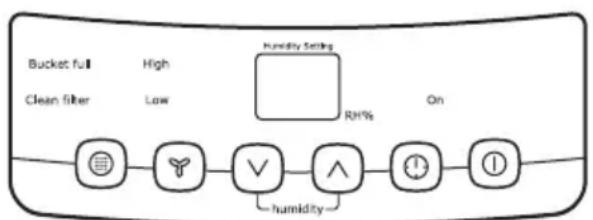
- To turn the unit on, press the ON/OFF button. The unit will run in the factory setting of CONTINUOUS and high fan speed. In the CONTINUOUS mode, the unit will only display CO and not the room humidity. It is recommended you leave the unit running in the CONTINUOUS setting for the first three or four days until the sweating and dampness odors have stopped.
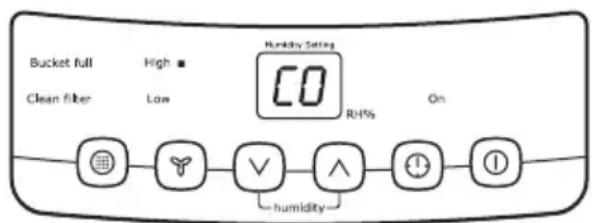
- After a few days when the Relative Humidity has declined, press the HUMIDITY or buttons to choose a value between 35% to 85%, so the room is kept at a comfortable humidity. Pressing the or buttons will change the humidity selection in 5% increments. After you have set the desired humidity, the readout will display the actual room humidity. If at any time you want to return to the CONTINUOUS Mode, pressing the HUMIDITY button will lower the Relative Humidity through the 5% increments until the display reads CO.
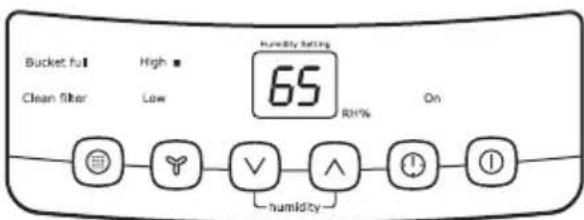
- You can also use the FAN SPEED button to change the fan speed to HIGH or LOW. The indicator light will show the setting you have selected. A higher fan speed will result in quicker moisture removal.
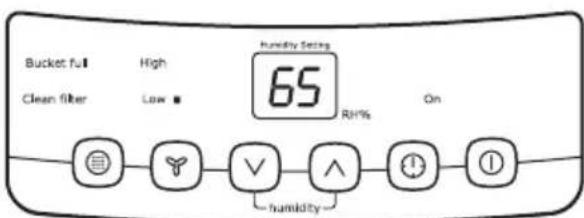
- The CLEAN FILTER light will illuminate after 250 hours of operation. At this time refer to the care and cleaning section to remove and clean the filter. Once the filter has been cleaned and replaced, simply press the FILTER button to extinguish the light.
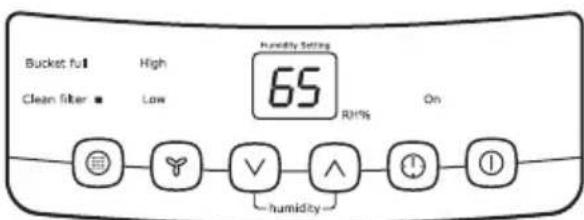
- The TIMER function enables you to either Delay Start or Delay Stop the unit in the choice from 0.5 hour to 24 hours. If the unit is running, then selecting Timer will turn the unit off in the hours that will be set (Delay Stop). If the unit is off, then selecting Timer will turn the unit on in the hours that will be set (Delay Start).
TIMER setting:
First press TIMER button, then adjust timer setting, by tapping or holding the or button to change the delay timer at 0.5 hour increments, up to 10 hours, then by 1 hour increments up to 24 hours. The control will count down the time remaining (8, 7.5, 7, etc.) until the unit either starts or stops. For the Delay Start, the fan speed and humidity maintained will be the same as previous setting. After TIMER setting finishes, pressing TIMER button again at any time will stop the TIMER function. The Delay Start/Stop Feature will work until the unit either starts or stops. Once that happens the above steps have to be repeated.
- Before entering TIMER setting, make sure power is being supplied to the unit. Before entering TIMER setting, make sure pressing HUMIDITY or button sets one desired room humidity first.
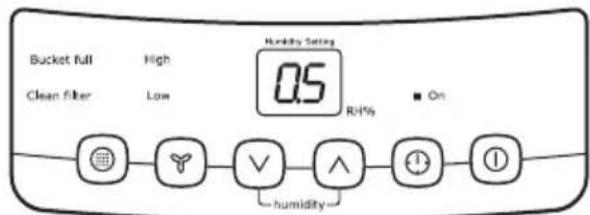
- To shut the unit down, press the ON/OFF button
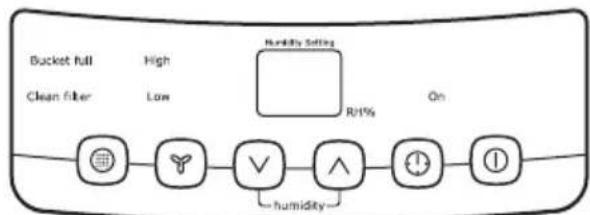
FAULT CODES
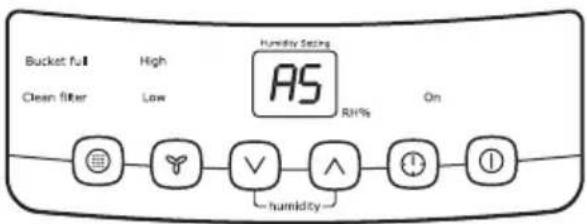
If the display reads "AS" or "ES", a sensor has failed. Contact your Authorized Service Center.
REMOVING COLLECTED WATER
- Emptying the Bucket:
- When the bucket is full, the unit will shut down and the BUCKET FULL indicator will illuminate.
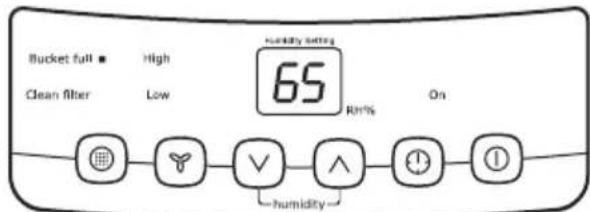
- Do not move the unit at this time otherwise water may spill on the floor.
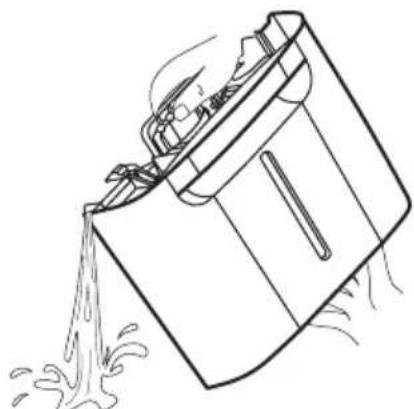
- Press sides of bucket gently to unclip the bucket from the unit.
- Remove the bucket as shown in the photographs below and empty the bucket.
- Replace the empty bucket back into the unit and once seated correctly, the unit will start up again.
- You should hear a click when the bucket is in the correct position.

Warning! Discard water from bucket.
Water is not potable and cannot be used for drinking.
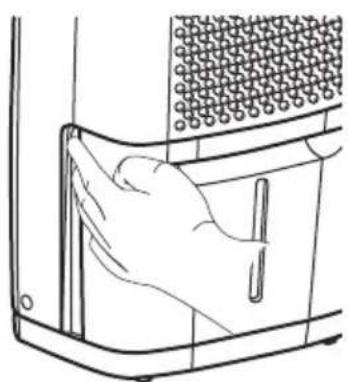
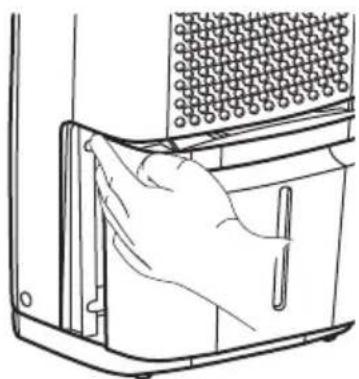
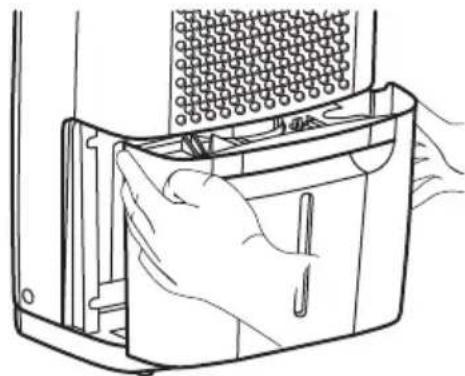
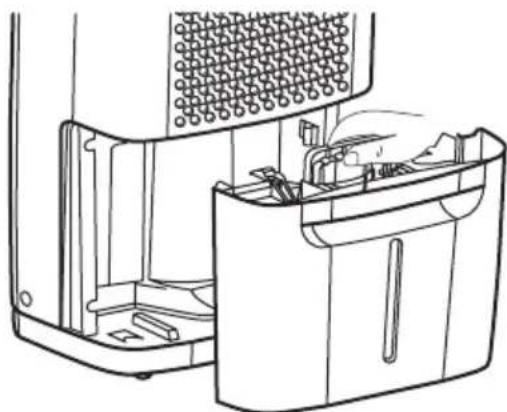
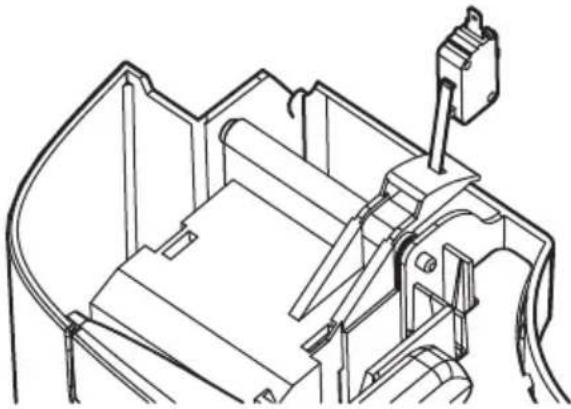
If the BUCKET FULL light does not extinguish, check that the float is correctly snapped in place as indicated by the diagram.
For continuous drainage operation, you will need a garden hose and a drain nearby to discharge the water.
fig.1 fig.2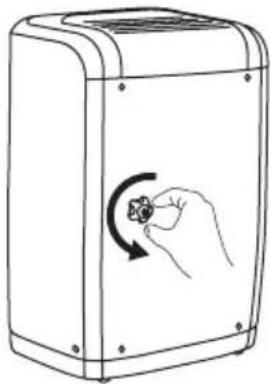
fig. 3 fig. 4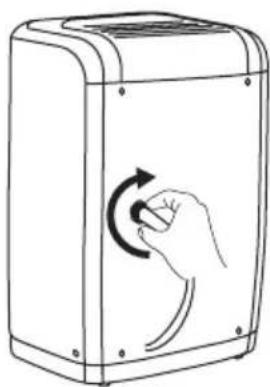
Important!
- Unscrew the drain cap on the back side of the unit. (fig.1)
- Insert the female threaded end of the hose onto the drain connector of the unit (fig. 2).
- Screw the garden hose onto the threaded portion of the connector. (fig.3)
- Make sure all the connections are secure and there are no leaks.
- Direct the hose toward the drain, making sure that there are no kinks that will stop the water flowing.
- Place the end of the hose into the drain. (fig.4)
- Select the desired humidity setting and fan speed on the unit for continuous draining to start.
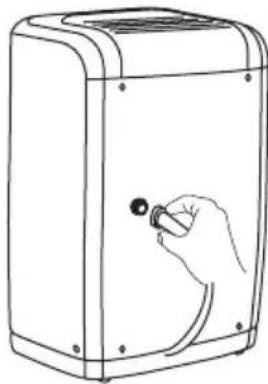
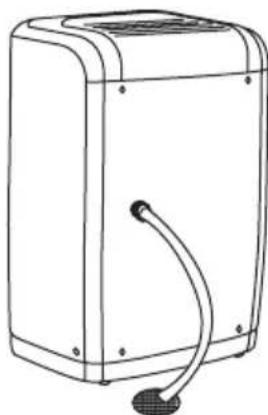
- Check the seal between the hose and the drain connector. If there is a small leak, replace the hose gasket and re-tighten the hose.
- If the mode of continuous drainage is not chosen, the drain cap must be screwed securely to prevent leakage.
CARE AND CLEANING
1. Filter
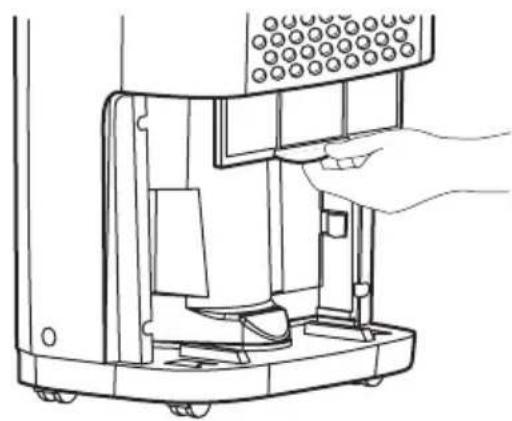
- Remove the filter every two weeks based on normal operating conditions.
- To remove the filter, remove the bucket, then pull the filter downwards.
- Wash the filter with clean water then dry.
- Re-install the filter, then replace Bucket.
2. Cabinet
- Dust cabinet with an oil-free cloth, or using a damp cloth. Vacuum grill using brush attachment.
3. Water Bucket
- Clean bucket with warm water and detergent.
STORAGE
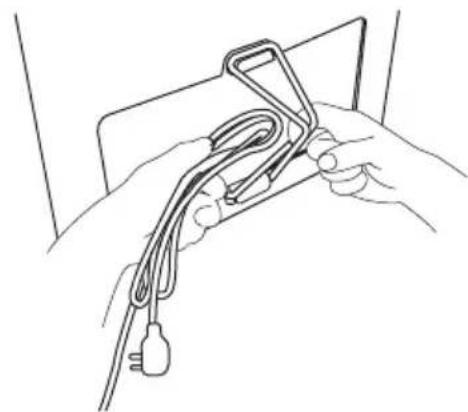
When unit is not in use, unplug and use the cord wrap shown for your model type.
15 or 25 liter Dehumidifier:
WHAT TO DO IF...
Before calling for service, review this list. It may save you time and expense. This list includes common occurrences that are not
the result of defective workmanship or materials in this appliance.
OCCURRENCE SOLUTION
Wall plug disconnected. Push plug firmly into wall outlet.
House fuse blown or circuit breaker tripped. Replace fuse with time delay type or reset circuit breaker.
| The dryness level you selected has been reached. Dehumidifier automatically shuts off when selected amount of moisture has been removed from the air. If you want to remove more moisture, Select CONTINUOUS by using the humidity button or knob. After the dehumidifier starts, reset the control to the desired setting. | |
| Bucket not installed properly. See “Removing Collected Water”. | |
| Water in the bucket has reached its preset level. Dehumidifier automatically turns off when this occurs. Empty bucket and return bucket to position. | |
| Dehumidifier is not turned on. Turn unit on. | |
| BUCKET FULL light is on. Remove bucket, empty water and re-install correctly. | |
| DEHUMIDIFIER RUNS TOO Much Windows or doors near dehumidifier are open to outdoors. Close all windows or doors to outside. | |
| Area to be dehumidified is too large. Check with your dealer to see if capacity is adequate. | |
| Air movement through dehumidifier is blocked. Grill may be dirty. Use brush attachment of vacuum cleaner to clean grill. See “Care and Cleaning”. Dehumidifier must be placed in a space that does not restrict air flowing into the rear coil or out of the front grill. | |
| Dehumidifier has been installed or restarted recently. The higher the moisture in the room, the longer the dehumidifier will operate. | |
| Dehumidifier is in the CONTINUOUS mode and will remain on in this mode, use the humidity button or knob to set a RH% higher level. | |
| DEHUMIDIFIER IS OPERATING, BUT ROOM IS NOT DRY ENOUGH. | Humidity setting is too high. Press the HUMIDITY button or rotate knob to a lower setting or choose CONTINUOUS for maximum dryness. |
| Dehumidifier has been installed or restarted recently. The higher the moisture in the room air, the longer it takes for the room air to become dry. | |
| Dehumidifier does not have sufficient clearance to operate. Air flow to front grill is blocked. See “Selecting a Location”. | |
| Room temperature is too low. Unit will not operate satisfactorily if the room temperature is below 5°C (41°F). See “Operating Conditions”. | |
| Refer to causes under DEHUMIDIFIER RUNS TOO Much. | |
| FROST APPEARS ON COILS ABOVE BUCKET. Dehumidifier has been turned on recently. This is normal due to refrigerant rushing through the coil. Frost will usually disappear within 60 minutes. | |
| Room Temperature is too low. All models will operate satisfactorily at temperatures greater than 5°C (41°F). | |
| FAN NOISE. Air is moving through the dehumidifier. This is a normal sound. | |
ENVIRONMENT CONCERNS
The symbol on the product or on its packaging indicates that this product may not be treated as household waste. Instead it should be taken to the appropriate collection point for the recycling of electrical and electronic equipment. By ensuring this product is disposed of correctly, you will help prevent potential negative consequences for the environment and human health, which could otherwise be caused by inappropriate waste handling of this product. For more detailed information about recycling of this product, please contact your local council, your household waste disposal service or the shop where you purchased the product.
Warning! THIS PRODUCT CONTAINS ECOLOGICAL REFRIGERANT GAS R 134A WITH O.D.P. = 0 (OZONE DEPLETION POTENTIAL). AT THE END OF ITS SERVICE LIFE IT MUST BE DELIVERED TO THE SPECIAL COLLECTION CENTRES. ASK FOR INFORMATION FROM YOUR MUNICIPAL WASTE DISPOSAL SERVICE. Do not vent R-134A into atmosphere: R-134A is a fluorinated greenhouse gas, covered by Kyoto Protocol, with a Global Warming Potential (GWP) = 1300
Electrolux. Thinking of you.
CHOICE OF LOCATION
Important
Electrolux. Thinking of you.
CONTENTS
Safety information 2
23
Care and cleaning 28
What to do if... 28
Environmental concerns
Electrolux. Thinking of you.
Electrolux. Thinking of you.
Electrolux. Thinking of you.
To see how we think, visit www.electrolux.com
CONTENTS
Safety information
Before first use 52
FOR YOUR SAFETY

Warning
DRAINING COLLECTED WATER
Electrolux. Thinking of you.
Electrolux. Thinking of you.
ELECTROLUX HOME PRODUCTS CORPORATION NV.
RAKETSTRAAT 40 / RUE DE LA FUSEE 40
B-1130 BRUSSEL / BRUXELLES BELGIUM
TEL: +32 2 716 26 00
FAX: +32 2 716 26 01
www.electrolux.com



- ELECTROLUX. THINKING OF YOU
- CONTENTS
- SAFETY INFORMATION
- CHILD SAFETY PRECAUTIONS
- WARNING
- FOR YOUR SAFETY
- ELECTRICAL INFORMATION
- SAFETY PRECAUTIONS
- CAUTION
- AVOID SERIOUS INJURY OR DEATH
- BEFORE FIRST USE
- SELECTING A LOCATION
- IMPORTANT
- AVOID INJURY OR DAMAGE TO THE UNIT OR OTHER PROPERTY
- HOW IT WORKS
- OPERATING INSTRUCTIONS
- TIMER SETTING
- FAULT CODES
- REMOVING COLLECTED WATER
- CARE AND CLEANING
- FILTER
- CABINET
- WATER BUCKET
- STORAGE
- WHAT TO DO IF
- OCCURRENCE SOLUTION
- ENVIRONMENT CONCERNS
- CHOICE OF LOCATION
- DRAINING COLLECTED WATER
- ELECTROLUX HOME PRODUCTS CORPORATION NV
Brand : ELECTROLUX
Model : EXD25DN3W
Category : Humidifier