
Flow A4 FA41-400WT - Humidifier ELECTROLUX - Free user manual and instructions
Find the device manual for free Flow A4 FA41-400WT ELECTROLUX in PDF.


| Product Type | Air Purifier |
| Brand | Electrolux |
| Model | Flow A4 FA41-400WT |
| Power Supply Frequency | 50/60 Hz |
| Power Cord | Grounded plug, do not use extension cord |
| Fan Speed Control | Touch control with slide function, low to max |
| Sleep Mode | Yes, low noise operation, all indicators off except sleep icon |
| Filter Type | Multi-layer composite (cannot be washed) and pre-filter (wipeable) |
| Filter Replacement Indicator | Red light flickers or stays on, press button 3s to reset |
| Control Panel | Touch icons: Power, Fan Speed, Sleep Mode, Filter Reset |
| Safety Features | Grounded plug, no extension cord, child safety warning, no user-serviceable parts |
| Cleaning Method | Unplug, wipe with damp cloth or vacuum with soft brush; do not use harsh cleaners |
| Installation | Open base by rotating anticlockwise, insert filter without plastic, close by rotating clockwise |
| Storage | Cover with plastic or return to carton for long-term storage |
| Error Code | Fan failure: all lights off, unit inoperable |
| Troubleshooting | Check power, filter compartment lock, level surface, filter insertion, outlet blockage |
| Disposal | Contains battery, do not dispose with household waste; recycle at official collection point |
| Warranty | Refer to authorized Electrolux servicer for repairs |
Frequently Asked Questions - Flow A4 FA41-400WT ELECTROLUX
User questions about Flow A4 FA41-400WT ELECTROLUX
0 question about this device. Answer the ones you know or ask your own.
Ask a new question about this device
Download the instructions for your Humidifier in PDF format for free! Find your manual Flow A4 FA41-400WT - ELECTROLUX and take your electronic device back in hand. On this page are published all the documents necessary for the use of your device. Flow A4 FA41-400WT by ELECTROLUX.
USER MANUAL Flow A4 FA41-400WT ELECTROLUX
natural_image
Abstract geometric logo with white circular and petal-like shapes on dark blue background (no text or symbols)Instruction Book
คู่มือการใช้งาน
FLOW A4

natural_image
Exterior view of a modern gray industrial device with a textured base and curved top (no visible text or symbols)Models/su :
FA41-400WT
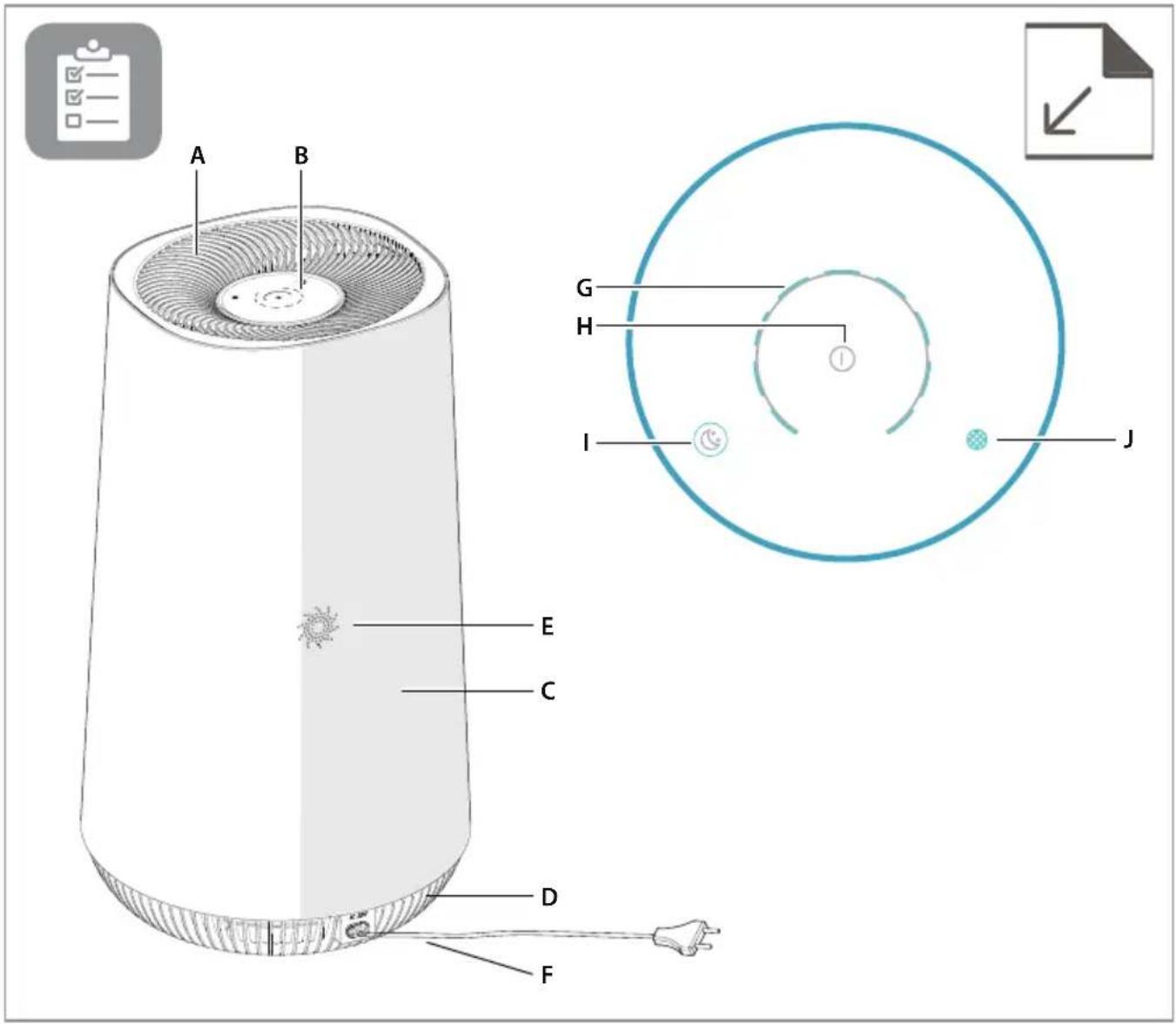
DESCRIPTION OF YOUR AIR PURIFIER FLOW A4
Appliance:
A. Air outlet
B. UI panel
C. Main body
D. Base
E. Decoration holes
F. Power cord
Control panel:
G. Fan speed control
H. Power on/off
I. Sleep mode button & indicator
J. Filter change reminder
natural_image
Diagram of a cylindrical container with internal components and directional arrows indicating rotation (no text or symbols)
natural_image
Illustration of a cylindrical container with an upward arrow indicating flow or direction (no text or symbols)
natural_image
Illustration of a cylindrical device with a blue upward arrow indicating motion or change (no text or symbols)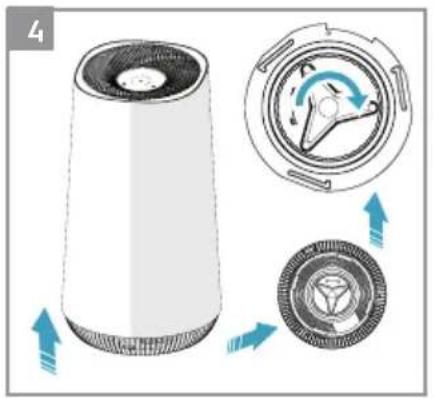
natural_image
Diagram showing a cylindrical device with internal components and directional arrows indicating rotation or flow (no text or symbols)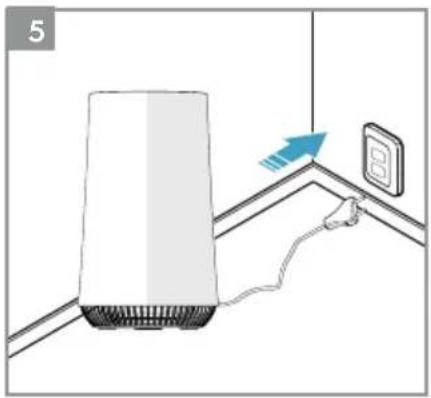
natural_image
Diagram of a server unit connected to a wall-mounted power outlet with a blue arrow indicating direction (no text or symbols)


flowchart
graph TD
    A["①"] --> B["②"]
    B --> C["③"]
    C --> D["④"]
    D --> A
SAFETY INFORMATION
This USER MANUAL provides specific operating instructions for your model. Use the unit only as instructed in this USER MANUAL. These instructions are not meant to cover every possible condition and situation that may occur. Common sense and caution must be practiced when installing, operating, and maintaining any appliance.
WARNING! Avoid fire hazard or electric shock. Do not use an extension cord or an adaptor plug. Do not remove any prong from the power cord. This appliance can be used in 50Hz or 60Hz power supply without any change.
Do not under any circumstances, cut, remove or bypass the grounding prong.
Do not store or use gasoline or other flammable vapors and liquids in the vicinity of this or any other appliance. Read product labels for flammability and other warnings.
Do not let water or any other liquid or flammable detergent enter the appliance to avoid electric shock and/or a fire hazard.
Do not touch the fan blade when removing the filter.
Children and Vulnerable People Safety
WARNING! Risk of suffocation, injury or permanent disability.
This appliance is not intended for use by persons (including children) with reduced physical, sensory or mental capabilities, or lack of experience and knowledge, unless they have been given supervision or instruction concerning use of the appliance by a person responsible for their safety. Children should be supervised to ensure that they do not play with the appliance.
Cleaning and user maintenance shall not be made by children without supervision.
Children under 3 years of age should be kept away from the appliance unless continuously supervised.
Keep all packaging away from children.
If the appliance has a child safety device, we recommend you activate it.
Electrical Information
WARNING! Avoid fire hazard or electric shock.
If you are not sure the outlet is adequately grounded or protected by a time delay fuse or circuit breaker, have a qualified electrician install the proper outlet according to the National Electrical Code and applicable local codes and ordinances.
Do not use an extension cord or an adapter plug.
Never unplug the unit by pulling on the power cord.
Always grip the plug firmly and pull straight out from the receptacle.
Do not pinch, bend, or knot the power cord.
Do not cut or damage the power cord. If the power cord is damaged, it should only be replaced by an authorized Electrolux servicer. This unit contains no user-serviceable parts. Always call an authorized Electrolux servicer for repairs.
If the supply cord is damaged, it must be replaced by the manufacturer, its service agent or similarly qualified persons in order to avoid a hazard.
Be sure to unplug the unit before cleaning to prevent shock or fire hazards.
Safety Precautions
CAUTION! Avoid Serious Injury or Death.
Do not insert or place fingers or objects into the air discharge area or front grille of the unit.
Do not start or stop the unit by unplugging the power cord or turning off the power at the electrical box.
In the event of a malfunction (sparks, burning smell, etc.), immediately stop the operation, disconnect the power cord, and call an authorized Electrolux servicer.
Do not operate the unit with wet hands.
Do not pull on the power cord.
CAUTION! Avoid Injury or damage to the unit or other property.
Do not direct airflow at fireplaces or other heat related sources as this could cause flare ups.
Do not climb on or place objects on the unit.
Do not hang objects off the unit.
Do not place containers with liquids on the unit.
Turn off the unit at the power source when it will not be used for an extended period of time.
Operate the unit with air filter in place.
Do not block or cover the intake grille, discharge area and outlet ports.
Ensure that any electrical/electronic equipment is 30 cm away from the unit.
DISPOSAL

This symbol on the product indicates that this product contains a battery which shall not be disposed with normal household waste..
This symbol on the product or on its packaging indicates that the product may not be treated as household waste.
To recycle your product, please take it to an official collection point or to an Electrolux service center that can remove and recycle the battery and electric parts in a safe and professional way. Follow your country's rules for the separate collection of electrical products and rechargeable batteries.
Thank you for choosing the Electrolux air purifier.
Always use original accessories and spare parts to get the best results. This product is designed with the environment in mind. All plastic parts are marked for recycling purposes.
BEFORE STARTING
- Read this manual carefully.
- Check that all parts described are included.
- Pay special attention to the safety precautions!
SET UP
The filters have to be installed before use.
Caution: Switch off the device before installing filters.
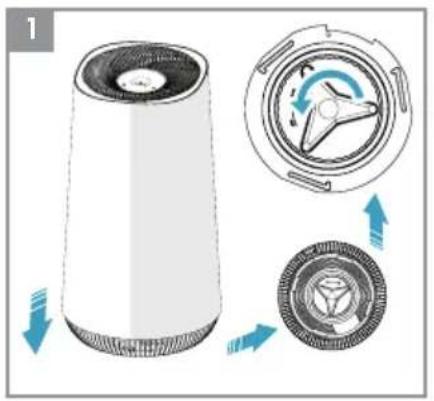
1 Open the base of the filter
Open the product by rotating the base in anticlockwise direction with the handle provided at the bottom till it comes loose (ref. picture 1).
2 Take out the filter and remove the filter bag
Carefully remove the filter incl. plastic packaging from the unit and break open the plastic bag and discard appropriately (ref. picture 2).
3 Install the filter
Carefully insert the filter back into the product without the plastic packaging (either end of the filter works). Take care that the filter is placed in the center of the cavity (ref. picture 3).
4 Close the base
Close the product by rotating the base in clockwise direction with the handle provided at the bottom till it is securely in place. There two opposing triangular marks on the base of the product to identify the leading edge for turning (ref. picture 4).
OPERATION
Caution: After filter is installed correctly, please ensure product is placed on a level surface before proceeding further. Ensure there is enough free space on top of and around the product.
5 Connect the power plug.
6 Power on
Power on the product by gently touching the ON/OFF icon on the center of the product (ref. picture 6).
7 Air speed control
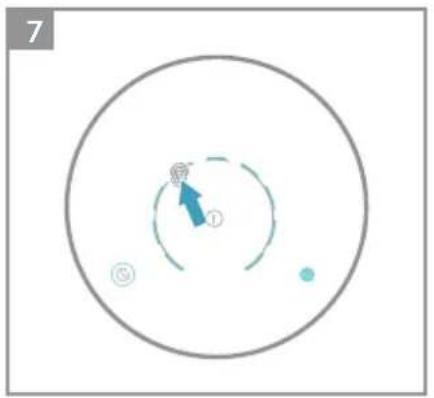
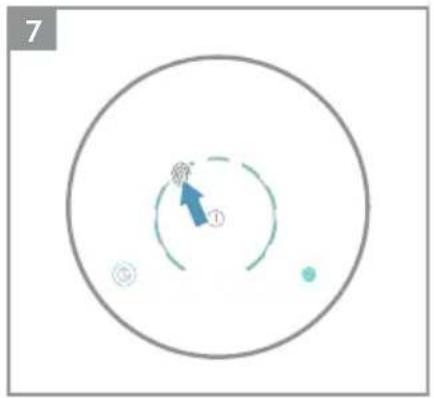
Change the fan speed by gently touching desired fan speed icon on the product. You can also slide your finger across the arc to change fan speed, Low speed as default setting and if select Max fan speed, it will reach the Max fan speed within 20s. (ref. picture 7).
8 Sleep mode
Chose the SLEEP mode by gently touching 🔊 icon on the product. In SLEEP mode unit will operate at the low noise level and all indicators except for SLEEP icon will go off. (ref. picture 8).
9 Power off
Power down the product by gently touching the ON/OFF icon on the center of the product (ref. picture 9).
FILTER CHANGE INDICATOR
10 The filter change indicator will light up to remind you to change the filter.
- When filter change indicator flicker with red light, please replace the filter and reset the filter change indicator.
- When filter change indicator stop flicker and the red light fix, please replace the filter immediately and reset the filter change indicator.
11 Filter change indicator reset operation
Press the filter change button "for 3s and filter change indicator will reset, then red light will go off.
CARE AND CLEANING
12 Unplug the appliance before cleaning to prevent shock or fire hazards. Use a damp cloth or a vacuum cleaner with soft brush to clean your air purifier.
13 The plastic part of the cabinet and top may be cleaned with an oil-free cloth or washed with a cloth dampened in a solution of warm water and mild liquid dishwashing detergent. Be sure to wring excess water from the cloth before wiping around the controls. Excess water in or around the controls may cause damage to the appliance.
14 Never use harsh cleaners, wax or polish when cleaning the unit.
STORAGE
15 If you are not planning to use the appliance for a long time, cover it with plastic or return it to its carton.
NOTE: The multi-layer filter can not be washed, it can only be replaced.
CAUTION!
Do not touch the fan blade when removing the multi-layer filter.
ERROR CODE
16 Fan failure error code, when fan failure occurs, the light of screen will all go off and the unit can't be operated then.
TROUBLESHOOTING
When fault indicators show that the system is not operating properly, perform the following check.
Commonly Asked Questions & Topics
Carry out the operations below for commonly-occurring questions or faults.
| Questions or Faults Corrective | Possible Diagnosis | |
| Can the filters be washed? | NO | Replace the compound filter instead of wash, the pre-filter can be wiped. |
| The control panel does not seem to work. | Power issue or the filter compartment if unlocked. | Check if the equipment is powered on and confirm whether the filter compartment door is locked. |
| The equipment emits a lot of noise. | The installation location is not at even level or the filter is not properly inserted. | Install the equipment on a level surface and re-confirm filter installation position and order. |
| The equipment operates normally but the outgoing air volume is significantly reduced. | The outlet might be blocked by a foreign object or the filter has not been replaced in a timely manner. | Please re-adjust the equipment installation position to ensure enough space is reserved, and confirm that filter have been replaced according to filter replacement indicator status. |
| If the fault encountered is not listed above, please call the Customer Service Hotline. | ||
The software in the air purifier is partly based on free and open source software. To see the full copyright information and applicable license terms, please visit: www.electrolux.com

natural_image
Diagram of a cylindrical device with internal components and directional arrows indicating rotation or flow (no text or symbols)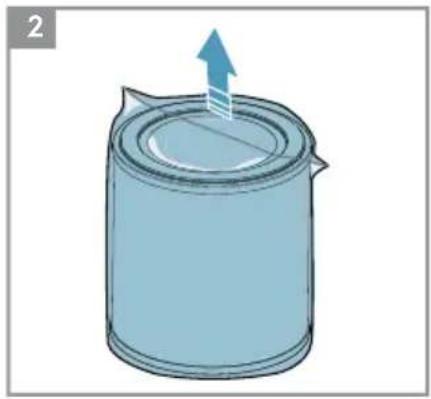
natural_image
Illustration of a cylindrical container with an upward arrow indicating motion or force (no text or symbols)
natural_image
Illustration of a cylindrical device with a blue upward arrow indicating motion or change (no text or symbols)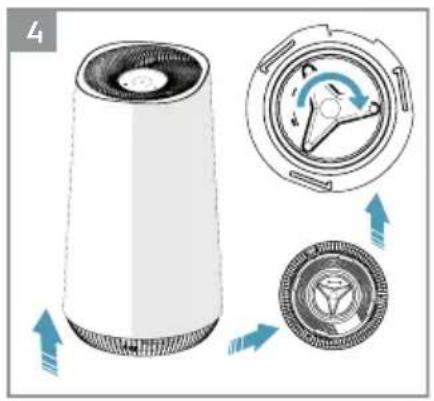
natural_image
Diagram of a cylindrical device with internal components and directional arrows indicating rotation or assembly (no text or symbols)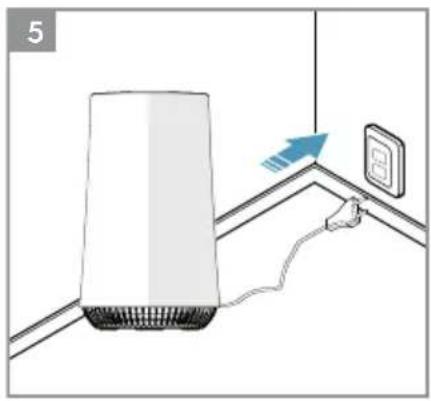
natural_image
Diagram showing a white appliance connected to a wall-mounted electrical outlet with a blue arrow indicating airflow direction (no text or symbols)

chemical
Diagram of a nuclear reaction showing electron movement and charge distribution around a protons
flowchart
graph TD
    A["①"] --> B["②"]
    B --> C["③"]
    C --> D["④"]
    D --> E["⑤"]
    style A fill:#fff,stroke:#000
    style B fill:#fff,stroke:#000
    style C fill:#fff,stroke:#000
    style D fill:#fff,stroke:#000
    style E fill:#fff,stroke:#000
natural_image
Abstract geometric logo with three overlapping gray shapes forming a stylized 'K' (no text or symbols)


- Instruction Book
- คู่มือการใช้งาน
- FLOW A4
- DESCRIPTION OF YOUR AIR PURIFIER FLOW A4
- Appliance:
- Control panel:
- SAFETY INFORMATION
- Children and Vulnerable People Safety
- Electrical Information
- Safety Precautions
- DISPOSAL
- BEFORE STARTING
- SET UP
- OPERATION
- FILTER CHANGE INDICATOR
- CARE AND CLEANING
- STORAGE
- CAUTION!
- ERROR CODE
- TROUBLESHOOTING
Brand : ELECTROLUX
Model : Flow A4 FA41-400WT
Category : Humidifier