AF 5077PS - Digital photo frame AGFA - Free user manual and instructions
Find the device manual for free AF 5077PS AGFA in PDF.



| Product Type | 7-inch Digital Photo Frame |
| Brand | Agfa |
| Model | AF 5077PS |
| Dimensions (W x H x D) | 190 x 153 x 80 mm |
| Weight | 0.4 kg |
| Power Supply | Input 100-240 V~, 50/60 Hz; Output 5 V / 2 A |
| Power Consumption | 5.0 W (in slideshow mode) |
| Screen Diagonal | 7 inches (17.8 cm) |
| Display Resolution | 800 x 600 pixels |
| Screen Format | 4:3 |
| Internal Memory | 128 MB (up to 500 JPEG photos) |
| Compatible Memory Cards | SD, MMC, MS, SDHC, XD |
| Supported Photo Formats | JPEG |
| Connectivity | USB Host port (USB key), Mini USB (for computer) |
| Main Functions | Slideshow with background music (via external memory), thumbnail display (16/20 images), rotation, zoom, file copy/delete |
| Remote Control | Yes, with batteries (type not specified) |
| Additional Functions | Clock, alarm, calendar, auto on/off, brightness/contrast/saturation adjustment |
| Frame | Interchangeable (magnetic attachment) |
| Operating Temperature | 5 to 45 °C |
| Relative Humidity | 20 to 80% |
| Care and Cleaning | Clean with a soft, dry cloth. Do not use abrasive products. |
| Safety | Respect the indicated mains voltage. Do not insert a memory card while accessing. Use only the supplied adapter. |
Frequently Asked Questions - AF 5077PS AGFA
User questions about AF 5077PS AGFA
0 question about this device. Answer the ones you know or ask your own.
Ask a new question about this device
Download the instructions for your Digital photo frame in PDF format for free! Find your manual AF 5077PS - AGFA and take your electronic device back in hand. On this page are published all the documents necessary for the use of your device. AF 5077PS by AGFA.
USER MANUAL AF 5077PS AGFA
Koportible Speicherkarten....SD/MMC/MS/SDHC/ XD
Fotoformate. JPEG
Copyright © 2009 Sagem Communications
Introduction
Cher client
raccordement USB / port USBUSB-Host, USB Device
Cartes mémoire photo compatibles .SD/MMC/MS/ SDHC/XD
Format Photo .JPEG
Cartes mémoire photo compatibles . SD/MMC/MS/SDHC/XD
Format Photo JPEG
\section*{Caracteristiques techniques AF 5087MS}
Dimensions (× × ) 203x163x90mm
Poids 0,5kg
Cartes mémoire photo compatibles . SD/MMC/MS/SDHC/XD
Format Photo JPEG
Formats musique MP3
Formats video........Motion Jpeg.Mpeg-4
FR

\section*{Caracteristiques techniques AF 5107PS}
Dimensions (× × ) 255x203x90mm
Poids 0,8kg
Cartes mémoire photo compatibles ..SD/MMC/MS/ SDHC/XD
Format Photo .JPEG
\section*{Caracteristiques techniques AF 5107MS}
Dimensions (× × ) 255x203x90mm
Poids 0,8kg
raccordement USB / port USBUSB-Host, USB Device
Cartes mémoire photo compatibles .SD/MMC/MS/ SDHC/XD
Format Photo .JPEG
Formats musique MP3
Formats video Motion Jpeg, Mpeg-4
Copyright © 2009 Sagem Communications

Introduction
Dear Customer
Thank you for purchasing our photo frame. Get ready to experience photography like never before! The photo frame allows you to view photos, audio and video files—all without a computer.
High definition LCD screen
Your digital photo frame includes a built-in memory, a memory card slot and a USB port. Files on the built-in memory can be deleted and files on memory card and USB-disc can be copied.
Supports browse mode (thumbnails of 20 images per page at a time). Your digital photo frame supports photo rotate and stretch function.
An automatic, continuous slide show with background music lets you enjoy all of your photos with ease.
The included remote control makes it simple to select photo-, music- and movies files, change settings and more.
Additional functions like time and date display, alarm clock and an automatic on and off switch are also available.
We hope you enjoy your device and its many functions!
About this User Manual
With the installation guide on the following pages, you can start using your device quickly and easily. Detailed descriptions can be found in the following sections of this user manual.
Read the entire user manual carefully. Follow all safety instructions in order to ensure proper operation of your device. The manufacturer accepts no liability if these instructions are not followed.
Multiple models of this device series are described in this user manual. Please note that some functions are only available with specific models.
Symbols Used
DANGER!

DANGER!
Warns about dangers for people, damage to the device or other objects as well as possible loss of data. Injuries or damage can result from improper handling.
Notice

Troubleshooting
This symbol designates tips that will help you to use your device more effectively and easily.
Safety Instructions and Recommendations
EN
Do not make any changes or settings that are not described in this user manual. Physical injury or damage to the device or loss of data can result from improper handling. Take note of all warning and safety notes indicated.
Setting Up the Device
The device is exclusively for indoor use only. The device should rest securely on a stabile, flat surface. Position all cables in such a way that no one will stumble on them, thus avoiding possible injuries to persons or damage to the device itself.
Always handle the unit with care. Avoid touching the LCD screen. Never place heavy or sharp objects on the LCD panel, frame or power cord.
Protect the device against direct sunlight, heat, large temperature fluctuations and moisture. Do not place the device in the vicinity of heaters or air conditioners. Observe the information on temperature and humidity in the technical data.
The device should not be switched on immediately after being moved from a cold to a warm room or vice versa or into a cold room which heated up quickly. In such cases, wait at least three hours until the device has adapted to the changed conditions (temperature, humidity...).
In the event that the device becomes too hot, or if you see smoke coming from the device, you must immediately pull the power cable out of the power socket. Have your device examined by trained professionals at a technical service location. To prevent the spread of fire, open flames should be kept away from the device.
Do not plug in the device in moist rooms. Never touch the mains cable or the mains connection with wet hands.
Do not allow liquids to enter into the device. Disconnect the device from the power socket if liquids or foreign objects have entered the device and have your device examined by trained professionals at a technical service location.
Do not allow children to handle the device without supervision. The packing materials should be kept out of the hands of children.
Power Supply
Use only the enclosed power adapter (see chapter Appendix / Technical Data). Check whether the mains voltage of your device [indicated on the type label] matches the mains voltage available at the setup location. This equipment complies with the voltage type specified on the unit.
Never touch the power cable if the insulation is damaged. Replace damaged wires immediately. Use suitable cables only; if necessary please contact our technical customer service or your retailer.
Before cleaning the surface of your device, disconnect it from the power network. Use a soft, lint-free cloth. Never use liquid, gaseous or easily flammable cleansers (sprays, abrasives, polishes, alcohol). Do not allow any moisture to reach the interior of the device.
Only clean the display with a dry, soft cloth. If the display breaks, a mildly corrosive liquid may escape. Avoid all contact with your skin and eyes.
haRepairs
Do not make any repairs to the device yourself. Improper maintenance can result in injuries or damage to the device. Only have your device repaired by an authorised service centre.
Do not remove the type label from your device; this would void the warranty.
Photo Memory Media
Only use storage media that are compatible with the device. In order to prevent damage to the card or the unit, please turn off the power before removing or inserting the card.
Never pull out the memory card while the device is accessing it. This could cause data to be damaged or lost.

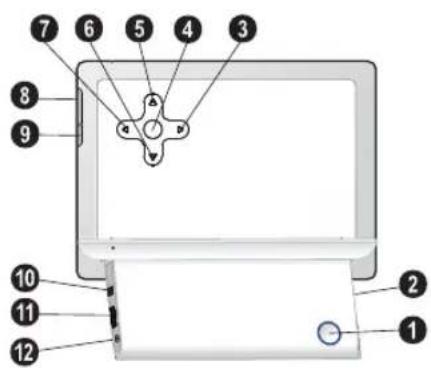
Overview
Device Overview
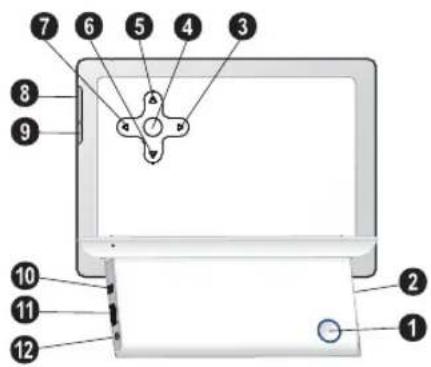
1 On/Off switch
2-Slot for Memory card
- Navigating in the Menu / Decrease the brightness, contrast and colour saturation / Skips to the previous image, previous row or page
OK-Confirms the selection / Starting, interrupting the slide show
- Navigating in the Menu / Increase the volume / Switch on the background music during slide show
6 -Navigating in the Menu / Decrease the volume
7 -Navigating in the Menu / Increase the brightness, contrast and colour saturation / Skips to the next image, next row or page
8 MENU—Calling the main menu / press and hold: Switch on the analog clock
9- Calling up the settings menu
10 Mini USB connection - for connecting a computer
1 Socket—USB port for a storage medium
Socket - Port for power supply
Remote Control
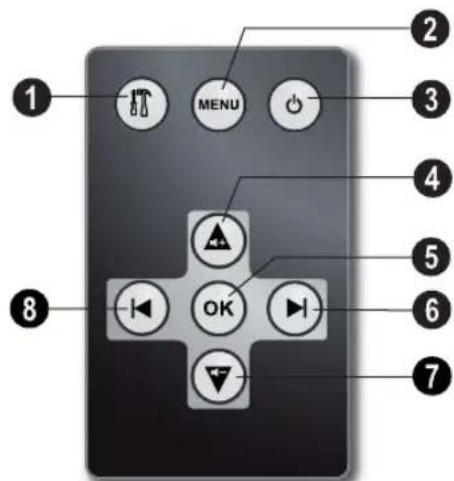
[AF5077/5087/5107MS]
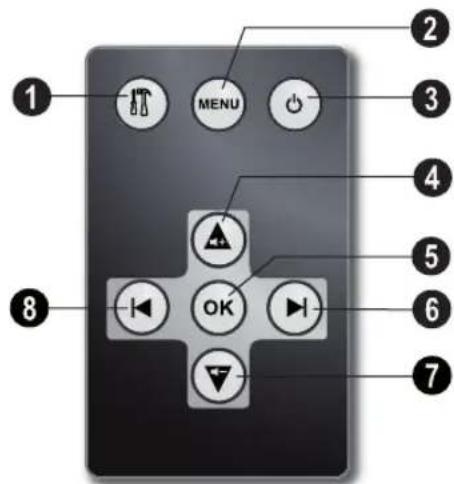
1- Calling up the settings menu
2- Calling the main menu / press and hold: Switch on the analog clock
Switching On and Off
4—Navigating in the Menu / Increase the volume / Switch on the background music during slide show
-Confirms the selection / Starting, interrupting the slide show
6—Navigating in the Menu / Increase the brightness, contrast and colour saturation / Skips to the next image, next row or page
7—Navigating in the Menu / Decrease the volume
- Navigating in the Menu / Decrease the brightness, contrast and colour saturation / Skips to the previous image, previous row or page
Initial Operation
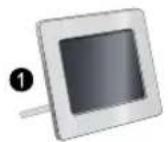
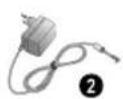
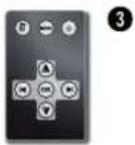
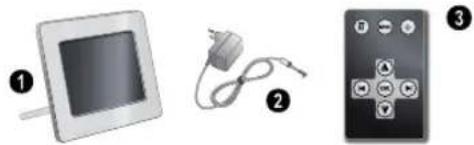
Packing Contents
Digital photo frame with bracket
Power supply with exchangeable plugs
A remote control (with battery) [AF5077/5087/5107MS]
User Guide (not depicted)
Notice

Missing Package Contents
If one of the parts is missing or damaged, please contact your retailer or our customer service.
Connecting power supply
CAUTION!

Mains Voltage at the Site of Installation! Check whether the mains voltage of your device (indicated on the type label) matches the mains voltage available at the setup location.
1 Choose the right plug for your country and slide it onto the power adapter. Ensure that the plug snaps in completely.
2 Insert the small plug of the power supply into the socket on the rear side of your device. Insert the power supply unit into the socket.
Connecting to the PC
Using the USB cable, you can connect your photo frame to a computer to transfer files between the internal memory and computer.
1 Switch the device off using the on/off switch on the rear.
2 With the frame turned off, connect the small end of the cable to the digital picture frame and the large end to your computer.
3 Switch the device on using the on/off switch on the rear. Allow the computer a few moments to recognize the new hardware. Compatible photo, music and video files can be copied onto the internal memory.
4 If the connection with the computer is disconnected, the digital photoframe will restart automatically.
Inserting a Memory Card
1 Insert a memory card into the appropriate card slot at the rear of the device. Your photo frame supports the following memory cards: SD/ MMC/MS/SDHC/XD.
DANGER!

Inserting a Memory Card!
Only use storage media that are compatible with the device.
Never pull out the memory card while the device is accessing it. This could cause data to be damaged or lost.
2 Switch the device on using the on/off switch on the rear. The player will start slide show after the start screen be displayed.
Notice

Many Photos on the Memory Card
If the memory card contains many photos, it can take some time until the slide show starts.
3 Press OK at the rear during a slide show to stop the slide show.
Notice

Using USB device and memory card at the same time
If a USB storage device is used at the same time as a storage card, the images from the memory card are displayed first.

Installing or Changing the Batteries of the Remote Control
DANGER!

Risk of explosion with incorrect type of batteries
CAUTION! RISK OF EXPLOSION IF BATTERY IS REPLACED BY ONE OF AN INCORRECT TYPE.
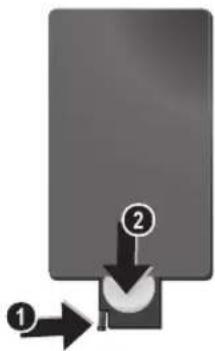
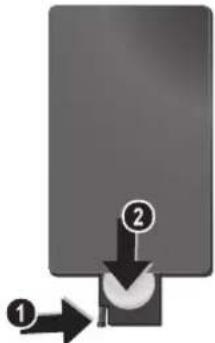
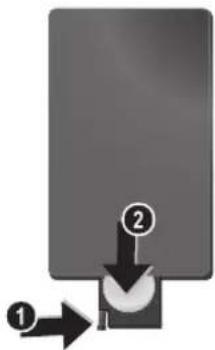
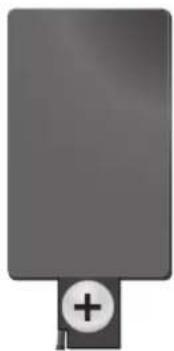
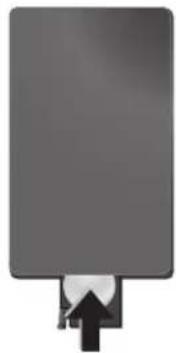
1 Take the battery compartment from the remote control by opening the locking mechanism [1] and pulling out the battery compartment [2].
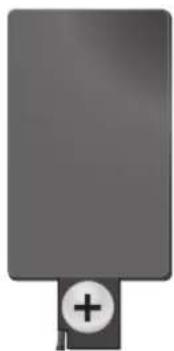
2 Insert the new batteries into the battery compartment with the positive and negative poles as shown on the back of the remote control. Make sure the polarities [+ and -] are aligned correctly.
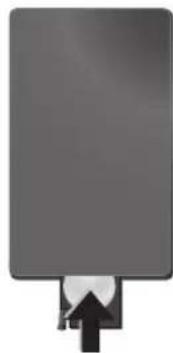
3 Push the battery compartment back into the remote control until the locking mechanism engages.
Notice

Normally the batteries will last for around one year. If the remote control does not work, please replace the batteries. If the player is not used for a long time, take out the batteries. So you can prevent leakage and possible damage to the remote control.
The batteries used should be disposed of according to the recycling regulations of your country.
Using the Remote Control
Point the remote control to the remote sensor on the front panel of the device. Its working limits is within an angle of 30 degrees and a distance of 2 meter. When using the remote control, no obstacle should be placed between the remote control and remote sensor.


Playback
Overview of the Menu Functions
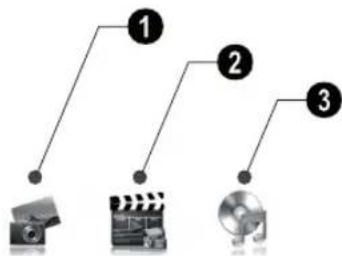
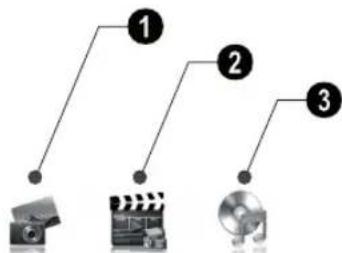
There are three items on the main menu.
Photo Menu
Video Menu [AF5077/5087/5107MS]
Music Menu [AF5077/5087/5107MS]
Navigating in the Menu
1 Press MENU on the remote control or MENU on the device.
2 Select the desired menu using
3 Confirm with
Photo Playback
1 Select the photo menu in the main menu and confirm using OK.
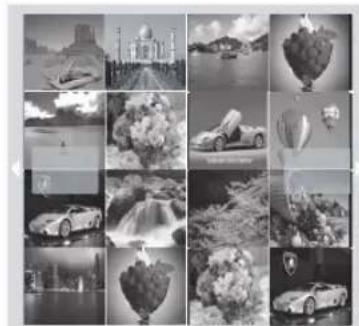
2 Then the frame will display 16 thumbnail images per page.
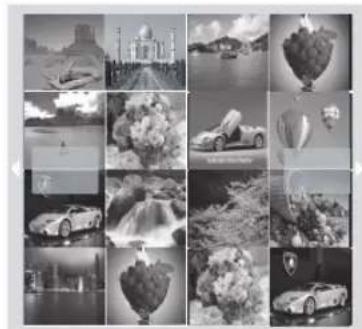
3 Use / or / to select the image from which to start the slide show
4 Press OK to start the slide show.
5 Press OK to pause the slide show. A 'pause symbol' appears on the screen.
6 Press / to skip top the previous or next image.
7 End the slide show using MENU.
Notice

Calling up Menu
During the slideshow you can return to the main menu by pressing MENU at any time.
Setting the Background Music of the Slide Show
[AF 5077/5087/5107MS]
Notice

As background music, you can only use files that are stored together with the photos in the internal memory on the memory card or the USB connection.
1 During the slide show press on the remote control or on the device, to start the background music.
Notice

Using / , set the volume.
MusicPlayback
[AF5077/5087/5107MS]
1 Select the music menu in the main menu and confirm using.
2 Using or select the music title you want to play.
3 Press OK to start playback. Additional informations will be displayed during playback.
4 To stop, press OK.
EN

Movie Playback
[AF5077/5087/5107MS]
1 Select the video menu in the main menu and confirm using.
2 Using or select the video title you want to play.
3 Press OK to start playback. To stop, press OK.
Notice

Additional Playback Functions
During playback, you can skip to the previous or next song by using / or
During playback, press the OK on the remote control to pause and to resume playback.
Adjusting Volume Level
[AF5077/5087/5107MS]
During playback you can adjust the volume using
/ on the remote control. Press repeatedly to switch off the volume [mate function].
Settings
The settings menu contains four items and can be called up using on the device or on the remote control.
ECO Settings [Automatically switch on/off, Adaption of the LCD brightness automatically [AF5077/5087/5107MS])
Picture-Settings (Slide show settings, rotating image)
3 File Management (Copy files, delete files, playlists)
4 Basic-Settings [Brighness, contrast, date, clock]
10 Press and select the symbol using ()
11 Confirm with OK.
12 You can exit with
Notice

Switching Automatic On/Off
You can deactivate the automatic on/off. The actual setting is retained.
1 Press
2 Using / select the symbol and confirm with OK.
3 The symbol is selected.
4 Select using I the black/white symbol (automatic switched off) or the coloured symbol (automatic switched on).
5 Confirm with OK.
6 You can exit with
ECO Settings
The digital picture frame can be switched on or off automatically or the brightness of the LCD screen can be adapted according the ambient light (AF5077/5087/5107MS).
Select from the following settings:
Switching On and Off Automatically
The digital photo frame can be switched on or off at a particular time of the day.
1 Press
2 Us ing with OK.
3 The symbol is selected.
4 Use to select the coloured symbol and confirm using OK.
5 Select the time at which the digital photo frame should be switched on using / .
6 Con f i r m w i t h OK. The colour of the cursor will change from white to red.
7 Select the time at which the digital photo frame should be switched off using /
8 Con f i r m w i t h OK. The colour of the cursor will change from red to white. The time period when the digital picture frame is switched on, is marked green.
9 To delete a time period, mark the time period again. The green marking will be removed.
Automatic adaption of the LCD brightness
[AF 5077/5087/5107MS]
With this function the brightness of the LCD screen can be adapted according the ambient light.
1 Press
2 Us ing with OK.
/ select the sy
bol and confirm
3 Us ing OK
select the symbol
and confirm with
4 Select using / the black/white symbol
firma automatic switched off] or the coloured symbol [automatic switched on].
5 Confirm with OK.
You can exit with
![AGFA AF 5077PS - [AF 5077/5087/5107MS] - 1](/content/2026/02/400424/images/e889bf5d213173c34f3009ac309cefdf5064e819779c1a3d0b020754d5b699bb.jpg)
![AGFA AF 5077PS - [AF 5077/5087/5107MS] - 2](/content/2026/02/400424/images/67522963a97f0b3b6209d13565b138f09f64838bf1a8c6156c4ee4cb3c649bd5.jpg)
![AGFA AF 5077PS - [AF 5077/5087/5107MS] - 3](/content/2026/02/400424/images/d3613ea2277bdc13d00ed451e6723fe2d0be6cbf4fc6179501e940da2fe10d3f.jpg)
Modifying the Picture Settings
Here you can rotating the images, changing aspect ratio, determine the transition effects or adjusting the slide show speed.
1 Press
2 Us i ng confirm with

select
[Picture Setting]
and
Using

to select icon and press OK
to start copying or deleting.
Notice

Copy all Files from the Memory Card
Select and confirm using OK to copy all files from the memory card to the internal memory.
3 Use to select the required symbol. Rotating Image-Change the orientation of the image
Aspect Ratio—The digital photo frame has a wide screen with 4:3 aspect ratio. Select whether you would like to view the image in the original format, in the wide screen format (16:9) or if the image should be stretched to match the shape of the screen.
Transition Effects- Allows you to choose different styles of slide show effects.
Slide Show Speed-Select from the displayed times.
Personal Frame - Select from different frames for displaying the pictures.
4 Select the required setting using () / () .
5 Confirm with OK.
6 You can exit with
File Management
Files on the memory card or USB disk can be copied. Files in the internal memory can be deleted.
Notice

Cancel Process
Select and confirm using OK to cancel the process.
8 The screen will display the processing bar. After finish copying, you can find the image in the internal memory.
Starting Mode
Select whether you would like images, movies or images and movies to be played automatically after Power on.
1 Press
2 Us i n g select [File Management] and confirm with OK.
3 Using ④ select and confirm with OK.
4 Select from the options displayed using I and confirm using OK.
5 You can exit with
Copy/DeleteFiles
1 Press
2 Us i ng confirm with

select

Management) and
3 Us ing confirm with


(delete) and
4 Using / , / select the file you want to copy or delete.
5 Mark the file using OK.
Notice

Cancelling the Selection
Press again OK to cancel the selection.
6 U sin g tom of the sc

to select the symbol line at the bot

Playlists
Create your own playlist for images, movies and music.
Only images, movies and music in this playlists will be played back. You can create up to five playlists.
Creating Playlist
1 Press
2 Us ing confirm with
select
(File Management)
and
Modifying the Basic Settings
1 Press
2 Us ing with OK.
I select the symbol
and confirm
3 Use A/V to select the setting you would like to allocate.
4 Confirm with .
You can allocate the following settings:
D Brightness, Contrast, Colour saturation)-Adjustment of brightness, cont and colour saturation of the LCD screen.
[Clock]—Setting the time and date.
[Alarm] [AF5077/5087/5107MS]-Setting of the alarmtime, on/off of the alarm and the selection of the alarmtone.
1 (Calendar) - Setting of year, month, day.
Default-Restore the settings to the facility default.
Select the desired setting using i
6 Confirm with
7 Modify the setting using I
8Cfnf m Rk modified setting using
9 You can exit with
2 Us i n g confirm with
3 Select [Playlists] using with
select (File Managen
4 Select using / wether you would like to create a playlist for music, images or movies.
5 Confirm with OK.
6 Confirm 'OFF' using OK to create a new playlist.
7 Us ing with OK.
select e.g. playlist 1 a
8 Select using 山 /山 or 山 /山 the file you want to add to the playlist. Mark the file using OK.
9 Mark further files
10 Using to select the symbol line at the bottom of the screen.
11 Using / to save the p
to select list.
icon and press OK
12 You can exit with
Switching Playlist On/Off
1 Press
2 Us i ng confirm with
select (FileManagen
3 Select [Playlists] using / and confirm with .
4 Select using / wether you would like to switch on a playlist for music, images or movies.
5 Confirm with OK.
6 Confirm e.g. playlist1 using OK.
7 Select the desired playlist using I
Notice

Switching Playlist Off
With the selection of 'OFF' using / the playlist will be switched off. All images, movies or music files are available again.



Service
Changing the frame
You can change the frame of the device using the picture frames supplied. The frames are held with magnets.
- Press on the change frames key on the back of the device. Remove the frame.
2 Place the picture frame onto the device until it engages on the magnets.
| Problems Solutions | |
| Photo Frame does not power on. Check that you can connect the AC adapter to the frame properly. | Connect the AC adapter to the frame properly. |
| Cannot save files Make sure that enough internal memory is available. Re-start the picture frame and delete some files in order to free up memory space. | Memory is available. Re-start the picture frame and delete some files in order to free up memory space. |
| No sound Make sure the file format is supported, the computer and the frame are correct connected or the memory card is not damaged. | Compu- ter and the frame are correct connected or the memory card is not damaged. |
| Memory card can not be recognized If you connect the frame to a computer, the inserted memory card can not be recognized. | The frame to a computer, the inserted memory card can not be recognized. |
| Not all files of the memory card will be shown for the slide show, movie and music play back. | Check whether a playlist is switched on. |
Appendix
Technical Data AF 5077PS
Recommended Ambient. 5-45°C
Relative humidity. 20-80%
Power Consumption
Device is switched on [slide show].....5,0W
Screen size 7
Aspect ratio 4:3
Resolution. 800x600 Pixel
Internal memory.....128MBMB or up to 500 photos
USB Port.. USB-Host
Compatible Memory Cards.SD/MMC/MS/SDHC/XD
Photo formats. JPEG
Technical Data AF 5077MS
Dimensions (× × ) 190x153x80mm
Weight 0.4kg
Mains Connection Input: 100 - 240V /50 - 60Hz Output: 5V = ~ / ~2A
Recommended Ambient. 5-45°C
Relative humidity. 20-80%
Power Consumption
Device is switched on [slide show] 4,3W
Screen size. 7
Aspect ratio 4:3
Resolution. .800x600 Pixel
Internal memory..256 MBMB or up to 1000 photos
USB Port USB-Host, USB Device
Compatible Memory Cards.SD/MMC/MS/SDHC/XD
Photo formats.JPEG
Music formats MP3
Video formats Motion Jpeg, Mpeg-4
Technical Data AF 5087PS
Dimensions [L× H× W] 203×163×90mm
Weight 0.5kg
Mains Connection Input: 100 - 240V /50 - 60Hz Output: 5V = ~ / ~2A
Recommended Ambient. 5-45°C
Relative humidity. 20-80%
Power Consumption
Device is switched on [slide show] 5,4W
Screen size 8
Aspect ratio 4:3
Resolution. 800x600 Pixel
Internal memory....128 MBMB or up to 500 photos
USB Port USB-Host
Compatible Memory Cards SD/MMC/MS/SDHC/XD
Photo formats. JPEG
Technical Data AF 5087MS
Dimensions [L× H× W] 203×163×90mm
Weight 0.5kg
Mains Connection Input: 100-240V~/50-60Hz Output: 5V = /2A
Recommended Ambient. 5-45oC
Relative humidity. 20-80%
Power Consumption
Device is switched on [slide show] 6,3W
Screen size. 8
Aspect ratio 4:3
Resolution. 800x600 Pixel
Internal memory.....1GBMB or up to 4000 photos
USB Port USB-Host, USB Device
Compatible Memory Cards SD/MMC/MS/SDHC/XD
Photo formats. JPEG
Music formats MP3
Video formats Motion Jpeg, Mpeg-4


Technical Data AF 5107PS
Recommended Ambient. 5-45°C
Relative humidity. 20-80%
Power Consumption
Device is switched on [slide show].6,1W
Screen size 10.4
Aspect ratio 4:3
Resolution. 800x600 Pixel
Internal memory.....128MBMB or up to 500 photos
USB Port. USB-Host
Compatible Memory Cards.SD/MMC/MS/SDHC/XD
Photo formats.. JPEG
Technical Data AF 5107MS
Dimensions (× × ) 255×203×90mm
Weight 0.8kg
Mains Connection Input: 100 - 240V /50 - 60Hz Output: 5V = ~ / ~2A
Recommended Ambient. 5-45°C
Relative humidity. 20-80%
Power Consumption
Device is switched on (slide show). 6.6W
Screen size. 8
Aspect ratio 4:3
Resolution. 800x600 Pixel
Internal memory.....1GBMB or up to 4000 photos
USB Port.. USB-Host, USB Device
Compatible Memory Cards.SD/MMC/MS/SDHC/XD
Photo formats. JPEG
Music formats MP3
Video formats Motion Jpeg, Mpeg-4
All data are provided for reference purposes only.
AgfaPhotoreserves the right to make any changes without prior notice.
AgfaPhoto is used under license of Agfa-Gevaert NV & Co. KG or Agfa-Gevaert NV. Neither Agfa-Gevaert NV & Co KG nor Agfa-Gevaert NV manufacture this product or provide any product warranty or support.
For service, support and warranty information, contact the distributor or manufacturer.
Contact:AgfaPhoto Holding GmbH, www.agfaphoto.com
Manufacturer: Sagem Communications, www.sagem-communications.com

The CE marking certifies that the product meets the main requirements of the European Parliament and Council directive 1999/5/CE on telecommunications terminal equipment, regarding safety and health of users and regarding electromagnetic interference.
The declaration of compliance can be consulted on the site www.agfaphoto.com
Preservation of the environment as part of a sustainable development logic is an essential concern of AgfaPhoto. The desire of AgfaPhoto is to operate systems observing the environment and consequently it has decided to integrate environmental performances in the life cycle of this products, from manufacturing to commissioning use and elimination.

Packaging: The presence of the logo [green dot] means that a contribution is paid to an approved national organisation to improve package recovery and recycling infrastructures to facilitate. Please respect the sorting rules set up locally for this kind of waste.
Batteries:If your product contains batteries, they must be disposed of at appropriate collection points.
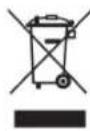
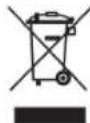
Product: The crossed-out waste bin stuck on the product means that the product belongs to the family of electrical and electronic equipment. In this respect, the European regulations ask you to dispose of it selectively;
- At sales points in the event of the purchase of similar equipment.
- At the collection points made available to you locally (drop-off centre, selective collection, etc.). In this way you can participate in the re-use and upgrading of Electrical and Electronic Equipment Waste, which can have an effect on the environment and human health.
The paper and cardboard packaging used can be disposed of as recyclable paper. Have the plastic wrapping and Styrofoam packaging recycled or dispose of it in the non-recyclable waste, depending on the requirements in your country.
Trademarks: The references mentioned in this manual are trademarks of the respective companies. The lack of the trademarks and TM does not justify the assumption that these dedicated terminologies are free trademarks. Other product names used herein are for identification purposes only and may be trademarks of their respective owners. AgfaPhoto disclaims any and all rights in those marks.
Neither AgfaPhoto nor its affiliates shall be liable to the purchaser of this product or third parties for damages, losses, costs, or expenses incurred by the purchaser or third parties as a result of accident, misuse, or abuse of this product or unauthorized modifications, repairs, or alterations to this product, or failure to strictly comply with AgfaPhoto operating and maintenance instructions.
AgfaPhoto shall not be liable for any damages or problems arising from the use of any options or any consumable materials other than those designated as original AgfaPhoto products or AgfaPhoto approved products.
AgfaPhoto shall not be held liable for any damage resulting from electromagnetic interference that occurs from the use of any interface cables other than those designated as AgfaPhoto products.
All rights reserved. No part of this publication may be reproduced, stored in a retrieval system or transmitted in any form or by any means, electronic, mechanical, photocopying, recording, or otherwise, without the prior written permission of AgfaPhoto. The information contained herein is designed only for use with this product. AgfaPhoto is not responsible, if this information is applied to other devices.
This user manual is a document that does not represent a contract.
Errors, printing errors and changes are reserved.
Copyright © 2009 Sagem Communications


Introduzione
IT
Stimato cliente,
Copyright © 2009 Sagem Communications
Inleiding
NL
Geachte klant
Apparaat is ingeschakeld [diashow] 5,0W
Fotodiagonal 7
Hooget/breedteverhouting 4:3
Resolutie. 800x600 Pixel
Intern geheugen.....128MBMB of maximaal 500 fo-to's
Apparaat is ingeschakeld (diashow) 4,3W
Fotodiagonal 7
Hooget/breedteverhuding. 4:3
Resolutie. 800x600 Pixel
Intern geheugen.256 MBMB of maximaal 1000 fo-to's
Apparaat is ingeschakeld (diashow) 6,3W
Fotodiagonal. 8
Hooget/breedteverhuding. 4:3
Resolutie. .800x600 Pixel
Intern geheugen.1GBMB of maximaal 4000photo's
Apparaat is ingeschakeld [diashow] 6,1W
Fotodiagonal 10,4"
Apparaat is ingeschakeld (diashow) 6,6W
Fotodiagonal 8
Hooget/breedteverhuding. 4:3
Resolutie. 800x600 Pixel
Intern geheugen.1GBMB of maximaal 4000photo's
Copyright © 2009 Sagem Communications
Interrumpir la operation
Copyright © 2009 Sagem Communications
ES
elos
Introdução
Estimado cliente
compativeis.. SD/MMC/MS/SDHC/XD
compateis.. SD/MMC/MS/SDHC/XD
compativeis.. SD/MMC/MS/SDHC/XD
Copyright © 2009 Sagem Communications
Introduktion
Bäste kund
Tack for du bestamde dig for vara digitala fotoramar. Gor dig redo for en helt ny fotoupplelse! Med din nya digitala bildram kan du se dina fotoch videos samt spel a din musik -utan dator.
Högkvalitets TFT-LCD bildskärn
Copyright © 2009 Sagem Communications
Uvod
Vázén y zákazniku,
Vyrobce: Sagem Communications, www.sagem-communications.com

Copyright © 2009 Sagem Communications
CZ
Bevezétés
Tiszteht Vásárló!
Copyright © 2009 Sagem Communications
HU


Wstep
Szanowy Kliencie!
Producent: Sagem Communications,
www.sagem-communications.com
KG lub Agfa-

Copyright © 2009 Sagem Communications
PL
Introducere
Stimate client
Vä multumim cä ati achizitionat Rama foto digitala commercializata de company noastrá. Vä recomandam sā fiti pregatit fiindcā veti experimenta arta fotografiei aça cum nu ati mai facut-o pana acum! Noua D-voastrà rama fotodigitala va permite sā vizualazi fotografiile, filmele si sā asculati muzica -toate acestea fāracalculator
Copyright © 2009 Sagem Communications
Uvod
Vázén y zákaznik,
d'akujeme vam, ze ste si zakupili tento fotoramcek. Pripravte sa zait' fotografiavanie tak, aka ste ho este nikdy nevideli! Fotoramcek vam umoznue zobrazovat fotografie a prehravat zvukové a video súbory bez počitača.
TFT LCD displeje s vysokym Rozliseinim
ZA NESPRÁVNY TYP HROZÍ
NEBEZPECENSTVO EXPLOZIE.
strane.

1 Uvolnite drziaik baterie v ovladaci otvorenim poistky (1) a drziaik vytiahnite (2).
m = 311 ;
当 m = 32 且 m 1 时方程有两个实数根;
Theorem 1.2. The following are equivalent:
- 实验原理及实验方法
Theorem 1.2. The following are equivalent:
Theorem 1.2. The following are equivalent:
Copyright © 2009 Sagem Communications
SK
Giris
Sayin musterimiz.
Uyumlu hafiza kartlan..SD/MMC/MS/SDHC/XD
Foto formati.. JPEG
Teknik Veriler AF 5077MS
Ölcüler (G×Y×D) 190×153×80mm
Aigrlk 0,4kg
Sebeke baglantisi..Giris: 100-240V\~/50-60Hz Cikis: 5V = - / 2A
Uyumlu hafiza kartlan..SD/MMC/MS/SDHC/XD
Foto formatari.....JPEG
Muzik formatari.. MP3
Video formatlan Motion Jpeg, Mpeg-4
Teknik Veriler AF 5087PS
OlcuiR (G× Y× D) 203x163x90mm
Aigrlk. 0,5kg
Sebeke baglantisi.Giris: 100-240V\~/50-60Hz Ckis:5V---/2A
Uyumu hafiza kartlan..SD/MMC/MS/SDHC/XD
Foto formatlari.JPEG
Teknik Veriler AF 5107MS
Ölcüler [G×Y×D] 255×203×90mm
Aigrlik 0.8kg
Sebeke baglantisi.Giris:100-240V\~/50-60Hz Cikis:5V--/2A
Uyumlu hafiza kartlan..SD/MMC/MS/SDHC/XD
Foto formatlari .JPEG
Muzik formatlan MP3
Video formatl .Motion Jpeg, Mpeg-4
Fabrikator: Sagem Communications,
www.sagem-communications.com

Copyright © 2009 Sagem Communications
TR
Eioaywyn
Ayantnte tEaTn
Euyapiotoupe Tou ETEIAEGATE TO ynpiaKO
WTOypaipKO TAAIO TNS Etaipias ac.
Etouaoteiye ia iya eTVeALwve aWTOypaikn
eUteipia! Me to veo ynpiaKO wTOypaipKO TAAIO
OAC uTopeite va deite wTOypaipcKai bivteo kai va
TalEteuovKn -xwpis nAekTPOviko UTOAOYiotn.
Ywnnc TioIOTNTac 0bOvN TFT-LCD
To ynpiako wftoypapiko nlaiaio aos diaaheTei eowtepikn pvun, eva avaywotn kaptuv pvvnks kal diaovseon USB. Ta apxieia npopoov va diaypapouv anto tvv eawtepikn pvunkai va atiyipapouv otic Kaptec pvnns n 0E USB stick.
UoTTIKI pOeTIIOKOTONn (TPOBOH mviatoUpa 20 wToovpapwTauroxpoVa). To npiak oToovpapko TcAio OaC UTOOtnpici Tn OTpOKn KAI TIV aALayn FOpMa TNS EIKOVAs.
AeE Eukoi Tis wotypiec oac e to auto slideshow eouikn.
Me To TnAeepiopnpo Tou npexetai utopeite e Eukolia va EIIAEETe apxela WTOypaipw, Mouikns, kai BivTeo, v aaaaete TIG puOmuEIC, kai Ttollaa aaaa.
Eriang, diaetete einnpooTees aeitoupyies otnw s npoan wpaac kai npeopunviae, uvtvnpi, kai pia autoupatn aeitoupyia avamatog kai aonaiatoc. Saexuopaote TOnaec EuyapiotcEs eTepiec Me t ouokeun kai Tt antoaee aeitoupyies ts!
Alambda puthetaewv Eikovac
EoJtpeTe va OtpeETe Tc EIKOvEc,va puOuAeTo KaDpo npoBoAns,va KaOpioTe Ta eppa aalayns Tou slideshow n va puOuiaTe To xpavo TpoBoAns Kabe oToypaiaq sTo slideshow.
[biayexipion aoywka n oT E
Copyright © 2009 Sagem Communications
В级以上
YbaxaemblnokynateJIb,
Bnaoradapm Bac 3a npno6peHne daHHo npodykun. PnroTOBbTecb K 3ameuTeNbHomy nyeueCTBNO B Mnp fOTorpaqnn! Bo3MOxHOCTb npocMToPa fOTorpaqnn, BNDeOpONKOB, a TAKKe npocnyuBaHn My3bIK 6e3 NcNoIb3OBAHn KOMNbHOtepa
BbICOKKaueCTBeHHbI XNdkokpncTaannueckn DnCnnne
YcTpoiCTBO coepKNT BCTPOeHHyIO nAMrTB, cIOT dIyycTaHOBKn KapnamrN u USB nopT. Bo3MOxHocTh ydaIaTb paIbI co BCTPOeHHoI nAMrTN a TaKKe BO3MOxHocTh KOnIpOBAHH paiNoB C KapTb nAMrTN nIN USB-HocTeJIa
Pexnmpedbapntelhoro npocmTopa n3o6paKeHn (noka3 do 20 n3o6paKeHn Ha cTpaHnue) UcfoBoe yctpoiCTBO-foTOpamKa nO3BOJnE T NOBopAHBaTb CtpaHnCbI N3MeHrTb uxΦopMaT.
Ipocmotp foTOrpaФn B peXnme ABTomAtuYeCKoCnAaD-LoO C My3bKaNbHbIM COIpOBOxKeHHem.
BxOaun B KOMnneKT NoCTabKn Iy N03BOJnEe Tnerko BbIbpaTb foToRpaHn, My3bky, BuDeOpOJIKN, n3MeHrTa HAcTpOKn n DeNaTb MHORe Dpyroe.
IMeIOCTaIOKe DOnONHInTeNbHbIe FyHKUHMn HAnpIMep, INDINKaUNBpeMeHN DaTbI, 6yDINbHnK, TaMep BKNIOUHeHn N BbIKIOUHeHn.
MbHaedeemca,TO BbI NpIyUte yDObOBCTBne OT pa60tbc annapatom ero MHorOuHcNeHHbx 1
O6 3TOM pyKOBoDCTBE
ПОльб3OBaTeЯ
C NOMOJIbIO npINBeHEnHO daJeepyKOBOCTBa NO yCTaHOBKe Bbl cMOKeTe 6bICTpo npiCTynITb K 3KcIIpyatau BaWero annapata. NoDpO6Hoe onncaHne FyHKUIN npINBeDEHO BnocNeIyoUx pa3dEax pyKOBOCTBa NOIb3ObaTeJIA.
BHHMATEbHO O3HaKOMbTcB C pyKOoDCTBOM noJIb3OBeTEnI. Ia o6ecneHHe 6eONaCHOI paBoTI aNapapa CoBnOdaTe BCE yKa3AHnI TexHNK 6e30NaCHocTN. N3rOToBnTEJI He HecET OTBeTCTBEHHOCTNB Cnuyae HecOBIODeHnI npABIN TExHNK 6e30NaCHocTN.
B 3TOM pykoOoCTBe nonb3oBaTeI npBBeDeHO onncaHne HeckonbKx MoedeJe annapata OJHOrToNa. ObpaTte BHHMaHne, yTO MHorne cyHKcIM IOCTyINbToJIbKO y HeKOTbIX MoedeJe.
IcnoJb3yEmble 06o3NaueHnra
OTACHOCTbI

ONACHOCTbI
IpeDynpexKaet o6 onaHocTJx InIIOde, BO3MOXHOCTN NOBpExKeHHn annapata uNN DpyrNX yCtpoiCTB, a TaKke O BO3MOXHOH NOTEpe DaHHbIX. HenpaBnBna HkCNpyaTaunia MOKeT npBecTe K TpaBmAM NIN NOBpeKDeHHo annapata.
3aMeyaHua

CobetbI peKOMeHdaUu
3TOT CUMBOI 0603Haayet COBETbl, KOTOpBIE NOMORAOT HANBOeNE IpOcTO IN 3fpeKTHNBHO NCOINb3OBaTB yCTPOINCTBO.
Pekomehdaци IO TexHnKe 6e30napocTu
He BHOCTe HNKAKHX N3MeHEHm HAcTPOeK, He OONCAHHbIX B 3TOM pyKOBOcCTBe NOIb3OBATeN. HenpaBnHbHo E cNOJIb3OBaHne MOKeT PnIBecTN K TpaBMPOBaHNIO INMaTEpNAHbHomy yUepey, NOBpeXdEHIO ycTPOcTBa ININ NOtepe DaHHbIX. Co6NoJaTe BCE npBEdeHHbIe npEDynpeNTeHbIe yKa3AHn I NHCTpyKmI IO TeXhIk63oNaCHOCTN.
PpoeDpya HacTPOkN annapata
3To ycTpoIcTBo npedHa3HaueHO TOIbKO dINnHIMNHyaIbHorO MCNoB3OBaHN. Annapat cneJyETyCTaHOIBt Ha NIOCKyIO yCtoMByIO NOBepxHOCTb.PacnoJaIte BCE uHpyi KABeIi TAKIM o6paOM,TO6bI HNKTO He MOHACTyNtB Ha HIX INN CNOTKHYtCB,3To NCKIIOuAeT BO3MOXHOCTb TpaBMPOBaHN IHOe NNOBpeXDeHn CaMOro annapata.
YcTPOCTBO npEHa3HauEHO DnA 3KcNpyatauNN BHYtpn NOMeueHn. He npHKacaiTeCb K KK-dncnneo. Hpea3MeaIte TReKenBie INN ocTpBle npEMeTb Ha KK-3KpaHe, pAMke INN UHype 3NeKtponntAHn.
3aunuae annapat OT nonadHn npMORO conHeHOro cBeTa, BO3dEChTBn Tenn, pe3KxN nepenadoB TemepaTpyb n Bnarn. He pa3MeauTe annapat B6mHn HarpeBaTeen u KOHNIOHEpOB Bo3dyxa.CmOTPte HfOpMaUNo O DoynCTHMoI TEMepaTy N BnaxHOCTn BO3dyxa B TexHnecknx XapakTepcNTkax.
He BkIIOUaIte yCTPOcTBO cpa3y nocLe nepMeueHn H3 NOMeJeHn C HN3KO TEMpePAtPOB N NOMeJeHn C BoOee BbICoKo TEMpePAtPOB Hn HaobOp, a TaXKe nocLe 6bICTPO NOHMaHn TEMpePAtpbl B NOMeJeHm. B TAKHX CHTyaUNx NDOXJNTe He MeHee Tpex YacOB, YTO6bI yCTPOCTBO aANTnPoBaNoCb K N3MeHNBIMMCA YCNOBnM (TEMpePAty, BlaXHoCTb BO3dyxa).
Ecnn Baannapa CnIuKOM CnIbHO Harpeetc HNN Bbl YBnDte BixOaunm N3 Hero DbIM,TO HeMeJeHNO OTKnOCHNTe WHP CTeBOrO 3NeKTPoNTAHN N3 po3ETKN OTaIe Baanapat nOcMOTpa KBAINuNpOBOAHbIM cneuaJIncTAM NNN B CEHTP cepBCHORO OcbnyKaBaHn. Dn npEDoTBpaUeHHn BO3rOpAHn 3Anpeuaetc NOHOCntB K annapaty ICTOHNK NTpBIrTO PnAmEHn.
HnKorda He NodKnHouaTe annapat K cetn n K TeneoHHO HnHH B cbpBx NOMeueHnx. HnKorda He KacaIteCb cTeBOB BNKN N po3ETKN TeneoHHorO pa3bema BlaxkHbIMn pykamn.
He donyckaTe nonadaHnKuDKoCTe BHTpb annapata. Ecnn BHTpb annapata nonana KnuKoCTb nnoctopohnnpedMeT, HeMeDneHNOtKNIOHTe shyp 3neKTponHTAHn n OdaTe annapat dnoOCMOTpa
KBaHnФuNpOBaHHbIM CneuaNCTam NmB CEHTP cepBCHOrO 06cIyKbAHn.
He no3B0JnTe DeTAM NOIb3oBaTbCAnnapaTOM 6e3 npncMoTa. He DonyckaTe DeteK yNakOBouHbIM MaTePnaanam.
3NeKtpnueckoe nTaHne
Icnonb3ynte TOnbKO 6nOK nHTaHnB XOJaBn B KOMNKeT NOCTaBKn (CMOTPte PpINoXKeHne / TexHHueckne DaHHbe). IPOBepBe, COOTBeTCTByET NIN TNI ENEKTPoNTaHn BAwero annapata (Yka3aHa Ha WInbDnke) TNY 3NEKTPoNTaHn B MecTe yCTaHOBKn annapata. HanpJxHe H C cTeN nepemEHORo TOKa BCERda DOJIKNHO COOTBeTCTBOBaTb Yka3aHHOMy HA N3deJIHN.
He kacaiTecb shypa 3neKtponntAHnC NOBpeXdeHHo H30JauH. HeMeDJIeHNO 3aMeHInTe NOBpeXdeHHbI Ka6JIb. IcnoJb3yTe TOJbKO COOTBEcTBcyHouNe Ka6EIN; npH HeO6xOdMIOCTN O6paUaJIteTcB B Cnyk6y TexHueckO noDepKKn nn K BaWemy NoCTabuKy.
Ipeep ouchtkno nobepxhoctn annapata 083ateNbHO tOKHouHTe oTo OT cTeN 3neKTponNTAHn. DnA ouCTkn MCNoJIb3yIte Mmkyu cyxyo 6e3BOPCOby TKaHB. He npImeHReTne OOCTKn XmDkNx, ra3oo6pa3hIx n roIpOxuOCHNTeNe [a3pO30nn, abpa3NBhIe n nonnpyUcne cpedCTBa, cnpt]. He donyckanTe nonadaHn BnA HByTp b annapata.
OuHuaTe DnCnne ToIbKO MmKo CxyoT KAnHb. Ecnn DnCnne Ha XnDkX KpNCTaIIax 6ydt Pa3bnt,To n3 Hero MoKeT BbITeY yMepeHHO eKaar XnDkoCTb. N3beraTe IIOBOro KOtAKTa KaTpPnDke C BaWei Koxe Hrna3Am.
PemOH
He nbItaItecb camOcToTeIbHo peMOHTnpoBaTb annapat. HenpaBnIbHbI peMOHT MOKeT npBecTn K TpaBMam N nobpeXdHIO annapata.Bau annapat MOKHO peMOHTnpoBaTb ToIbKO B ynoHOMOeHHOM cepBUCHOM ueHTpe.
He CHIMaIte 3aBODCKo WnHbNk cannapata, npn 3TOM OTMeHryIOCTra paaHTnHbIe o6raTeNbCTBa.
Hocntenb namrtnoToIpaapn
NcnoBsyte TOnbKO COBMeCTMble C yctpoiCTBOM HocnteIN INHOpMaUN. Bcerda OTKIOUaHTe 3NEkTPOINTAHne yCTPOICTBa npexKe, Yem N3BNeYb N3 HERO KapTy NamrTo BO N36ExAHm NOBpeXdEHHa KaPTbI namrTo NIO Yo yCTPOICTBa.
Hikorda He BbITACKBauTe KapTu NamrTu, KOTopar nCNoJIb3yETcB TEkyuMOMeHT.3To MOxET npUBecTu K NOBpeKDeHnU INN KyTpAte DaHHbIX.
Obuine cBeDeHna
063op annapata
BbIKNoHaTeNb
- CNOT DnIa KapT namrtn
- HabiruaB MeHIO/YMeHBIeHNA RpKoCTN, KOHTpactHOCTN, HacbIeHHOCTN CBeta/npexoK npdebluyem My 306paXeHIO, npdeblyua KONOHA NCI CTpaHnla
OK-ⅠoNTBepxdeHne BbIbopa/3anyck,ocTaHOB cnai-dwoy
HabnraaB MeHO/IOBbIeHnepromKoCTN/BKIOueHne FOHOBOy My3bIK BO Bpemnoka3 cnaJd-woy
- HabiracnB MeH/ymHeHbWeHne rPOMKoCTN
Habirua B MeHO/YBEnuHHe HApKoCTN, KOHTpactHOCTn, HacbIeHHOCTn CBeta/npexoK CNeDyIOUeMy N3O6paXeHIO, CNeDyIOUaJ KOnOHKa nn CTpaHnca
3 MENU - Bby3OB rnaBHoro MeHIO/BKNIQUEHHe aHaNoRoBbIX YacOB [yepxNBaTe KHOkY B HaxaTOM NOOKeHN]
BbI3OB MeHIO HAcTpoek
10 -Pa3bEM MUNH-USB dna noDKIIOUeHnK KOMNbIoTepy
1 THe3do-USB-pa3bEm dnn noKnHueHnryCtpoiCTBa XpaHeHHaHbIX
1 ΕΘΦ- Pa3bεmДЯ ceTeBOrO aanTepa
IyIbT IINCTaHcUHOHHoro
ynpabneneHna
[AF 5077/5087/5107MS]
BbI3OB MeHIO HacTpoek
2 - Bb3OB rIaBHOrO MeHIO/BKIIIOueHHe aHaNoRObbIX YacOB (ydePknBaTe KhoNky B HaxaTOM noJoxKeHH)
3-BKJIIOUeHHe/BbIKIIOUeHHe
4-HabiracnBMeHNO/NoBbIeHne rPOMKocTN/ BKNIOueHHe FOHOBOy My3bIKN BO BpMa NOKa3a cnaiD-woy
-Повтберждени Быбopa/3anyck,octaHOB cnaiD-woy
- Habirua B MeHO/yBeHnueHne npKoCTN, KOHTpactHcOCTN, HacbIeHHocT NcBETA/npexoK cNeDyIOSeMy 1306paXeHnO, CneDyHOaJ KOnOHka nnn CTpaHnca
7-HabraaBMeHIO/YMeHbWeHHe rPOMKoCTN
- Habiruaia B MeHO/ymeHbueHnraKpOcTN, KOHTpactHOCTN, HacbIeHHOCr YBeta/npexoK npdeIduyEm My 306paXeHHo, Ppebluya Ka KONOHka nn CTpaHnca
BbOДВЗКсПлУаТaцию
KOMNNEKT NOCTABKN
LHpObaPamKaInIΦOTorpaΦnHa CToKe
CTeBoa aadTep co CMeHHbIMN ceTeBbIMN BnKAMN
Пильт диссerteонногупавлия [ПДY] (c 6atapee) [AF5077/5087/5107MS]
PykoBODCTBO no 3KcNnyatauHn He noka3aHO
3aMeuHaHua

HenoHbIK KomnNeKT NoCTaBKn
Ecnn OINH n3 3TNX npEIMeTOB OTCYCTByET INN NOBPexKeH, 6paTnTEcB K BaWemy NocTabuKky INN B Cnykby Noepckn.
IopKJIIOUeHne cTeBOro aanTepa
OCTOPOKHOCTb!

HnpanpkeHne ceTH B MecTe yCTaHOBKn! PIOBepbTe, COOTBeTcTBYeT TIN TUN 3NEKTPoNTaHnBaWero annapata [yka3AHa IINbDnKe) Tnny 3NEKTPoNTaHnB MeCeYCTaHOBKn annapata.
1 BbI6epnte COOTBeCTBHyUO CEteByIO BUNKy DnBaWei CtpaHbI HAdEhTe ee Ha CeTEBOI aDANTep.CJeNTe 3a TEM, YTO6bl CEteBAJ BUNKa IONHOCTbIO HAeJIacb Ha CeTEBOI aDANTep.
2 BCTaBbTe MaHEnbKyU BnKy Ka6eIe CTeBOro aAnTepa B pa3bem Ha 3aHHe CTOpOHe yCtpoiCTBa. BCTaBbTe cTeBOI aanTep B ceTEByIO pOeTKy.
PoiKJIIOUeHne K KOMNbIOTepy
NcnoB3y USB-ka6eIb, MoKHO NOKJIIOUHTb yCTpoiCTBO KOMMbIoTepy dIe NpepaH paIIOB MExdy BHyTpEHHa NamTbIO yCTpoiCTBa N KOMNbIoTePOM.
1 BbIKIOHHTe yCTpoIcTBO npn nOmoU BbIKHOaTeJI Ha o6paTHoN CTOpOHe.
2 PoiKIOUHTe MeHbWn WTeKeP USB-Ka6eR K BbIKIOUeHHo UΦpOBo ΦOTopAMke a 60JIbWn WTeKeP - K KomNbIOTepy.
3 BKnHOnHTe ycTpoNCTBO npn NOMOuBbIKNoHTaTeJI Ha 0bpaTHoI CTOpOHe. IIOOXdIte, noka KOMNbIoTeP He paCno3HaetHOBOE aannapatHoe yctpoNCTBO.CoBMecTmblE N3O6paKeHnA ayDINO-N BUNDeoΦaJbMOrYT 6bITb CkONPiOBaHb BO BHYTpEHNO pAmrTb.
4PnOTKNOHEnNOT KOMNbTepeaUΦpOBApaMka3anyckaETc3aHOBO.
YcTaHOBKa KapTbI NaMaTn
1 BCTaBbTe KapTy NamrIn B COOTBeTCTByUOuIN CNOT Ha 6bpaTHo CTopoHe yCTpoiCTBa. OHO NOdepKINBAIoT KapTbI NamrIn CNeDyHouXn φopMaToB: SD/MMC/MS/SDHC/XD.
ONACHOCTb!

YctaHOBnte KapTy namrT!
NcnoB3yTe TOnBko CoBMeCTnMbIe C yctpoiCTBOM HOCHTEN INHΦOpMaUN. HNKoRda He BbITACKBaIte KApTy naMRT, KOtOPa IcNoB3yETcB TEkyuIM MOMENT. 3TO MOKET npNBecT N NOBpeXdEHNO HIN K yTpate DaHHbIX.
2 BkIIOHTe yctpoNCTBO npn nOmoU BbIKIOuATEHa O6paTHoN CTopoHE. Iocne NOBHeHNA 3KpHa-3actABKn 3anyckaetc NaJd-woy.
3aMeuHaHua

Ha Kapte namrtn meeTcMHO foToIpaPn
Ecnn Ha Kapte naMrtn coXpaHeHO Mhoro foTOrpaFm, 3anyck cnaIuWoy MoKet 3aHrTb HeKToTopoe Bpem.
3 Bo BpemcIaJHooy HAKMITE Ha o6paTHOHTOPoHE KHOKNK OK dNraero OCTAHOBKn.
3aMeuHua

OndobpeMeHHoe HcNoJb3oBaHne USB-HakonnteIg KApTbI naMaTn
Pn NcNtob3oBaHnn ycTpoNCTBa XpaHeHn DaHbIX, NOKJIIOyAeMOrO uepe3 USB-pa3bEm, OJHOBPeMeHHO C KapToI NaMrtN Chayana OTO6pKaHaOTcN3O6pKaHeHn C KapTb NaMrtN.
YcTaHOBka NJIa 3aMeHa 6aTapeek B Iy
ONACHOCTb!

Onachoctb B3pb1BA npn HcNoB3oBaHn HnPaBnBHoro Tnna AKKyMnyTOpB.
BHIMAHIE!Bcnyae nCnoIb3oBaHnna 3IeMeHToB NITAHN HEnpaBUNbHOr TNa cyueCTByET BepoarTHOCTb B3pblBA.
1ДЯЗAMeHb6aTapeeKПДYOTKpoTeФKKcAToP [1]ИИЗВЛЕКТe 6NOKc6aTapeKamn[2].
2 BCTaBbTe HoBbIe 6aTapeKn B 6NoK 6aTapeek, coBnHOaH NyKHyO NOJrPHoCTb NOKnIOUeHnna NoJXHTeNbHbIX N OTpuaTeNbHbIX NOHOCOB corNaCHO cxeme Ha oBaTHo CTopoHe Iy. Bcerda coBnOdaTe noJrPHocTb!
3 BCTaBbTe 6nOK 6aTapeek B Iy do ueuka KcTopa.
3aMeyaHua

Cpok cnky6bl 6bI 6aTape npn HOpMaIbHbIX ycnoBnx 3Knnyataunnpn6mnteIbHo oINn rOg. Ecn nIy He pa6oTaET, 3aMeHnte 6bataepo. Ecnn FOtopamKa He IcNoIb3yETcB TeueHne DInTeJIbHorO BpeMeHH, N3BNeKeNTe AKKymyIaTOphHe 6bATapeKn. BlaRoaDapr3OTMy OHn HE BBTEkyTn He NopeJIT nyblT DCtAHTUHOHOrO ynpabJeHn.
NcnoB3OBaHbIe AKyMyIaTOpHbIe 6atapeKHeoXOIMO yTNIN3nPOBaTB CORIACHO DeIcTBYIOUM HAIOHAJIbHbIM npabINAM HOPMAM yTNIN3aUIM.
NcnoJb3OBaHneIy
Hapabte Pny Ha daTnK Ha nepeDne nane HnyctpoCTBa. Ndy KoprkeKTHO pa6oTaET Ha pacctoHHn Do 2 M ot yctpoCTBa n npu YrNe, He npebblaioeM 30 rpaYcoB. YbendTeCb. yTO HNKakne npedMeTbI He 3aropaxNBAOT npoctpaHCTBO MeJy N npINHMaIOeM ceHCOPOM Ha n3deNn.
Bocnpon3VeJeHne
O63op yHKU MeHIO
JIaBHOe MeHcOcTOnT nTpeNyHKTOB.
MeHIOΦoTo
MeHIO Bndeo [AF5077/5087/5107MS]
MeHIO My3bika[AF5077/5087/5107MSI
6 Haxmnte KhoNky npedbIyuemy n3o6paKeHHIO.

nepexoKa cnedyuouemy
7 3aBepuTe cnaH-woy MENU.
HakatneM KHOPIK
3aMeuHa

BbI3OB MeHIO Bo Bpemr cnaJ-woy BJIIO6oe BpeMn MOxHO OTKpbITrIaBHOe MeHIO npn NOMOUI MENU.
YcTaHOBka FOHOBOy My3bIKn IpnypeXIMa CnaId-woy
[AF 5077/5087/5107MS]
3aMeuHaHua

B KaueCTBe FOHOBOI My3bIK MOXHO
HcNOJIb3OBAbT ToJIbKO Te FaiJIbI,
KOTOpBle COxPAHeHbI BMeCTe C
ΦoTORpaΦnMn BO BHTpeHHeN nAMrTn,
Ha KapTe NaMrTn Nn Ha HocITene,
Habiracnno CnCTeMe MeHIO
1 HaxmteHaIy
2Bb6epTe HxKHOe MeHIO C NOMOULIO
3 NpOITBepDTe BbIbOp c nOMoUbIO KHOIIK.
Bocnpoun3BeDeneHne oToTporpaDn
1 Bb6epnte MeHIO ΦOTo B OCHOBHOM MeHIO nOaTBePNTe Bb6Op npn NOMOUs OK.
2Ha3kpahe OTo6pkaeTcra 16 MmHaTHOpHbIXΦotorpaФn.
3BbIePeTepnnoMoUKNKHOKnI/1HIN/ HIO6paKeHne, c KOtOporo Heo6xOIMO 3anyCTNTcAaN-ooy.
4ДЯЗANyCKa CnAД-woHaxMHTe KHOHNY OK.
5ДЯ octaHOBa cnaI-woy HAKMTe KHOKNky OK. Ha dncnnee oTo6paXaEcTc CmBON nay3bl.
1 Bo Bpemr cnaH-woy HaxMnte KhoNky Ha Iy nn HA ycTPOINCTBe, YTObI BKIOHTb FOHOByO My3bKy.
3aMeyaHua

HactpoTe rpoMKoCTb npn nOmoN KHOKN A/V.
Bocnpon3BeJeHne My3bIKI
[AF5077/5087/5107MS]
1 BbIbepnte My3bIkaJIbHoe MeHIO B OCHOBHOM MEHIO NIOITBePNTe BbIbOp npn IomOu.
2BbIepeHnPi NOMOu H/HuN △/Ha3BaHHe My3bKaJIbHOJ KOMNo3uMn, KOtopyHo Heo6xoHMo BOCIpOn3BeCTn.
3ДЯЗANyCKA BOCnPON3BeDEHNEOK. BoBpEMBAOCnPON3BeDEHNEprDc Ha3BaHNEM OTo6paXaETc DOONHTeNbHa INΦOPMaUHA
4ДЯ OCTaHOBKn HaxMITE OK
Bocnpoun3BeDene Bndeo
[AF 5077/5087/5107MS]
1 BbIbepuTe BnDeOMeHOB OCHOBHOM MeHO INoTBePNTe BB6Op npN NOMOUN.
2BbIepeHn pnoHnn HnA/V BnDeoqain, KOToPbH Heo6xOJMO BOCIpOn3BeCTn.
3 3nycBA BOCpOn3BeHnOK. OCTaHOBKn HAXMITE OK.
3aMeyaHua

DOnOHnHTeHbHbIe FyHKcHn Bocnpon3BedeHn
Bo BpemBocpon3BeDen npn NOMOuN H Nn A MOxHO nepexoNTb K PpeDyUeMy Nn CneNyOuEmy 3aROnOBky.
HaKMTe Ha Ndy OK, YTO6bl npHOCTaHOBTb INN pOdoJKNtB BOCpON3BeDEHne.
HactpoKa rPOMKocTn
[AF5077/5087/5107MS]
Bo Bpem BoCnpOn3BeHnHa Iy npn NOMOuN 7A MOxHO peryIupoBaTb rpmKocTb. Haxmaite NOBTOPO KHONKY DnI NOHOrO BbIKIOueHn 3Byka.
Hac tropon
B MeHIO HAcTpoE KIMeETcA YeTBpe CmMbONa.ErO MOxHO OTKpbITb Pn NOMoUKN KHOIN Ha yCTpOCTBe HnHa Iy.
Hacptpokn ECO [aBtOMaTHueckoe BKNIOueHne/ BbIKHOueHne, aBtOMaTHuecka peRyINPOBka npKocTn DcNner [AF5077/5087/5107MS])
HacptpoKn 1306paKeHHa [HaCTpOKn dna CnaI-woy, BpaueHeH e 1306paKeHHa
3 YnpabJIeHne paimn [KoInpOBaHne, ydaJIeHne paimNoB, cIMCKN BOCpON3BeHeH]
Баоььп Нстpoи [яркocь, кOTpactHOCb, Data,Врм]
Hactpoyn ECO
BbMoKTe yCTaHOBtB aBTOMaTnueckoe BKNIOUeHHe/BbIKIOUeHHe UΦPOBOI FOToPAMKn B 3aJAHNOE BPEMN NIN ABTOMATNUeCKoe perynlpoBaHne npKoCTn Dcncnner B 3aBNCmOCTn OT ypOBH NOBcBESeHHOCHTn [AF5077/5087/ 5107MS].
IMeetcBO3MOxHocbKoNupOBaHnIgOTorpaFm C KapTbI NAMrN INI USB-CTnKePa.MoxHo ydaJIrTa faJIbI n3 BHYtpHeHn NAMrN.
KoHPOBaHne u ydaJIeHne faJIOB
1 Haekmte
2BbIbepnTe npn NOMOuN (ynpaBneHne paJIamn) nOHTBePnTe npn NOMOuN OK.
3 BbIbepnTe npn NpOMOuN (KoNIpOBaHne) n [YdaneHne] n noDTBepnTe BbIbOp npn NOMOuN OK.
4Bb6epTe npn nmoOnu 1/0, 0/0 paanI Dnna KOnnpoBaHn uyn ydaenHn.
5BbIeIte paJ npn nOmoUOK.
3aMeuHua

OTMeHa BbIeJeHn
Haxmte epe pa3 OK nTMeHbI BbleneHH.
6 BbIepnTe npn nmoOnn KhONKn CmBONOB y HxKHeO Kpa3KpHa.
7BbIePe npn nomoU 1 CmBOJ n HaxMTe OK dny3aNycka npOeDpybl KOINPOBaHn nn ydaJIeHn.
3aMeuHua

KoHPOBaHne BcEx caiIOB Ha KapTe nAMrTH
Bb6epnt npn nomouu n noTBePNTe KHONKo OK KOnIpOBaHHe BcEx paIIOB c KapTbI NaMTo BO BHYTpEHIOI NaMToB.
3ameyuaHua

IpepbBaHne npouceca
Bb6epnte npn nOmouN noTBePNTe npn nOmoUOn octaHOBy npoedypbl.
8Ha nncnnee noBntcnoNocA o6pa6oTkn. No OKOHuaHmKoNNPOBaHna qaiI 6yTeCoxpaHe H BO BHYtpHHe NAMrTn yCTpOHTBA.
Pexim BkIoueHn
YcTaHOBnTe, cNeIyET IIN Nocne BKNIOUeHnABTOMaTHueckN 3anyckatb BOCpON3BeDEHnEΦOTorpaФn,ФЛьмOB nIN ΦOTorpaФn nФЛьмOB.
1 HaxMnte
2Bb6epntepnnooou(ynpaBneHne paimam)nnoTbePNTepnnooouOK.
3Bb6epTe npn nOmou 1 noTBePdnte npn nOmoUOK.
4 C N O M O u b k o /BbIepeHTe OINH npeCTaBnEHbIX BapnaHTOB nOJTBePdNTe BbI6Op pnp NOMOUs OK.
53aBepuTe npoceDpy npn nmoOnn KhoNKn
Cnickn BocnpOn3BeDeHn
CoCTaBbTe NnHbIe CnNcK BOCpON3BeHeHn foTOrpaHn, pHJbMOB nMy3bIKn.
Bocnpoun3BODNTBC86ydyTToIbKO HaxoJHnuecB CnNCKAX BOCNPoun3BedeHnO pOTOrpaHn, PnIbMbI INMy3bika.MoXHO Co3DaBaTb Do IaTN CnNCKOB BOCNPoun3BedeHn.
Co3dHHe cNcKOB BocnpOn3BeDeHn
1 HaxMnte

2BbIbepnTe npn NOMOuN (YnpaBneHne paJnMaMn) nOHTBePnTe npn NOMOuN OK.
3 BbI6epHTe npn noMOU 1/1 [CnNCKBOCpOu3BeHnHaKMTe
4 NcnoB3yTe KHOJky 0000000000000000000000000000000000000000000000000000000000000000000000000000000000000000000000000000
5NoTBePnte Bb6op c NMOuB KoHONK OK.
6 NoITBepnTE OFF [BbIK] npn nOmoN KHOKN OK dna nepexoJa K coaHaHIO HOBORO CNCKA BOCnpon3BeDeHNA.
7 Bb6epnte npn nOmo#n / , Hapnpmeplaylist 1 n noTBePnTe npn noMoOn OK.
8 Bb6epnte npn nmooun 1/4 nn 0/2 pnn Dnna do6aBneHn B CNIOK Bocnpo3BeDeHn. BbDeneTe pnn nooou OK.
9 BbDnEaTe dpYne faNb npn nomOu OK.
10 Bb6epnte npn NMOUKN KHOKN ④ cTPOky CmBBONoB y HxKHeRo KpaAkpHa.
11 Bb6epnte npn nomou n CmB0n HaxMNTe OK dNn COxpaHHeHn CNCKa BOCnpOu3BeDeHn.
12 3aBepuTe npoceDpy npn nOOMOn KHOHNK
BkIoueHne/BbIKIOueHne BOCpOu3BeDHeHn

1 HaxMnte
2BbIbepnte npn nOmoU 念 / 念 (ynpabneHne paJamaN)noTBePNTe npn nOmoU OK.
3BbI6epnTe npn noMoUH 1/(CnNCKN BOCnpOn3BeDeHnRn HnKaMnTe
4 NcnoB3yTe KhONky / DnRA BKNIOUeHnA cnNCKa BOCnpON3BeDEHnMy3bIKn, n3o6paKeHn nn PhnMbMOB.
5IoTBePnte BbIbOp c nOmoBIO KHOKNK OK.
6 IoTBePnte, HanpMep playlist1 [cncoc BOCnpon3BedeHn] npn NMOuN KhoNk OK.
7 BbIbepnTe npn NMOOuN 1 HxKbH CnncOK BOCpnpo3BeDEHn.
3aMeeyHua

BbIKIOUeHHe cNncka BocpOun3BeDeHHA
Bb6epTe npn nmoOn 念 /念 [BblK] Dna BblKnUeHn CnNcKa
BOcnPon3BeDeHn. Pn
BOcnPon3BeDeHn CHOBa DOctYnHbI
Bce N3o6paKeHn, FInMbI nn
My3bkaJbHbe KOMNo3uHn.
N3MeHeHHe OCHOBhBix HAcTpoEK
1 Ha Mnte
2Bb6epnte npn nmoos CmBON NOITBEpNTe npn nmoos OK.
3 NcnoB3yIe KnaBnUy A/ДЯ BbIbOpa HAcTpoKn, KOtOpYIO Heo6xOJIMOB BbINONHTb.
4NoTBePAnTe BbIbOp c NOMOu bKHOHKn
MoxHO BbINOHNHTb CnEduoune HaCTpoKN:
[RPKOCtB, KOHTpACT, perynipOBKa] [BETHOCTN] - PerynipOBKa npKoCTN, KOHTpa [BETHOCTN KK-dmCnJe.
[Ha]yCTaHOBka DaTbI N BpeMeHn.
[cnrhan 6yduNbHnka] [AF5077/5087/5107MS)-HactpoKa BpeMeHN BKIOueHnna CnHaJb 6dyuNbHnka, BKIOueHne/BbkIOueHne nBbIbOp CnHaJb 6dyuNbHnka.
1 [KaJIeHdApb] -ycTaHOBka rOda, MeCsa, Hna.
[HaTpoKnNo yMOJUHnIO] - Bo3BpaT K HAcTPOKam No yMOJUHnIO.
5 Bb6epTe HxKHyHacTpOky c NOMOsbIO
6 NpOdBepnTe BbIbOp c NOMoUsb KHOKn
7 N3MeHnTe HacTpOuKn npn NOMOni
8 PntBepnTe H3MeHeHHe HactpoKn npn NOMOuN.
93aBepuTe npoueDpy npn NMOUKN KONKn
TexHnueckoe obcIyXnBaHne
I3MeHeHne paMKn
Pamky yctpoCTBa MoXHO MeHrTa Ha Dpyryo, BXOyU B KOMNKeT NOCTABKn. Pamkn ydepKNBaIOCT pIN NMOOuM MArHITOB.
1 HaxmTe Ha 3aHne cToPOHe yCTpoCTBa KHONKY dIg CMeHbI paMOK. CHIMTe paMKy.
2 YCTAHOBHTe CMeHHyO paMKy Ha ycTPOIcTBO, Yo6bI OHA 3aФNKCINPOBaJIacbHa MaHHTax.
| Немправносту Устра themselves | |
| Устroduстvo He Bклочаetся. YбeДиTeСь, чTO БLOК пь Устroduстvo He Bклочаetся. YбeДиTeСь, чTO БLOK пь Ystroduстvo He Bклочаetся. YбeДиTeСь, чTO БLOK pь Ystroduстvo He Bклочаetся. YбeДиTeСь, чTO БLOK pь Ystroduстvo He Bклочаetся. YбeДиTeСь, чTO БLOK pь Ystroduстvo He Bклочаetся. YбeДиTeСь, чTO БLOK pь YSTROTBVYET 3BYK YбeДиTeСь B TOM, чTO Формат сь YSTROTBVYET 3BYK YбeДиTeСь B TOM, чTO Формат сь YSTROTBVYET 3BYK YбeДиTeСь B TOM, чTO Форmат сь YSTROTBVYET 3BYK YбeДиTeСь B TOM, чTO Форmат сь YSTROTBVYET 3BYK YбeДиTeСь B TOM, чTO Форmат сь YSTROTBVYET 3BYK YбeДиTeСь B TOM, чTO Форmат сь YSTroTBVYET 3BYK YбeДиTeСь B TOM, чTO Форmат сь YSTROTBVYET 3BYK YбeДиTeСь B TOM, чTO Форmат сь YSTROTBVYET 3BYK YбeДиTeСь B TOM, чTO Форmат сь YSTROTBVYET 3 BYK YбeДиTeСь B TOM, чTO Форmат сь YSTROTBVYET 3BYK YбeДиTeСь B TOM, чTO Форmат сь YSTROTBVYET 3BYK YбeДиTeСь B TOM, чTO Форmат сь YSTROTBVYET 3BYK YбeДиТСь B TOM, чTO Форmат сь YSTROTBVYET 3BYK YбeДиТСь B TOM, чTO ФорmATСь YSTROTBVYET 3BYK YбeДиТСь B TOM, чTO ФорmATСь YSTROTBVYET 3BYK YбeДиТСь B TOM, чTO ФорmATСь YSTROTBVYET 3BYK YбeДиТСь B TOM, чTO ФорmATСь YSTROTBVBYET 3BYK YбeДиTeСь B TOM, чTO ФорmATСь YSTROTBVBYET 3BYK YбeДиTeСь B TOM, чTO ФорmATСь YSTROTBVBYET 3BYK YбeДиTeСь B TOM, чTO ФорmATСь YSTROTBVBYET 3BYK YбeДиTeСь B TOM, чTG YSTROTBVBYET 3BYK YбeДиTeСь B TOM, чTG YSTROTBVBYET 3BYK YбeДиTeСь B TOM, чTG YSTROTBVBYET 3BYK YбeДиTeСь B TOM, чTG YSTROTBVBYET 3BYK YбeДиTeСь B TOM, чYG YSTROTBVBYET 3BYK YбeДиTeСь B TOM, чYG YSTROTBVBYET 3BYK YбeДиTeСь B TOM, чYG YSTROTBVBYET 3BYK YбeДиTeСь B TOM, чYG YSTROTBVBYET 3BYK YбeДиTeСь B TOM, чTG YSTROTBVBYET 3BYK YбeДиTeСь B TOM, чTG YSTROTBVBYET 3BYK YбeДиTeСь B TOM, чYG YSTROTBVBYET 3BYK YбeДиTeСь B TOM, чTG YSTROTBVBYET 3BYK YбeДиTeСь B TOM, чYG YSTROTBVBYET 3BYK YбeДиTeСь B TOM, чYG YSTROTBVBYET 3BYK YбeДиTeСь B TOM, чTG YSTROTBVBYET 3BYK YбeДиTeСь B TOM, чYG YSTROTBVBYET 3BYK YбeДиTeСь B TOM, чTG YSTROTBVBYET 3BYK YбeДиTeСь B TOM, чTG YSTROTBVBYET 3BYK YбeДиTeСь B TOM, чTG YSTROTBVBYET 3BYK YбeДиTeСь B TOM, чFG YSTROTBVBYET 3BYK YбeДиTeСь B TOM, чFG YSTROTBVBYET 3BYK YбeДиTeСь B TOM, чFG YSTROTBVBYET 3BYK YбeДиTeСь B TOM, чFG YSTROTBVBYET 3BYK YбeДиTeСь B TOM, чTG YSTROTBVBYET 3BYK YбeДиTeСь B TOM, чTG YSTROTBVBYET 3BYK YбeДиTeСь B TOM, CHT YSTROTBVBYET 3BYK YбeДиTeСь B TOM, CHT YSTROTBVBYET 3BYK YбeДиTeСь B TOM, CHT YSTROTBVBYET 3BYK YбeДиTeСь B TOM, CHT YSTROTBVBYET 3BYK YбeДиTeСь B TOM, CHI YSTROTBVBYET 3BYK YбeДиTeСь B TOM, CHT YSTROTBVBYET 3BYK YбeДиTeСь B TOM, CHT YSTROTBVBYET 3BYK YбeДиTeСь B TOM, CHT YSTROTBVBYET 3BYK YбeДиTeСь B TOM, CH YSTROTBVBYET 3BYK YбeДиTeСь B TOM, CHT YSTROTBVBYET 3BYK YбeДиTeСь B TOM, CHT YSTROTBVBYET 3BYK YбeДиTeСь B TOM, CHT YSTROTBVBYET 3BYK YбeДиTeСь B TOM, CH |
Приложения
Texnueckne daHHbIe AF 5077PS
Ta6apuTHbIe pa3MepbI [UxBxΓ]...190×153×80MM
Bec. 0,4K
Cetb 3nEeKpOnHtAHnB...BXoN: npem. Tok 100-240B\~/50-60Tc BbIXoN: NOCT. Tok 5B\~/2Tc
PekomeHdyembe ycnoBna 3Kcnnyataun.5-45oC
OTHOCHTeBHaB BnaXHoCTb Bo3dyxa.20-80%
NotpebIeMaM MoHocTh
YcTpoIcTBO BKJIOueHO HAXOINTCra (CnaIa-woy) 5,0Bt
Pa3Mep no dnaRoHaJIu 7"
CoothoueHne cToPOH 4:3
CoBmecTmblie KapTbI naMaTn.SD/MMC/MS/SDHC/ XD
ΦoToΦopMaTbl.JPEG
Texnueckne daHhble AF 5077MS
T6apntHbpea3mepebl [UxBx]...190x153x80MM
Bec. 0,4K
Cetb 3nEeKpOnHtAnH..BxOJ nepem. Tok 100-240B\~/50-60TcBbIXoJ noCT. Tok 5B\~/2T
PekomeHydemybIe ycnOBnAeknnyatauN.5-45°C
OTHOCHTBHaB BnAaJHoCTb Bo3Dyxa.20-80%
Tnpe6nma Mooctb
YCTPOINCTBO BKNIOUeHO HAXOINTCa [cnaI-10oy] 4,3BT
Pa3Mep no DnaarOHaHn. 7"
CoothouheHne cToPOH 4:3
PazpeuHHe: 800x600 PnKceBb
BnytpenHnnaMaTb. 256MBM6nndo 1000foToIorpaFm
Iotp USB USB-Host,USB Device
CoBmecTnMbIe KapTbI nAmrTu.SD/MMC/MS/SDHC/ XD
ΦotopopMaTbl.JPEG
AydnoΦopMaTbI MP3
BundeofopMaTbI Motion Jpeg, Mpeg-4
TexHHueckne daHhbIe AF 5087PS
Ta6apuTHbIe pa3MepbI [UxBxΓ]...203x163x90MM
Bec. 0,5K
Cetb 2eNtponntanH..BxOJ nepem. Tok 100-240B\~/50-60u
BbIXoI:NoCT.TOK5B\~/2T
PekomeHnyemblyeycnobna3cknnyataun.5-45°C
OTHOCHTbHaBnaxKHoCTbBO3nyx.20-80%
Tpe6nemMOuHocTB
YcTpoIcTBO BKNIOUeHO HAXOINTCra (CnaH-woy) 5.4BT
CoBmecTnMbIe KapTbI namrTu.SD/MMC/MS/SDHC/ XD
ΦoToΦopMaTbl. JPEG
Texhueckne daHbIe AF 5087MS
Ta6apuTHbIe pa3MepbI (UxBxI)...203×163×90MM
Bec. 0.5K
Cetb 3neKtponntanHn..BxoD: npem. Tok 100-240B\~/50-60TbixoD: NOCT. Tok 5B\~/2T
PekomeHdyemble ycnoBna 3Kcnnyataun.5-45°C
OTHOCHTbHaBnAaXHoCTb Bo3Dyxa.20-80%
Notpe6JMaMMAOuHocTb
YcTpoIcTBO BKNIOUeHO HAXOINTCra (CnaI-D-LOOY) 6,3BT
Pa3mep no dnaorohann 8
Co0THoUeHHe cToPOH. 4:3
PazpeuHnE: 800x600 Nkcebl
BnytpenHnnaTb. 1GBM6nnndo 4000potoorpaqni
Nopt USB USB-Host,USB Device
CoBmecTnMbIe KapbI nAMrTu.SD/MMC/MS/SDHC/ XD
ΦoToΦopMaTbI JPEG
AydnoopMaTbI MP3
Bundeocopmatb MotionJpeg,Mpeg-4
TexHHueckne daHHbIe AF 5107PS
T6apnthepea3mepbl [UxBx]...255×203×90MM Bec. 0,8Kf
Cetb 3neKtponntaHnBxOJ: npem. Tok 100-240B\~/50-60T BixoJ: NOCT. TOK 5B\~/2Tg
PekomeHdyembe ycnoBna 3Kcnnyataun.5-45oC
OTHOCHTenbHaB BnaxKHOCTb Bo3dyxa.20-80%
NotpebIeMaM MoHocTh
YcTpoIcTB0BKNIOHcHO HaxoNTcra (CnaI-D-woy) 6.1BT
Pa3mep no dnaarohnn 10,4"
CoothouheHne cToPOH 4:3
PazpeuHne: 800x600 Nkcebl
BnytpenHnnaMaTb. 128MBM6nnndo 500ΦoToRaФn
Iopr USB USB-Host
CoBmecTnMbIe KapTbI naMaTn.SD/MMC/MS/SDHC/ XD
ΦoToΦopMaTbI.JPEG
TexHHueckne daHHbIe AF 5107MS
T6apnTHbIe pa3mepbl [UxBx]..255×203×90MM Bec. 0,8kr
Cetb 3neKtponItanHn.. Bxod: npem. Tok 100- 240B\~/50-60TgBbIXoD: NOCT. TOK 5B\~/2Tg
PekomeHdyembe ycnoBna ekcnnyataun.5-45oC
OTHOCHTBnBnAaXHOCTb BO3dyxa.20-80%
Totppe6nma MoUHocTb
YCTPOICTBO BKNIOUeHO HAXOINTCa (cnaH-woy) 6,6BT
Pa3Mep no DnaRoHa.. 8"
CooTHoWeHHe cToPOH 4:3
Pazpeшени: 800×600Пиксельы
BnytpenHnnaPamrTa 1GBM6nnndo 4000foToIpaFni
Iopr USB USB-Host,USB Device
CoBmecTmblie KapTbI namrtn.SD/MMC/MS/SDHC/ XD
ΦoToΦopMaTbI .JPEG
Aydnoopmatb MP3
BundeofopMaTbI Motion Jpeg, Mpeg-4
Bce daHHbIe npNBedeHb NCKJIIOHTeNbHO CnpaBOHybIX ueJX. AgfaPhotoocTabnreT 3a co6oB npabo BHOCITb JIO6be I3MeHeHNA B
KoHCTpyKUIO n3dEINRA 6e3 npedBapuTeNbHorO yBeDOMTeHnR.
H3dennnoTropBoMapKo AgfaPhoto npOn3BOaTcNo NnueHnn KOMnAHn Agfa- Gevaert NV & Co.KG nN Agfa-Gevaert NV. Hn Agfa-Gevaert NV & Co.KG, Hn Agfa-Gevaert NV He npOn3BODNT daHHbIe yCTpOiCTBa, a TaKxHe ne npedocTabJeT rapaHTnHbIe ycnyr nn noDpekky.
No Bonpocam o6cnykBaHn, noDpeKKn nn rapaHTnn o6paauTecb K nocTaBnky nn npoun3BODnten.
KoHTaKTTha HnΦopMaun: AgfaPhoto Holding GmbH, www.agfaphoto.com
Поживороть: Sagem Communications, www.sagem-communications.com
C
MapknpoBka CE ydocToBepaTe, YTO ycTpoNCTBO COOTBeTCTBye OCHOBHbIM Tpe6oBaHNrM DupeKTHbBi 1999/5/CE Ebponeckoro TaPnAmEHTu CoBeta no TeNeKOMMyHnKaUHOHHOMy TepMNHaJIbHOMy ObopyDobAHIO, KacaOuXc8 Se3OnaCHOCTN, 3OpOBbI NnB3OBAteJe n 3NeKtpomarHNTbIX nomex.
C cepTnФКaTOM COOTBeTCTBnM OMOH03HaKOMITbCRA Ha caTe WWW.agfaphoto.com.
Oxpana okpykaioe cpebl KaK qactb paonohalbno pa3pa6oTaHHoro Pnana RaBnEra Tc Baxho coctabnaHoue pa6oTb AgfaPhoto. AgfaPhoto p3pa6aTbIbaet 3kONOrnHhle cnCTembl. I03tomy AgfaPhoto nHTerpnpuyET DeINTBnNo 3auInTe Okpykaioe cpebl B KHNHeHHBI UKNN Hdenn,OT IN NpOn3BODCTBa DO BBODa B E KCNnyatauHO,NCNOJb3OBAHIN yTNIN3aUN.

YnakoBka:HaHnue DaHHoro JOROTnna [3eHeHaa ToKa] O3Haayet, yTO BHeceH BKnad B HauNoHaIbHyIO OprAHN3aUINo NO yNyUWeHNIO INΦpactpyKTypbIO NO BTOpHOMy NcNOJb3OBAHNIO ynakoBN. IoxaanyCTa, cJeDyTe MeCThBMnpabnnam No yTnIn3aUNy npakoBN.
AkkymyIaTOpb: Ecnn B ycTpoNCTBe NcNoJIb3yIOrCaAkkymyIaTOpb,ToIOncne IcTeeHn
cpoKa nX 3Kcnnyatauunn XHEo6xOIMo CdaBaTb B CNEuaJIbHbIe NyHKtI IpneMa dIaJIbHeIWeI yTNIN3auu.
IpoaykT:13o6paqhenne nepeepkytoKop3mHbI DnI Mycopa O3HaayeT, YTO yCTPOINCTBO OTHOCITcK Kateropnn 3NeKTpueckoro n 3NeKTPoHHORO o6OpydoBaHn. CoNlacho Ebponeckm HOpMaTNBAM yCTPOINCTBO Heo6xOIMO yTINMIPOBaT cJeDyUOUM o6pa3OM
B ToproBbix Toukax npn npno6peHn ananoruyHoro o6opydoBaHna.
B MecTHbIX NyHKTx C6opa [HaNPmep, LcHTpax npnema Otpa6oTabuero ObopydOBAHn, NyKtax BbIbOpOCHOro npnema n dp.].
IIOO6HbIM 6pa3OM Bby MoKTe yAcTBoaTbB Iporpamme no nepepa60Ke n NOBTOPHOMy NcNoIb3OBaHNIO 3JeKTpyueckoro n 3JeKTPOHHORO 6OpdyoBaHnHa npabHeHHo Ha COxpaHeHne OKpykaOuie CpeDbN 3DopOBbIIOde.
Ncnonb3yemyuynakOBky n36ymarnnKaptoHa MOxHO cdaBaT bnn BTOpHNO nepepa6OTKn. PnactIKOByo nIeHKy uynakOBOCHybe 3neMeHTb n3 neHONIOCTPOna CnedyET cDaBaT dnoBTOpHNO nepepa6OTKn nIN yTNIn3npoBaTB COOTBETCTBn C HauHOHaNbHbIM 3aKOHOaTeNBcTBOM.
Toprobbie MapKn: Pa3nHbHe Ha3BaHn, yNOMnHaembIe B 3TOM pyKOBoCTBe, RbNIOCTcR TOPROBIMM MapkAMN COOTBEcTByUOxN KOMNaHn. OTCyTCTBne CmBONOB 8 n TM He 03hAaet, YTO DaHHble 0603hauChen Hr ABJIOCTc 3aperncTpnpoBAHbIMN TopROBIMN MapkAMN. Ha3BaHn Apynx N3denn yka3aHbI 3Decb TOnbKO C cEnbIO TOXKeCTBnEHn, IN OHN MOrYt 6bITb TOPROBIMM MapkAMN COOTBEcTByUOxN Bnaednbuev. AgfaPhoto oTKa3bBaEtCt OT NIO6bIX IN BCEx npab Ha TaKHe TOPROBIE MapKn.
Hn KomnaHn AgfaPhoto, Hn ee otDeneHn He Hecyt HnkakOJ OTBETCTBEHNOCT NepeD NOKyNaTeNEM 3TOrO N3DeNn IIN TpeTbeI CTopoHOH 3a yuepe6, NOBpeXdHe, pacxoDbI INn 3aTpaTbI, NoHEceHNbIE NOKyNaTeNEM INN TpeTbeI CTopoHOH B pe3ynbTaTE HeCtACTHO CnyAa, HENpABINbHorO INN He HAJIeXaUero NCNoB3OBAHN 3TOrO N3DeNn INN BHeCEHn B HrO HeCAHKnOHIOPAHHbIX N3MeHeHn, PmOHTa INN PepeDenK 3TOrO N3DeNn INN HecO6JIIODeHne YkazAHn KomnAHn AgfaPhoto no 3cKnpyatau n IN TeXHNUeCKOMY o6cIyKINBAHIO.
KOMnHaHn AgfaPhoto He Hecet NkakOu OBeTCTBeHHoCTn 3a NIO60yUeep6nnnpo6IeMbbl, B03NtKaUcme n3-3a NCNOb3OBaHnN IO6bIX npHaNDexHOCTe nn pacxoNbIx MaTePnaNoB, OTnHuBx OTex KOTopbe 0o3HaHehbl KaOpurnAHLbHbIe n3denn AgfAPhoto nn n3dennpeKoMeHDoBaHHbIe KOMnHaHne AgfaPhoto.
KOMnHn AgfaPhoto He Hecet HnKaKoI OTBeTCTBeHHOCTn 3a IIO60yUepe6,BO3NkAIOuIIN N3-3a 3JIeKTPOMaHTNHbIX NOMEX,CBraHHbIX nCNoB3OBaHMeM IIO6bIX INTEpEeCHbIX Ka6eNeI, OTnuaOuixxcrOT Tex,KOTOpbe npedHa3NaueHbI DnI N3denn KOMnAHn AgfaPhoto.
Bce npaba 3aunuHbI. Hkakyio qacTb 3Toi ny6nkaun Heh38 BOCPON3BONDtB, XpaHNTB B apxNBHO CnCTMe NIN nepeDabATB B IIO6OM fOpMaTe n IIO6blm CpECDtBAMn, B TOM YNCNE 3JNEKTOHNbIMn, MEXAHUNeCKMn, NYTEM fOTOKOIPOBAHNA, 3ANCSN HIO6blm DpyrMMn 6e3 npdBaPTENbHORo NONYeHHN NcBMeHHORO pa3peHNeOH OT KompanaH AgfaPhoto.YkaaHHa 3DeCB NHFOPMAOnA OTHOCHTaTbKO K DAHHOMY n3deJIHNO. KompanaH AgfaPhoto He Hecet OTBeTCTBEHHoCTn B cnyae npImeHeHHa 3ToI INHOFOPMAUKN DpyrMMn
PykoBOCTBO noIb3OBaTeN RAeTcdoKymeHTOM, KOtOpBn Hn KaKo CTeneH HeIb3paCCMaTpBaTb BKaYeCTBe DOrOBopa.
Bo3MOxH0 HaJIyue oneaTOK, TnIorpaΦcknx OwB6OK n3MeHeHn.
Copyright © 2009 Sagem Communications