EasyManual
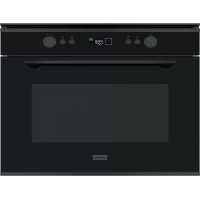
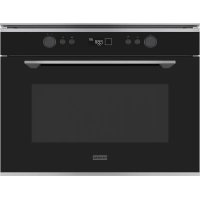
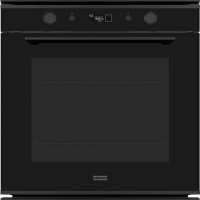
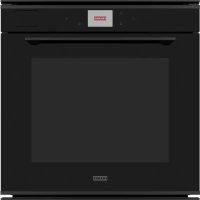
FS 982 M - Oven FRANKE - Free user manual and instructions
Find the device manual for free FS 982 M FRANKE in PDF.



Frequently Asked Questions - FS 982 M FRANKE
User questions about FS 982 M FRANKE
0 question about this device. Answer the ones you know or ask your own.
Ask a new question about this device
Download the instructions for your Oven in PDF format for free! Find your manual FS 982 M - FRANKE and take your electronic device back in hand. On this page are published all the documents necessary for the use of your device. FS 982 M by FRANKE.
USER MANUAL FS 982 M FRANKE
Proper installation and placement 7
Proper use 7
Maintenance and cleaning 7
Repair 8
Taking out of service 8
Information for energy saving 8
Overview 9
Oven 9
Control panel 10
Menu icons on display 11
Switching on the first time 13
Configuring the display 13
Operation 14
Cooking in manual mode 14
Cooking in automatic mode 14
Cooking in eco cooking mode 15
Scheduling an end time for cooking 17
Setting the timer 17
Manual cooking programs 18
Cooking table 20
Cooking tested 22
Complete Menu Programs 23
Complete Meat Menu 23
Complete Meat Menu - low energy 25
Complete Fish Menu 27
Complete Fish Menu - low energy 29
Complete menu 4 Pizzas and Bread 31
Complete menu 4 Pizzas and Bread - low energy 32
Menu Wellness 32
Cleaning and care 33
General recommendations 33
Cleaning the oven chamber 33
Cleaning the oven door 33
Removing the oven door 33
Mounting the oven door 34
Cleaning the glass panels of the oven door 34
Cleaning the side frames and telescopic guides 35
Replacing the oven lamp 36
Maintenance and repair 37
Disposal 37
Customer service 37
Technical data 38
InTroDUCTlon
Dear customer,
Thank you for choosing Frames by Franke.
Before using the oven, please carefully read the instructions and advice contained in this manual. This will enable you to make best use of the oven and ensure many years of trouble-free operation.
Keep this user manual for further reference.
Frames by Franke is a next generation oven, developed to turn domestic and professional cooking around. Our proven Dynamic Cooking Technology (DCT) has been upgraded with a HD display that allows you to program, schedule, and control every cooking process with a simple touch.
With Frames by Franke the choice is in your hands:
You can decide to cook "old-style" helped by the ultimate technological upgrades provided by the oven, or you can enjoy saved recipes and complete menus which will make your everyday life easier, faster and healthier.
These are the options you can choose from:
MANUAL - Cooking in manual mode and setting the system, temperature and duration as desired.
AUTO - Cooking in automatic mode and enjoying a great variety of recipes and complete menus ready to go.
ECO COOKING - Cooking in automatic or ecologic mode and enjoying a great variety of recipes and
complete menus perfect for your health.
An aesthetic and technological upgrade that perfectly combines design and performance, Frames by Franke is a piece of elegance suitable for every kitchen that guarantees outstanding reliability thanks to the quality of materials and the attention to detail, typical of every Franke product.
aBoUT THIS manUaL
This user manual applies to several models of the device. Thus it may be possible that some of the described features and functions are not available on your specific model.
- Carefully read the user manual before using the device.
- Keep the user manual.
- Use the device described in this user manual only according to the intended use.
Symbol Meaning

Warning symbol. Warning against risks of injury.
Actions in safety and warning notes to avoid injury or damage.
Action step. Specifies an action to be done.
Result. Result of one or more action steps.
Precondition that has to be fulfilled before performing the following action.
InTenDeD USe
The oven was developed exclusively for nonprofessional, domestic use in the household.
The oven is designed to offer professional performance in the household. It is a highly versatile appliance enabling safe and easy selection of different cooking methods.
SafeTY InformaTlon
Read the user manual and the safety information carefully before using the oven.
Keep the manual for future reference.
The manufacturer can not be made liable for possible damage which may occur due to incorrect installation and incorrect, improper or unreasonable use of the device.
The electrical safety of the oven is guaranteed only when it is connected to an earthing system in compliance with the valid regulations.
To ensure safe and efficient operation of this electrical device:
Only contact authorised service centres.
Do not modify any features of the device.
Children of 8 years or older and persons with restricted physical, sensory or mental abilities, or with limited experience or knowledge, may not use or clean the device, except when they are supervised and instructed by a person responsible for their safety.
Children under 8 years may not use or clean the device even if supervised.
This device is not a toy.
- Keep children away from the device and the packaging material.
Do not leave children near the device unattended.
Do not let children play with the device.
Do not allow children to touch the device or its controls during and immediately after using it.
Proper installation and placement
If the oven is to be permanently connected to the power supply:
Ensure that the device is installed only by the customer service, an electrician or trained personnel with the appropriate knowledge/ education.
Ensure that the device is installed in a way that allows to disconnect it from the power supply, with a contact opening distance that ensures complete disconnection in category III overvoltage conditions.
Ensure that the device is connected directly to the mains socket.
- Ensure that no adapters, no multi-sockets and no extension cables are used to connect the device.
Ensure that the device is not exposed to atmospheric agents (rain, sun).
Proper use
Only use the device to prepare and cook food.
Use oven gloves when placing containers in the oven or when taking containers out of the oven.
Observe the manuals of the cooking devices that are used with the oven when using the device.
Do not place power cables of other electric appliances on hot parts of the oven.
Do not use the oven chamber to store any objects.
Do not use flammable liquids near the oven.
Only use the temperature probe recommended for this oven.
Risk of overheating and malfunction of the oven due to blocked ventilation!
Never cover the inside walls of the oven with aluminium foil, especially the lower part of the oven chamber.
Do not block the ventilation of the fan or the cooling openings above the oven door.
Damage to the enamel in the oven due to wrong handling of pots or containers!
During cooking, never place pots or containers directly on the floor of the oven chamber.
Place pots and containers only on the racks or enamel trays provided on one of the five shelves available in the oven chamber.
Risk of burns!
The oven and its accessible parts become very hot during use.
Do not to touch the heating elements inside the oven.
! Risk of burns!
The end of the door handle may be hotter due to hot air being vented.
- When opening or closing the door, always hold the door handle in the middle.
Always make sure that the control knobs are in the off position when the oven is not in use.
! Risk of electric shock due to damaged device!
Do not switch on a damaged device.
Switch off the fuse in the fuse box.
Contact the customer service.
! Risk of electric shock!
Do not touch the device with wet parts of your body.
Do not use the device when barefoot.
Do not pull on the device or power cable to unplug it from the socket.
Maintenance and cleaning
Before maintenance or cleaning:
Disconnect the device from the power supply, e.g., switch off the fuse in the fuse box.
The oven uses a special enamel which is easy to keep clean. However, Franke recommends to clean it frequently in order to avoid baking on grime and previous cooking residues.
Do not use coarse abrasive materials or sharp metal scrapers to clean the glass parts of the oven door, as they could scratch the surface and cause the glass to shatter.
Do not use steam cleaners or direct jets of water.
! Risk of electric shock due to entering liquid!
The device contains electrical components.
Make sure that no liquid enters the interior of the device.
Do not use pressurised steam to clean the device.
Do not use a wet cloth to clean the operating elements.
Repair
Do not allow anyone except qualified personnel to install or repair the appliance.
Contact a service centre authorised by the manufacturer or qualified personnel in the following cases:
- Immediately after unpacking, in the event of doubts regarding the integrity of the device
- During installation (according to the manufacturer's instructions)
- Doubts regarding the correct operation of the device
- Malfunction or poor operation
- Replacing the power socket if incompatible with the power plug of the device
- Damage to the power cable or need of replacing the power cord or plug
Taking out of service
If the oven is no longer to be used, call the service centre or qualified personnel to disconnect it from the power supply.
InformaTion for enerGY SaVInG
The operating modes GENTLE HEAT and HOT
AIR consume less energy than the other cooking functions available.
Avoid frequent door opening.
Preheat as rapidly as possible.
Preheat the oven chamber only if the baking results depend on this operation.
If a recipe for a gratin uses residual heat for longer than 30 minutes, turn the appliance off 5-10 minutes before the end of cooking.
Oven
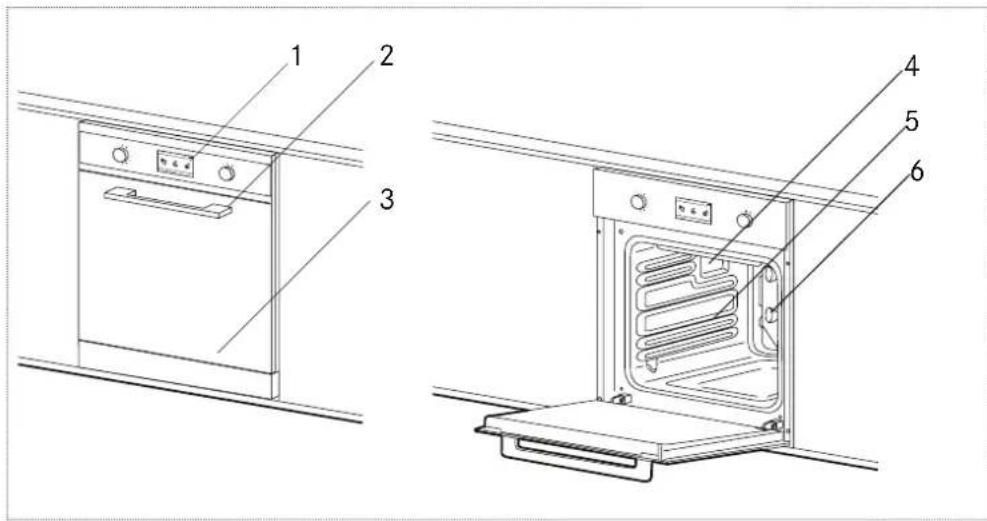
1 Control panel
2 Front door handle
3 Front door glass
4 Lighting
5 Runners for racks and enamel trays
6 Cooling fan (rear side)
Cooling fan
In order to reduce the temperature at the door, the control panel and the sides, your Franke oven is equipped with a cooling fan which is automatically activated when the oven gets hot. When the cooling fan is on, air is vented out of the oven between the front panel and the oven door. The speed of the air being expelled was optimised to create no disturbance in the kitchen and to keep the noise to a minimum.
To protect kitchen units, the cooling fan continues to run after cooking until the oven has cooled down sufficiently.
Runners for racks and enamel trays
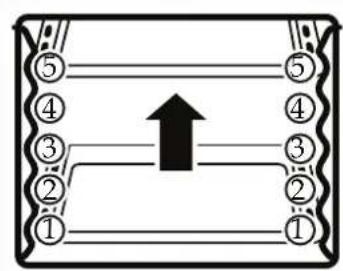
Used for correctly positioning the racks and enamel trays in 5 predetermined positions (depending on model; 1 to 5 starting from the bottom). The cooking table (page 19) indicates the best position for each type of cooking.
Accessories Description
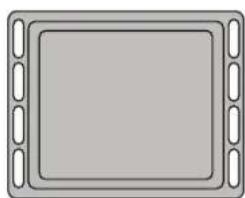
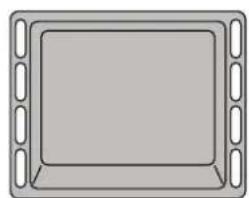
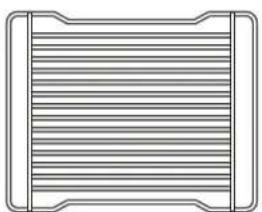
Enamel Tray
Normally used for collecting juices from grilled food or for cooking food directly on the enamel tray. Enamel trays must be removed from the oven when they are not used. The enamel trays are made from "AA" food-grade enamelled steel.
Rack
Used for supporting pans, pastry moulds and any containers other than the enamel trays provided, or for cooking meat and fish mainly with the grill and turbo grill functions, toasting bread, etc. Food should not come into direct contact with the rack.
Control panel
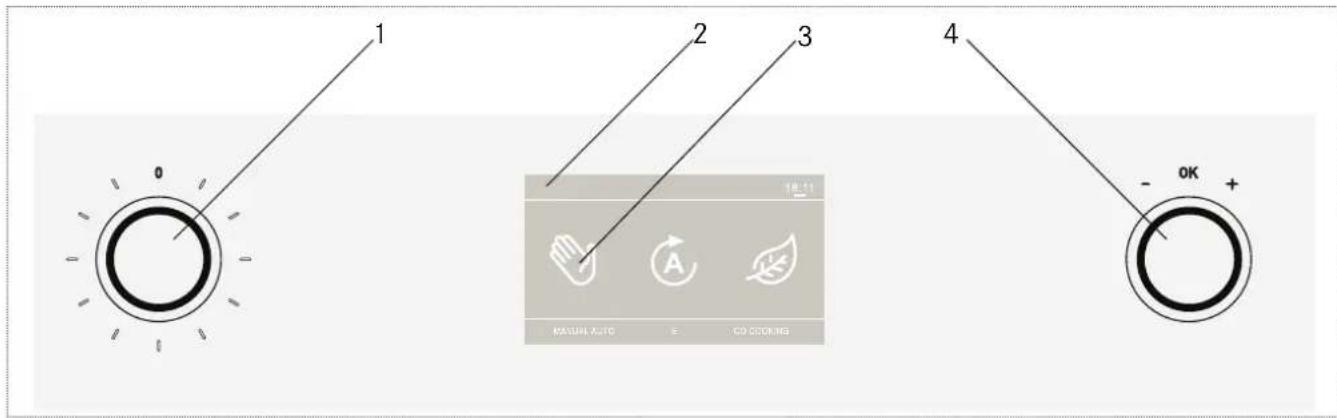
1 Knob, left
2 Display
3 Menu icons
4 Knob, right
Knob icon Knob name Function

Knob, left Enter the list of the manual cooking programs:
Turn the knob right.
On the display, the list of the manual cooking programs appears.
Turn the knob right to scroll through the list.
Stop the oven:
Turn the knob into position 0.

Knob, right Start the oven:
Press the knob briefly.
Navigate inside a menu:
Turn the knob left or right.
Validate your operations, enter a sub menu and confirm the program:
Press the knob briefly.
Menu icons on display
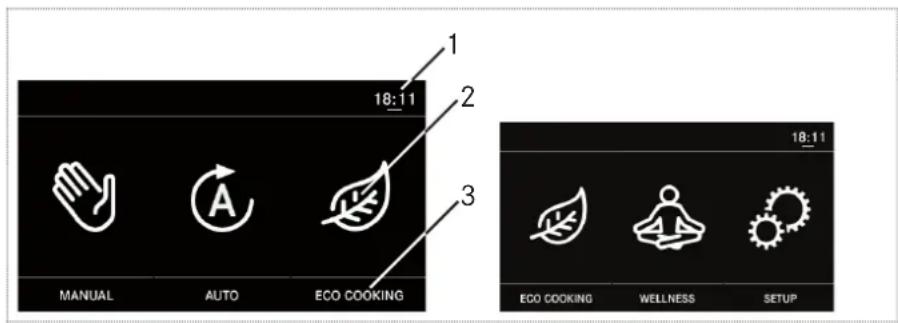
Main view
1 Actual time
2 Menu icon
3 Menu name
Menu icon Menu name Function
| MANUAL Cooking in manual mode |
| AUTO Cooking in automatic mode |
| ECO COOKING In this menu the following programs are provided: Recipes Eco and Complete menu Eco Cooking with reduced power consumption to use the domestic power supply available in the most ecological way. The recipes in this menu are the same as in the AUTO mode, but with a lower power consumption for cooking. - In the RECIPES program you can cook on only one level. - In the COMPLETE MENU program you can cook on four levels. |
| WELLNESS In this menu the following program is provided: Wellness Cooking of meat, fish and vegetable dishes in a completely natural and low-fat way. This program requires prolonged cooking at a low temperature inside the food (around 100°C) without the addition of oil or other fats. This allows you to retain the original nutritional value of the food (minerals, vitamins, etc.) and to enhance its natural flavours. - In the WELLNESS program you can cook on only one level. |
| SETUP In this menu you can configure the display, e.g., time, language, brightness and contrast. |
| RECIPES In this menu you can choose from different recipe categories, e.g., pasta, vegetables, meat, fish, cakes, bread or pizza. |
| COMPLETE MENU In this menu you can choose from different programs for complete menus, e.g., meat menu, fish menu, 4 pizzas, bread in 4 trays. |
MANUAL mode view
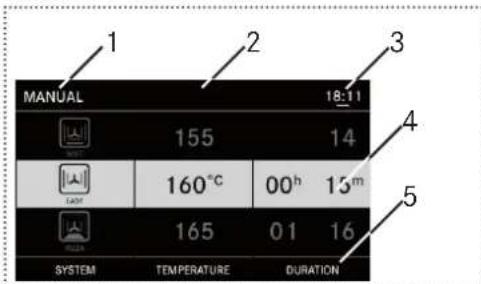
1 Menu name
2 Menu bar
3 Actual time
4 Sections with program settings (grey: active setting)
5 Section name
RECIPIES, COMPLETE MENU, WELLNESS view
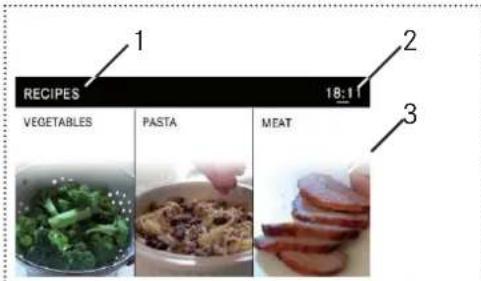
1 Menu name
2 Actual time
3 Recipe or complete menu with example picture and name In ECO COOKING mode the view is the same, but the menu name shows ECO at the end.
Sub menu view
This sub menu appears when pressing and holding during programming.
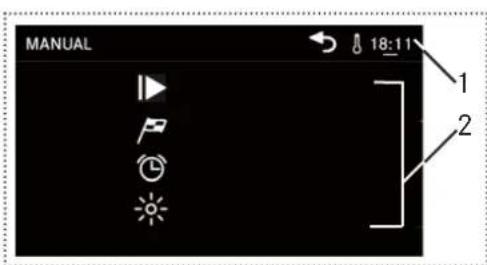
1 Actual Time. The ampoule icon appears when the oven is in function, is heating up or is programmed.
2 Function icons (Icon name not shown here; see table below)
| Icon Icon name Function | ||
| ID | START COOKING | Start cooking |
| P | SET END TIME | Set an end time for cooking |
| E | TIMER | Set an alarm time |
| L | LIGHT OFF | Switch the internal lighting on/off |
| R | RETURN | Exit the sub menu and return to the previous menu |
| C | RESET TIMER | Reset the cooking time and duration after the cooking has started |
If you did program the duration of cooking with a starting delay, the display shows the total cooking time and the end time when the cooking will be finished.
SwitchInG on THe flrST TIme
When using the oven for the first time:
- Open the front door and ensure that the oven is empty. Remove all accessories.
- Ensure that the room is well aired, e.g., open the doors and windows.
Press to start the oven.
After starting, the main view appears.
▶Turn right to select and press.
In the SYSTEM section select the program MULTICOOKING.
In the TEMPERATURE section, select the maximum temperature (270^)
In the DURATION section, select 00^h40^m
- Operate the oven while empty at maximum temperature with the door fully open.
The odour detectable during this operation results from the evaporation of substances used to protect the oven during the time between manufacture and actual installation.
After the 40 minutes, the oven stops automatically and will be ready for use.
ConfigUrlnG The DISPLAYaY
This chapter explains how to set up your display features according to your preferences.
Starting the configuration
Turn right to select and press.
- The SETUP menu appears and shows different options.
Configuring the time
Turn R, select TIME AND DATE and press R.
Choose hours, minutes and seconds by turning and pressing the R.
Configuring the language
Select LANGUAGE and press R
Choose your language by by turning the and scrolling through the list.
Configuring the display brightness
Select DISPLAY BRIGHTNESS and press R
- Set the brightness of the control panel by turning the () and selecting one of the segments of the bar.
Configuring the volume of the alarm tone
Select SOUND and press R
Set the volume by by turning the and selecting one of the segments of the bar.
Configuring the clock display type
Select CLOCK DISPLAY TYPE and press R
- Select your favourite skin: analogue clock or digital clock.
Switching the display off
The display can switch off automatically when the oven is switched off. If this option is activated, the clock is not visible.
Select DISPLAY OFF and press R
Finishing the configuring
To confirm the configuration, press R The main menu appears. Your settings will be saved.
oPeraTlon
For best use of your Franke oven, consult the cooking table.
Cooking in manual mode
In manual mode you are cooking by setting a program, the temperature and duration according to your preferences.
Turn enter the list of manual cooking programs.
The menu MANUAL with different sections appears:
| Section Description | |
| SYSTEM | Select from different programs (see chapter Manual Cooking Programs) |
| TEMPERATURE | Select the required temperature from min. 50°C up to max. 270°C (in program GENTLE HEAT: 230°C) |
| DURATION | Select the duration in hours and minutes |
Tum to choose a program.
Turn R to select TEMPERATURE or DURATION and press R.
-In each section:Turn to choose temperature or duration and press to confirm.
Place the prepared food in the oven chamber and close the oven door.
Press select and press to confirm.
The cooking program starts.
To stop the program:
Turn to position 0 and press.
Cooking in automatic mode
In automatic mode there are many recipes and complete menus.
Turn Rselect anRress. R
The menu AUTO with its submenus appears:
-RECIPES
In this menu you can choose from different recipe categories, e.g., pasta, vegetables, meat, fish, cakes, bread or pizza.
- COMPLETE MENUS
In this menu you can choose from different programs for complete menus, e.g., meat menu, fish menu, 4 pizzas, bread in 4 trays.
Example for a recipe program
Turn Rselect anRpress.
- Select and press PASTA, then select and press CANNELLONI.
The summary of the recipe appears:
Section Description
QUANTITY Select the weight of food to cook from the vertical menu
INFO Automatic set-up of temperature, program and display of the optimal position for the tray
TIME Automatic set-up of cooking duration
Turn R to select QUANTITY.
- Tum R to choose the quantity and press R to confirm.
Turn to select SYSTEM and turn to choose a program.
Place the prepared food in the oven chamber and close the oven door.
Press, select and press to confirm.
The cooking program starts.
To stop the program:
Turn position 0 and press.
The details of the recipes (ingredients and preparation) are available on our web site:
- http://recipes.franke.com
Example for a a complete menu program
▶Turn Rselect arpress.
Select and press MEAT.
The summary of the complete menu appears:
| Section Description | |
| PROGRAM | Automatic set-up of the cooking program |
| TEMPERATURE | Automatic set-up of the temperature |
| TRAY INFO | Automatic display of the optimal position for the tray |
| TIME | Automatic set-up of the cooking duration |
Turn to select SYSTEM and turn to choose a program.
Place the prepared food in the oven chamber and close the oven door.
Press R confirm, select a R press to confirm.
The cooking program starts.
To stop the program:
▶Turn position 0 and press.
The details of the recipes (ingredients and preparation) are available on our web site: - http://recipes.franke.com
Cooking in eco cooking mode
In eco cooking mode you are enjoying an eco-friendly way of cooking with numerous recipes and complete menus perfect for your health and wellness.
In this menu the recipes are the same as in the AUTO mode, but with a lower power consumption for cooking.
▶ Tum to select anpress.
The menu ECO COOKING with its submenus appears:
-RECIPES
In this menu you can choose from different recipe categories, e.g., pasta, vegetables, meat, fish, cakes, bread or pizza.
WELLNESS
In this menu you can choose from different recipe options like lamb, pork, sheep, poultry, fish, veal and vegetables.
- COMPLETE MENUS
In this menu you can choose from different programs for complete menus, e.g., meat menu, fish menu, 4 pizzas, bread in 4 trays.
Example for a recipe program
Turn Rselect andpress. R
- Select and press PASTA, then select and press CANSELLONI.
The summary of the recipe appears:
Section Description
| QUANTITY | Select the weight of food to cook from the vertical menu |
| INFO | Automatic set-up of temperature, program and display of the optimal position for the tray |
| TIME | Automatic set up-of the cooking duration |
Turn R to select QUANTITY.
- Turn R to choose the quantity and press R to confirm.
Turn to select SYSTEM and turn L to choose a program.
Place the prepared food in the oven chamber and close the oven door.
Press, select and press to confirm.
The cooking program starts.
To stop the program:
Turn position 0 and press.
The details of the recipes (ingredients and preparation) are available on our web site:
- http://recipes.franke.com
Example for a wellness menu program
This program enables the cooking of meat, fish and vegetable dishes in a completely natural and low-fat way. It requires prolonged cooking at a low temperature inside the food (around 100^ ) without the addition of oil or other fats. This allows you to retain the original nutritional goodness of the food (minerals, vitamins, etc.) and to enhance its natural flavours.
▶Turn ,select an. press . R
Select and press VEGETABLES.
The summary of the complete menu appears:
| Section Description | |
| PROGRAM | Automatic set-up of the cooking program |
| TEMPERATURE | Automatic set-up of the temperature |
| TRAY INFO | Automatic display of the optimal position for the tray |
| TIME | Automatic set-up of the cooking duration |
Turn to select SYSTEM and turn to choose a program.
- Press® to confirm.
Place the prepared food in the oven chamber and close the oven door.
Press select and press to confirm.
The cooking program starts.
To stop the program:
Turn to position 0 and press.
The details of the recipes (ingredients and preparation) are available on our web site:
- http://recipes.franke.com
Example for a complete menu program
Turn,select anpress. R
Select and press MEAT.
The summary of the complete menu appears:
| Section Description | |
| PROGRAM | Automatic set-up of the cooking program |
| TEMPERATURE | Automatic set-up of the temperature |
| TRAY INFO | Automatic display of the optimal position for the tray |
| TIME | Automatic set-up of the cooking duration |
Turn to select SYSTEM and turn to choose a program.
- Press® to confirm.
Place the prepared food in the oven chamber and close the oven door.
Press, select and press to confirm.
The cooking program starts.
To stop the program:
Turn position 0 and press.
Scheduling an end time for cooking
In manual cooking mode
Tum enter the list of manual cooking programs.
The menu MANUAL with different sections appears:
Press ng.
The sub menu view appears.
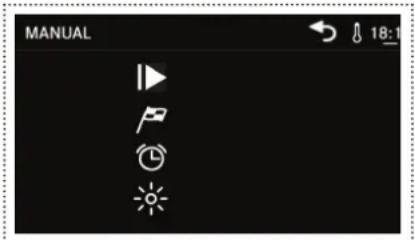
▶Turn Rselect anpress.

Choose hours, minutes and seconds by turning and pressing R.
▶ Tum to select anpress to confirm.
The oven is now in standby mode.
The oven calculates the start time based on the chosen cooking time or cooking program and the preset end time. Cooking will start at the calculated start time.
Setting the timer
The timer can be used in all cooking modes, it is independent from any function.
In manual cooking mode
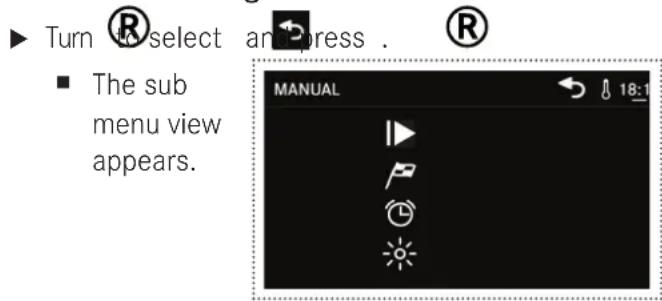
Turn Rselect anRress.
Choose hours, minutes and seconds by turning and pressing R.
Turn to select an press to confirm.
The timer runs in the background.
When finished, you hear a sound.
manUaL CookInG ProGramS
| Program Description Knob / Position | ||
| GENTLE HEAT The set temperature is 100°C with the inside cooling fan switched on for cooking at low power (1000 Watts). Cooking times are elongated which allows a very delicate and uniform cooking (e.g., cooking type „wellness“). This function is suitable for preheating the oven before inserting the prepared food. | L1 | |
| DEFROSTING The set temperature is 25°C with the inside cooling fan switched on. This function is suitable for defrosting food slowly or to cool the oven down after cooking. | L1 ► Select temperature with R. | |
| DOUGH RESTING The set temperature is 30°C with the inside cooling fan switched off. This creates the ideal conditions for dough to rise. | L1 ► Select temperature with R. | |
| LOW TEMPERATURE The low temperature function is ideal to cook food at low temperature for a longer time, in order to preserve tenderness and organoleptic properties. You can cook meat, fish and vegetables, keeping the original flavor and nutritional values. | L1 ► Select temperature (from 35°C up to 100°C) with R. | |
| HOT AIR This energy-saving cooking function (1500 Watts) is generally suited for a wide variety of dishes. Cooking times are longer but heat distribution is optimal which guarantees excellent results at a low power consumption. | L2 | |
| PIZZA The heating elements are combined to create highly concentrated heat in the lower part of the oven. This function is ideal for cooking pizza which requires heating from below on a single shelf. Cooking is quick and perfect results are guaranteed (for preheating use RAPID HEATING and then switch on Pizza mode). | L3 | |
| EASY BAKING This is the ideal function for novice cooks. The combination of DCT technology and traditional heating elements creates a balanced heat distribution, which allows a great variety of food to be cooked with limited instantaneous power absorption. | L4 | |
| COMPLETE MENU The combination of DCT technology and traditional heating elements creates gradual heat distribution predominantly towards the upper shelf, which is ideal for cooking large quantities of food on 2-3 shelves. | L5 | |
| Program Description Knob / Position | |
| MULTI COOKING This function uses all of the oven's heating elements (DCT and traditional). Unlike the COMPLETE MENU-function, this function creates heat predominantly in the lower part of the oven, which is ideal for cooking on 4 shelves (bread, 4 pizzas, savoury pies). | |
| RAPID HEATING This very powerful function exploits the DCT booster effect. High temperatures are reached in a short time. This function is suitable for traditional cooking of large pieces of meat (e.g., leg of lamb, roast suckling pig, pork/veal leg, oven-baked ham). | |
| BBQ Traditional grill and upper heating elements are assisted by the DCT. Heat is generated only in the upper part of the oven, radiating uniformly over the surface of the food. This function is suitable for tender or small pieces of meat and hamburger. | |
| GRILL This function uses the top grill only and is ideal for toasting bread and for browning meat or fish. | |
| FAN GRILL The heat is generated by the grill and distributed by the rear fan. Ideal for cooking large pieces of meat and poultry. | |
| TOP & BOTTOM HEAT This traditional function is ideal for all dishes, for baking bread and cakes and for cooking roasts and lamb. | |
| FAN ASSISTED This a traditional function is used for flans, savoury pies, desserts and roasts of for cooking on two shelves. | |
| ENERGY SAVING This function reduces the power consumption of the oven during cooking. This function is not suitable for all types of food. | |
CookInG TaBLe
The instructions in the cooking table are the result of cooking tests carried out by a team of professional chefs. They are given only as a guide and can be changed according to personal tastes.
| Function selected | Type of food or recipe Weight (kg) | Shelf position (level) | Preheating time (min.) | Temperature (℃) | Duration (minutes) |
| GENTLE HEAT | Scallops | 0.5 | 3 or 4 | 8 | 170 |
| Vegetable pies 1 3 or 4 8 175 17-20 | |||||
| Baked pasta dishes | 1.8 | 2 or 3 | 9.5 | 195 | |
| Cannelloni | 1.3 | 2 or 3 | 10 | 195 | |
| Roast beef | 1.3 | 2 or 3 | 10 | 195 | |
| Fish en papillote | 0.4 | 4 or 5 | 8 | 200 | |
| Biscuits | 0.8 | 2 or 3 | 8 | 165 | |
| Apple pie | 1.6 | 2 or 3 | 10 | 180 | |
| FAN | Pizza by the slice | 1.3 | 4 or 3 | 7 | 200 |
| Baked vegetables | 1 | 2 or 3 | 8 | 190 | |
| Stuffed pancakes | 1.3 | 3 or 4 | 8 | 200 | |
| Hamburgers | 180 g | 3 or 4 | 8 | 180 | |
| Roast pork | 1.3 | 2 or 3 | 12 | 200 | |
| Bass | 0.8 | 3 or 4 | 8 | 200 | |
| Salt-crusted fish | 0.8 | 2 or 3 | 6 | 190 | |
| Tarts | 1.3 | 3 or 4 | 8.5 | 180 | |
| PIZZA | Bread | 1 | 2 or 3 | 8 | 180 |
| Thin-crust pizza | 0.2 | 2 or 3 | 8 | 190 | |
| Focaccia pizza | 1.3 | 2 or 3 | 10 | 185 | |
| Focaccia | 1.3 | 2 or 3 | 8 | 185 | |
| Toasted garlic bread | 0.4 | 4 or 5 | 10 | 190 | |
| EASY BAKING | Cannelloni | 1.3 | 2 or 3 | 10 | 195 |
| Baked Parmigiana dishes | 1.3 | 3 or 4 | 8.5 | 190 | |
| Meat & veg pie | 1.8 | 2 or 3 | 10 | 180 | |
| Vegetables au gratin | 1.2 | 2 or 3 or 4 | 7.5 | 195 | |
| Baked potatoes | 1.5 | 2 or 3 | 8 | 190 | |
| Gilt-head bream | 0.8 | 2 or 3 | 10 | 180 | |
| Rabbit (pieces) | 1.1 | 2 or 3 | 8 | 175 | |
| Loaf cake | 0.9 | 2 or 3 | 10 | 175 | |
| Function selected | Type of food or recipe Weight (kg) | Shelf position (level) | Preheating time (min.) | Temperature (°C) | Duration (minutes) |
| COMPLETE MENU | Cheese pies | 0.8 | 2 or 3 | 6.5 | 180 |
| Vegetable pies | 1.5 | 2 or 3 | 8 | 190 | |
| Tomatoes au gratin | 9 pcs | 2 or 3 | 7.5 | 200 | |
| Roast veal | 1.3 | 1 or 2 or 3 | 8.5 | 190 | |
| Chicken | 0.4 | 2 or 3 | 7.5 | 200 | |
| Cod | 1.5 | 2 or 3 | 7.5 | 190 | |
| Monkfish | 0.7 | 2 or 3 | 8 | 190 | |
| Cream puffs | 0.9 | 2 or 3 | 6 | 200 | |
| MULTI COOKING | Large rustic cob loaf | 1.5 | 3 or 4 | 8 | 210 |
| Vegetable flan | 0.8 | 2 or 3 or 4 | 7.5 | 180 | |
| Baked pasta dishes | 1.3 | 2 or 3 | 9.5 | 190 | |
| Pilaf rice | 1 | 2 or 3 | 10 | 190 | |
| Swordfish | 0.8 | 2 or 3 | 8 | 200 | |
| Chicken pieces | 1 | 2 or 3 | 7.5 | 175 | |
| Croissants | 12 pcs | 3 or 4 | 6 | 180 | |
| Puff pastry | 0.8 | 2 or 3 or 4 | 6.5 | 165 | |
| RAPID HEATING | Courgettes au gratin | 1.4 | 1 or 2 or 3 | 6 | 190 |
| Tortellini au gratin | 1 | 2 or 3 | 5.5 | 175 | |
| Potato dumplings | 1.5 | 1 or 2 | 5 | 180 | |
| Meat kebabs | 1 | 1 or 2 or 3 | 8.5 | 190 | |
| Chicken wings | 1 | 2 or 3 | 7.5 | 175 | |
| Sausages | 15 pcs | 2 or 3 | 5.5 | 180 | |
| Chocolate Bonet dessert | 9 pcs | 2 or 3 | 3 | 210 | |
| Muffins | 9 pcs | 1 or 2 | 4.5 | 190 | |
| BBQ | Omelette | 1.8 | 2 or 3 | 4 | 190 |
| Fish pie | 1.8 | 2 or 3 or 4 | 5.5 | 185 | |
| Goat skewers | 1 | 2 or 3 | 6 | 200 | |
| Pork ribs | 1.8 | 1 or 2 | 8 | 195 | |
| Hamburgers | 180 g | 1 or 2 or 3 | 3 | 195 | |
| Trout | 0.8 | 1 or 2 or 3 | 6.5 | 200 | |
| Sweet stuffed pancakes | 12 pcs | 1 or 2 | 5.5 | 190 | |
| Mini croissants | 12 pcs | 1 or 2 | 4 | 185 |
CookInG TeSTeD
- In accordance with the Standard EN / IEC 60350 These tables have been created for the controlling authorities in order to facilitate the examination and testing of the various devices.
How to read the cooking table
The table suggests the ideal function to use for a particular food cooked on one or more shelves simultaneously.
The cooking times refer to the introduction of the food in the oven, excluding preheating (if required). Temperatures and cooking times are approximate values and depend on the quality of food and the type of accessory.
Initially use the recommended values and, if the firing result is not as expected, increase or decrease the time. We recommend using the supplied accessories, cake tins and tray made of dark metal. Follow the selection table which lists the supplied items to be placed on different shelves.
The indicated levels refer to the shelves without sliding guides (please remove).
Cooking different foods at the same time
Using the recommended ventilated functions, it is possible to cook on different shelves simultaneously. When cooking on a single shelf you can also use the static function.
| Recipe Function Preheating Level | (from bottom to top) | Temperature (℃) | Time (minutes) | Accessories / Notes | |
| Shortbread TOP/Bottom HEAT | ✓ | 4 160 22-26 Level 4: enamel baking tray | |||
| EASY BAKING | ✓ | 3-5 | 150 | 35-40 | Level 5: enamel baking trayLevel 3: enamel roasting tray |
| Small cakes TOP/Bottom HEAT | ✓ | 3 | 170 | 33-38 | Level 3: enamel roasting tray |
| EASY BAKING | ✓ | 3 | 150 | 24-28 | Level 4: enamel roasting trayLevel 3: deep tray |
| EASY BAKING | ✓ | 3-4 | 150 | 24-28 | Level 4: enamel baking trayLevel 3: enamel roasting tray |
| Spongecake made without added fat | TOP/Bottom HEAT | ✓ | 2 | 170 | 43-48 |
| EASY BAKING | ✓ | 2 | 170 | 28-32 | |
| Apple pie | TOP/Bottom HEAT | ✓ | 1 190 60-70 | Level 1: baking tin on rack | |
| MULTICOOKING | ✓ | 1 | 180 | 50-55 | |
| Two apple pies | MULTICOOKING | ✓ | 1 | 180 | 50-55 |
| Level 1: 2 baking tins on rack | |||||
| Recipe Function Preheating Level | (temperature (℃) from bottom to top) | Time (minutes) | Accessories / Notes | ||
| Leavened cakes | TOP/BOTTOM HEAT | ✓ | 2 165 25-30 Level 2: baking tin on rack | ||
| EASY BAKING | ✓ | 2 165 28-35 Level 2: baking tin on rack | |||
| Grill cooking | If cooking foods directly on the rack, place the enamel tray on the shelf below. This will collect cooking residues and keep the oven clean. | ||||
| Toasted sandwich | GRILL ✓ | (5 min.) | 5 80 2-3 Level 5: rack | ■ Keep the door closed for the entire cooking time. | |
| Burgers | BBQ | no | 4 200 | 20 | Level 4: rack Level 3: enamel baking/roasting tray ■ Turn food after 10 min. |
ComPLETe menU ProGramS
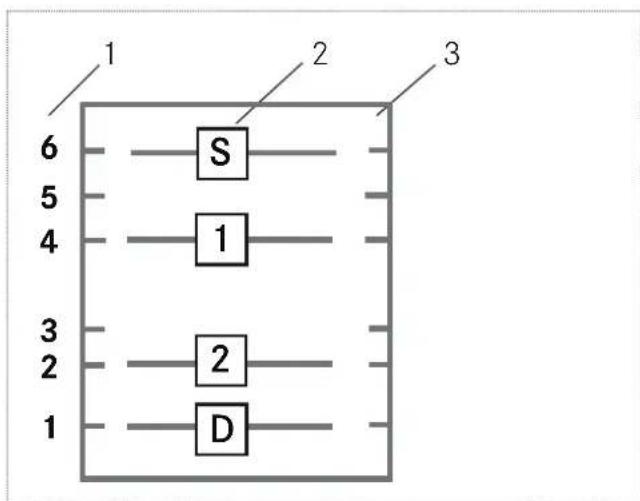
1 Runners
2 Shelf position
3 Oven chamber
Example:
S Starter
1 1st Course
2 2nd Course
D Dessert
Information about weight and position: on website: http://recipes.franke.com
Complete Meat Menu
Meat Menu 1
| Food | Recipes | Shelf position | Total cooking time | Weight (recipe) | FRANKE accessory to be used |
| Starter | SAVOURY GRUYERE ROFITEROLES | 6 | 28 min | n20 300 g | Enamel baking tray |
| 1st course | BEEF Caneloni | 4 | 41 min | 1100 g | Baking tin on grill |
| Dessert | CHOCOLATE CHILLI CAKE | 1 | 51 min | 800 g | Baking tin on Enamel roasting tray |
| 2nd course | STUFFED GUINEA FOWL | 2 | 98 min | 1450 g | Baking tin on grill |
Meat Menu 2
| Food Recipes Shelf | position | Total cooking time | Weight (recipe) | FRANKE accessory to be used | |
| Starter | STUFFED COURGETTES | 6 18 min | n16 700 g Enamel baking tray | ||
| Dessert | APPLE PIE 1 34 min | 800 g | Baking tin on Enamel roasting | ||
| tray | |||||
| 1st course | LASAGNE WITH PESTO | 4 44 min | 1600 g Baking tin on grill | ||
| 2nd course | CHICKEN MEATLOAF WITH PEAS & ASPARAGUS | 2 | 54 min | 1100 g | Baking tin on grill |
Meat Menu 3
| Food Recipes Shelf | position | Total cooking time | Weight (recipe) | FRANKE accessory to be used | |
| Starter | FENNEL GRATIN | 6 | 22 min | 800 g | Baking tin on grill |
| 1st course | GNOCCHI | 4 | 29 min | 650 g | Baking tin on grill |
| Dessert | PLUM TART | 1 | 51 min | 580 g | Baking tin on Enamel roasting tray |
| 2nd course | WILD BOAR IN SAUCE | 3 | 55 min | 900 g | Enamel baking tray |
Meat Menu 4
| Food Recipes Shelf | position | Total cooking time | Weight (recipe) | FRANKE accessory to be used | |
| Starter | SPINACH FLAN | 6 | 19 min | 800 g | Baking tin on grill |
| 1st course | PATE WITH POLENTA & VEGETABLES | 4 | 25 min | 1200 g | Baking tin on grill |
| 2nd course | TURKEY STUFFED WITH ASPARAGUS | 3 | 29 min | 870 g | Enamel baking tray |
| Dessert | SWEET FOCACCIA | 1 | 32 min | 1100 g | Baking tin on Enamel roasting tray |
Meat Menu 5
| Food Recipes Shelf | position | Total cooking time | Weight (recipe) | FRANKE accessory to be used | |
| Starter | STUFFED COURGETTE FLOWERS | 6 | 17 min | 600 g | Baking tin on grill |
| 1st course | PAPPARDELLÉ PASTA WITH COURGETTES | 4 | 23 min | 1100 g | Baking tin on grill |
| 2nd course | ROAST VEAL | 3 | 28 min | 900 g | Enamel baking tray |
| Dessert | RICOTTA CINNAMON PUDDING | 1 | 41 min | 850 g | Baking tin on Enamel roasting tray |
Meat Menu 6
| Food | Recipes Shelf | position | Total cooking time | Weight (recipe) | FRANKE accessory to be used |
| Starter | POTATO BASKETS | 6 | 23 min | 800 g | Enamel baking tray |
| 1st course | STUFFED PASTA | 4 | 38 min | 1100 g | Baking tin on grill |
| Dessert | CHESTNUT CAKE | 1 | 38 min | 900 g | Baking tin on grill |
| 2nd course | LEG OF LAMB | 3 | 78 min | 800 g | Enamel roasting tray |
Meat Menu 7
| Food | Recipes Shelf | position | Total cooking time | Weight (recipe) | FRANKE accessory to be used |
| Starter | STUFFED PEPPERS | 6 | 25 min | 600 g | Baking tin on grill |
| 1st course EGG NOODLES WITH HAM & CHEESE | 4 | 34 min | 1300 g | Baking tin on grill | |
| Dessert | GERMAN CAKE | 1 | 54 min | 850 g | Baking tin on Enamel roasting tray |
| 2nd course | CHICKEN WITH RAISINS | 3 | 79 min | 1450 g | Enamel baking tray |
Meat Menu 8
| Food | Recipes Shelf | position | Total cooking time | Weight (recipe) | FRANKE accessory to be used |
| Starter | OLIVE TOFU DUMPLINGS | 6 | 28 min | 850 g | Enamel baking tray |
| 1st course | MEAT FILLED PASTA | 4 | 35 min | 1100 g | Baking tin on grill |
| 2nd course | ROAST VEAL | 2 | 38 min | 900 g | Baking tin on grill |
| Dessert | MARBLE CAKE | 1 | 65 min | 1326 g | Baking tin on Enamel roasting tray |
Complete Meat Menu - low energy
Meat Menu 1 - low energy
| Food | Recipes Shelf | position | Total cooking time | Weight (recipe) | FRANKE accessory to be used |
| Starter | SAVOURY GRUYERE PROFITEROLES | 6 | 45 min | n20 300 g | Enamel baking tray |
| 1st course | BEEF CANELONI | 4 | 58 min | 1100 g | Baking tin on grill |
| Dessert | CHOCOLATE CHILLI CAKE | 1 65 min 800 g Baking tin on Enamel roasting | tray | ||
| 2nd course | STUFFED GUINEA FOWL | 2 | 98 min | 1450 g | Baking tin on grill |
Meat Menu 2 - low energy
| Food Recipes Shelf | position | Total cooking time | Weight (recipe) | FRANKE accessory to be used | |
| Starter | STUFFED COURGETTES | 6 45 min n16 | 700 g Enamel baking tray | ||
| Dessert | APPLE PIE 1 56 min 800 g Baking tin on Enamel roasting tray | ||||
| 1st course | LASAGNE WITH PESTO | 4 | 70 min | 1600 g | Baking tin on grill |
| 2nd course | CHICKEN MEATLOAF WITH PEAS & ASPARAGUS | 2 | 82 min | 1100 g | Baking tin on grill |
Meat Menu 3 - low energy
| Food Recipes Shelf | position | Total cooking time | Weight (recipe) | FRANKE accessory to be used | |
| Starter | FENNEL GRATIN | 6 | 45 min | 800 g | Baking tin on grill |
| 1st course | GNOCCHI | 4 | 45 min | 650 g | Baking tin on grill |
| Dessert | PLUM TART | 1 | 60 min | 580 g | Baking tin on Enamel roasting tray |
| 2nd course | WILD BOAR IN SAUCE | 3 | 74 min | 900 g | Enamel baking tray |
Meat Menu 4 - low energy
| Food Recipes Shelf | position | Total cooking time | Weight (recipe) | FRANKE accessory to be used | |
| Starter | SPINACH FLAN | 6 | 38 min | 800 g | Baking tin on grill |
| 1st course | PATE WITH POLENTA & VEGETABLES | 4 | 52 min | 1200 g | Baking tin on grill |
| 2nd course | TURKEY STUFFED WITH ASPARAGUS | 3 | 56 min | 870 g | Enamel baking tray |
| Dessert | SWEET FOCACCIA | 1 | 56 min | 1100 g | Baking tin on Enamel roasting tray |
Meat Menu 5 - low energy
| Food Recipes Shelf | position | Total cooking time | Weight (recipe) | FRANKE accessory to be used | |
| Starter | STUFFED COURGETTE FLOWERS | 6 43 min | 600 g Enamel baking tray | ||
| 1st course | PAPPARDELLÉ PASTA WITH COURGETTES | 4 | 48 min | 1100 g | Baking tin on grill |
| 2nd course | ROAST VEAL | 3 | 56 min | 900 g | Baking tin on grill |
| Dessert | RICOTTA CINNAMON PUDDING | 1 | 58 min | 850 g | Baking tin on Enamel roasting tray |
Meat Menu 6 - low energy
| Food Recipes Shelf | position | Total cooking time | Weight (recipe) | FRANKE accessory to be used tray | |
| Dessert | CHESTNUT CAKE 1 42 min 900 g Baking tin on Enamel roasting | ||||
| Starter | POTATO BASKETS | 6 | 49 min | 800 g | Enamel baking tray |
| 1st course | STUFFED PASTA | 4 | 60 min | 1100 g | Baking tin on grill |
| 2nd course | LEG OF LAMB | 3 | 96 min | 800 g | Baking tin on grill |
Meat Menu 7 - low energy
| Food Recipes Shelf | position | Total cooking time | Weight (recipe) | FRANKE accessory to be used | |
| Starter | STUFFED PEPPERS | 6 | 52 min | 600 g | Enamel baking tray |
| 1st course | EGG NOODLES WITH HAM & CHEESE | 4 | 65 min | 1300 g | Baking tin on grill |
| Dessert | GERMAN CAKE | 1 | 65 min | 850 g | Baking tin on Enamel roasting tray |
| 2nd course | CHICKEN WITH RAISINS | 3 | 86 min | 1450 g | Baking tin on grill |
Meat Menu 8 - low energy
| Food Recipes Shelf | position | Total cooking time | Weight (recipe) | FRANKE accessory to be used | |
| Starter | OLIVE TOFU DUMPLINGS | 6 | 56 min | 850 g | Enamel baking tray |
| 1st course | MEAT FILLED PASTA | 4 | 58 min | 1100 g | Baking tin on grill |
| 2nd course | ROAST VEAL | 2 | 58 min | 900 g | Baking tin on Enamel roasting tray |
| Dessert | MARBLE CAKE | 1 | 65 min | 1326 g | Baking tin on grill |
Complete Fish Menu
Fish Menu 1
| Food Recipes Shelf | position | Total cooking time | Weight (recipe) | FRANKE accessory to be used | |
| Starter | SWORDFISH SKEWERS | 6 22 min | 600 g Enamel baking tray | ||
| 1st course | PASTA WITH RADICCHIO & PRAWNS | 4 | 27 min | 1200 g | Baking tin on grill |
| Dessert | PEAR TART | 1 | 44 min | 950 g | Baking tin on grill |
| 2nd course | SEA BASS IN FOIL | 2 | 50 min | 800 g | Baking tin on grill |
Fish Menu 2
| Food Recipes Shelf | position | Total cooking time | Weight (recipe) | FRANKE accessory to be used | |
| Starter | SALMON TART | 6 | 35 min | 1200 g | Enamel baking tray |
| 1st course | FISH PIE | 4 | 41 min | 1200 g | Baking tin on grill |
| Dessert | TORTA MARGHERITA | 1 | 45 min | 890 g | Baking tin on Enamel roasting tray |
| 2nd course | GILTHHEAD BREAM IN FOIL | 2 45 min 800 g Baking tin on grill | |||
Fish Menu 3
| Food Recipes Shelf | position | Total cooking time | Weight (recipe) | FRANKE accessory to be used | |
| Starter | STUFFED ANCHOVIES | 6 | 25 min | 400 g | Enamel baking tray |
| 2nd course | ROLLS OF SOLE | 2 | 32 min | 600 g | Baking tin on grill |
| 1st course | TIMBALE OF VERMICELLI | 4 | 46 min | 1300 g | Baking tin on grill |
| Dessert | YOGHURT CAKE | 1 46 min | 680 g Baking tin on Enamel roasting | tray | |
Fish Menu 4
| Food Recipes Shelf | position | Total cooking time | Weight (recipe) | FRANKE accessory to be used | |
| Starter | COD WITH ARTICHOKES | 6 | 24 min | 900 g | Enamel baking tray |
| Dessert | HONEY CAKE | 1 30 min | 800 g Baking tin on Enamel roasting tray | ||
| 1st course | SPAGHETTI BAKED IN PAPER | 4 34 min | 1200 g Baking tin on grill | ||
| 2nd course | BREAM WITH CAPERS | 3 | 45 min | 800 g | Baking tin on grill |
Fish Menu 5
| Food Recipes Shelf | position | Total cooking time | Weight (recipe) | FRANKE accessory to be used | |
| Dessert | PINEAPPLE TART | 1 | 22 min | 300 g | Baking tin on Enamel roasting tray |
| Starter | FRIED ARTICHOKES | 6 | 29 min | 500 g | Baking tin on grill |
| 1st course | RISOTTO WITH SCAMPI & MUSHROOMS | 4 | 32 min | 1100 g | Baking tin on grill |
| 2nd course | CALAMARI WITH PEAS | 3 40 min 900 g | Enamel baking tray | ||
Fish Menu 6
| Food Recipes Shelf | position | Total cooking time | Weight (recipe) | FRANKE accessory to be used | |
| Starter | SALT COD BALLS | 6 | 21 min | 600 g | Enamel baking tray |
| 1st course | LASAGNE WITH SEAFOOD & PEAS | 4 38 min | 1300 g Baking tin on grill | ||
| 2nd course | JOHN DORY | 3 | 42 min | 1100 g | Baking tin on grill |
| Dessert | LEMON CAKE 1 48 min | 800 g | Baking tin on Enamel roasting | ||
| tray | |||||
Fish Menu 7
| Food Recipes Shelf | position | Total cooking time | Weight (recipe) | FRANKE accessory to be used | |
| Starter | GROUSE | 6 | 14 min | 400 g | Enamel baking tray |
| 2nd course | STUFFED SALMON | 3 | 22 min | 800 g | Baking tin on grill |
| Dessert | CITRUS FRUIT TART | 1 | 36 min | 700 g | Baking tin on Enamel roasting tray |
| 1st course | RICE, POTATOES & MUSSELS | 4 | 42 min | 1400 g | Baking tin on grill |
Fish Menu 8
| Food Recipes Shelf | position | Total cooking time | Weight (recipe) | FRANKE accessory to be used | |
| Starter | SCALLOPS WITH LEEKS | 6 | 24 min | 550 g | Baking tin on grill |
| 1st course | SEAFOOD TAGLIATELLE | 4 | 28 min | 750 g | Baking tin on grill |
| 2nd course | SCORPIONFISH IN SAUCE | 2 34 min 700 g per 2 p.z | Enamel baking tray | ||
| Dessert | LEMON TART | 1 34 min 600 g Baking tin on Enamel roasting tray | |||
Complete Fish Menu - low energy
Fish Menu 1 - low energy
| Food Recipes Shelf | position | Total cooking time | Weight (recipe) | FRANKE accessory to be used | |
| Starter | SWORDFISH SKEWERS | 6 42 min | 600 g Enamel baking tray | ||
| 1st course | PASTA WITH RATICCHIO & PRAWNS | 4 | 50 min | 1200 g | Baking tin on grill |
| Dessert | PEAR TART | 1 | 52 min | 950 g | Baking tin on Enamel roasting tray |
| 2nd course | SEA BASS IN FOIL | 2 | 65 min | 800 g | Baking tin on grill |
Fish Menu 2 - low energy
| Food Recipes Shelf | position | Total cooking time | Weight (recipe) | FRANKE accessory to be used | |
| Dessert | TORTA MARGHERITA | 1 | 50 min | 890 g | Baking tin on Enamel roasting tray |
| Starter | SALMON TART | 6 | 53 min | 1200 g | Enamel baking tray |
| 1st course | FISH PIE | 4 | 57 min | 1200 g | Baking tin on grill |
| 2nd course | GILTHAD BREAM IN FOIL | 2 59 min 800 g | Baking tin on grill | ||
Fish Menu 3 - low energy
| Food Recipes Shelf | position | Total cooking time | Weight (recipe) | FRANKE accessory to be used | |
| Starter | STUFFED ANCHOVIES | 6 | 48 min | 400 g | Enamel baking tray |
| 2nd course | ROLLS OF SOLE | 2 | 48 min | 600 g | Baking tin on grill |
| Dessert | YOGHURT CAKE | 1 54 min | 680 g | Baking tin on Enamel roasting tray | |
| 1st course | TIMBALE OF VERMICELLI | 4 | 57 min | 1300 g | Baking tin on grill |
Fish Menu 4 - low energy
| Food Recipes Shelf | position | Total cooking time | Weight (recipe) | FRANKE accessory to be used | |
| Starter | COD WITH ARTICHOKES | 6 | 45 min | 900 g | Enamel baking tray |
| Dessert | HONEY CAKE | 1 | 48 min | 800 g | Baking tin on Enamel roasting tray |
| 1st course | SPAGHETTI BAKED IN PAPER | 4 | 59 min | 1200 g | Baking tin on grill |
| 2nd course | BREAM WITH CAPERS | 3 | 62 min | 800 g | Baking tin on grill |
Fish Menu 5 - low energy
| Food Recipes Shelf | position | Total cooking time | Weight (recipe) | FRANKE accessory to be used | |
| Dessert Starter | PINEAPPLE TART | 1 | 32 min | 300 g | Baking tin on Enamel roasting tray |
| Starter | FRIED ARTICHOKES | 6 | 48 min | 500 g | Baking tin on grill |
| 1st course | RISOTTO WITH SCAMPI & MUSHROOMS | 4 | 54 min | 1100 g | Baking tin on grill |
| 2nd course | CALAMARI WITH PEAS | 3 | 62 min | 900 g | Enamel baking tray |
Fish Menu 6 - low energy
| Food Recipes Shelf | position | Total cooking time | Weight (recipe) | FRANKE accessory to be used | |
| Starter | SALT COD BALLS | 6 | 39 min | 600 g | Enamel baking tray |
| 1st course | LASAGNE WITH SEAFOOD & PEAS | 4 54 min | 1300 g Baking tin on grill | ||
| 2nd course Dessert | JOHN DORY | 3 | 54 min | 1100 g | Baking tin on grill |
| Dessert | LEMON CAKE 1 54 min | 800 g | Baking tin on Enamel roasting | ||
| tray | |||||
Fish Menu 7 - low energy
| Food Recipes Shelf | position | Total cooking time | Weight (recipe) | FRANKE accessory to be used | |
| Starter | GROUSE | 6 | 32 min | 400 g | Enamel baking tray |
| 2nd course | STUFFED SALMON | 3 | 35 min | 800 g | Baking tin on grill |
| Dessert | CITRUS FRUIT TART | 1 | 53 min | 700 g | Baking tin on Enamel roasting tray |
| 1st course | RICE, POTATOES & MUSSELS | 4 | 58 min | 1400 g | Baking tin on grill |
Fish Menu 8 - low energy
| Food Recipes Shelf | position | Total cooking time | Weight (recipe) | FRANKE accessory to be used | |
| Starter | SCALLOPS WITH LEEKS | 6 | 45 min | 550 g | Enamel baking tray |
| 1st course | SEAFOOD TAGLIATELLE | 4 | 50 min | 750 g | Baking tin on grill |
| Dessert | LEMON TART | 1 | 50 min | 600 g | Baking tin on Enamel roasting tray |
| 2nd course | SCORPIONFISH IN SAUCE | 2 59 min 700 g per | 2 p.z | Baking tin on grill | |
Complete menu 4 Pizzas and Bread
Menu 4 Pizzas
| Food | Recipes | Shelf position | Total cooking time | Weight (recipe) | FRANKE accessory to be used |
| 1 | PIZZA MARGHERITA | 6 | 21 min | 600 g | Enamel baking tray |
| 2 | PIZZA WITH BACON AND OLIVES | 4 25 min | 600 g on grill | ||
| 3 | PIZZA WITH TUNA AND ONIONS | 3 25 min | 600 g on grill | ||
| 4 | PIZZA WITH VEGETABLES | 1 | 25 min | 600 g | Enamel roasting tray |
Menu Bread
| Food Recipes Shelf | position | Total cooking time | Weight (recipe) | FRANKE accessory to be used | |
| 1 | BREAD / PlzzA 6 25 min 500 g Enamel baking tray | ||||
| 2 | BREAD / PlzzA 4 27 min 500 g on grill | ||||
| 3 | BREAD / PlzzA 2 27 min 500 g on grill | ||||
| 4 | BREAD / PlzzA 1 27 min 500 g Enamel roasting tray | ||||
Complete menu 4 Pizzas and Bread - low energy
Menu 4 Pizzas
| Food Recipes Shelf | position | Total cooking time | Weight (recipe) | FRANKE accessory to be used | |
| 1 | PIZZA WITH BLACK OLIVES 6 33 min 600 g Enamel baking tray | ||||
| 2 | PIZZA WITH HAM AND MUSHROOMS | 1 33 min 600 g Enamel roasting tray | |||
| 3 | PIZZA WITH VEGETABLES 3 42 min 600 g on grill | ||||
| 4 | PIZZA WITH TUNA AND ONIONS | 4 42 min 600 g on grill | |||
Menu Bread
| Food Recipes Shelf | position | Total cooking time | Weight (recipe) | FRANKE accessory to be used | |
| 1 | BREAD / PlzzA 1 49 min 500 g Enamel roasting tray | ||||
| 2 | BREAD / PlzzA 2 49 min 500 g on grill | ||||
| 3 | BREAD / PlzzA 4 53 min 500 g on grill | ||||
| 4 | BREAD / PlzzA 6 55 min 500 g Enamel baking tray | ||||
Menu Wellness
| Food Recipes Shelf | position | Total cooking time | Weight (recipe) | FRANKE accessory to be used | |
| 1 | LAMB/PORK/SHEEP | 3 | 194 min | 1550 g | Enamel baking tray |
| 3 | FISH | 3 | 92 min | 1100 g | Enamel baking tray |
| 2 | POULTRY | 3 | 138 min | 600 g | Enamel baking tray |
| 4 | VEAL | 3 | - | - | Enamel baking tray |
| 5 | VEGETABLES | 3 | 75 min | 900 g | Enamel baking tray |
CLeanInG and Care
Before performing any cleaning and care:
Read the general safety information about cleaning in the chapter „Safety information".
Turn the oven off.
Depending on how the oven is installed: Unplug the oven or disconnect the power at the main electrical system switch, e.g., switch off the fuse of the oven in the fuse box.
General recommendations
Stains on the base of the oven from various cooking products (saues, sugar, proteins and fat) are always caused by spills and splashes. Splashes occur during cooking and are usually the result of cooking at too high temperatures. Spills occur when using cooking dishes which are too small, or due to an incorrect estimate of increases in volume during cooking. These problems can be avoided by using deep cooking receptacles or by using the enamel tray supplied with the oven.
The stainless steel and enamelled parts of the oven will remain as good as new if cleaned regularly with water or special detergents.
Ensure that the oven is cold before you start cleaning.
Do not use steam cleaners or direct jets of water.
Do not use coarse abrasive materials or sharp metal scrapers to clean the glass parts of the oven door. They could scratch the surface and cause the glass to shatter.
Never use scouring pads, steel wool, muriatic acid or other products which could scratch or mark the surface.
Only use hot water and non-abrasive detergents when cleaning the enamelled surfaces and the oven chamber.
Use a branded glass cleaner for the glass panels.
Cleaning the oven chamber
It is easier to remove any stains while the oven is still warm and while the stains are still new.
Ensure that the oven is cold before you start cleaning.
Clean the enamelled surfaces and the oven chamber with hot water and non-abrasive detergents.
Dry all parts of the oven thoroughly after cleaning.
Cleaning the oven door
Ensure that the oven is cold before you start cleaning.
To facilitate oven cleaning, the oven door can be removed (see chapter „Removing the oven door").
Use a branded glass cleaner for the glass.
Dry all parts of the oven thoroughly after cleaning.
Removing the oven door
Open the oven door completely.
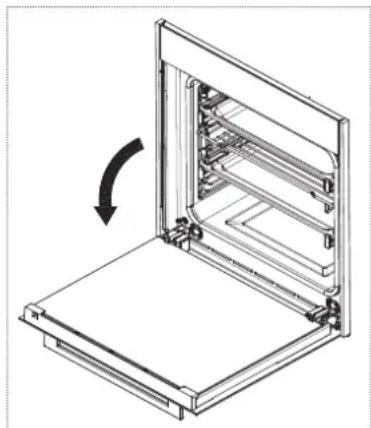
The hinges are equipped with two moveable locks.
To release the hinge lift the lock and hold the door at the sides near the hinges.
Turn the two block hooks down.
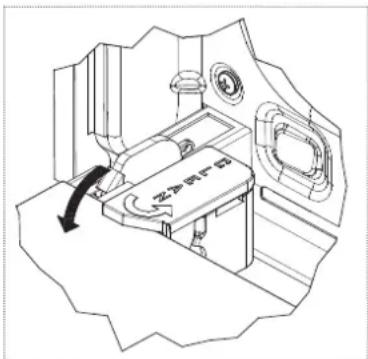
- Ensure that the block hooks are turned down completely.
EN
- Close the door halfway.
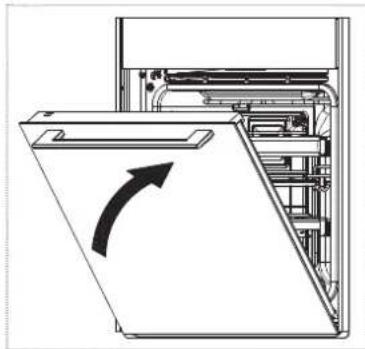
Pull the door outwards.
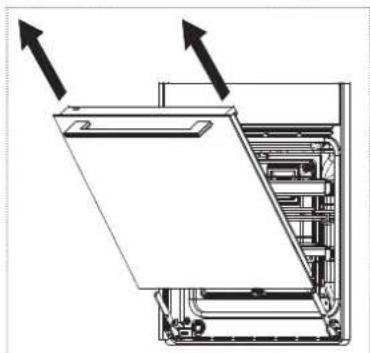
Mounting the oven door
After cleaning, the oven door has to be mounted again.
▶ Slide the hinges into their grooves.
- Turn the two block hooks (used as hinge attachments) upwards.
CAUTION! Damage to the oven due to wrong handling!
Never try closing the door when one or both blocks are partially or completely open.
Close the oven door.
Cleaning the glass panels of the oven door
The oven door and the glass panels can be removed to enable thorough cleaning of the glass panel.
The oven door has 3 glass panels:
- internal glass panel (near the cavity)
intermediate glass panel (inside the oven door)
external glass panel
The internal glass panel and the intermediate glass panel can be removed for cleaning purposes.
The inside of the external glass panel can be cleaned when the internal and the intermediate glass panel are removed.
Removing and cleaning the internal glass panel from the oven door
Ensure that the oven is cold before you start cleaning.
- Open the oven door completely.
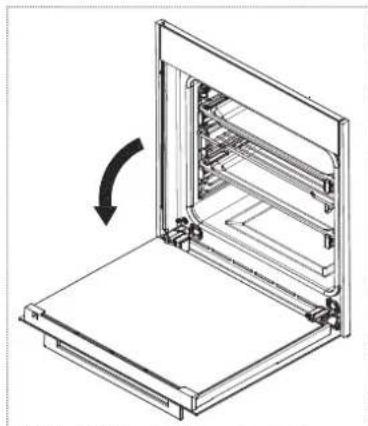
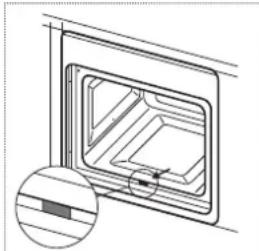
Turn the two black blocks (with the word CLEAN, at the bottom of the door) for 180^ so that they fit into the seats in the oven structure.
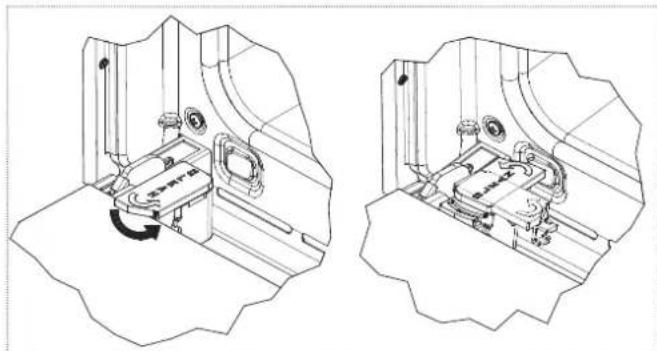
- Make sure to turn the black blocks completely.
The blocks click into their position.
CAUTION! Damage to the oven due to wrong handling!
If the blocks are not turned completely, removing the glass panel will cause the oven door to close immediately.
- Never try closing the door when one or both blocks have partially or completely freed the glass panel.
Carefully push the internal glass panel (1) towards the oven. Then lift the internal glass panel (2).
The two black blocks will prevent the door from closing.
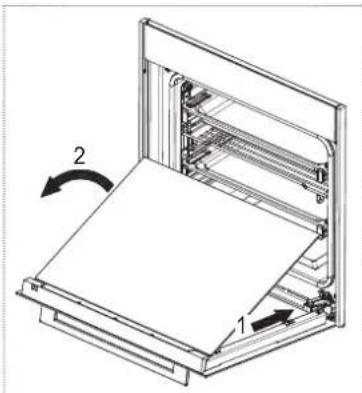
Clean the internal glass panel.
Removing and cleaning the intermediate glass panel of the oven door
After removing the internal glass panel, the intermediate glass panel can be removed.
Carefully lift the intermediate glass panel out of the rubbers on both sides.
Clean the intermediate glass panel.
Removing and cleaning the upper trims for glass panels
For more thorough cleaning, the upper trims on the oven door can be removed. The upper trims are fixed with two screws, one in the upper right, one in the upper left corner on the inside of the oven door. It is only possible, to remove the upper trims when the internal glass is removed.
Unscrew the fixing screws in the upper right and left corner of the oven door.
Remove the upper trim.
Clean the upper trim.
Mounting the glass panels
The correct position of the mounted glass panels is indicated by the wording TEMPERED GLASS which must be perfectly legible.
If unmounted, put the upper glass trim back in place.
If unmounted, put the intermediate glass panel back in place within the rubbers.
Put the internal glass panel back in place.
Turn the two glass retaining blocks back to their original position.
Close the oven door.
Cleaning the side frames and telescopic guides
To clean the side frames and telescopic guides thoroughly they can be removed from the oven.
Removing the telescopic guides
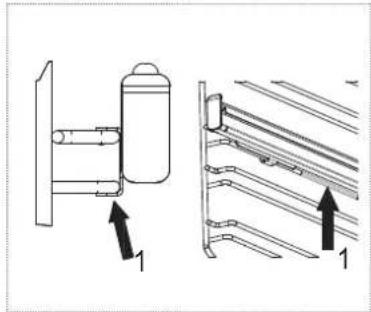
With the telescopic guide in closed position press firmly (1) on the middle of the wire rack where the bottom side of the guide rests.
Lift the telescopic guide (3) while pulling out (2) towards the other side of the oven.
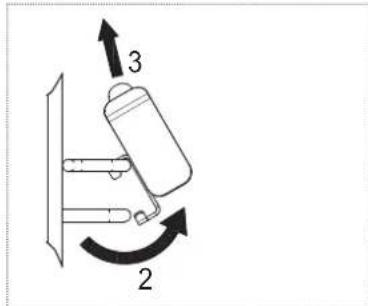
Remove the telescopic guides.
Removing the side frames
Bend the crosspiece which is engaged in the fixing bush downwards and remove it from the groove.
Push the side frame upwards and remove it from the two upper hooks.
Cleaning
Clean the side frames and the telescopic guides.
After cleaning, keep the side frame tilted and insert the side frames into the two respective guides on the top.
Bend the crosspiece which is engaged in the fixing bush upwards and insert it in the groove.
Insert the telescopic guides.
Replacing the oven lamp
Franke ovens are equipped with two rectangular lamps. The replacement lamp must meet the following technical specifications:
- Temperature resistance: 300^
Voltage: 220-240 V, 50/60 Hz - Power: 40 W
-Connection:G9
CAUTION! Damage to the lamp due to wrong handling!
Avoid touching the lamps with bare hands.
Use a cloth or a sheet of kitchen paper.

WARNING! Possibility of electric shock!
Ensure that the oven is switched off before replacing the lamp.

WARNING! Electric shock due to wrong
handling!
Switch the oven off.
-
Depending on how the oven is installed: Unplug the oven or disconnect the power at the main electrical system switch, e.g., switch off the fuse of the oven in the fuse box.
-
Remove the glass cover by carefully prying it off with a flat-blade screwdriver.
Remove the lamp from its holder.
Replace the lamp.
Reattach the glass cover.
malnTenanCe andrePalr
Make sure that maintenance on electrical components is carried out only by the manufacturer or the customer service.
Make sure that damaged cables are changed only by the manufacturer or the customer service.
- When contacting the customer service, please provide the following information:
-type of fault
- appliance model (Art.)
- serial number (S.N.)
This information is given on the data plate.
Software version
This option contains technical information useful for the customer service in case of an intervention on the electronic control.
Select and press
- The SETUP menu with different options appears.
Select and press SOFTWARE VERSION.
The software information appears.
Demo
The option can only be activated by service technicians.
The option allows to navigate the display functions without activating the heating elements. It is useful in situations such as fairs or product presentations.
DISPoSaL
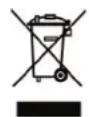
The symbol on the product or on the packaging indicates that the device must not be disposed of in the domestic waste.
By disposing of the device in a proper way you help to avoid harmful consequences to environment and health.
Further information about recycling the device is available from the competent authority, the local refuse disposal service or the vendor of the device.
Dispose of the device, which is to be discarded, via a specialised waste collection point for electronic and electrical devices.
In accordance with the article of Legislative Decree no. 15 dated 25 July, Implementation of Directives 2002/95/EC,2002/96/EC and 2003/108/EC, regarding the reduction of the hazardous substances used in in electrical and electronic appliances, and waste disposal".
The barred dustbin symbol on the appliance indicates that at the end of its working life the product must not be disposed of as household waste.
Consequently, when the appliance has reached the end of its working life the user must take it to a suitable recycling centre for electronic and electrotechnical waste, or return it to the dealer when purchasing a new appliance of equivalent type. Proper separate waste collection of the scrapped appliance for subsequent recycling, treatment and environmentally-friendly disposal helps prevent a potentially negative impact on the environment and health and facilitates recycling of the materials used in appliance construction.
CUSTomer SerVlCe
Refer to the contact address for your country on the back page or on our website www.franke.com
TeCHnICal DaTa
Product identification
Type:OE-9D
Model: FS 982 M BK DCT TFT
Refer to the data plate placed on the product.
This appliance complies with the following EC Directives:
- 2006/95/EC (Low Voltage)
- 2004/108 EEC (Electromagnetic Compatibility)
The energy efficiency class (according to 2009 / 60350-50304 / EN) is determined by operating modes: Energy Saving and Statics.
To calculate the volume, if present, remove the inner side of the guide wire (according to regulations 2009 / 60350-50304 / EN).
Parameter Value
Working dimensions of 480 × 370 × 405 the oven (mm) (W × H × D)
Power supply voltage and 220-240 V, 50/60 Hz frequency
Total power and fuse 2900 W, 16 A rating
Power and heating element values
Radial motor 27 ... 40 W
Light bulb 40 W (2x)
Tangential fan 15 ... 35 W
Roof 520 W / 124 V
Floor 1250 W
Grill 2100 W
DCT heating elements 2650 W
| Parameter | Symbol | Value | Unit of measure |
| Model identification | FS-CR | 913-982 DCT | |
| Oven type | built-in | ||
| Appliance weight | M | 41 | kg |
| Number of cavities | 1 | ||
| Heat source of each cavity | electric | ||
| Volume of each cavity | V | 74 | l |
| Energy consumption required to heat a standard load in a cavity of an electric oven during a cycle in convection mode for each cavity | EC electric cavity | 1.12 | kWh/cycle |
| Energy consumption required to heat a standard load in a cavity of an electric oven during a cycle in forced air circulation mode for each cavity | EC electric cavity | 0.53 | kWh/cycle |
| Energy efficiency ratio for each cavity | EEI cavity | 61 |
The manufacturer provides continuously product enhancements. For this reason, the text and the illustrations in this manual may be changed without notice.
Further information on technical data is available on: www.franke.com
InHaLTSVerZeICHnIS
Einleitung 41
Eléments chauffants DCT 2650 W
Franke Kindred Canada Limited
Midland, ON L4R 4K9
Phone+18666877465
Czech Republic
Franke s.r.o.
190 00 Praha 9
Phone +420 281 090 411
Denmark
Franke Kitchen Systems Denmark
8520 Lystrup
Phone +45 8624 9024
Egypt
Franke Kitchen Systems Egypt S.A.E.
6th of October City
Phone +202 3828 0000
Finland
Franke Finland Oy
76850 Naarajärvi
Phone +358 15 341 11
France
Franke France S.A.S.
60230 Chambly
Phone +33 130 289 400
Germany
Franke GmbH
79713 Bad Säckingen
Phone +49 7761520
Greece
Franke Hellas S.A.
19003 Markopoulos Attikis (Athens)
Phone +30 22991 500 00
Hong Kong SAR
Franke Asia Hong Kong Office
Causeway Bay
Phone +852 3184 1900
India
Franke Faber India Limited
Aurangabad-431136
Phone +91 240 2556697/98
Italy
Franke S.p.A.
37019 Peschiera del Garda
Phone +39 045 644 9311
Kazakhstan
Franke Kazakhstan Ltd.
040918 Almaty City
Phone +7 727 297 3812
Morocco
Franke Kitchen System SARL
21 000 Casablanca
Phone +212 522 674 200
Norway
Franke Kitchen Systems Norway
8520 Lystrup, Denmark
Phone +47 35 566 450
P.R.China
Franke (China) Kitchen Systems Co., Ltd.
Heshan, Guangdong, 529700
Phone +86 750 841 9288
Shanghai office +86 215 150 6715
Poland
Franke Polska Sp. z o.o.
05-090 Raszyn
Phone +48 22 711 6700
Portugal
Franke Portugal S.A.
2735-531 Cacém
Phone +351 21 426 9670
Romania
Franke Romania SRL
Pantelimon 077145
Phone +40 21 350 1550
Russia
Franke Russia GmbH
199106 St. Petersburg
Phone +7 812 703 1503
Singapore
Franke Singapore Pte. Ltd.
068811 Singapore
Phone +65 6709 5608
Slovak Republic
Franke Slovakia s.r.o.
010 01 Zilina
Phone +421 41 733 6200
South Africa
Franke Kitchen Systems (Pty.) Ltd.
Durban 4052
Phone +27 31 450 6300
Spain
Franke Espana S.A.U.
United Arab Emirates
Franke LLC
Ras Al Khaimah
Phone +971 7 203 4700
United Kingdom
Franke UK Ltd.
Manchester M22 5WB
Phone +44 161 436 6280
USA
Franke Kitchen Systems LLC
Smyrna, TN 37167
Phone 8006265771