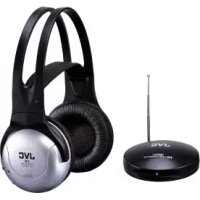
HAW500RF - Headphones JVC - Free user manual and instructions
Find the device manual for free HAW500RF JVC in PDF.

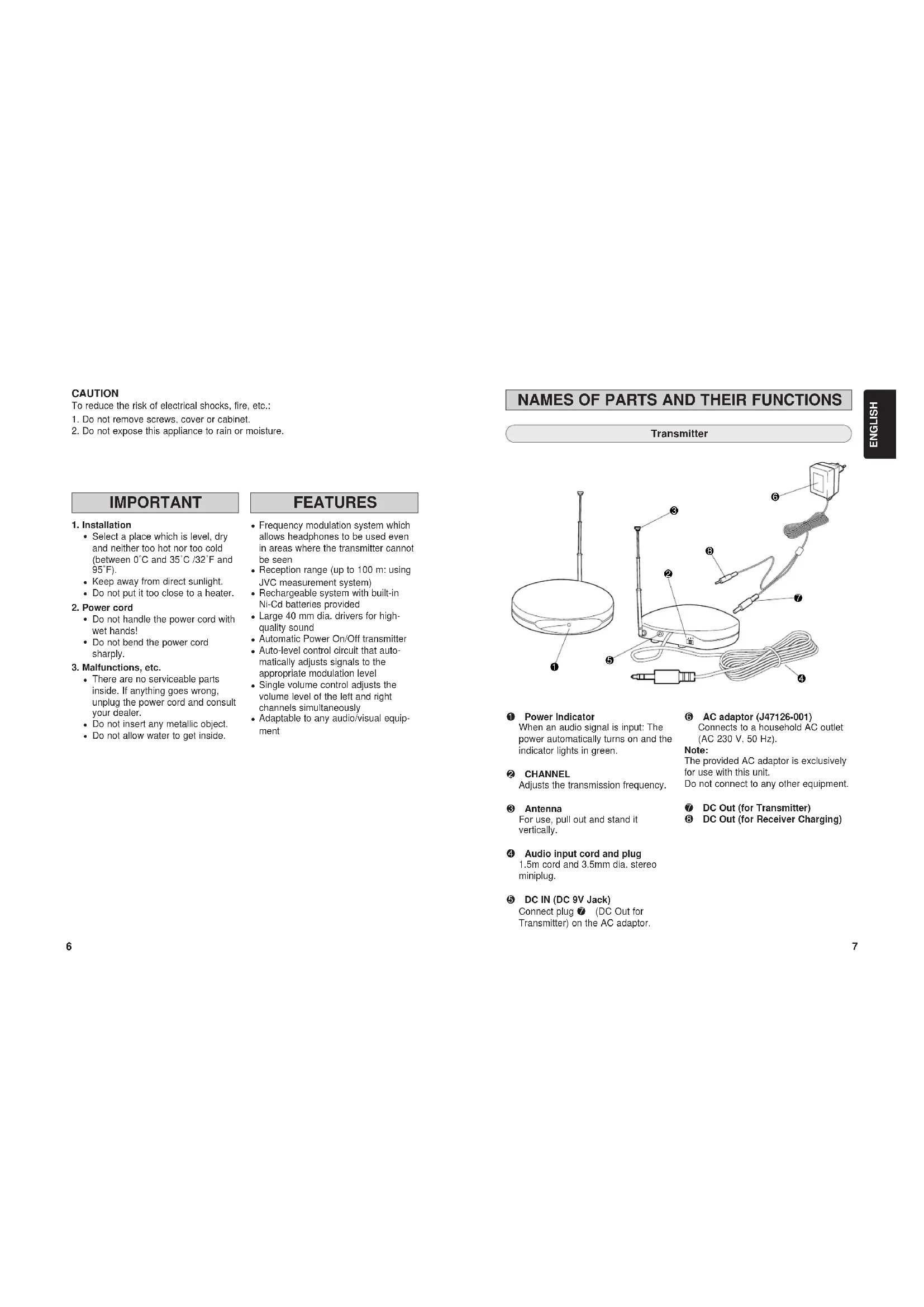


| Product type | FM wireless audio headset |
| Brand | JVC |
| Model | HAW500RF |
| Dimensions (transmitter) | 100 x 100 x 106 mm (with antenna) |
| Weight (transmitter) | 115 g (without cable or AC adapter) |
| Weight (headset) | 280 g (with Ni-Cd batteries installed) |
| Power (transmitter) | 9 VDC via supplied AC adapter (model J47126-001) |
| Power (headset) | 2 rechargeable 1.2 V Ni-Cd batteries (model J46514) |
| Battery life | Approximately 20 hours after full charge |
| Range | Up to 100 m (under JVC controlled conditions) |
| Frequency response | 30 - 15 000 Hz |
| Distortion | Less than 4% (at 1 kHz) |
| Carrier frequency | 863 - 865 MHz |
| Main functions | FM transmission, auto off, volume control, channel selection, manual tuning |
| Supplied accessories | Instruction manual, AC adapter, connection cable (3.5 mm stereo miniplug to RCA x 2), adapter plug (3.5 mm stereo miniplug to 6.3 mm jack) |
| Safety | Do not open, avoid moisture, do not expose to rain |
| Maintenance | Wipe with a dry cloth. Do not use solvents. |
| Spare parts | Rechargeable Ni-Cd battery J46514 (1.2 V, 600 mAh, x2) |
| Repairability | No user-serviceable parts. Contact JVC dealer. |
Frequently Asked Questions - HAW500RF JVC
User questions about HAW500RF JVC
0 question about this device. Answer the ones you know or ask your own.
Ask a new question about this device
Download the instructions for your Headphones in PDF format for free! Find your manual HAW500RF - JVC and take your electronic device back in hand. On this page are published all the documents necessary for the use of your device. HAW500RF by JVC.
USER MANUAL HAW500RF JVC
VICTOR COMPANY OF JAPAN, LIMITED
JVC

CORDLESS FM STEREO HEADPHONES
KABELFREIER FM STEREO-KOPFHÖRER
DRAADLOZE FM STEREO HOOFDTELEFOON
CASQUE STEREOFM SANS FIL
TRADLOSA FM STEREO HÖRLURAR MED
UPPLADDNINGSBART BATTERI
LADATTAVAT LANGATTOMAT FM STEREOKUULOKKEET
HA-W500RF (EG)
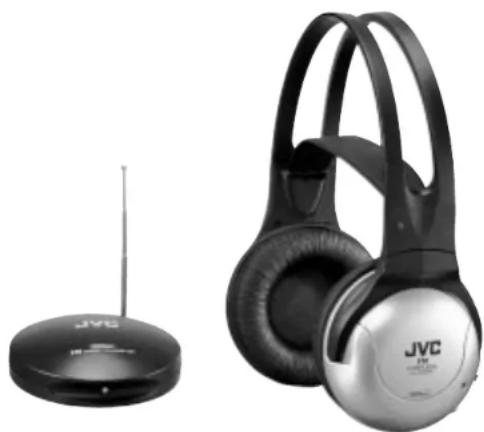
"SOME DO'S AND DON'TS ON THE SAFE USE OF EQUIPMENT"
This equipment has been designed and manufactured to meet international safety standards but, like any electrical apparatus, care must be taken if you are to obtain the best results and safety is to be assured.
Do read the operating instructions before you attempt to use the equipment.
Do ensure that all electrical connections (including the plug, extension cord and interconnections between pieces of equipment) are properly made and in accordance with the manufacturer's instructions. Switch off and withdraw the plug when making or changing connections.
Do consult your dealer if you are ever in doubt about the installation or operation or safety of your equipment.
Do be careful with glass panels or doors on equipment.
DON'T continue to operate the equipment if you are in any doubt about it working normally, or if it is damaged in any way—switch off—withdrawn the plug and consult your dealer.
DON'T remove any fixed cover as this may expose dangerous voltages.
DONT leave equipment switched on when it is unattended unless it is specifically stated that It is designed for unattended operation or has a standby mode. Switch off using the switch on the equipment and make sure that your family know how to do this.
Special arrangements may need to be made for infirm or handicapped people.
DON'T use equipment such as personal stereos or radios so that you are distracted from the requirements of road safety. It is illegal to watch television when driving.
DON'T listen to headphones at high volume as such use can permanently damage your hearing.
DON'T obstruct the ventilation of the equipment, for example with curtains or on soft furnishings.
Overheating will cause damage and shorten the life of the equipment.
DONT use makeshift stands and NEVER fix legs with wood screws. To ensure complete safety always fit the manufacturer's approved stand or legs with the fixing screws supplied according to the instructions.
DON'T allow electrical equipment to be exposed to rain or moisture.
ABOVE ALL
NEVER let anyone especially children push anything into holes, slots or any other opening in the case. This could result in a fatal electrical shock.
NEVER guess or make changes with electrical equipment of any kind. It is better to be safe than sorry!
CAUTION:
CHARGE ONLY WITH PROVIDED NICKEL-CADMIUM TYPE BATTERIES. OTHER TYPES OF BATTERIES MAY BURST CAUSING PERSONAL INJURY AND DAMAGE.
CORDLESS FM STEREO HEADPHONES
C∈0681①
OPERATING AT 863 MHz TO 865 MHz
ACCORDING TO THE USED FREQUENCY BAND THIS DEVICE IS INTENDED TO USE IN GERMANY, THE UK, FRANCE, AUSTRIA, THE NETHERLANDS, SWEDEN, NORWAY, DENMARK, FINLAND, BELGIUM
Thank you for purchasing this JVC product.
Before you begin operating this unit, please read the instructions carefully to be sure you get the best possible performance.
If you have any questions, consult your JVC dealer.
ENGLISH INSTRUCTIONS Page 6-17
To reduce the risk of electrical shocks, fire, etc.:
1. Do not remove screws, cover or cabinet.
2. Do not expose this appliance to rain or moisture.
IMPORTANT
1. Installation
- Select a place which is level, dry and neither too hot nor too cold (between 0°C and 35°C / 32°F and 95°F ).
- Keep away from direct sunlight.
- Do not put it too close to a heater.
2. Power cord
- Do not handle the power cord with wet hands!
- Do not bend the power cord sharply.
3. Malfunctions, etc.
There are no serviceable parts inside. If anything goes wrong, unplug the power cord and consult your dealer.
- Do not insert any metallic object.
- Do not allow water to get inside.
FEATURES
Frequency modulation system which allows headphones to be used even in areas where the transmitter cannot be seen
- Reception range (up to 100m using JVC measurement system)
- Rechargeable system with built-in Ni-Cd batteries provided
Large 40 mm dia.drivers for high-quality sound
Automatic Power On/Off transmitter
- Auto-level control circuit that automatically adjusts signals to the appropriate modulation level
- Single volume control adjusts the volume level of the left and right channels simultaneously
- Adaptable to any audio/visual equipment
NAMES OF PARTS AND THEIR FUNCTIONS
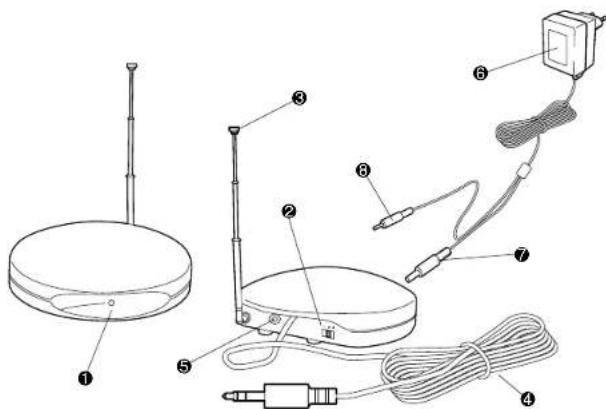
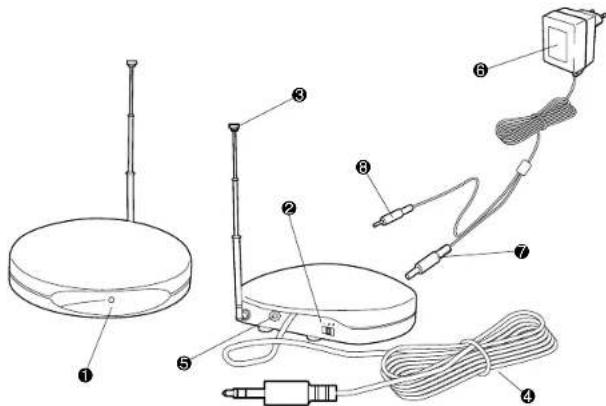
Transmitter
Power Indicator
When an audio signal is input: The power automatically turns on and the indicator lights in green.
CHANNEL
Adjusts the transmission frequency.
Antenna
For use, pull out and stand it vertically.
Audio input cord and plug
1.5m cord and 3.5mm dia. stereo miniplug.
DC IN (DC 9V Jack)
Connect plug (DC Out for
Transmitter) on the AC adaptor.
AC adaptor (J47126-001)
Connects to a household AC outlet
(AC 230 V, 50 Hz).
Note:
The provided AC adaptor is exclusively for use with this unit.
Do not connect to any other equipment.
DC Out (for Transmitter)
DC Out (for Receiver Charging)
NAMES OF PARTS AND THEIR FUNCTIONS CONNECTION
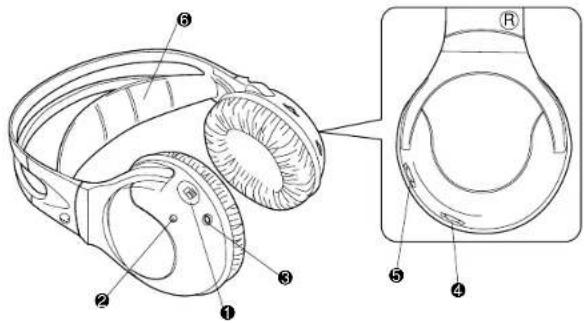
Receiver (Cordless Headphones)
POWER (Power switch)
Power Indicator
The indicator lights in red when the power is turned on. Also, the indicator lights in green during recharge.
CHARGE (Charging input terminal)
VOL. (Volume control)
Adjusts the volume level of the left and right channels simultaneously.
- For replacement ear pads, please consult with the dealer where you purchased the headphones.
TUNING (Tuning control)
Adjusts the reception frequency.
Soft Comfort-Fit Headband
How to connect to AV equipment
Connection to HEADPHONES jack
When connecting to a standard stereo phone jack (6.3 mm dia.)
Use the provided plug adaptor
(Converts a stereo miniplug to a standard stereo phone plug)
TV, audio amplifier, VCR, tape deck, video disc player, etc.
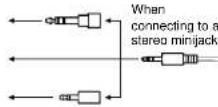
To HEADPHONES jack
When connecting to a monaural miniback
Use an optional plug adaptor
(Converts a stereo miniplug to a monaural miniplug)
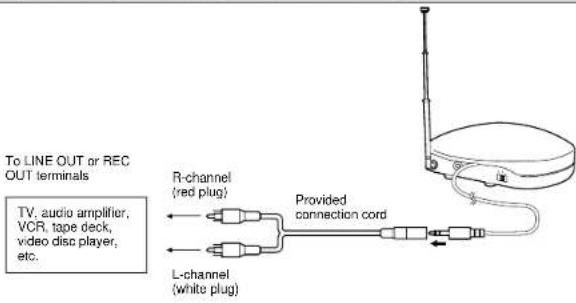
Connection to LINE OUT or REC OUT terminals
CONNECTION
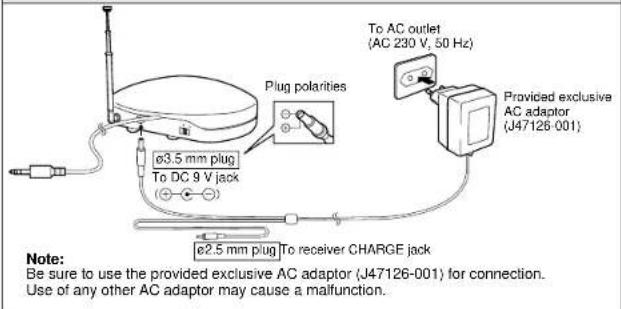
Connection to power supply
RANGE OF USE
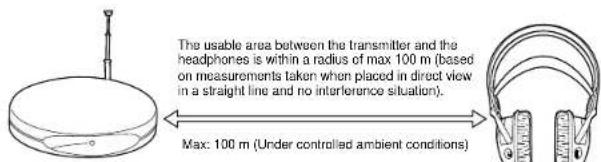
Note:
The usable area may differ depending on building structure, etc. The range becomes shorter in the following cases:
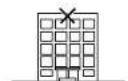
In places such as inside an apartment with reinforced concrete walls, or when the transmitter and headphones are separated by obstacles such as steel-reinforced doors.
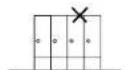
When items such as metal furniture are situated nearby,
- Be sure to keep this unit more than 0.5m away from concrete walls, metal furniture, etc.
POWER REQUIREMENTS OF HEADPHONES
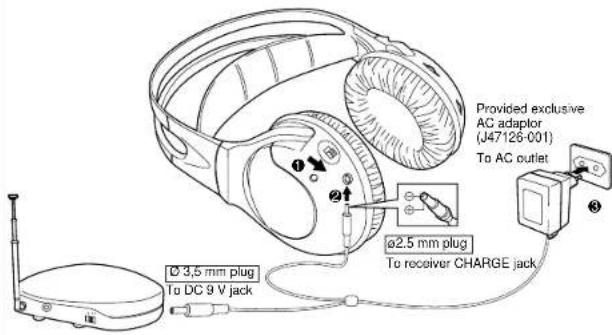
Charging rechargeable Ni-Cd batteries
1 Set the POWER switch on the headphones to OFF.
The batteries cannot be charged when the switch is set to ON.
Connect the DC out (for Receiver Charging) from the AC adaptor to the headphones.
Plug the AC adaptor into an AC outlet. The charger starts charging the batteries automatically.
Charging time
The battery can be fully charged in approx. 24 hours.
During recharge the indicator lights in green, which will start to blink rapidly near completion. Blinking will gradually slow down or turn off at completion.
When done, unplug the DC plug from the battery.
Battery running time
After charging is complete, you can use them continuously for approx. 20 hours.
Tips for better use
- Be sure to charge the batteries within the temperature range of 10°C 35°C ( 50°F 95°F ).
- Charging batteries that are not completely exhausted will cause efficiency to decline. Be sure to charge them after they have been completely exhausted.
CAUTIONS ABOUT THE RECHARGEABLE BATTERY
ATTENTION:
The product that you have purchased contains a rechargeable battery. The battery is recyclable. At the end of its useful life, under various state and local laws, it may be illegal to dispose of this battery into the municipal waste stream. Check with your local solid waste officials for details in your area for recycling options or proper disposal.
Note:
Be sure to consult your local dealer or JVC service counter for replacement of the rechargeable battery.
If you attempt to disassemble this unit for purposes other than disposal, it may damage the unit.
Warning:
Do not open, the rechargeable battery may produce an electrical shock.
If the batteries are used incorrectly, they may leak, heat or explode, and may cause fire, injury or soiling. Make note of the following:
- Be sure to use the provided exclusive Ni-Cd battery. Do not use any other rechargeable Ni-Cd battery or dry cell battery.
- Do not throw the battery in a fire or heat it.
- Do not deform, take apart, modify or directly solder the battery.
- Do not remove or damage the covering tube.
- If any liquid from the battery gets into your eyes, it may cause blindness. If battery liquid does get into your eyes, do not rub them, but instead immediately wash them thoroughly with clean water, then consult a doctor at once. Also, should any liquid from the rechargeable battery get onto your skin or clothes, it may burn your skin. In this case, wash with clean water immediately.
- Do not immerse or wet the battery in water.
- Do not use or leave the battery in an area where the temperature becomes significantly higher, such as in direct sunlight, inside a car on hot day or near heat-generating equipment.
- Do not subject the battery to strong shocks or throw it.
CAUTIONS ABOUT CHARGING
- Be sure to use only this unit for charging.
- You can charge the rechargeable Ni-Cd batteries approx. 300 times.
- Charging times differ depending on the temperature range or the amount of charge already in the batteries.
- Excessive charging doesn't result in malfunction.
- Battery life will decrease in cold places.
- If the usable time of fully-charged batteries decreases by about half, replace them with new ones. When purchasing rechargeable Ni-Cd batteries, consult the dealer from whom you bought this product.
Exclusive Rechargeable Ni-Cd Batteries: J46514 (1.2 V, 600 mAh, 2 pcs/pack)
- Due to characteristics of the batteries, they expend their charge a little even when the power is turned off.
- Be sure to use the provided AC adaptor (model J47126-001)
OTHER CAUTIONS
- Caution! To avoid risk of fire or injury, do not attempt to charge non-rechargeable batteries.
- Replace only with the same type recommended by the manufacturer.
- Please dispose of old, defective batteries in an environmentally friendly manner in accordance with the relevant legislation.
- No naked flame sources, such as lighted candles, should be placed on the apparatus.
- The unit shall not be exposed to dripping or splashing and that no objects filled with liquids, such as vases, shall be placed on or by the unit.
- For indoors use only. Do not expose to rain.
- Don't open, no user serviceable parts inside.
HOW TO USE
- Connect the transmitter and AV equipment. (Refer to page 9)
- Connect the AC adaptor to the transmitter, then plug the AC adaptor into an AC outlet. (Refer to page 10)
- Turn on the power on the transmitter and the connected AV equipment.
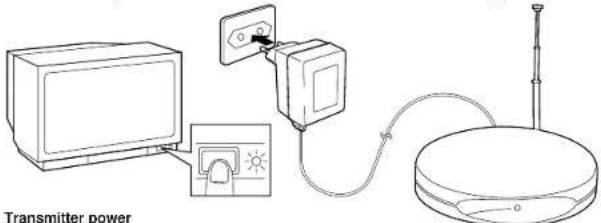
When an audio signal is input, the transmitter's power is turned on automatically, and the indicator lights in green. Also, when no audio signal is input for about a minute, the indicator goes out automatically and the power turns off. (Automatic Power On/Off function) The Automatic Power On/Off function is activated from audio on the left channel. The function may not activate properly in situations when the audio signal is detected only from the right channel.
In some situations, the power may not be turned on automatically by the input sound (e.g. a song with a quiet opening or gradual fade-in). This is not a malfunction.
- Turn on the headphones' power. To avoid excessive volume, first set the headphones' volume to a low level.
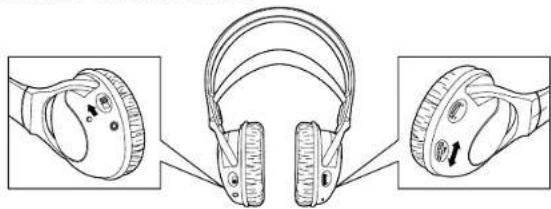
Before using the headphones for the first time, charge the rechargeable Ni-Cd battery.
HOW TO USE
- Adjust the volume control of the connected AV equipment and the headphones, and set them to the desired listening level.
- Turn the TUNING control to get the best reception in the headphones.
In cases of interference or too much noise, select the CHANNEL switch on the transmitter to another position, then repeat step 6.
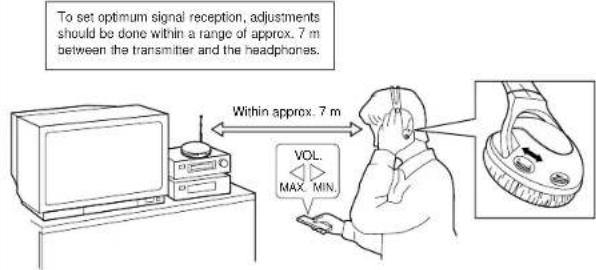
Tips for better use
For improved sound quality, set the volume level of the connected equipment as high as possible without causing distortion, while setting the volume level of the headphones to a slightly lower level.
After use
Keep the headphones' power off.
Notes:
- When using the headphones, don't raise the volume excessively. Continuous listening for a long time at high volumes may damage your hearing.
- For safety reasons, do not use the headphones while riding a bicycle or driving a motorcycle, car, etc.
TROUBLESHOOTING SPECIFICATIONS
What appears to be a malfunction may not always be serious. First make sure...
| Symptoms Cause Remedy | ||
| No sound. | Is the transmitter's power OFF? | Check the connection of the transmitter. |
| Turn the power on the connected AV equipment ON and start playing. | ||
| Is the headphones' power OFF? | Turn on the headphones' power. (The indicator lights.) | |
| Is the battery in the headphones exhausted? | Fully charge the headphones. | |
| Is the volume of the headphones set to the minimum level? | Adjust the volume of the headphones to the appropriate level. | |
| Is the volume of the connected AV equipment set to the minimum level? | Raise the volume level of the connected AV equipment as high as possible without causing distortion. | |
| No sound from the R-channel. | Is the transmitter connected to equipment with monaural audio output? | Connect them with an optional plug adaptor. (Converts monaural audio output to stereo audio output.) |
| Distorted sound. | Is the battery in the headphones exhausted? | Fully charge the headphones. |
| Is the volume of the connected AV equipment set too high? | Adjust the volume level of the connected AV equipment as high as possible without causing distortion. | |
| Noisy sound. | Is the battery in the headphones exhausted? | Fully charge the headphones. |
| Are the frequency modulation signals being received correctly? | Turn the TUNING controls on the headphones or select the CHANNEL on the transmitter to adjust them. | |
| Is the volume of the connected AV equipment set too low? | Adjust the volume level of the connected AV equipment as high as possible without causing distortion. | |
| Are the headphones too far away from the transmitter? | Use them within the range the frequency modulation signal can reach. (Refer to page 10.) | |
| Battery charging is impossible. | Has the rechargeable Ni-Cd battery expired? | Replace it with a new Ni-Cd battery. Please consult your dealer for replacement. |
General Specifications
Modulation system : Stereo frequency modulation system
Carrier frequency:863-865MHz
Usable area
(distance to reach): Max. 100 m (using JVC measurement systems, under controlled ambient conditions)
Frequency response : 30 - 15,000 Hz
Distortion: Less than 4% (at 1 kHz)
Transmitter (J22121-001)
Power requirements : DC 9 V (with the exclusive AC adaptor)
Audio input terminal : 3.5 mm dia. stereo miniplug
Input impedance: 25ks2
Reference input level: 300mV
Dimensions : 100 (W) x 100 (D) x 106 (H) mm
(including antenna)
Mass : 115 g (without connection cord and AC adaptor)
Headphones (HA-W500RF)
Power requirements : Rechargeable Ni-Cd battery (1.2 V) x 2
Battery running time : 20 hours (when charged for 24 hours)
Mass : 280 g (with installed rechargeable Ni-Cd battery x 2)
Provided Accessories
Instructions x1
AC adaptor X1
Connection cord x 1 (3.5 mm dia. stereo minijack - RCA pin plug x 2: 0.1 m)
Plug adaptor x1 converts 3.5 mm dia.stereo miniplug to a 6.3 mm dia.
standard stereo phone plug)
Design and specifications subject to change without notice.
ACHTUNG
WAARSCHUWINGEN MET BETREKKING TOT DE OPLAADBARE BATTERIJ
LET OP:
DC OUT (pour I'emetter)
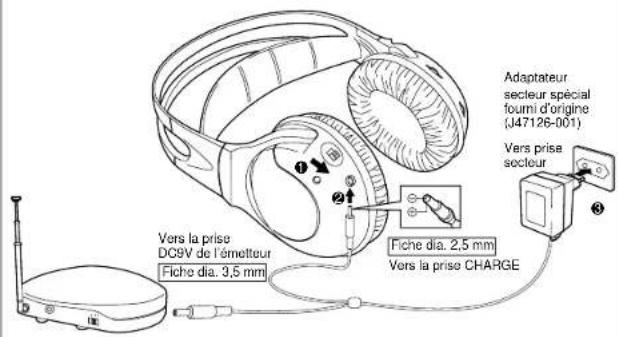
Charge des batteries Ni-Cd rechargeables
FELSOKING SPECIFKATIONER
OSAT JA NIIDEN TOIMINNOT
Lahetin
Virran merkkivalo
OSAT JA NIIDEN TOIMINNOT ASENNUS


- JVC
- HA-W500RF (EG)
- "SOME DO'S AND DON'TS ON THE SAFE USE OF EQUIPMENT"
- ABOVE ALL
- CAUTION:
- CORDLESS FM STEREO HEADPHONES
- C∈0681①
- OPERATING AT 863 MHz TO 865 MHz
- IMPORTANT
- Installation
- Power cord
- Malfunctions, etc.
- FEATURES
- NAMES OF PARTS AND THEIR FUNCTIONS
- Power Indicator
- CHANNEL
- Antenna
- Audio input cord and plug
- DC IN (DC 9V Jack)
- AC adaptor (J47126-001)
- Note:
- DC Out (for Transmitter)
- NAMES OF PARTS AND THEIR FUNCTIONS CONNECTION
- POWER (Power switch)
- How to connect to AV equipment
- CONNECTION
- RANGE OF USE
- POWER REQUIREMENTS OF HEADPHONES
- Charging time
- Battery running time
- CAUTIONS ABOUT THE RECHARGEABLE BATTERY
- ATTENTION:
- Warning:
- CAUTIONS ABOUT CHARGING
- Exclusive Rechargeable Ni-Cd Batteries: J46514 (1.2 V, 600 mAh, 2 pcs/pack)
- OTHER CAUTIONS
- HOW TO USE
- Tips for better use
- After use
- Notes:
- TROUBLESHOOTING SPECIFICATIONS
- General Specifications
- Transmitter (J22121-001)
- Headphones (HA-W500RF)
- Provided Accessories
- ACHTUNG
- WAARSCHUWINGEN MET BETREKKING TOT DE OPLAADBARE BATTERIJ
- LET OP:
- DC OUT (pour I'emetter)
- FELSOKING SPECIFKATIONER
- OSAT JA NIIDEN TOIMINNOT
- Virran merkkivalo
- OSAT JA NIIDEN TOIMINNOT ASENNUS
Brand : JVC
Model : HAW500RF
Category : Headphones