
HA-SW01 - Headphones JVC - Free user manual and instructions
Find the device manual for free HA-SW01 JVC in PDF.


| Product Type | Over-ear, closed-back headphones |
| Model | HA-SW01 |
| Brand | JVC |
| Driver Unit | 40 mm |
| Impedance | 32 ohms |
| Frequency Response | 10 Hz - 22 kHz |
| Sensitivity | 105 dB/mW |
| Maximum Input Power | 1000 mW |
| Connector | 3.5 mm stereo mini plug, gold-plated |
| Cable Length | 1.2 m |
| Weight | 165 g (without cable) |
| Dimensions (W x H x D) | 7.1 x 6.5 x 2.6 in (folded) |
| Foldable | Yes |
| Earpad Material | Leatherette |
| Headband Material | Plastic with cushion |
| Color | Black |
| Controls | None (no inline remote) |
| Cleaning | Wipe with a dry, soft cloth. Do not use solvents. |
| Safety | Keep away from children. Do not disassemble. |
| Spare Parts | Earpads and cable available from JVC service centers. |
Frequently Asked Questions - HA-SW01 JVC
User questions about HA-SW01 JVC
0 question about this device. Answer the ones you know or ask your own.
Ask a new question about this device
Download the instructions for your Headphones in PDF format for free! Find your manual HA-SW01 - JVC and take your electronic device back in hand. On this page are published all the documents necessary for the use of your device. HA-SW01 by JVC.
USER MANUAL HA-SW01 JVC
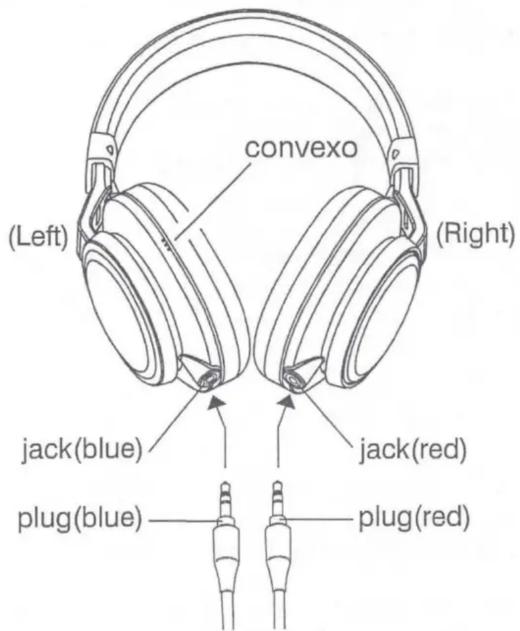
When you connect the cable with the headphones, please match same colour for plugs and jacks.
- Convexo is located only left side
Folding headphones

natural_image
Line drawing of a pair of hardcover headphones (no text or symbols)when you wear

natural_image
Line drawing of a pair of hardcover headphones (no text or symbols)when you fold
- Being made of wood, each one, each housing of this model has a distinctive appearance, characterized by features such as the grain, gnarls or resinous black lines. They emphasize the uniqueness, without causing trouble in use.
Caution
- Do not listen at high volume for an extended period. Do not use while driving or cycling.
- Pay special attention to traffic around you when using the headphones outside. Failure to do so could result in an accident.
For your safety...
- The headphones have metallic parts which directly touch your skin. Do not use them if you have a metal allergy. Metallic parts may be cold to the touch in lower temperatures.
- Stop using the headphones if they are causing great discomfort or irritation on the skin and the ears. They may damage your skin and cause rash or inflammation.
• In dryer air conditions such as in winter, you may feel some static shock when using the headphones. - Should you start to feel ill while using the headphones, you should stop using them immediately.
- Be sure that your hair or any other objects do not get caught in the headband slider (adjuster) when adjusting the headband.
Avoid using the headphones...
• in places subject to excessive humidity or dust
- in places subject to extremely high (over 40 °C or 104 °F) or low (under 0 °C or 32 °F) temperatures
DO NOT leave the headphones...
• exposed to direct sunlight
- near a heater
To protect the headphones, DO NOT...
- allow them to get wet
- shake them or drop them against hard objects
Precautions for use
- Do not use any audio cords other than the one provided.
- Do not use the supplied audio cord for any other equipment.
- Be careful not to apply power that exceeds the headphones' input capacity. This may result in sound distortion and could damage the oscillation board.
- Grasp and pull the plug directly when disconnecting from the headphones and your device. Do not pull out by the cord.
- The ear pads will wear out earlier than the other parts even in normal use or in normal storage due to the material characteristics.


Brand : JVC
Model : HA-SW01
Category : Headphones