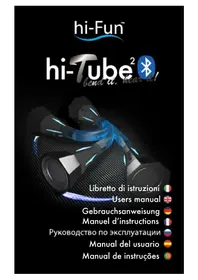
Tube2 - Speaker hi-Fun - Free user manual and instructions
Find the device manual for free Tube2 hi-Fun in PDF.


| Product type | Bluetooth speaker |
| Brand | hi-Fun |
| Model | Tube2 (hi-Tube2 Bluetooth) |
| Dimensions (L×W×H) | 330 x 48,6 x 48,6 mm |
| Weight | 245 g |
| Power | 5 VDC via micro USB port |
| Output power | 1 W |
| Battery life | 8 hours |
| Bluetooth technology | Bluetooth 3.0 |
| Bluetooth range | 10 m |
| Connectivity | Bluetooth, 3.5mm stereo jack input |
| Built-in microphone | Yes |
| LED indicator | Transparent fins (red/blue) |
| Functions | Play/pause, volume, track skip, hands-free calling, voice dialing |
| Maintenance | Clean with a dry cloth |
| Warnings | Do not expose to water, heat, do not disassemble |
| Repairability | Non-removable battery, no information on spare parts |
| Box contents | Micro USB charging cable |
Frequently Asked Questions - Tube2 hi-Fun
User questions about Tube2 hi-Fun
0 question about this device. Answer the ones you know or ask your own.
Ask a new question about this device
Download the instructions for your Speaker in PDF format for free! Find your manual Tube2 - hi-Fun and take your electronic device back in hand. On this page are published all the documents necessary for the use of your device. Tube2 by hi-Fun.
USER MANUAL Tube2 hi-Fun
To switch on hi-Tube2 Bluetooth® hold the button until transparent fins turns on and hi-Tube2 Bluetooth® emits 4 acoustic tones. Afterwards hi-Edo automatically connects itself to the last paired device, if available, and the warning LED flash slowly in blue to confirm the connection. If there is no available paired device or if it is out of range, hi-Tube2 Bluetooth® turns off in about 7 minutes in order to prevent battery from discharging.
Pair hi-Tube2 Bluetooth® with a compatible device.
To pair for the first time, pair for a second time or to pair to a different device, hi-Edo must be set in pairing mode, signaled by the transparent fins flashing alternately and quickly red and blue. To activate the pairing mode you need to switch off hi-Tube2 Bluetooth® and switch it on again holding the button until the transparent fins flash alternately red and blue. Now you can select hi-Tube2 Bluetooth® from the list of found devices on your device. As soon as the device is paired, the transparent fins flash slowly blue.
Now it is possible to listen to music and to make calls through hi-Tube2 Bluetooth® (thanks to the integrated microphone). It is also possible to pair hi-Tube2 Bluetooth® to 2 devices at the same time. To do this, pair the first device as explained before, then repeat this step with another devices. At this point the two paired devices could be connected at the same time and priority is assigned to the last device that start streaming to hi-Tube2 Bluetooth®.
Switch off hi-Tube2 Bluetooth®.
To switch off hi-Tube2 Bluetooth® hold the power button until the transparent fins flash red.
*Only if paired to a mobile phone.
Bluetooth® functions.
Playing music.
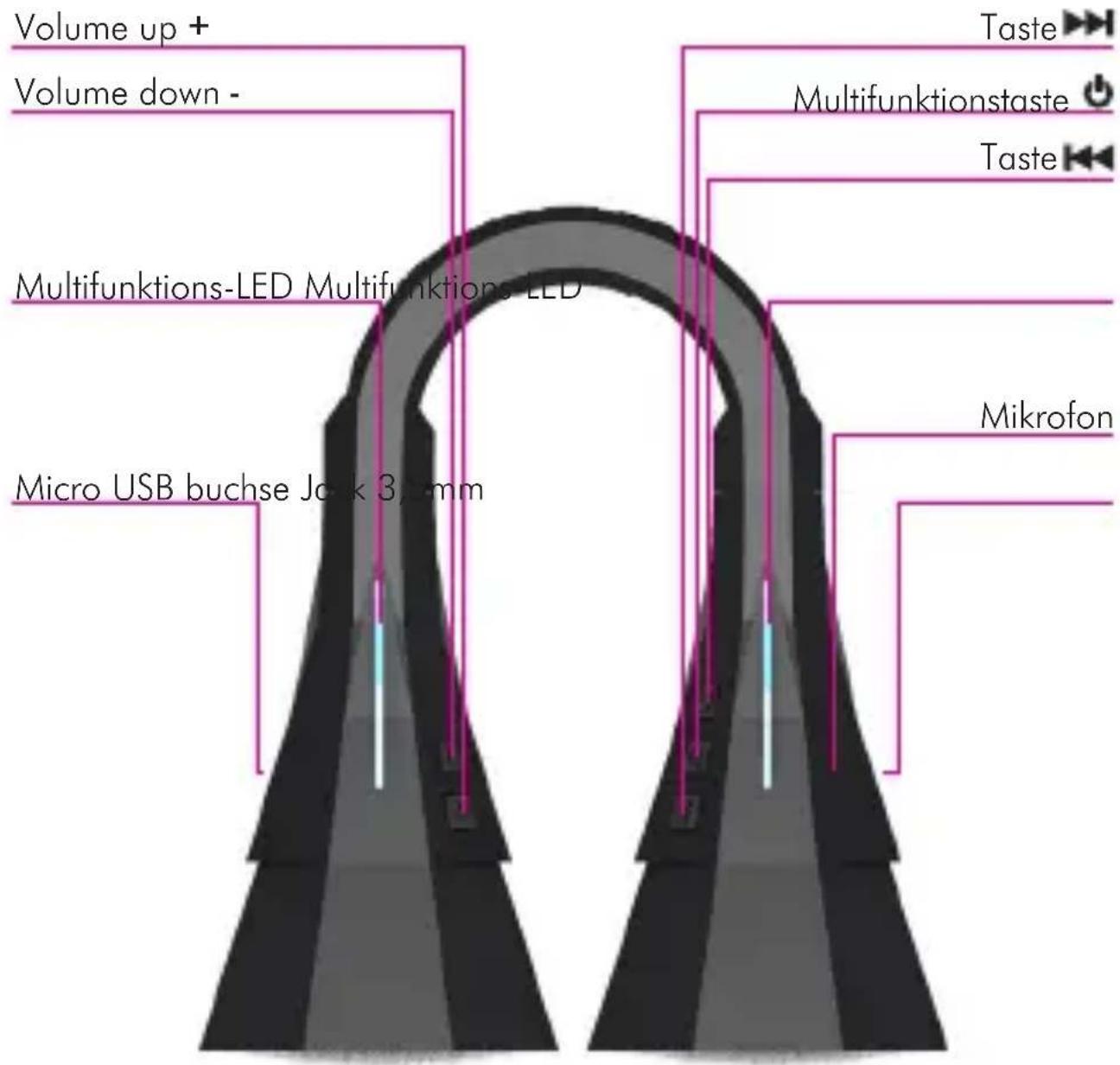
Thanks to the buttons of hi-Tube2 Bluetooth® it is possible to play, stop and control music on your device connected via Bluetooth. Moreover it is possible to adjust the volume.
To play:press shortly the button
- To adjust the volume: press the volume button + to increase it or the volume button - to decrease it.
- To move to the next song: press the button. To switch to the previous song in your playlist press the button
- To stop the music: press the button
During music reproduction the transparent fins are steady blue.
Make and receive a call.
If hi-Tube2 Bluetooth® is paired to a mobile phone it is possible to make and receive calls, as using a Bluetooth headset, thanks to the internal microphone and to the buttons on the side.
- Answer a call: to answer a call press briefly the button
- End a call: to end a call press briefly the button during the call.
- Reject an incoming call: To reject an incoming call hold the
button for 2 second until you hear a long tone, then release the button the incoming call is rejected.
-
Activate voice dialing / voiceover / Siri: if your phone supports voice dialing / voiceover / Siri you can activate it if a phone call is not in progress. To activate voice dialing / voiceover / Siri hold the button until you ear a tone from hi-Tube2 Bluetooth®; when you hear the second tone you can dictate the command.
-
Call the last selected number: press twice (double click) the button
*Only if paired to a mobile phone.
hi-tube2 Bluetooth ® supports the simultaneous connection of two Bluetooth devices. Connect the first device and then perform the same procedure for the second device. At this point you can connect simultaneously both paired devices. The last device connected will have the priority.
Connection via 3,5mm stereo jack.
In addition to Bluetooth connection, hi-Tube2 Bluetooth® features a line level input 3,5mm stereo jack. When the jack plug is connected the Bluetooth connection remains active but the priority is given to the jack input. When hi-Tube2 Bluetooth® is used with the jack input, it is only possible to control the volume. All other functions must be controlled on the connected device. The power button act as MUTE button. Pressing it once will mute the volume (note: it does not stop the reproduction), pressing it once again will restore the previous volume setting.
Note: when hi-Tube2 Bluetooth® is connected via jack line input only, internal microphone is not active. It is not possible to use hi-Tube2 Bluetooth® as phone handsfree.
Note: In order to obtain the best listening experience from your hi-Tube2 Bluetooth® both via bluetooth and jack lin e input, we suggest to set the EQ of your connected device to "small loudspeakers" setting.
If the jack cable remains connected to hi-Tube2 Bluetooth® with no volume input, after about 10 minutes, hi-Tube2 Bluetooth® automatically switches itself off in order to preserve the battery from discharging.
Recharging hi-Tube2 Bluetooth®.
If supported by paired devices, the charge status of hi-Tube2 Bluetooth® battery is displayed on the screen of the connected device.
When hi-Tube2 Bluetooth® battery is discharged the transparent fins(2) start flashing red. It indicates that in few minutes hi-Tube2 Bluetooth® will turn off in order to preserve the battery. To charge the battery connect the supplied hi-Tube2 Bluetooth® charger cable to a charger equipped with USB port, or alternatively, to an USB port on your laptop/computer. It is possible to charge hi-Tube2 Bluetooth® while it is in use.
As soon as the charger cable is connected to the plug (8), the transparent fins(2) turn on red and they turn off once the charging is complete. When hi-Tube2 Bluetooth® is fully charged it is possible to unplug it from the charger.
Alternatively to the cable included, it is possible to use every cable equipped with a micro USB connector.
Product dimensions (WxDxH mm): 330x48.6x48.6
Product weight: 245 g
Warnings
Please read carefully this part in order to guarantee a safe experience and avoid damage to hi-Tube2 Bluetooth®.
- Do not place hi-Tube2 Bluetooth® near liquids, water, rain or humidity.
- Do not use hi-Tube2 Bluetooth® near sinks, bathtubs, showers, saunas or swimming-pools.
- Do not drop, disassemble, open or hit hi-Tube2 Bluetooth® with sharp objects.
- Do not place hi-Tube2 Bluetooth® near microwave ovens, heat sources. - Do not paint it.
- Clean hi-Tube2 Bluetooth® with a dry towel only.
- Do not expose hi-Tube2 Bluetooth® to extreme hot or extreme cold environments.
- Do not expose hi-Tube2 Bluetooth® to direct sunlight for extended periods.
- Do not expose hi-Tube2 Bluetooth® to fires like fireplaces, kitchen or candles.
Battery warnings:
- Do not dispose hi-Tube2 Bluetooth® in fire because battery could explode causing injuries or even death.
- Battery is not user removable and must be charged only accordingly to this manual instructions.
- Do not recharge hi-Tube2 Bluetooth® in extremely hot or cold environments.
Car accidents warning:
- Do not place hi-Tube2 Bluetooth® near or on the airbag because in case of accident it could cause serious injuries or even death.
Fall warning:
- Do not place hi-Tube2 Bluetooth® on high surfaces because during music reproduction it could move and fall causing injuries.

NOTE: This equipment has been tested and found to comply with the limits for a Class B digital device, pursuant to part 15 of the FCC Rules. These limits are designed to provide reasonable protection against harmful interference in a residential installation. This equipment generates, uses and can radiate radio frequency energy and, if not installed and used in accordance with the instructions, may cause harmful interference to radio communications. However, there is no guarantee that interference will not occur in a particular installation. If this equipment does cause harmful interference to radio or television reception, which can be determined by turning the equipment off and on, the user is encouraged to try to correct the interference by one or more of the following measures:
- Reorient or relocate the receiving antenna.
- Increase the separation between the equipment and receiver.
- Connect the equipment into an outlet on a circuit different from that to which the receiver is connected.
- Consult the dealer or an experienced radio/TV technician for help.
- He 6pocaiTe, He pa3bnpaITe, He oTKpbBaIte hi-Tube2 Bluetooth@.
He ocTabraJTe hi-Tube2 Bluetooth@ B6n3mMKpOBoJHObIx Neuei, nCToUHKnOB TeIJa. He OkpaunBaTb.
- Праза te hi-Tube2 Bluetooth@ Толбко cyхо calфetko.
He nCloB3yIe hi-Tube2 Bluetooth@ npn 3KCTpeMaJIbHO BbICOKNX IIN CIniXKom Hn3Knx TeMnepaTypax.
He noDbepraTe hi-Tube2 Bluetooth@ B03deiCTBIO npMbIX cOJIHeuHbIX JIyEeB TteUeHne dJIITeJIbHOro BpeMeHN.
He octablan Te hi-Tube2 Bluetooth@ Bo3ne KaMaHa nIin cBeuei.
IpeDynpexKdEHHo6 nCnoJb3OBaHn 6aTapei:
He BbI6paBbAaTe hi-Tube2 Bluetooth@ B orOhb, TaK kaK 6aTapeN MOryT B3OpBaTbcR, N npNBecTn K TpaBMam.
- AkkymларTop He яВяETcЯ СьeMHbIM. 3apЯKaTb 6aTaapeIO Heo6xOДmo Ctporo B COOTBeTCTBnC ДaHHbIM pyKOBODCTBOM.
- 3aπpeüaetcā 3apjkaTb hi-Tube2 Bluetooth@ πρι oуehb BbvCOKNX nII Hn3Knx TeMnepaTypax.
-Предупжденио6испльбовань
aBtOMo6nJIe:
He pa3meaaiTe hi-Tube2 Bluetooth@ B6n3n noyuweK 6e30napochtn. B npOTNBHom clyuae BO3MOxHbI cepbe3HbI TpaBMbl n daXe cMeptb.
Преупждени:
He yctaHaBnBaIte hi-Tube2 Bluetooth@ Ha BbICOKNX
NOBepxHocTgX, NOTOMy yTO BO BpeM RAocnpOn3BeJeHnMy3bIKN OH MOKeT DBNrAeTbcR, yNaCTb N pInuHNHT TpaBMbl.
ΦeepaJIbHaJa KOMnCCnJ
Приимechане: Дадно obopyдоване 6ылno рotectnoBaHo и пиЗнaho COOTBeTCTBvUOsm KlaCCy B zuΦpoBbIX устpoиCTB,В COOTBeTCTBn CчaTbIO 15 Празил FCC. Огранченя pa3pa6OtaHbI C ueCpehenя 3auntbI OT ВрEDhIx NOMEX BЖИlbx NOMEseHnax.
This product bears the selective sorting symbol for waste electrical and electronic equipment (WEEE).
This means that this product must be handled to the local collecting points or given back to retailer when you buy a new product, in a ratio of one to one pursuant to European Directive 2002/96/EC in order to be recycled or dismantled to minimize its impact on the environment.
For further information, please contact your local or regional authorities.
Electronic products not included in the selective sorting process are potentially dangerous for the environment and human health due to the presence of hazardous substances.
The unlawful disposal of the product carries a fine according to the legislation currently in force.
DECLARATION OF CONFORMITY
This product complies with all the requisites of R&TTE and CE directives.
Complete declaration of conformity is available at hifun s.r.l. via Santa Tecla 4, Milano, Italy
hi-Fun
Designed in Milan
Made in China,
produced by hifun s.r.l.
Via Santa Tecla 4, 20122 Milano, Italy.
Tel: +39 02 36767640
Fax: +39 02 99988029
P.IVA 06141720968
info@hi-fun.com