Call - Electronic accessory hi-Fun - Free user manual and instructions
Find the device manual for free Call hi-Fun in PDF.


| Product Type | Bluetooth Glove for Calls |
| Brand | hi-Fun |
| Model | Call |
| Wireless Technology | Bluetooth |
| Bluetooth Range | Up to 10 meters (30 meters outdoors) |
| Talk Time | Up to 12 hours |
| Standby Time | Up to 10 days |
| Charging Time | Approximately 30 minutes |
| Battery Type | Rechargeable Lithium-ion |
| Charging Connector | Micro USB |
| Main Functions | Answer, reject, end call, redial last number, voice command/Siri |
| LED Indicator | Red/blue flashing for pairing, slow blue for connected, red for low battery |
| Vibration Mode | Yes (not detailed in manual) |
| Care and Cleaning | Do not immerse in water, do not machine wash |
| Water Resistance | Not waterproof |
| Safety Instructions | Do not use in bathroom, turn off before flight, do not open or disassemble battery |
| Recycling | Do not dispose of battery with household waste, recycle according to local regulations |
Frequently Asked Questions - Call hi-Fun
User questions about Call hi-Fun
0 question about this device. Answer the ones you know or ask your own.
Ask a new question about this device
Download the instructions for your Electronic accessory in PDF format for free! Find your manual Call - hi-Fun and take your electronic device back in hand. On this page are published all the documents necessary for the use of your device. Call by hi-Fun.
USER MANUAL Call hi-Fun
compatible with iPhone and most of Bluetooth mobiles

Vibration mode
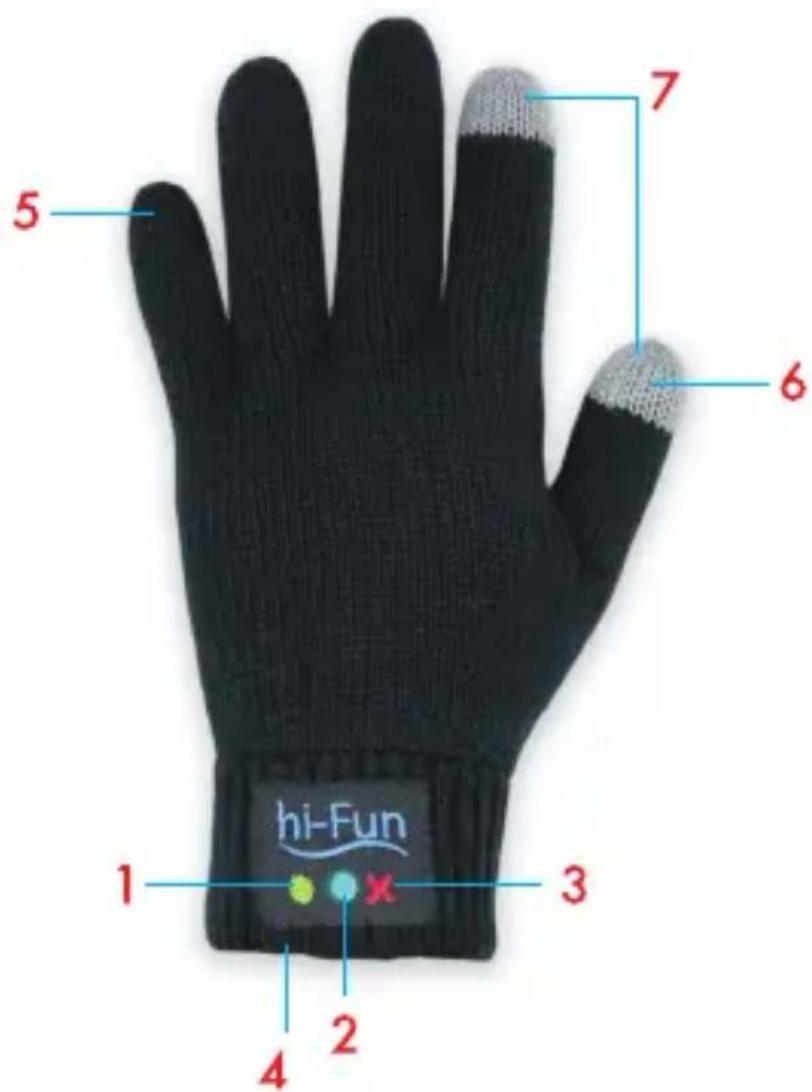
1) Multifunction button
2) Multifunction LED
3)Power button
4)USB charging plug
5)Microphone
6)Loudspeaker
7)Conductive fabric
Main functions
1) Switch on hi-Call.
To switch on hi-Call hold the power button (3) until the LED (2) turns on. Afterwards hi-Call automatically connects itself to the last paired device, if available, and the LED (2) flashes slowly in blue to confirm the connection. If there is no available paired device or if it is out of range, after 5 minutes hi-Call turns off in order to avoid battery discharging.
2) Pair hi-Call with a compatible device.
To pair for the first time, pair for a second time or to pair to a different device, hi-Call Bluetooth must be set in pairing mode, signaled by the multifunction LED (2) which flashes alternately and quickly in red and blue.
To activate the pairing mode you need to switch off hi-Call and switch it on again holding the power button (3) until the multifunction LED (2) will flash alternately red and blue.
Now you can select hi-Call from the list of found devices on your device. As soon as the device is paired, the multifunction LED (2) flashes slowly in blue.
Now is possible to make calls through hi-Call.
3) Switch off hi-Call.
To switch off hi-Call hold the power button (3) until the LED (2) flashes twice in quick succession. Immediately will hi-Call turn itself off.
Make and receive phone calls
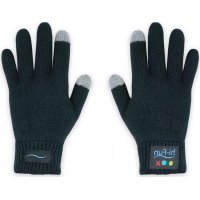
If hi-Call is paired to a mobile phone, it is possible to make and receive phone calls thanks to the microphone and the speaker placed respectively on the little finger and on the thumb of the left glove. The buttons which control hi-Call functions are placed on the back side of the glove over the wrist.
1) Answer an incoming call.
To answer an incoming call press briefly the multifunction button (1).
2) End a phone call.
To end a phone call press briefly the multifunction button (1) when you want to end the call.
3) Reject an incoming call.
To reject an incoming call hold the multifunction button (1) for 2 second, then release it. The incoming call is rejected.
4) Activate voice dialing / voiceover / Siri.
When there are no calls in progress it is possible to activate voice dialing / voiceover / Siri from your mobile phone using hi-Call.
To activate voice dialing / voiceover / Siri hold the multifunction button (1) until you hear a tone from the speaker on the thumb of your left glove, afterwards release the multifunction button (1); when you hear the second tone you can pronounce the command.
5) Call the last selected number. Press twice (double click) the multifunction button (1).
All the previous functions are available if supported by the paired device.
Charge hi-Call
If supported by paired devices, the charge status of hi-Call battery is displayed on the screen of the connected device.
When the hi-Call battery is discharged, the multifunction LED (2) starts flashing red. It indicates that in a few minutes hi-Call will be turned off in order to protect the battery.
To charge the battery connect the hi-Call's MicroUSB plug to a power source such as an USB port of your computer, a car charger or a wall charger compatible with standard USB.
It is possible to charge hi-Call while in use. When operating hi-Call is connected to the power supply, it switches off in order to protect the battery. You can now switch it on again. In this case the indication LED (2) flashes red until the battery is fully charged. If you disconnect the power source while hi-Call is charging, it remains operating.
If hi-Call is not operating, as soon as it is connected to a power source, the multifunction LED (2) lights on in red and it turns off once the battery is fully charged. It is possible now to disconnect hi-Call from the power source.
Technical specifications:
Battery life: until 12 hours
Battery duration on standby: until 10 days
Charge time: about 30 minutes
Operating range: >10 metres (>30 metres outdoor)
Warnings:

- Never immerse hi-Call in water and do not wash it in a washing machine. hi-Call is not waterproof.
- Follow the local rules about mobile phones usage and their accessories while driving.
- Keep hi-Call out of the reach of small children to avoid chocking hazard.
- Switch off hi-Call before a flight. Do not use it on a plane if not permitted by the airline.
- Keep hi-Call dry and avoid humidity.
- Disconnect hi-Call from charging cable before polishing it.
- Do not try to repair or modify hi-Call. Its components are cannot be repaired by the user.
- Do not use hi-Call if it does get wet.
- Do not try to open, disassemble or overcharging the lithium-ion battery of hi-Call: danger of explosion.
- At the end of battery lifecycle do not dispose it as household waste. Dispose of batteries according to local regulations. Please recycle when possible.
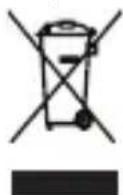
This product bears the selective sorting symbol for waste electrical and electronic equipment (WEEE). This means that this product must be handled to the local collecting points or given back to retailer when you buy a new product, in a ratio of one to one pursuant to European Directive 2002/96/EC in order to be recycled or dismantled to minimize its impact on the environment. For further information, please contact your local or regional authorities. Electronic products not included in the selective sorting process are potentially dangerous for the environment and human health due to the presence of hazardous substances. The unlawful disposal of the product carries a fine according to the legislation currently in force.
We, hi-Fun declare that the product hi-Call code HFHICALL is compliant with the R&TTE 1999/5/EC directive.
hi-Fun
hi-Fun s.r.l.
Via Santa Teda 4, 20122 Milano, Italy.
Tel: +39 02 36767640
Fax: +39 02 99988029
info@hi-fun.com
All logos and trademarks are registered and property of their respective owners