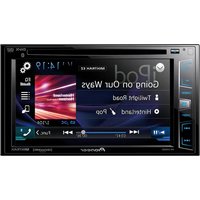
MVH170UBG - Car stereo PIONEER - Free user manual and instructions
Find the device manual for free MVH170UBG PIONEER in PDF.


Frequently Asked Questions - MVH170UBG PIONEER
User questions about MVH170UBG PIONEER
0 question about this device. Answer the ones you know or ask your own.
Ask a new question about this device
Download the instructions for your Car stereo in PDF format for free! Find your manual MVH170UBG - PIONEER and take your electronic device back in hand. On this page are published all the documents necessary for the use of your device. MVH170UBG by PIONEER.
USER MANUAL MVH170UBG PIONEER
DIGITAL MEDIA RECEIVER
PykoBoOCTBO NOIb3OBaTeJra
Table of Contents
Before You Start. 3
Getting Started. 3
Radio. 5
USB/iPod/AUX. 6
Bluetooth 8
App Mode. 10
Settings 11
FUNCTION settings 11
AUDIO settings. 12
SYSTEM settings 13
ILLUMINATION settings. 13
MIXTRAX settings 13
Connections/Installation. 15
Additional Information. 18
About this manual:
- In the following instructions, a USB memory or USB audio player are referred to as "USB device".
- In this manual, iPod and iPhone are referred to as "iPod".
Declaration of Conformity with regard to the R&TTE Directive 1999/5/EC
Manufacturer:
PIONEER CORPORATION
1-1, Shin-ogura, Sawaiki-ku, Kawasaki-shi, Kanagawa 21,0037, JAPAN
EU Representative's:
Pioneer Europe NV Haven 1087, Keetberglaan 1, B-9120 Melsele, Belgium/Belgique http://www.pioneer.eu

English:
Hereby, Pioneer, declares that this MVH X370BT is in compliance with the essential requirements and other relevant provisions of Directive 1999/5/EC.
Suomi:
Thank you for purchasing this PIONEER product
To ensure proper use, please read through this manual before using this product. It is especially important that you read and observe WARNINGs and CAUTIONs in this manual. Please keep the manual in a safe and accessible place for future reference.
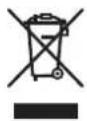
If you want to dispose this product, do not mix it with general household waste. There is a separate collection system for used electronic products in accordance with legislation that requires proper treatment, recovery and recycling.
Private households in the member states of the EU, in Switzerland and Norway may return their used electronic products free of charge to designated collection facilities or to a retailer (if you purchase a similar new one).
For countries not mentioned above, please contact your local authorities for the correct method of disposal.
By doing so you will ensure that your disposed product undergoes the necessary treatment, recovery and recycling and thus prevent potential negative effects on the environment and human health.

WARNING
-
Do not attempt to install or service this product by yourself. Installation or servicing of this product by persons without training and experience in electronic equipment and automotive accessories may be dangerous and could expose you to the risk of electric shock, injury or other hazards.
-
Do not attempt to operate the unit while driving. Make sure to pull off the road and park your vehicle in a safe location before attempting to use the controls on the device.

CAUTION
- Do not allow this unit to come into contact with moisture and/or liquids. Electrical shock could result. Also, damage to this unit, smoke, and overheating could result from contact with liquids.
Always keep the volume low enough to hear outside sounds.
The Pioneer CarStereo-Pass is for use only in Germany.
If you experience problems
Should this unit fail to work properly, please contact your dealer or nearest authorized PIONEER Service Station.
Getting Started
Basic operation
MVH-X370BT/170UI/170UBG/170UB
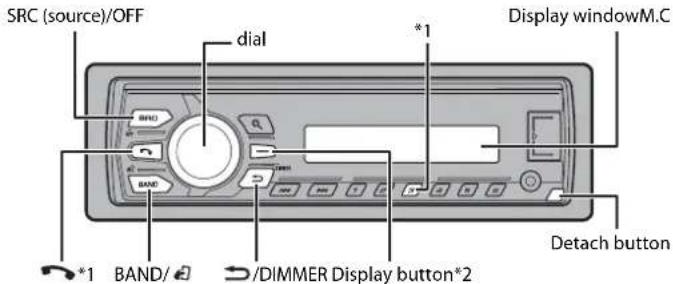
1 The button Indications vary depending on the unit.
2 This button is referred to as DISP In this manual.
Frequently used operations
The available buttons vary depending on the unit.
| Purpose Operation | |
| Turn on the power* Press SRC/OFF to turn on the power. Press and hold SRC/OFF to turn off the power. | |
| Adjust the volume Turn the M.C. dial. | |
| Select a source Press SRC/OFF repeatedly. | |
| Change the display information Press DISP repeatedly. | |
| Return to the previous display/list Press /DIMMER. | |
| Return to the normal display from the menu. | Press BAND/ |
| Answering/ending a call (Only for MVH-X370BT) | Press |
*When this unit's blue/white lead is connected to the vehicle's auto-antenna relay control terminal, the vehicle's antenna extends when this unit's source is turned on. To retract the antenna, turn the source off.
Display indication
| Indication Description | |
| Appears when a lower tier of the menu or folder exists. | |
| c | Appears when the automatic answering function is set (page 10). (Only for Bluetooth-compatible models.) |
| p | Appears when the Button is pressed. |
| LOC Appears when the local seek tuning function is set (page 11). | |
| TP Appears when a traffic program is received. | |
| TA Appears when traffic announcements are received (page 11). | |
| S R R V | Appears when the sound retriever function is set (page 12). |
| XX | Appears when random/shuffle play is set (except when BT AUDIO is selected as the source). |
| ← | Appears when repeat play is set (except when BT AUDIO is selected as the source). |
| d | Appears when the iPod control function is set (page 7). |
| θ | Appears when a Bluetooth connection is made (page 8). (Only for Bluetooth-compatible models.) |
Detaching the front panel
Detach the front panel to prevent theft. Remove any cables and devices attached to the front panel and turn off the unit before detaching it.
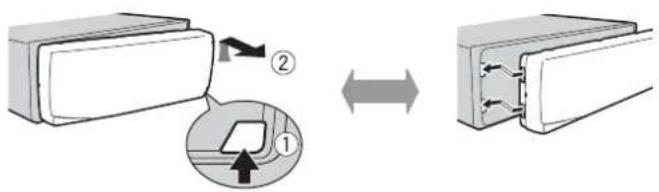
Detach Attach

Important
- Avoid subjecting the front panel to excessive shock.
- Keep the front panel out of direct sunlight and high temperatures.
Always store the detached front panel in a protective case or bag.
Setup menu
When you turn the ignition switch to ON after installation, [SET UP:YES] appears in the display.
1 Press the M.C. dial.
The setup menu disappears after 30 seconds of no operation. If you prefer not to set at this time, turn the M.C. dial to select [NO], then press to confirm.
2 Turn the M.C. dial to select the options, then press to confirm.
To proceed to the next menu option, you need to confirm your selection.
| Menu Item Description | |
| LANGUAGE Select the [ENG](English), [PYC](Russian), [TUR](Turkish) | language to display the text information from a compressed audio file. |
| CLOCK SET Set the clock. | |
| FM STEP Select the F [100], [50] | M tuning step from 100 kHz or 50 kHz. |
3[QUIT:YES] appears when all the settings have been made.
To return to the first item of the setup menu, turn the M.C. dial to select [QUIT:NO], then press to confirm.
4 Press the M.C. dial to confirm the settings.
NOTES
- You can cancel the menu setting by pressing SRC/OFF.
- These settings can be made at any time from the SYSTEM settings (page 13) and INITIAL settings (page 5).
Canceling the demonstration display (DEMO OFF)
1 Press the M.C. dial to display the main menu.
2 Turn the M.C. dial to select [SYSTEM], then press to confirm.
3 Turn the M.C. dial to select [DEMO OFF], then press to confirm.
4 Turn the M.C. dial to select [YES], then press to confirm.
INITIAL settings
1 Press and hold SRC/OFF until the unit turns off.
2 Press and hold SRC/OFF to display the main menu.
3 Turn the M.C. dial to select [INITIAL], then press to confirm.
4 Turn the M.C. dial to select an option, then press to confirm.
NOTE
The options vary depending on the unit.
| Menu Item Description | |
| FM STEP Select the FM tuning step from 100 kHz or 50 kHz. | |
| [100], [50] | |
| SP-P/O MODE Select when there is a full-range speaker connected to the rear speaker output leads and there is a subwoofer connected to the RCA output. | |
| [REAR/SUB.W] | Select when there is a passive subwoofer connected directly to the rear speaker output leads and there is a subwoofer connected to the RCA output. |
| [SUB.W/SUB.W] | |
| [REAR/REAR] | Select when there are full-range speakers connected to the rear speaker output leads and RCA output. If there is a full-range speaker connected to the rear speaker output leads, and the RCA output is not used, you may select either [REAR/SUB.W] or [REAR/REAR]. |
| S/W UPDATE | Select to update the unit to the latest Bluetooth software. For details on Bluetooth software and updating, visit our website. |
| SYSTEM RESET [YES], [CANCEL] | Select [YES] to initialize the unit settings. The unit will be restarted automatically. (Some of the settings will be retained even after resetting the unit, such as Bluetooth pairing information, etc.) |
Radio
The tuner frequencies on this unit are allocated for use in Western Europe, Asia, the Middle East, Africa and Oceania. Use in other areas may result in poor reception. The RDS (radio data system) function only works in areas that broadcast RDS signals for FM stations.
Receiving preset stations
1 Press SRC/OFF to select [RADIO].
2 Press BAND/ to select the band from [FM1], [FM2], [FM3], [MW] or [LW].
3 Press a number button (1/△ to 6/)。
TIP
The function can be also used to select a preset station when [SEEK] is set to [PCH] in the FUNCTION settings (page 12).
Best stations memory (BSM)
The six strongest stations are stored on the number buttons (1/ ∧ to 6/).
1 After selecting the band, press the M.C. dial to display the main menu.
2 Turn the M.C. dial to select [FUNCTION], then press to confirm.
3 Turn the M.C. dial to select [BSM], then press to confirm.
To seek a station manually
1 After selecting the band, press kshed a station.
Press and hold I her release to seek an available station. Scanning stops
when the unit receives a station. To cancel seek tuning, press
NOTE
[SEEK] needs to be set to [MAN] In the FUNCTION settings (page 12).
To store stations manually
1 While receiving the station you want to store, press and hold one of the number buttons (1/ to 6 / 2 ) until it stops flashing.
Using PTY functions
The unit searches for a station by PTY (program type) information.
1Press dQing FM reception.
2 Turn the M.C. dial to select a program type from [NEWS/INFO], [POPULAR], [CLASSICS] or [OTHERS].
3 Press the M.C. dial. The unit begins to search for a station. When it is found, its program service name is displayed.
NOTES
To cancel the search, press the M.C. dial.
The program of some stations may differ from that indicated by the transmitted PTY.
- If no station is broadcasting the type of program you searched for, [NOT FOUND] is displayed for about two seconds and then the tuner returns to the original station.
PTY list
For more details about PTY list, visit the following site: http://www.pioneer.eu/eur/products/25/121/tech/CarAudio/PTY.html
USB/iPod/AUX
NOTE
iPod function is not available for MVH-170UBG/170UB.
Playing back
Disconnect headphones from the device before connecting it to the unit.
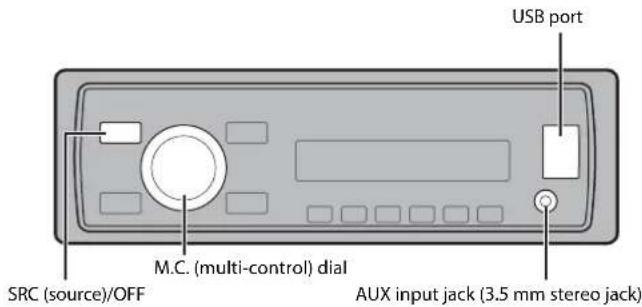
USB device/iPod
1 Open the USB port cover.
2 Plug in the USB device/IPod using an appropriate cable.
CAUTION
Use an optional Pioneer USB cable (CD-U50E) to connect the USB storage device as any device connected directly to the unit will protrude out from the unit, which could be dangerous.
Before removing the device, stop playback.
MTP connection
A device installed with Android OS 4.0 or later can be connected to the unit via MTP, using the cable supplied with the device. However, depending on the connected device and the numbers of the files in the device, audio files/songs may not be able to be played back via MTP. Note that MTP connection is not compatible with WAV and FLAC file formats, and cannot be used with the MIXTRAX function.
* The FLAC files are only compatible with MVH-170UI/170UBG/170UB.
AUX
1 Insert the stereo mini plug into the AUX input jack.
2 Press SRC/OFF to select [AUX] as the source.
NOTE
If [AUX] is set to [OFF] in the SYSTEM settings, [AUX] cannot be selected as a source.
You can make various adjustments in the FUNCTION settings (page 11). Note that the following operations do not work for an AUX device. To operate an AUX device, use the device itself.
Operations
| Purpose Operation | |
| Select a folder/album*1 | Press 1/ ▲ or 2/ √ . |
| Select a track/song (chapter) Press or . | ▲ ▲ ▲ ▲ |
| Fast forward or reverse Press and hold or . | ▲ ▲ ▲ ▲ ▲ |
| Search for a file from a list | 1 Press Ⓞ to display the list.2 Turn the M.C. dial to select the desired file (folder) name or category, then press to confirm.3 Turn the M.C. dial to select the desired file, then press to confirm.Playback starts. |
| View a list of the files in the selected folder/ category*1 | Press the M.C. dial when a folder/category is selected. |
| Play a song in the selected folder/ category*1 | Press and hold the M.C. dial when a folder/ category is selected. |
| Alphabetical search (iPod only) | 1 Press Ⓞ to display the list.2 Turn the M.C. dial to select the desired category list, then press Ⓞ enter the alphabetical search mode.(Turning the M.C. dial twice also enters the alphabetical search mode.)3 Turn the M.C. dial to select a letter, then press to display the alphabetical list.To cancel alphabetical search, press ▷/ DIMMER. |
| Repeat play | Press 6/ ▲ . |
| Random/shuffle play | Press 5/ △ △ . |
| Shuffle all play (iPod only) | Press and hold 5/ △ △ . |
Useful functions for iPod
| Purpose Operation | |
| Pause/resume playback | Press 4/PAUSE. |
| Sound retriever*2 | Press 3/S.Rtrv. [1]: Effective for low compression rates [2]: Effective for high compression rates |
| Return to root folder (USB only)*1 | Press and hold BAND/☑. |
| Change drives in USB device(Devices that support the USB mass storage device class protocol only) | Press BAND/☑. |
1 Compressed audio files only
2 When there is no 3/5.Rtrv button on the unit, the sound retriever function can be set by the FUNCTION settings.
Link play mode
You can access songs based on the artist, album, or genre currently playing.
1 While listening to a song, press and hold to enter the link play mode.
2 Turn the M.C. dial to select the mode ([ARTIST], [ALBUM], [GENRE]), then press to confirm.
The selected song/album will be played after the currently playing song.
NOTE
The selected song/album may be canceled if you use functions other than those from the link play mode (e.g. fast forward and reverse).
iPod control
You can control the unit via a connected iPod.
The following iPod models are not compatible with this function.
- iPod nano 1st generation, iPod with video
1 Press BAND/ during playback, then select the control mode.
[CONTROL iPod/CTRL iPod]: The unit's iPod function can be operated from the connected iPod.
[CONTROL AUDIO/CTRL AUDIO]: The unit's iPod function can only be operated by the buttons on the unit. In this mode, the connected iPod cannot be turned on or off.
NOTES
- Pressing iPod can also switch the control mode (only for MVH-170UI).
-
Switching the control mode to [CONTROL iPod/CTRL iPod] pauses song playback. Use the connected iPod to resume playback.
-
The following operations are still accessible from the unit, even if the control mode is set to [CONTROL iPod/CTRL iPod].
- Pause, fast forward/reverse, song/chapter selection
The volume can only be adjusted from the unit.
About MIXTRAX (USB/iPod only)
(Only for MVH-X370BT)
The MIXTRAX function creates a non-stop mix of your music library, accompanied by illumination effects. For details on MIXTRAX settings, see page 13.
NOTES
This function is not compatible with an Android device connected via MTP.
- When USB is selected as a source and the MIXTRAX function is in use, the sound retriever function is disabled.
- Depending on the file/song, sound effects may not be available.
- Turn the MIXTRAX function off if the illumination effects it produces interfere with driving.
1Press 3/MIX to turn MIXTRAX on/off.
Bluetooth
(Only for MVH-X370BT)
Bluetooth connection
Important
If three or more Bluetooth devices (e.g., a phone and separate audio player) are connected, they may not work properly.
1Turn on the Bluetooth function of the device.
2Press and hold to display the connection menu.
3 Turn the M.C. dial to select [ADD DEVICE], then press to confirm.
The unit starts to search for available devices, then displays them in the device list.
To cancel searching, press the M.C. dial.
If the desired device is not in the list, select [RE-SEARCH].
If there is no device available, [NOT FOUND] appears in the display.
4 Turn the M.C. dial to select a device from the device list, then press to confirm. Press and hold the M.C. dial to switch the displayed device information between the Bluetooth device address and device name.
5Select [Pioneer BT Unit] shown in the device display.
6Make sure the same 6-digit number appears on this unit and the device, then select "Yes" on the device.
NOTES
- [DEVICE FULL] appears if the unit has already been paired with three other devices. In this case, delete
one of the paired devices. See [DEL DEVICE] or [GUEST MODE] in the connection menu (page 8). - Depending on the device, the PIN code is required in step 6. In this case, Input [0000].
TIP
The Bluetooth connection can be also made by detecting the unit from the Bluetooth device. To do so, [VISIBLE] in the connection menu needs to be set to [ON]. For details on a Bluetooth device operations, refer to the operating instructions supplied with the Bluetooth device.
Connection menu
| Menu Item Description | |
| DEVICELIST Display the device list of paired Bluetooth devices. ** appears on the device name when the Bluetooth connection is established. | |
| DEL DEVICE Delete the device information. | |
| [DELETE YES], [DELETE NO] | |
| ADD DEVICE Register a new device. | |
| A.CONN Select [ON] to connect to a Bluetooth device automatically. | |
| VISIBLE Select [ON] so that a Bluetooth device can detect the unit when the unit is connected via Bluetooth to another device. | |
| PIN CODE Change the PIN code. | |
| 1 Press the M.C. dial to display the setting mode.2 Turn the M.C. dial to select a number.3 Press the M.C. dial to move the cursor to the next position.4 After inputting the PIN code, press and hold the M.C. dial. After inputting the PIN code, pressing the M.C. dial returns you to the PIN code input display, and you can change the PIN code. | |
| DEV. INFO | Switch the device information on the display between the device name and Bluetooth device address. |
| GUEST MODE [ON], [OFF] | Select [ON] to move to the [DEL DEVICE] screen automatically when the unit has already been paired with three devices. |
| Menu Item | Description |
| A.PAIRING Select [ON] to [ON], [OFF] | pair the unit and iPhone automatically when an iPhone is connected to the unit via USB. (This function may not be available depending on the version of iOS you are using.) |
Bluetooth telephone
First, make a Bluetooth connection with the Bluetooth telephone (page 8). Up to two Bluetooth telephones can be connected simultaneously.
Important
- Leaving the unit on standby to connect to your phone via Bluetooth while the engine is not running can drain the vehicle's battery.
- Be sure to park your vehicle in a safe place and apply the parking brake before operation.
To make a phone call
1 Press to display the phone menu.
When two phones are connected, a phone name appears first then a phone menu will display. To switch to another phone, press again.
2 Turn the M.C. dial to select [MISSED], [DIALLED], [RECEIVED] or [PHONE BOOK], then press to confirm.
The phone number list appears.
3 Turn the M.C. dial to select a name or phone number, then press to confirm. The phone call starts.
To answer an incoming call
1 Press when a call is received.
TIP
When two phones are connected to the unit via Bluetooth and there is an incoming call while one phone is being used for a call, a message will appear in the display. To answer that incoming call, you need to end the existing call.
Basic operations
| Purpose Operation | |
| End a call | Press |
| Reject an incoming call | Press and hold when a call is received. |
| Switch between the current caller and a caller on hold | Press the M.C. dial. |
| Purpose Operation | |
| Cancel a caller on hold | Press and hold |
| Adjust the volume of the caller's voice (When private mode is on, this function is not available.) | Turn the M.C.dial during the call. |
| Turn the privacy mode on or off | Press BAND/ d during the call. |
To preset phone numbers
1 Select a phone number from a phone book or call history.
2 Press and hold one of the number buttons (1 / to 6 / 一
The contact is stored in the selected preset number.
To make a call using a preset number, press one of the number buttons (1/ A to 6/), then press the M.C. dial.
Voice recognition (Only for iPhone)
This function is only available when an iPhone equipped with voice recognition is connected to the unit via Bluetooth.
1 Press and hold the M.C. dial to activate the voice recognition mode.
2 Press the M.C. dial and then talk into the microphone to input voice commands.
To exit the voice recognition mode, press BAND/
NOTE
For details on the voice recognition features, refer to the manual supplied with your iPhone.
Phone menu
| Menu Item | Description |
| MISSED | Display the missed call history. |
| DIALLED | Display the dialed call history. |
| RECEIVED | Display the received call history. |
| PHONE BOOK*1 | Display the contacts which have been transferred from your phone. Set [VISIBLE] in the connection menu to [ON] to browse the contacts via this unit. |
| PRESET 1-6 Recall the p | reset phone numbers. You can also recall the preset phone numbers by pressing one of the number buttons (1/▲ to 6/▲) . |
| PHONE FUNC Select [ON] A.ANSR:*2 [ON], [OFF] | to answer an incoming call automatically. |
| R.TONE: [ON], [OFF] | Select [ON] if the ring tone does not come out from the car speakers. Depending on the connected phone, this function may not work. |
| PB INVT Invert the order of names in the phone book (name view). | |
1 The contacts on your phone will normally be transferred automatically when the phone is connected. If they are not, use your phone to transfer the contacts.
2 If two phones are connected, this function does not work on Incoming calls that are received while one of the phones is being used for a call.
Bluetooth audio
Important
- Depending on the Bluetooth audio player connected to this unit, the available operations will be limited to the following two levels:
- A2DP (Advanced Audio Distribution Profile) can only play back songs on your audio player.
AVRCP (Audio/Video Remote Control Profile) can perform functions such as playback, pause, select, song, etc.
The sound of the Bluetooth audio player will be muted when the phone is in use. - When the Bluetooth audio player is in use, you cannot connect to a Bluetooth telephone automatically.
- Depending on the type of Bluetooth audio player you have connected to this unit, operation and information displayed may vary based on availability and functionality.
1Make a Bluetooth connection with the Bluetooth audio player.
2 Press SRC/OFF to select [BT AUDIO] as the source.
3 Press BAND/ to start playback.
Basic operations
You can make various adjustments in the FUNCTION settings (page 11).
| Purpose Operation | |
| Fast forward or reverse Press and hold | or . | | | | |
| Select a track | Press | or | . |
| Repeat play* | Press 6/8. |
| Purpose Operation | |
| Random play* | Press 5/XX. |
| Pause/resume playback | Press 4/PAUSE. |
| Search for a file from a list | 1 Press to display the list. 2 Turn the M.C. dial to select the desired folder name, then press to confirm. 3 Turn the M.C. dial to select the desired file, then press to confirm. Playback starts. |
- Depending on the connected device, these operations may not be available.
App Mode
(APP mode is not available for MVH-170UBG/170UB.)
You can enjoy listening to an application on an iPhone/Android device via the unit. In some cases, you can control an application by using the unit.
For details on compatible devices, visit our website.
Important
Use of third party apps may involve or require the provision of personally identifiable information, whether through the creation of a user account or otherwise, and for certain applications, the provision of geolocation data.
ALL THIRD PARTY APPS ARE THE SOLE RESPONSIBILITY OF THE PROVIDERS, INCLUDING WITHOUT LIMITATION COLLECTION AND SECURITY OF USER DATA AND PRIVACY PRACTICES. BY ACCESSING THIRD PARTY APPS, YOU AGREE TO REVIEW THE TERMS OF SERVICE AND PRIVACY POLICIES OF THE PROVIDERS. IF YOU DO NOT AGREE WITH THE TERMS OR POLICIES OF ANY PROVIDER OR DO NOT CONSENT TO THE USE OF GEOLOCATION DATA WHERE APPLICABLE, DO NOT USE THAT THIRD PARTY APP.
For iPhone users
This function is compatible with iPhones and iPod touches installed with iOS 5.0 or later.
For Android device users
This function is compatible with devices that have Android OS 2.3 or later installed and also support Bluetooth SPP (Serial Port Profile) and A2DP (Advance Audio Distribution Profile).
NOTE
PIONEERIS NOT LIABLE FOR ANY THIRD PARTY APPS OR CONTENT, INCLUDING WITHOUT LIMITATION THEIR ACCURACY OR COMPLETENESS. THE CONTENT AND FUNCTIONALITY OF SUCH APPS ARE THE SOLE RESPONSIBILITY OF THE APP PROVIDER.
Playback of an application via the unit
The Bluetooth connection is available for MVH-X370BT.
1Connect this unit with the mobile device.
- iPhone via USB (page 6)
Android device via Bluetooth (page 8)
2 Press the M.C. dial to display the main menu.
3 Turn the M.C. dial to select [SYSTEM], then press to confirm.
4 Turn the M.C. dial to select [APP CONN.SET], then press to confirm.
5 Turn the M.C. dial to select one of the below, then press to confirm.
- Select [WIRED] for iPhone.
- Select [BLUETOOTH] for an Android device.
6 Press SRC/OFF to select [APP].
7Operate the mobile device to start up the application.
You can make various adjustments in the FUNCTION settings (page 11).
Basic operations
| Purpose Operation | |
| Select a track Press or . | |▶▶| |
| Fast forward or reverse Press and hold or . | |▶▶| |
| Pause/resume playback Press BAND/ . | # |
Settings
You can adjust various settings in the main menu.
1 Press the M.C. dial to display the main menu.
2 Turn the M.C. dial to select one of the categories below, then press to confirm.
FUNCTION settings (page 11)
- AUDIO settings (page 12)
SYSTEM settings (page 13)
ILLUMINATION settings (page 13)
- MIXTRAX settings (page 13)
3 Turn the M.C. dial to select the options, then press to confirm.
NOTES
- The Bluetooth-related menu items in the following tables are not available for MVH-H170UI/170UBG/170UB.
- iPod-related menu items in the following tables are not available for MVH-170UBG/170UB.
- APP mode-related menu items in the following tables are not available for MVH-170UBG/170UB.
FUNCTION settings
The menu items vary according to the source.
Menu Item Description
FM SETTING RADIO
[TALK], [STANDARD], [MUSIC] Match the sound quality level with the broadcast signal conditions of the FM band signal.
(Available only when FM band is selected.)
BSM RADIO
Store the six strongest stations on the number
buttons (1 / to 6 / 2) )automatically.
REGIONAL RADIO
[ON], [OFF]
Limit the reception to the specific regional
programs when AF (alternative frequencies
search) is selected. (Available only when FM
LOCAL RADIO
FM: [OFF], [LV1], [LV2], [LV3], [LV4] Restrict the tuning station according to the
MW/LW: [OFF], [LV1], [LV2]
signal strength.
TA RADIO
[ON], [OFF]
Receive current traffic information if available.
(Available only when FM band is selected.)
AF RADIO
[ON], [OFF]
Allow the unit to retune to a different frequency
providing the same station. (Available only when
NEWS RADIO
[ON], [OFF]
Interrupt the currently selected source with
news programs. (Available only when FM band is
selected.)
| Menu Item Description | |||
| SEEK RADIO [MAN], [PCH] Assign / buttons to seek the stons one by one (manual tuning) or select a station from the preset channels. | |||
| SEL DEVICE APP BT AUDIO Connect a Bluetooth device in the list. | |||
| S.RTRV USB iPod APP BT AUDIO | |||
| [1] (effective for low compression rates), [2] (effective for high compression rates), [OFF] | Enhance compressed audio and restore rich sound. Not available when; • USB is selected as a source and the MIXTRAX function is set to on. • The FLAC file is played back. (Available for MVH-170UI/170UBG/170UB) | ||
| AUDIO BOOK iPod [FASTER], [NORMAL], [SLOWER] Change the playback speed. (Not available when [CONTROL iPod/CTRL iPod] is selected in the control mode.) | |||
| PAUSE APP Pause or resume playback. | |||
| PLAY BT AUDIO Start playback. | |||
| STOP BT AUDIO Stop playback. | |||
| AUDIO settings | |||
| Menu Item Description | |||
| FADER*1 Adjust the front and rear speaker balance. | |||
| BALANCE Adjust the left and right speaker balance. | |||
| Menu Item Description | |
| EQ SETTING | |
| [SUPER BASS], [POWERFUL], [NATURAL], [VOCAL], [CUSTOM1], [CUSTOM2], [FLAT] | Select or customize the equalizer curve. [CUSTOM1] can be set separately for each source. However, each of the below combinations are set to the same setting automatically. |
| Select an equalizer band and level for further customizing. Equalizer band: [80HZ], [250HZ], [800HZ], [2.5KHZ], [8KHZ] Equalizer level: [+6] to [-6] | • USB, iPod, and APP (iPhone) • BT AUDIO, and APP (Android) [CUSTOM2] is a shared setting used for all sources. You can also switch the equalizer by pressing EQ,III repeatedly (Only for MVH-170UBG/170UB). |
| LOUDNESS | |
| [OFF], [LOW], [MID], [HI] Compensate for clear sound at low volume. | |
| SUB.W*2 | |
| [NOR], [REV], [OFF] Select the subwoofer phase. | |
| SUB.W CTRL*2*3 | |
| Cut-off frequency: [50HZ], [63HZ], [80HZ], [100HZ], [125HZ], [160HZ], [200HZ] Output level: [-24] to [+6] Slope level: [-12], [-24] | Only frequencies lower than those in the selected range are output from the subwoofer. |
| BASS BOOST | |
| [0] to [+6] Select the bass boost level. | |
| HPF SETTING | |
| Cut-off frequency: [OFF], [50HZ], [63HZ], [80HZ], [100HZ], [125HZ], [160HZ], [200HZ] Slope level: [-12], [-24] | Only frequencies higher than the high-pass filter (HPF) cutoff are output from the speakers. |
| SLA | |
| [+4] to [-4] Adjust the volume level for each source except FM. Each of the below combinations are set to the same setting automatically. • USB, iPod, and APP (iPhone) • BT AUDIO, and APP (Android) | |
1 Not available when [SUB.W/SUB.W] is selected in [SP-P/O MODE] in the INITIAL settings (page 5).
2 Not available when [REAR/REAR] is selected in [SP-P/O MODE] in the INITIAL settings (page 5).
*3 Not available when [OFF] is selected in [SUB.W].
SYSTEM settings
You can also access to these menus when the unit is turned off.
Menu Item Description
LANGUAGE
Select the language to display the text information from a compressed audio file.
CLOCK SET
Set the clock (page 4).
12H/24H
[12H], [24H] Select the time notation.
AUTOPI
[ON], [OFF] Search for a different station with the same
programming, even if using a preset station.
AUX
[ON], [OFF] Set to [ON] when using an auxiliary device connected to the unit.
BT AUDIO
[ON], [OFF] Set the Bluetooth signal on/off.
MUTE MODE (Only available for MVH-170UI)
[MUTE], [20dB ATT], [10dB ATT] Mute or attenuate sound automatically when a signal from equipment with a mute function is received.
PW SAVE*1
[ON], [OFF] Reduce the battery power consumption.
Turning on the source is the only operation allowed when this function is on.
BT MEM CLEAR
[YES], [CANCEL] Clear the Bluetooth device data (device list, PIN code, call history, phone book, preset phone numbers) stored in the unit.
[CLEARED] appears when data is successfully deleted.
BT VERSION
Displays the system version of the unit and the Bluetooth module.
Menu Item Description
APP CONN. SET*2
[Wired], [BLUETOOTH] Select the appropriate connection method according to your device.
1 [PW SAVE] is canceled If the vehicle battery is disconnected and will need to be turned back on once the battery is reconnected. When [PW SAVE] is off, depending on connection methods, the unit may continue to draw power from the battery if your vehicle's ignition does not have an ACC (accessory) position.
^2 Not available when [APP] is selected as the source.
ILLUMINATION settings
Menu Item Description
DIM SETTING
[SYNC CLOCK] [MANUAL] Change the display brightness.
BRIGHTNESS
[1] to [10] Change the display brightness.
The available setting ranges differ depending on [DIM SETTING].
MIXTRAX settings
(Only for MVH-X370BT)
Menu Item Description
SHORT MODE
[1.0 MIN], [1.5 MIN], [2.0 MIN], [2.5 MIN], [3.0 MIN], [OFF]
Select the length of the playback time.
MIX PATTERN
[Sound Level]
Change the MIXTRAX special effects according to the audio level. The mix pattern changes according to the sound level.
[LOW PASS]
The mix pattern changes according to the bass level.
[RANDOM]
The mix pattern changes randomly according to the sound level mode and low pass mode.
Menu Item Description
DISP FX
[ON], [OFF] Set the MIXTRAX special effects on/off.
CUT IN FX
[ON], [OFF] Turn the MIXTRAX sound effects on/off while
manually changing the tracks.
Connections/Installation
Connections
Important


- When installing this unit in a vehicle without an ACC (accessory) position on the ignition switch, failure to connect the red cable to the terminal that detects operation of the ignition key may result in battery drain.
ACC position No ACC position - Use of this unit in conditions other than the following could result in fire or malfunction.
Vehicles with a 12-volt battery and negative grounding.
-Speakers with 50 W (output value) and 4 to 8 impedance value).
To prevent a short-circuit, overheating or malfunction, be sure to follow the directions below.
-Disconnect the negative terminal of the battery before installation. - Secure the wiring with cable clamps or adhesive tape. Wrap adhesive tape around wiring that comes into contact with metal parts to protect the wiring.
-
Place all cables away from moving parts, such as the shift lever and seat rails.
-Place all cables away from hot places, such as near the heater outlet.
-Do not connect the yellow cable to the battery by passing it through the hole to the engine compartment.
-Cover any disconnected cable connectors with insulating tape.
-Do not shorten any cables. -
Never cut the insulation of the power cable of this unit in order to share the power with other devices. The current capacity of the cable is limited.
- Use a fuse of the rating prescribed.
- Never wire the negative speaker cable directly to ground.
-
Never band together negative cables of multiple speakers.
-
When this unit is on, control signals are sent through the blue/white cable. Connect this cable to the system remote control of an external power amp or the vehicle's auto-antenna relay control terminal (max. 300mA 12 V DC). If the vehicle is equipped with a glass antenna, connect it to the antenna booster power supply terminal.
- Never connect the blue/white cable to the power terminal of an external power amp. Also, never connect it to the power terminal of the auto antenna. Doing so may result in battery drain or a malfunction.
- The black cable is ground. Ground cables for this unit and other equipment (especially, high-current products such as power amps) must be wired separately. If they are not, an accidental detachment may result in a fire or malfunction.
This unit
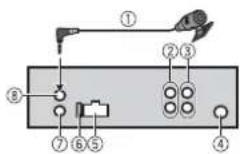
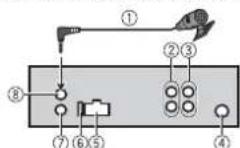
MVH-X370BT/170UI/170UBG/170UB
① Microphone 4m (13 ft. 1 in.) Only for MVH-X370BT)
Rear output or subwoofer output
③ Front output (Only for MVH-X370BT/ 170UI)
Antenna input
⑤ Power cord input
⑥ Fuse(10A)
⑦ Wired remote input (Only for MVHX370BT/170UI) Hard-wired remote control adapter be connected (sold separately).
© Microphone input (Only for MVH-X370BT)
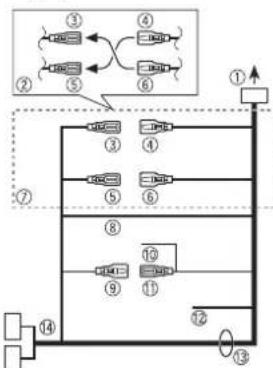
Power cord
Perform these connections when not connecting a rear speaker lead to a subwoofer.
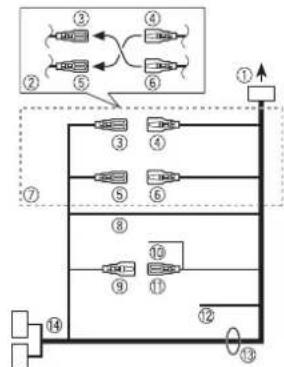
① To power cord input
② Depending on the kind of vehicle, the function of and may be different. In this case, be sure to connect to and
③ Yellow Back-up (or accessory)
④ Yellow
Connect to the constant 12 V supply terminal.
Red
Accessory (or back-up)
Red
Connect to terminal controlled by the ignition switch (12 V DC).
② Connect leads of the same color to each other.
Black (chassis ground)
Blue/white
The pin position of the ISO connector will differ depending on the type of vehicle. Connect and when Pin 5 is an antenna control type. In another type of vehicle, never connect and
Blue/white
Connect to the system control terminal of the power amp (max. 300mA12V DC).
Blue/white
Connect to the auto-antenna relay control terminal (max. 300 mA 12 V DC).
Yellow/black (Only for MVH-170UI) If you use equipment with a Mute function, wire this lead to the Audio Mute lead on that equipment. If not, keep the Audio Mute lead free of any connections.
Speaker leads
White:Front left White/black:Front left Gray:Front right Gray/black:Front right Green:Rear left or subwoofer Green/black:Rear left or subwoofer Violet:Rear right or subwoofer
Violet/black:Rear right or subwoofer
ISO connector
In some vehicles, the ISO connector may be divided into two. In this case, be sure to connect to both connectors.
NOTES
- Change the initial menu of this unit. Refer to [SP-P/O MODE] (page 5). The subwoofer output of this unit is monaural.
- When using a subwoofer of 70W (2) , be sure to connect the subwoofer to the violet and violet/black leads of this unit. Do not connect anything to the green and green/black leads.
Power amp (sold separately)
Perform these connections when using the optional amplifier.
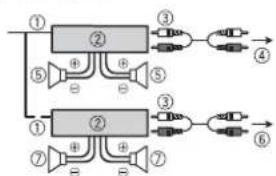
① System remote control
Power amp (sold separately)
③ Connect with RCA cables (sold separately)
④ To front output
⑤ Front speaker*
To rear output or subwoofer output
Rear speaker or subwoofer
Only for MVH-X370BT/170UI
Installation
Important
- Check all connections and systems before final installation.
- Do not use unauthorized parts as this may cause malfunctions.
- Consult your dealer if installation requires drilling of holes or other modifications to the vehicle.
- Do not install this unit where:
-it may interfere with operation of the vehicle.
-it may cause injury to a passenger as a result of a sudden stop.
- The semiconductor laser will be damaged if it overheats. Install this unit away from hot places such as near the heater outlet.
Optimum performance is obtained when the unit is installed at an angle of less than 60^
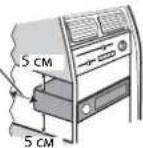
- When installing, to ensure proper heat dispersal when using this unit, make sure you leave ample space behind the rear panel and wrap any loose cables so they are not blocking the vents.
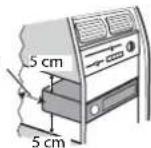
Leave ample space
DIN front/rear mount
This unit can be properly installed using either front-mount or rear-mount installation. Use commercially available parts when installing.
DIN Front-mount
1 Insert the mounting sleeve into the dashboard.
For installation in shallow spaces, use the supplied mounting sleeve. If there is enough space, use the mounting sleeve that came with the vehicle.
2 Secure the mounting sleeve by using a screwdriver to bend the metal tabs (90^) into place.
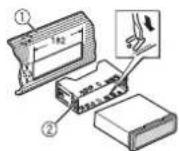
① Dashboard
Mounting sleeve
Make sure that the unit is installed securely in place. An unstable installation may cause skipping or other malfunctions.
DIN Rear-mount
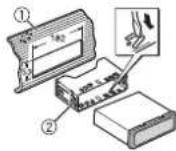
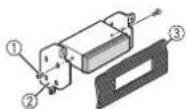
1 Line up the holes on the mounting bracket with the holes on the sides of the unit to attach the bracket.
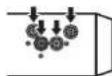
2 Screw in one screw on each side to hold the unit in place.
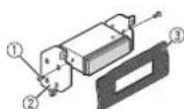
① Tapping screw (5mm× 8mm)
② Mounting bracket
③ Dashboard or console
Using the included bracket
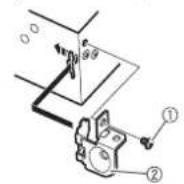
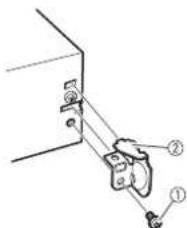
You can also use the included bracket to mount the unit. Check to make sure that the included bracket matches your particular model of vehicle and then attach it to the unit as shown below.
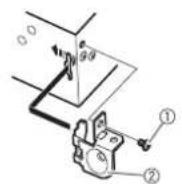
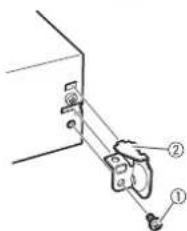
① Screw
Bracket
Removing the unit
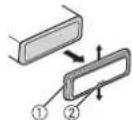
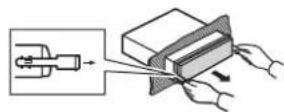
1 Remove the trim ring.
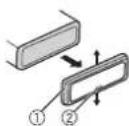
① Trim ring
Notched tab
- Releasing the front panel allows easier access to the trim ring.
- When reattaching the trim ring, point the side with the notched tab down.
2 Insert the supplied extraction keys into both sides of the unit until they click into place.
3 Pull the unit out of the dashboard.
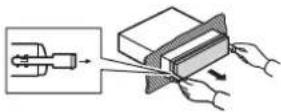
Installing the microphone
(Only for MVH-X370BT)
The microphone should be placed directly in front of the driver at a suitable distance to pick up their voice clearly.

CAUTION
It is extremely dangerous to allow the microphone lead to become wound around the steering column or shift lever. Be sure to install the microphone in such a way that it will not obstruct driving. It is recommended to use the clamps (sold separately) to arrange the lead.
To install on the sun visor
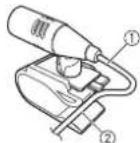
1 Fit the microphone lead into the groove.
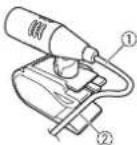
① Microphone lead ② Groove
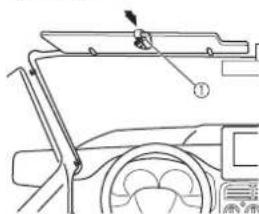
2 Install the microphone clip on the sun visor. Lowering the sun visor reduces the voice recognition rate.
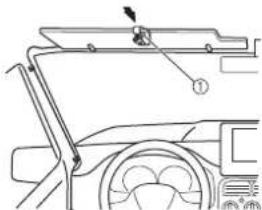
① Microphone clip
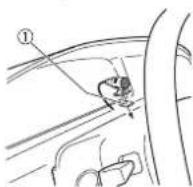
To install on the steering column
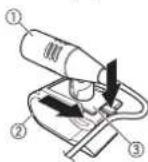
1 Slide the microphone base to detach it from the microphone clip.
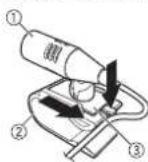
① Microphone
② Microphone clip
3 Microphone base
2 Install the microphone on the rear side of the steering column.
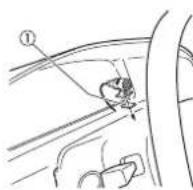
① Double-sided tape
Additional Information
Troubleshooting
The display automatically returns to the normal display.
No operations have been made for about 30 seconds.
Perform an operation.
The repeat play range changes unexpectedly.
Depending on the repeat play range, the selected range may change when another folder or track is being selected or during fast forwarding/reversing. Select the repeat play range again.
A subfolder is not played back.
Subfolders cannot be played when [FLD] (folder repeat) is selected. Select another repeat play range.
The sound is intermittent.
You are using a device, such as a cellular phone, that may cause audible interference.
- Move electrical devices that may be causing the interference away from the unit.
The sound from the Bluetooth audio source is not played back.
There is a call in progress on a Bluetooth-connected cellular phone. The sound will be played back when the call is terminated.
A Bluetooth-connected cellular phone is currently being operated. Stop using the cellular phone. The connection between the unit and
The connection between the unit and the cellular phone is not established correctly after a call made by a Bluetooth-connected cellular phone.
Make a Bluetooth connection between the unit and the cellular phone again.
Error messages
Common
AMP ERROR
→This unit fails to operate or the speaker connection is incorrect.
The protective circuit is activated. Check the speaker connection.
Turn the ignition switch OFF and back to ON again. If the message remains, contact your dealer or an authorized Pioneer Service Station for assistance.
NO XXXX (NO TITLE, for example)
There is no embedded text information. Switch the display or play another track/file.
USB device/iPod
FORMATREAD
Sometimes there is a delay between the start of playback and when you start to hear any sound.
- Wait until the message disappears and you hear sound.
NO AUDIO
→There are no songs.
Transfer the audio files to the USB device and connect.
→The connected USB device has security enabled.
- Follow the USB device instructions to disable the security.
SKIPPED
→The connected USB device contains DRM protected files.
- The protected files are skipped.
PROTECT
- All the files on the connected USB device are embedded with DRM. Replace the USB device.
N/A USB
The connected USB device is not supported by this unit.
- Disconnect your device and replace it with a compatible USB device.
CHECK USB
→The USB connector or USB cable has short-circuited.
- Check that the USB connector cable is not caught in something damaged.
The connected USB device consumes more than maximum allowable current. - Disconnect the USB device and do not use it. Turn the ignition switch OFF and back to ACC or ON. Connect only compliant USB devices.
The iPod operates correctly but does not charge.
- Make sure the connection cable for the iPod has not shorted out (e.g., not caught in metal objects). After checking, turn the ignition switch OFF and back to ON, or disconnect the iPod and reconnect.
ERROR-19
Communication failed.
Perform one of the following operations, then return to the USB source.
- Turn the ignition switch OFF and back to ON.
- Disconnect the USB device.
- Change to a different source.
iPod failure.
- Disconnect the cable from the iPod. Once the iPod's main menu is displayed, reconnect the iPod and reset it.
ERROR-23
USB device was not formatted properly.
- Format the USB device with FAT12, FAT16 or FAT32.
ERROR-16
The iPod firmware version is old. -Update the iPod version.
iPod failure.
- Disconnect the cable from the iPod. Once the iPod's main menu is displayed, reconnect the iPod and reset it.
STOP
There are no songs in the current list. Select a list that contains songs.
NOT FOUND
→No related songs.
- Transfer songs to the iPod.
Bluetooth device
ERROR-10
→The power failed for the Bluetooth module of the unit.
Turn the ignition switch OFF and back to ACC or ON.
Apps
NO BT DEVICE GO TO BT MENU TO REGISTER
No Bluetooth device found. Connect the unit and the device via Bluetooth (page 8).
CONN. Failed PRESS BAND KEY TO RETRY
→Bluetooth connection failed.
- Press BAND to make a connection again.
DISCONNECTED PRESS BAND KEY TO RETRY
Bluetooth connection failed. Press BAND/ make a connection again.
CHECKAPP
Connection to the application failed. -Follow the instructions that appear on the screen.
STARTUPAPP
The application has not started running yet.
- Operate the mobile device to start up the application.
Handling guidelines
USB storage device
-
Connections via USB hubs are not supported.
-
Firmly secure the USB storage device before driving. Do not let the USB storage device fall onto the floor, where it may become jammed under the brake or accelerator pedal.
-
Depending on the USB storage device, the following problems may occur.
- Operations may vary.
- The storage device may not be recognized.
-Files may not be played back properly.
The device may cause audible interference when you are listening to the radio.
iPod
-
Do not leave the iPod in places with high temperatures.
-
Firmly secure the iPod when driving. Do not let the iPod fall onto the floor, where it may become jammed under the brake or accelerator pedal.
-
The settings of the iPod such as the equalizer and repeat play are changed automatically when the iPod is connected to the unit. Once the iPod is disconnected, those settings will return to the original settings.
- Incompatible text saved on the iPod will not be displayed by the unit.
Compressed audio compatibility
Only the first 32 characters can be displayed as a file name (including the file extension) or a folder name.
The unit may not work properly depending on the application used to encode WMA files.
There may be a slight delay at the start of the playback of audio files embedded with image data, or audio files stored on a USB device with numerous folder hierarchies.
- Russian text to be displayed on this unit should be encoded in one of the following character sets:
-Unicode(UTF-8,UTF-16)
- A character set other than Unicode that is used in a Windows environment and is set to Russian in the multi-language setting
CAUTION
- Pioneer cannot guarantee compatibility with all USB mass storage devices, and assumes no responsibility for any loss of data on media players, smartphones, or other devices while using this product.
- Do not leave discs or a USB storage device in any place that is subject to high temperatures.
WMA files
File extension.wma
| Bit rate 48 kbps to 320 kbps (CBR), 48 kbps to 384 kbps (VBR) | |
| Sampling frequency 32 | kHz, 44.1 kHz, 48 kHz |
| Windows MediaTM Audio Professional, Lossless, Voice/DRM Stream/Stream with video | Not compatible |
MP3 files
| File extension.mp3 | |
| Bit rate 8 kbps to 320 kbps (CBR), VBR | |
| Sampling frequency 8 kHz to 48 kHz (32 kHz, 44.1 kHz, 48 kHz for emphasis) | |
| Compatible ID3 tag version | 1.0, 1.1, 2.2, 2.3, 2.4 (ID3 tag Version 2.x is given priority over Version 1.x.) |
| M3u playlist Not compatible | |
| MP3i (MP3 interactive), mp3 PRO | Not compatible |
WAV files
WAV file formats cannot be connected via MTP.
| File extension .wav | |
| Quantization bits 8 and | 16 (LPCM), 4 (MSADPCM) |
| Sampling frequency 16 | kHz to 48 kHz (LPCM), 22.05 kHz and 44.1 kHz (MS ADPCM) |
FLAC files (Only for MVH-170UI/ 170UBG/170UB)
- FLAC file formats cannot be connected via MTP.
- FLAC files may not be playable, depending on the encoder.
File extension.fla
| Sampling frequency B/ | 1.025/12/16/22.05/ |
| 24/32/44.1/48 [kHz] | |
| Quantization bit rate 16 | bit |
| Channel mode | 1/2 ch |
USB device
- There may be a slight delay when starting playback of audio files on a USB storage device with numerous folder hierarchies.
| Playable folder hierarchy | Up to eight tiers (A practical hierarchy is less than two tiers.) |
| Playable folders | Up to 500 |
| Playable files | Up to 15 000 |
| Playback of copyright-protected files | Not compatible |
| Partitioned USB device | Only the first partition can be played. |
iPod compatibility
This unit supports only the following iPod models. Supported iPod software versions are shown below. Older versions may not be supported. Made for
- iPod touch (1st through 5th generation)
- iPod classic
-iPod with video - iPod nano (1st through 7th generation)
-
iPhones
iPhone5c
iPhone5
iPhone4S
iPhone4
-iPhone3GS
-iPhone3G
iPhone -
Operations may vary depending on the generation and/or software version of the iPod.
-
Users of iPod with the Lightning Connector should use the Lightning to USB Cable (supplied with iPod).
- Users of iPod with the Dock Connector should use the CD-IU51. For details, consult your dealer.
Refer to the iPod manuals for information about the file/format compatibility. - Audiobook, Podcast: Compatible
CAUTION
Pioneer accepts no responsibility for data lost on the iPod, even if that data is lost while this unit is used.
Sequence of audio files
The user cannot assign folder numbers and specify playback sequences with this unit. Sequence of audio file depends on the connected device.
Note that the hidden files in a USB device cannot be played back.
Example of a hierarchy
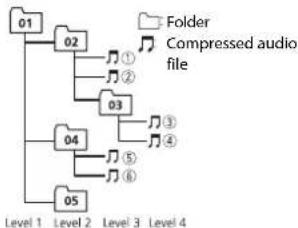
01 to 05: Folder number
toPlayback sequence
Russian character chart
| D: C | D: C | D: C |
| A:A | B:B | B:B |
| F:F | E:D | E:E,E |
| Z:X | Z:3 | H:N, N |
| K:K | A:N | H:M |
| H:H | O:O | N:N |
| P:P | C:C | T:T |
| Y:Y | Φ:Φ | X:X |
| U:U | Q:Q | W:W, U |
| V:B | H:B1 | B:B |
| J:J | H:IO | R:R |
D:Display C:Character
Copyright and trademark
Bluetooth
The Bluetooth® word mark and logos are registered trademarks owned by Bluetooth SIG, Inc. and any use of such marks by PIONEER CORPORATION is under license. Other trademarks and trade names are those of their respective owners.
iTunes
Apple and iTunes are trademarks of Apple Inc., registered in the U.S. and other countries.
WMA
Windows Media is either a registered trademark or trademark of Microsoft Corporation in the United States and/or other countries.
This product includes technology owned by Microsoft Corporation and cannot be used or distributed without a license from Microsoft Licensing, Inc.
FLAC
Copyright © 2000-2009 Josh Coalson
Copyright © 2011-2013 Xiph.Org Foundation
Redistribution and use in source and binary forms, with or without modification, are permitted provided that the following conditions are met:
-
Redistributions of source code must retain the above copyright notice, this list of conditions and the following disclaimer.
-
Redistributions in binary form must reproduce the above copyright notice, this list of conditions and the following disclaimer in the documentation and/or other materials provided with the distribution.
Neither the name of the Xiph.org Foundation nor the names of its contributors may be used to endorse or promote products derived from this software without specific prior written permission.
THIS SOFTWARE IS PROVIDED BY THECopyrightHOLDERS AND
CONTRIBUTORS "AS IS" AND ANY EXPRESS OR IMPLIED WARRANTY, INCLUDING, BUT NOT LIMITED TO, THE IMPLIED WARRANTY OF MERCHANTABILITY AND FITNESS FOR A PARTICULAR PURPOSE ARE DISCLAIMED. IN NO EVENT SHALL THE FOUNDATION OR CONTRIBUTORS BE LIABLE FOR ANY DIRECT, INDIRECT, INCIDENTAL, SPECIAL, EXEMPLARY, OR CONSEQUENTIAL DAMAGES (INCLUDING, BUT NOT LIMITED TO, PROCEDURE OF SUBSTITUTE GOODS OR SERVICES; LOSS OR USE, DATA, OR PROFITS; OR BUSINESS INTERRUsION) HOWEVER CAUSED AND ON ANY THEORY OF LIABILITY, WHETHER IN CONTRACT, STRICT LIABILITY, OR TORT
(INCLUDING NEGLIGENCE OR OTHERWISE) ASING IN ANY WAY OUT OF THE USE OF THIS SOFTWARE, EVEN IF ADVISED OF THE POSSIBILITY OF SUCH DAMAGE.
iPod & iPhone
iPhone, iPod, iPod classic, iPod nano, and iPod touch are trademarks of Apple Inc., registered in the U.S. and other countries. Lightning is a trademark of Apple Inc. "Made for iPod" and "Made for iPhone" mean that an electronic accessory has been designed to connect specifically to iPod or iPhone, respectively, and has been certified by the developer to meet Apple performance standards. Apple is not responsible for the operation of this device or its compliance with safety and regulatory standards. Please note that the use of this accessory with iPod or iPhone may affect wireless performance.
AndroidTM
Android is a trademark of Google Inc.
MIXTRAX
MIXTRAX is a trademark of the PIONEER CORPORATION.
Specifications
General
Power source: 14.4 V DC (10.8 V to 15.1 V allowable)
Grounding system: Negative type
Maximum current consumption: 10.0 A
Dimensions (W× H× D)
DIN
Chassis: 178mm× 50mm× 97mm
Nose: 188 mm × 58 mm × 17 mm
D
Chassis: 178mm× 50mm× 97mm
Nose: 170mm× 46mm× 17mm
Weight: 0.5kg
Audio
Maximum power output:
50W×4
70 W × 1/2 Ω (for subwoofer)
Continuous power output:
22W×4(50Hzto15000Hz,5%
THD, 4 Ω load, both channels driven)
Load impedance: 4 (4 to 8 allowable)
Preout maximum output level: 2.0 V
Loudness contour: +10 dB (100 Hz),
+6.5 dB (10 kHz) (volume: -30 dB)
Equalizer (5-Band Graphic Equalizer):
Frequency: 80 Hz/250 Hz/800 Hz/2.5
kHz/8 kHz
Equalization range: ±12 dB (2 dB step)
Subwoofer (mono):
Frequency: 50 Hz/63 Hz/80 Hz/100
Hz/125 Hz/160 Hz/200 Hz
Slope: -12 dB/oct, -24 dB/oct
Gain: +6 dB to -24 dB
Phase: Normal/Reverse
USB
USB standard specification: USB 2.0 full
speed
Maximum current supply: 1 A
USB Class: MSC (Mass Storage Class)
File system: FAT12, FAT16, FAT32
MP3 decoding format: MPEG-1 & 2 Audio Layer 3
WMA decoding format:Ver.7,7.1,8,9,10
11, 12 (2 ch audio) (Windows Media
Player)
FLAC decoding format: v1.3.0 (Free
Lossless Audio Codec) (Only for MVH
170UI/170UBG/170UB)
WAV signal format: Linear PCM & MS
ADPCM (Non-compressed)
FM tuner
Frequency range: 87.5 MHz to 108.0 MHz
Usable sensitivity: 11 dBf (1.0 μV/75 Ω,
mono,S/N:30 dB)
Signal-to-noise ratio: 72 dB (IEC-A network)
MWtuner
Frequency range: 531 kHz to 1602 kHz
Useable sensitivity: 25 V( S/N : 20 dB)
Signal-to-noise ratio: 62 dB (IEC-A network)
LWTuner
Frequency range: 153 kHz to 281 kHz
Usable sensitivity: 28 V (S/N: 20 dB)
Signal-to-noise ratio: 62 dB (IEC-A network)
Bluetooth
(Only for MVH-X370BT)
Version: Bluetooth 3.0 certified
Output power: +4 dBm Maximum (Power
class 2)
Bluetooth profiles:
GAP (Generic Access Profile)
SDAP (Service Discovery Application
Profile)
OPP (Object Push Profile)
HFP (Hands Free Profile) 1.6
PBAP (Phone Book Access Profile)
A2DP (Advanced Audio Distribution
Profile)
AVRCP (Audio/Video Remote Control
Profile) 1.5
SPP (Serial Port Profile) 1.1
NOTE
Specifications and the design are subject
to modifications without notice.
Table des matieres
Raccordements/Installation. 16
Mémoire des秽lues stations (BSM)
[1.0MIN],[1.5MIN],[2.0MIN],
[2.5 MIN], [3.0 MIN], [OFF]
Raccordements/Installation
Raccordements

Important
| D: C | D: C | D: C |
| A:A | B:B | B:B |
| F:F | F:D | E:E,E |
| J:X | J:3 | H:N, N |
| K:K | K:N | H:M |
| H:H | G:O | N:N |
| P:P | C:C | T:T |
| Y:Y | Φ:Φ | X:X |
| U:U | Y:Y | W:W, W |
| V:V | H:bl | b:b |
| J:J | H:IO | J:J |
Copyright © 2000-2009 Josh Coalson
Copyright © 2011-2013 Xiph.Org
Foundation
Classe USB: MSC (Mass Storage Class
10, 11, 12 (2 canaux audio) (Windows
Media Player)
FLAC Format de decodage: v1.3.0 (Free
Lossless Audio Codec (Uniquement
GAP (Generic Access Profile)
SDAP (Service Discovery Application
Profile)
OPP (Object Push Profile)
HFP (Hands Free Profile) 1.6
PBAP (Phone Book Access Profile)
A2DP (Advanced Audio Distribution
Profile)
AVRCP (Audio/Video Remote Control
Profile) 1.5
SPP (Serial Port Profile) 1.1
REMARQUE
| D: C | D: C | D: C |
| A: A | B: B | B: B |
| F: F | J: D | E: E, E |
| J: JX | J: 3 | H: H, H |
| K: K | I: N | M: M |
| H: H | O: O | N: N |
| P: P | C: C | T: T |
| Y: Y | Φ: Φ | X: X |
| U: U | Y: Y | U: U, U |
| '': b | H: b1 | b: b |
| J: Ψ | H: I0 | η: J |
Copyright e marchio
Bluetooth
Specifica standard USB: USB 2.0 full speed
GAP (Generic Access Profile)
SDAP (Service Discovery Application Profile)
OPP (Object Push Profile)
HFP (Hands Free Profile) 1.6
PBAP (Phone Book Access Profile)
A2DP (Advanced Audio Distribution
Profile)
AVRCP (Audio/Video Remote Control)
Profile) 1.5
SPP (Serial Port Profile) 1.1
NOTA
| D: C | D: C | D: C |
| A: A | B: B | B: B |
| F: F | J: J | E: E, E |
| J: J | J: 3 | H: H, H |
| K: K | I: I | H: M |
| H: H | O: O | J: J |
| P: P | C: C | T: T |
| Y: Y | Φ: Φ | X: X |
| U: U | Y: Y | W: W, W |
| V: V | H: b1 | b: b |
| Z: Z | M: K | R: R |
D: visor C: caracté
Copyright y marcas registradas
Bluetooth
Geratedaten loschen (Gerateliste, PIN-Code,
[SYNC CLOCK], [MANUAL]
[2.5 MIN], [3.0 MIN], [OFF]
m = 311
MIX PATTERN
Copyright © 2000-2009 Josh Coalson
Copyright © 2011-2013 Xiph.Org
Foundation
PBAP (Phone Book Access Profile)
A2DP (Advanced Audio Distribution
Profile)
AVRCP (Audio/Video Remote Control
Profile) 1.5
SPP (Serial Port Profile) 1.1
HINWEIS
Best stations memory (BSM)
Helling: -12 dB/oct, -24 dB/oct
Gain: +6 dB tot -24 dB
Fase: Normaal/tegengesteld
USB
GAP (Generic Access Profile)
SDAP (Service Discovery Application
Profile)
OPP (Object Push Profile)
HFP (Hands Free Profile) 1.6
PBAP (Phone Book Access Profile)
A2DP (Advanced Audio Distribution
Profile)
AVRCP (Audio/Video Remote Control)
Profile) 1.5
SPP (Serial Port Profile) 1.1
OPMERKING
Pexmm cbbiohoro Bocpon3BedeHn
BbMOXETeOcUyecTBtBIOCTyI KOMIO3uHmHa OCHOBE TEkyuero HcNOJHHTe, anb60ma nn KaHpa.
1 Bo BpemBocnpn3BeHnKOMNo3uHnHaXmTe nYepKnBaTe HnpeXoDa B pexmm CcbIOOHOrO BOCnpn3BeHn.
2 Nobeprnnte pernyatop M.C. nla blyb6opa pexmma ([ARTIST], [ALBUM], [GENRE]), 3aTEM haxmte ero for noTBePckdene Hb6opa. Bb6paHnHa KOMno3uA/Alb6om Bydyt BocpOn3BedeHb nocIe TeKyuiei KOMNo3uHn.
NIPUMEYAHNE
Bbpaahyo KOMO3HIOHO/5b0M OMO KOHO MTOEHHTb PnI cNOIb3oBH3AHy HYKLI, OTNIHbIXOT yHKLINKPEKIMCA CIOHNOHOROBCPOMBIEHENH (HarImpeM, B6tPraeh nepeMeTOKB NBepeN HsAaJ).
UnpaBneHne iPod
Bb MoKETe ynpaBnTb yctpOCTBOM c NOMoDbIO NDOKIOHeHOrO iPOD. Cnelyoune moENi iPOD HeOBMeTmMb c daHHOn fHyKUmei. -iPOD nano 1-ro nokoneHn, iPOD c BnDeo
1 Bo Bpema BoCppon3BedeHnHaXmTe BAND/, 3aTeM Bb6epnte peKIMynpaBneHn.
[CONTROL iPod/CTRL iPod]: ΦυκιημεiPod yctpɔnCTBa moxHo ynpaBnTb c noKIOUeHHoro iPod.
[CONTROL AUDIO/CTRL AUDIO]: DyHKUENI POD yCTPOIOCTBA MOXHO YNPABNbTc B NOMOUBK HONIKOK HA yCTPOIOCTBE. B DAHNO M PEXIME NOKIOHHE OCTPOIOCTBO POD HENB3B BKIOHHTB NII BHKIOHHTB.
PIMMEAHNA
- HαkaTmE KONKIO iPOD MOKHO TAKKE nepeKNOHHTbC B PekM ynpabHeNIA (TOBko IJRA MVH170U).
-Пипгелкиму龟нem pekkma ynpablenHa [CONTROL IPod/CTRL IPod] bnyonHreTc npnoctoRaBa BocpoNtBcDEHnK KomOaMm. McnoIb3yTe noKnHoueHnI Pod dra 80360BHeHn BOCpOIN3BcEHN.
Czduyoune onepaun 6bdt ouctnhy nI IINBIOHNEH C yctpoCTBa, daxe ccnYcTahOBHeN peHHXpUaBPCHEN [CONTROL IPD/CTRL IPD]. - Bb60bФyHKUH"PaY3a", bBCTpAePnEeMoTkaBnepoA/Ha3aD", bBb60bKOMOAnuHm/Pa3aDeA. - PfOkMckTOBMOHACHTPOBNTOJbHOATPOYCB.
HΦopMaζη o MIXTRAX (TolbkoДЯ USB/iPod)
(TonbKO mMVAH-X370BT)
ФункиIMIXTRAXmncIb3yETcIЯ nCTABKIM CTepeo3ΦeKToB MExJy KOMNo3nIaMIM, NO3BOJIaClyaTb My3bIKY HOH-OTON B CoHTAHN C Bu3yAJIbHbIM N3ΦeKtAMi.ДОпоннгentьнбс Всебел�и O hactpoKAnX MIXTRAX cM. ctrp. 15.
ПРМЕЧАнЯ
JaHHaYHKUHHeCOBMeCTMaC yCTpoNCTBOM Android, NOKNUOeHHbM C NMOUbM TPT.
- EcnB KaucheT BCTHOHNA BbOaP USB, a FyHKuA MIXTRAX AKTNIBHA, to FyHKuA nepeo303AOBAHn 38Yk 6bETD otKIOHcNA.
B 3aBNCMnOCTn OT faHnA/KOMN03mUu 3ByKOBBle 3eKbMoYr 6bTb HeoctynHbI.
Bbiknoute yhkuio MIXTRAX,ecnn B3ayalnbhe 000ktoBTBneKaot Bac ot BoxdeHna.
1HaKmte KhONky 3/MIX, qTo6bI BkIOuHTb/OTKnOuHTb MIXTRAX.
Bluetooth
(Tonbko mMVAH-X370BT)
PoiKJIoueHne no Bluetooth

BaxHo
Ecnjno kniuohoe TPN II 060ney cTPOKCTB Bluetooth (HapnIMep, teneoH nOTdEBhN yauDIOHeep), OHN MOrT pAbOToH hEnCpNaBH
1BkIOHTe yHKUHO Bluetooth yctpoCTBA.
2HaKMTe uyepeKuaBte TTO6paKeHMeHIO coeHNHeHnA.
3 NobepHnTe M.C. nIy BbI6opa [ADD DEVICE], 3aTeM hAekmnte Iy noTBepeKxDeHn.
yCTpoIcTBHO HauHET NOCK DocTyNbIX yCTpoIcTB, nocne Yero OTo6pa3NT INB CnCKe yCTpoIcTB.
YTO6bIOTMEHHTBNONCK,HAXMNTEM.C.
- ECNI HEO6XOUMORO yCTPOIcTBa HE T B CnIcKe, Bbl6epNTe [RE-SEARCH].
- EcnHETDOCTyINbIXyCTPOINCTB,Ha3KpaHeOTo6pa3nTcR[NOT FOUND].
4 NobeprHne M.C. nIy bIbOpa yCTpoiCTBa u3 cNcKa yCTpoiCTB, 3aTeM HaxMNte InnoTBePxDeHIN.
Haxmte n yepknBaTe M.C. dna nepeknoeHn HFOpmauu no 6yctpoCTBe MeKdy aPecom yctpoCTBa Bluetooth mMeHem yctpoCTBA.
5Bb6epuTe [Pioneer BT Unit] Ha ekpahe yctpoiCTBa.
6y6eNTecb, yTO 3TO KE 6-3HaHoe YMCNO OTO6paXaetc H A OCHOBHOM HA NOKJIIOYehHom ycTPOICTBE, 3aTeM HaKMnTE "Ja" Ha NODKIIHOEHOM ycTPOICTBE.
ПРМЕЧАнЯ
Ecnnyx6pa0aHa npapa c TpmnH yctpoCTBAMn, OTO6pa3nTCH coo6hneHNE [DEVICE FULL]. B atom cyueae heo6xoammo Chayana dyanbnt OIO h3 3aprIeTropobaaHHbx yctpoCTB H3 nAmTN. CM.[DEL DEVICE]n[GUEST MODE]B meHO cooeiHHeN (Ctp.9).
B 3aBnCmOCTn OT yCTpOHTBa,Ha Ware 6 nTpe6yETcB B0d PIN Kopa.B AToM cnyuae BBeDnte [0000].
COBET
CoeHnEHHeNo Bluetooth moKHO TaKxue yCTaONOBt NocpeCTBOM 3anycka 6bHApyKeHHy uCTPOIcTBa cYcTPOIcTBaBluetooth.ДЯТоТОnapaMetyP [VISIBLE] B MEnIO coeDHeHHa Heo6XodmO 3a4abT b3aHuOHe[ON].BoneNo noPbO6Hy nHOpMaHIO no onepaHIM No aYcTPOIcTBe Bluetooth CM. B pyKobOHeCBe NOb3oBaTeN,NOCTABMeHOro BMeCTe C yTPOIcTBom Bluetooth.
MeHIO coeHNHeHn
Ecnno nocne noqknoe Hb8x Teneoohp Upeea Bluetooth Ha odnn 3 teneooho noctynaet BxOaHmBbHO,Ha KpAne Oto6pa3ntt CoooieHne. DIn OTbTa HA TOT BxOaHmBbHOB HeoXoHmO ZabeepuHt BnOToHnKoHmchBbHOs.
OchOBhble onepaunn
[MUTE, [20dB ATT], [10dB ATT] ABToMaTnueckoe OTKnHoyeHne nn
npnnyweHne 3Byka npn nonyueneHH cnHana c
obopydobaHnCfhyKneIOTKIOueHn3Byka.
PW SAVE*1
[ON], [OFF] Pexmm3heproc6epexeHH.
PnBkHoueHHyHKmN6ydtDcTynHO
TOLbKO BKIOUeHNE NCTOCHNKA.
BT MEM CLEAR
[YES], [CANCEL] YdAJIeHHe DaHHbIX C yCtpoiCTBa Bluetooth
(cnncka yctpoinCTBa, PIN-koJa, Jyphnana
BbI3OB0B,TeNEoHHoro CnpaBOuHnKa
npenycTaHOBnEHbIX TeneoOHHBIX HomepoB).
[CLEARED] oTo6paKaTaTc npu ycneHOM
ydaJIeHnIaHHbIX.
BT VERSION
OTo6paXHeBepCmCNCTEmblYCTpoNCTBaH
modynbluetooth.
APP CONN. SET*2
[Wired], [BLUETOOTH] Bb6op Heo6xOIMorO cnoc6a noKIOueHnB
COOTBETCTBUN CYCTPOINCBOM.
^1 Pexim [PW SAVE]OTKIOHaeTc npn oTOcoeINHeHHN AKKyMnTApOH GoBtapeen ABToMObHn; npn nOdoCIOHEN BAtapem ERO NOTPbEyCTB KBNIOHTb ChOBA. pnpBkIOHoeHHOM pEXIM [PW SAVE]BO3MOxHO, YTO, BABNCIOHCTOn To MToDA NOkIOHcyHNE, yCTPOCTBO 6yET NotpTeBHb 3HEpTHIOA kKMyTNATOp, cEbn 3AOKHnAE HAOBtAMOBIH NHEMEETNOLOXEHN ACC (aKceccypap).
^2 Heoctynho, ecnn BaqueCTBe nCTouHnKa Bbipao [APP].
Hactpoikn ILLUMINATION
3NeMeHT MeHIO OmmcaHMe
DIM SETTING
(TonbkoMnMVH-X370BT)
3JemeHT MeHIO OnmcaHMe
SHORT MODE
[1.0 MIN], [1.5 MIN], [2.0 MIN],
[2.5 MIN], [3.0 MIN], [OFF]
Bb60 npoonkntbHocTn
BOCIPON3BeDHeH.
MIX PATTERN
[SOUND LEVEL] N3meHeHne CnepaJIbHbIX 000eKToB MIXTRAX
B COOTBETCTBNN CypOBHcM 3Byka.
3aCTabKa MeHReTcB 3aBnCmOcTn O T yPoBHa
POMKOCTM.
[LOW PASS] 3aCTaBka MeHHETCR B 3aBNCMOCnOT yPOBBA
HN3KNX qACTOT.
[RANDOM] 3actaBka MeHReTcraPon3BOJbHO B
3aBNCIMOCTN OTypOBHrPOMKOCTHIyPOBH
HIN3KHX 4ACTOT.
DISPFX
[ON],[OFF]BkIOueHHe/OTKIOueHHe 3ΦeKToB MIXTRAX.
CUT IN FX
[ON], [OFF]
BkIOueHHe/OTKIOueHHe 3BYKOBBx ΦΦeKTOB
MIXTRAX npn n3MeHnn DopoJek BpyHyIO.
PoiKJIoueHn/YcTaHOBKa
PoiKJIIOUeHnA

Baxkho
-Пиуctановke ДАнHorO yCTPOIcTBA B ВАТOMОБи, КогДа КИч OЗдУАнH He HAXOДТСВ B NOLOKeHEN ACC (akceccap), OTCYCTBNe NOДКIOUeHEN Крachoro KabeЯ K TePmHAny, KOTOpbI ФКСССРЕТ NOLOKeHMe KINOVA ЗАкURAHIM, MOKETnpMBeCTN Ka3pRJaK AKKYMYIITOPA.

B noJoxeHHN ACC

BHeNoIIOJeHnA ACC
- Ncnonb3oBAHne daHHoro yCTPOBCTBA CYOBNAX,OTMnHbXOT YkA3AHbIX, MOKETnpINBeCTKNIOKAPy INHENCPABHOCTN.
-ABTOMOBN CAKKYMNRTOPHOH 6aTaapeen 12 Bn OTPNATeNbHBM 3aaEMNEHM.
-ДИнмKKMМошСТБьОбЕ 50ВТ (На ВьхODE) И срOTиBЛeHmE 4-8Ω (NONHoe cspOTiBnHcHcHc)
BoN36KAnHe KOpOTKOrO 3aMbKaHnH, NpepeBa Hnn HeNcnpABHOCTn coNIOaIe CnEyOnuOy Kya3aHnH. -Pepd yctAHOBKO tONIOHTNE OTPiATeBHyO KNEMMy BatapeH.
-3akpenitne npoDOBc nMOOJIO 3aKIMOB nA KABENI NIK KKOJI NENTb.ObepHNTe KNEKYIO NHTY BOKpyr npoDOB, KOToPbe KACAOTc METANLIuecknx ActeT, JNIA 3aunITb npoDOB.
-乙6pneptbe 3ce kaeennondaaboe ot DBKNUXUHCSnaCTe,TAKNX KAKbUaH
PeneKbOHeHnpeNayu HapRbIIOUe CnDEHN
-76epntaKa6eHnIoganBueOTMeCToNobbUeHHoTEMpepaTyO, HAnPIMepNeuK.
-He npKIOUaHTe KeJIb KaBEn K 6BaTApEN NytEm npCocOBBAHnE oTepe3 OTBepCTe B DBuRatEnbHb OTEcK.
-3aKneHTe HNEoNkIOHcHHeIpaBembI Ka6bI MaONeHTO.
-HeyokpaunbaiteKaBen.
-He npaunte N30nauK KaBen nntAHIN DaHNO yCTpoCTBa dIn nTnAHIN Dpynx yCTpoCTB.EMKoCTb Ka6eNBAVNTcOr APANHEHON.
mnobnbtyne nnaekn npenoxaHNTbe cooTBETCTByoUcero HOMNHA.
He 3aMbKaIte OTPuIaTeNbHbI Ka6eBn DAHAIMKOB HENOpCpeDCTBEHHO Ha 3EMIO.
-He CnB3bIaIe MBeCte OtnPauTeIbHbIe KaEBJI HECKOBKHX DAHMMKOK.
KoJ4a yctpoCTBO BKIOUHO, CnHAnbIy npAanBHeN OITnpAHTOHTNo CmHemy/ 6enomy KabeIO. PNOkHOnTe DAHHB KabEe K yduaneHOMy YnpAbeHIno CTcEMo BHeHrero ycInneTnernn TEPMHNAY peneHOrO YpAanBEmHn ABOTMaTHueCKOn PAnHEHb ATOBMO6nna (MaKc.300MA.12B NOr.TOK).Ecnn ABOTMO6nNb OChauEn aHTEHNOB BCTPOEHN B No6OBoCteKlNO, NODKIOUHTe cK TepMHAny nTtAHnA ANHTEHORO YcINNTeN.
HnKoHa He NoKIOKUOaHTe CmH/6enbl npoBD K TepMHNy NtAHN BHeuHero ycINNTeA. TaXke NOKIOKHa HE noKIOKUOaHTe ERO K TepMHNy NtAHN ABOTMAuNECKO AHTeHHb. B nPOTNBOM cYae 3TO MOxET PnPBcTn K nPOTEKAHO6TaApEN Nn ee HncnPABHOCTN.
Aepnbl Kaebnl 3a3eMHe.KaBn
3a3eMNEHn DaanHoro yctpoCTBa n
Dpyroe o60pOyDabHne (oc6eHHo
ycPoTPOCTBa BcKoKOr HAnPKeHHn,
HaNPmep ycNtTeH) HeoXoDMo
NoKnIOuHTb OTEnHO. B pOtnBHOM
Clyueae CnyaHoe OTKJIOeHne MOKET
PnBceT KNOxApY Nnn HcNcPbABHOCT
DaHHoe yCtpoiCTBO
MVH-X370BT/170UI/170UBG/170UB
① MHKPOΦOH 4 M (13 ΦT. 1 ΦHΠ) (TOJIbKO pIa MVH-X370BT)
3aHn BbXoN nn BbXoN caBpyepa
③ NepedHnBbXoD(TobNoJyA MVIH-X30BT7/170U)
BxOaHnAHTeHHb
6Bxodwhhypa nHTaHnA
6 PnpdoxpaHntb (10A)
7 POBOHOH nylbT DY (tolbo DNMyHV-X370BT/170UI)CQda MOKHO NOKNIUHTb npOBHOHa aadTep DY (npno6peTaetcOTdEHNHO).
BxOlaMnKPOfoHa(TOnbkoJnA MVH-X370BT)
Unyp nntaHn
BbnoHnHteJdHHeIeNpKIOHueHH, KOrJa npBoOa3ApHeroDINHaMnKa He NpKIOUeH KcbSypey.
① Bo BXoJ uHypa nTaHn
② B3aBNCMOCTNOTTHNAABTOMO6NHAyHKUIMMOFOTNNUATcB.B3TOMCnYaeNOKJIOHNTe K 5K
③KentbI PeBepBn (NII ONJIa)
4XeTbB BbnoHnReTe NoKIOueHne K TepMaHany C NOCToHHBM HapPaeHcM 12 B
Kcpaehn Onpca (nnpe3epBHy)
KpaChbBbnoHnne nOKnIOyHeN KTePMnany,ynpABmemyKIOyOM3aKHaHn(12B Noct. ToKa).
②BnOONHtATE NOKIOUHOENHEPOBOD Dpyr KDPyR OJHOQUBETA.
⑧ YepHbM ("Macca")
CUNH/Hen
PONJOKHNE KONTAKTA pazbema ISO 6ydeT OTNIHuaTbCBABNCMOCHTOT TINaA BTOMOBnIA. POnKJIIOVITe
- cEmi 5 KOHTK OTBUEaET 3a ynpabeneHne antehenOcEi NcnoJb3yETc ABOTMOBnIb DpyTOrO TUNa, HNKOrDa HE NOkKnOuAte
CnHn/6enblin
BbONNHTE NOdKIOUeHNE KTePmHNAny ynpabJIeHHN CnCTeMO YcINNTeR (MAK.C.300mA,12B NoCT.TOKA).
CnHn/6enbln
BbIOHnHTe NOKIOUHeHne K TepMHNany peneHO rynpaBHeHHA bOMaTHueCKoI AHTeHHbI (MAcK. 300 mA, 12 B nOCT. TOKA).
JXeHTbIyueHbI(TOnbIO JnA MVH-170UJI)
PnIcNpONb3OaAHmN O6pOyD0AHmC
fYHKUeM OTKIOUeyH N38yKa
NoKIOHnTe DAnHHN pOBoD K
npOBdyO tOKIOUeyH 38yKa
O6pOyD0AHm. B npOTNBOM Cnyae
He NoKIOUaHTe pOBoD OTKIOUeyH
38yKa.
13PpOBoDaHnHaMnKa
Bebn. IpepeHn nebbl Bemb/uepHbI:pepeHn nebbI Cepb.IpepeHnpabbl
Cepb/epHbPipeDn npabB 3eneh:3aHn nebbnn C68byep 3eneh/epHbN:3aHn nebbn nnc68byep
ΦOneTeToBb:3aJHn npabB nn c6Ba7ybp
OctabTeIOCTaTOHH MeCTa
IpeHn/3aHn yCTaHOBkA DIN
JaHoeo yCTPOIcTB OMOHO YCTAHOBHTB BpeHneHHn 3AaJHn HuaTt.
PnycTaHOBKe hncNoIb3yTe IMeHOuNecR B PnpOdaKte Dantai.
Ipeednya yctaHObka DIN
1 yctahOBHTe Ha npH6OpHy nHaenb yctahOBOHTy waxTy.
Ecnn MeCTa Mano, nCnONb3yIte npnnaeMyO yctahOBouHyIO xauTy. Ecnn MeCTa DoCTaTOHc, nCnONb3yIte yctahOBouHyIO xauTy, npnnaeMyO K abTOMO6HIO.
23akpeniye tycahonobohy uaxty, OTOHcyb cnoomcbo OTBepTKM metanmueckne knapn (90').
①Пиборная naHelb
②YCTaHOBOUHAAJXAXTa
Haedekho3akpennte yctpoNTBO 0teCek. HenpnoHoe3akpenneHe MOKET CTaTb npHuHoiN npOnycka CTaHnM mI pDyrnx HncnPcBnOC
3aDnYyCTaHOBKa DIN
1 COBMECTNEOTBepCTMnHa KPNEXKHOOMPOHHTeHeC OBTpeTNAmHa NKPOYNcyeCTpOHTBa N3AKPENTEKPOHHTeN.
2BkpyTHe IOJHOMy BmHTy cKaJdoCTOpOnbI, YTObI 3aФИKcNPOBaT yCTpOJIcTBo Ha MeCTe.
1 Camope3 (5 MM × 8 MM)
KpenexKhbl KPOHHTeH
Pnp6opHnHaHnEhNnnKOHcoNb
KaK mCnONb3OBAt b KOMNJIeKTHbI KPOHHTeHH
KOMNKEHTHKPOHHTH HAKKENONBlyETCA DnMOFTAyCTOBA.
YBEJNTEC,TOO KOMNKEHTHKPOHHTH PACCvTTAH HA KPNENNE B BAWEMABTOMO6HNE, a3aTe mnpcoeHNHTEero K yCPOHTCY, kAK NOKA3AHO Danee.
① BnHT
KpoHwTeHH
13BneHnE yctpOCTBa
1 CHUMMTE OKAHTOBKY.
① OKaHTOBKa
② NanKa C3a3y6pHann
- Ppi CHNTNI nepeHHI naHNI 06bJIeAeTCA DOctyn K OKaHTOBKe.
PnnoBTOPHOyCTAHOBKe OKAHTOBKNIOBEPHNTaHENb CTPOHOIc3a3y6peHHoNAnKOH BHN3.
2BCTaBtpe npnaraembe knouy n3BNEeHHNO 06eM CTOPOHAM yCTPOINCTBa DO uHcNA.
3 NoTHHTHe yCTPOeTBO n3 pN6BOpHn naHEI.
YcTaHOBKa MMKpOfoHa
(TonbKO dMVRVH-X370BT)
MnKpOoHn Heo6xOmoYctaHabnBaBt
HEOCpeCTBeHHo HApOTMB BODNTeHa
COOTBE TcyuOp mPacCTOnHHnnDn
npABnBHorO fKnCnpoBaHHrTONaCA.
BHIMAHINE
3anytbHaeNnpoBaMnKpO0Ha BOKpy pyeBcO KOLOHmIINbpaara NEpeKUQCHEn NpeDaaMQeT pINBcCTN KBO3HMKOBHeHIO Ype3BbuaaHIO ANChOH CYtaaun. YtAhabINbAAte MKNPOOH TAKIMobp3OM,TOb6On HMeWaiynpaBbYabTomObHmE.PekomeHyetca
NCNOnb3OaBt 3axnMbI (npno6pTaIOCTOgTneHo) DnA qKcaun npoBa.
YCTAHOBKaHa
COINHue3aunTHbIKo3bipeK
1 Bctabbte npobod Mnkpofoha B Jkeno6.
①UHyp
MKNPOΦOHa
②Xenob
2yCTAHOBITE3aXMMMKNKPOfOHa H coHnue3aunTHbI KO3bpek. PnOOnyCKaHNmCOHnE3aunTHoRO KO3bPbKa paCnO3HaBaHHe rOToCA oxyDuaetc.
① 3 aMmMnKpOoHa
YctaHObKa Ha pyneByIO KOHOky
1 NepeBnIbTe OCHOBy MMKpOfoHa, YTO6bl OTcoeHNITb ETo 3AKNMa dnnMkPOfoHa.
① MнкpoФОH
3aKMMMkPOoHOb
2 cystaHOBIMTE MKNPOD0H H3aDHIOO 即ctypeBOEONKOHIO
1DByCTOpOHnHaJeHTa
Дононтульнаифорmaцnia
Yctpaehne
HencnpabHocTei
Дипnettов ATOMATUNECN BO3BpaaetcBy B WDCOduh peKIM.
BTEUCHEN30 科HKHNE B HbIOBUNHEHOHKAKXOnepauiN.
- BbInonHnTe onepaunio.
Mnana3OH NOBTOPHORO
BOCPNO3BDEHNAOMPON3BONbHO NAmEHReTcA.
B 3aBcUMOCTN OT Bbl6paHHOTO
ДианэзOA NOBTOPOHO
Bocnpoun3BeDenHnOH MoKeT
n3MeHrTbcn npu Bblbope pyroynanKn
MINO doPOxKII, a TaKKe Ipn NepeMoTKe BnepeH/Na3a#.
-BbIepeTe Dnana3OH NOBTOPOHO
BOCnpon3BedeHn eue pa3.
BloxKeHHa nanka He Bocnpoun3BoNDTCa.
→BnOxKeHHbIe nAnKHe
BOCppon3BODaTc,eCNn Bb6paH
dma30H [FLD] (noBtOphoe
Bocnpon3BedeHne nankn).
-BbIbepeTeDpyroOnduna3OH
NOBTOHPORBOCnpon3BeHeHn.
MEmOTc nOMExn 3Byka.
→Vcnonb3yETcRACTBO,HanPIMep,coTobbl Tenefoh,KOTOPOE MOKET
SIRIBATO BYMOBIE HOMEXH.
Homexn, of storo ycrpontcba.
He Bocnpn3B0DNTca 38yK c yctpoiCTBa Bluetooth, nCnoIb3yeMoR b KaueCTBe NTOCHNIKA CINHANA.
→PoiKnIoueHbIypePe3 BluTooth
TeNeoH3AHRT3BOHKOM.
Bocnpon3BeHne 3Byka
BO306HOBNTCH NOCNE 3aBepueHnA
3BOHKa.
→Подкlioуеннь чeрзBluetooth
TeneoH B DAHHbIMOmeHT
NCNIOJB3yeTCA
-He nnonb3yntB 3TO Bpemr
TeneoH.
→C NOMOUBIO NODKJIQUEHHO Uepe3
Bluetooth TeneoHa 6bn npOn3BedeH
cpa3y cbpowen 3BOHOK.B pe3ynbTaTe
3TOTO CoeINHeHne Mekdy Da
yctponCTBOMM00MbHbIM
TenefoHOM 0bIO 3abepeHo
HempabnibHO.
-BocCTaHOBnTe coeINHeHne MeKdY
yctpoCTBOM Bluetooth mMo6nIbHbIM
TenefoHOM.
Coo6eHn8 o6wn6kax
067ne
AMP ERROR
→YCTpoHCTBOHe pa6oTaETnn
HnPabNbHO NOcOeHNHeHnHaMnK.
→Cpa6oTana ueb 3aunntbl
BOcnpOn3BcDnTe Dpyryo Dopoxk/
aann.
USB-ycTpoNCTBO/iPod
FORMATREAD
→HOrda npOncxOAnT 3aepKKa MeXyD
HAYADOMBOCDPDM3BDEEHM
NoBHeHnEM 3RVka.
-38VK NOABMTCA NoCne TOROKAK C
DnCnnnerNCue3HETcoo6uene.
NO AUDIO
→KOMN03NUUHOTCYTCTBYHOT.
-NepeHenCeTe ayDnOaaiNbHa
3aONMHaIOue yCTpoCTBO USB
NOKIOUHTeero.
→Ha noqknioueHHOM ycTpoiCTBe USB
BKNIOUeHa 3aUNTa.
- Cnedynt HNCTpykunm yctpojCTBa
USB nra chTnna 3aunntb
SKIPPED
→PonKlnHoeHoe yctpoNCTBO USB
COePKNTfainbl,3aunueHHhie
TexHONornei DRM.
-3aunueHHbIe faHbI npOnyckAOTcA.
PROTECT
→Bce faaHbHa noDKnIOueHHOM
yctpoiCTBe USB 3aunueneHbI no
TEXHONORINDRM
-3aMeHnTe yCTpoNCTBO USB.
N/A USB
→IopKJIIOHHe yCTpoiCTBO USB He
noepxmbaetdHaHbIM
yCTpOJCTBOM.
-OTKIOHTE yCTPOINCTBO IN 3aMCHNTE
ero COBMECTHMbIM yCTPOINCTBOM USB.
CHECK USB
→KopoTkoe 3aMbikaHne Ha pa3beme USB
mnnKa6ene USB
-96cintecb,HTo pa3bem USBnnn
Ka6enb USB He 3aHemnEH He
noBpeKdEh.
→TnDkJIIOUeHHoe 3aIOMHaIOuiee
yctpoiCTBO USB noTpe6nreT 6oJbwe
MaKcMmaJIbHO DOIpyCTHMoN CJIbI TOKA.
-OTcoeDInHtzeIaONMaHuaOoeyctpOthcTbO US HneHCNOB3yTe
ero.YCTaHOBNTe KIOU 3aXnRAHIN B
noJoxKeHne OFF,3aTeM-B
nonokhene ACCnnON.
PoiKIOUaTe TOnbKO COBMeCTNMBie
3aONMHaOuNe yCtpoNCTBa USB.
→iPod pa6oTaet, Ho He noD3apXaEeTcA.
-76eNTecb BOTCYCTBNN KOPOTKORO
3aMbikaHnB Kaabe iPod (Ha npimep.
TO KaBEnb He 3axat Mekdy
MeTAnIuYeCKMn IpeMTeAMN).
Pocne npOBcPK Ka6eYyCTaHOBInTe
KIOU 3aKaIraHIN B nONoKeHne OFF, a
3aTEM-BNIOJXeHNEON,
OTKIOUHTE 3aHOBO NOKIOUHTE
iPod.
ERROR-19
60B CBA3N.
BbInHnTe CneDyUOuNe onepaun,
3aTeM CHOBA Bb6epnTe USB B
KaueCTBe NCTOHTHnKa.
-NoBepHHTe KIOU 3aKnraHnB
noJoxHeNnOFFnBepHnTe B
nonoxeHne ON.
-OTKIOUHTe yCTpoNCTBO USB
- BvIoNHTHe IepeKIOUeHNe Ha DpyoT OCTNUHAc.
→C6ouiPod.
-OTKInouTeKa6enb ot iPod.Pnp
OTobpaKeHHrnaBHoro MeHIO IPod
nepenodknoute iPod n bInonHnTe
c0poc HAcTpoek.
ERROR-23
→YcTpoNCTBOUSBOTΦopMaTIpObaHo
eBepHO.
OTOPOMATNVPYTEVCTPOICTBOUSB
FAT12,FAT16,WM,FAT32
ERROR-16
→YctapeBwAan Bepcn npownBkn IPod.
-ObHOBnTe BepCmIO Pod.
→C6ouiPod.
OTKIOUHTe Ka6JIb ot iPod. Pn
06paKeHHn rnaBHoro MeHIO iPod
nepenoKJouHte iPod n BbONHHeC 6c06 Nactpoek.
STOP
BTEKUOMCNIICKEOTCYCTBYYOT KOMN03MHN.
- Bb6eBPeTHe cIcNcK, copeRzauuH My3b4kaBnBe KOMON3uHIn.
NOT FOUND
KOMno3nH He HaJeHO.
-3arpy3nte kOmno3nHnHa iPod.
Bluetooth-устpoиТВо
ERROR-10
→C60nTahmMyDyBlaeoth
DAHHOROYCTPOJCTBA.
-YCTaHOBHTe KIOU3aXnTAHnB
noLoXHeNOff,3atEM-B
noLoXHeNMe ACCnnON.
PpnoJoxhen
NO BT DEVICE GO TO BT MENU TO REGISTER
- YcTpoIcTBo Bluetooth He Haideno
- PIOKIOUHTE OCHOBHOe N
NoDKIOHaeMOE YoCTBO No Bluetooth (ctp. 9).
CONN. FAILED PRESS BAND KEY TO RETRY
→C60n oipknIOeHN BluTooth.
-HaMnTE BANB, YTObI cHOBa BbINONHHT CoOpENHeHc
DISCONNECTED PRESS BAND KEY TO RETRY
→C6bno npKIOeHn BluTooth.
-HaKMNTe BAN7, YTO6bI ChOBa
BbINONHHTc COOJIENHE.
CHECKAPP
→C60B NOJDKIQUHENK N PIPNOXEHINO. CnDyNJV INHCTYPKUHMN HA KpAne
STARTUPAPP
→PnnoxKeHne eue He 3anyeHo.
- NcnoIb3yIte MO6NbHOBHOCY TPOIOCTBO 1nnAaONCKa PnroNOKeHH.
PekomeHdaun no 06paueHIO c n3dennem
3anomnhaoueyctpoictBO USB
- PIIKNOHNEHEEPE3 USB-KOHENTpOpT HE NOIeUPKINAEETC.
He noKnouaTe npYnE yCTPOINCTBa, KPMe 3aONMOHnAIOHNx YCTPOINCTB USB. He donyckaTe naENmN yCTPOINCTBa USB HA non, rIe OHO MoKET 3aCtPbTb NOD nndabToRa3n HOpTOMa3.
B 3aBMCIOCTO TINA 3ANOMHAAOeero yctpoiCTBa USB MOryT Bo3NHKHyb cnDyUme np6nMbe. - YnpaBENHeN ΦyHKUIMM MOKET OTMNUbTaCb.
-3AnOMNHAOJIeEYCTPOICTBOMOKETHE PACNO3AHABTBe.
-ФанлгУТЕВОБСПОНЗВОДЛТСК KODPEKTHO - YCTPOI3BO MOKET COZAIABTbUMOBBE NOMEHX BO BPEMNAPOCUYUNBAHNA PAHO.
iPod
- He octablaite IPOB M MeCTA C BVICOKI TEMNEPATPOY BOZdya.
-ПиДВИЗЕНАВТOMОБИЙнаджно ЗAPКENITE iPod. He nOуСКаТе nadeHIN УСТЮРСТЯ iPod Ha non, rge OHO MOKET ЗАСТРБ ПОДпEDДьг罗ЗАИ TOPMO3A.
Hactpokn IPoD, TaKHe KAKkBaNae3ep NOBTOPHOE BOOPNBOBDEHNE, INMehOTcA BOMATuHEeKN PnIN NOKnIOUeHNIPoKCTBY.Pocne
OTKLOUHENI Pod HacTropon K6yDUT BOBRApChenbky K XOCHDMHJ.
- TektCH eNoCBMeTmOro φOpMata, coXpaHEnbHn Ha I Pod, He 6ydet OToBpaKbAcbY cypToBCTOBm.
PoeepKa cKaTbix aynnoaioB
B KaueCTBe HaaBaHnHa FaaiHa Hnn NaHKn MOnyT OTo6paKaTaBc TOnJIbKe npBbte 32 CmBOJa (BkIOJauCpaIIMpeH)
-ETOYCTPOINCTBOMOKETpa60TaBHeNKOPPEKTHOB3ABNCIMOCTNOTPnIOKEHEN,HCNOB3oBAHbIXDnKaODIOBAAHNWMA.
-Пинчале BCPONINBDEHINAYduPAHINOB,CoepKaunixM3o6pakhenu,n4aONBc3anOMHaIOUeOyCTPOINCTBAUSB,C0epKaauTeP3aEBTHeHbIe HepapxnnnanOK.MoKTe npovCxOJNTb He6oBbA3aKePPKa.
PcckmTeKTdnnOTOBpaKeHHHa DAHONYMCTPOINCTBE DIONKHeh6BtB 3aIIOPOBAH B OHNOM NcDyeHOJHX FOPMAT0:
-Unicode (UTF-8, UTF-16)
-Дургий сормат, OTиMuHnТОУnicode, KOTOPИн cnoIbIaByeTcB cpeGe Windows nHaCTpoEh Na CypCKN a3bIK.
BHIMAHHE
Pioneer He rapaHTnpyet COBmecTMMOCTb C0BcEMN yTOPOCTBAMM USB HHE Hecet OTBECTBHeHOCT3A JIOBOY NOTEPOI DAHHBIX HA MEIDIANPOONPBBAETENX, McPToHax H dpyRx yTOPOCTBAX pIN NcNtloB3OBAHN 3TOTO 3dENIA.
He octabnne Dnckn nn 3anomnaiaoue yctpoctBO USB a MecTx C blicokon TmemepaTypo B03Dyxa.
Daiy WMA
| D: C | D: C | D: C |
| A:A | B:B | B:B |
| F:F | J:D | E:E,E |
| Z:X | Z:3 | H:N, N |
| K:K | M:N | H:M |
| H:H | O:O | N:N |
| P:P | C:C | T:T |
| Y:Y | Φ:Φ | X:X |
| U:U | Y:Y | U:U, U |
| V:b | H:bI | b:b |
| J:J | H:IO | J:J |
D:Диспл徳С:Буква
AbTopckoe npabo TOBapHbIe 3HaKN
Bluetooth
Bluetooth" [CROB NO.10701] HANETCH 3aERHCTPNPOBAHbHM TOBAPbHM 3HAKOM IN pNnHApNekHT KOMMANH Bluetooth SIG, INC.; mIOHNsOBAHne PIONEERCORPORATION 3nIX TOBAPbHbX 3HAOKPappeHeo COOTBEcTByuOeHNIueHNeH INpOme ToBAPbHMe 3HAKmTOPBOB HAMHEMOBAHIN PnIHJauHKeAT COOTBEcTByuOeHMIaJIbIaUM
iTunes
AppleiTunes NBNNOTC TOpROBIMN 3aKAMNI KOMNAHNI Apple Inc. 3apernctpnpoBaHHbIMN CUSA N pyrnx ctpnaX.
WMA
Windows Media - 3TO
3aerntcnpoBaHaH TropoBamKpaI IINTropoBamKa Mapka Microsoft Corporation B CIIUA w/nnn npyrnx ctpaah.
B DānHOM iEiENm IcIOnb3yOTc
TexHoiLoN, npHaIaJnxJa
kopnOApuMn Microsoft, kotOpbe He
papaeMaTaTc IcIOnb3oBaTb Nm
paCipocPtaPaHb 6e3 mUeH3mN OT
Microsoft Licensing, Inc.
FLAC
ABtopckoe npabo © 2000-2009 Josh Coalson
AbtopcKoe npabo © 2011-2013 Xiph.Org Foundation
PacnpocpaHHe HcNOnb3ObaHne B
BnDE nCXoHnHO KOA nnB 6HnAPHOM
ΦopMaTe, C BHeCEHMe N3MeHEn Hnn
Be3 N3MeHEnH, pa3peWaaetca H
CnEduuXnx YcNobnX:
BpacnpoctpaHembXfaiJaxC INxOHNbHM KOOM DOnIKHO CODepKaTbCBA kya3aAHOE BHeIe YBEoDMnHE Imo ABTOPCKINPpAbax,3OT CnICOK yCNOBNI cNHyOuNIODokyMeHT oBtKa3e O TOBETCBHHOCT.
BpaccnpoctpaHemb6 BinnapbXb#a#naX
Dolka 6bTb BOMOKHOCTb
BOCPOV3BECTN yk3AHHoe B1WUE
yBeOMLeHMe 06 abTOPCKHX npabax;B
KOMNNEKT NOCTABK TAKNX #AIIOB
DOLJKe 6bTb BNIOUeH A HCTAOJI
CNICOK YCOIbON, DOKMeyHT 06 OTKA3E O TOTBECTBENHOCTN, BNIOUeHBN B NAKET
DOKMeyTAuIN, u/InuPiOuy
MatepeNaIbI, NOCTABNEMBe B KOMNNEKTe.
- Hn Ha3BaHnE φoHnda Xiph.org
Founation, Hn MMHe erO yuaCTNikOB
He MOrTy INCtIb3ObaTbCJr Dn peKnAmbl
HnnpDobBHXeHN PNOyKTOB,
Co3dABaEMbIX Ha OCHOBE 3TORO
PnORpAMMHorO o6cNEChENHb 6e3
CneUHaBHorO ppeBaPntelBHorO
NbcMeHHorO pa3PeuEHn.
HACTORUUEIIE PDPAMMHOE
OBECEYEHME INPEIOCTABJRIOTCBAIJIbUAMM ABTOPCKXIPRAIBNDPYTMICSTOPOHAMH HAYCIOBHXKAKEETBE3 KAKNX-JINLORBHIXMNIOIPA3YMEBAEMBXTAPAHNTM
BKJIOUHAR,HO TImH ME
OTPAHNUBARc,NOIPA3YMEBAEMBIE
FAPAHNTMOTABOPINPODHOCTN H
PINTDOHCOTNJIIAKOHKPETHOIUEIIN
HI IPIKAKIXOCTOBTEJIbCTBXHNI
FOHD,HI EFOYCAHTNHKIHE
OTBECHAOT3A KAKIEIIMBOITPRMbIE, KOCBEBHIIIE, IIO6OHBIE.
TOBAOBO NCYPT, YTPATOI
BO3MOJXHOCTN 3KCPNJYATAUHIN,
TOTEPEI DAHHBIX, PIPNBJIIN HJN
NEPEPBIBAMN B KOMMEPUECKOINDETEIbHOCTU,HE3ABMCIMOOTPNVHHb INX BO3HNIKHOBEHINJILOBOTEOPM NTBETCTBEHHOCTKAKIO JOROBOPY,TAKI NIO
TPAKJDAHCKM INCKAM INCKAMIOCTPOGOTBETCBHEHOCTINIM3AIPABOHAHPUJEHNAJIATHOCHbINNHBIEPNUHbI,
OBCYIOBJIeHHIeJIIObIM
NCIOJIb3OBAHEMDAHHORO
IPORPGAMMHOrO OBOCEIeEHIN,DAKE
ECNIJIOB3OBATEbI PEPDYNPEKJENHO
BO3MOXHOM YUcEP6E.
IPod & iPhone
iPhone, iPod, iPod classic, iPod nano u iPod touch yBnOCTc TOBaHbMn 3HaKaAMN KomnAHm Apple Inc.,
3aperncptpOBAHbMn B CLIJn npyHX CTpaHx
Lightning ABNETCA TopROBbIM 3HaKOM
kompani Apple Inc.
"Made for iPod" n "Made for iPhone"
03haaet, DTQ JIeKTKPOHbN Ipn6Op 6bln
pa3pa8oTah C cIeJbIO npKnIOUeHnA
onpeIeJIeHNO K iOS iINi iPhone
coOTBeTCTBEHNo, N IMecTcA
ceptnphiunkauna pa3pa6otnka o
COOTBETCTBIM CTEXHUMECKMIM
XapakTePnKAMn Apple. Apple He Hecet OTBETCBEHNOCTM 3a paobTy daHnHOrO yctpoTcBA mnn erO cOTBETCbne Co CTaNAPTaMI NO TEsNHKe BeoanACHOnm INN peryTNIHBHMn HOPMaMn.
PonanyiCTa,obpaTne BHMMHHe,TO mNcNoIbZoBaHne DaHHOrO pNb6Opa c IPod nnIPhone MoKeT oPtuaTeJIbHo cKa3MaBtBcRaHa KaueCTbe 6ecnPoBoHOH CB8M.
AndroidTM
Android Webnetet TobaHbIM hAOKOM kompanhui Google Inc.
MIXTRAX
MIXTRAX YBHTCTC TOPROBO MAPKOB PIONEER CORPORATION.
CepnHbI Homep
Ha 3TOM pncyHke noka3aHa HnΦopMaun O mecuue ngrode n3rotobneu yctpoiCTBa.

Data n3rotobneHn o6OpyobAHn
P1-0aH3rTOBnEHn
| Год 2012002 | 2003 2004 2005 | 2006 2007 2008 | 2009 2010 | |||
| Симв养老金 | ABCDEF | FGEHIJ |
| Год 2011 | 2012 | 2013 | 2014 | 2015 | 2016 | 2017 | 2018 | 2019 | 2020 | |||
| С. M. | M. | B. | O. | n. | K. | L. | M. | N. | O. | P. |
P2-Mechu n3rotobneHH
| Месац | 1 | 2 | 3 | 4 | 5 | 6 | 7 | 8 | 9 | 10 | 11 | 12 |
| Символ | A | B | C | D | E | F | G | H | I | J | K | L |
Texnueckne
XapakTepeNtKN
067ne
VCTHNNKNTAHNR:14,4BNOCT.TOKA (DONYCTMmblnnaa3OHOT10,8Bdo 15,1B)
CINCTEMA 3a3eMENHIA:3a3eMENHEOTPIATENTbHoro NONKCA
MaKcMnAblbNtOpEbnEmBtOK: 10.0 A
Pa3MePb (× × ) DIN
17MM D
17MMX50MMX97MM
Pepennaheb:170MMx46MM X 17MM
Macca:0,5K
Aydno
MakcimabHbBAbxOHaMAOIOHOCTb50Bt×470Bt×1/2Ω(nla ca6byepa)
HOMHHBHA BIXOHDMA MOUHOCTB: 22Br×4(ot50TIO15000TcymMPhoe3AueHHeKo3ΦnHnENTa HENHHEHbIX NCKAKeHIN5% Harpy3ka4ΩdNb6OuX KAHANOB
ConpotBneHMeNarhyPkn:4Ω (DnOyNTMTO-04Ωdo8Ω)
CnpotnBneHne Harpy3Kn:2,0 B
KoHTy rPoMOKOTu: +10 d5 (100 Fu), +6.5 n6 (10 kFU) (rPoMOKOTcu: -30 d5)
3Kbana3ep(5-nonochmyra4muueckn 3Kbana3ep): 8Ku/250/800/2,5Ku/ 8Ku
Mnanaoh AMNNTyHO-chaTOTbIX xapakTePNCTNK:±12Dc(wamor 2D6
OTHOWEHNE CnHAn/uyM:62 65 (CebTB IEC-A)
Tiohep LW
(OTHOUHHeCnHAn/WHM:20D5)
OTHOSEHNE CnHAn/UmM: 62 I5 (ceTB IEC-A)
Bluetooth
(Tolboк дэл МИH-X30B7)Версь:Bluetooth 3.0 сэр.
BbXoDnHa MoHIOCTb+4DbM MaKc.(KnaccMoHIOCTN2)
PpOoMnNn Bluetooth:
GAP (Generic Access Profile)
SDAP (Service Discovery Application Profile)
OPP (Object Push Profile)
HFP (Hands Free Profile) 1.6
PBAP (Phone Book Access Profile)
A2DP (Advanced Audio Distribution Profile)
AVRCP (Audio/Video Remote Control
Profile) 1.5
SPP (Serial Port Profile) 1.1
PnmuMeaHne:
B COBTBCTBN C0 TaBET 53KHOPAOCHCKOΦeepaUNo OaHHTpe npABnptBeHEnE NIOCTAHOBINHEPMNPABNTCBTAPOCCNKBoΦeepaUNN720OT16.06.9OMKAHNPIEIEREGNEVOrOHAPNAETCpOKcN6MnI3dJIIM,OFHbHOIOCTABREMHxHAPOCCNKNPBHK
AROMOBHbHn3NKePONKa:6NET PpOHe HaeEINa (HayuHnKmMkPoHOHn T.n.):5net
IPIMMEAHNE
XapakTePnCTMKN KOHCTpyKUNI MORYT 6bIt MBmENHeMH 6e3 npEpaBpNTbHO YbeDQMHNH.
-Данноу ecypordctBO npOn3BcEHO BInHOnOHe3N.
http://www.pioneer.eu
Visit www.pioneer.co.uk (or www.pioneer.eu) to register your product.
Pioneer CarStereo-Pass
Please fill out immediately after purchase.
© 2014 PIONEER CORPORATION. All rights reserved.
PIONEER CORPORATION, 2014. Bce npaba zauuuehbl.
PIONEER CORPORATION
1-1, Shin-ogura, Saiwai-ku, Kawasaki-shi,
Kanagawa 212-0031, JAPAN
Kopnpaunna NaiOnn
1-1,CnH-Orypa, CaBaaN-Ky, r Kabacakn
npefektypa Kaharaba,
212-0031,Anonn
Hmnprep OOO "TMOHEP PYC"
125040, Pocca, r. MockBa, yr. PpaBbl, 26
Ten.:+7(495)956-89-01
PIONEER EUROPE NY
Haven 1087, Keetberlaan 1, B-9120 Melsele, Belgium/Belgique
TEL: (0) 3/570.05.11
PIONEER ELECTRONICS (USA) INC.
P.O.Box 1540, Long Beach, California 90801-1540,U.S.A.
TEL: (800) 421-1404
PIONEER ELECTRONICS OF CANADA, INC.
340 Ferrier Street, Unit 2, Markham, Ontario L3R 2Z5, Canada
TEL:1-877-283-5901
TEL:905-479-4411
PIONEER ELECTRONICS ASIACENTRE PTE. LTD.
253 Alexandra Road, #04-01, Singapore 159936
TEL:65-6472-7555
PIONEER ELECTRONICS AUSTRALIA PTY. LTD.
5 Arco Lane, Heatherton, Victoria, 3202 Australia. TEL: (06) 2822-2821
TEL: (03) 9586-6300
PIONEER ELECTRONICS DE MEXICO, S.A. de C.V.
Blvd.Manuel Avila Camacho 138 10 piso
Col.Lomas de Chapultepec, Mexico, D.F. 11000
TEL:55-9178-4270
先锋股份有限公司
台北市内湖国瑞光路407號8樓