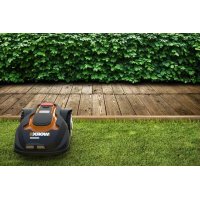
Landroid WG794 - Lawn mower WORX - Free user manual and instructions
Find the device manual for free Landroid WG794 WORX in PDF.


| Product type | Robotic lawn mower |
| Brand | Worx |
| Model | Landroid WG794E |
| Rated voltage | 28 V Max (25.2 V nominal) |
| No-load speed | 2800 rpm |
| Cutting diameter | 180 mm |
| Cutting height | 20-60 mm adjustable to 5 positions |
| Battery type | Lithium-ion, 28 V, model WA3225 |
| Charging time | Approximately 1.5 hours |
| Charger model | WA3716, input 100-240 V~50/60 Hz, output 24-28 V DC 1.5 A |
| Weight | 8.3 kg |
| Protection class | IPX4 |
| Sound pressure level | 44.5 dB(A), K=0.325 dB(A) |
| Sound power level | 63 dB(A) |
| Maximum mowing area | Up to 1000 m² |
| Random movement | Yes, for uniform mowing |
| Rain detection | Yes, automatic return to base |
| Perimeter wire tracking | Yes, for area delimitation |
| Blades | 3 blades with 4 cutting edges, model WA0176 |
| Anti-theft system | Yes, 4-digit PIN code |
| Included accessories | Charging base, 180 m of wire, 200 pegs, 9 blades and screws, spacer, Allen key |
| Blade maintenance | Monthly rotation/flipping, full replacement at end of season |
| Cleaning | Damp cloth, no water jet or high pressure |
| Winter storage | Clean, fully charge, store dry |
Frequently Asked Questions - Landroid WG794 WORX
User questions about Landroid WG794 WORX
0 question about this device. Answer the ones you know or ask your own.
Ask a new question about this device
Download the instructions for your Lawn mower in PDF format for free! Find your manual Landroid WG794 - WORX and take your electronic device back in hand. On this page are published all the documents necessary for the use of your device. Landroid WG794 by WORX.
USER MANUAL Landroid WG794 WORX
1.1 SafetyWarnings for your lawnmower 3
1.2 Information on the Android M 5
2. Technical Data and Component List 7
2.1 Technical data 7
2.2 Component list 8
3. Understanding Your AndroidM 10
3.1 How does my Android M know what to mow? 10
3.2 How does my Android M know where to go? 11
A. Finding the charging base 11
B. Rain sensors 11
C. Sensing the boundary wire 11
D. Starting and stopping while mowing 11
3.3 How big an area can my Android M mow? 12
3.4 How efficiently will my Android M mow the grass? 12
4. Boundary Wire Basics 13
4.1 Pegging the Boundary Wire 13
4.2 Burying the Boundary Wire 13
4.3 Joining the Boundary Wire 13
4.4 Turn on and test installation 14
5. Maintenance 14
5.1 Keep it Sharp 14
A. Rotate and Flip the Blades 14
B. Replace the Blades 14
5.2 Keep it Clean 15
A. Cleaning the Body 15
B. Cleaning the Underside 15
C. Clean the contact pins and the charging strips 15
5.3 Battery Life 16
5.4 Winter Hibernation 16
5.5 Replacing the battery 17
6.Declaration of Conformity 18
1. Product Safety
1.1 Safety warnings for your lawnmower
WARNING: Read all safety warnings and all instructions. Failure to follow the warnings and instructions may result in electric shock, fire and/or serious injury.
Carefully read the instructions for the safe operation of the machine.
Save all warnings and instructions for future reference.
This appliance is not intended for use by persons (including children) with reduced physical, sensory or mental capabilities, or lack of experience and knowledge, unless they have been given supervision or instruction concerning use of the appliance by a person responsible for their safety.
Children should be supervised to ensure that they do not play with the appliance.
IMPORTANT
READ CAREFULLY BEFORE USE
KEEP FOR FUTURE REFERENCE
SAFE OPERATION PRACTICES
Training
a) Read the instructions carefully. Make sure you understand the instructions and be familiar with the controls and the proper use of the appliance;
b) Never allow people unfamiliar with these instructions or children to use the appliance. Local regulations can restrict the age of the operator;
c) The operator or user is responsible for accidents or hazards occurring to other people or their property
Preparation
a) Ensure the correct installation of the automatic perimeter delineation system as instructed.
b) Periodically inspect the area where the appliance is to be used and remove all stones, sticks, wires, bones, and other foreign objects.
c) Periodically visually inspect to see that the blades, blade bolts and cutter assembly are not worn or damaged. Replace worn or damaged blades and bolts in sets to preserve balance.
d) On multi-spindle appliances, take care as rotating one blade can cause other blades to rotate.
e) WARNING! The lawnmower shall not be operated without the guard in place.
OPERATION
1. GENERAL
a) Never operate the appliance with defective guards, or without safety devices, for example deflectors, in place;
b) Do not put hands or feet near or under rotating parts. Keep clear of the discharge opening at all times;
c) Never pick up or carry an appliance while the motor is running;
d) Operate the disabling device from the appliance;
- Before clearing a blockage;
- Before checking, cleaning or working on the appliance;
e) It is not permitted to modify the original design of robotic lawnmower. All modifications are made at your own risk.
f) Start robotic lawnmower according to the instructions. When the main switch is in the ON position, make sure you keep your hands and feet away from the rotating blades. Never put your hands and feet under the mower.
g) Never lift up robotic lawnmower or carry it around when the main switch is in the ON position.
h) Do not let persons who do not know how robotic lawnmower works and behaves use the mower.
i) Do not put anything on top of robotic lawnmower or its charging station.
j) Do not allow robotic lawnmower to be used with a defective blade disc or body. Neither should it be used with defective blades, screws, nuts or cables.
k) Do not use robotic lawnmower if the main switch does not work.
) Always switch off robotic lawnmower using the main switch when you do not intend to use the mower. Robotic lawnmower can only start when the main switch is moved to the ON position and the correct PIN code has been entered.
2. ADDITIONALLY WHEN THE APPLIANCE IS OPERATING AUTOMATICALLY
a) Do not leave the machine to operate unattended if you know that there are pets, children or people in the vicinity.
3. ADDitionally WHEN USING THE MANUAL CONTROLLER
a) Mow only in daylight or in good artificial light;
b) Avoid operating the equipment in wet grass;
c) Do not operate the appliance when barefoot or wearing open sandals. Always wear substantial footwear and long trousers;
d) Always be sure of your footing on slopes;
e) Use extreme caution when reversing the appliance towards you;
f) Always switch on the motor according to instructions with feet well away from the blades(s);
MAINTENANCE AND STORAGE

WARNING! When the mower is turned upside down the main switch must always be set to the OFF position
The main switch should be set to the OFF position during all work on the mower's underframe, such as cleaning or replacing the blades.
a) Keep all nuts, bolts and screws tight to be sure the appliance is in safe working condition;
b) Inspect the robotic lawnmower each week and replace worn or damaged parts for safety;
c) Check especially that the blades and blade disc are not damaged. Replace all blades and screws at the same time if necessary so that the rotating parts are balanced.
d) Ensure that only replacement cutting means of the right type are used;
e) Ensure that batteries are charged using the correct charger recommended by the manufacturer. Incorrect use may result in electric shock, overheating or leakage of corrosive liquid from the battery;
f) In the event of leakage of electrolyte flush with water/neutralizing agent, seek medical help if it comes into contact with the eyes etc;
g) Servicing of the appliance should be according to manufacturers instructions.
Transport
The original packaging should be used when transporting robotic lawnmower over long distances.
To safely move from or within the working area:
a) Press the STOP button to stop the mower. If the anti-theft alarm is activated, enter the first digit of the PIN code. You select the four digit PIN code when you start the mower for the first time.
b) Move the main switch to the OFF position if you intend to carry the mower.
c) Carry the mower by the handle at the rear under the mower. Carry the mower with the blade disc away from the body.

WARNING! The appliance is only to be used with the unit provided.

Safety warnings for battery pack
a) Do not dismantle, open or shred cells or battery pack.
b) Do not short-circuit a battery pack. Do not store battery packs haphazardly in a box or drawer where they may short-circuit each other or be short-circuited by conductive materials.
c) Do not expose battery pack to heat or fire. Avoid storage in direct sunlight.
d) Do not subject battery pack to mechanical shock.
e) In the event of battery leaking, do not allow the liquid to come into contact with the skin or eyes. If contact has been made, wash the affected area with copious amounts of water and seek medical advice.
f) Seek medical advice immediately if a cell or battery pack has been swallowed.
g) Battery pack gives its best performance when it is operated at normal room temperature (20^ ± 5^) .
h) When disposing of battery packs, keep battery packs of different electrochemical systems separate from each other.
i) Recharge only with the charger specified by POSITEC. A charger that is suitable for one type of battery pack may create a risk of fire when used with another battery pack.
j) Under abusive conditions, liquid may be ejected from the battery pack; avoid contact. If contact accidentally occurs, flush with water. If liquid contacts eyes, additionally seek medical help. Liquid ejected from the battery may cause irritation or burns.
k) Do not use any battery pack which is not designed for use with the equipment.
I) Dispose of properly.
1.2 Information on the Android®M

WARNING - Robotic lawnmower can be dangerous if incorrectly used.
Read through the Operator's manual carefully and understand the content before using your robotic lawn mower.
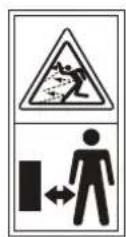
WARNING - Keep a safe distance from the machine when operating.
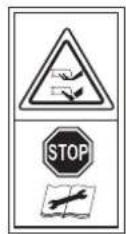
WARNING - Operate the disabling device before working on or lifting the machine.
Keep your hands and feet away from the rotating blades. Never place your hands or feet close to or under the body when robotic lawnmower is in operation.
Robotic lawnmower can only start when the ON/OFF button press ON and the correct PIN code has been entered. Inspection and/or maintenance must be carried out with the main switch set to OFF.
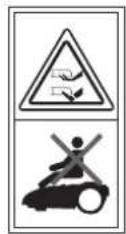
WARNING - Do not ride on the machine.

Do not burn

Batteries may enter water cycle if disposed improperly, which can be hazardous for ecosystem. Do not dispose of waste batteries as unsorted municipal waste.

Li-Ion battery. This product has been marked with a symbol relating to 'separate collection' for all battery packs and battery pack. It will then be recycled or dismantled in order to reduce the impact on the environment. Battery packs can be hazardous for the environment and for human health since they contain hazardous substances.
Lawn Mowing Robot EN

Do not wash the machine with a high pressure washer
This product has been marked with a symbol relating to removing electric and electronic waste. This means that this product shall not be discarded with household waste but that it shall be returned to a collection system which conforms to the European Directive 2002/96/CE. It will then be recycled or dismantled in order to reduce the impact on the environment. Electric and electronic equipment can be hazardous for the environment and for human health since they contain hazardous substances.
2. Technical Data and Component List
2.1 Technical data
Type: WG794E (790-799-Designation of machinery, representative of lawn mowing robot)
| Rated voltage 28V Max* | --- | |
| No load speed 2800/min | ||
| Cutting diameter 180mm | ||
| Cutting height 20-60mm | ||
| Cutting height positions 5 | ||
| Battery type Lithium-lon | ||
| Battery model WA3225 | ||
| Charging time 1.5h approx. | ||
| Charger model WA3716 | ||
| Charger rating | Input: 100-240V~50/60Hz, 50W, | |
| Output: 24-28V DC, 1.5A | ||
| Machinery weight 8.3kg | ||
| Protection degree | IPX4 | |
*Voltage measured without workload. Initial battery voltage reaches maximum of 28 volts. Nominal voltage is 25.2 volts.
Noise and technical data
| A weighted sound pressure | 44.5dB(A), KPA: 3.25dB(A) |
| A weighted sound power | 63dB(A) |
| Wear ear protection when sound pressure is over | 80dB(A) |
Accessories
| Charging base with 15m extension cable | 1 |
| Blades (WA0176) | 9 |
| Screws | 9 |
| Wire pegs (WA0179) | 200 |
| 180m boundary wire | 1 |
| Charging base fixing nails | 4 |
| Power adaptor (WA3716) | 1 |
| Boundary wire distance gauge | 2 |
| Hex key | 1 |
We recommend that you purchase genuine accessories listed in the above list from the same store that sold you the tool. Use good quality accessories marked with a well-known brand name. Refer to the accessory packaging for further details. Store personnel can assist you and offer advice.
2.2 Component List
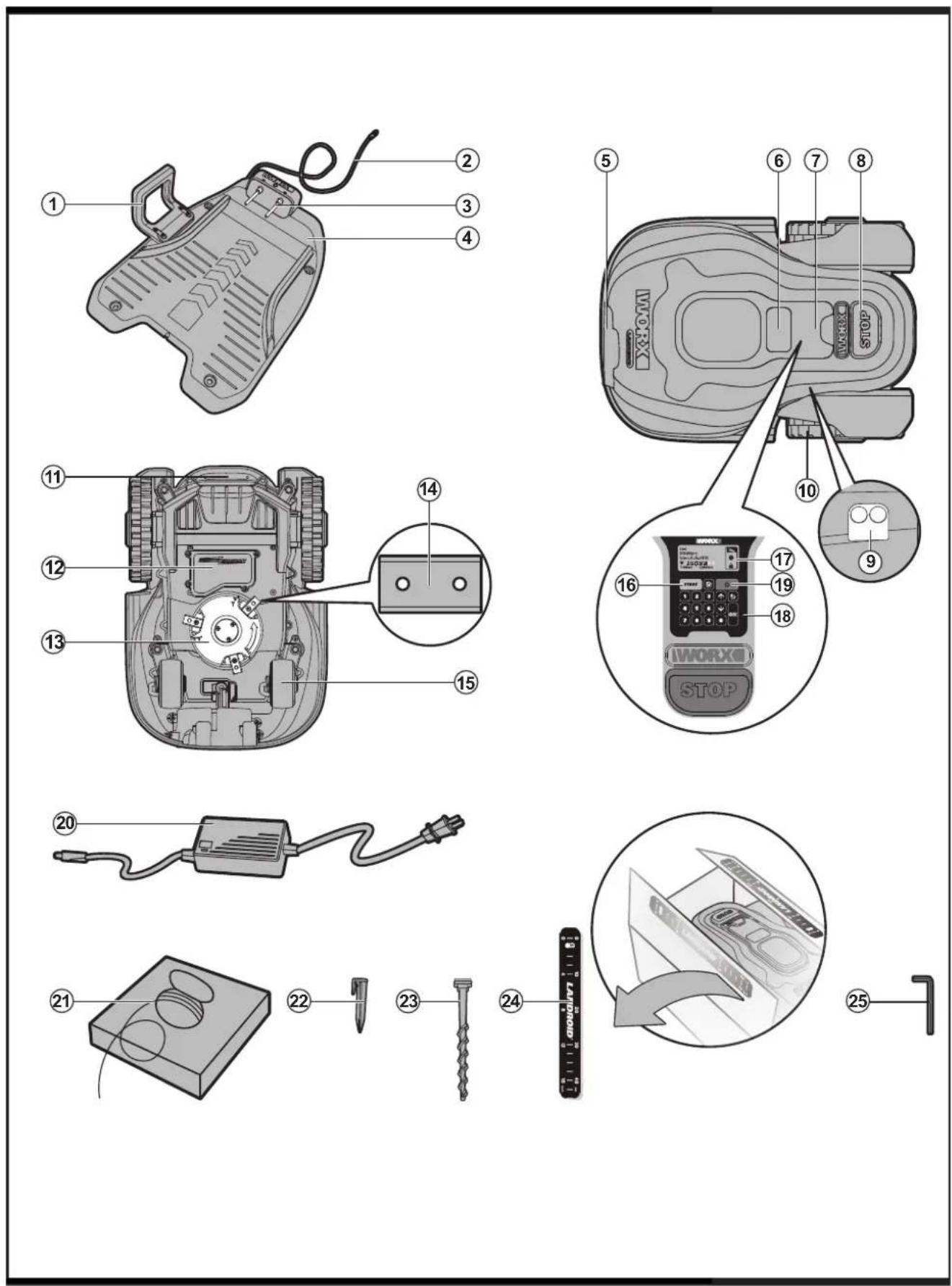
- hANDLE BAR
- LOW VOLTAGE CABLE
- CONTACT PINS
- CHARGING BASE
- ChARGING STRIP
- DISPLAY WINDOW
- CONTROL PANEL COVER
- STOP BUTTON
- RAIN SENSOR
- REAR DRIVING Wheel
11.hANDLE - BATTERY PACK
- BLADE TURNING DISC
- CUTTING BLADE
- FRONT Wheel
- START KEY
- DISPLAY
- KEYPAD
- ON/OFF KEY
- POWER ADAPTOR
- BOUNDARY WIRE(180m)
22.WIRE PEGS - CHARGING BASE FIXING NAILS
- BOUNDARY WIRE DISTANCE GAUGE
- hEX KEY
3. Understanding Your Android®M
We would like to congratulate you on your new purchase of the Android M and entering into the care-free life of automatic mowing. In the following, we would like to help you better understand how your Android M thinks.
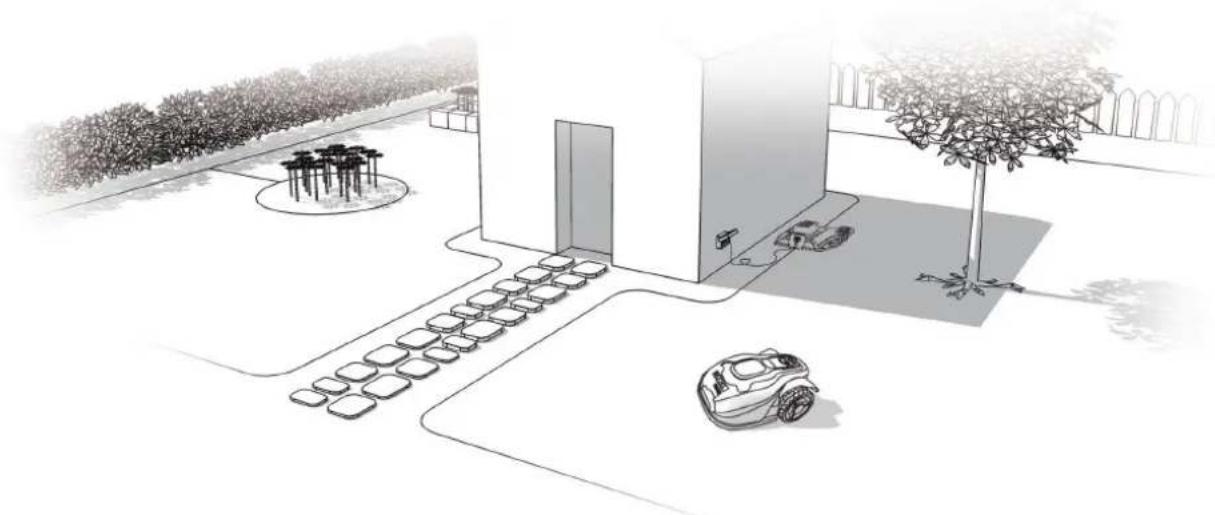
3.1 How does my Android®M know what to mow?
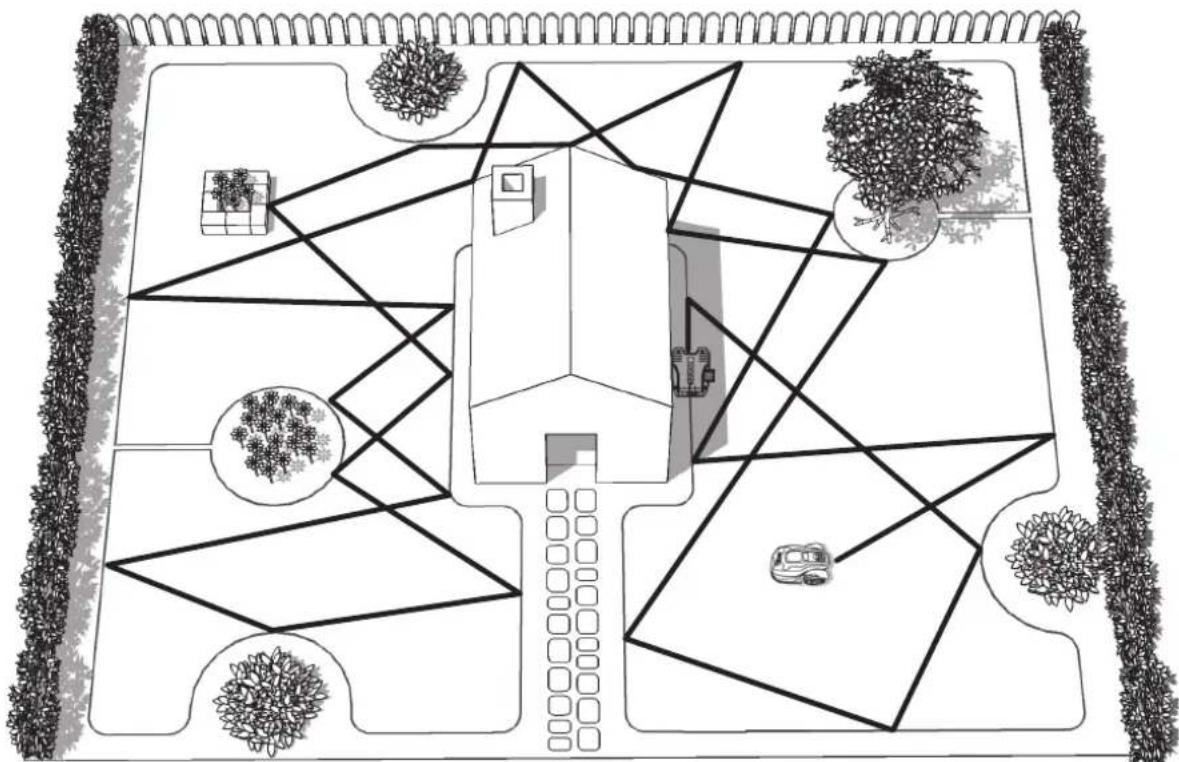
The Landroid M chooses its direction at random. It will make sure your entire lawn is evenly mowed without leaving behind any unattractive mowing paths (See Fig. A).
A
Lawn Mowing Robot EN
3.2 How does my Android®M know where to go?
Your Android M is capable of doing things on its own. The Android M knows when it needs to go to its Charging Base (4) to charge, can sense when it is raining, can stop itself if it senses a problem, and knows to stop, draw back, and then turn around when it bumps into something blocking its path, such as a person, pet, or other object. The Android M will also automatically stop its Blade Turning Disc (13) from rotating if it is lifted off the ground to prevent an accident.
A. Finding the charging base
When your Landroid M needs to recharge, it will stop mowing and follow the Boundary Wire (21) in an anti-clockwise motion back to its Charging Base. Landroid M will automatically stop rotating its Blade Turning Disc when returning to its Charging Base. However, if it is required to go back the Charge Base manually (when you press the home button), the Blade Turning Disc will rotate and cut the grass near the boundary wire. So if you want to mow the grass near the boundary wire, just press the home button. We suggest you use this function when the battery power is more than 75% . You can check the battery power in the display.
B. Rain sensors
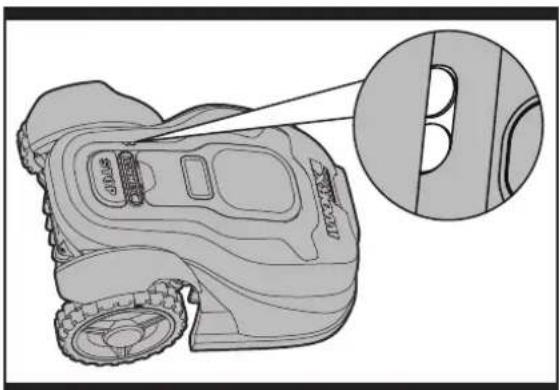
The Landroid M is fitted with a Rain Sensor (9) that will detect rain drops and tell the Landroid M to stop mowing and follow the Boundary Wire back to its Charging Base (See Fig. B) The Landroid M is programmable to have a delay start function 0-180 mins when it rains. When the rain sensors are wet, the Landroid M returns to its docking station. Only when the rain sensors
become dry will the Android M begin the delay start countdown or return to mowing immediately. See the Programming and Troubleshooting Guide for more details.
B
C
C. Sensing the boundary wire
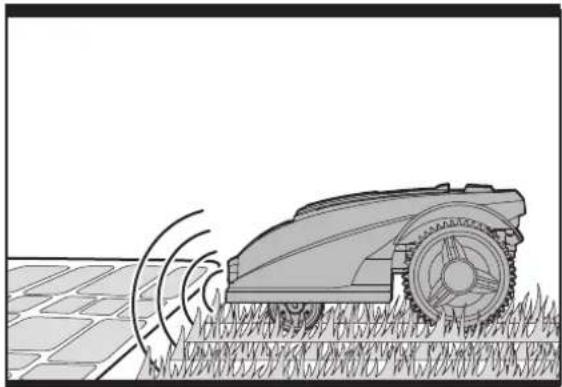
The Landroid always obeys the border set by the Boundary Wire and uses two sensors at its front to sense when it is getting close(See Fig. C). Before changing direction, the Landroid will overrun the Boundary Wire up to 20cm^ . This is the recommended distance. Use the provided distance gauge to ensure proper installation.
D. Starting and stopping while mowing
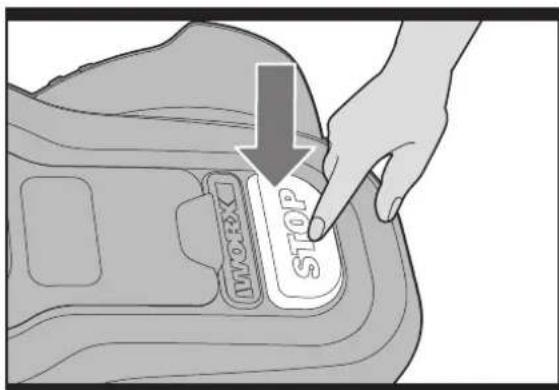
If you would like to command the Android M to stop mowing, then simply press the STOP button (8) on top of the mower. To start mowing, open the Control Panel Cover and press the ON/OFF key, then press START key directly or input your further commands, then press the START key (See Fig. D,E).
D
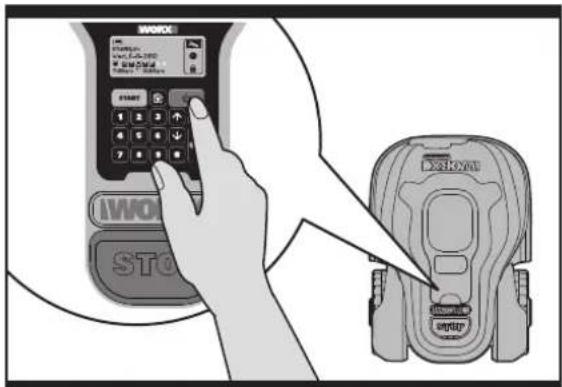
E
Lawn Mowing Robot EN
If the Landroid®M senses that something is wrong, it will display a fault message on the Display (16), and will turn itself off if it does not receive any input from the user within 20 min (for information on fault messages refer to the Programming and Troubleshooting Guide).
To resume:
- Press the STOP Key to correct the problems.
Press ON/OFF Key (19) twice to restart the machine. - Press START Key.
Now the Android®M will begin to mow!
3.3 How big an area can my Android®M mow?
Your Landroid M is capable of mowing areas of up to around 1000m^2 , although this depends on various factors, such as:
Species of grass in your lawn and its growth rate
Sharpness of the Cutting Blades (14)
- Humidity
- Surrounding temperature
Amount of obstacles in your Lawn
If the surrounding temperature is very hot where you live then your Landroid M may charge at a slightly slower rate. The Landroid M uses less energy in open areas that have fewer obstacles, such as flower beds, fountains, walkways, etc... You could find more details about default work time of Landroid M in following table:
Landroid®M WG794E - AUTO MOWING TIME SCHEDULE.
| Area m2 | Auto Mowing Runtime - Hours | Monday Mowing Hours | Tuesday Mowing Hours | Wednesday Mowing Hours | Thursday Mowing Hours | Friday Mowing Hours | Saturday Mowing Hours | Sunday Mowing Hours |
| 100 | 3 | 7:00-8:30 | / | / | 7:00-8:30 | / | / | / |
| 200 7 7:00-8:24 7:00-8:24 | 24 7:00-8:24 | 7:00-8:24 7:00-8:24 // | ||||||
| 300 8 7:00-8:36 7:00-8:36 | 36 7:00-8:36 | 7:00-8:36 7:00-8:36 // | ||||||
| 400 | 11 | 7:00-9:12 | 7:00-9:12 | 7:00-9:12 | 7:00-9:12 | 7:00-9:12 | / | / |
| 500 | 13.5 | 7:00-9:42 | 7:00-9:42 | 7:00-9:42 | 7:00-9:42 | 7:00-9:42 | / | / |
| 600 | 16.5 | 7:00-10:18 | 7:00-10:18 | 7:00-10:18 | 7:00-10:18 | 7:00-10:18 | / | / |
| 700 | 19 | 7:00-10:48 | 7:00-10:48 | 7:00-10:48 | 7:00-10:48 | 7:00-10:48 | / | / |
| 800 | 21.6 | 7:00-11:18 | 7:00-11:18 | 7:00-11:18 | 7:00-11:18 | 7:00-11:18 | / | / |
| 900 | 24.3 | 7:00-11:54 | 7:00-11:54 | 7:00-11:54 | 7:00-11:54 | 7:00-11:54 | / | / |
| 1000 | 27 | 7:00-12:24 | 7:00-12:24 | 7:00-12:24 | 7:00-12:24 | 7:00-12:24 | / | / |
Mowing times are different for every lawn depending on the factors mentioned previously. Gradually adjust the time you allow your Android®M to mow each day until you find the most suitable setting.
You can also program Landroid®M working time to suit your schedule – refer to Programming Guide.
3.4 How efficiently will my Android ^ M mow the grass?
The Android®M's cutting height can be adjusted between 2cm - 6cm. Before starting your Landroid®M for the first time, you should cut the grass to the height not more than 9 cm. Then make sure you open the Control Panel Cover (7) and set the cutting height to its maximum cutting height of 6cm (See Fig. F,G).
Your Landroid®M will cut its best in dry weather. It does not like wet grass, which can build up on the Blade Turning Disc (13) and within the motor, and can also cause loose traction and slippage while working.
Your LandroidM is afraid of Lightening Storms. In case of a Lightening Storm, protect the LandroidM by unplugging the Charging Base (4), disconnecting the Boundary Wire (21), and making sure the LandroidM is not allowed to charge.
Your Android M loves mowing grass and requires its Cutting Blades
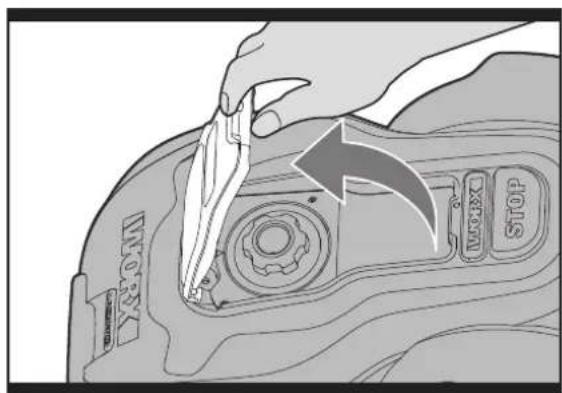
F
Lawn Mowing Robot EN
(14) to be kept in good condition to cut at its best. The Landroid®M can do most things by itself, but will need your help sometimes to prevent damage to itself.
- Never let the Android M travel over gravel.
- Remove or block off obstacles that the Android®M could accidentally climb on and damage its Blade Turning Disc.
- Remove all debris and foreign objects from your lawn.
4. Boundary Wire Basics
4.1 Pegging the Boundary Wire
Use the Boundary Wire Distance Gauge (24) to set the correct distance from the border of your lawn (More than 35cm^* ).
- This is the recommended distance. Use the provided distance gauge to ensure proper installation.
If your neighbor also uses a Landroid M, then you must keep a spacing of at least 2 metres between your Boundary Wire and your neighbors.
Please be aware that your Landroid®M will not be able to receive a signal from the Boundary Wire beyond the distance of 18m.
The boundary wire must outline the intended mowing area exactly. Your Android®M will become confused by extra bends or coils of Boundary Wire that are not part of its mowing area ( See Fig. H). If there is excess Boundary Wire after the mowing area has been outlined, then cut it off and store this additional wire in a separate location. However, it is important to leave the necessary length where it connects to the Charging Base so it can be connected and still remain buried.
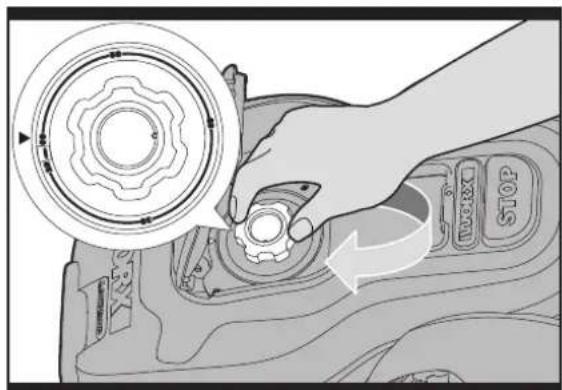
G
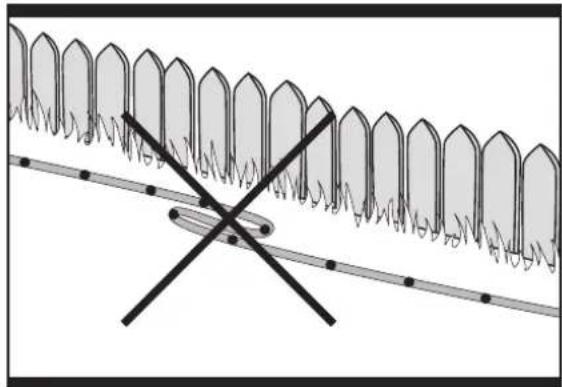
H
4.2 Burying the Boundary Wire
We recommend that you bury your boundary wire a few centimeters underground. This will ensure trouble-free operation year after year, season after season. For burying the Boundary Wire you may purchase the optional WORX Territorial Marker Tool accessory at the same store that sold you your Landroid M.
If you are planning to bury the Boundary Wire then it should be noted that when entering its Charging Base for the first time, your Landroid M may find problems with the way you have laid the wire. It is recommended to first peg down the Boundary Wire to the lawn so it is easy to make adjustments if necessary. This will allow the Landroid M to become adjusted to its new environment and ensures it will successfully work with the charging base before the Boundary Wire is buried.
When you have completed installing the boundary wire, it is recommended that you ask Landroid®M to follow the boundary wire by pressing the home button.
Whilst observing Landroid M locating the charging station you can then make alterations to the boundary wire route to ensure trouble free tracking of the boundary wire by Landroid M when locating the charging station.
4.3 Joining the Boundary Wire
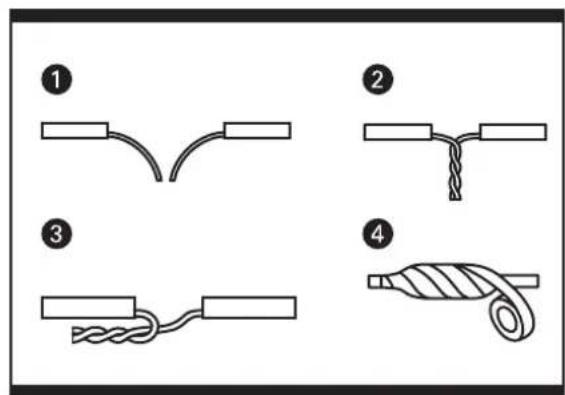
The Boundary Wire (21) can be extended simply by splicing the ends and connecting it to the ends of another piece of wire. You can use insulating tape to secure the joined part of the wire. (See Fig. I)
Lawn Mowing Robot EN
4.4 Turn on and test installation
If the charger light does not come on, then check the power connections.
If the charger base LED is flashing green, check if the boundary wire is connected correctly.
Red light on: charging.
Red light flashing: error message, refer to Trouble Shooting and correct the problems.
Green light flashing: check if the boundary wire is connected correctly.
When the green light on the charging base is on, place your Android M over the boundary wire, if Android M follows the boundary it is connected correctly.
If your Landroid®M is inside its territory but the display says "out of cutting area", and the charger base LED is green, it means you clamped the boundary wire ends incorrectly. Just reverse them.
5. Maintenance
Your Landroid M needs to be checked from time to time. The LandroidM works hard and after time needs a good cleaning as well as having some parts replaced, as they can become worn.
In the following we want to let you know how to take care of your Android M.
5.1 Keep it sharp

WARNING: Before cleaning, adjusting, or replacing the Blades, turn your AndroidM OFF by pressing the ON/OFF Button to OFF and put on protective gloves.

WARNING: When fitting new blades, make sure you replace ALL the blades. Always use new blades to screw when fitting blades. This is important to ensure blade retention. Failure to use new blades could cause serious injury.
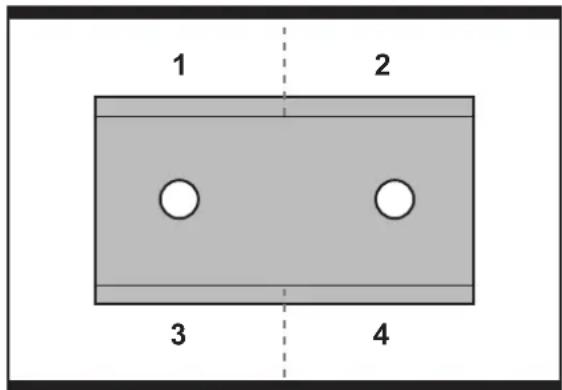
The Landroid®M does not cut grass like other mowers. Its Cutting Blades (14) are razor sharp on all 4 edges and spin in both directions for maximum cutting capacity (See Fig. J). Each blade of your Landroid®M has 4 cutting edges. Depending on the frequency the Landroid®M mows your lawn, the cutting blades will need to be flipped/rotated periodically for a new cutting edge. If your Landroid®M is programmed to mow the lawn every day then the cutting blades will need to be rotated monthly for the best mowing results. Each cutting blade will last up to 4 months when it is programmed to mow every day. When the cutting blades are dull and worn out, they should be replaced with the spare blades provided with your Landroid®M. Spare blades are also available at your nearest WORX retailer.
J
A. Rotate and flip the blades
Your Landroid M carries 3 Blades that are all screwed onto your its Blade Turning Disc (13). The Blades are what let the Landroid M do its job and need care and attention. Every once in awhile, you should simultaneously rotate and flip all
3 blades for a perfect cut. When rotating and flipping the Blades, make sure all the Blades are adjusted at the same time or else it could make the Blade Disc off balance. If your Landroid®M mows on a normal schedule (daily) then the Blades should last one season if they are rotated and flipped every month. Always check to see if the Blades are chipped or damaged and replace them if they are.
B. Replace the blades
After some time, usually every season, your Android®M's Blades will need to be replaced. Your Android®M does not like mowing while using Blades of different age and quality. So when replacing the Blades, make sure to replace all of them at the same time. You can replace them with one of the three spare Blade kits and extra Blade screws supplied with your Android®M.
K
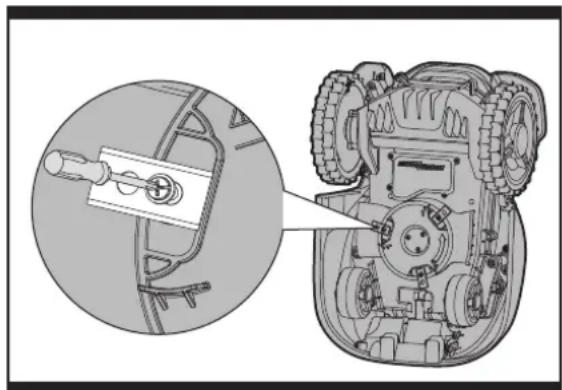
Before attempting to replace your Landroid M's Blades, turn the power off and put on protective gloves. Then follow these steps:
- Gently flip the Landroid M over
- Take the screws off the Blades with a screwdriver
- Firmly screw on the new Blades (See Fig. K)
IMPORTANT: After screwing the Blade to the Blade Disc, make sure the Blade is able to spin freely.
5.2 Keep it clean

WARNING: Before cleaning turn your Android® M OFF by pressing the ON/OFF Button. Put on protective gloves before cleaning the Blade Turning Disc (13) and do not use running water.
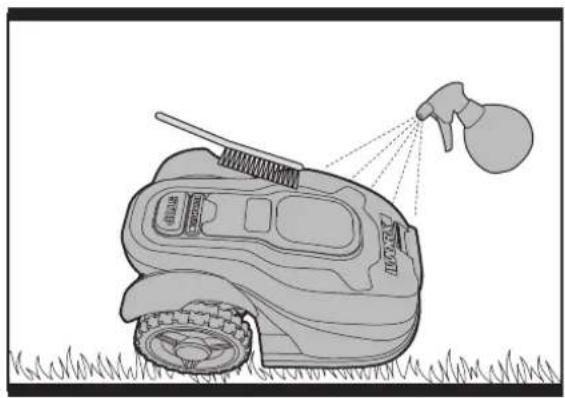
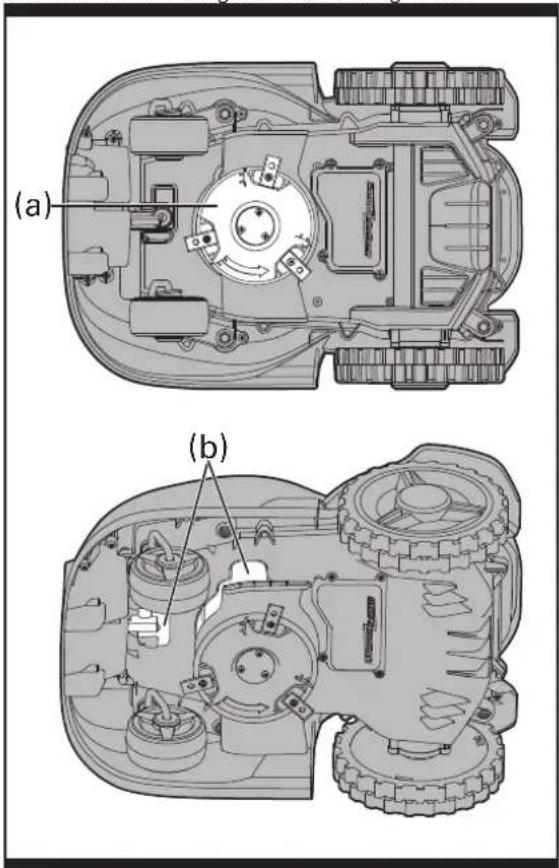
(See Fig. L.M)
A. Cleaning the body
Your Landroid M will live a much happier and longer life if it is cleaned regularly. Although, as your Landroid M is an electric machine, you will need to take care when cleaning, so DO NOT use a hose, high pressure washers or otherwise pour running water on your Landroid M, it is best to use a spray bottle filled with water. When cleaning the machine body use a soft brush or clean cloth and avoid using solvents or polishes (See Fig. L). Lastly, make sure that you remove all build up of grass clippings and debris.
B. Cleaning the Underside
Again, it is important that you power the Android M OFF using the ON/Off Button and wear protective gloves before touching the Blade Turning Disc (13).
First, flip your Landroid M upside down to expose its underside. Here you will see the Blade Disc (a), the chassis (b), and the Front Wheel (15) and Driving Wheel(10). Clean everything thoroughly with a soft brush or moist rag(See Fig. M). Rotate the Blade Disc to make sure it moves freely and that there is not anything lodged between it and the surrounding Motor Frame Box. Also, make sure the Blades are able to spin freely and that there's no grass obstructing them.
IMPORTANT: Remove any lodged debris so that it does not cause a crack in the Blade Disc. Even the tiniest crack can decrease your Android®M's mowing output.
C. Clean the contact pins and the charging strips
Clean the Contact Pins (3) located on the Charging Base (4) and the Charging Strip (5) located on the Android M using a cloth. Remove any build up of grass clippings and debris around the contact pins and charge strips periodically to ensure the Android M successfully charges each time.
LM
5.3 Battery life
The heart of the Landroid®M is its 28-volt lithium-ion battery. No maintenance is required. For proper storage of the battery, make sure it is fully charged in kept in a cool dry place between (20^ - 60^) . The life-span of the Landroid®M's battery depends on various factors, such as:
The time span of the mowing season in your region
Amount of hours the Android M mows per day
Battery maintenance during storage
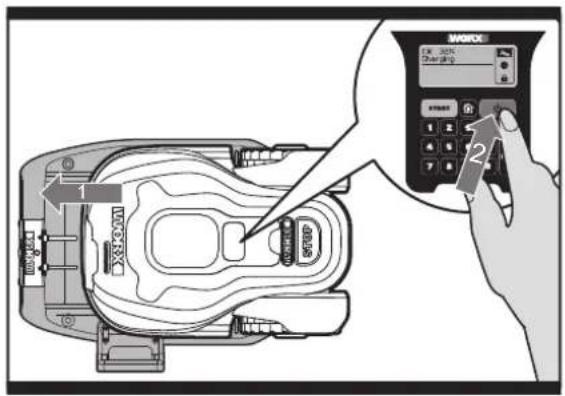
Android®M can be charged manually without the boundary wire
(See Fig. N).
To manually charge the battery without connecting the boundary wire to the charging base;
M
- Connect the Charging Base to a suitable power supply.
- Manually dock the Android M into the Charging Base while the Android M is powered off.
- The charging base red light will turn on.
- Within 3 seconds and before the charging base light turns green, press the Landroid power ON/OFF button.
- Android will begin to charge.
5.4 Winter hibernation
Your Landroid M will live longer and healthier if it is allowed to hibernate. So even though it is tough, we would recommend that you store your Landroid M in your shed or garage during the winter.
Before you prepare your Android®M for winter hibernation, we recommend you:
Thoroughly clean your Android® M
Fully charge the battery
- Turn the power off
To maximize the battery life, it is recommended to fully charge the battery before storage during winter.
The Boundary Wire can be left in the ground although its ends should be protected, such as placed in a tin can with grease. If the Charging Base is left outside for winter, leave the Boundary Wire connected.
NOTE: Before storing for winter, you can take your Android M to a dealer for a thorough cleaning and tune-up, where its functions will be tested and worn parts will be replaced.
When bringing the Landroid®M back to work after winter hibernation, make sure the Charging Strips (5) and Contact Pins (3) are clean, it is recommended to use a fine grade emery cloth to clean. Then make sure the date and time are correct and send the Landroid®M back to what it loves doing: mowing.
5.5 Replacing the battery

WARNING: Press the ON/OFF Key to OFF before attempting any adjustment, replacement or repair.
If you need to replace the Battery, follow these steps:
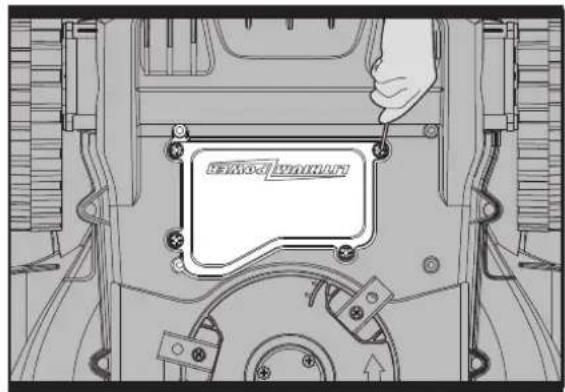
- Gently turn your Android ^® M upside down.
- Remove the four screws on the battery cover (See Fig. O).
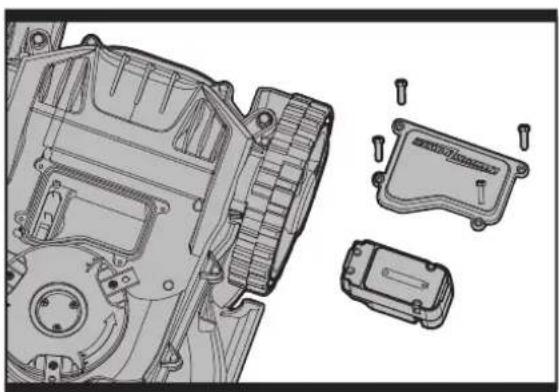
- Take out the old battery (See Fig. P).
- Put in the new battery.
- Firmly replace the 4 screws.
0
P
Environmental Protection

Waste electrical products should not be disposed of with household waste. Please recycle where facilities exist. Check with your Local Authority or retailer for recycling advice.
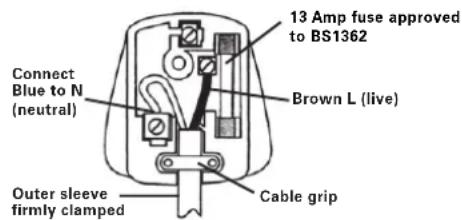
Plug Replacement (UK & Ireland Only)
If you need to replace the fitted plug then follow the instructions below.
IMPORTANT
The wires in the mains lead are colored in accordance with the following code:
Blue - Neutral
Brown - Live
As the colors of the wires in the mains lead of this appliance may not correspond with the coloured markings identifying the terminals in your plug, proceed as follows. The wire which is coloured blue must be connected to the terminal which is marked with N. The wire which is coloured brown must be connected to the terminal which is marked with L.
WARNING: Never connect live or neutral wires to the earth terminal of the plug. Only fit an approved BS1363/A plug and the correct rated fuse.
NOTE: If a moulded plug is fitted and has to be removed take great care in disposing of the plug and severed cable, it must be destroyed to prevent engaging into a socket.
Declaration of Conformity
We,
Declare that the product
Description WORX Lawn Mowing Robot
Type WG794E (790-799-Designation of machinery, representative of lawn mowing robot)
Function Cutting grass
Complies with the following Directives,
Machinery Directive 2006/42/EC
Electromagnetic Compatibility Directive
2004/108/EC
RoHS Directive 2011/65/EU
Noise Emission in the Environment by Equipment for Use Outdoors Directive 2000/14/EC amended by 2005/88/EC
Conformity Assessment Procedure as per Annex V.
Measured Sound Power Level: 61.95dB(A)
Declared Guaranteed Sound Power Level: 63dB(A)
Standards conform to,
EN ISO 12100-1
EN ISO 12100-2
EN ISO 14121-1
EN ISO 3744
EN 55014-1
EN 55014-2
The person authorized to compile the technical file,
Name Russell Nicholson
Address Positec Power Tools (Europe) Ltd, PO Box 152, Leeds, LS10 9DS, UK

PIN Code Area:
2013/01/10
Leo Yue
POSITEC Quality Manager
Directive RoHS 2011/65/EU
Adresse Positec Power Tools (Europe) Ltd, PO Box 152, Leeds, LS10 9DS, UK

Zone code PIN:
2013/01/10
Leo Yue
Adresse Positec Power Tools (Europe) Ltd, PO Box 152, Leeds, LS10 9DS, UK

2013/01/10
Leo Yue
Standards in overeenstemming met,
EN ISO 12100-1
EN ISO 12100-2
EN ISO 14121-1
EN ISO 3744
EN 55014-1
EN 55014-2
WORX it's your nature
Copyright © 2013, Positec. All Rights Reserved.
2CLM81APK11000A2