BC 60 - Air Conditioning Master - Free user manual and instructions
Find the device manual for free BC 60 Master in PDF.



| Product Type | Evaporative Air Cooler (Portable) |
| Brand | Master |
| Model | BC 60 |
| Operating Air Temperature | 18°C to 45°C |
| Operating Water Temperature | < 45°C |
| Water Supply | Manual fill via tank or optional direct mains water connection |
| Fan Speeds | 3 (Low, Mid, High) |
| Cooling Mode | Evaporative cooling with water pump and cooling panel |
| Oscillation | Automatic vertical air flow direction (Swing) |
| Ionizer | Negative ion release for air purification |
| Timer | Automatic switch-off from 0.5 to 12 hours |
| Control Panel | Touch buttons with LED indicators |
| Remote Control | Included (6-button wireless remote) |
| Filter Type | Removable washable dust filter |
| Tank Capacity | Graduated scale with MIN/MAX levels |
| Safety Features | Earth connection, overload protection, low water level indicator (flashing red LED) |
| Recommended Clearance | 0.5 m from walls/obstructions |
| Cleaning | Regular tank and filter cleaning with mild detergent |
| Water Treatment | Chlorine or bromine tablets recommended to prevent algae |
| Indoor Use Only | Yes |
Frequently Asked Questions - BC 60 Master
User questions about BC 60 Master
0 question about this device. Answer the ones you know or ask your own.
Ask a new question about this device
Download the instructions for your Air Conditioning in PDF format for free! Find your manual BC 60 - Master and take your electronic device back in hand. On this page are published all the documents necessary for the use of your device. BC 60 by Master.
USER MANUAL BC 60 Master
MASTER
CE
| USER AND MAINTENANCE BOOK | en |
| LIBRETTO USO E MANUTENZIONE | it |
| BEDIENUNGS- UND WARTUNGSANLEITUNG | de |
| MANUAL DE INSTRUCCIONES PARA EL USO Y MANTENIMIENTO | es |
| MANUEL D'UTILISATION ET DE MAINTENANCE | fr |
| HANDLEIDING VOOR GEBRUIK EN ONDERHOUD | nl |
| MANUAL DE USO E MANUTENÇÃO | pt |
| VEJLEDNING OM BRUG OG VEDLIGEHOLDELSE | da |
| KÄYTTÖ- JA HUOLTO-OHJE | fi |
| HEFTE FOR BRUK OG VEDLIKEHOLD | no |
| ANVÄNDAR- OCH UNDERHÅLLSHANDBOK | sv |
| INSTRUKCJA OBSŁUGI I KONSERWACJI | pl |
| РУКОВОДСТВО ПО ЭКСПЛУАТАЦИИ И ТЕХНИЧЕСКОМУ ОБСЛУЖИВАНИЮ | ru |
| PŘÍRUČKA PRO POUŽITÍ A ÚDRŽBU | cs |
| HASZNÁLATI ÉS KARBANTARTÁSI KÉZIKÖNYV | hu |
| PRIROČNIK Z NAVODILI ZA UPORABO IN VZDRŽEVANJE | sl |
| KULLANIM VE BAKIM KÍTAPÇIĞI | tr |
| KNJIŽICA O UPORABI I ODRŽAVANJU | hr |
| NAUDOJIMO IR PRIEŽIŪROS KNYGELĖ | lt |
| LIETOŠANAS UN TEHNISKĂS APKOPES GRĂMATIŅA | lv |
| KASUTUS- JA HOOLDUSJUHEND | et |
| LIVRET DE UTILIZARE ȘI ÎNTREȚINERE | ro |
| PRÍRUČKA PRE POUŽITIE A ÚDRŽBU | sk |
| НАРЪЧНИК ЗА ИЗПОЛЗВАНЕ И ПОДДРЪЖКА | bg |
| ІНСТРУКЦІЯ КОРИСТУВАЧА ТА ОБСЛУГОВУВАНЯ ОБЛАДНАННЯ | uk |
| ΕΓΧΕΙΡΙΔΙΟ ΧΡΗΣΗΣ ΚΑΙ ΣΥΝΤΗΡΗΣΗΣ | el |
| 使用和维护手册 | zh |
BC 60 - BC 180
FIGURES - FIGURE - ABBILDUNGEN - FIGURAS - FIGURES - FIGUREN
- FIGURAS - FIGURER - KUVAT - FIGURER - FIGURER - ILUSTRACJE
- ИЛЛЮСТРАЦИИ - OBRÁZKY - ÁBRÁK - SLIKE - ŞEKİLLER - SLIKE -
ILIUSTRACIJOS - ATTĚLI - JOONISED - IMAGINI - OBRÁZKY - CXEMI - ДАНИ
- EIKONEΣ - 图示
7
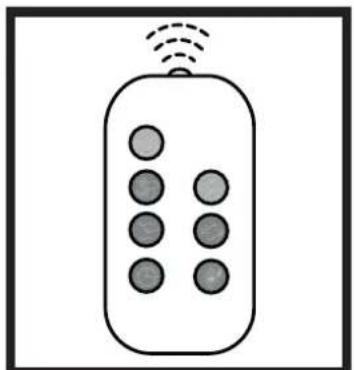
natural_image
Simple line drawing of a remote control with six buttons and wireless signal lines (no text or symbols)8
Figures and texts of this book are protected by COPYRIGHT.
FIGURES - FIGURE - ABBILDUNGEN - FIGURAS - FIGURES - FIGUREN
- FIGURAS - FIGURER - KUVAT - FIGURER - FIGURER - ILUSTRACJE
- ИЛЛЮСТРАЦИИ - OBRÁZKY - ÁBRÁK - SLIKE - ŞEKİLLER - SLIKE -
ILIUSTRACIJOS - ATTĚLI - JOONISED - IMAGINI - OBRÁZKY - CXEMI - ДАНИ
- EIKONEΣ - 图示
9
natural_image
Diagram of a mechanical device with a lever and adjustment arrow, no text or symbols present10
natural_image
Diagram showing a mechanical device with rotating wheels and a gear mechanism, no text or symbols present11
natural_image
Diagram showing a spray gun spraying water onto a cloud, with a cart pulling a wheel (no text or symbols)12
natural_image
Diagram showing a mechanical device with a gear and wheel, no text or symbols present13
natural_image
Diagram of two server units with upward arrows indicating data flow or storage (no text or symbols)14
natural_image
Illustration of a hand reaching toward a large tray filled with food, with arrows pointing outward (no text or symbols)15
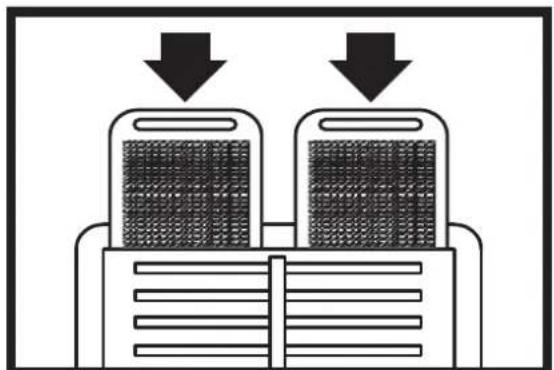
natural_image
Diagram showing two stacked electronic devices with downward arrows indicating process or data flow (no text or symbols)16
Figures and texts of this book are protected by COPYRIGHT.
▶▶1. INFORMATION REGARDING SAFETY
IMPORTANT: READ AND UNDERSTAND THIS OPERATIONAL MANUAL BEFORE ASSEMBLING, COMMISSIONING OR PERFORMING MAINTENANCE ON THIS APPLIANCE. INCORRECT USE OF THE APPLIANCE CAN CAUSE SERIOUS INJURY. KEEP THIS MANUAL FOR FURTHER REFERENCE.
IMPORTANT: This appliance is not suitable for use by persons (including children) with reduced physical, sensory and mental capacities or with lack of experience or knowledge unless supervised by a person responsible for their safety. Children must be supervised to make sure they do not play with the appliance.
▶1.1. Fill the appliance tank only with clean water.
▶1.2. Switch off and disconnect the appliance from the mains before filling it.
▶1.3. Do not move the appliance, once the tank has been filled.
▶1.4. When using the appliance, comply with all local regulations and Standard in force.
▶1.5. Keep the appliance dry, in order to avoid electric shocks. Hands must always be dry.
▶1.6. Use only in ventilated and dry areas.
▶1.7. For indoor use only.
▶1.8. Power the appliance only with voltage and frequency as specified on the data plate.
▶1.9. Only use extensions with three wires appropriately connected to earth.
▶1.10. Do not cover the appliance with paper, cardboard, plastic, metal sheets or any other inflammable material during use, in order to prevent any risk.
▶1.11. The appliance must be used on a stable and levelled surface, in order to prevent any risk.
▶1.12. When it is not used, disconnect the appliance from the power plug.
▶1.13. Do not block the air vent (rear side) or the air outlet (front side) of the appliance.
▶1.14. The minimum safety distance recommended between the appliance and walls or other items is 0,5 m.
▶1.15. When the appliance is connected to the mains or running, it must never be moved, handled, topped-up or subject to any maintenance operation.
▶1.16. The appliance (power cable included) must be kept at a suitable safety distance from heat sources.
▶1.17. In any case, the appliance must be opened and/or repaired by authorised after-sales centre.
▶1.18. If the power cable is damaged, it must be replaced by the technical after-sales centre, in order to prevent any risk.
▶1.19. Rinse the case with clean water and clean it before using, after the period during which the bio cooler was not in use.
▶1.20. The flashing of the red diode on the control panel means that the water level in the vessel is low.
▶1.21. In the case of improper operation of the product at the start, disconnect it from the power supply immediately and contact service point.
▶1.22. Protect the power supply cord from damage as a result of movement of the vehicles or pedestrians. The connection of improper electrical voltage or improper installation, will cause the electrical shock hazard.
▶1.23. Conditions of use:
A) Air temperature: 18°C to 45°C; Water temperature: <45°C.
B) Voltage in the power supply source may not exceed the required voltage by (+/-) 5%.
C) The air supply must be free of dust, pollutants, or additional cleaning should be used.
▶▶2. UNPACKING
▶2.1. Remove all packaging materials used to wrap and deliver the appliance and dispose of them in compliance with the Standards in force.
▶2.2. Extract all items from the packaging.
▶2.3. Verify if damage undergone during transport. If the appliance appears damaged, inform the dealer, where the purchase was made, immediately.
▶▶3. ASSEMBLY
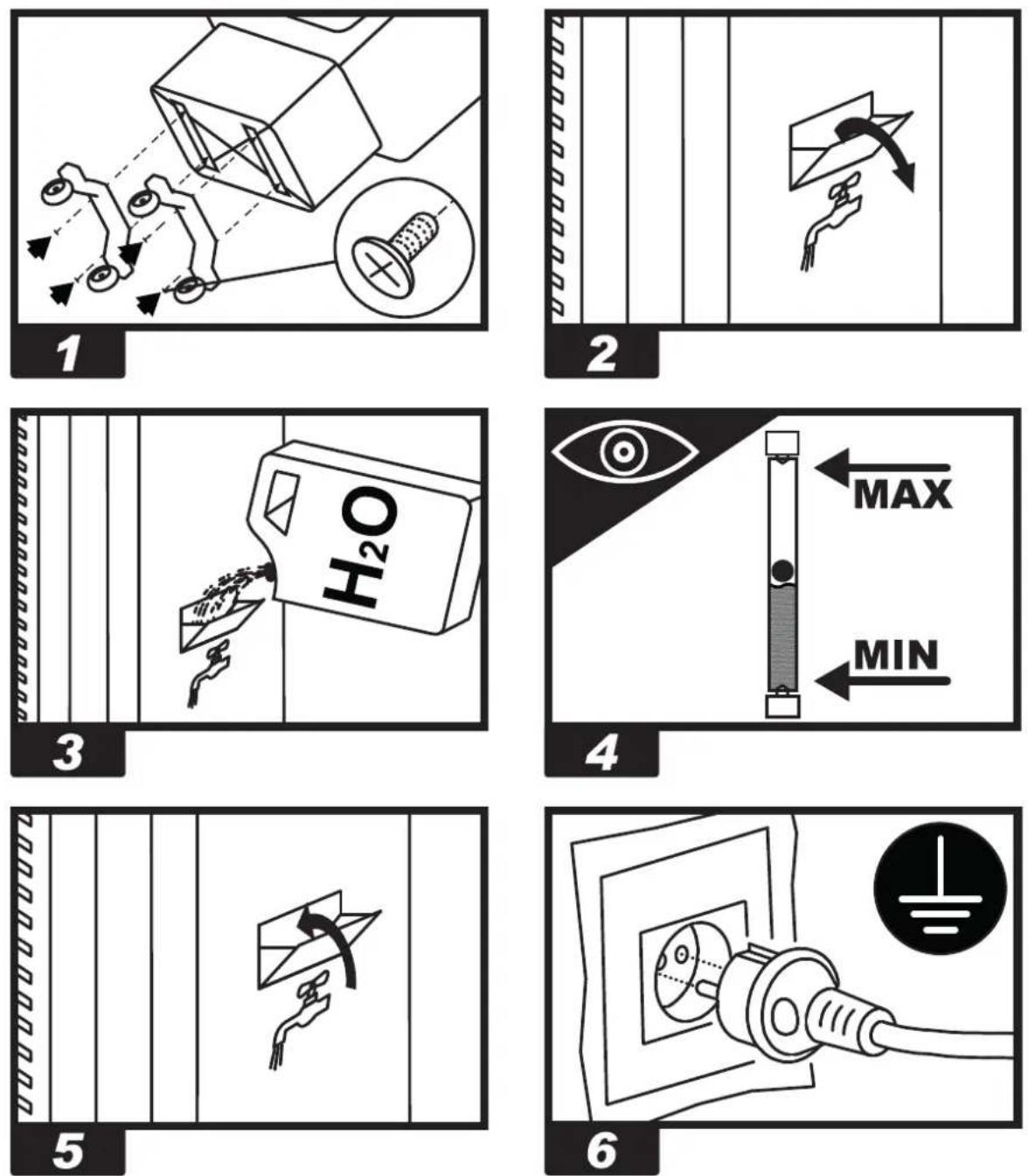
The device is equipped with wheels to facilitate handling. Depending on the model, wheels can be found already installed or not. Components equipped with relative nuts and bolts are found inside the packaging (Fig. 1).
▶▶4. OPERATION
WARNING: Thoroughly read the "INFORMATION REGARDING SAFETY", before switching the appliance on.
WARNING: Only use clean water to prevent failures or other anomalies.
WARNING: Verify if your electronic system is earthed correctly. Connection to the mains must be made in compliance with the National Standards in force. Power the appliance only with voltage and frequency as specified on the data plate.
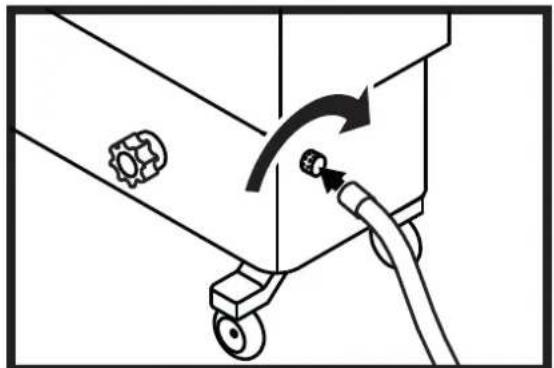
NOTE: These models can be connected to the water mains, by connecting the pipe to the fitting (Fig. 10).
▶▶4.1. SWITCHING ON:
▶4.1.1. Open the tank door (Fig. 2).
▶4.1.2. Fill the tank with water (Fig. 3); water level must be within MIN and MAX level of the graduated scale, placed at the side of the appliance (Fig. 4), in order to prevent risks.
▶4.1.3. Close the tank door (Fig. 5).
▶4.1.4. Connect the power plug to the mains (Fig. 6).
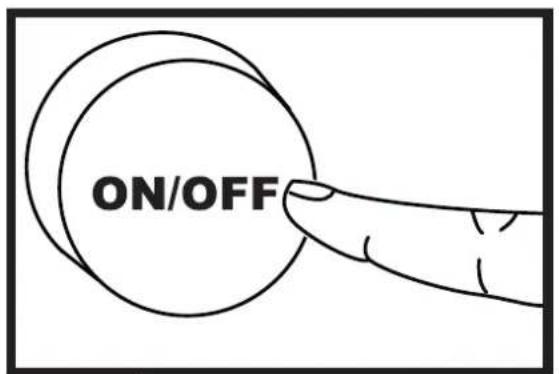
▶4.1.5. Press the ON/OFF button to switch on the appliance (Fig. 9).
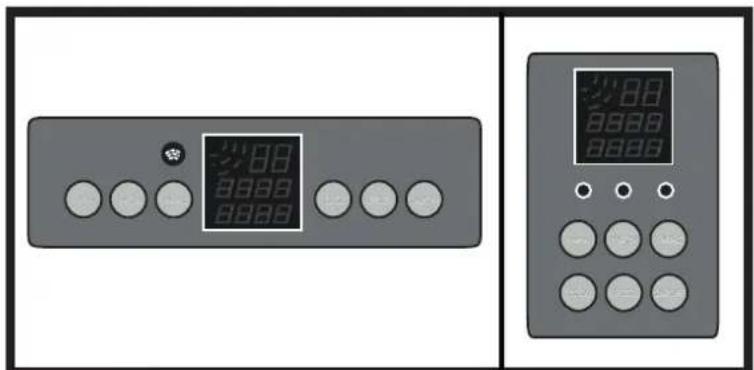
▶▶4.2. CONTROL PANEL, USE AND FUNCTIONS FOR MODEL BC 60 (Fig. 7-8):
▶ ON/OFF: It allows switching ON or OFF the appliance.
▶SPEED: Allows increasing or decreasing the appliance ventilation speed. Three speeds can be selected - LOW, MID and HIGH.
▶COOL: It enables or disables the cooling mode.
▶ SWING: It enables or disables the automatic vertical oscillation of the flaps to direct the air flow.
▶ANION: It enables or disables the ionisation mode, i.e. release of negative ions into the environment, in order to make air healthier.
▶TIMER: It enables or disables the timer of the appliance automatic switch-OFF. Intervals can be of half-hour up to 12 hours.
▶▶4.3. CONTROL PANEL, USE AND FUNCTIONS FOR BC 180 (Fig. 7-8):
▶ ON/OFF: It allows switching ON or OFF the appliance.
▶COOL: It enables or disables the cooling mode. Pay attention to the fact that the fan is switched on one minute after the initiation of wetting of the cooling panel with water.
▶BLAST: Pressing the COOL button again switches off the water vaporization function, and only the fan is in the operating mode.
▶SPEED: Allows increasing or decreasing the appliance ventilation speed. Three speeds can be selected - LOW, MID and HIGH.
▶ SWING: It enables or disables the automatic vertical oscillation of the flaps to direct the air flow.
▶TIMER DELAYED START: Enables the commencement of the operation of the device with a delay, after several hours. When the green light -POWER- is switched on only, press the TIMER until the required number of hours of delay (1-24) appears.
▶ TIMER AUTOMATIC STOP: When the device is in use, press the button and set the number of hours (1-24), after the expiry of which, the device will stop operating.
▶WATER SUPPLY: Use clean and fresh water only. Pour water through an inlet located on the right side of the device (maximum 60 l). Optionally, in order to fill the vessel, it is possible to connect the hose with water to the inlet located on the left side of the device. If high pressure is present in the water source, use a reducing valve.
▶▶4.4. SWITCHING OFF:
▶4.4.1. Press the ON/OFF button to switch off the appliance (Fig. 9).
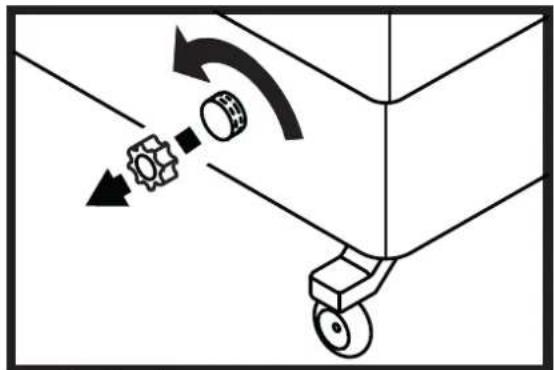
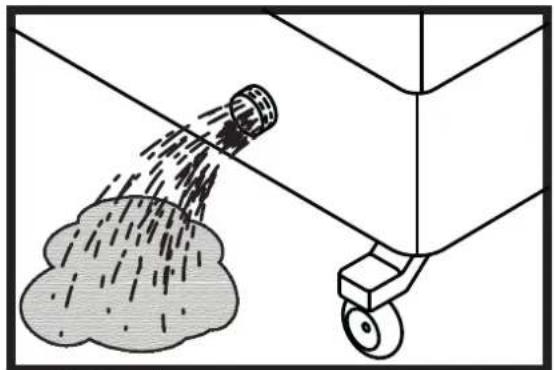
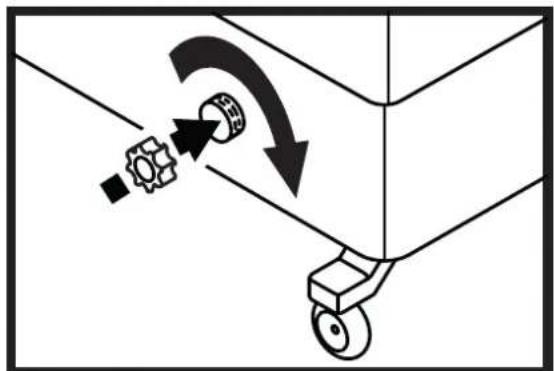
▶4.4.2. Empty the tank using the drain cap (Fig. 11-12-13).
▶▶5. CLEANING AND MAINTENANCE
WARNING: BEFORE PERFORMING ANY MAINTENANCE OR REPAIR, DISCONNECT THE POWER CABLE FROM THE MAINS.
DEPENDING ON THE ENVIRONMENT WHERE THE APPLIANCE IS USED, DUST, DIRT OR WATER QUALITY CAN AFFECT THE PERFORMANCE OF THE UNIT. THEREFORE, CLEANING THE FOLLOWING COMPONENTS CAN BE NECESSARY:
▶▶5.1. TANK:
We recommend changing the water frequently.
▶5.1.1. Switch off the appliance and disconnect the plug from the mains (Fig. 9-6).
▶5.1.2. Remove the drain plug and empty the vessel, then wash it, using a soft cloth. Wash away the dirt from the water sensor, water pump and float valve. Rinse everything.
▶5.1.3. In order to clean the housing, use delicate soap and a soft cloth. Do not use any caustic detergents, which may damage the air conditioner housing.
▶5.1.4. In order to prevent the accumulation of algae and other biological organisms in the vessel, add chlorine or bromine tablets or other tablets recommended by the manufacturer regularly, intended for the vessels of evaporation air conditioners.
▶5.2. FILTERS FOR MODEL BC 60: We recommend cleaning filters frequently.
WARNING: Dirty filters can affect the performance of the appliance.
▶5.2.1. Switch off the appliance and disconnect the plug from the mains (Fig. 9-6).
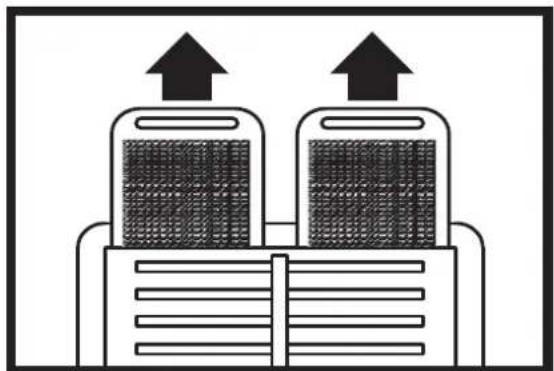
▶5.2.2. Remove the filters upwards (Fig. 14).
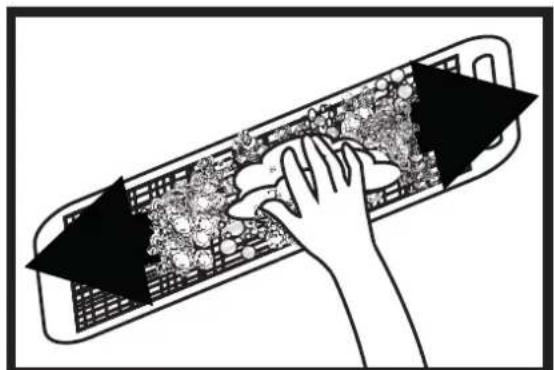
▶5.2.3. Clean the filters using a mild detergent and a clean cloth (Fig. 15). Ensure the filter is fully dry.
▶5.2.4. Place the filter back into its housing (Fig. 16).
▶▶6. TROUBLESHOOTING
| FUNCTIONING ANOMALIES | CAUSES SOLUTIONS | |
| The display doesn’t work | 1. No power supply2. Defective equipment | 1a. Check whether the device is connected to power supply1b. Contact service point2. Contact service point |
| No air flow or too low 1. | Obstruction of the air intake on the back2. Defective equipment | 1a. Keep the back side far from walls that can block air inlet1b. Remove objects from inlet air section1c. Contact service point2. Contact service point |
| The device does not respond to commands | 1. Defective equipment 1. Contact service point | |
| The device leak water 1. | The drain cap is loose2. The drain is dirty and the cap doesn’t fit3. The tank leak4. The panel drip | 1. Close the drain cap2. Clean the drain and close the cap3. Contact service point4. Contact service point |
▶▶4.1. INBETRIEBNAHME:
▶▶5.2. FILTRES POUR LE MODÈLE BC 60:
▶▶6. PROBLEMEN OPLOSSEN
▶▶2. PAKKAUKSEN PURKAMINEN
▶▶5. RENGJ∅RING OG VEDLIKEHOLD
ADVARSEL: KOBLE STR∅MLEDNINGEN FRA STR∅MNETTET F∅R EN HVER FORM FOR VEDLIKEHOLD ELLER REPARASJON.
AVHENGIG AV OMGIVELSENE HVOR APPARATET BRUKES, DVS. ST∅V, SKITT OG KVALITETEN TIL VANNET SOM BRUKES KAN PÅVIRKE ENHETENS YTELSER. AVHENGIG AV MODELLKAN DET BLI N∅DVENDIG MED RENGJ∅RING AV:
▶▶5.1. BEHOLDER:
▶▶5.2. FILTRE FOR MODELL BC 60:
▶▶5.2. FILTRU PENTRU MODELUL BC 60:
▶en - DISPOSAL OF THE PRODUCT
-This product has been designed and manufactured with top-quality materials and components, which can be re-cycled and re-used.
-When a crossed-wheely bin symbol is attached to the product, it means that the product is protected by the, 2002/96/EC European Directive.
-Please obtain information regarding the local differentiated collection system for electrical and electronic products.
-Respect local Standards in force and do not dispose of old products as normal domestic waste. Correct disposal of the product helps to prevent possible negative consequences for health, the environment and mankind.
▶ Iv - PRODUKTA IZNÍCINÁŠANA
Pastrengo (VR), Italy
info@mcsitaly.it
MCS Central Europe Sp. z o.o.
ul. Magazynowa 5A,
62-023 Gądki, Poland
office@mcs-ce.pl
MCS Russia LLC
ul. Transportnaya - 22 ownership 2,
142802, STUPINO, Moscow region, Russia
info@mcsrussia.ru
MCS China LTD
Unit A1, No. 1515, Jinshao Rd.,
Baoshan Industrial Zone,
Shanghai, 200949, China
office@mcs-china.cn
MCS Italy S.p.A.
Виа Тионе, 12, 37010
MCS Central Europe Sp. z o.o.
ул. Магазинова, 5А,


- MASTER
- CE
- ▶▶1. INFORMATION REGARDING SAFETY
- ▶▶2. UNPACKING
- ▶▶3. ASSEMBLY
- ▶▶4. OPERATION
- ▶▶4.1. SWITCHING ON:
- ▶▶4.2. CONTROL PANEL, USE AND FUNCTIONS FOR MODEL BC 60 (Fig. 7-8):
- ▶▶4.3. CONTROL PANEL, USE AND FUNCTIONS FOR BC 180 (Fig. 7-8):
- ▶▶4.4. SWITCHING OFF:
- ▶▶5. CLEANING AND MAINTENANCE
- ▶▶5.1. TANK:
- ▶5.2. FILTERS FOR MODEL BC 60: We recommend cleaning filters frequently.
- ▶▶4.1. INBETRIEBNAHME:
- ▶▶5.2. FILTRES POUR LE MODÈLE BC 60:
- ▶▶2. PAKKAUKSEN PURKAMINEN
- ▶▶5. RENGJ∅RING OG VEDLIKEHOLD
- ▶▶5.1. BEHOLDER:
- ▶▶5.2. FILTRE FOR MODELL BC 60:
- ▶▶5.2. FILTRU PENTRU MODELUL BC 60:
- ▶en - DISPOSAL OF THE PRODUCT
- ▶ Iv - PRODUKTA IZNÍCINÁŠANA
Brand : Master
Model : BC 60
Category : Air Conditioning