CKR 20S - Heating STIEBEL ELTRON - Free user manual and instructions
Find the device manual for free CKR 20S STIEBEL ELTRON in PDF.



User questions about CKR 20S STIEBEL ELTRON
0 question about this device. Answer the ones you know or ask your own.
Ask a new question about this device
Download the instructions for your Heating in PDF format for free! Find your manual CKR 20S - STIEBEL ELTRON and take your electronic device back in hand. On this page are published all the documents necessary for the use of your device. CKR 20S by STIEBEL ELTRON.
USER MANUAL CKR 20S STIEBEL ELTRON
natural_image
Simple line drawing of a door with a recessed ventilation grille (no text or symbols)BEDIENUNG
text_image
X2 N1 3> T1 3 2 4 6 5 A1 R1 R2 M 1~ M1 F1 3 > 1/2" T = 4" T > 80°C ≧ 3K F1 3 > 1/2" T = 4" T > 80°C ≧ 3K 1 2 X1 PE L N 26_07_31_02151.2 Other symbols in this documentation 15
1.3 Units of measurement 15
- Safety 15
2.1 Intended use 15
2.2 General safety information 15
2.3 General information 16
2.4 CE designation 16
2.5 Test symbols 16
-
Appliance description 16
-
Operation CK 20 S 16
4.1 Starting heating 16
4.2 Control with external room temperature controller _16
4.3 Stopping heating / Frost protection 16
4.4 Taking the appliance out of use 16
- Operation CKZ 20 S 16
5.1 Starting heating 17
5.2 Stopping heating / Frost protection 17
5.3 Taking the appliance out of use 17
- Operation CKR 20 S 17
6.1 Starting heating 17
6.2 Control with external room temperature controller 18
6.3 Stopping heating / Frost protection 18
6.4 Taking the appliance out of use 18
- Operation CKT 20 S 18
7.1 Starting heating 18
7.2 Adjusting the time switch 18
7.3 Stopping heating / Frost protection 18
7.4 Taking the appliance out of use 18
-
Cleaning, care and maintenance 18
-
Storage 18
-
Troubleshooting 18
INSTALLATION
- Safety 19
11.1 General safety information 19
11.2 Instructions, standards and regulations 19
- Appliance description 19
12.1 Standard delivery 19
- Preparations 19
13.1 Minimum clearances 19
-
Assembly 19
-
Electrical connection 19
-
Appliance handover 20
-
Troubleshooting 20
-
Specification 20
18.1 Dimensioned connection drawing 20
18.2 Data table 20
18.3 Wiring diagram CK 20 S 21
18.4 Wiring diagram CKZ 20 S 21
18.5 Wiring diagram CKR 20 S 22
18.6 Wiring diagram CKT 20 S 22
WARRANTY | ENVIRONMENT AND RECYCLING
OPERATION
1. General information

Note
Read these instructions carefully before using the appli-ance and retain them for future reference.
Pass on the instructions to a new user if required.
1.1 Safety information
1.1.1 Structure of safety information

KEYWORD Type of risk Here, possible consequences are listed that may result from non-observation of the safety information.
▶ Steps to prevent the risk are listed.
1.1.2 Symbols, type of risk
Symbol
Type of risk

Injury

Electrocution

Burns or scalding

Fire
1.1.3 Keywords
| KEYWORD | Description |
| DANGER | If this information is not observed, it will result in serious injury or death. |
| WARNING | If this information is not observed, it can result in serious injury or death. |
| CAUTION | If this information is not observed, it can lead to medium or minor injury. |
1.2 Other symbols in this documentation

Note
Notes are bordered by horizontal lines above and below the text. General information is identified by the symbol shown on the left.
▶ Read these notes carefully.
Symbol

Damage to the appliance and environment

Appliance disposal

Never cover the appliance
This symbol indicates that you have to do something. The action you need to take is described step by step.
1.3 Units of measurement

Note
All measurements are given in mm unless stated otherwise.
2. Safety
Observe the following safety information and regulations.
Operate the appliance only when fully installed and with all safety equipment fitted.
2.1 Intended use
This appliance is designed to heat living areas.
Any other use beyond that described shall be deemed inappropriate. Observation of these instructions and of instructions for any accessories used is also part of the correct use of this appliance.
The appliance is intended for domestic use, i.e. it can be used safely by untrained persons. The appliance can also be used in a non-domestic environment, e.g. in a small business, as long as it is used in the same way.
2.2 General safety information

DANGER Fire
Never operate this appliance ...
- if the minimum clearances to adjacent object surfaces are not maintained, for example to furniture, net curtains, curtains, textiles or other flammable materials (for minimum clearances, see “Installation / Preparations”).
- in rooms where the appliance is at risk from fire or explosion as a result of chemicals, dust, gases or vapours.
- in the direct proximity of pipes or receptacles that carry or contain flammable or explosive materials.
- if work such as laying cables, grinding or sealing is carried out in the installation room.
- if sprays, floor polish or similar products containing naphtha are used. Vent the room sufficiently before heating.
- if an appliance component is damaged, the appliance has fallen over or already has a fault.
- outdoors.

DANGER Fire
Never place any flammable, combustible or insulating objects or materials, such as laundry, blankets, magazines, containers with floor polish or naphtha, spray cans or similar on the appliance or in direct proximity to it.

WARNING Fire
Ensure that no foreign bodies enter the ventilation and extract air apertures. This could result in electric shock or fire or in damage to the appliance.

WARNING Fire
To prevent fires ensure that the air inlets and outlets are never blocked. Never position the appliance on soft surfaces, such as a bed, as this could result in the apertures becoming blocked.

DANGER Overheating
The appliance could continue to heat the room unchecked if it is operated on a time switch. Ensure constant supervision if the appliance is used in a small room and the persons within that room cannot leave the room on their own.

WARNING Injury
Where children or persons with limited physical, sensory or mental capabilities are to be allowed to control this appliance, ensure that this will only happen under supervision or after appropriate instructions by a person responsible for their safety.
Children should be supervised to ensure that they never play with the appliance.

CAUTION Burns
The casing surfaces of the appliance and the expelled air become hot during use (above 90 °C (194 °F)). To prevent burns ensure that the hot surfaces never come into contact with bare skin.
2.3 General information

Damage to the appliance and environment
- Never cover this appliance.
- Never step on the appliance.
2.4 CE designation
The CE designation shows that the appliance meets all essential requirements according to the:
- Electromagnetic Compatibility Directive
- Low Voltage Directive
2.5 Test symbols
See type plate on the appliance.
3. Appliance description
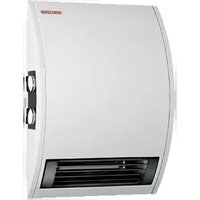
This appliance is wall mounted and is particularly suitable for work rooms, kitchens, bathrooms, wash rooms and similar.
The external casing of the appliance is made from stove enamelled sheet steel. The sides are made from plastic. The controls are located on the r.h. side panel.
The quiet fan draws in the ambient air that is heated by a bare wire heater element. The air then exits evenly through the hot air channel and the air outlet grille set into the bottom of the appliance.
The appliance heats up the ambient air inside the room and maintains it at the selected temperature.
After mounting the appliance on the wall and making the electrical connection using a mains plug, the appliance is ready for operation.
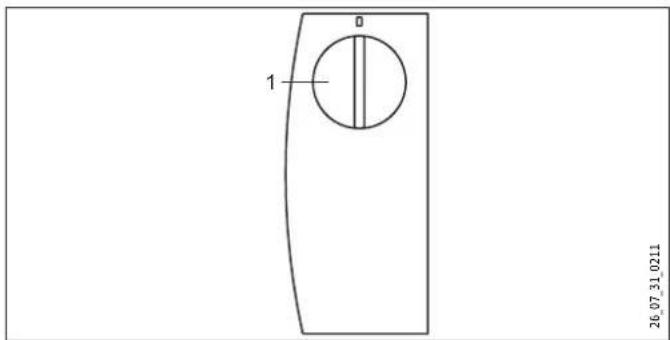
4. Operation CK 20 S
text_image
1 0 26_07_31_02111 Temperature selector
4.1 Starting heating
The temperature is infinitely adjustable. The appliance switches off as soon as the selected room temperature has been reached.
▶ Turn the temperature selector clockwise to the required setting.
4.2 Control with external room temperature controller
In rooms larger than 20 m ^4 you can operate the appliance with a conventional external room temperature controller.
▶ To do so, turn the temperature selector fully clockwise.
4.3 Stopping heating / Frost protection
▶ Turn the temperature selector fully anti-clockwise.
This position ensures frost protection. The heater starts automatically if the room temperature drops below the frost protection temperature.
4.4 Taking the appliance out of use
▶ Pull the plug from the power socket.
5. Operation CKZ 20 S
text_image
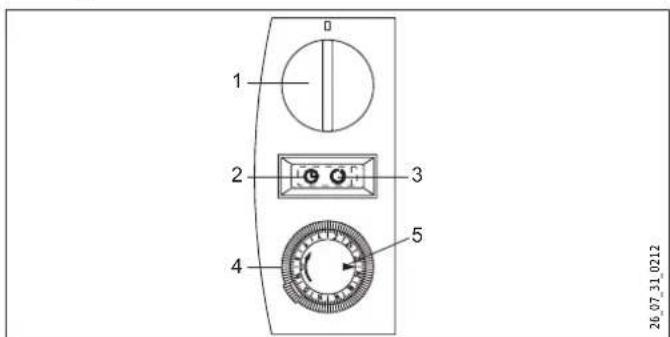
1 2 3 4 5 26.07.31.02121 Temperature selector
2 Rocker switch position (Operation with the time switch)
3 Rocker switch position (Standard operation)
4 Time switch
5 Marker arrow
5.1 Starting heating
▶ Use the rocker switch to select one of the following operating modes:
- Standard operation
- Operation with the time switch
Standard operation
The temperature is infinitely adjustable. The appliance switches off as soon as the selected room temperature has been reached.
▶ Turn the temperature selector clockwise to the required setting.
Operation with the time switch
The 24-hour time switch has 96 time segments. Every hour is divided into 4 time segments of 15 minutes. The time switch has to be reset when commissioning the appliance and after any power interruption. To do this, turn the time switch clockwise until the marker arrow points to the current time.
To select the required heating time, proceed as follows:
Press down the time segments around the circumference. Red markings will become visible, indicating the preselected heating time at which the appliance automatically starts to heat. If the required room temperature has been reached during the heat-up time, the appliance switches off. It starts again if there is a further heat demand and will continue doing so until the selected heating time has elapsed. This process is repeated daily. The heating time can be adjusted at any time if required by pressing time segments up or down.
5.2 Stopping heating / Frost protection
▶ Turn the temperature selector fully anti-clockwise.
In this setting, frost protection is only ensured if the rocker switch is positioned for "Standard operation". The heater starts automatically if the room temperature drops below the frost protection temperature.
5.3 Taking the appliance out of use
▶ Pull the plug from the power socket.
6. Operation CKR 20 S
text_image
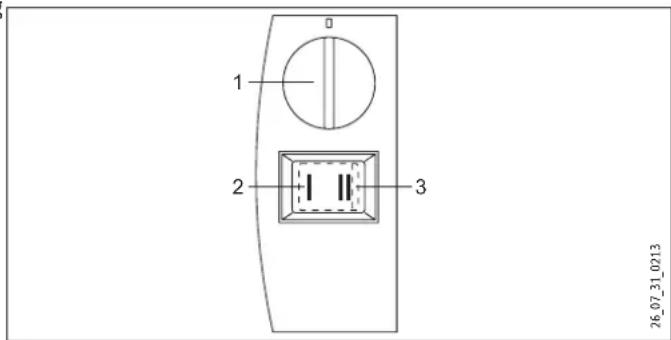
1 2 3 26_07_31_02131 Temperature selector
2 Rocker switch stage (Base heating stage)
3 Rocker switch stage (Quick heating stage)
6.1 Starting heating
▶ Turn the temperature selector clockwise to the required setting.
The temperature is infinitely adjustable. The appliance switches off as soon as the selected room temperature has been reached.
You can use the rocker switch to choose between the following two outputs with matched fan motor speed:
Base heating stage
Set the rocker switch to "I". Provided that the appliance has been switched on via the temperature selector, it will heat with an output of 1000 W at the slow fan stage.

Hinweis
Never operate the appliance at standard heating stage I, if the room where the appliance has been installed has cooled down severely.
▶ If the room has cooled down severely, switch the appliance to rapid heating stage II in order to ensure normal appliance operation.
Quick heating stage
Set the rocker switch to "II". Provided that the appliance has been switched on via the temperature selector, it will heat with an output of 2000 W at the quick fan stage.
Select the powerful quick heating stage if you need to heat up a cold room rapidly to the selected temperature. Afterwards, set the rocker switch back to stage "I".
Once the preselected room temperature has been reached, the appliance switches off. The appliance then starts and stops heating as necessary to keep the room temperature constant.
6.2 Control with external room temperature controller
In rooms larger than 20 m ^4 you can operate the appliance with a conventional external room temperature controller.
▶ To do so, turn the temperature selector fully clockwise.
6.3 Stopping heating / Frost protection
▶ Turn the temperature selector fully anti-clockwise and select quick heating stage "II" on the rocker switch.
This position ensures frost protection. The heater starts automatically if the room temperature drops below the frost protection temperature.
6.4 Taking the appliance out of use
▶ Pull the plug from the power socket.
7. Operation CKT 20 S
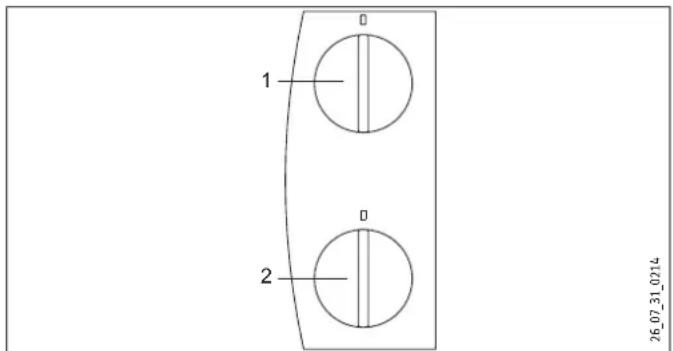
text_image
1 2 26_07_31_02141 Temperature selector
2 Time switch
7.1 Starting heating
The temperature is infinitely adjustable. The appliance switches off as soon as the selected room temperature has been reached.
▶ Turn the temperature selector clockwise to the required setting.
7.2 Adjusting the time switch
With the time switch, the appliance heats with full output and without temperature control.
▶ Turn the time switch selector clockwise to set any number of minutes to count down, from 0 - 60 minutes.
7.3 Stopping heating / Frost protection
▶ Turn the temperature selector fully anti-clockwise and ensure that the time switch is set to "0".
This position ensures frost protection. The heater starts automatically if the room temperature drops below the frost protection temperature.
7.4 Taking the appliance out of use
▶ Pull the plug from the power socket.
8. Cleaning, care and maintenance
The appliance contains no user serviceable parts.
Clean the appliance when cold with ordinary cleaning products. Avoid abrasive or corrosive cleaning products.
If a pale brownish discolouration appears on the appliance casing, wipe this off as soon as possible with a damp cloth.

Damage to the appliance and environment Never spray cleaning spray into the air slot.
9. Storage
▶ When not in use, keep the appliance in a dry place.
10. Troubleshooting
If the appliance does not heat, check the temperature set at the appliance and the MCB/fuse in your fuse box.
The appliance has a temperature limiter that shuts the appliance down if it overheats. After the cause has been removed (for example air outlet or inlet apertures covered) and the appliance has cooled down for a few minutes, operation starts again.
If you cannot remedy the fault, notify your heating contractor. To facilitate and speed up your enquiry, please provide the serial number from the type plate (000000-0000-000000).
INSTALLATION
11. Safety
Only qualified contractors should carry out the maintenance and repair of this appliance.
11.1 General safety information
We guarantee trouble-free operation and operational reliability only if the original accessories and spare parts intended for the appliance are used.
11.2 Instructions, standards and regulations

Note
Observe all applicable national and regional regulations and instructions.
12. Appliance description
This appliance is a wall mounted electric direct heater. This appliance is particularly suitable for heating rooms, such as work rooms, kitchens, bathrooms, wash rooms etc.
12.1 Standard delivery
- Wall mounting bracket
- Fixing bracket
13. Preparations
13.1 Minimum clearances
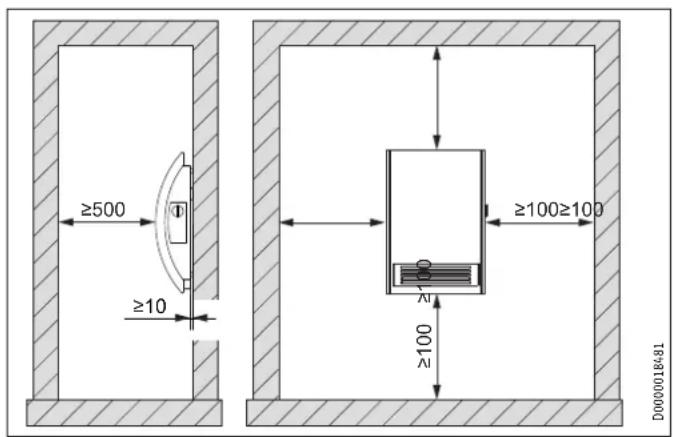
text_image
≥500 ≥10 ≥100≥100 ≥100 D000001B48114. Assembly

DANGER Electrocution
- If installing the appliance in rooms with a bath and/or shower, take the relevant safety zone into account in accordance with the information on the appliance type plate.
- Install the appliance in such a way that switching and control equipment cannot be touched by a person in the bath or shower.

DANGER Fire
- Only fit the appliance to a vertical wall that is temperature-resistant to at least 90 °C.
- Maintain minimum clearances to adjacent surfaces.
- Never install the appliance directly below a wall socket.
▶ Check the hole distances for the wall mounting bracket in the dimensioned drawing.
- Secure the wall mounting bracket with suitable fixing materials. The horizontal and vertical slots in the wall mounting bracket enable alignment if drilled holes are not completely accurate.
▶ Hook in the appliance so that both top protrusions in the back panel are inserted into the slots in the wall mounting bracket.
▶ Secure the appliance with the fixing bracket and one screw against unintentional unhooking. Hook the fixing bracket from behind into the back panel.
15. Electrical connection

DANGER Electrocution
Carry out all electrical connection and installation work in accordance with relevant regulations.

Damage to the appliance and environment
- Observe the type plate. The specified voltage must match the mains voltage.
The cable must not touch the appliance.
Ensure the socket or junction box is at least 10 cm from the appliance.
Never install the appliance directly below a wall socket.
If a permanent connection is required, trim the cable (cut off the plug) so that it is routed directly to the junction box.
In the case of a permanent connection, the appliance must be able to be separated from the power supply by an isolator that disconnects all poles with at least 3 mm contact separation.
This appliance is unsuitable for fixed cables.
16. Appliance handover
Explain the functions of the appliance to users. Draw their attention in particular to the safety information. Hand over the operating and installation instructions to users.
18. Specification
18.1 Dimensioned connection drawing
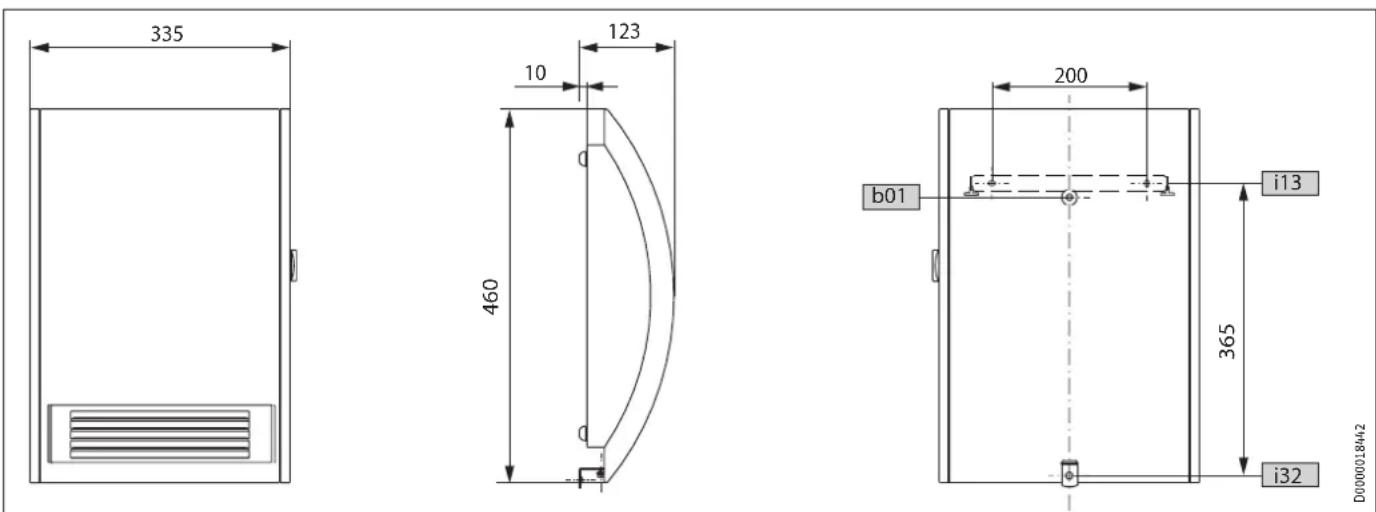
D0000018442
b01 Entry electrical cables
i13 Wall mounting bracket
i32 Fixing
18.2 Data table
| CK 20 S CKZ 20 S CKR 20 S CKT 20 S | |||||
| Part number | 071793 | 071795 | 072633 | 230344 | |
| Electrical details | |||||
| Connection output | W | 2000 | 2000 | 2000 | 2000 |
| Phases | 1/N/PE | 1/N/PE | 1/N/PE | 1/N/PE | |
| Rated voltage | V | 230 | 230 | 230 | 230 |
| Frequency | Hz | 50 | 50 | 50 | 50 |
| Dimensions | |||||
| Height | mm | 460 | 460 | 460 | 460 |
| Width | mm | 335 | 335 | 335 | 335 |
| Depth | mm | 123 | 123 | 123 | 123 |
| Weights | |||||
| Weight | kg | 4,4 | 4,4 | 4,4 | 4,4 |
| Versions | |||||
| Version | 24 h time switch | 60-minute short-time timer | |||
| Frost protection setting | °C | 7 | 7 | 7 | 7 |
| IP-Rating | IP13B | IP13B | IP13B | IP13B | |
| Protection class | I | I | I | I | |
| Colour | alpine white | alpine white | alpine white | alpine white | |
| Values | |||||
| Output stages | kW | 1,0 / 2,0 | |||
| Setting range | °C | 5-30 | 5-30 | 5-30 | 5-30 |
| Operating noise | dB(A) | 53 | 53 | 42/51 | 53 |
18.3 wiring diagram cK 20 s

text_image
N1 A1 R1 R2 M 1~ M1 >80 °C ±5 K F1 >80 °C ±5 K F1 1 2 X1 X2 PE L N 26.07.33_0216A1 Electric heater element assembly
F1 Overheating protection
M1 Fan
N1 Temperature controller
R1 Heating resistor
R2 Heating resistor
X1 Socket terminal
X2 Plug-in connection
18.4 wiring diagram cKZ 20 s
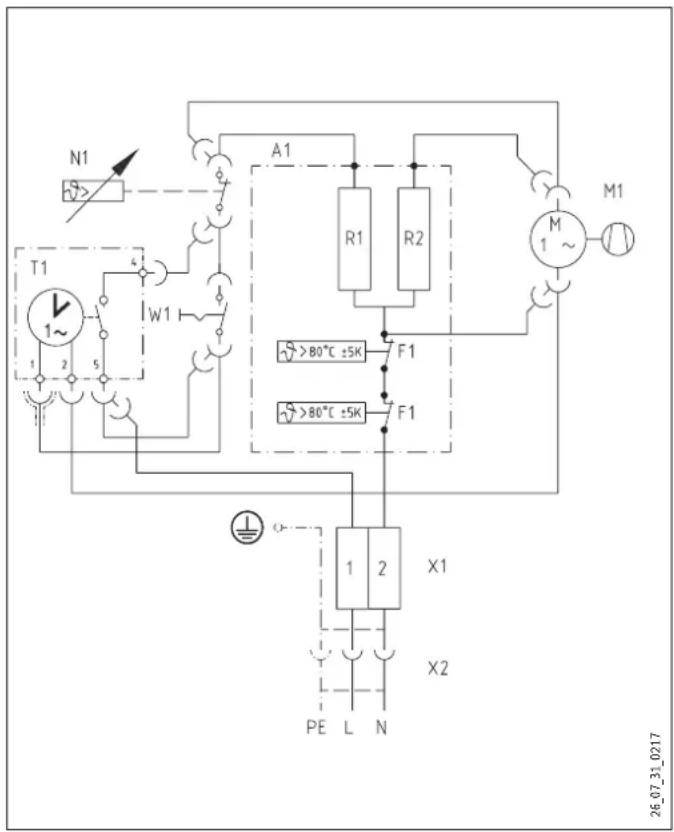
text_image
N1 T1 1~ 2 5 W1 A1 R1 R2 M1 M 1~ F1 >80°C ±5K F1 >80°C ±5K 1 2 X1 X2 PE L N 26_07_31_0217A1 Electric heater element assembly
F1 Overheating protection
M1 Fan
N1 Temperature controller
R1 Heating resistor
R2 Heating resistor
T1 Time switch
W1 Rocker switch
X1 Socket terminal
X2 Plug-in connection
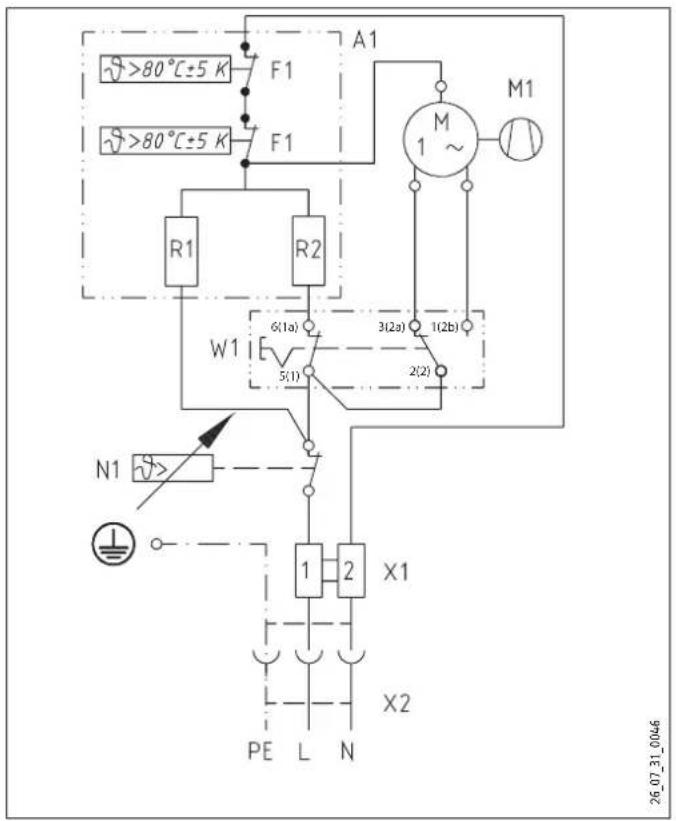
18.5 Wiring diagram CKR 20 S
text_image
A1 F1 >80°C±5 K F1 M1 R1 R2 W1 6(1a) 3(2a) 1(2b) 5(1) 2(2) N1 X1 X2 PE L N 26_07_31_0046A1 Electric heater element assembly
F1 Overheating protection
M1 Fan
N1 Temperature controller
R1 Heating resistor
R2 Heating resistor
W1 Rocker switch
X1 Socket terminal
X2 Plug-in connection
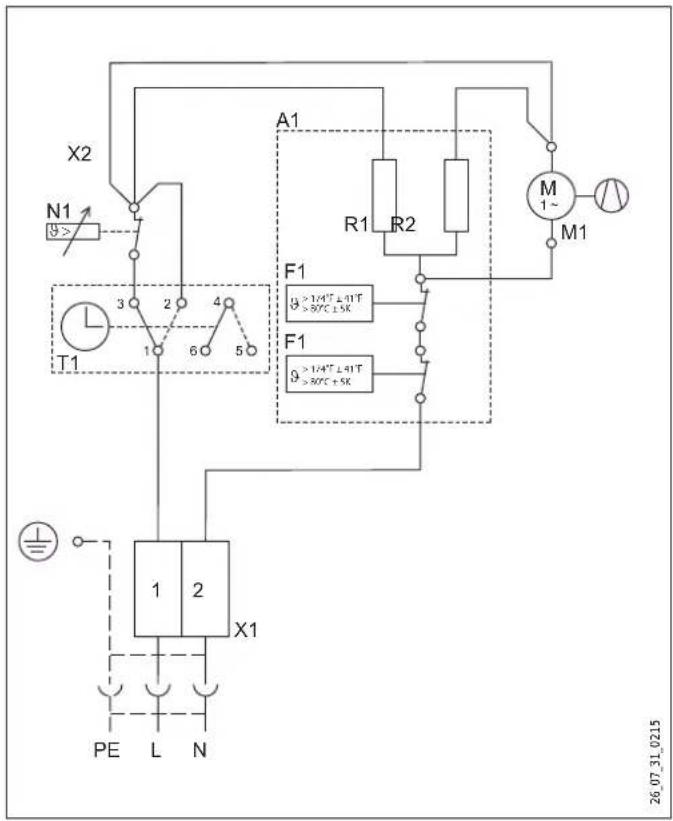
18.6 Wiring diagram CKT 20 S
text_image
X2 N1 9> T1 3 2 4 6 5 A1 R1 R2 M 1~ M1 F1 9 >1/4T ≤ 0.1T >87°C ±5K F1 9 >1/4T ≤ 0.1T >87°C +5K 1 2 X1 PE L N 26_07_31_0215A1 Electric heater element assembly
F1 Overheating protection
M1 Fan
N1 Temperature controller
R1 Heating resistor
R2 Heating resistor
T1 60 minute time switch
X1 Socket terminal strip
Guarantee
For guarantees please refer to the respective terms and conditions of supply for your country.

The installation, electrical connection and first operation of this appliance should be carried out by a qualified

The company does not accept liability for failure of any goods supplied which have not been installed and open-accordance with the manufacturer's instructions.
Environment and recycling
Please help us to protect the environment by disposing of the packaging in accordance with the national regulations for waste processing.
UTILISATION
- Commande CKR 20 S 27
- Commande CKT 20 S 28
WAARSCHUWING Voor letsel
Urzhumskaya street 4,
building 2 | 129343 Moscow
Tel. 0495 7753889 | Fax 0495 7753887
info@stiebel-eltron.ru
www.stiebel-eltron.ru
Slovakia
TATRAMAT - ohrievače vody, s.r.o.
Hlavná 1 | 058 01 Poprad
Tel. 052 7127-125 | Fax 052 7127-148
info@stiebel-eltron.sk
www.stiebel-eltron.sk
Switzerland
STIEBEL ELTRON AG
United Kingdom and Ireland
STIEBEL ELTRON UK Ltd.
Unit 12 Stadium Court
Stadium Road | CH62 3RP Bromborough
Tel. 0151 346-2300 | Fax 0151 334-2913
info@stiebel-eltron.co.uk
www.stiebel-eltron.co.uk
United States of America
STIEBEL ELTRON, Inc.
17 West Street | 01088 West Hatfield MA
Tel. 0413 247-3380 | Fax 0413 247-3369
info@stiebel-eltron-usa.com
www.stiebel-eltron-usa.com

text_image
4017211286853Irrtum und technische Änderungen vorbehalten! | Subject to errors and technical changes! | Sous réserve d'erreurs et de modifications techniques! | Onder voorbehoud van vergissingen en technische wijzigingen! | Salvo error o modificación técnica! | Excepto erro ou alteração técnica! | Zastrzezone zmiany techniczne i ewentualne błędy | Omyly a technické změny jsou vyhrazeny! | A muszaki változtatások és tévedések jogát fenntartjuk! | Отсутствие ошибok ne гарантируется. Возможны технические изменения. | Chyby a technické zmeny sú vyhradenél Stand 8726
STIEBEL ELTRON