Power Station Pro4 - Iron BEEM - Free user manual and instructions
Find the device manual for free Power Station Pro4 BEEM in PDF.


| Product Type | Steam Ironing Station |
| Brand | BEEM |
| Model | Power Station Pro4 |
| Dimensions (H x W x D) | 385 x 315 x 215 mm |
| Net Weight | 3.14 kg |
| Gross Weight | 3.95 kg |
| Power Supply | 220-240 V ~, 50/60 Hz |
| Max Power Consumption | 2400 W |
| Protection Class | I |
| Water Tank Capacity | 1 liter |
| Power Cord Length | 1.7 m |
| Ironing Functions | Dry ironing, steam ironing, vertical steam |
| Temperature Setting | Electronic, 4 levels (low, medium, high, max) |
| Automatic Shutoff | After 20 minutes of steam inactivity |
| Steam Lock | Yes, for continuous use |
| Anti-Calc System | Removable and replaceable anti-calc filter |
| Overheat Protection | Yes, automatic shutoff if pump overheats |
| Soleplate | Smooth, easy to clean |
| Cleaning | Soleplate with soft damp cloth; change filter every 15-20 refills |
| Spare Part | Anti-calc filter (ref. D1000273) |
| Manufacturer Warranty | Subject to conditions, see BEEM website |
| Compliance | EC Directives: 2006/95/EC, 2009/125/EC, 2004/108/EC |
| Intended Use | Ironing textiles indoors, domestic use |
Frequently Asked Questions - Power Station Pro4 BEEM
User questions about Power Station Pro4 BEEM
0 question about this device. Answer the ones you know or ask your own.
Ask a new question about this device
Download the instructions for your Iron in PDF format for free! Find your manual Power Station Pro4 - BEEM and take your electronic device back in hand. On this page are published all the documents necessary for the use of your device. Power Station Pro4 by BEEM.
USER MANUAL Power Station Pro4 BEEM
Open the fold-out page at the beginning and end of the user manual in order to view the illustrations during reading.
Safety instructions ..... 17
Startup 19
Appliance description 20
Operation 20
After using 23
Cleaning and maintenance ..... 2 4
Storage 24
Troubleshooting 25
Technical data 26
Spare parts and other accessories .. 26
Dear Customer,
before using the appliance, please read the instructions on startup, safety, intended use as well as cleaning and care contained in this user manual.
Open the fold-out page at the beginning and end of the user manual in order to view the illustrations during reading.
Keep this user manual for future reference and pass it on to any future owner.
General notes
Copyright
This document is copyrighted. Any duplication, reprinting or reproduction of the illustrations either wholly, partially or in modified form is only permitted with the written approval of the manufacturer.
Notes on environmental protection

The packaging materials used can be recycled. When no longer requi-dispose of the packaging materials in accordance with the local regulations.

This product may not be disposed of in the domestic refuse within the European Union. Dispose of the appli-via communal collection points.
Warranty/Guarantee
In addition to the statutory warranty obligation, BEEM also grants an extended manufacturer's guarantee for some products.
Provided this is granted, the corresponding details for each product can be found either on the product-specific packaging, advertising material or on the BEEM website.
Please visit our website to obtain more information on comprehensive guarantee conditions, available accessories and spare parts as well as user manuals in various languages.
Symbols used
DANGER
This indicates to an imminent hazardous situation, which could lead to severe physical injury or death.
Follow these instructions to avoid danger.
WARNING
This indicates a possible hazardous situation, which could lead to severe physical injury or death.
Follow these instructions to avoid danger.
CAUTION
This indicates a potentially hazardous situation, which could lead to minor injuries or material damage.
Follow these instructions to avoid danger.
NOTE
A note contains additional information to simplify the use of the appliance.
Intended use
This appliance is intended only for non-commercial use for ironing and steam ironing of textiles in closed rooms.
Any use other than previously stated is considered as improper use.
WARNING
If not used for its intended purpose and/or used in any other way, the appliance may be or become a source of danger.
Only use the appliance for its intended purpose.
Observe the procedures described in this user manual.
No claims of any kind will be accepted for damage resulting from use of the machine for other than its intended purpose.
The risk must be borne solely by the user.
Limitation of liability
We assume no reliability for damage or follow-up damage in the case of:
failure to observe the instructions in ■ the user manual,
use for other than the intended purpose,
improper or unsuitable handling, ■
incorrectly performed repairs, ■
unauthorised modifications, ■
use of non-approved parts or spare ■ parts,
use of unsuitable supplementary or accessory parts.
Declaration of Conformity
BEEM hereby declares that this appliance complies with the fundamental requirements and other relevant provisions of 2006/95/EC, 2009/125/EC and 2004/108/EC directives.
Safety instructions
Inspect the appliance for visible signs of damage or leaks before use. Do not use a damaged or leaking appliance.
Do not use the appliance if the appli-ance or the iron were dropped.
Do not remove the rating plate or any warning signs on the appliance.
Keep the appliance out of the reach of children.
Do not leave the appliance unattended during use.
Pull the plug out of the mains socket if the appliance is not under supervision.
Persons who due to their physical, ■ mental or motor response abilities are unable to operate the appliance may only use the appliance under supervision or instruction by a responsible person.
Never immerse the appliance, the mains cable or the plug in water or other liquids.
Do not pull the cable to remove the plug from the mains socket.
Only allow repairs to the appliance to be carried out by an authorised specialist or by the works customer service; this particularly applies for replacing a damaged connecting cable or steam hose. Unqualified repairs can lead to considerable danger for the user. They will also invalidate the warranty/guarantee.
Repairs to the appliance during the warranty/guarantee period may only be carried out by service centres authorised by the manufacturer as the warranty/guarantee will otherwise be invalidated in the event of damage or subsequent damage.
DANGER
Danger from electric current!
Do not use the appliance if the ▶ connecting cable, plug or housing is damaged.
Do not open the housing of the appliance. Danger from electric current if live connections are touched or the electrical and mechanical configuration is changed.
Danger of suffocation!
Never play with packaging material. Risk of suffocation.
WARNING
Danger of burning!
During use, do not touch the ironing sole or the iron rest on the appliance.
▶ Use the handle to hold the iron during operation.
Transport the appliance only after it has cooled down.
Never point the iron at persons when using the steam iron function.
Never iron clothes while they are being worn.
Before cleaning, allow the appliance to cool down.
Do not touch the the iron rest when the iron is switched in.
WARNING
Do not touch the sole of the iron.
Avoid contact with discharging steam.
Fire risk
Do not "park" the hot ironing sole on fabrics to be ironed.
Make sure that the hot appliance does not come into contact with other materials.
CAUTION
The steam hose may not be bent or twisted.
Never use abrasive cleaners, scratching items or chemicals for cleaning the ironing sole.
Fill the appliance with tap water up to 17^ dt. hardness (3 mmol/l). If your tap water is harder, use a mixture that consists of equal parts of tap water and distilled water.
Only fill the appliance with water ▶ without additives (starch, vinegar, perfume, decalcifier etc.).
The lifecycle of the appliance is prolonged if pure distilled water is used.
Requirements for the place of use
For safe and trouble-free operation of the appliance, the place of operation must satisfy the following requirements:
Use the appliance on an even, heat-resistant and splash-proof surface (ironing board).
Do not use the appliance in a hot, wet or very humid environment or in the vicinity of inflammable materials.
Immediately after ironing, place the hot appliance at least 15 cm away from walls, furniture and other objects.
Select a location that does not allow ■ children to reach the hot surfaces, the appliance itself or the connecting cable of the appliance.
The mains socket must be easily accessible so that the plug can be quickly pulled out in an emergency.
Electrical connection
The following instructions must be observed for the electrical connection:
Before connecting the appliance, ■ compare the connection data (voltage and frequency) on the rating plate with those of your mains power supply. The data must correspond in order to avoid damage to the appliance. If in doubt, ask your electrical appliance retailer.
The mains socket must be protected by at least a 10 A circuit breaker.
■Ensure that the connecting cable is undamaged and is not laid over hot surfaces or sharp edges.
■The connecting cable must not be strained, bent or come into contact with the hot appliance.
Place the cable in such a way as to avoid danger from tripping.
If the appliance is to be connected to the power supply via an extension lead, the cable cross-section must be at least 1.5 mm ^2 .
■The electrical safety of the appliance is only assured when it is connected to a properly installed protective earth (PE) conductor system. Connection to a mains socket without PE conductor is forbidden. If in doubt, the electrical system must be checked by a qualified electrician. The manufacturer assumes no liability for injury or damage caused by a missing or interrupted protective earth conductor.
Protective equipment
The water circulated by the pump is also required for cooling the pump. The pump can overheat if there is no water in the tank. The appliance is therefore equipped with overheat protection. If the pump becomes too hot, the appliance switches the pump off and the water pump light extinguishes.
Press the temperature selection button (4) repeatedly until only displays (8) and (18) are lighted.
Pull the plug out of the mains socket.
Fill the water tank with water. ◆
Wait approx. 30 minutes and switch ◆ on the appliance again.
Startup
Unpacking
Remove the appliance, all accessory parts and the user manual from the box.
Remove all packaging materials and protective foils from the appliance and the accessories before using it for the first time.
NOTE
Do not remove the rating plate or ▶ any warning signs on the appliance. If possible, keep the original pa-▶ packaging during the warranty/guarantee period in order to be able to pack the appliance properly in the event of a guarantee claim. Transport damage will invalidate the warranty/guarantee.
Check the delivery contents
Check for visible signs of damage or missing items.
Report incomplete or damaged contents to your supplier immediately.
Before using for the first time
Soak the calcium filter separately for a few minutes before inserting it into the tank filled with water (see section Filling the water tank).
Make yourself familiar with the steam ironing function of the appliance (see sections Filling the water tank and Steam ironing). Then steam iron an old cloth for several minutes.
NOTE
Residual assembly grease may be on the appliance. It is therefore possible that light odour or smoke could occur when using for the first time.
Appliance description
(refer to the left fold-out page for illustration)
Water tank1
Carrying handle2
Ironing sole3
4 Temperature selection button
5 Steam button
6 Steam button lock mechanism
7 Steam button
8 Power indicator
9 Temperature display 1
10 Temperature display 2
11 Temperature display 3
12 Temperature display 4
13 Cable/steam hose
14 Mains cable
15 Carrying handle lock release
16 Water tank lock release
17 Filter
18 Water tank light
19 User manual (not illustrated)
Special functions of the appliance
■ The appliance is equipped with an electronic temperature setting that maintains or quickly heats up to the selected temperature.
■ The appliance is equipped with an automatic switch-off that switches off after 20 minutes when the steam ironing function is not in use.
■ The anti-liming system filter reduces calcium deposits within the appliance if normal tap water is used instead of distilled water (see section Filling the water tank).
Operation
Filling the water tank
Press the button upwards to release ◆ the lock on the water tank and pull the tank to the front and out of the appliance (see figure A1).
Remove the calcium filter by pulling it upwards out of the water filling opening (see figure A2).
Fill the water tank up to the MAX mark with approx. 1 litre of water (see figure A3).
Insert the calcium filter back into the water tank (see figure C3).
Push the water tank back into the ◆ appliance until it audibly locks in (see figure A5).
NOTE
During ironing, the pumping noise of the appliance becomes very loud if the water level is low or the water tank is empty. In this case, refill the the tank with water immediately.
It is only possible to remove the tank when the appliance is switched on. Quickly fill the tank with water and insert it again.
The water tank light extinguishes if you remove the tank and lights up again after you have reinserted it.
The light of the water tank only lights up when the tank is inserted and locked in properly.
Selecting the ironing temperature
The following table and the labels attached to garments indicate which temperature setting should be used for ironing. The symbol in the column on the right indicates that steam ironing is not possible at this temperature level.
| Temperature Fabric Recommendations |  | ||
| low | Synthetics•Silk•Nylon•Acrylic•Acetate• | Iron dry and preferably from the inside. | |
| middle | Wool•Polyester•Viscose• | Lay a cloth over the material and steam iron preferably from the inside. |  |
| high | Linen•Cotton• | Damp iron laundry |  |
| max. | Linen•Cotton• | Steam ironing |  |
NOTE
The following particularly applies to mixed fabrics and textiles with applications: if you are unsure which temperature level to use when ironing a garment, try ironing an area that is not visible when wearing. Start at a lower temperature level.
Iron different textiles preferably in ascending temperature order.
Allow the appliance to cool for at least eight minutes if you wish to change from a higher to lower temperature level.
Dry ironing
Only allow the steam iron to heat up while it is standing on the base station.
Insert the plug of the appliance into the mains socket. The power indicator (8) and the water tank light (18) light up.
Press the temperature selection button (4) repeatedly until the desired temperature level starts flashing in the display. As soon as the appliance has heated up to the selected temperature, the appliance emits an acoustic signal and the selected temperature lights up constantly.
Steam ironing
Fill the appliance with water (see section Filling the tank with water).
Allow the steam iron to heat up while it is standing on the base station.
Insert the plug of the appliance into the mains socket.
The power indicator (8) and the water tank light (18) light up.
Press the temperature selection button (4) repeatedly until the desired temperature level starts flashing in the display. As soon as the appliance has heated up to the selected temperature, the appliance emits an acoustic signal and the temperature display lights up contantly.
Before beginning with ironing, clean the steam nozzles. To do this, press the steam button (7) for 20 seconds, release the button and then wait 30 seconds.
Repeat the process. When the appliance has subsequently heated up (temperature display lights up constantly), it is now ready for ironing.
For steam ironing, press the steam button (7).
NOTE
A loud pumping noise may be heard at the beginning of steam ironing. If there is sufficient water in the tank, the noise will decrease as soon as air has been pumped out of the hoses etc.
The amount of steam produced depends on the temperature level that is set. The higher the temperature, the more steam is produced (see table in the section Selecting the ironing temperature).
Upright steam ironing
NOTE
Upright steam ironing is suitable for hanging textiles (coats, suits, curtains) and for removing creases.
Only hang the washing to be ironed where heat and humidity cannot cause damage, NOT in front of wallpaper, windows or mirrors for example.
Iron upright for a maximum of two minutes, otherwise hot water may leak out of the iron.


Fill the appliance with water (see section Filling the tank with water).

Only allow the steam iron to heat up while it is standing on the base station.

Insert the plug of the appliance into ◆ the mains socket. The power indicator (8) and the water tank light (18) light up.

Press the temperature selection button (4) repeatedly until the desired temperature level starts flashing in the display. As soon as the appliance has heated up to the selected temperature, the appliance emits an acoustic signal and temperature display lights up constantly.

Hold the appliance upright with a gap of 5 to 15 cm in front of the fabric to be ironed and press the steam button (7). Move the ironing sole up and down in front of the fabric.

◆ steam is no longer discharged, wait for a few seconds until the appliance produces new steam.
Steam lock
If you wish to use the steam ironing function continually, you can lock the steam button.
To lock the steam button (5), press it and push the locking button (6) backwards.
If you no longer wish to steam iron, push the locking button (6) forwards.
Automatic switch-off
The appliance switches itself off automatically after approx. 20 minutes if the steam ironing function is not used during this time.
Reselect the ironing temperature. ◆ To do this, press the temperature selection button (4) repeatedly until the desired temperature level starts flashing in the display. As soon as the appliance has heated up to the selected temperature, the appliance emits an acoustic signal and the selected temperature lights up constantly.
NOTE
The automatic switch-off only functions when the steam iron function is not locked (see section Steam lock). To reactivate the automatic switch-off, release the steam lock.
After using
Switching off the appliance
Press the temperature selection button (4) repeatedly until only displays (8) and (18) are lighted.
Pull the plug out of the mains socket.
Empty the water tank (see section ◆ Emptying the water tank).
Transporting the appliance
For transporting, pull up the swivelling carrying handle on the base station until it locks (see figure B1).
After you have set aside the appli-◆ance, simultaneously press both unlocking buttons (15) and fold the carrying handle down (see figure B2).
Empty the water tank.
Switch off the appliance. ◆
Press the button upwards to release ◆ the lock on the water tank and pull the tank to the front and out of the appliance (see figure A1).
Remove the calcium filter by pulling it upwards out of the water filling opening (see figure A2).
◆ Tip the rest of the water out of the tank (see figure A4).
◆ Insert the calcium filter back into the water tank (see figure C3).
Push the water tank back into the ◆ appliance until it audibly locks in (see figure A5).
Cleaning and maintenance
Before beginning, pay attention to the safety instructions in the Safety section!
Cleaning the ironing sole
Clean the ironing sole with a soft damp cloth. Subsequently wipe with a soft dry cloth.
Store the appliance with the iron standing in the base station.
Anti-lime system - filter change
The anti-liming system filter reduces the formation of calcium deposits in the appliance. Replace the filter after filling the tank 15 to 20 times.
It is recommended to replace the water filter immediately before beginning with ironing.
Press the button upwards to release ◆ the lock of the water tank and pull the tank to the front and out of the appliance (see figure C1).
Remove the old calcium filter (A) by pulling it upwards out of the water filling opening (see figure C2).
Fill the water tank up to the MAX mark with approx. 1 litre of water (see figure A3).
Soak the new calcium filter (B) separately for a few minutes before inserting it into the tank filled with water.
Insert the new calcium filter into the water tank (see figure C3).
Push the water tank back into the ◆ appliance until it audibly locks in (see figure A5).
Storage
If you do not intend to use the appliance for a longer period of time, empty the water tank as described in the section Emptying the water tank and clean the appliance as described in the section Cleaning and care.
Store the appliance on an even, stable surface. The iron must be standing on the base station.
Troubleshooting
The following table will help you locate and eliminate minor faults:
| Fault Possible cause | Remedy | |
| Plug not inserted into mains socket | Insert plug | |
| Power indicator (8) does not light up or the iron does not heat up | No mains power | Check the mains socket or automatic circuit breaker |
| Iron not switched on. | Set iron to desired temperature (4) | |
| Defective lamp Contact customer service | ||
| Stains in ironed washing | Water in tank is discoloured | Always empty the water tank after use |
| Water tank light does not light up | Temperature setting is too low | Increase temperature, see section "Selecting the ironing temperature" |
| Calcium filter not installed | Install calcium filter | |
| Water tank not locked in Water tank not properly inserted | ||
| Water leaks out of the ironing sole | Temperature setting is too low | Increase temperature, see section "Selecting the ironing temperature" |
| Required temperature not yet reached | Wait for a few seconds | |
| Washing remains creased | Temperature too low | Set temperature as high as possible. Pay attention to the label in the garment! |
| Singed areas on the ironed washing | Temperature too high | Set temperature lower and allow iron to cool down Pay attention to the label in the garment! |
| Power indicator (8) flashes quickly, temperature displays switched off, buttons do not function | Problem with appliance circuitry, appliance is in safety mode | Disconnect appliance from mains, wait a few seconds and reinsert the plug. If the problem is not solved, notify customer service |
| House safety fuse is triggered | Appliance defective Contact connected. | customer service |
| Too many appliances connected. | Reduce the number of appliances on the power circuit | |
NOTE
If you cannot resolve the problem with the steps described above, please contact after-sales service.
Technical data
| Model | Steam iron stationPower Station Pro4 |
| Type number D3.001 | |
| Operating voltage | 220 - 240 VAC |
| Mains frequency | 50/60 Hz |
| Maximum power consumption | 2400 W |
| Dimensions (H x W x D) | 385 x 315 x 215 mm |
| Net weight 3.14 kg | |
| Gross weight 3.95 kg | |
| Protection class I | |
| Type of protection | IP X0 |
| Water tank capacity | 1 litre |
| Connecting cable length: | 1.7 m |
Spare parts and other accessories
| Item* Article No. | Designation |
| 17 D1000273 Calcium filter | |
* numbering according to the description of the appliance
Table des matières
natural_image
Line drawing of a steam iron with motion arrow indicating left-hand maneuver (no text or symbols)
natural_image
Illustration of a hand holding a cylindrical object with an upward arrow, no text or symbols present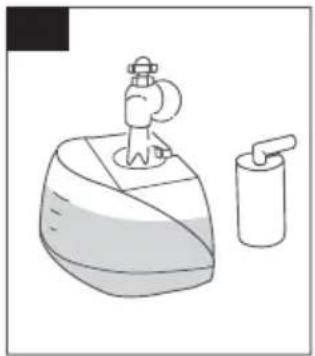
natural_image
Simple line drawing of a washing machine with a side arm and a soap dispenser (no text or symbols)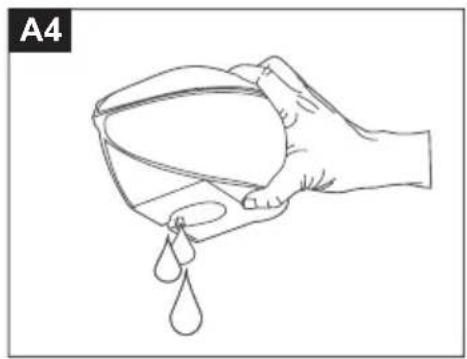
natural_image
Line drawing of a hand holding a cup with liquid droplets (no text or symbols)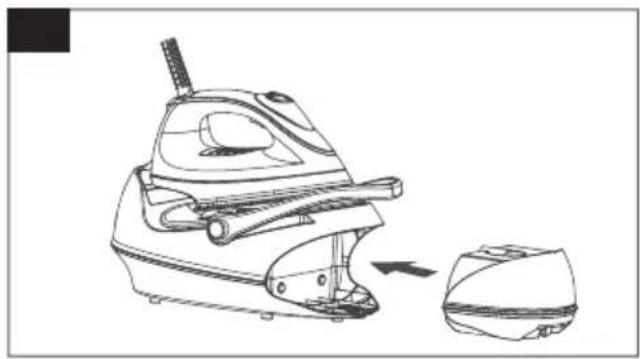
natural_image
Line drawing of a steam iron with a side view showing the cutting edge (no text or symbols)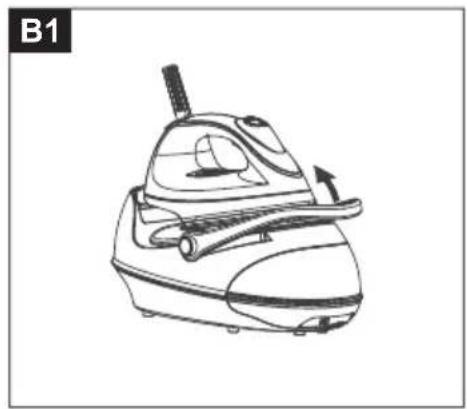
natural_image
Line drawing of a steam iron with handle and side arm (no text or symbols)
natural_image
Line drawing of a car seat with attached straps and buttons (no text or symbols)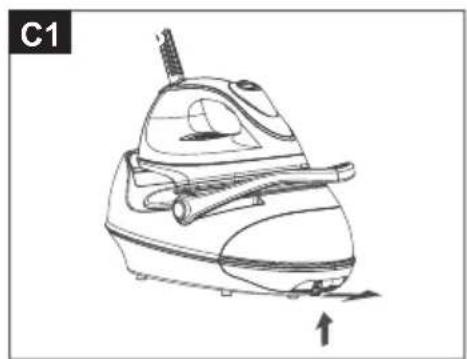
natural_image
Line drawing of a steam iron with handle and side arm, showing motion direction (no text or symbols)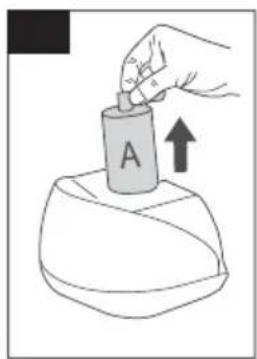
natural_image
Hand pouring liquid into a container labeled 'A' with an upward arrow, no text or symbols present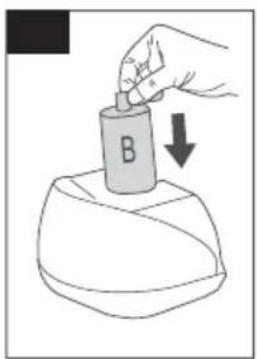
text_image
BCustomer service points:
Bureaux de service Après-vente:
Klantenservice:

text_image
BEEMElements of Lifestyle
BEEM GmbH
Subject to printing error.
For customer service in other countries, please contact your local retailer.