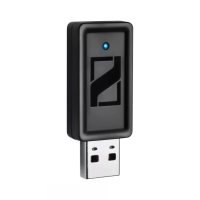
BTD 500 USB - Hi-fi system SENNHEISER - Free user manual and instructions
Find the device manual for free BTD 500 USB SENNHEISER in PDF.



| Product type | Bluetooth USB audio adapter |
| Brand | Sennheiser |
| Model | BTD 500 USB |
| Dimensions (L × H × D) | 47 × 18 × 9 mm |
| Weight | 6 g |
| Bluetooth version | 3.0 |
| Range | Up to 10 m |
| Bluetooth profiles | A2DP, AVRCP, HSP |
| Audio codecs | SBC, apt-X |
| Output power | 2.5 mW |
| Power supply | USB port |
| Operating temperature | +10 °C to +40 °C |
| Storage temperature | -20 °C to +60 °C |
| Operating humidity | 20 to 85 % non-condensing |
| Main functions | Wireless music listening, hands-free calls, apt-X audio quality |
| Care and cleaning | Soft, dry cloth |
| Safety | Keep 20 cm away from pacemakers, avoid extreme temperatures |
| Spare parts and repairability | 24-month warranty, no specific spare parts |
| General information | Compliant with FCC, IC, CE. Bluetooth QD ID: B018607 |
Frequently Asked Questions - BTD 500 USB SENNHEISER
User questions about BTD 500 USB SENNHEISER
0 question about this device. Answer the ones you know or ask your own.
Ask a new question about this device
Download the instructions for your Hi-fi system in PDF format for free! Find your manual BTD 500 USB - SENNHEISER and take your electronic device back in hand. On this page are published all the documents necessary for the use of your device. BTD 500 USB by SENNHEISER.
USER MANUAL BTD 500 USB SENNHEISER
natural_image
Close-up of a black USB flash drive with a metallic port and internal slots (no text or symbols visible)Instruction manual
Notice d'emploi
Bedienungsanleitung
Important safety information
▶ Please read this instruction manual carefully and completely before using the product.
▶ Always include this instruction manual when passing the product on to third parties.
▶ Do not use an obviously defective product.
Preventing damage to health and accidents
Keep this product at least 20 cm away from cardiac pacemakers. Radio waves can impair the operation of pacemakers.
Keep the product, accessory parts and packaging away from children and pets to prevent accidents and choking hazards.
Preventing damage to the product and malfunctions
▶ Always keep the product dry and do not expose it to extreme temperatures (hairdryer, heater, extended exposure to sunlight, etc.) to avoid corrosion or deformation.
▶ Only clean the product with a soft, dry cloth.
Only use the product in environments in which wireless Bluetooth® technology is permitted.
The radio waves of a Bluetooth product can impair the operation of electronic and medical devices. Do not use the product in medical facilities, trains and aircraft, or close to automatic doors, automatic fire alarms or other automatically controlled devices.
Intended use/Liability
The BTD 500 USB is a wireless stereo audio transmitter and receiver for PCs and laptops (USB) that allows you to listen to music and make calls from softphones (e.g. Skype) without requiring any cables.
It is considered improper use when the product is used for any application not named in this instruction manual.
Sennheiser does not accept liability for damage arising from abuse or misuse of this product and its attachments/accessories.
Sennheiser is not liable for damages to USB devices that are not consistent with the USB specifications.
Sennheiser is not liable for damages resulting from the loss of connection due to flat or overaged rechargeable batteries or exceeding the Bluetooth transmission range.
BTD 500 USB
If your audio source, PC or laptop does not support Bluetooth technology or apt-X ^TM , you can use the BTD 500 USB adapter. The adapter allows you to add Bluetooth or apt-X to your devices.
Bluetooth
Bluetooth wireless technology provides an interface for wireless communication between your audio source, PC or laptop and other devices (e.g. headsets).
apt-X
With apt-X audio coding, you can be assured of crisp, pure and full stereo sound. It allows you to not only hear, but experience and feel the audio as it was intended. Utilizing apt-X, Bluetooth technology can now offer wireless audio quality that is indistinguishable from the highest quality wired connection.
Delivery includes
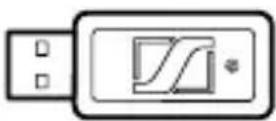
BTD 500 USB adapter
Instruction manual
HeadSetup

The HeadSetup software can be downloaded free of charge from our website at www.senncom.com/headsetup.
The software establishes a connection between your headset, the BTD 500 USB and the softphone installed on your PC and enables a firmware update.
Connecting the BTD 500 USB
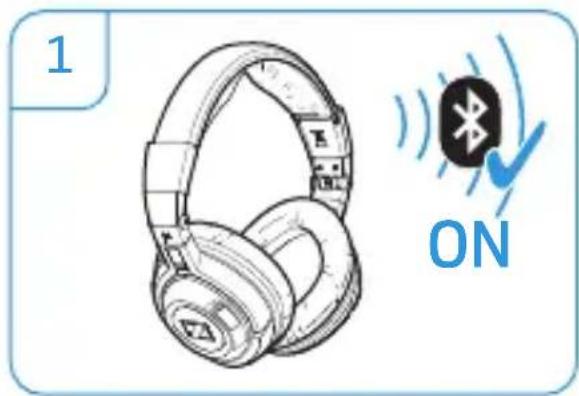
1 Activate pairing mode on your Bluetooth headset.
2 Plug the adapter into the USB port.
natural_image
Illustration of a pair of headphones with sound waves and a 'ON' button, no text or symbols present.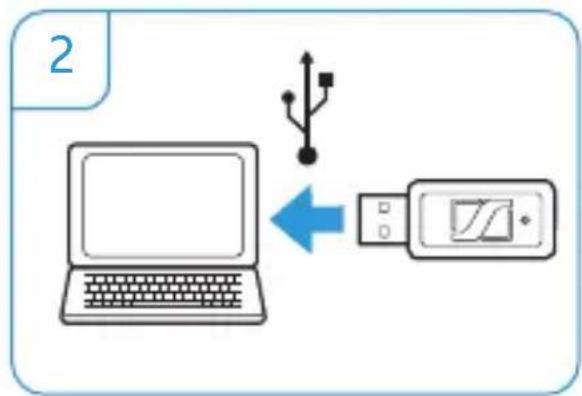
flowchart
graph TD
    A["Laptop"] -->|USB| B["Device"]
    style A fill:#f9f,stroke:#333
    style B fill:#ccf,stroke:#333
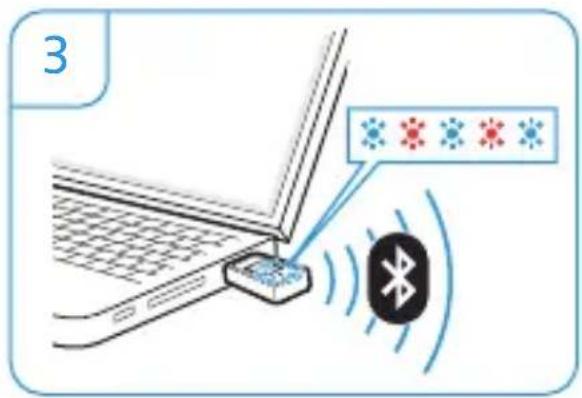
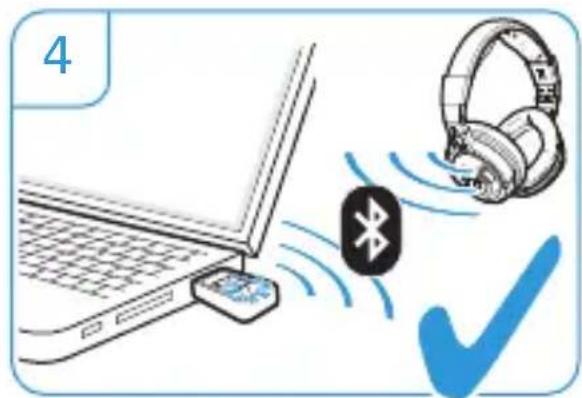
When you connect the adapter for the first time, it switches to pairing mode (3) and automatically connects to your Bluetooth headset (4).
If the adapter cannot detect a Bluetooth headset within 5 minutes, the LED goes off.
▶ Restart the procedure.
Pairing to another headset
▶ Activate pairing mode on your Bluetooth headset.
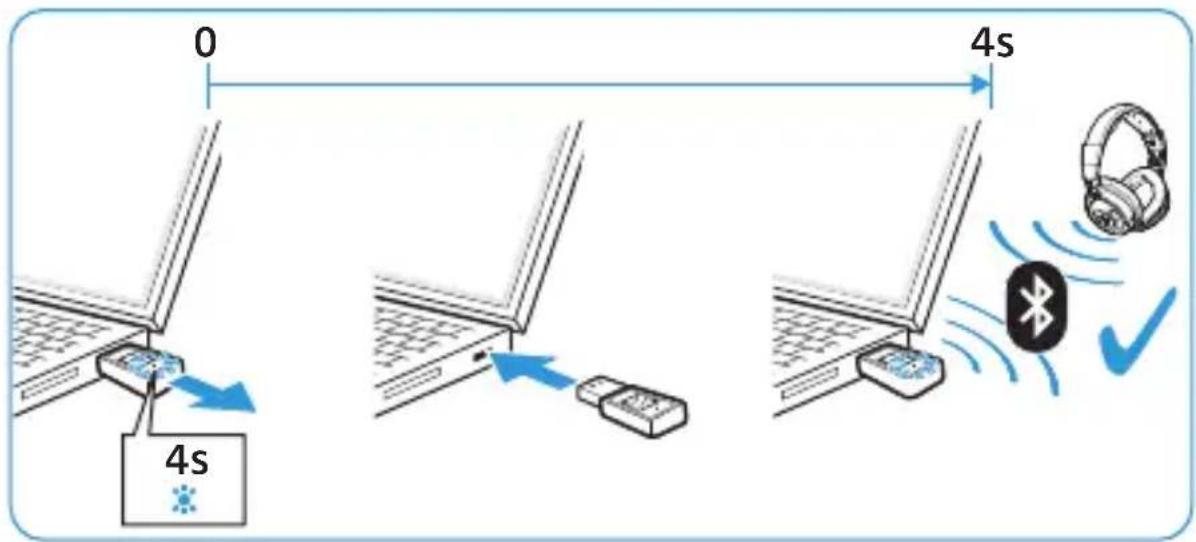
Plug the adapter into the USB port. The LED lights up blue for 4 seconds.
▶ Within this 4-second period, remove the adapter from the USB port and then plug it back in. The adapter switches to pairing mode and connects to your Bluetooth headset.
LED overview
During setup
| Pairing | ⊥  ⊥... ⊥... | pairing mode |
⊥  | successful | |
⊥  | failed | |
⊥  | pairing duration | |
| Connection | ⊥  | connecting |
⊥  | connected |
In use
| Calls |  | incoming call |
 | outgoing/active call | |
| Music streaming |  | standard quality (SBC) |
 | high quality (apt-X) |
Settings in the operating system
Most computers will automatically recognize the connected adapter as the default audio device; the audio signal is then transmitted to your Bluetooth headset.
To manually set your adapter as the default audio device:
Microsoft® Windows® 7
In the Control Panel, select "Sound".
In the "Playback", "Recording" and „Communication" tabs, select "BTD 500 USB" as the default device.
Apple Mac OS ^® X
In System Preferences, select "Sound".
Click the "Output" tab.
▶Select "BTD 500 USB".
Technical data
Weight 6 g
Dimensions 47 x 18 x 9 mm
(W x H x D)
Operating temperature range +10°C
(+50°F) to
+40°C (+104°F)
Relative humidity (operation) 20 to 85%,
non-condensing
Storage temperature range
-20^ C (-4^ F) to
+60°C (140°F)
Relative humidity (storage) 10 to 95%,
non-condensing
Output power BTD 500 USB 2.5 mW
Bluetooth
Bluetooth version 3.0
Range up to 10 m
Transmission frequency 2.4 GHz
Profiles A2DP, AVRCP, HSP
Codecs SBC, apt-X
Manufacturer declarations
Sennheiser electronic GmbH & Co. KG gives a warranty of 24 months on this product. For the current warranty conditions, please visit our website at www.sennheiser.com or contact your Sennheiser partner.
In compliance with the following requirements
• RoHS Directive (2002/95/EC)
• WEEE Directive (2002/96/EC)
Please dispose of this product at the end of its operational lifetime by taking it to your collection point or recycling center for such equipment.
CE Conformity
• R&TTE Directive (1999/5/EC)
• EMC Directive(2004/108/EC)
- Low Voltage Directive (2006/95/EC)
The declaration is available at www.sennheiser.com.
Before putting the product into operation, please observe the respective country-specific regulations!
In compliance with:
USA FCC ID: DMOBTD300U  | ||
| Canada IC: 2099A-BTD300U | ||
| Europe |  | |
| Australia/New Zealand |  | |
| Singapore |  | |
| Bluetooth |  | QD ID : B018607 |
The Bluetooth® word mark and logos are registered trademarks owned by Bluetooth SIG, Inc. and any use of such marks by Sennheiser electronic GmbH & Co. KG is un license.
Other product and company names mentioned in this instruction manual may be the trademarks or registered trademarks of their respective owners.
Statements regarding FCC and Industry Canada
This device complies with Industry Canada licence-exempt RSS standard(s). Operation is subject to the following two conditions: (1) this device may not cause interference, and (2) this device must accept any interference, including interference that may cause undesired operation of the device.
FCC User Information
This equipment has been tested and found to comply with the limits for a Class B digital device of the FCC Rules. These limits are designed to provide reasonable protection against harmful interference in a residential installation. This equipment generates uses and can radiate radio frequency energy and, if not installed and used in accordance with the instructions, may cause harmful interference to radio communications. However, there is no guarantee that interference will not occur in a particular installation. If this equipment does cause harmful interference to radio or television reception, which can be determined by turning the equipment off and on, the user is encouraged to try to correct the interference by one or more of the following measures:
- Reorient or relocate the receiving antenna.
- Increase the separation between the equipment and receiver.
- Connect the equipment into an outlet on a circuit different from that to which the receiver is connected.
- Consult the dealer or an experienced radio/ TV technician for help.
Changes or modifications made to this equipment not expressly approved by Sennheiser electronic Corp. may void FCC authorization to operate this equipment.
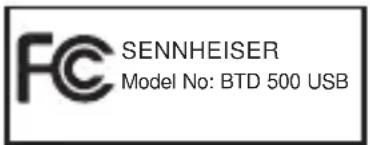
FCC Declaration of Conformity (DoC)

SENNHEISER
Model No: BTD 500 USB
We,
Sennheiser Electronic Corporation
One Enterprise Drive • Old Lyme •
CT 06371 • USA
Tel: +1 (860) 434 9190, ext. 144
declare the above device comply with the requirements of Federal Communications Commission.
Responsible Party: John Falcone
RF Radiation Exposure Information
Since the radiated output power of this device is far below the FCC radio frequency exposure limits, it is not subjected to routine RF exposure evaluation as per Section 2.1093 of the FCC rules.
natural_image
Illustration of a pair of headphones with sound waves and a 'ON' button, no text or symbols present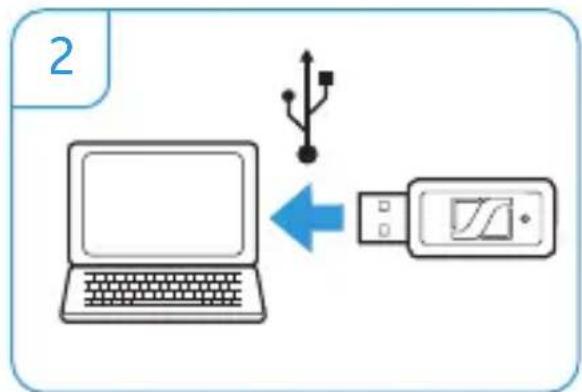
flowchart
graph TD
    A["Laptop"] -->|USB| B["Digital Display"]
    style A fill:#f9f,stroke:#333
    style B fill:#ccf,stroke:#333
• Directive RoHS (2002/95/CE)
• Directive WEEE (2002/96/CE)
• Directive R&TTE (1999/5/CE)
• Directive CEM (2004/108/CE)
• Directive Basse Tension (2006/95/CE)
FCC Declaration of Conformity (DoC)
We,
Sennheiser Electronic Corporation
One Enterprise Drive • Old Lyme •
CT 06371 • USA
Tel: +1 (860) 434 9190, ext. 144
declare the above device comply with the requirements of Federal Communications Commission.
Responsible Party: John Falcone
natural_image
Illustration of a pair of headphones with sound waves and a 'ON' button, no text or symbols present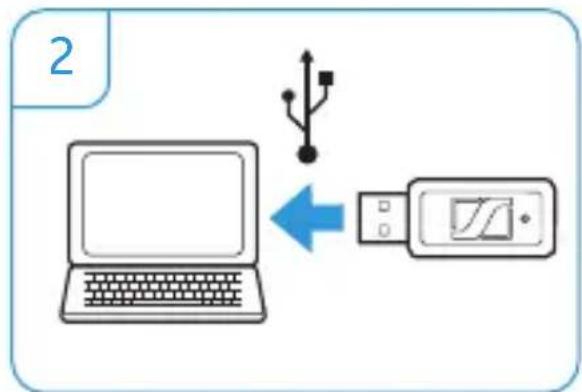
flowchart
graph TD
    A["Laptop"] -->|USB| B["Device"]
    style A fill:#f9f,stroke:#333
    style B fill:#ccf,stroke:#333
- Directiva RoHS (2002/95/CE)
• Directiva WEEE (2002/96/CE)
natural_image
Illustration of a pair of headphones with sound waves and a 'ON' button, no text or symbols present.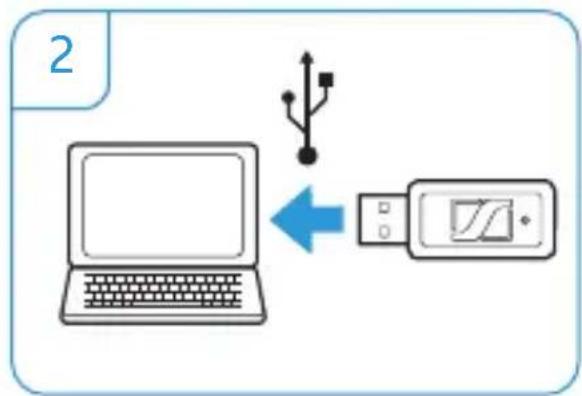
flowchart
graph TD
    A["Laptop"] -->|Blue Arrow| B["USB Device"]
    style A fill:#f9f,stroke:#333
    style B fill:#ccf,stroke:#333
natural_image
Illustration of a pair of headphones with sound waves and a 'ON' button, no text or symbols present.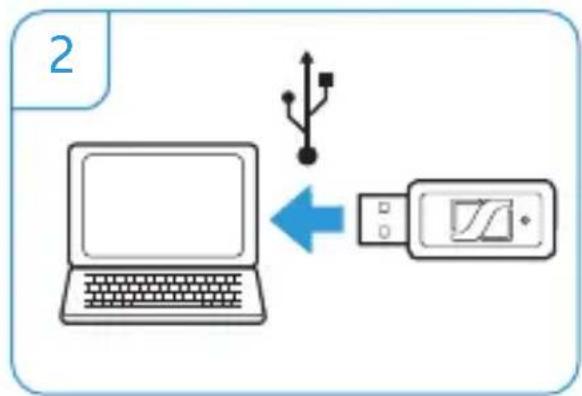
flowchart
graph TD
    A["Laptop"] -->|Blue Arrow| B["USB Device"]
    style A fill:#f9f,stroke:#333
    style B fill:#ccf,stroke:#333
natural_image
Illustration of a pair of headphones with a Bluetooth icon and 'ON' button, no text or symbols present.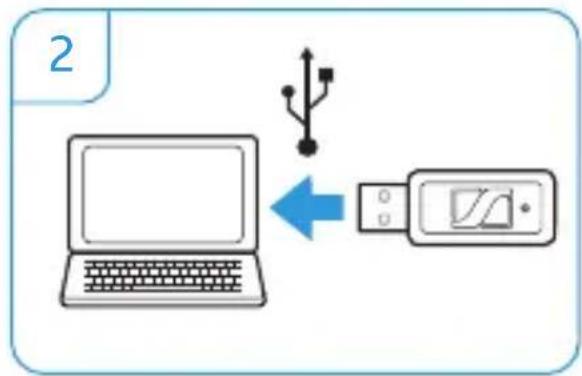
flowchart
graph LR
    A["Laptop"] -->|USB| B["Device"]
    style A fill:#f9f,stroke:#333
    style B fill:#ccf,stroke:#333
- Directiva RoHS (2002/95/CE)
- Directiva REEE (2002/96/CE)

Am Labor 1, 30900 Wedemark, Germany
www.sennheiser.com
Printed in China, Publ. 11/11, A02