Cozzil - Exercise bike Capital Sports - Free user manual and instructions
Find the device manual for free Cozzil Capital Sports in PDF.


User questions about Cozzil Capital Sports
0 question about this device. Answer the ones you know or ask your own.
Ask a new question about this device
Download the instructions for your Exercise bike in PDF format for free! Find your manual Cozzil - Capital Sports and take your electronic device back in hand. On this page are published all the documents necessary for the use of your device. Cozzil by Capital Sports.
USER MANUAL Cozzil Capital Sports
Congratulations on purchasing this product. Please read and follow these instructions, in order to avoid damaging the item. We do not cover any damages that may arise from improper use of the item or the disregard of the safety instructions.
General Safety Notice
- Read all instructions before using.
- Do not place on or near a hot gas or electric burner or in a heated oven.
- To protect against a fire, electric shock or personal injury, do not immerse cord, electric plugs or device in water or other liquids.
- Do not expose the appliance to extreme temperatures. The appliance shall be used in moderate climates.
- Disconnect the appliance from the power source if it is not going to be used for a long time, if there is a thunderstorm or if it isn't working properly.
- The use of attachments that are not recommended by the appliance manufacturer may result in fire, electric shock or personal injury.
- The appliance is not a toy. Do not let the children play with it. Never let children insert foreign objects into the appliance.
- Do not use the appliance for other than intended use. This appliance has been designed solely for domestic use; the manufacturer's liability shall not be engaged in the event of any professional use, by any misuse or by any use not complying with the operating instructions.
- Save these instructions.
Special safety advice for the use of sports equipment
- Check all the bolts, nuts and other connections before using the machine for the first time to ensure the machine is in the safe condition.
- Place a suitable base (e.g. rubber mat, wooden board etc.) beneath the machine in the area of assembly to avoid dirt.
- Before beginning the training, remove all objects within a radius of 2 meters from the machine.
- Your health can be affected by incorrect or excessive training. Consult a doctor before beginning the training program. He can define the maximum setting (Pulse. Watts. Duration of training etc) to which you may train yourself and can get precise information during training. This machine is not suitable for therapeutic purpose.
Only train on the machine when it is in correct working way. Use only original spare parts for any necessary repairs. - This machine can be used for only one person's training at a time.
- Wear training clothes and shoes that are suitable for fitness training with the machine. Your training shoes should be appropriate for the trainer.
If you have a feeling of dizziness, sickness or other abnormal symptoms, please stop training and consult a doctor immediately. - People such as children and handicapped persons should only use the machine in the presence of another person who can give aid and advice.
- The power of the machine increases with increasing the speed, and the reverse. The machine is equipped with adjustable knob that can adjust the resistance.
Maximum user's weight is 120KGS.
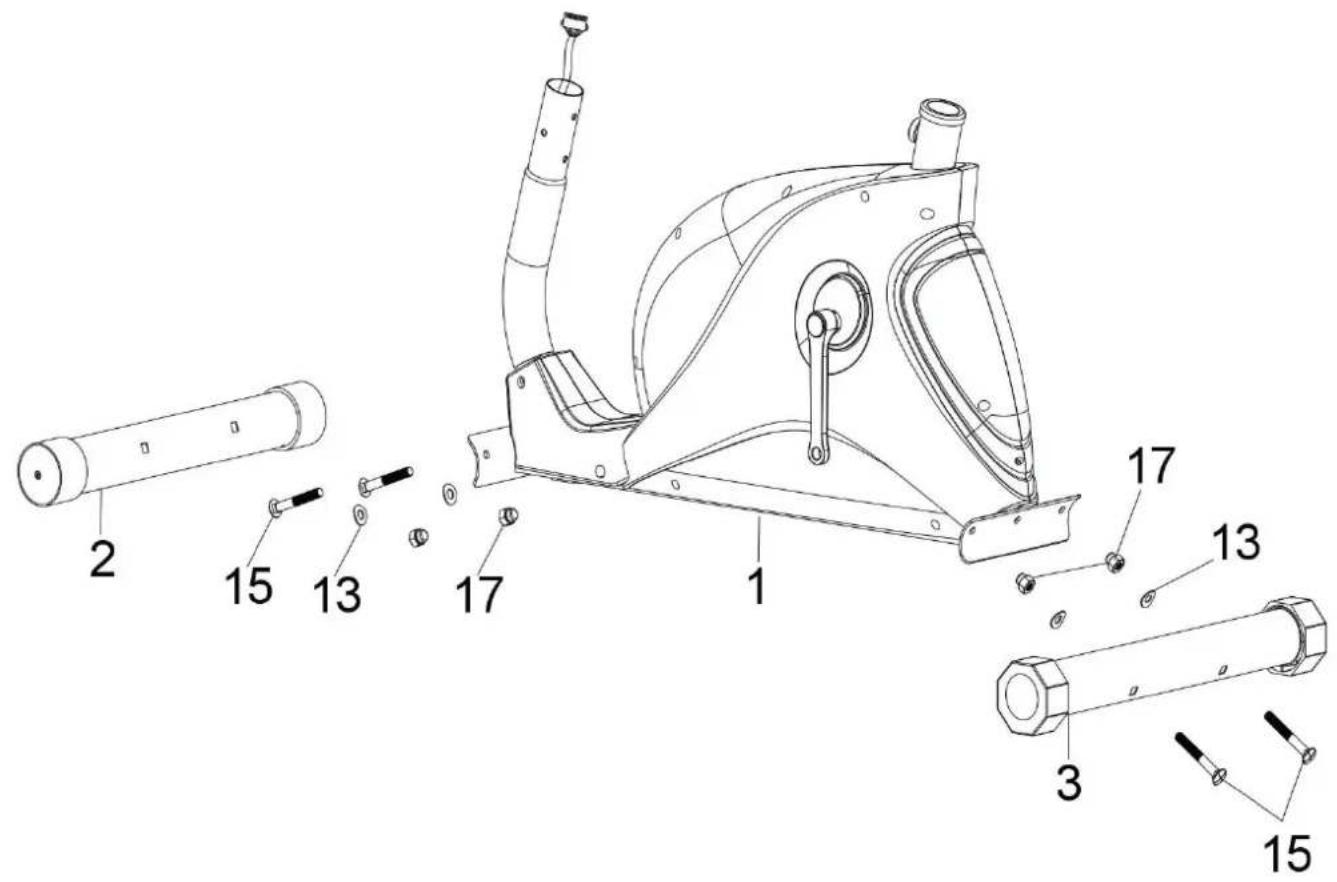
Attach the front stabilizer (2) to the front of the main frame (1), fasten with two carriage bolts (15), two curved washers (13) and two domed nuts (17).
Attach the rear stabilizer (3) to the rear of the main frame (1), fasten with two carriage bolts (15), two curved washers (13) and two domed nuts (17).
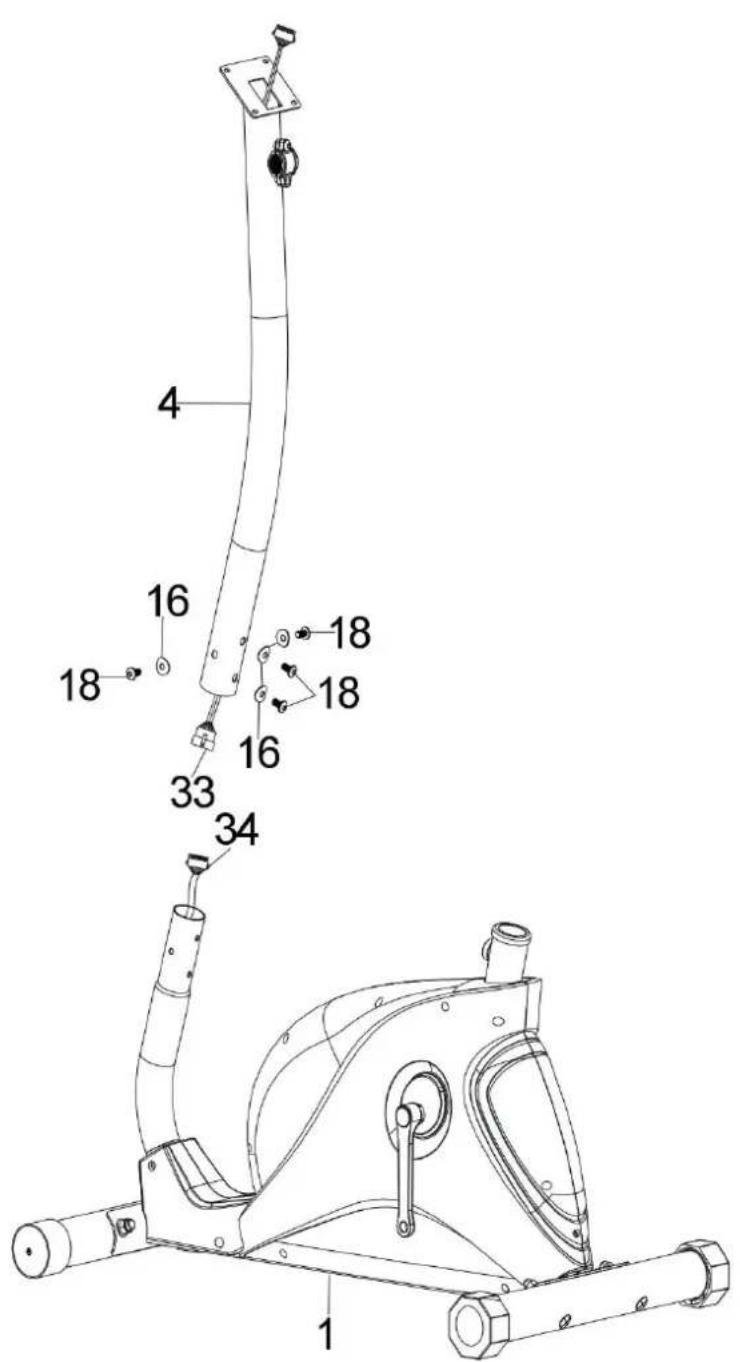
Connect the middle sensor cable (33) from the front support (4) to the lower sensor cable (34).
Insert the front support (4) into the main frame (1) and fasten with four allen bolts (18) and four curved washers (16).
Schritt 3 Step 3
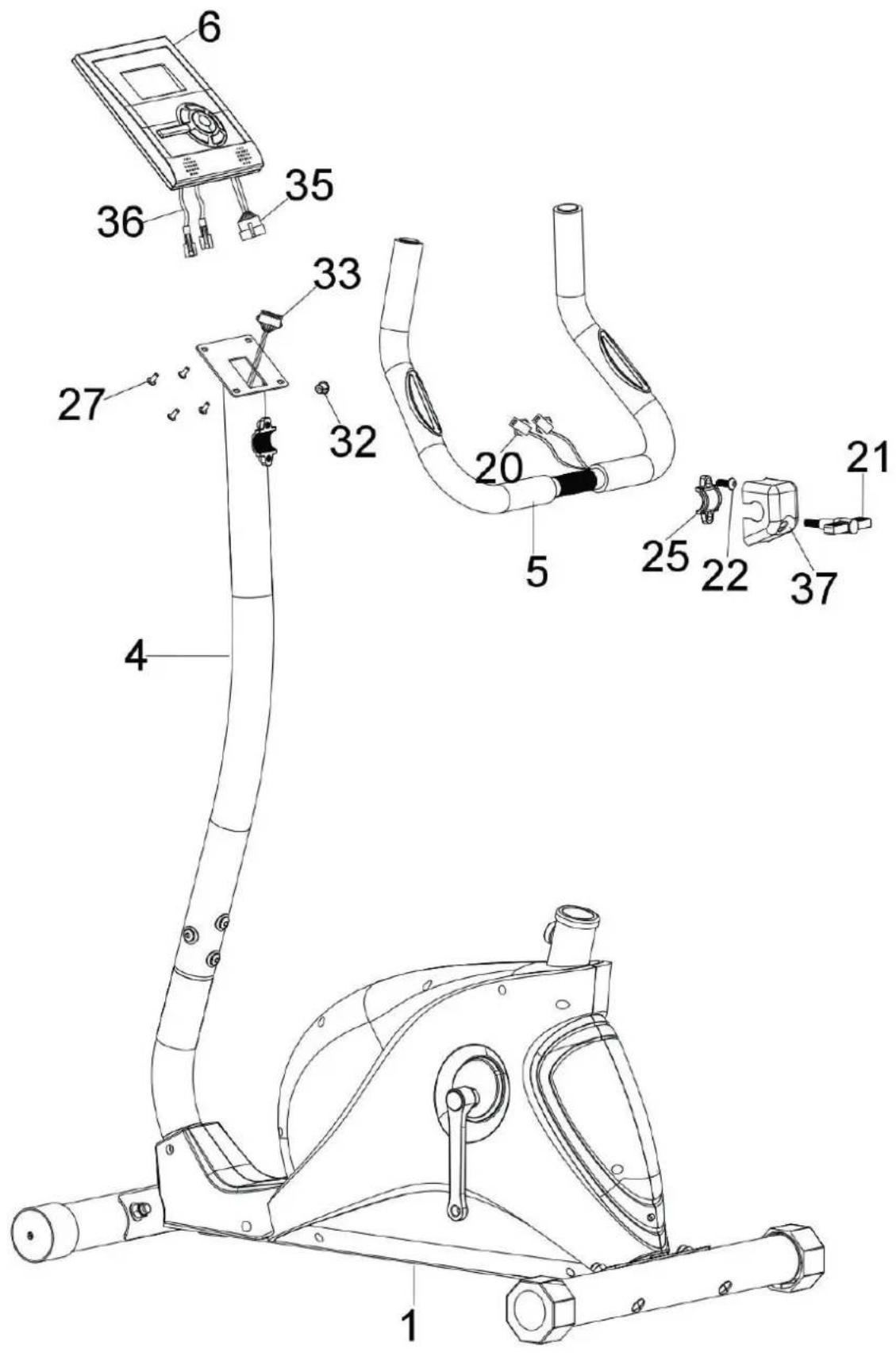
Take off the four screws (27) which are pre-assembled on the meter (6).
- Attach the handlebar (5) to the front support (4) and fasten with one clamp (25), one allen bolt (22), one clamp cover (37) and one T type knob (21).
- Connect the upper sensor cable (35) to the middle sensor cable (33).
- Put the Lower pulse wires (20) through the hole on the front support (4) and pull them out from the hole of front support (4), then cover with one grommet (32).
- Connect the upper pulse wires (36) to the lower pulse wires (20).
- Attach the meter (6) to the front support (4) and fasten with four screws (27).
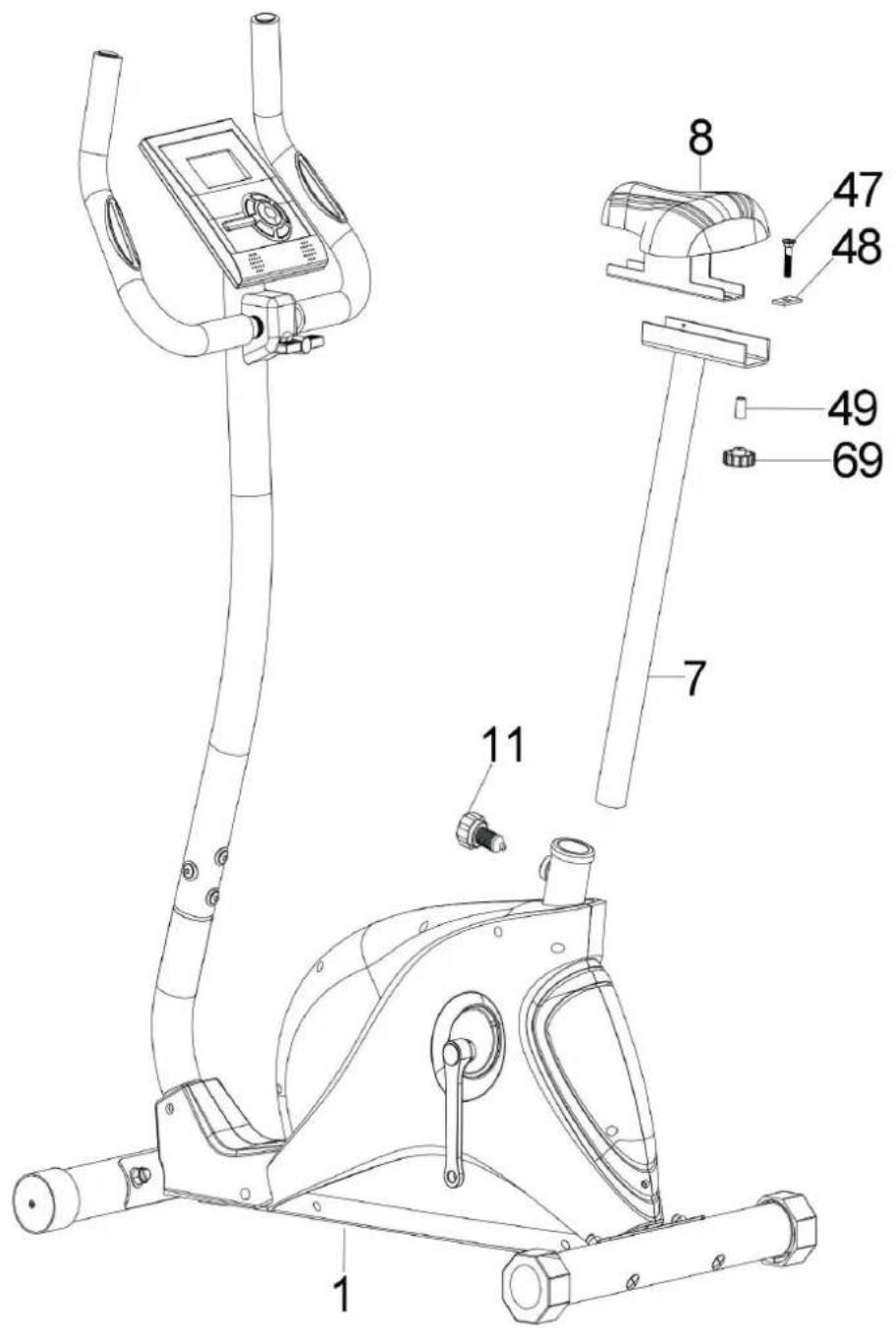
Attach the seat (8) to the seat post (7) and fasten with one carriage bolt (47), one square washer (48), one sleeve (49) and one club knob (69).
Insert the seat post (7) into the main frame (1) and fasten with a quick release knob (11) which could adjust the height to your desired position.
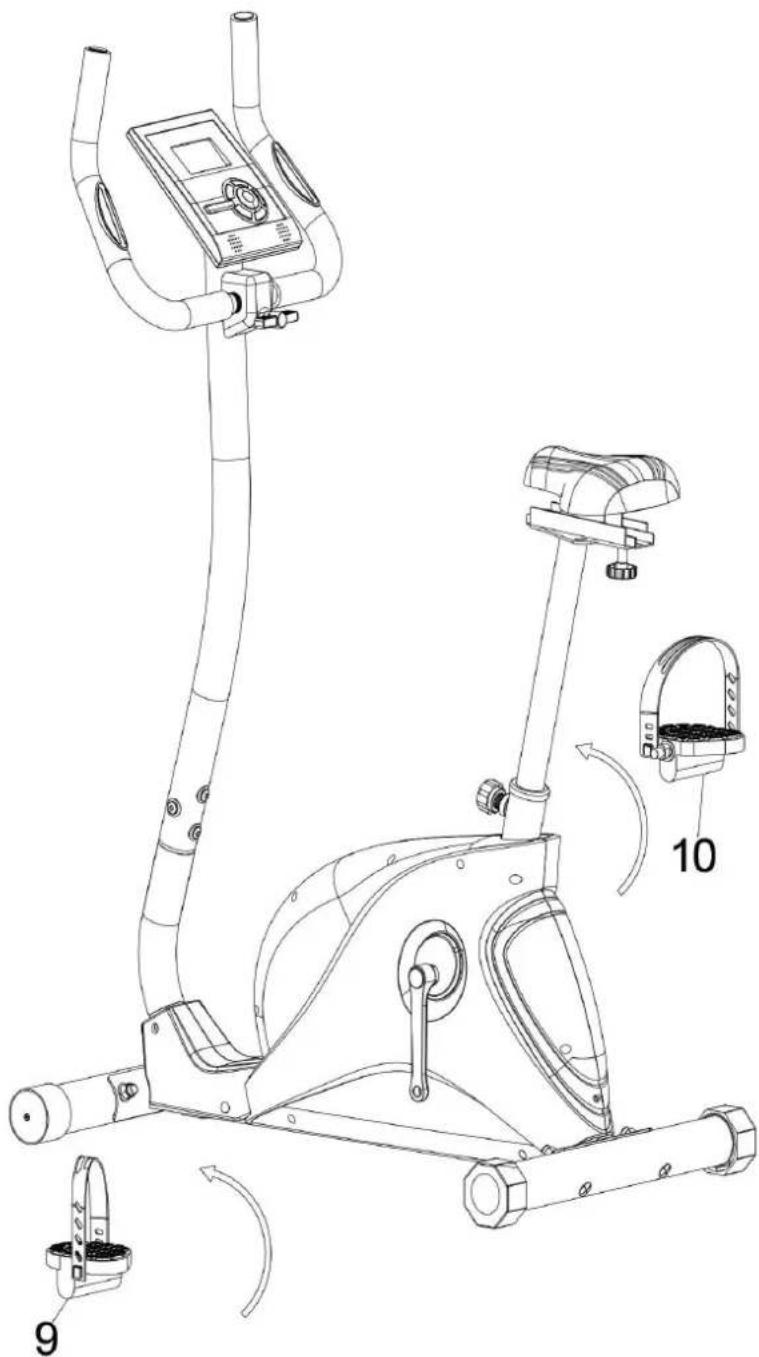
The pedals (9 & 10) are marked L and R - Left and Right. Connect them to their appropriate crank arms on the main frame. The crank right arm is on the right-hand side of the cycle as you sit on it. Note: the right pedal should be threaded on clockwise and the left pedal anticlockwise
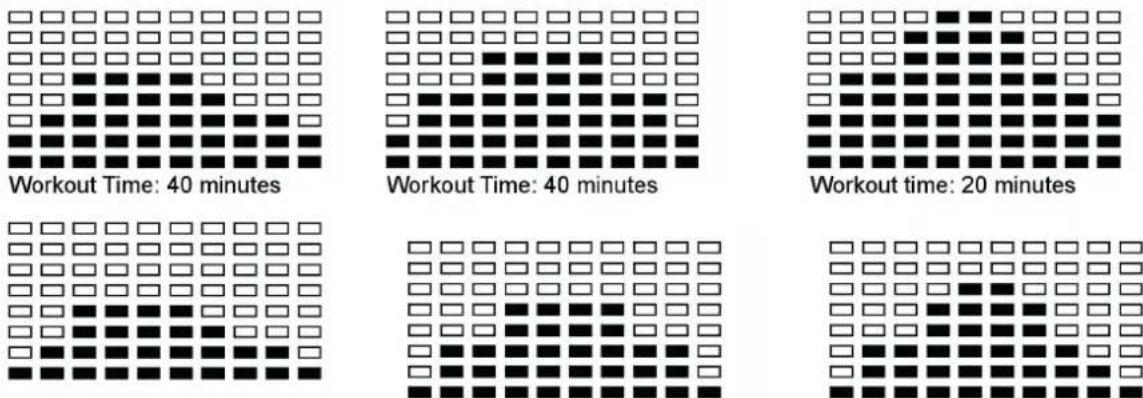
Steps, Hill, Rolling, Valley, Fat Burn, Ramp, Mountain, Intervals, Random, Plateau, Fartlek, Precipice Program
Program 18 = 55% Max H.R.C. -- Target H.R. = (220 - AGE) x 55% Program 19 = 65% Max H.R.C. -- Target H.R. = (220 - AGE) x 65% Program 20 = 75% Max H.R.C. -- Target H.R. = (220 - AGE) x 75% Program 21 = 85% Max H.R.C. -- Target H.R. = (220 - AGE) x 85% Program 22 = Target H.R.C. -- Workout bis zur Zielherzfreienz.
Plug in the adaptor - the computer will produce a beep sound and turn on the computer in manual mode.
Selecting and editing programs:
Use the UP/DOWN keys to select program mode and then press ENTER to confirm your exercise mode.
In Manual mode, the computer will use the UP or DOWN keys to set up your exercise TIME, DISTANCE, CALORIES, PULSE.
- Press the START/STOP key to start exercise.
- When you reach the target, the computer will produce beep sounds and then stop.
If you set up more than one target and you would like to reach next target, press START/STOP key to keep on exercise.
Please note: The monitor will entry SLEEP mode (LCD off) when there is no signal input and no key be pressed after 4 minutes. Press the screen to start the monitor.
Buttons:
| START/STOP | a. Quick Start function: Allows you to start the computer without selecting a program. Manual workout only. Time automatically begins to count up from zero b. During the exercise mode, press the key to STOP exercise. c. During the stop mode, press the key to START exercise. |
| UP/DOWN | a. Press the key to increase/decrease the resistance during exercise mode. b. During the setting mode, press the key to increase/decrease the value of Time, Dis- tance, Calories, Age and select Gender and Program. |
| ENTER | a. During the setting mode, press the key to accept the current data entry. b. At the stop mode, by holding this key for over two seconds the user can reset all values to zero or default value. c. During setting the Clock, press this key can accept the setting hour and setting minute. |
| BODY FAT | Press the key to input your HEIGHT, WEKGHT, GENDER and AGE then to measure your body fat ratio, |
PULSE RECOVERY Press the key to activate heart rate recovery function.
Functions / Features
| TIME | Shows your elapsed workout time in minutes and seconds. Your computer will automat- tically count up from 0:00 to 99:59 in one second intervals. You can also program your computer to count down from a set value by using the UP and DOWN keys. If you continu exercising once the time has reached 0:00, the computer will begin beeping, and reset itself to the original time set, letting you know your workout is done. |
| DISTANCE Zeigt die gefahrene Distanz an (max 999.0 km) | |
| RPM Your pedal cadence. | |
| SPEED Displays your workout speed value in KM/MILE per hour. | |
| CALORIES | Your computer will estimate the cumulative calories burned at any given time during your workout. |
| PULSE Your computer displays your pulse rate in beats per minute during your workout. | |
| AGE | Your computer is age-programmable from 10 to 99 years. If you do not set an age, this function will always default to age 35. |
| TARGET PULS The heart rate you should maintain is called your Target Hear Rate in beats per minute. | |
| PULSE RECOVERY | During the START stage, leave the hands holding on grips or leave the chest transmitter attached and then press “PULSE RECOVERY” key, time starts counting from 00:60 - 00:59 - - to 00:00. As soon as 00:00 is reached, the computer will show your heart rate recovery status with the grade F1.0 to F6.0. |
| 1.0 = OUTSTANDING | |
| 1.0 < F < 2.0 = EXCELLENT | |
| 2.0 < F < 2.9 = GOOD | |
| 3.0 < F < 3.9 = FAIR | |
| 4.0 < F < 5.9 = BELOW AVERAGE | |
| 6.0 = POOR | |
| Note: If no pulse signal input then the computer will show “P” on the PULSE window. If the computer shows “ERR” on the message window, please re-press the PULSE RECOVERY key and please make sure your hands are keeping well on the grips or the chest transmit-ter is attached well. | |
| TEMPERATURE Displays the current temperature | |
Programs
(See appendix on p.36 for workout program diagrams)
Manual Program: Manual
P1 is a manual program. User can start exercise by pressing START/STOP key. The default resistance level is 5. Users may exercise in any desirous of resistance level (Adjusting by UP/DOWN keys during the workout) with a period of time or a number of calories or a certain distance. Operation:
- Use UP/DOWN keys to select the MANUAL (P1) program.
- Press the ENTER key to enter MANUAL program.
The TIME will flash and you can press UP or DOWN keys to set your exercise TIME. Press ENTER key to confirm your desired TIME.
The DISTANCE will flash and you can press UP or DOWN keys to set your target DISTANCE. Press ENTER key to confirm your desired DISTANCE.
The CALORIES will flash and you can press UP or DOWN keys to set your exercise CALORIES. Press ENTER key to confirm your desired CALORIES.
The PULSE will flash and then you can press UP or DOWN keys to set your exercise PULSE. Press ENTER key to confirm your desired Pulse. - Press the START/STOP key to begin exercise.
Preset Programs:
Steps, Hill, Rolling, Valley, Fat Burn, Ramp, Mountain, Intervals, Random, Plateau, Fartlek, Precipice Program
PROGRAM 2 to PROGRAM 13 is the preset programs. Users can exercise with different level of loading in different intervals as the profiles show. Users may exercise in any desirous of resistance level (Adjusting by UP/DOWN keys during the workout) with a period of time or a number of calories or a certain distance.
- Use UP/DOWN keys to select one of the above programs from P2 to P13.
- Press the ENTER key to enter your workout program.
The TIME will flash and you can press UP or DOWN keys to setting your exercise TIME. Press ENTER key to confirm your desired TIME.
The DISTANCE will flash and you can press UP or DOWN keys to setting your target DISTANCE. Press ENTER key to confirm your desired DISTANCE.
The CALORIES will flash and you can press UP or DOWN keys to setting your exercise CALORIES. Press ENTER key to confirm your desired CALORIES.
The PULSE will flash and then you can press UP or DOWN keys to set your exercise PULSE. Press ENTER key to confirm your desired Pulse. - Press the START/STOP key to begin exercise.
User Setting Program: User 1, User 2, User 3, User 4
Program 14 to 17 is the user setting program. Users are free to create the values in the order of TIME, DISTANCE, CALORIES and the resistance level in 10 columns. The values and profiles will be stored in the memory after setup. Users may also change the ongoing loading in each column by UP/DOWN keys, and they will not change the resistance level stored in the memory.
- Use UP/DOWN keys to select the USER program from P14 to P17.
- Press the ENTER key to enter your workout program.
The column 1 will flash, and then use the UP/DOWN keys to create your personal exercise profile. Press ENTER to confirm your first column of exercise profile. The default level is load 1.
The column 2 will flash, and then use the UP/DOWN keys to create your personal exercise profile. Press ENTER to confirm your second column of exercise profile. - Follow the above description 5 and 6 to finish your personal exercise profiles. Press ENTER to confirm your desired exercise profile.
The TIME will flash and you can press UP or DOWN keys to setting your exercise TIME. Press ENTER key to confirm your desired TIME.
The DISTANCE will flash and you can press UP or DOWN keys to setting your target DISTANCE. Press ENTER key to confirm your desired DISTANCE.
The CALORIES will flash and you can press UP or DOWN keys to setting your exercise CALORIES. Press ENTER key to confirm your desired CALORIES.
The PULSE will flash and then you can press UP or DOWN keys to set your exercise PULSE. Press ENTER key to confirm your desired Pulse. - Press the START/STOP key to begin exercise.
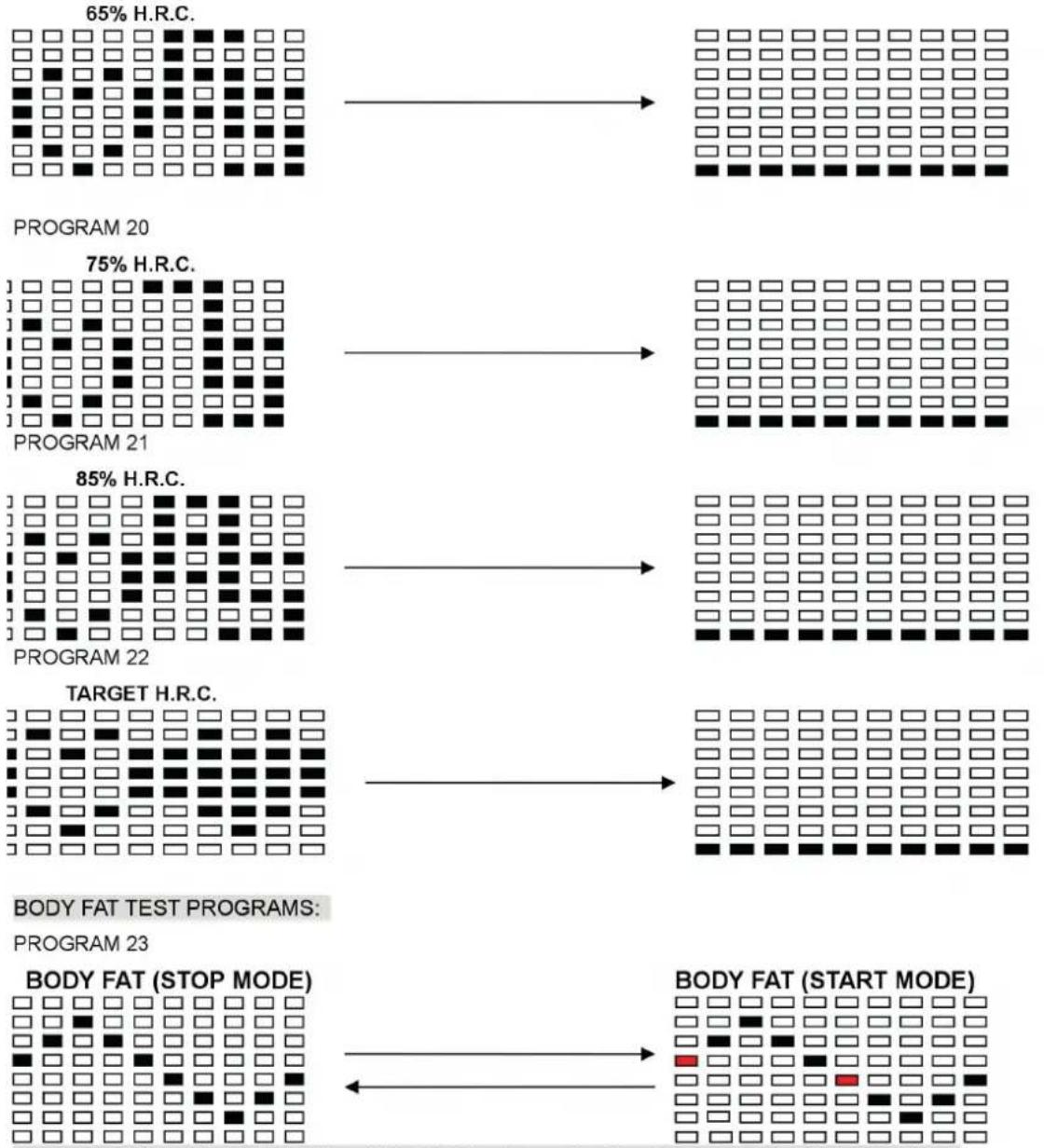
Heart Rate Control Program: 55% H.R.C., 65% H.R.C., 75% H.R.C., 85% H.R.C., Target H.R.C.
Program 18 to Program 22 is the Heart Rate Control Programs and Program 22 is the Target Heart Rate Control program.
Program 18 is the 55% Max H.R.C. -- Target H.R. = (220 - AGE) x 55%
Program 19 is the 65% Max H.R.C. -- Target H.R. = (220 - AGE) x 65%
Program 20 is the 75% Max H.R.C. -- Target H.R. = (220 - AGE) x 75%
Program 21 is the 85% Max H.R.C. -- Target H.R. = (220 - AGE) x 85%
Program 22 is the Target H.R.C. - - Workout by your target heart rate value.
Users can exercise according to your desired Heart Rate program by setting your AGE, TIME, DISTANCE, CALORIES or TARGET PULSE. In these programs, the computer will adjust the resistance level according to the heart rate detected. For example, the resistance level may increase every 20 seconds while the heart rate detected is lower than the TARGET H.R.C. Also the resistance level may decrease every 20 seconds while the heart rate detected is higher than the TARGET H.R.C.
- Use UP/DOWN keys to select one of the heart rate control program from P18 to P22.
- Press the ENTER key to enter your workout program
The AGE will flash at P18 to P21 programs and you can press UP/DOWN to set your AGE. The default age is 35. - At program 22, the TARGET PULSE will flash and you can press UP or DOWN keys to set your TARGET PULSE between 80 to 180. The default TARGET PULSE is 120.
The TIME will flash and you can press UP or DOWN keys to set your exercise TIME. Press ENTER key to confirm your desired TIME.
The DISTANCE will flash and you can press UP or DOWN keys to set your target DISTANCE. Press ENTER key to confirm your desired DISTANCE.
The CALORIES will flash and you can press UP or DOWN keys to set your exercise CALORIES. Press ENTER key to confirm your desired CALORIES. - Press the START/STOP key to begin exercise.
Body Fat Program: Body Fat
Program 23 is a special program design to calculate users' body fat ratio and to offer a specific loading profile for users. There are 3 body types divided according to the FAT% calculated.
Type1: BODY FAT% > 27
Type2: 27 BODY FAT% 20
Type3: BODY FAT % < 20
The computer will show the test results of FAT PERCENT, BMI and BMR.
- Use UP/DOWN keys to select the BODY FAT (P24) program.
- Press the ENTER key to enter your workout program.
The HEIGHT will flash and you can press UP or DOWN keys to set your HEIGHT. Press ENTER key to confirm your HEIGHT. The default HEIGHT is 170cm or 5'07" (5feet 7 inches). - The WEIGHT will flash and you can press UP or DOWN keys to set your WEIGHT. Press ENTER key to confirm your WEIGHT. The default WEIGHT is 70kgs or 155lbs.
The GENDER will flash and you can press UP or DOWN keys to select your sex. Number 1 means man and number 0 means female. Press ENTER key to confirm your Gender. The default sex is 1 (MAN).
The AGE will flash and you can press UP or DOWN keys to set your AGE. Press ENTER key to confirm your AGE. The default AGE is 35. - Press the START/STOP key to begin body fat measurement. If the window show E on the window, please make sure your hands are attached well on the grips or the chest belt is touch well on your body. Then press the START/STOP key again to begin body fat measurement.
After finished your measurement, the computer will show the values of BMR, BMI and FAT PERCENT on the LCD display. Furthermore, the computer will show your own exercise profile for your body type. - Press START/STOP key to begin exercise.
Additional Information
Sleep Mode: The computer will enter the sleep mode when there is no signal input and no keys be pressed after 4 minutes. You can press any key to wake up the computer.
BMI (Body Mass Index): BMI is a measure of body fat based on height and weight that applies to both adult men and women.
BMR (Basal Metabolic Rate): Your Basal Metabolic Rate (BMR) shows the number of calories your body needs to operate. This doesn't account for any activity, it's simply the energy needed to sustain a heartbeat, breathing and normal body temperature. It measures the body at rest, not sleep, at room temperature.
Error Messages
E1 (ERROR 1):
Normal state: During workout, when the monitor did not get the count signal from the gear motor more than 4 seconds and check under successive 3 times then the LCD will show E1.
Power on state: The gear motor will return to zero automatically, when the signal of motor cannot be detected for more than 4 seconds then the gear motor's driver will be cut off immediately and show the E1 on the LCD display. All the other digital and function mark are blank, and the output signals are cut off also.
E2 (ERROR 2): When the monitor read the memory data, if the I.D. code is not correct or the memory IC damages then the monitor will show E2 immediately at power on.
E3 (ERROR 3): After 4 seconds by start mode, the computer detects the faulty motor did not leave the zero point then the LCD bar displays "E3".
Disposal Considerations
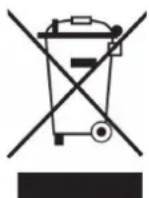
According to the European waste regulation 2002/96/EC this symbol on the product or on its packaging indicates that this product may not be treated as household waste. Instead it should be taken to the appropriate collection point for the recycling of electrical and electronic equipment. By ensuring this product is disposed of correctly, you will help prevent potential negative consequences for the environment and human health, which could otherwise be caused by inappropriate waste handling of this product. For more detailed information about recycling of this product, please contact your local council or your household waste disposal service.
Your product contains batteries covered by the European Directive. 2006/66/EC, which cannot be disposed of with normal household waste. Please check local rules on separate collection of batteries. The correct disposal of batteries helps prevent potentially negative consequences on the environment and human health.
Declaration of Conformity
Producer: Chal-Tec GmbH, Wallstraße 16, 10179 Berlin, Germany.
This product is conform to the following European Directives:
2014/30/EU (EMV)
2011/65/EU (RoHS)
Chere cliente, cher client,
Steps, Hill, Rolling, Valley, Fat Burn, Ramp, Mountain, Intervals, Random, Plateau, Fartlek, Precipice Program
Programme Heart Rate Control : 55% H.R.C., 65% H.R.C., 75% H.R.C., 85% H.R.C., Target H.R.C.
Programme 18 = 55% Max H.R.C. -- Target H.R. = (220 - AGE) x 55% Programme 19 = 65% Max H.R.C. -- Target H.R. = (220 - AGE) x 65% Programme 20 = 75% Max H.R.C. -- Target H.R. = (220 - AGE) x 75% Programme 21 = 85% Max H.R.C. -- Target H.R. = (220 - AGE) x 85% Programme 22 = Target H.R.C. -- Entrainement à la fréquence cardiaque cible.
PROGRAM 19
One of the Following Six Profiles Will Display Automatically after Measuring Your BODY FAT: