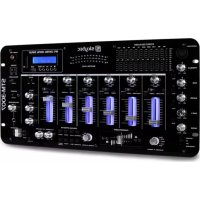
6 channel mixer - DJ Equipment Skytec - Free user manual and instructions
Find the device manual for free 6 channel mixer Skytec in PDF.

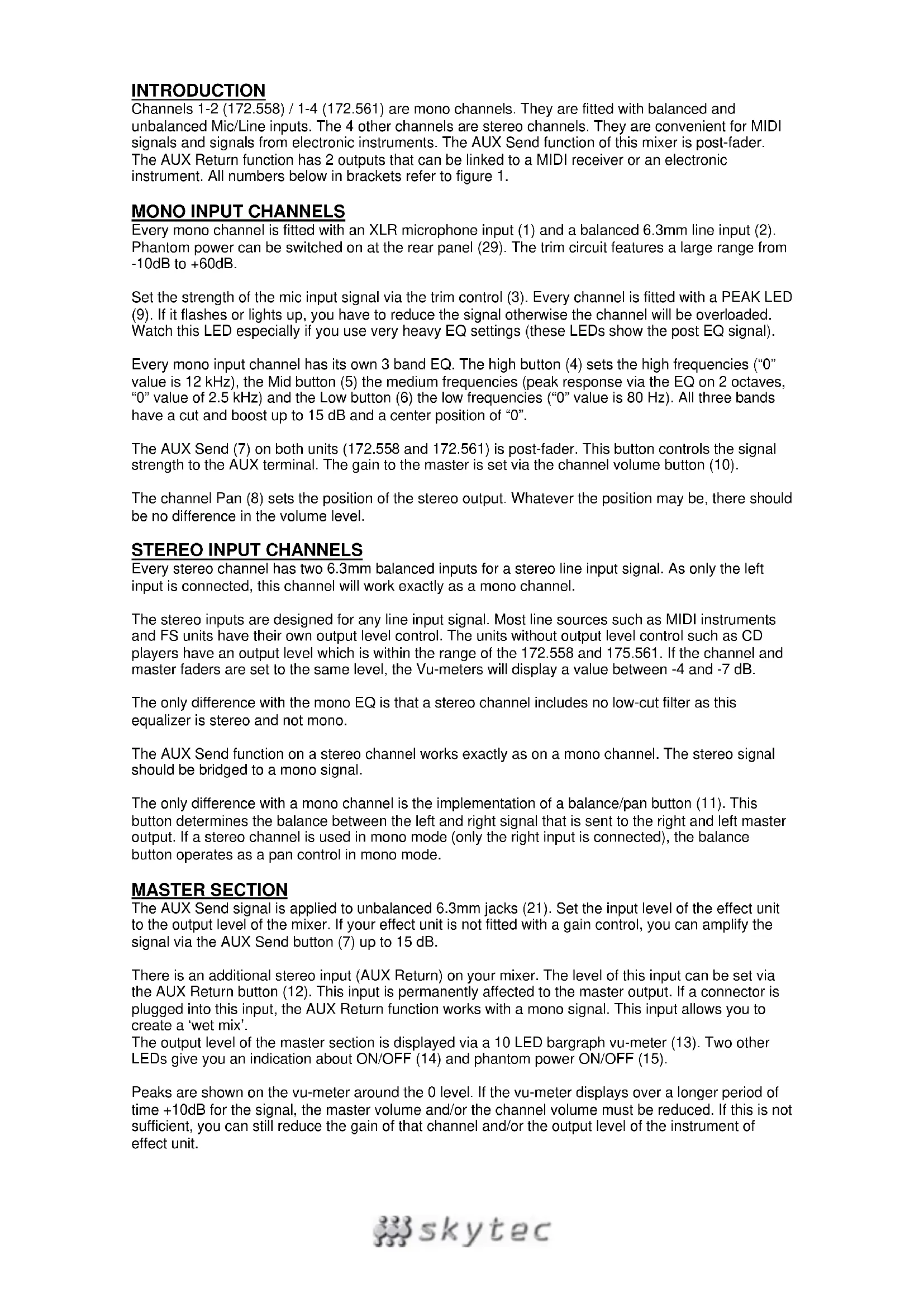


| Product type | 6-channel mixing console |
| Brand | Skytec |
| Number of channels | 6 (2 mono + 4 stereo) |
| Dimensions (H x W x D) | 70 x 176 x 230 mm (172.558) / 70 x 230 x 230 mm (172.561) |
| Weight | 2.4 kg (172.558) / 3.0 kg (172.561) |
| Power supply | 220 VAC, 50 Hz |
| Microphone inputs | 2 x XLR balanced (channels 1-2) with switchable phantom power |
| Line inputs | 2 x 6.3 mm balanced (mono) + 4 x 6.3 mm balanced (stereo) |
| Outputs | Balanced master output (2 x 6.3 mm), headphone output (6.3 mm), AUX Send output, AUX Return input |
| Equalizer | 3-band per channel (High, Mid, Low) with cut/boost up to 15 dB |
| Phantom power | 48 V switchable on rear panel |
| AUX functions | AUX Send post-fader, AUX Return with level control |
| VU meters | 10-LED bargraph for master, clip LED per channel |
| Frequency response | 10 Hz - 60 kHz (±3 dB) |
| Signal-to-noise ratio | 112 dB |
| Maximum output level | +22 dBu (balanced) |
| Maintenance and cleaning | Do not use sprays on potentiometers. Consult a specialist if problems occur. |
| Safety | Read the manual before use. Do not open the casing. Use only with grounded outlet 230V/10-16A. Disconnect during storms or prolonged non-use. |
| Spare parts and repairability | Repairs only by authorized professional. Do not modify the device or warranty will be voided. |
| General information | Indoor use only. Keep out of reach of children. Allow to reach room temperature after transport. |
Frequently Asked Questions - 6 channel mixer Skytec
User questions about 6 channel mixer Skytec
0 question about this device. Answer the ones you know or ask your own.
Ask a new question about this device
Download the instructions for your DJ Equipment in PDF format for free! Find your manual 6 channel mixer - Skytec and take your electronic device back in hand. On this page are published all the documents necessary for the use of your device. 6 channel mixer by Skytec.
USER MANUAL 6 channel mixer Skytec
Congratulations on the purchase of this SkyTec mixer. Please read this manual carefully prior to using the unit.
Warning:
- Read the manual prior to using the unit.
- Keep the manual for future reference.
- Keep the packaging for safer transport in its original packaging
- For indoor use only.
- Prior to the first use, have the unit checked by a qualified person.
- The unit contains voltage carrying parts. DO NOT open the mixer.
- When you unplug the unit from the mains always pull the plug, never the lead.
- Never plug or unplug the unit with wet hands.
If the plug and/or mains lead are damaged, they need to be repaired by a qualified technician.
If the unit is damaged to an extent that you can see internal parts, do not plug the unit into a mains outlet. - Repairs and lamp replacement has to be carried out by a qualified technician.
- Only connect this unit to an earthed mains outlet of 230Vac / 50Hz and 10-16A.
- Do no place the unit near heat sources.
- Always unplug the unit during a thunderstorm or when it is not in use.
- If the unit has not been used for a longer period of time, condensation can occur inside the housing. Please let the unit reach room temperature prior to use.
- Keep out of the reach of children.
- All channel controls and the master volume control must be set to zero prior to switching the unit on.
- Set the channel slider controls slowly. Fast variation can overload the speakers.
- To prevent clipping of the amplifier do not set the volume level too high.
- Switch the amplifier on at latest and switch it off at first.
- Do not use cleaning sprays for the slider controls. The residues of these spray cause dust deposits in the controls. If a problem occurs, please consult a specialist.

INTRODUCTION
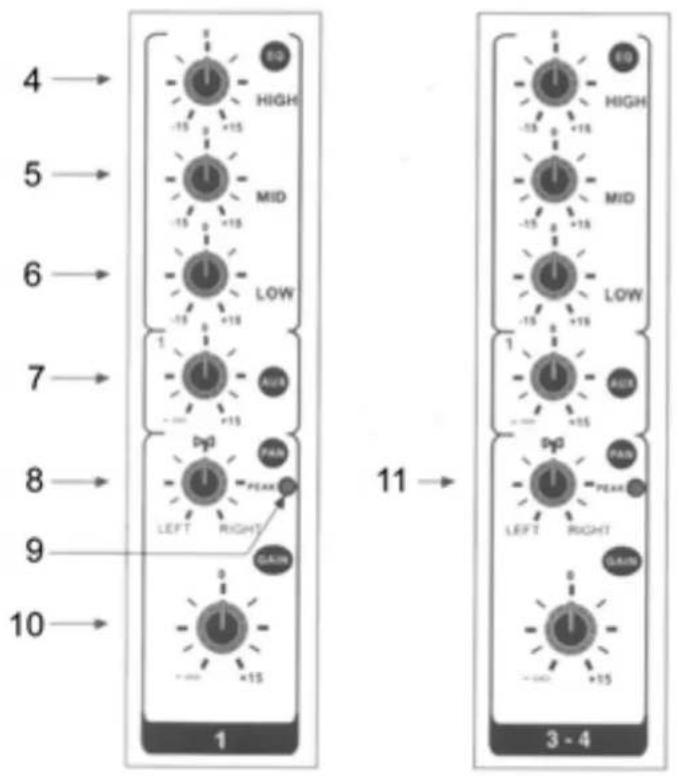
Channels 1-2 (172.558) / 1-4 (172.561) are mono channels. They are fitted with balanced and unbalanced Mic/Line inputs. The 4 other channels are stereo channels. They are convenient for MIDI signals and signals from electronic instruments. The AUX Send function of this mixer is post-fader. The AUX Return function has 2 outputs that can be linked to a MIDI receiver or an electronic instrument. All numbers below in brackets refer to figure 1.
MONO INPUT CHANNELS
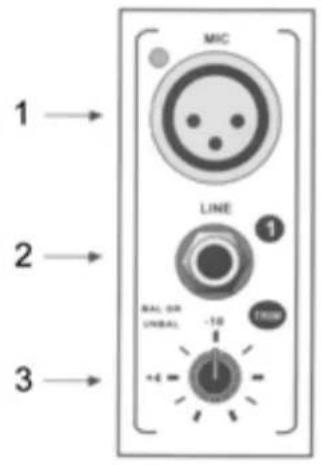
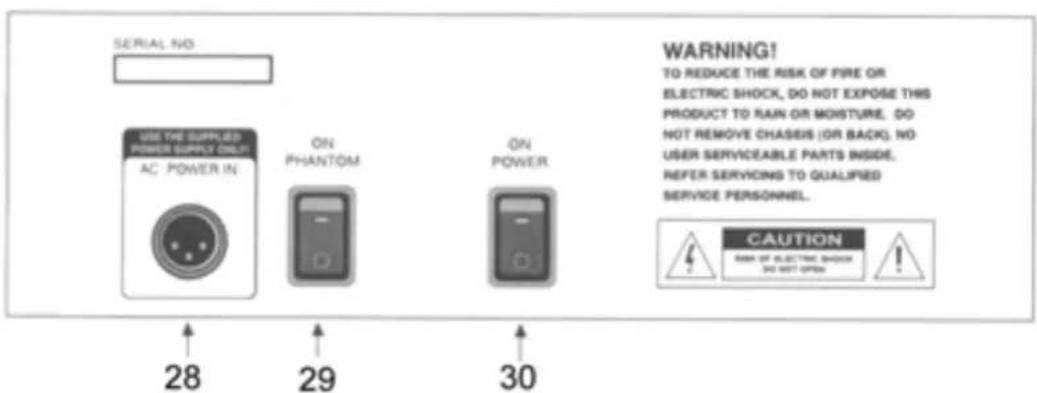
Every mono channel is fitted with an XLR microphone input (1) and a balanced 6.3mm line input (2). Phantom power can be switched on at the rear panel (29). The trim circuit features a large range from -10dB to +60dB.
Set the strength of the mic input signal via the trim control (3). Every channel is fitted with a PEAK LED (9). If it flashes or lights up, you have to reduce the signal otherwise the channel will be overloaded. Watch this LED especially if you use very heavy EQ settings (these LEDs show the post EQ signal).
Every mono input channel has its own 3 band EQ. The high button (4) sets the high frequencies ("0" value is 12kHz ), the Mid button (5) the medium frequencies (peak response via the EQ on 2 octaves, "0" value of 2.5kHz ) and the Low button (6) the low frequencies ("0" value is 80Hz ). All three bands have a cut and boost up to 15 dB and a center position of "0".
The AUX Send (7) on both units (172.558 and 172.561) is post-fader. This button controls the signal strength to the AUX terminal. The gain to the master is set via the channel volume button (10).
The channel Pan (8) sets the position of the stereo output. Whatever the position may be, there should be no difference in the volume level.
STEREO INPUT CHANNELS
Every stereo channel has two 6.3mm balanced inputs for a stereo line input signal. As only the left input is connected, this channel will work exactly as a mono channel.
The stereo inputs are designed for any line input signal. Most line sources such as MIDI instruments and FS units have their own output level control. The units without output level control such as CD players have an output level which is within the range of the 172.558 and 175.561. If the channel and master faders are set to the same level, the Vu-meters will display a value between -4 and -7 dB.
The only difference with the mono EQ is that a stereo channel includes no low-cut filter as this equalizer is stereo and not mono.
The AUX Send function on a stereo channel works exactly as on a mono channel. The stereo signal should be bridged to a mono signal.
The only difference with a mono channel is the implementation of a balance/pan button (11). This button determines the balance between the left and right signal that is sent to the right and left master output. If a stereo channel is used in mono mode (only the right input is connected), the balance button operates as a pan control in mono mode.
MASTER SECTION
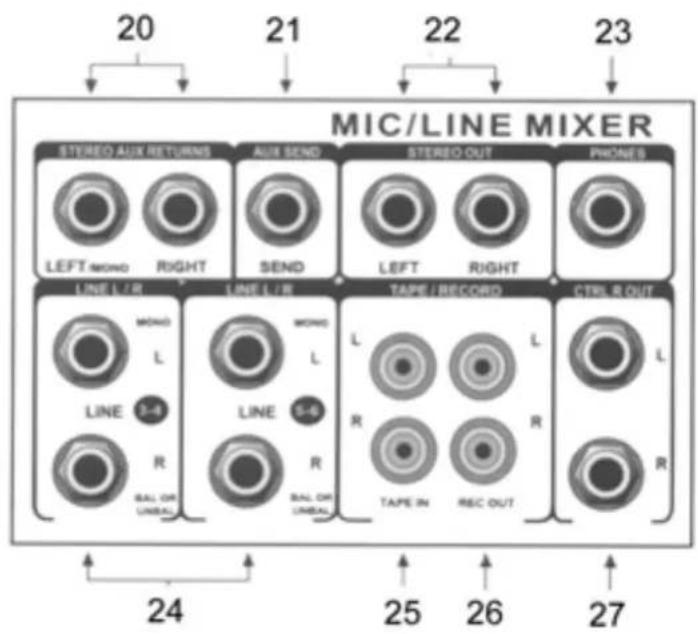
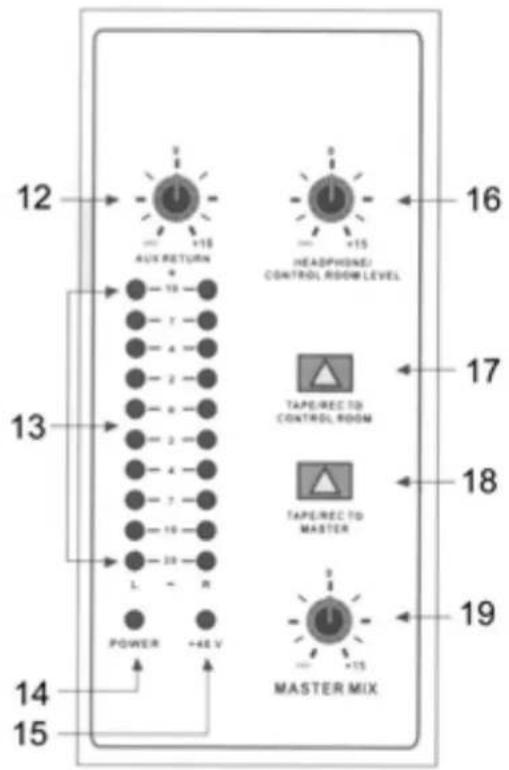
The AUX Send signal is applied to unbalanced 6.3mm jacks (21). Set the input level of the effect unit to the output level of the mixer. If your effect unit is not fitted with a gain control, you can amplify the signal via the AUX Send button (7) up to 15 dB.
There is an additional stereo input (AUX Return) on your mixer. The level of this input can be set via the AUX Return button (12). This input is permanently affected to the master output. If a connector is plugged into this input, the AUX Return function works with a mono signal. This input allows you to create a 'wet mix'.
The output level of the master section is displayed via a 10 LED bargraph vu-meter (13). Two other LEDs give you an indication about ON/OFF (14) and phantom power ON/OFF (15).
Peaks are shown on the vu-meter around the 0 level. If the vu-meter displays over a longer period of time +10dB for the signal, the master volume and/or the channel volume must be reduced. If this is not sufficient, you can still reduce the gain of that channel and/or the output level of the instrument of effect unit.
The RCA inputs are for connection of a CD player or a turntable. You can now route the signal via the "tape/rec to control room level" push button (17) to the studio monitors or to the master routes via the push button "tape / rec to master" (18). Make sure however that the push button (17) is in the up position otherwise the signal will be input twice.
Connect the mixer to an amplifier via the balanced "stereo out" sockets (22). Use 2 6.3mm mono jacks for this connection. The total output volume is set via the master volume button (19).
The mixer is fitted with a separate headphone output (23). The signal is the same as from the control room output (27). The volume control (16) sends the signal to the headphones and the monitors. The L/R meters are the same as the master output
INSTALLATION
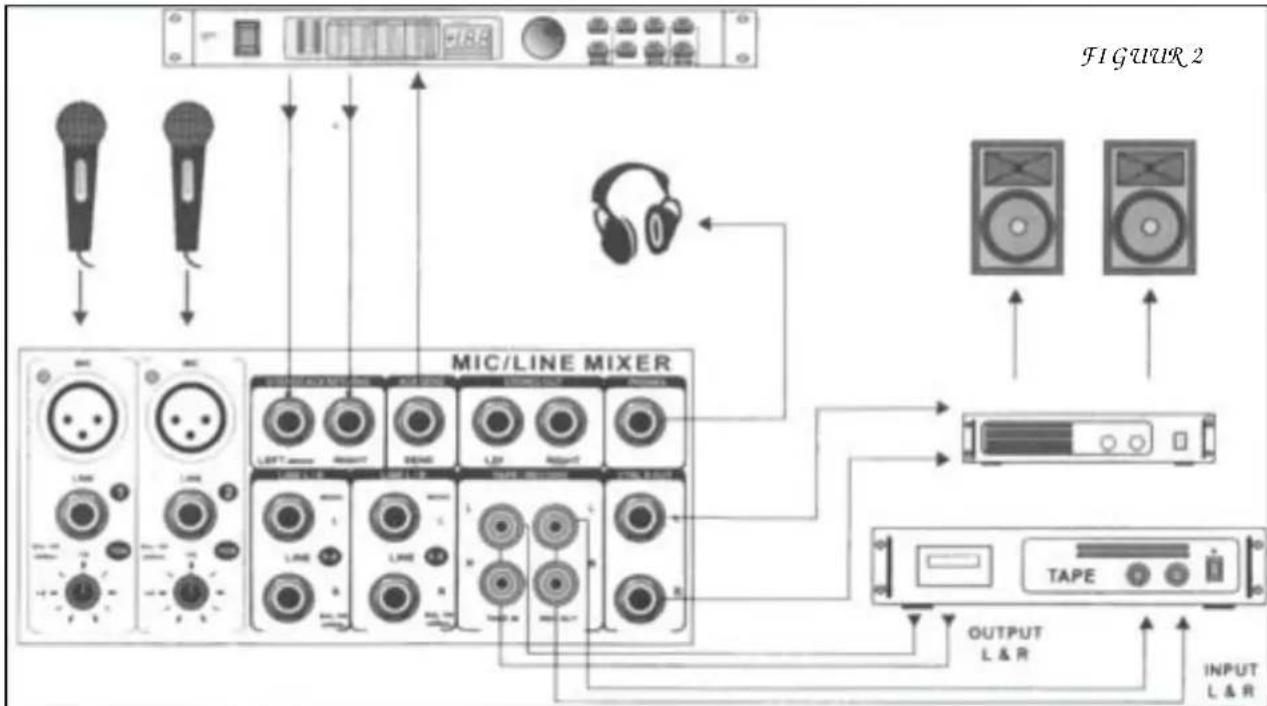
Do not mix up the cable in order to avoid wrong connections. Connect the leads one by one and not all leads on one side first and then all on the other side. In the worst case, you might permanently damage the unit. Figure 2 shows an example of possible connections.
Prior to connecting the mixer, set all controls to "0". You can connect microphone or line units to the mono channels, all kinds of line units to the stereo channels and effect units to the AUX Return. You can also connect Midi instruments to the AUX Return.
If you connect a microphone, make sure that the phantom power is switched OFF. DO NOT use unbalanced units when the phantom power is switched on. Do not short-circuit the 48V circuit of the phantom power to the ground. You might heavily damage the unit.
If you record something on a DAT or ADAT recorder, do not set the maximum level. If your recorder can support a level of 96 dB, record at a maximum level of 86 - 91 dB. The peak level must always be 5 - 10 dB lower than the maximum level of your recorder.
CONNECTIONS
On a balanced in/output, always use balanced equipment. You can use either balanced or unbalanced equipment on an unbalanced in/output. See the drawings below for the equipment that you can use:
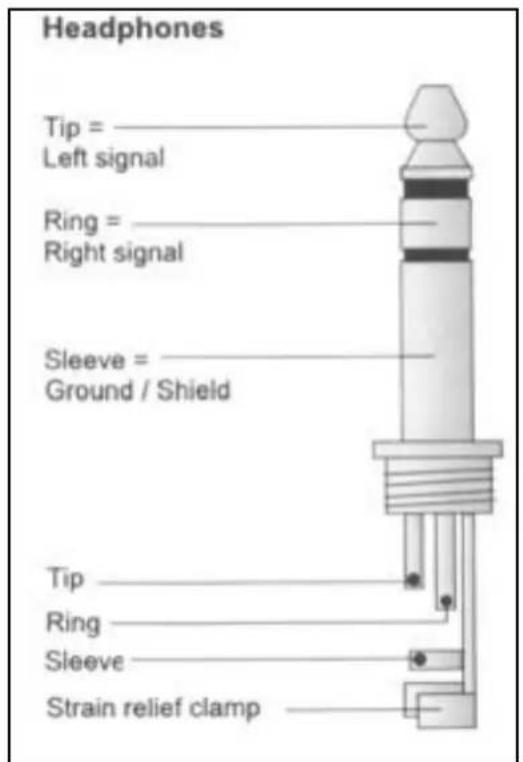

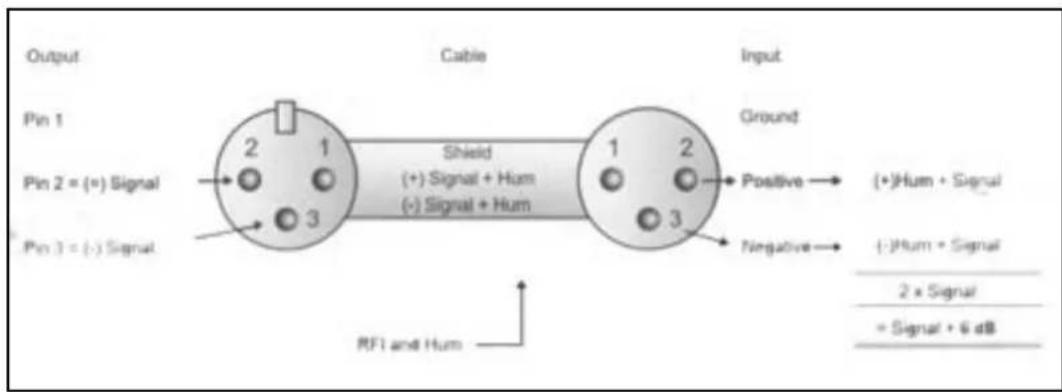
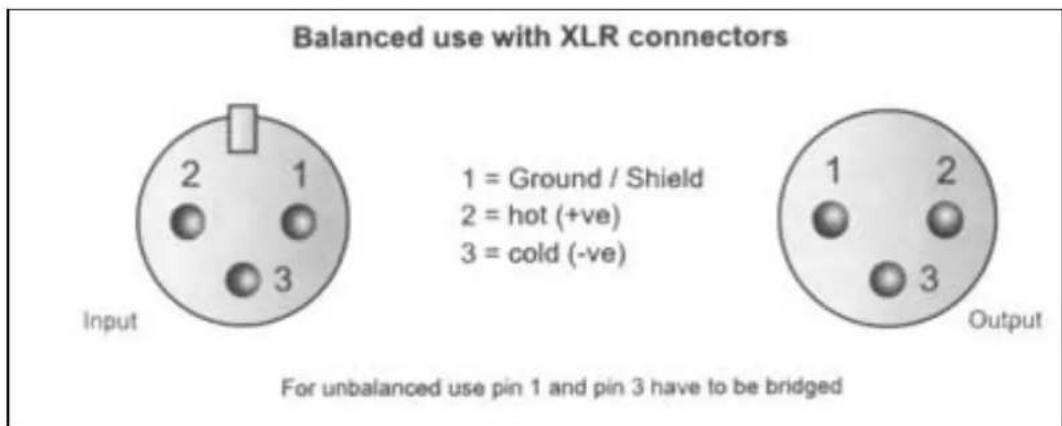
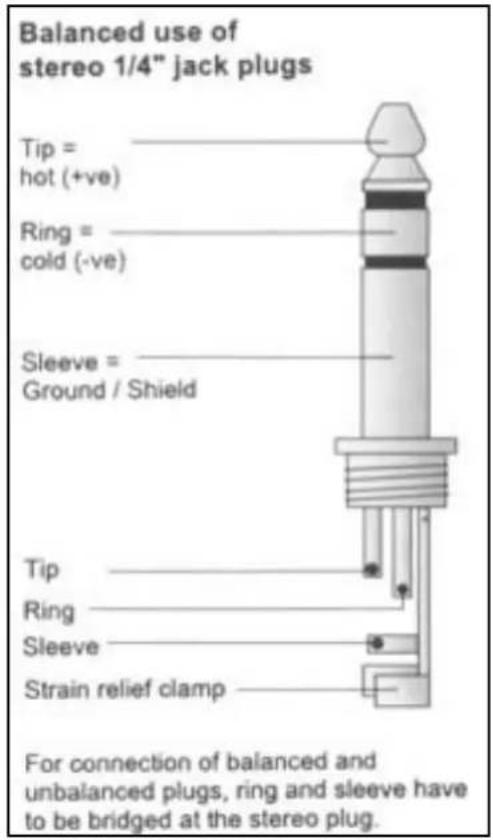
If possible, connect the balanced outputs to other balanced units to avoid interference.
SPECIFICATIONS
Mono inputs
Mic input: electronically balanced, discrete input configuration
Frequency response: 10 Hz - 20 kHz (± 3 dB)
Distortion: .0.01% @ +4 dBu (± 1 kHz)
Input impedance: 150 Ohms @ -129.5 dB
Line input: electronically balanced
Frequency response: 10 Hz - 20 kHz (± 3 dB)
Distortion: 0.01% @ +4 dBu (± 1 kHz)
Equalizer.
High: 12 kHz (±-15 dB)
Mid: 2.5 kHz (± -15 dB)
Low: 80 Hz (±-15 dB)
Stereo inputs
Line input: unbalanced
Frequency response: 10 Hz - 20 kHz (±3 dB)
Distortion: 0.01% @ +4 dBu (± 1 kHz)
Equalizer.
High: 12 kHz (±-15 dB)
Mid: 2.5 kHz (± -15 dB)
Low: 80 Hz (± -15 dB)
Master section
Max output level: +22 dBu, balanced
AUX Send max output level: +22 dBu unbalanced
Control room output level: +22 dBu unbalanced
Signal/noise ratio: >112 dB
General
Power supply: 220 VAC, 50 Hz
Dimensions (hxwxd): 70 x 176 x 230 mm (172.558)
Dimensions (hxwxd): 70 x 230 x 230 mm (172.561)
Weight: 2.4 kg (172.558)
Weight: 3.0 kg (172.561)
- Specifications and design subject to changes without prior notice.
Do not attempt to make any repairs yourself. This would invalid your warranty.
Do not make any changes to the unit. This would also invalid your warranty.
The warranty is not applicable in case of accidents or damages caused by inappropriate use or disrespect of the warnings contained in this manual.
SkyTronic UK cannot be held responsible for personal injuries caused by a disrespect of the safety recommendations and warnings. This is also applicable to all damages in whatever form.
NL
Mid: 2.5 kHz (± -15 dB)
Low: 80 Hz (±-15 dB)
Stereo ingangen
Distorsion: 0,01% @ +4 dBu (± 1 kHz)
Impedance d'entree: 150 Ohms @ -129,5 dB
Distorsion: 0,01% @ +4 dBu (± 1 kHz)
Equalizer.
High: 12 kHz (±-15 dB)
Mid: 2,5 kHz (± -15 dB)
Low: 80 Hz (±-15 dB)
Entrées Stéréo
Distorsion: 0,01% @ +4 dBu (± 1 kHz)
Equalizer.
High: 12 kHz (±-15 dB)
Mid: 2,5 kHz (± -15 dB)
Low: 80 Hz (±-15 dB)
Section Master
Mid: 2.5 kHz (± -15 dB)
Low: 80 Hz (±-15 dB)
Stereo Eingänge
Mid: 2.5 kHz (± -15 dB)
Low: 80 Hz (±-15 dB)