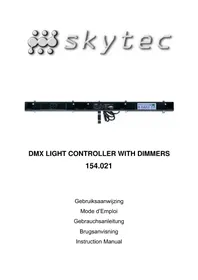
DMX Light Controller - DJ Equipment Skytec - Free user manual and instructions
Find the device manual for free DMX Light Controller Skytec in PDF.


| Product type | DMX Light Controller |
| Brand | Skytec |
| Model | DMX Light Controller |
| Power supply | AC 230-240 V, 50 Hz, 20 A |
| Max. output current | 5 A per channel, 20 A total |
| Fuse | F6.3 A, 250 V, 5 x 20 mm |
| Dimensions | 1308 x 80 x 74 mm |
| Temperature range | 0 to 50 °C |
| Relative humidity | 85 % |
| Number of channels | 4 DMX channels |
| DMX address | 1 to 512 |
| Operating modes | DMX (receive) and MASTER (transmit) |
| MASTER modes | Manual Dimmer, Manual Program, Auto Program, Hold Sound, Prog Sound, Auto Sound |
| Special functions | Stand By, Full On, Preheat, Fade, Dimmer, Speed |
| LED indicators | DMX, Signal, Master, Channel 1-4 |
| Display | 7-segment LED for IN/OUT, level, address |
| Safety | Do not open, indoor use only, disconnect before maintenance |
| Maintenance | Disconnect before any maintenance, entrust repairs to qualified technician |
| Repairability | No user-serviceable parts |
| Warranty | Warranty void if modified or repaired by unauthorized persons |
Frequently Asked Questions - DMX Light Controller Skytec
User questions about DMX Light Controller Skytec
0 question about this device. Answer the ones you know or ask your own.
Ask a new question about this device
Download the instructions for your DJ Equipment in PDF format for free! Find your manual DMX Light Controller - Skytec and take your electronic device back in hand. On this page are published all the documents necessary for the use of your device. DMX Light Controller by Skytec.
USER MANUAL DMX Light Controller Skytec
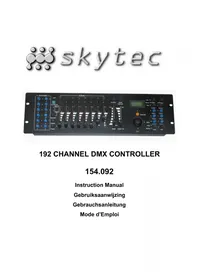
This model is used as either a 4CH. DMX chase controller or a DMX dimmer pack. It has two operating modes comprised of DMX and MASTER modes, which is corresponding to the receiving and transmitting functions respectively. In DMX mode, it features 4-channel individual DMX address setting. In MASTER mode, it is incorporated with 6 operating modes, MANUAL DIMMER, MANUAL PROGRAM, AUTO PROGRAM, HOLD SOUND, PROG SOUND and AUTO SOUND. In addition, multiple units can be connected to be used together, one as a DMX dimmer pack and the others as chase controllers. Also, STAND BY, FULL ON and PREHEAT functions are incorporated with this unit.
Before operating this unit, please read this manual thoroughly. This manual will guide you through all functions step by step.
SAFETY INTRODUCTION
- This apparatus must be earthed.
The back-function when power -down is effective in a month. If reuse this unit more than a month later after last time, reset the system and make a setting again. - The duration between power-on and power-off must not be less than 1 second. Otherwise, malfunction or mistake may result.
If malfunction or mistakes result when using, reset the system for initialization to restart this unit. - This apparatus is suitable for normal pollution situation..
- Keep the manual for further reference.
- This device is a lighting effect for creating decorative effects. It is only allowed to be operated with a voltage of 230V, 50Hz and was designed for indoor used only.
During use, these lamps get very hot. Therefore the light effect must be placed at least 1m away from inflammable materials such as curtains, books, etc. Make sure that the housing cannot be touched by accident.
Any installation, operation and maintenance of this device should be carried out by a qualified person.
If the device is damaged by transportation, do not use it and consult your dealer. - Never let the power-cord come into contact with other cables. Handle the power-cord and all connections with the mains with particular caution.
- The device is not a toy. Keep it away from children.
- Prior to the first use, have the unit checked by a qualified person.
- The unit contains voltage carrying parts. DO NOT open the light effect.
- Never plug or unplug the unit with wet hands.
- Disconnect the unit from the mains prior to replacing the fuse.
If the plug or mains lead are damaged, they need to be repaired by a qualified technician.
If the unit is damaged to an extent that you can see internal parts, do not plug the unit into a mains outlet. - Always unplug the unit during a thunderstorm or when it is not in use.
If the unit has not been used for a longer period of time, condensation can occur inside. - When you unplug the unit from the mains always pull the plug, never the lead.
- The supplied bracket is the main fixing and must be used to solidly mount the light effect.
In order to avoid accidents in public premises, the local legal requirements and safety regulations/warnings must be fulfilled.
A. DMX mode
When the DMX indicator is on (Press "F + SIGNAL SELECT" until DISPLAY shows IN) shows this unit is used as DMX dimmer pack.
A.1. BUTTONS 1, 2, 3 and 4
Press any one of these 4 buttons, corresponding indicator will blink, and the DMX address of corresponding channel will appear in DISPLAY screen. Press UP or DOWN button to select desired DMX address followed by pressing corresponding channel button, corresponding indicator is off indicating information of entry is confirmed. Then the information in DISPLAY screen returns to initial condition.
A.2. UP BUTTON
Press to increase the DMX address with the maximum 512.
This function is not effective when in full letter indication.
A.3. DOWN BUTTON
Press to decrease the DMX address with the maximum 512.
This function is not effective when in full letter indication.
A.4. F + BUTTON (Press F an buttons at a time)
NOTE : L-- refers to data information of CH1, CH2, CH3 and CH4 corresponding to 1, 2, 3 and 4 output.
R-- refers to data information of CH1, CH2, CH3 and CH4 corresponding to 4, 3, 2 and 1 output.
A.5. F + D/S BUTTONS (Press F and D/S buttons at a time)
Press to select CRO or NOR.
NOTE: NOR refers to 0-100% dimming.
CRO denotes only FULL ON and STAND BY are available. When dimming level is greater than 50% .
FULL ON is activated, otherwise, STAND BY is effective.
A.6. F + MODE BUTTONS
This function is effective only in MASTER mode.
A.7. F + PRESET BUTTONS
Press F + PRESET to select available parameter, adjust the selected parameter with UP and DOWN buttons.
| PARAMETER | FUNCTION |
| F00-F99 | FADE TIME (0-10S) |
| 000-0FF | DIMMER (0-100%) |
| R01-R99 | SPEED (1/60 STEP PER SECOND TO 20 STEP PER SECOND) |
| E00-E25 | PRESET MINIMUM DIMMING LEVEL (0-25%) |
| P01-P16 | PROGRAM (1-16) |
A.8. F + SIGNAL SELECT BUTTONS
Press to switch operating mode from DMX to MASTER mode, and the DISPLAY will show OUT.
A.9. F + SIGNAL SELECT + RESET BUTTONS
Press to perform a reset for the whole system, which enables to return to initial condition.
A.10. DMX indicator blinks when preheat is effective, otherwise lights.
A.11. SIGNAL indicator blinks when DMX signal is available and goes out when not available.
A.12. DISPLAY shows IN and channel indicators stop blinking after 10 seconds when operation is paused.
B. MASTER mode
When the MASTER indicator is on (Press "F + SIGNAL SELECT" until DISPLAY shows OUT), this unit is used as a DMX chase controller.
B. 1. F + MODE BUTTONS
Press to select desired operating mode.
This function is effective only in MASTER mode. The operating modes are changed in order of:

B.1.1.MANUAL DIMMER
Normally, the dimming level of all four channels are the same ( 0-100%, DISPLAY shows d00-dFF ). Press F + PRESET buttons, dFF will show on DISPLAY, press UP or DOWN can adjust the total dimmer level.
Press one of buttons 1, 2, 3 and 4, corresponding indicator will blink, then select desired dimming level using UP or DOWN button. These 4 buttons are effective only when MANUAL DIMMER indicator is on.
Press F + RESET buttons to withdraw from this condition, the indicator won't blink.
B.1.2.MANUAL PROGRAM
Press F + PRESET to select available parameter, adjust the selected parameter with UP and DOWN buttons.
| PARAMETER | FUNCTION |
| F00-F99 | FADE TIME (0-10S) |
| 000-0FF | DIMMER (0-100%) |
| R01-R99 | SPEED (1/60 STEP PER SECOND TO 20 STEP PER SECOND) |
| E00-E25 | PRESET MINIMUM DIMMING LEVEL (0-25%) |
| P01-P16 | PROGRAM (1-16) |
B. 1.3. AUTO PROGRAM
All the functions are available in AUTO PROGRAM, except the programming function. Once AUTO PROGRAM was selected, the PB-4-DMX will be run under all the program one by one, i.e. P01-16, preset in MANUAL PROGRAM.
B. 1.4. HOLD SOUND
The performance of the light will depends on the input sound.
B. 1.5. PROG SOUND
The selected program will be run by the input sound.
B. 1.6. AUTO SOUND
The preset programs will be run from P01 to P16.
B. 2. F + D/S BUTTONS (Press F and D/S buttons at a time)
Press to select CRO or NOR.
NOTE : NOR refers to 0-100% dimming.
CRO denotes only FULL ON and STAND BY are available. When dimming level is greater than 50% .
FULL ON is activated, otherwise, STAND BY is effective.
B.3. F+ B BUTTON (PressFand buttons at a time)
NOTE : L-- refers to data information of CH1, CH2, CH3 and CH4 corresponding to 1, 2, 3 and 4 output.
R-- refers to data information of CH1, CH2, CH3 and CH4 corresponding to 4, 3, 2 and 1 output.
B.4.F+SIGNALSELECT+RESETBUTTONS
Press to perform a reset for the whole system, which enables to return to initial condition.
B. 5. MASTER indicator blinks when preheat is effective.
B.6.SIGNAL indicator goes out in master modus.
B.7. FULL ON & STAND BY (Located on the remote control 154.068)
FULL ON and STAND BY are effective only in MASTER mode. Press FULL ON to activate full on function of whole channel output, DISPLAY shows FUL. Press STAND BY to turn off whole channel, and STD appears.
B. 8. DISPLAY shows OUT and channel indicators don't blink after 10 seconds when operation is paused.
Appendix I
The indications in DISPLAY and explanations
| Indication | Explanation |
| L - - | Data information of CH1-4 corresponding to CH1-4 output |
| R - - | Data information CH1-4 corresponding to CH4-1 output |
| NOR | Output 0-100% dimming enabled |
| CRO | Only FULL ON and STAND BY enabled, dimming disabled |
| OUT | DMX output |
| IN | DMX input |
| FUL | FULL ON |
| STO | STAND BY |
| 000-0FF | 0-100% dimming level |
| F00-F99 | Fade time with range of 0-10 seconds |
| A01-A99 | Speed with the range of 1/60-20 step per second |
| P01-P16 | Program 1-16 |
| E00-E25 | Preset minimum dimming level of 0-25% |
| 001-512 | DMX adres 1-512 |
TECHNICAL SPECIFICATIONS
POWER INPUT AC 230V/240V 50Hz 20A
CHANNEL OUTPUT 5A per channel, total 20A max.
FUSE. F6.3A 250V 5 X 20mm
DIMENSIONS 1308X80X74mm
OPERATING CONDITIONS
TEMPERSTURE 0-50°C
RELATIVE HUMIDITY 85%

Do not attempt to make any repairs yourself. This would invalid your warranty. Do not make any changes to the unit. This would also invalid your warranty. The warranty is not applicable in case of accidents or damages caused by inappropriate use or disrespect of the warnings contained in this manual. SkyTronic UK cannot be held responsible for personal injuries caused by a disrespect of the safety recommendations and warnings. This is also applicable to all damages in whatever form.