USB 7004 - DJ Equipment US Blaster - Free user manual and instructions
Find the device manual for free USB 7004 US Blaster in PDF.



| Product type | DJ mixing console |
| Brand | US Blaster |
| Model | USB 7004 |
| Category | DJ equipment |
| Channels | 3 channels (A, B, C) with faders + 1 microphone channel |
| Inputs per channel | 2 inputs (phono/line) with button switching |
| Microphone input | 1 input with gain adjustment, -54 dB / 600 ohms |
| Main outputs | Balanced Master XLR (0 dB and +6 dB), subwoofer (125 Hz), monitor, 2 headphone pairs |
| Equalization | 3 bands (High, Mid, Bass) with cut switches (Killer) per channel |
| Crossfader | Assigned to channels A and C, with Transform function for cut effects |
| Pre-listening (Cue) | On each channel, with separate or mixed listening (Split) |
| Faders | Long ALPS, dust-resistant mounting |
| Power supply | 220-240 V, 50 Hz, 25 W |
| Protection | Relay on master output against failures |
| Technical specifications | Channel separation > 65 dB @ 1 kHz, input noise > 80 dB |
| Phono input | Level -41 dB @ 47 kΩ, impedance 47 kΩ / 25 pF |
| Line input | Level -14 dB @ 600 Ω, impedance 22 kΩ |
| Headphone output | 0.3 W into 4 Ω, impedance 4..32 Ω |
| Special functions | Killer (instant frequency cut), Transform (blending music fragments) |
| Indicator lights | LED meter (master/cue level), line/phono LED, active Cue LED |
| Maintenance and cleaning | Faders protected against dust; clean with a soft, dry cloth. |
| Safety | Protection relay on master output; respect the supply voltage. |
| General information | Device intended for indoor use; operating ambient temperature 5°C to 35°C. |
Frequently Asked Questions - USB 7004 US Blaster
User questions about USB 7004 US Blaster
0 question about this device. Answer the ones you know or ask your own.
Ask a new question about this device
Download the instructions for your DJ Equipment in PDF format for free! Find your manual USB 7004 - US Blaster and take your electronic device back in hand. On this page are published all the documents necessary for the use of your device. USB 7004 by US Blaster.
USER MANUAL USB 7004 US Blaster
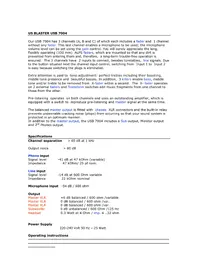
Our USB 7004 has 3 channels (A, B and C) of which each includes a fader and 1 channel without any fader. This last channel enables a microphone to be used; the microphone volume level can be set using the gain control. You will surely appreciate the long, flexibly operating (100 mm) ALPS faders, which are mounted so that any dirt is prevented from entering them and, therefore, a long-term trouble-free operation is ensured. The 3 channels have 2 inputs to connect, besides turntables, line signals. Due to the button situated next the channel input control, switching from Input 1 to Input 2 is easy because switching the plugs is eliminated.
Extra attention is paid to tone adjustment: perfect trebles including their boosting, middle tone presence and beautiful basses. In addition, 3 killers enable bass, middle tone and/or treble to be removed from X-fader within a second. The X- fader operates on 2 external faders and Transform switches add music fragments from one channel to those from the other.
Pre-listening operates on both channels and uses an outstanding amplifier, which is equipped with a switch to reproduce pre-listening and master signal at the same time.
The balanced master output is fitted with chassis XLR connectors and the built-in relay prevents undesirable cracking noise (plops) from occurring so that your sound system is protected in an optimum manner.
In addition to the master output, the USB 7004 includes a Sub output, Monitor output and 2^nd Phones output.
Specifications
Channel separation > 65 dB at 1 kHz
Output noise >80 dB
Phono input
Signal level -41 dB at 47 kOhm (variable)
Impedance 47 kOhm/25 pf nom.
Line input
Signal level -14 db at 600 Ohm variable
Impedance 22 kOhm nominal
Microphone input -54 dB / 600 ohm
Output
Master XLR +6 dB balanced / 600 ohm /variable
Master XLR 0 dB balanced / 600 ohm /var.
Master XLR 0 dB balanced / 600 ohm /var.
Subwoofer 0 dB unbalanced / 600 Ohm /125 Hz
Headset 0.3 Watt at 4 Ohm / imp. 4..32 ohm
Power Supply
220-240 Volt 50 Hz - 25 Watt
Operating instructions
Input section:
| LED meter | To indicate the cue or master level. You can maintain a working level of about 0 dB. |
| Masterfader | Volume control for the Sub and Stereo outputs. |
| Cue LED | If Cue is not active, the LED will light up. Then, the master signal will be led through the Phones output. |
| Monitor | To adjust the volume of the stereo monitor output. |
| Cue | Headset volume control. |
| Split | To set a function of the headset if Cue is active on a channel. After the Split button is pressed down, Cue signal will be present on the right side of the headset and the Master signal on the left side. |
| Phones | Headset stereo connection. |
Crossfader and Transform Functions
The Crossfader is used to set a volume level of the A and C channels. If the Crossfader is in the left position, the A channel will only be audible. If the Crossfader is in the right position, the C channel will only be audible. If the Crossfader is in the left position and the right Transform button is pressed down, the signal of the C channel will be mixed in. If the Transform is pressed down in that situation, the A channel will be suppressed. The above mentioned procedure also applies to the Crossfader in the right position.
Killer Function
Using these switches, you can very quickly remove basses, middle tones and/or trebles.
DJ Channel
Gain Microphone level control.
High Treble control.
Bass Bass control.
Pan To set the microphone to any required position between the left and the right channels.
A, B and C Channels
This section includes 2 inputs, 3-way tone control, volume level control and pre-listening. The A and C channels are outputted on the left or the right side of the Crossfader respectively.
The B channel is outputted directly to the master output.
Line /phono LEDs indicate the input you have selected.
Gain To pre-set a volume level of the line and phone inputs.
High Treble control.
Mid Middle tone control.
Bass Bass control.
Ball To set balance between the left and the right channels.
Cue To switch on/off pre-listening. If the function is active, headset will be switched on and led to Cue and 1 output or more outputs will be audible even if the Fader is in the closed position! If the LED is on, the Cue function is active.
Master XLR +6 dB equilibrato/600 ohm/variable
Master XLR 0 dB equilibrato/600 ohm/variable
Master XLR 0 dB equilibrato/600 ohm/variable
Subwoofer 0 dB non eaulibrato 600 ohm / 125 Hz
Headset 0,3 Watt @ 4 ohm/imp. 4..32 ohm