BSR 1283 - Vacuum Cleaner CLATRONIC - Free user manual and instructions
Find the device manual for free BSR 1283 CLATRONIC in PDF.


| Product type | Robot vacuum cleaner |
| Brand | Clatronic |
| Model | BSR 1283 |
| Net weight | 2.95 kg |
| Power supply | Mains adapter 230-240 V~, 50 Hz, output 18 V DC, 400 mA |
| Battery | 14.4 V, 2000 mAh, NiMH rechargeable |
| Runtime | Up to 70 minutes |
| Charging time | 6 to 8 hours (first charge: 12 hours) |
| Dust container capacity | Approximately 300 ml (estimated) |
| Filter | Fleecy filter bag (washable and reusable) |
| Main functions | Automatic cleaning, 3 surface modes (S, M, L), collision detection, automatic return to base, virtual wall |
| Included accessories | Charging station, mains adapter, battery pack, virtual wall emitter unit, replacement filter bag |
| Maintenance and cleaning | Emptying dust compartment, cleaning filter, cleaning main and side brushes |
| Safety | Do not vacuum liquids, do not use without filter, do not use in damp rooms, unplug before maintenance |
| Spare parts and repairability | Removable battery pack, replaceable brushes, replacement filter, virtual wall (batteries not included) |
| General information | Domestic use, protection class II, CE certification, do not dispose with household waste |
Frequently Asked Questions - BSR 1283 CLATRONIC
User questions about BSR 1283 CLATRONIC
0 question about this device. Answer the ones you know or ask your own.
Ask a new question about this device
Download the instructions for your Vacuum Cleaner in PDF format for free! Find your manual BSR 1283 - CLATRONIC and take your electronic device back in hand. On this page are published all the documents necessary for the use of your device. BSR 1283 by CLATRONIC.
USER MANUAL BSR 1283 CLATRONIC
natural_image
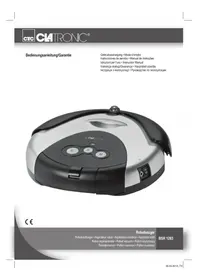
Exterior view of a black and silver ECATRONC robotic vacuum cleaner (no visible text or symbols on body)CE
Robotsauger
Robotstofzuiger • Aspirateur robot • Aspiradora robótica • Aspirador robô
Figures A to F Page 3
Figures G to N Page 4
Instruction Manual Page 30
Cleaning Page 32
Maintenance Page 32
Technical Data Page 33
Disposal Page 33
JEZYK POLSKI
Spis treści
Retirar as pilhas / Eliminar as pilhas
Thank you for choosing our product. We hope you enjoy using the appliance.
General Safety Instructions
Read the operating instructions carefully before putting the appliance into operation and keep the instructions including the warranty, the receipt and, if possible, the box with the internal packing. If you give this device to other people, please also pass on the operating instructions.
- The appliance is designed exclusively for private use and for the envisaged purpose. This appliance is not fit for commercial use.
- The power adaptor is only intended for use in dry environments.
- Ensure that output power, voltage, and polarity of the power adapter match the specifications on the type label!
- Do not touch the connected power adaptor with wet hands!
- Disconnect from mains power supply before cleaning.
- Ensure that the mains cable is not bent or kinked; do not walk or drive over the cable; do not subject the cable to heat sources.
- The device and the mains lead have to be checked regularly for signs of damage. If damage is found the device must not be used.
- Do not try to repair the appliance on your own. Always contact an authorized technician. To avoid the exposure to danger, always have a faulty cable be replaced only by the manufacturer, by our customer service or by a qualified person and with a cable of the same type.
- Use only original spare parts.
- Pay careful attention to the following "Special Safety Instructions".
Symbols in these Instructions for Use
Important information for your safety is specially marked. It is essential to comply with these instructions in order to avoid accidents and prevent damage to the machine:
WARNING:
This warns you of dangers to your health and indicates possible injury risks.
CAUTION:
This refers to possible hazards to the machine or other objects.
i NOTE:
This highlights tips and information.
Children and Frail Individuals
- In order to ensure your children's safety, please keep all packaging (plastic bags, boxes, polystyrene etc.) out of their reach.
Caution! Do not allow small children to play with the foil as there is a danger of suffocation! - This device is not intended to be used by individuals (including children) who have restricted physical, sensory or mental abilities and/or insufficient knowledge and/or experience, unless they are supervised by an individual who is responsible for their safety or have received instructions on how to use the device.
- Children should be supervised at all times in order to ensure that they do not play with the device.
WARNING!
Special Safety Instructions
CAUTION:
- Only use the supplied power adaptor.
- Do not suck up liquids!
- Do not suck up hot ashes or pointed or sharp objects!
- Do not use the device in damp rooms!
- Never use without the filter. Check that the filter is inserted correctly!
- The robot vacuum may collide with objects which are standing on the floor. Put fragile objects such as vases in a safe place!
- Do not leave the robot vacuum unattended. It may become jammed and damage the floor covering!
Intended use
This appliance is designed to clean the surface of short pile carpets or smooth floors in domestic households.
The appliance is only to be used as described in the user manual. Do not use the appliance for any commercial purposes.
Any other use is not intended and can result in damages or personal injuries.
The manufacturer assumes no liability for damages caused by improper use.
Supplied parts (see fig. A)
1 X Power supply
1 X Charger station
1 X Robot vacuum
1 X Plug-in battery pack
1 X "Virtual Wall" transmitter unit
1 X Spare fleece filter bag (not shown)
Unpacking the appliance
- Remove the appliance from its packaging.
- Remove all packaging materials such as films, filler material, cable clips and carton.
- Check the contents for completeness.
i NOTE:
Production residue or dust may have collected on the appliance. We recommend cleaning the appliance according to chapter "Cleaning".
Description of controls (see fig. B)
1 Status indicator
2 Start buttons S-M-L
3 Dust compartment
4 Handle
5 Collision sensor
6 Infrared receiver
7 Infrared sensor
8 Main brush
9 Filter
10 Vacuum compartment cover
11 Charger socket
12 On/off switch (ON/OFF)
13 Side brushes
14 Infrared sensor
15 Battery pack
"Virtual Wall" transmitter unit (see fig. E)
16 Power indicator
17 "Virtual Wall" transmitter unit
18 Coverage selector S-M-L
19 On/off button (press for 3 seconds)
20 Infrared sensor
Setting up the appliance
i NOTE:
- You must insert the battery pack on the bottom of the robot vacuum.
- The battery pack is included. You can find it in the packaging.
- The robot vacuum cannot be operated solely from the mains.
Insert the battery pack
- Turn the robot vacuum onto its back. The collision sensor should be facing you.
- Attach the battery pack to the left side.
- Guide the terminals on the battery pack onto the terminals on the robot vacuum.
- Press gently onto this area. The battery pack latches into the housing.
Charging the battery (see fig. C, D)
- Switch off the robot vacuum at the switch (12).
-
Connect the power supply to the
2.1. Charger socket (11) on the appliance or
2.2. to the charger socket on the charger station. Put the robot vacuum onto the charger station. -
Connect the power supply to a properly installed 230 V\~50 Hz earthed socket.

CAUTION:
Place the mains cable in such way that it does not become a trip hazard.

NOTE:
- The status indicator is lit red during the charging process.
-
The charging time is around 12 hours for the initial charge and around 6 to 8 hours for all subsequent charges.
-
Disconnect the charger plug from the charger socket.
- Disconnect the power supply from the outlet to save energy.
Setting up the charger station (see fig. D)
- Place the charger station close to a plug socket.
- The robot vacuum must have free access.
- Plug the power supply charger into the charger socket on the charger station.
- Connect the power supply to properly installed 230 V\~50 Hz earthed socket.
- The green light lights up on the charger station.
- Place the robot vacuum onto the charger station. The sensors should be facing you. The status indicator on the robot vacuum must light up red.
Setting up the "Virtual Wall" (see fig. E, F)
Do you want the robot vacuum to cover a limited area? You can set up a "Virtual Wall" to enable this. Infrared beams are transmitted and received and a barrier is thus erected.
- Rotate the "Virtual Wall" transmitter unit.
- Open the battery compartment. To do so you will need a small Philips head screwdriver.
- Insert 2 batteries size • D • MONO • R20 •

OTE:
- Make sure the polarity is correct. Use the appliance to guide you.
-
Batteries are not included.
-
Close the battery compartment.
- Press the button on the transmitter unit. The indicator light turns green.
-
Select coverage on the selector: S = short, M = medium, L = long.
-
Position the transmitter unit at the transition to the other area.
- Align the transmitter diode along the barrier (see fig. F).

WARNING:
Do not look directly into the transmitter diode!
Operating the robot vacuum
The initial charging of the robot vacuums is complete after around 12 hours.
- Switch the robot vacuum on at the on/off switch. The start buttons light up.
- Estimate the size of the area and select the start button S for around 10 to 15 m²
M for around 15 to 25 m²
L for around more than 25 m² - The robot vacuum now begins its work automatically. It will move around the room for around 70 minutes according to the specific program (see fig. G).
- If the battery is almost exhausted, the robot vacuum will look for the charger station on its own.

NOTE:
- This function is active in a radius of around 1.5 metres around the charger station.
- The search function is deactivated when the battery is charged.
- Depending on its position, the robot vacuum may need several attempts to dock with the charger station.
-
The robot vacuum has now cleaned the floor. For best results, service the vacuum.
-
Switch off robot vacuum at the on/off switch.
-
Disconnect the power supply from the outlet to save energy.
-
Switch off the "Virtual Wall" transmitter unit.
Cleaning

WARNING:
• Always disconnect the device from the power adaptor before cleaning!
- Do not submerge the device in water.

CAUTION:
- Do not use a wire brush or other abrasives for cleaning.
- Do not use aggressive or abrasive cleaning agents.
Housing
Wipe the housing clean with a dry cloth.
Dust compartment (see fig. H, I)
- Press the button on the dust compartment and pull it out.
- Empty the dust compartment into a dustbin.
- Open and clean the filter compartment on the dust compartment (see fig. 1).
- Empty the filter compartment and clean the fleece filter bag.
- If the fleece filter bag is too heavily soiled or damaged, use the spare fleece filter bag.
Air intake (see fig. J)
The air intake is masked by a cover.
- Remove the cover, as shown in fig J.
- Remove any residue which may have collected under the cover.
- Clean the intake filter. Use a brush if necessary.
Maintenance
If long fibres or hairs are caught in the brushes it may be necessary to detach the brushes.

WARNING:
- Before maintenance, always disconnect the appliance from the mains!
- Switch off the robot vacuum at the on/off switch!

CAUTION:
- The following work requires some technical know-how. If necessary seek advice from a specialist.

IOTE:
- You will need a small Philips head screwdriver for this work.
Main brush (fig. K, L, M)
- Turn the robot vacuum onto its back. The collision sensor should face away from you.
- Loosen the screw on the right hand side of the brush.
- Unhook the brushes on the right hand side. You can now remove the brushes completely.
- Threads and hairs which may have been caught in the brushes can be cut off.
- Attach the brushes on the left hand side. Pay attention to the square axle.
- Guide the rollers back into the housing.
- Replace the screws.
Side brushes (fig. N)
- Loosen the two screws on the housing.
- Detach the cover.
- Remove the threads and hairs.
- Replace the cover.

IOTE:
Conduct a test run to check the function.
Troubleshooting
| Problem Possible cause Solution | ||
| The appli-ance does not work. | The appliance is not connected to mains power. | Check the wall outlet with a different appliance. |
| Insert the plug properly in the wall outlet. | ||
| Check the fuse. | ||
| The appliance is not switched on. | Check the on/off switch. | |
| The battery pack is not correctly inserted. | Detach the battery pack again and put it back in. | |
| The appliance is not charged. | Check the charger connection. | |
| The appliance is defective. | Contact our service centre or a specialist. | |
| Weak vacuum power. | The filter system is clogged. | Clean the filter as described under “Cleaning” and “Maintenance”. |
| There is a loud noise during opera-tion. | The brushes are dirty or blocked. | Clean the brushes as described under “Maintenance”. |
Noise development
The sound pressure level in the ear of an operator (LpA) was measured according to DIN EN ISO 3744.
Sound pressure level detected: 68 dB(A) (no limit)
Technical Data
Model: BSR 1283
Net weight: 2.95 kg
Power Adaptor
Protection class:
Input: 230-240 V \~, 50 Hz
Output: DC 18 V-, 400 mAh
Polarity: ⭕—○—⊖
Batteries: 14.4 V-, 2000 mAh
Operating time: max. 70 minutes
Charging time: 6-8 hours
Subject to technical changes without prior notice!
This device has been tested according to all relevant current CE guidelines, such as electromagnetic compatibility and low voltage directives, and has been constructed in accordance with the latest safety regulations.
Disposal
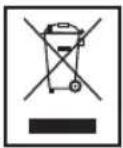
Meaning of the "Dustbin" Symbol
Protect our environment: do not dispose of electrical equipment in the domestic waste.
Please return any electrical equipment that you will no longer use to the collection points provided for their disposal.
This helps avoid the potential effects of incorrect disposal on the environment and human health.
This will contribute to the recycling and other forms of reutilization of electrical and electronic equipment.
Information concerning where the equipment can be disposed of can be obtained from your local authority.
Detaching the battery pack / disposal of batteries
The appliance contains rechargeable nickel-metal hybrid batteries.
Remove these batteries before disposing of the appliance.
As the consumer you are legally obliged to return spent batteries/battery packs.
WARNING:
- Disconnect the appliance from the mains before detaching the battery pack!
- Only remove spent battery packs.
The battery pack is latched into the bottom of the appliance.
- Turn the robot vacuum onto its back. The collision sensor should be facing you.
- Detach the battery pack on both sides and pull it up.
- Take the battery pack out of the housing.
You can take the battery pack to a collection point for old batteries or special waste. Contact your local authority for information.