LibertyMic - Talkie Walkie PRESIDENT - Free user manual and instructions
Find the device manual for free LibertyMic PRESIDENT in PDF.



User questions about LibertyMic PRESIDENT
0 question about this device. Answer the ones you know or ask your own.
Ask a new question about this device
Download the instructions for your Talkie Walkie in PDF format for free! Find your manual LibertyMic - PRESIDENT and take your electronic device back in hand. On this page are published all the documents necessary for the use of your device. LibertyMic by PRESIDENT.
USER MANUAL LibertyMic PRESIDENT
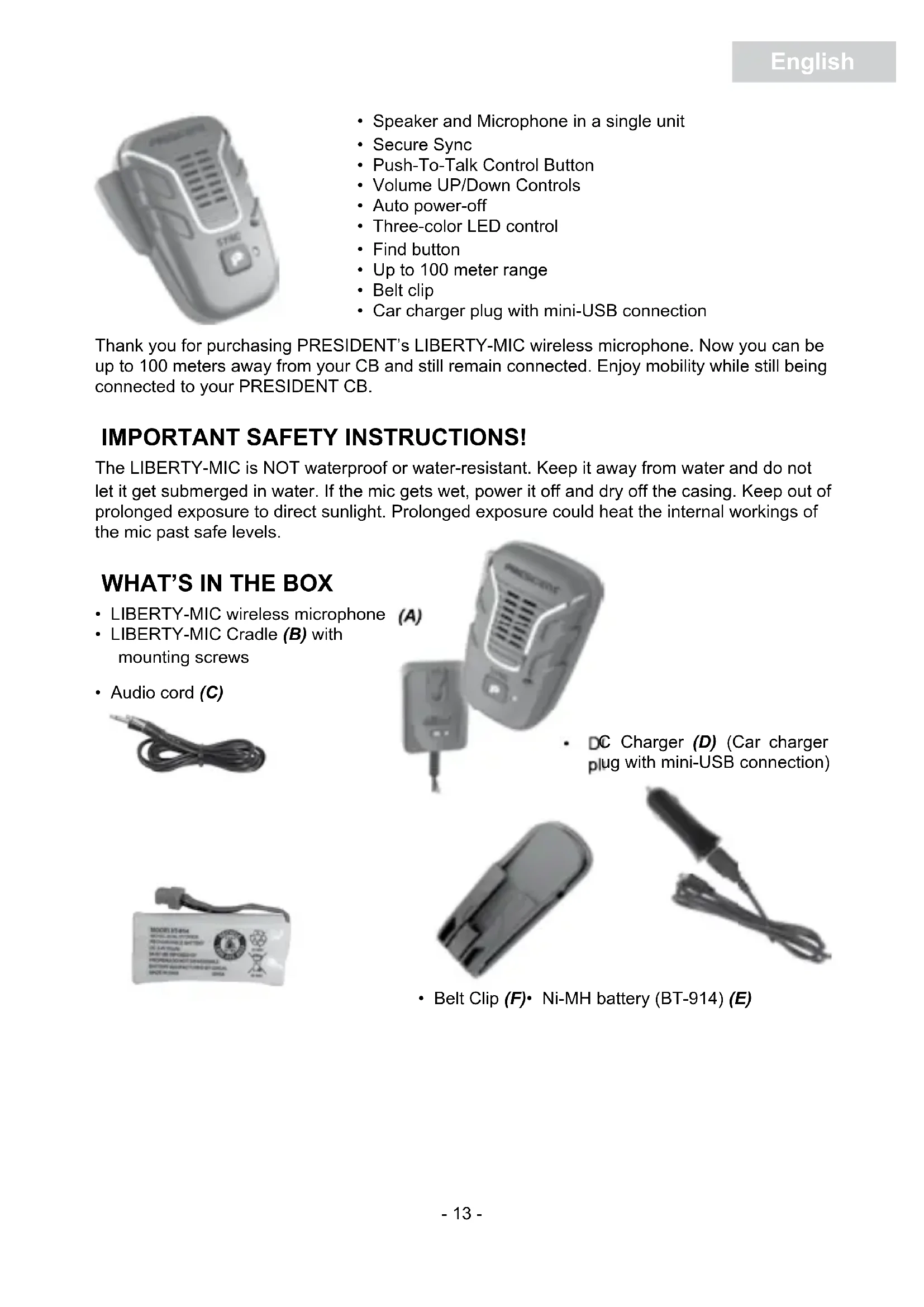
- Speaker and Microphone in a single unit
- Secure Sync
- Push-To-Talk Control Button
Volume UP/Down Controls - Auto power-off
- Three-color LED control
Find button - Up to 100 meter range
- Belt clip
- Car charger plug with mini-USB connection
Thank you for purchasing PRESIDENT's LIBERTY-MIC wireless microphone. Now you can be up to 100 meters away from your CB and still remain connected. Enjoy mobility while still being connected to your PRESIDENT CB.
IMPORTANT SAFETY INSTRUCTIONS!
The LIBERTY-MIC is NOT waterproof or water-resistant. Keep it away from water and do not let it get submerged in water. If the mic gets wet, power it off and dry off the casing. Keep out of prolonged exposure to direct sunlight. Prolonged exposure could heat the internal workings of the mic past safe levels.
WHAT'S IN THE BOX
LIBERTY-MIC wireless microphone
- LIBERTY-MIC Cradle (B) with mounting screws
Audio cord (C)


(A)
- DC Charger (D) (Car charger plug with mini-USB connection)


- Belt Clip (F)· Ni-MH battery (BT-914) (E)

CONTROLS AND FUNCTIONS
LED (4) DEFINITIONS
| Color | Status | Meaning |
| Green Solid On Linked, battery charged | ||
| Red Solid On Linked, low battery | ||
| All Off Powered down | ||
| Green Long Flash Transmitting, battery charged | ||
| Red Long Flash Transmitting, low battery | ||
| Green Short Stutter Registration mode, battery charged | ||
| Red Short Stutter Registration mode, low battery | ||
| Orange/Green Short Flash Not linked, battery charged | ||
| Orange/Red Short Flash Not linked, low battery | ||
| Green/Red Long Flash Charging, battery not full | ||
| All Long Flash Unregistered | ||
Install batteries in mic
- Remove the back battery cover.
- Insert the Ni-MH (E) battery, connecting it to the mic at the plug.
- Replace the back cover.
- Use the DC charger (D) to charge battery completely before using.
Mount the microphone cradle
- Mount the cradle (B) using the supplied screws.
- Disconnect the current wired mic
- Connect cradle (B) in place of the microphone.
- Turn on CB. The cradle LED (4) flashes red while it powers up, then becomes solid red.
Sync the mic
On the mic, press PTT (1) or SYNC/Power On/Off (2). The mic turns on and the LED (4) turns green when it has synced with the CB.
If you are out of range and move back in range, the mic will automatically re-sync.
Install the belt clip
If you are using the belt clip, slide it onto the belt clip knob on the back of the mic.
Press PTT (1) located on the side of the mic to transmit.
An error tone sounds if your CB is off, if the wireless microphone is out of range or if the wireless connection is lost. It will stop when you release PTT (1).
The mic only operates when it is in range. If it is out of range for 2 minutes, it automatically powers down.
Receive
Release PTT (1) to listen for a response
Note: to hear the reception sound in the wireless microphone, depending on the model of your CB radio, it may be necessary to connect the audio cord (C). In this case, plug it between the audio plug (11) of the cradle (B) and EXT. SP. located on the back side of your CB radio. Be sure to properly adjust the volume of your CB radio.
Increase/Decrease Volume
Press + (7) to increase or - (8) to decrease the volume in 16 step increments. When you reach the 16th step in either direction, an error tone sounds.
Find a lost mic
- Press FIND (10) on the cradle.
- When you locate the mic, press FIND (10) on the cradle again or any key on the mic.
- The tone times out after 1 minute.
AUTOMATIC POWER OFF
When you turn off the car, the CB is also turned off. If the wireless mic has not been turned off, press SYNC/Power On/Off (2) to turn it off; otherwise, it will automatically power off after 2 minutes.
The wireless mic will also power off if the mic is out of range for 2 minutes.
TURNS OFF ALL FEATURES EXCEPT CHARGING
- While the battery pack charges in the mic, press and hold SYNC/Power On/Off (2) for about 5 seconds.
- The mic beeps.
- After the battery is charged, the LED alternately flashes orange and green.
There are three methods to turn the features back on. You can press SYNC/Power On/Off (2) or you can press PTT (1). You can also disconnect the mini-USB cable (3), and then reconnect it.
SPECIFICATIONS
Speaker Output : 8 ohm
Operating Temp. : - 10°C ~ 50°C
Storage Temp. : - 20°C ~ 60°C
Ni-MH battery : BT-914
Typical Battery Life : 8 hours
DC Charger Power Input : 12 ~ 24 V DC
Digital Format : DECT
Frequency Band : 1880 ~ 1900 MHz
TWO-YEAR LIMITED WARRANTY
Important: Evidence of original purchase is required for warranty service.
WARRANTOR: GROUPE PRESIDENT ELECTRONICS ("PRESIDENT")
ELEMENTS OF WARRANTY: PRESIDENT warrants, for two years, to the original retail owner, this PRESIDENT Product to be free from defects in materials and craftsmanship with only the limitations or exclusions set out below.
WARRANTY DURATION: This warranty to the original user shall terminate and be of no further effect two years after the date of original retail sale. The warranty is invalid if the Product is (A) damaged or not maintained as reasonable or necessary, (B) modified, altered, or used as part of any conversion kits, subassemblies, or any configurations not sold by PRESIDENT, (C) improperly installed, (D) serviced or repaired by someone other than an authorized PRESIDENT service center for a defect or malfunction covered by this warranty, (E) used in any conjunction with equipment or parts or as part of any system not manufactured by PRESIDENT, or (F) installed or programmed by anyone other than as detailed by the owner's manual for this product.
STATEMENT OF REMEDY: In the event that the product does not conform to this warranty at any time while this warranty is in effect, warrantor will either, at its option, repair or replace the defective unit and return it to you without charge for parts, service, or any other cost (except shipping and handling) incurred by warrantor or its representatives in connection with the performance of this warranty. Warrantor, at its option, may replace the unit with a new or refurbished unit. THE LIMITED WARRANTY SET FORTH ABOVE IS THE SOLE AND ENTIRE WARRANTY PERTAINING TO THE PRODUCT AND IS IN LIEU OF AND EXCULES ALL OTHER WARRANTY OF ANY NATURE WHATSOEVER, WHETHER EXPRESS, IMPLIED OR ARISING BY OPERATION OF LAW, INCLUDING, BUT NOT LIMITED TO ANY IMPLIED WARRANTY OF MERCHANTABILITY OR FITNESS FOR A PARTICULAR PURPOSE. THIS WARRANTY DOES NOT COVER OR PROVIDE FOR THE REIMBURSEMENT OR PAYMENT OF INCIDENTTAL OR CONSEQUENTIAL DAMAGES.
Some states do not allow this exclusion or limitation of incidental or consequential damages so the above limitation or exclusion may not apply to you.
LEGAL REMEDIES: This warranty gives you specific legal rights, and you may also have other rights which vary from state to state.
PROCEDURE FOR OBTAINING PERFORMANCE OF WARRANTY: If, after following the instructions in the owner's manual you are certain that the Product is defective, pack the Product carefully (preferably in its original packaging). The Product should include all parts and accessories originally packaged with the Product. Include evidence of original purchase and a note describing the defect that has caused you to return it. The Product should be shipped freight prepaid, by traceable means, to warrantor at:
Groupe PRESIDENT ELECTRONICS
We, GROUPE PRESIDENT ELECTRONICS, Route de Sète, BP 100 - 34540 Balaruc - FRANCE, declare, on our own responsibility that the wireless microphone:
Brand: PRESIDENT
Model: LIBERTY-MIC
is in conformity with the essential requirements of the Directive 1999/5/CE (Article 3) adapted to the national law, as well as with the following European Standards:
EN 301 406 V2.1.1
EN 301 489-6 V1.3.1
EN 60950-1:2006+A11:2009+A1:2010+A12 : 2011
and is in conformity with Directive RoHS2: 2011/65/EU (2011/06/08)
Balaruc, the 2013-03-01

Jean-Gilbert MULLER
General Manager