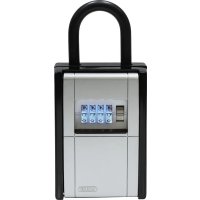
KeyGarage 797 - Safe ABUS - Free user manual and instructions
Find the device manual for free KeyGarage 797 ABUS in PDF.



| Product type | Safe |
| Brand | ABUS |
| Model | KeyGarage 797 |
| Dimensions | 83 x 120 x 63 mm |
| Weight | Approx. 883 g |
| Storage capacity | Up to 20 standard keys or 30 plastic cards |
| Power supply | 2 AA 1.5V batteries (not included) |
| Connectivity | Bluetooth 4.0 LE and higher |
| Required app | ABUS HomeTec Pro (iOS/Android) |
| Opening methods | Bluetooth via app, generated PIN code |
| Encryption | AES 128-bit |
| Radio frequency | 2.402 - 2.480 GHz |
| Max transmission power | < 10 dBm EIRP |
| Operating temperature | -10 °C to +50 °C |
| LED signaling | Green (unlocked/locked), red (incorrect code), blue (Bluetooth activity), orange (low battery) |
| Wall mounting | Yes, compatible with 797 Smart-BT |
| Outdoor use | Limited (protected wall mounting, avoid unprotected horizontal exposure) |
| Maintenance | Clean with a dry cloth, replace batteries if orange indicator |
| Spare parts | AA batteries, silicone sealing caps |
| Delivery contents | KeyGarage, wall mount, key cards, manual |
| Warranty | Manufacturer's warranty against material and manufacturing defects (duration not specified) |
Frequently Asked Questions - KeyGarage 797 ABUS
User questions about KeyGarage 797 ABUS
0 question about this device. Answer the ones you know or ask your own.
Ask a new question about this device
Download the instructions for your Safe in PDF format for free! Find your manual KeyGarage 797 - ABUS and take your electronic device back in hand. On this page are published all the documents necessary for the use of your device. KeyGarage 797 by ABUS.
USER MANUAL KeyGarage 797 ABUS
Thank you for choosing this ABUS product!
Please read this guide carefully before use. Keep these instructions and provide all users with instruction on how to use it.
To set up your smart KeyGarageTM for the first time, you will need a Bluetooth®-enabled smartphone (Bluetooth 4.0 LE or higher), a currently supported iOS or Android software version and the free ABUS HomeTec Pro app for iOS or Android.
The smart KeyGarage™ can be operated using either the ABUS HomeTec Pro app or the keypad with an automatically generated code.
The contents of this installation and operating manual reflect the current status at the time of printing. The printed manual may be outdated at the time of the product's entry into service due to updates and further developments.
We therefore ask you to visit our website
www.abus.com and enter "787 Smart-BT" or "797 Smart-BT" into the search bar. You'll always find the current and complete version of the installation and operating instructions on the product page under the "Downloads" column.
Warnings and safety instructions
Please read and observe these safety instructions. Non-observation of these instructions could lead to fire, injury to persons and/or device damage!
| Symbol | Signal word | Remark |
| ! | Caution | Security note indicating a risk of injury or health hazards. Failure to observe these warnings can lead to injury. |
| ! | Attention | Warning about possible damage to the device. Failure to observe these warnings can lead to material damage or malfunctions. |
| i | Notice | Informative note |

- Keep packaging material and small parts away from children: Danger of suffocation!
Danger of pinching fingers when closing the KeyGarageTM. - Keep batteries out of the reach of children. Children may put batteries in their mouths and swallow them. This can cause serious harm to their health. Seek immediate medical attention in this event! Risk of burns from contact with leaking or damaged
batteries! In these cases, use suitable protective gloves and clean the battery compartment with a dry cloth.
Batteries must not be dismantled, punctured, damaged, short-circuited, heated, charged or thrown into an open fire (risk of explosion!). Do not use or store the product in areas where the temperature could reach below -10^ or above +50^ . Do not expose the product to direct sunlight for long periods of time!

- Only open the key compartment of the KeyGarage™, never the housing with the electronic unit.
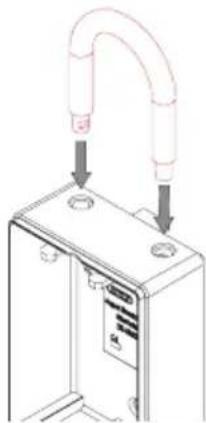
- For 797 Smart-BT: When changing the shackle of the smart KeyGarage™, make sure that the lock does not fall down.
- Make sure that the smart KeyGarage™ is always properly locked.
- The smart KeyGarage™ must not be operated lying down in unprotected outdoor areas: penetrating moisture can damage the electronic unit or objects in the key compartment.
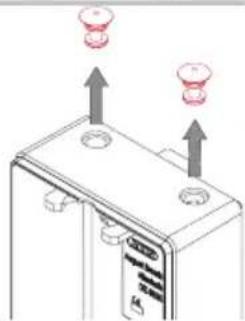
- When dismantling the shackle, put on the silicone sealing plugs so that no moisture can get into the smart KeyGarage™.
- The product may only be used for its intended purpose. Any modification to the product is prohibited.
787 Smart-BT wall mounting
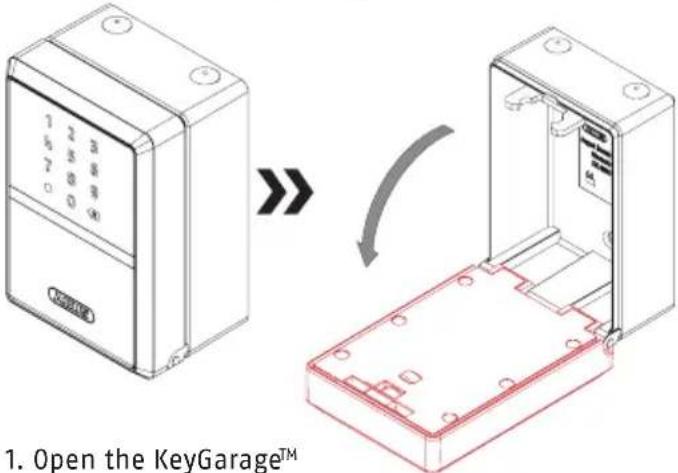
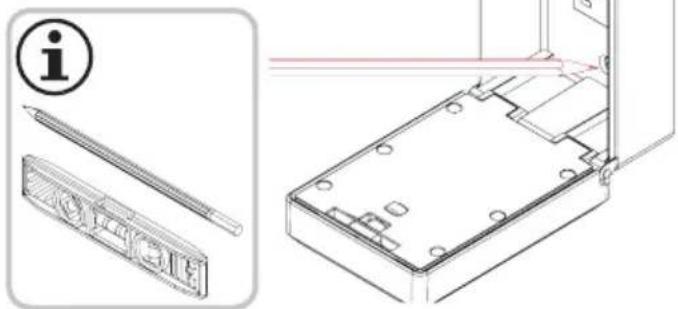
- Place the open KeyGarage™ vertically in the desired position. Mark the drill holes, align with spirit level.
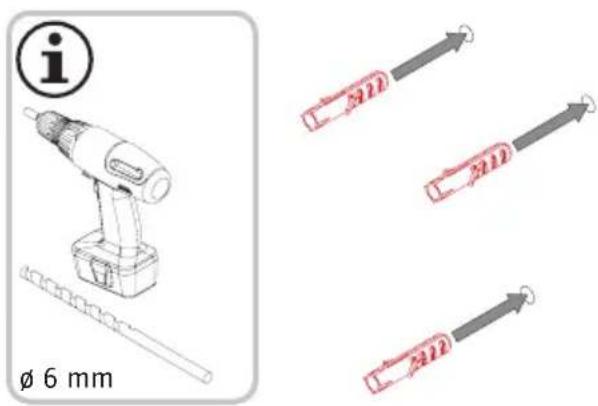
3. Drill holes and insert dowels.
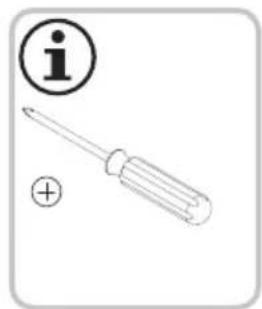
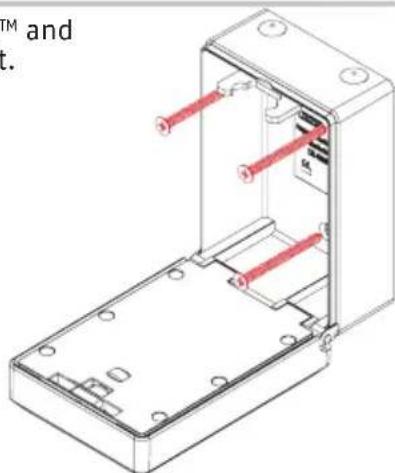
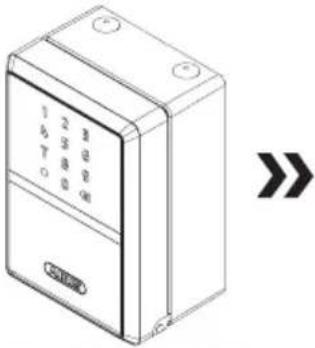
- Screw on KeyGarageTM and close the compartment.
Mounting the shackle 797 Smart-BT / changing shackle
- Open KeyGarageTM
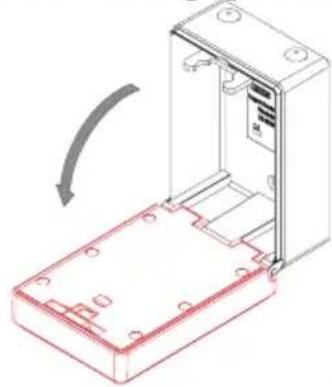
- Push the bolt backwards
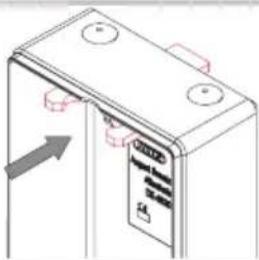
- Remove silicone sealing plug
- Insert shackle
- Push the bolt forward again
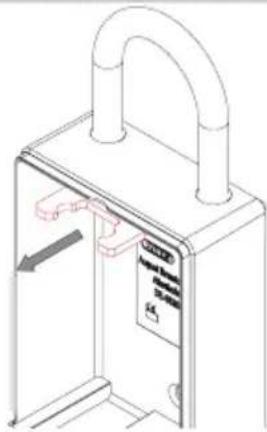
- Close KeyGarageTM
Insert or change batteries
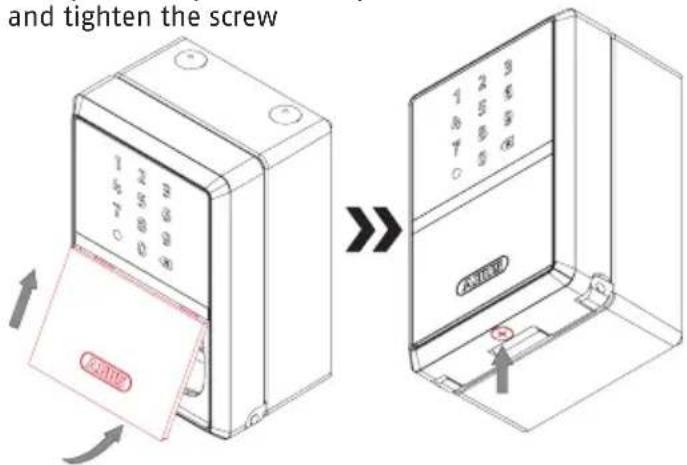
- Loosen the screw on the underside

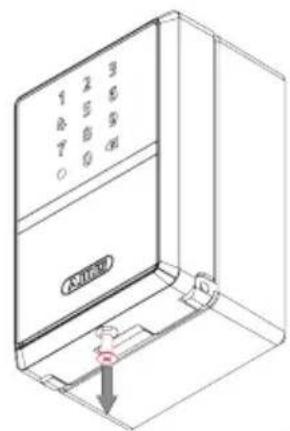
- Remove the protective flap
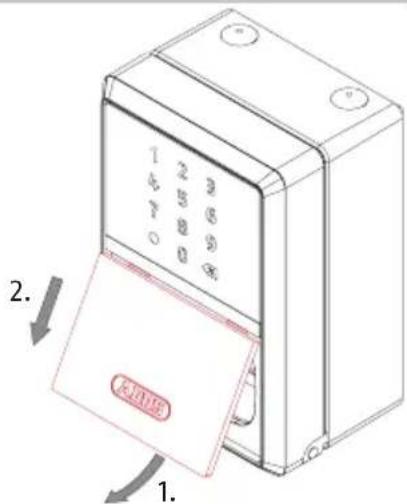
- Insert or change batteries (2x 1.5 V AA)
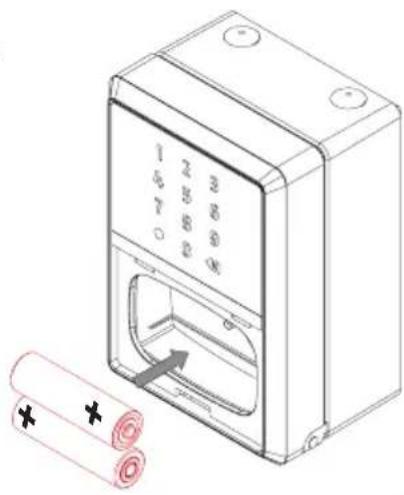
- Replace the protective flap and tighten the screw
Opening the key compartment
- Can be done in delivery state without Bluetooth® / code
- Via Bluetooth®
- Via generated code
HomeTec Pro App
- Download the ABUS HomeTec Pro app and enable Bluetooth® on your smartphone.
- Start the app and follow the instructions in the app.
- Pay attention to the assignment of the different keycards to the products, and always scan the correct keycard. Never leave the keycard in the smart KeyGarage™.
- To program the smart KeyGarage™, start by pressing the button „Add HomeTec Pro / component".
- It is imperative to keep the ABUS keycard(s) in a safe place even after completing the setup! If you forget your password, you can reset and reassign it by scanning the QR code. Do not give the card to third parties.
To guarantee proper function, we expressly recommend performing updates in the app and software/firmware updates for HomeTec Pro components in a timely manner. The app will provide
information on this. You can also perform the respective update in the component's settings.
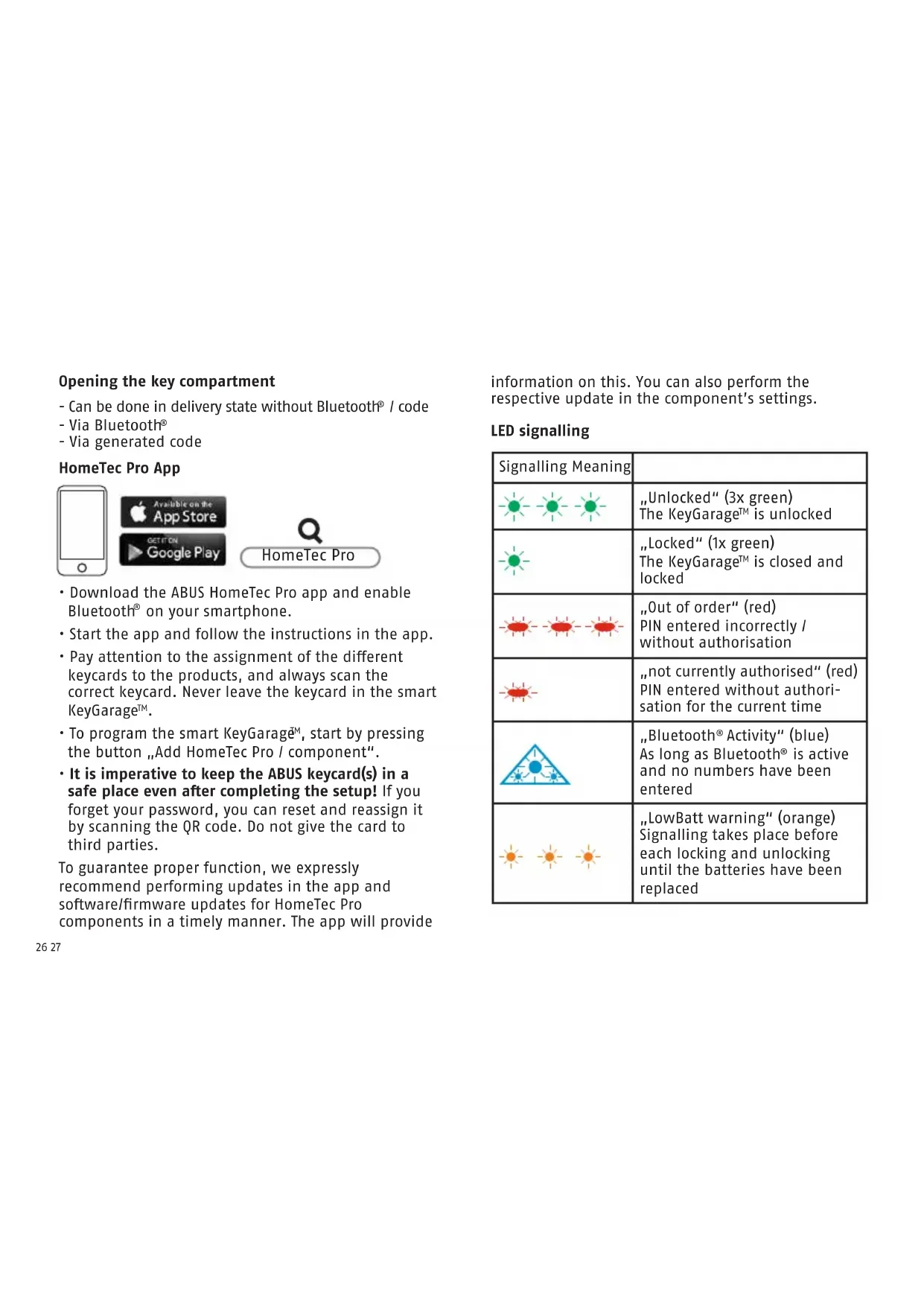
LED signalling
| Signalling Meaning | |
| - - - - - - | "Unlocked" (3x green) The KeyGarage™ is unlocked |
| - - - - - - | "Locked" (1x green) The KeyGarage™ is closed and locked |
| - - - - - - | "Out of order" (red) PIN entered incorrectly / without authorisation |
| - - - - - - | "Not currently authorised" (red) PIN entered without authorisation for the current time |
| - - - - - - | "Bluetooth® Activity" (blue) As long as Bluetooth® is active and no numbers have been entered |
| - - - - - - | "LowBatt warning" (orange) Signalling takes place before each locking and unlocking until the batteries have been replaced |
Technical data
| Dimensions 83 x 120 x 63 mm | |
| Weight approx. 883 grams | |
| Storage space up to 20 keys | (standard front door keys) or up to 30 plastic cards (credit card format) or entire bunches of keys |
| Operating temperature range | -10°C to +50°C |
| Radio frequency 2,402 GHz | -2,480 GHz |
| Max. radiated transmission power | < 10dBm eirp |
| Encryption AES-128 bit | |
Declaration of Conformity
ABUS August Bremicker Sohne KG hereby declares that the radio system type 787 / 797 Smart-BT complies with Directives 2014/53/EU and 2011/65/EU. The full EU Declaration of Conformity can be found online at: docs.abus.com
Disposal
This product contains valuable raw materials. At the end of its service life, dispose of the product in accordance with the applicable legal requirements.
Electrical appliances, rechargeable batteries and
batteries must not be disposed of with household waste. Disposal must be carried out in accordance with Directive 2012/19/EU on waste electrical and electronic equipment (WEEE), or Directive 2006/66/ EC on batteries and accumulators and waste batteries and accumulators.
Dispose of the packaging according to type. Separate the cardboard, foil and plastic elements for recycling. Please contact the local authority responsible for disposal if you have any queries. You can obtain information on collection points for your old appliances, for example, from the local municipal or city administration, the local waste disposal companies, or your specialist dealer.

ABUS products are designed, manufactured and tested in accordance with applicable regulations with great care. The warranty exclusively covers faults that are caused by material or manufacturing defects. If a material or manufacturing defect can be proven, the product will be repaired or replaced at the discretion of the warrantor. In such cases, the warranty ends with the termination of the original warranty period. Any further claims are expressly excluded.
ABUS assumes no liability for defects or damage that has been caused by external influences (e.g. transport, external forces), improper use, normal wear and tear or non-compliance with this operating
and installation instructions document. If a warranty claim is asserted, the product must be returned with the original receipt with date of purchase and a brief written description of the fault.
Subject to technical alterations. No liability for mistakes and printing errors.
Licence texts
The Bluetooth® word mark and logos are registered trademarks owned by Bluetooth SIG, Inc. and any use of such marks by ABUS is under license. Other trademarks and trade names are those of their respective owners.
Apple and the Apple logo are trademarks of Apple Inc., registered in the U.S. and other countries and regions. App Store is a service mark of Apple Inc.
Google Play and the Google Play logo are trademarks of Google LLC.
This product was manufactured and is sold under a licence granted to ABUS August Bremicker Sohne KG by Vectis One Ltd. for patents on Wi-Fi technology and owned by Wi-Fi One, LLC ("Licence"). The licence is limited to the finished electronics for end-use. It does not extend to any third party equipment or processes used or sold combined with this product.

ABUS (UK) Ltd.
Unit 8 Third Way Corner, Avonm.
BS11 9HL Bristol, GB
USA-required information regarding products with FCC certification and SDoC
Contains Transmitter Module FCC ID: XPYANNAB1
Changes or modifications not expressly approved by the party responsible for compliance could void the user's authority to operate the equipment.
NOTE: This equipment has been tested and found to comply with the limits for a Class B digital device, pursuant to part 15 of the FCC Rules. These limits are designed to provide reasonable protection against harmful interference in a residential installation. This equipment generates, uses and can radiate radio frequency energy and, if not installed and used in accordance with the instructions, may cause harmful interference to radio communications. However, there is no guarantee that interference will not occur in a particular installation. If this equipment does cause harmful interference to radio or television reception, which can be determined by turning the equipment off and on, the user is encouraged to try to correct the interference by one or more of the following measures:
- Reorient or relocate the receiving antenna.
- Increase the separation between the equipment and receiver.
-
Connect the equipment into an outlet on a circuit different from that to which the receiver is connected.
-
Consult the dealer or an experienced radio/TV technician for help.
Supplier's Declaration of Conformity 47 CFR 2.1077 Compliance Information
Unique Identifier: 787 Smart-BT KeyGarage™ and 797 Smart-BT KeyGarage™
Responsible Party - U.S. Contact Information ABUS USA LLC
23910 N 19th Avenue Unit #56
Phoenix, AZ 85085-1850 Phone: 623-516-9933
FCC Compliance Statement
This device complies with Part 15 of the FCC Rules. Operation is subject to the following two conditions: (1) This device may not cause harmful interference, and (2) this device must accept any interference received, including interference that may cause undesired operation.
Canada-required information regarding products with ICES certification and SDoC
Contains IC: 8595A-ANNAB1 CAN ICES-003 (B)
This device contains licence-exempt transmitter(s)/receiver(s) that comply with Innovation, Science and Economic Development Canada's licence-exempt RSS(s). Operation is subject to the following two conditions:
1. This device may not cause interference.
2. This device must accept any interference, including interference that may cause undesired operation of the device.
Application HomeTec Pro
ABUS August Bremicker Söhne KG
DE-58292 Wetter
Tel.: +49 (0) 23 35 63 40
www.abus.com | info@abus.de
- Thank you for choosing this ABUS product!
- Warnings and safety instructions
- Smart-BT wall mounting
- Drill holes and insert dowels.
- Mounting the shackle 797 Smart-BT / changing shackle
- Insert or change batteries
- Opening the key compartment
- HomeTec Pro App
- LED signalling
- Declaration of Conformity
- Disposal
- Licence texts
- USA-required information regarding products with FCC certification and SDoC
- Supplier's Declaration of Conformity 47 CFR 2.1077 Compliance Information
- FCC Compliance Statement
- Canada-required information regarding products with ICES certification and SDoC
- Application HomeTec Pro
Brand : ABUS
Model : KeyGarage 797
Category : Safe