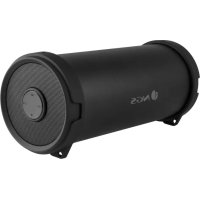
Roller Flow mini - Docking station NGS - Free user manual and instructions
Find the device manual for free Roller Flow mini NGS in PDF.



| Brand | NGS |
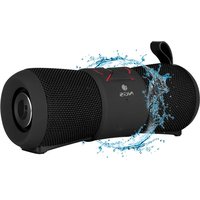
| Model | Roller Flow mini |
| Product type | Docking station / Portable Bluetooth speaker |
| Power source | Built-in rechargeable battery, charges via micro USB |
| Connectivity | Bluetooth, USB (USB drive playback), FM Radio |
| Battery life | Varies depending on use (not specified in manual) |
| Charging indicator | Red LED: charging, turns off when fully charged |
| Bluetooth indicator | Flashing blue LED in pairing mode, slow flashing when connected |
| Controls | Play/pause, previous/next track, volume, mode switch (M) |
| Modes | Bluetooth, USB, FM Radio |
| FM Radio | Automatic station search, automatic memory |
| Waterproofing | Waterproof gasket on the cover (splash protection) |
| Dimensions | Approximately 20 x 10 x 10 cm (estimate) |
| Weight | Approximately 500 g (estimate) |
| Battery warranty | 12 months (battery considered consumable) |
| Maintenance | Clean with a soft, dry cloth. Do not use abrasive products. |
| Recycling | Do not dispose of with household waste. Recycle at an appropriate collection point. |
| Standards | Compliant with directive 1999/5/EC |
| Color | Not specified (probably black or gray) |
| Box contents | Speaker, micro USB cable, user manual |
Frequently Asked Questions - Roller Flow mini NGS
User questions about Roller Flow mini NGS
0 question about this device. Answer the ones you know or ask your own.
Ask a new question about this device
Download the instructions for your Docking station in PDF format for free! Find your manual Roller Flow mini - NGS and take your electronic device back in hand. On this page are published all the documents necessary for the use of your device. Roller Flow mini by NGS.
USER MANUAL Roller Flow mini NGS
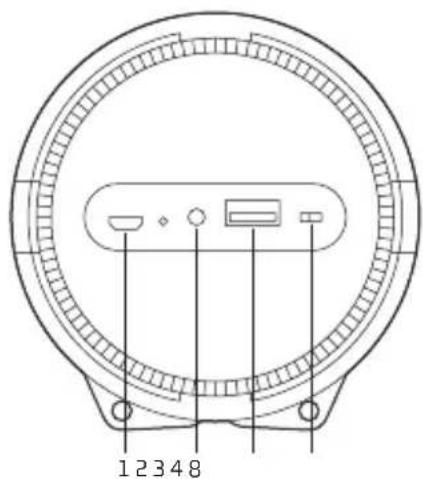
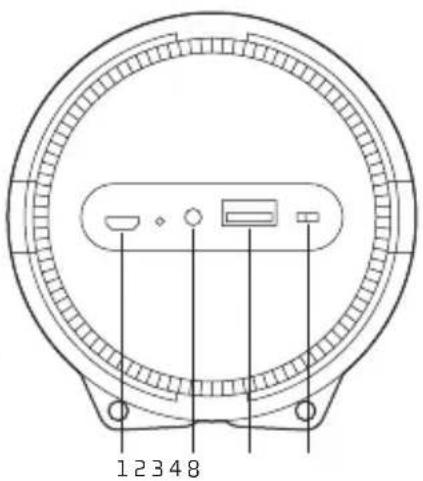
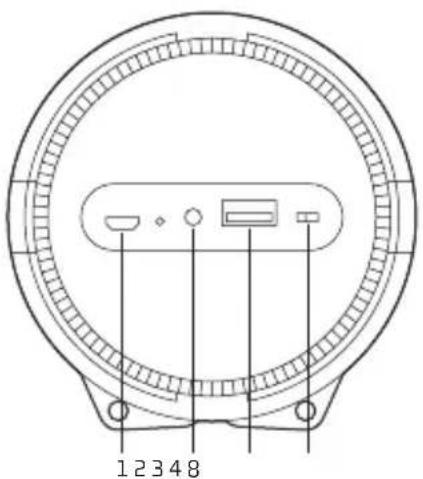
1 Charging jack
2 Aux-in jack
3 USB port
4 ON/OFF button
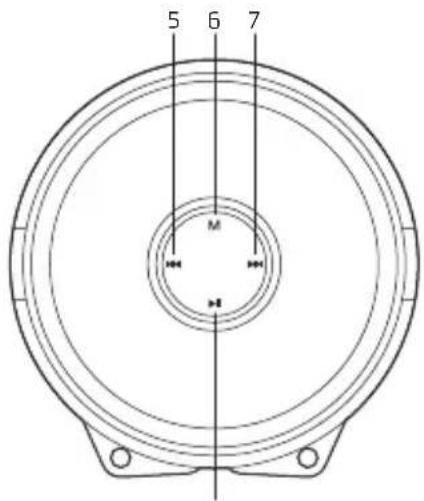
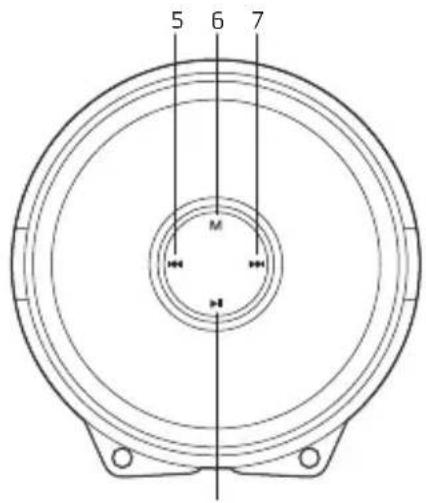
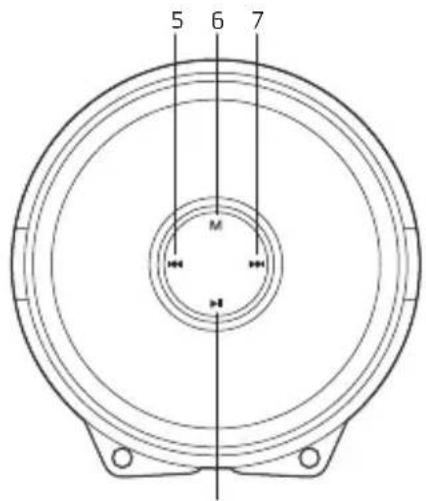
5 Backward/Volume down
6 Mode (Switch Bluetooth, USB disk, FM and AUX-IN state)
7 Forward/Volume up
8 Play/Pause
CHARGING THE BLUETOOTH SPEAKER
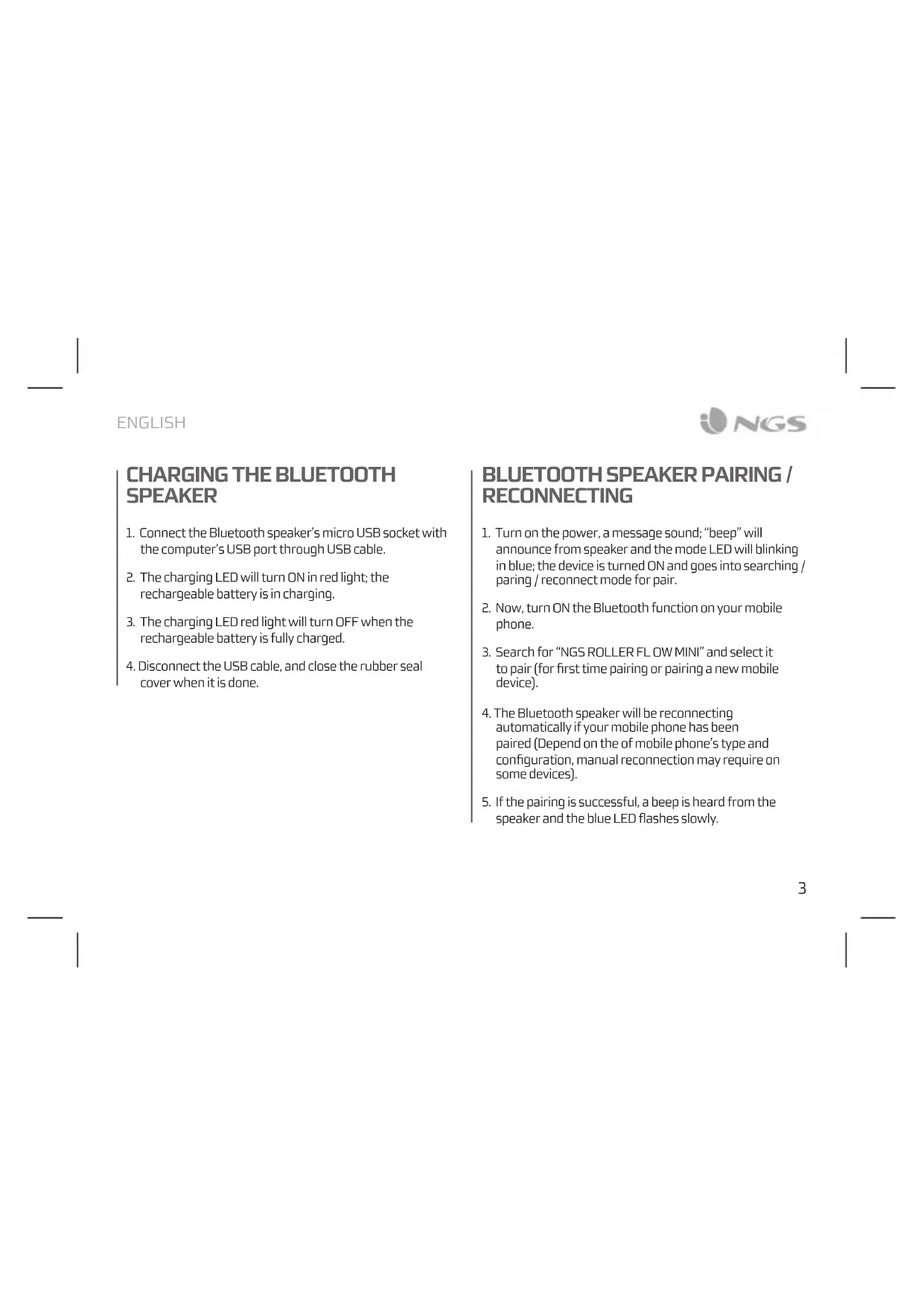
- Connect the Bluetooth speaker's micro USB socket with the computer's USB port through USB cable.
- The charging LED will turn ON in red light; the rechargeable battery is in charging.
- The charging LED red light will turn OFF when the rechargeable battery is fully charged.
- Disconnect the USB cable, and close the rubber seal cover when it is done.
BLUETOOTH SPEAKER PAIRING / RECONNECTING
- Turn on the power, a message sound; "beep" will announce from speaker and the mode LED will blinking in blue; the device is turned ON and goes into searching / sparing / reconnect mode for pair.
- Now, turn ON the Bluetooth function on your mobile phone.
- Search for "NGS ROLLER FLOW MINI" and select it to pair (for first time pairing or pairing a new mobile device).
- The Bluetooth speaker will be reconnecting automatically if your mobile phone has been paired (Depend on the of mobile phone's type and configuration, manual reconnection may require on some devices).
- If the pairing is successful, a beep is heard from the speaker and the blue LED flashes slowly.
USER'S MANUAL
MODES
BLUETOOTH/USB/FMRADIO
To switch between modes, press the M key. If the device is not connected to a USB memory, it will skip these modes when the M key is pressed.
- In playing music, press button to pause music, press it once again to play.
- If you press this button briefly, you return to the previous track.
- If you press this button briefly, you move to the next track.
- To raise and lower the volume, hold down the keys respectively.
FM MODE
- Press the M button to switch to Radio mode.
- Press the button to start an automatic channel search. Channels are remembered automatically.
- To skip between channels, simply press the end buttons.
Note: For better radio reception, connect the charging cable (which also acts as an antenna) into the micro USB slot.
Battery warranty: The battery is a consumer product, and as such it is under warranty for 12 months.
If at any time in the future you should need to dispose of this product please note that:
Waste electrical products should not be disposed of with household waste. Please recycle where facilities exist.
Check with your Local Authority or retailer for recycling advice.
(Waste Electrical and Electronic Equipment Directive)
HEREBY, LURBE GRUP S.A, DECLARS THAT THIS SPEAKER IS IN COMPLIANCE WITH THE ESSENTIAL REQUIREMENTS AND OTHER RELEVANT PROVISIONS OF DIRECTIVE 1999/5/EC.

ROLLER FLOW MINI
HAUT-PARLEUR BLUETOOTH
APERÇU GENERAL
1 Prise de chargement
2 Prise aux-in
3 Port USB
4 Bouton marche/arret
5 Arriere / reduction volume
6 Mode (Activier Bluetooth, disque USB, FM et état AUX-IN)
7 Avance / augmentation volume
8 Lecture/pause
CHARGEMENT DU HAUTPARLEUR BLUETOOTH
BLUETOOTH REPRODUCTOR
VŠEOBECNÁ PREHLED
1 Nákladní port
2 Pomocnyvstup
3 USB port
4 tlačitkoprozapnuti/vypnuti
5 Predchozi/snizithlasitost
6 Rezim (prepinani mezi Bluetooth, USB, FM a AUX-IN)
7 Dalsi /zvysit hlasitosti
8 Prehravat/pauza
NAHRÁT BLUETOOTH REPRODUKTORY
HAS BEEN TESTED AND FOUND IN CONFORMITY WITH THE FOLLOWING HARMONIZED EUROPEAN STANDARDS:
HA SIDO TESTADD EN CONFORMIDAD CON LAS SIGUIENTES NORMAS STANDARDE EUROPEAS ARMONIZADAS
EN60065:2002+A1:2006+A11:2008+A2:2010+A12:2011
EN 300 328 V1.8.1: 2012; EN 301 489-1 V1.9.2: 2011; EN 301 489-17 V2.2.1: 2012
AND THEREFORE COMPLY WITH THE ESSENTIAL REQUIREMENTS AND PROVISIONS OF THE FOLLOWING DIRECTIVES OF THE EUROPEAN PARLIAMENT AND EUROPEAN COUNCIL:
Y, POR LO TANTO, CUMPLE CON LOS REQUIERIMIENTOS Y PROVISIONES DE LAS SIGUIENTES DIRECTIVAS DEL PARLAMENTO EUROPEO:
RADIO EQUIPMENT DIRECTIVE 2014/53/EU
R&TTDEIRECTIVE1999/5/EC
ROHS DIRECTIVE 2011/65/EU
Brand : NGS
Model : Roller Flow mini
Category : Docking station