EasyManual
S1000DB - Speaker EDIFIER - Free user manual and instructions
Find the device manual for free S1000DB EDIFIER in PDF.



User questions about S1000DB EDIFIER
0 question about this device. Answer the ones you know or ask your own.
Ask a new question about this device
Download the instructions for your Speaker in PDF format for free! Find your manual S1000DB - EDIFIER and take your electronic device back in hand. On this page are published all the documents necessary for the use of your device. S1000DB by EDIFIER.
USER MANUAL S1000DB EDIFIER
English Thank you for purchasing this Edifier product. For generations, Edifier tries to provide powered speaker products to satisfy the need of our end customers, even the most demanding ones. This product can add to your home entertainment, personal computer, and mini home theater great sound performance. Please read this manual carefully to obtain the best of this system. The lightning flash with arrowhead inside the triangle, is intended to alert the user to the presence of un-insulated dangerous voltage within the product's enclosure that may be of a sufficient magnitude to constitute a risk of electric shock to persons. To prevent the risk of electric shock, do not remove cover (or back). No user-serviceable Parts inside. Refer servicing to qualified Service personnel only.
1. Read these instructions. 2. Keep these instructions.
3. Heed all warnings. 4. Follow all instructions.
5. Do not use this apparatus near water. 6. Clean only with dry cloth.
7. Do not block any ventilation openings. Install in accordance with the manufacturer’s instructions.
8. Do not install near any heat sources such as radiators, heat registers, stoves, or other apparatus (including amplifiers) that produce heat. 9. Do not defeat the safety purpose of the polarized or grounding-type plug. A polarized plug has two blades with one wider than the other. A grounding type plug has two blades and a third grounding prong. The wide blade or the third prong are provided for your safety. If the provided plug does not fit into your outlet, consult an electrician for replacement of the obsolete outlet. 10. Protect the power cord from being walked on or pinched particularly at plugs, convenience receptacles, and the point where they exit from the apparatus.
11. Only use attachments/accessories specified by the manufacturer.
12. Unplug this apparatus during lightning storms or when unused for long periods of time.
13. Refer all servicing to qualified service personnel. Servicing is required when the apparatus has been damaged in any way, such as power-supply cord or plug is damaged, liquid has been spilled or objects have fallen into the apparatus, the apparatus has been exposed to rain or moisture, does not operate normally, or has been dropped. 14. The MAINS plug or an appliance coupler is used as the disconnect device, the disconnect device shall remain readily operable.
15. The maximum ambient temperature is 40°C.
The exclamation point inside the triangle is intended to alert the user to the presence of important operating and maintenance (servicing) instructions in the literature accompanying the product.
WARNING: To reduce the risk of fire or electric shock, do not expose this apparatus to rain or moisture.
Correct Disposal of this product. This marking indicates that this product should not be disposed with other household wastes throughout the EU. To prevent possible harm to the environment or human health from uncontrolled waste disposal, recycle it responsibly to promote the sustainable reuse of material resources. To return your used device, please use the return and collection systems or contact the retailer where the product was purchased. They can take this product for environmental safe recycling. Use only with the cart, stand, tripod, bracket, or table specified by the manufacturer, or sold with the apparatus. When a cart is used, use caution when moving the cart/apparatus combination to avoid injury from tip-over. WARNING DO NOT INGEST BATTERY, CHEMICAL BURN HAZARD This product contains a coin/button cell battery. If the coin/button cell battery is swallowed, it can cause severe internal burns in just 2 hours and can lead to death. Keep new and used batteries away from children, if the battery compartment does not close securely, stop using the product and keep it away from children. If you think batteries might have been swallowed or placed inside any part of body, seek immediate medical attention. The battery (in remote control) shall not be exposed to excessive heat such as sunshine, fire or the like.Unpack the box Box contents
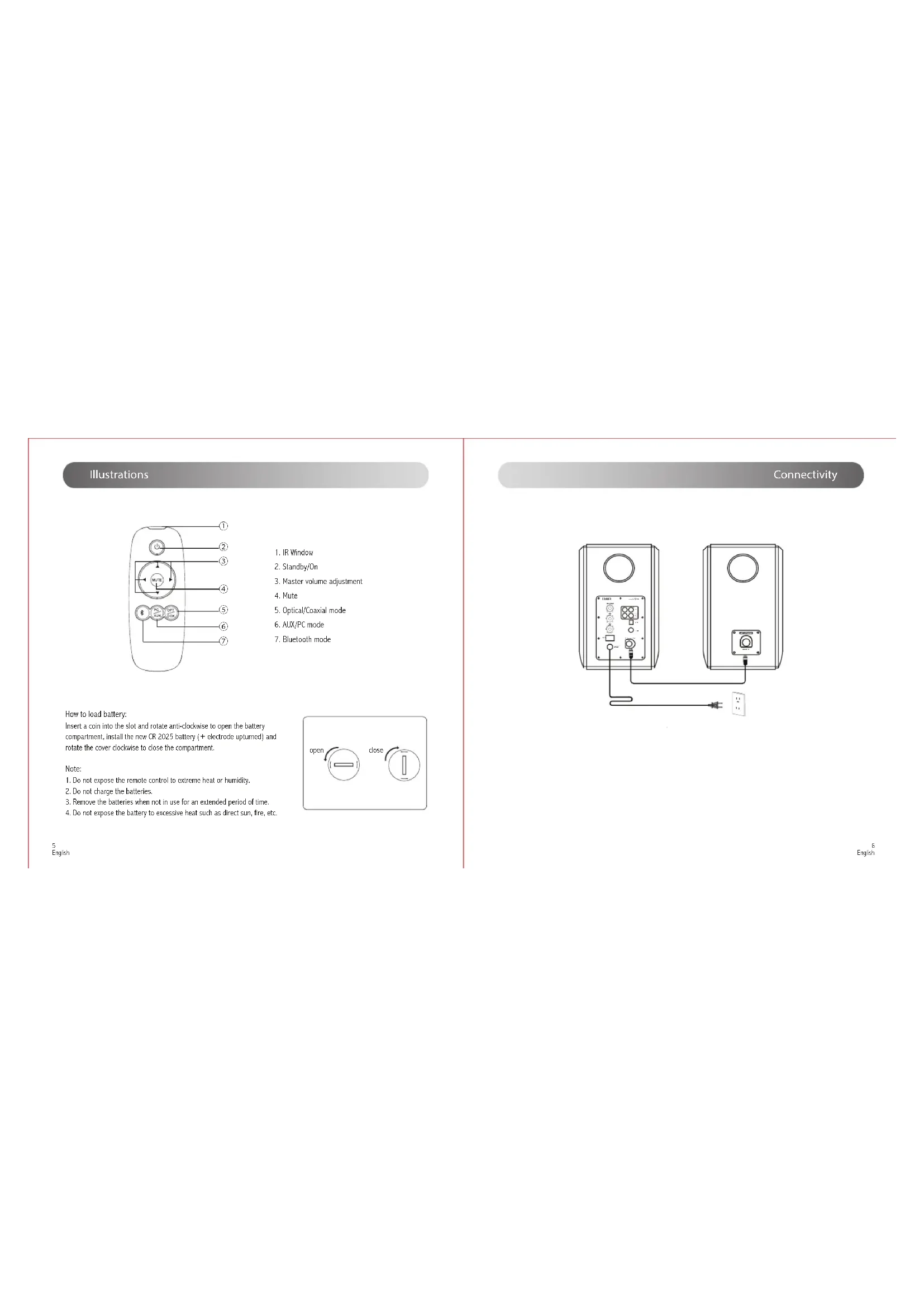
English Illustrations
Press to cycle inputs: AUX/PC/Optical/ Coaxial/Bluetooth Press and hold to disconnect active Bluetooth device
6. Line in input port
9. Connect to passive speaker
10. Connect to active speaker
Red: Optical/Coaxial mode Green: AUX/PC mode Blue: Bluetooth mode
Multimedia Speaker S1000DB Speaker In Power Off On L Speaker Out OPT COX
3. Master volume adjustment
5. Optical/Coaxial mode
Connectivity How to load battery: Insert a coin into the slot and rotate anti-clockwise to open the battery compartment, install the new CR 2025 battery (+ electrode upturned) and rotate the cover clockwise to close the compartment. Note:
1. Do not expose the remote control to extreme heat or humidity.
2. Do not charge the batteries.
3. Remove the batteries when not in use for an extended period of time.
4. Do not expose the battery to excessive heat such as direct sun, fire, etc.
English Basic operation Basic operation
1. Press master volume dial on active speaker or press the “PC/AUX” key on the remote control to select AUX
audio source, LED indicator turns to green.
2. Connect PC/AUX input port on active speaker to your audio source (phone, mp3, mp4 player etc) using the
included 3.5mm-2RCA audio cable.
3. Touch play on your device and adjust the volume to a desired level.
1. Press master volume dial on active speaker or press the “OPT/COX” key on the remote control to select
optical audio source, LED indicator turns to red.
2. Connect optical input port on active speaker to your audio source (DVD player etc) using the included optical
fiber cable. 3.Touch play on your device and adjust the volume to a desired level. Note:
1. Press master volume dial on active speaker or press the “ ” key on the remote control to select Bluetooth
mode, LED indicator turns to blue.
2. Set your device (mobile phone, tablet device, MP3/MP4 player etc.) to search and select “EDIFIER S1000DB”.
3. Pair your device with “EDIFIER S1000DB”.
4. Touch play on your device and adjust the volume to a desired level.
1. Bluetooth connectivity and compatibility may be different between different source devices, depending on the
software versions of source devices.
2. To enjoy the full Bluetooth functions of this product, please ensure your mobile device has A2DP profile.
3. PIN code for connection is “0000” if needed.
Bluetooth operation Disconnect Bluetooth: Press and hold master volume dial for approx. 2 seconds to disconnect Bluetooth. Playback: Re-connect Bluetooth to play music. Specication Power output: RMS 25W×2(Treble) +35W×2(Mid-range and bass) Signal to noise ratio:
85dBA Frequency response: 48Hz~20KHz (±4dB) Input sensitivity: PC: 900 ± 50mV AUX: 700 ± 50mV OPT, COX: 350 mFFs ± 50 mFFs Input type: PC/Auxiliary/Optical/Coaxial/Bluetooth Mid-range and bass driver: 5.5 inch Treble driver: 1 inch EDIFIER S1000
Ensure Bluetooth function is enabled on your Bluetooth devices.
Move the devices closer and retry the connection.
Try another Bluetooth device for connection.
Check the power cord connection and make sure the wall outlet is on.
Check for proper connections of the audio input cable.
Multimedia Speaker S1000DB Speaker In Power Off On L Speaker Out OPT COX
Multimedia Speaker S1000DB Speaker In Power Off On L Speaker Out OPT COX
Multimedia Speaker S1000DB Speaker In Power Off On L Speaker Out OPT COX
Multimedia Speaker S1000DB Speaker In Power Off On L Speaker Out OPT COX