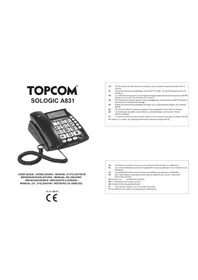
Sologic A831 - Telephone TOPCOM - Free user manual and instructions
Find the device manual for free Sologic A831 TOPCOM in PDF.


| Product Type | Analog landline phone with SOS function and wireless pendant |
| Brand | Topcom |
| Model | Sologic A831 |
| Power supply | 9 V DC, 300 mA mains adapter; 4 AA/LR03 alkaline batteries (not supplied); 23A, 12 V pendant battery (supplied) |
| Dimensions (approx.) | 220 x 180 x 80 mm |
| Weight (approx.) | 500 g (with batteries) |
| Main functions | Caller ID, 30-entry directory, direct memory keys M1/M2, hands-free speaker, redial, pause, SOS function with pendant, emergency message recording, clock with automatic date |
| Display | LCD with date, time, number of calls display |
| Dialing mode | Tone (DTMF) / Pulse |
| Flash duration | 100 / 300 / 600 ms adjustable |
| Available languages | 11 languages (French, English, German, Spanish, Swedish, Dutch, Italian, Finnish, Danish, Polish, Portuguese) |
| Wireless pendant | SOS button, 23A 12 V battery, range up to 100 m (in open field) |
| Support / Warranty | 24-month warranty, Topcom after-sales service center |
| Care and cleaning | Clean with a slightly damp cloth, do not use abrasive detergents |
| Safety | CE compliant, R&TTE directive; do not use in damp environments (bathroom); unplug during storms |
| Operating temperature | +5 °C to +45 °C |
| Relative humidity | 25% to 85% |
Frequently Asked Questions - Sologic A831 TOPCOM
User questions about Sologic A831 TOPCOM
0 question about this device. Answer the ones you know or ask your own.
Ask a new question about this device
Download the instructions for your Telephone in PDF format for free! Find your manual Sologic A831 - TOPCOM and take your electronic device back in hand. On this page are published all the documents necessary for the use of your device. Sologic A831 by TOPCOM.
USER MANUAL Sologic A831 TOPCOM
USER GUIDE / HANDLEIDING / MANUEL D'UTILISATEUR BEDIENUNGSANLEITUNG / MANUAL DE USUARIO BRUKSANVISNING / BRUGERVEJLEDNING / MANUAL DO UTILIZADOR / INSTRUKCJA OBSŁUGI
V1.0 - 08/10

UK The CE symbol indicates that the unit complies with the essential requirements of the R&TTE directive.
NL Het toestel voldoet aan de basiseisen van de R&TTE-richtlijn. Dit wordt bevestigd door de CE-markering.
FR La conformité de l'appareil avec les exigences fondamentales de la directive européenne R&TTE relative aux terminaux, est confirmée par le label CE.
DE Die Übereinstimmung des Gerätes mit den grundlegenden Anforderungen der R&TTE-Directive ist durch das CE-Kennzeichen bestätigt.
ES El sello CE corrobora la conformidad del equipo con los requerimientos básicos de la directiva R&TTE.
SE CE-märket bekräftar att apparaten uppfyller de grundläggande kraven i R&TTE direktivet.
DK CE-mærkningen bekræfter, at produktet er i overensstemmelse med kravene i Rådets teleterminaldirektiv.
PT O simbolo CE indica que esta unidade cumpre com os requisitos essenciais da directiva R&TTE.
PL Symbol CE oznacza, że urządzenie spełnia istotne wymogi dyrektywy R&TTE.
UK The features described in this manual are published with reservation to modifications.
NL De in deze handleiding beschreven mogelijkheden worden gepubliceerd onder voorbehoud van wijzigingen.
FR Les possibilités décrites dans ce manuel sont publiées sous réserve de modifications.
DE Die in dieser Bedienungsanleitung umschriebenen Möglichkeiten, werden vorbehaltlich Änderungen publiziert.
ES Conexión a la red telefónica analógica.
SE For anslutning til det analoga nätverket.
DK Tilsluttes til del analoge telefonfastnet.
PT Para efectuar a ligação com a rede pública analógica.
PL Do podłączenia do publicznej analogowej sieci telefonicznej.
UKTo be connected to the public analogue telephone network.
This product is in compliance with the essential requirements and other relevant provisions of the R&TTE directive 1999/5/EC.
The Declaration of conformity can be found on
http://www.topcom.net/support/cedeclarations.php
Solgiic A831 3
distributor.
any problem comes up, get in touch firstly with the
guarantee for an optimal working in every concession point to the PSTN of any country. If
to another, the verifying measurements by themselves do not set up an unconditional
comporily. However, due to the fact that there are some differences in the PSTNs from one country
and the reciprocal acknowledge of their
5/EC Directive about radio electric equipments following the established guidelines by the 1999/
Pan-European connection or a terminal to the Public Switching Telephone Network (PSTN) and
This device has been designed and manually acquired to comply with the 98/482/EC rule, referent to the
requirements of the R&ITIE directive.
The CE symbol indicates that the unit complies with the essential
1.3 Convention
disply of your telephone.
phone line, the incoming telephone numbers will NOT be shown on the
company to activate this function. If you don't have the Caller ID function on your
provide time: Nominaly you need a separate subscription from your telephone
To use, Caller ID, (display caller), the service has to be activated on your
1.2 Caller ID
occupied for at least 3 minutes, even when the receiving party hung up the call.
Each time the phone days an emergency number, the telephone line will be
deactivate the emergency feature
„15“ to continue the conversation and to
and the phone will deal the next emergencynumber unless the receiving party presses
- After 3 minutes the call will be disconnected
activated.
- Now a speakerphone conversation will be
call will press "0" to accept the call.
- The receiver who answers the emergency
Solgiic A831
ENGLISH
4 Soloic AB31
| 3 CleaningClean the telephone with a slightly damp cloth or with an anti-static cloth. Never use cleaning agents or abrasive solvents.Poisoning danger:• Keep batteries away from small children.Danger of explosion:• Never throw batteries in fire.Danger of explosion:Danger frequently underestimate the dangers associated with electrical equipment. Therefore you must never leave children unsupervised in the vicinity of room (e.g. bathrooms) or rooms where there is a lot of dust.Fire safety:• The heat accumulated inside the equipment can lead to the defect and/or to the fire of the equipment. Do not expose this equipment therefore to extreme temperature like:– direct sun exposure and heater warmth– ventilation holes may not be coveredFire safety:• Simmarily, if a fault develops during use or before you start to clean the equipment, pull the plug out if the socket.• Do not touch the charger and plug contacts with share or metal objects.• Do not carry out any modifications or repairs to the equipment yourself. Have repairs done to the equipment yourself. Have repairs done to the equipment yourself. Have repairs done to the equipment yourself. Have repairs done to the equipment yourself. Have repairs done to the equipment yourself. Have repairs done to the equipment yourself. Have repairs done to the equipment yourself. Have repairs done to the equipment yourself. Have repairs done to the equipment yourself. Have repairs done to the equipment yourself. Have repairs done to the equipment yourself. Have repairs done to the equipment yourself, Have repairs done to the equipment yourself. Have repairs done to the equipment yourself. Have repairs done to the equipment yourself. Have repairs done to the equipment yourself. Have repairs done to the equipment yourself. Have repairs done to the equipment yourself. Have repairs done to the equipment yourself. Have repairs done to the equipment yourself. Have repairs done to the equipment yourself. Have repairs done to the equipment yourself. Have repairs done to the equipment yourself. |
| • Electrical safety and protection :• Do not operate the equipment if the mains plug, cable or the equipment itself is damaged.• If the equipment is dropped, then it must be checked by an electrician before further use.• Dangerous vollages are present inside the equipment. Never open the housing or insert objects through the ventilation holes.• Do not allow liquids to get into the equipment. In case of emergency, pull out the plug from the socket.• Similarly, if a fault develops during use or before you start to clean the equipment, pull the plug out if the socket.• Do not touch the charger and plug contacts with share or metal objects.• Do not carry out any modifications or repairs to the equipment yourself. Have repairs done to the equipment yourself. Have repairs done to the equipment yourself. Have repairs done to the equipment yourself. Have repairs done to the equipment yourself. Have repairs done to the equipment yourself. Have repairs done to the equipment yourself. Have repairs done to the equipment yourself. Have repairs done to the equipment yourself. Have repairs done to the equipment yourself. Have repairs done to the equipment yourself. Have repairs doneto the equipment yourself. Have repairs done to the equipment yourself. Have repairs done to the equipment yourself. Have repairs done to the equipment yourself. Have repairs done to the equipment yourself. Have repairs done to the equipment yourself. Have repairs done to the equipment yourself. Have repairs done to the equipment yourself. Have repairs done to the equipment yourself. Have repairs done to the equipment yourself. Have repairs done to the equipment yourself. Have repairs done tothe equipment yourself. Have repairs done to the equipment yourself. Have repairs done to the equipment yourself. Have repairs done to the equipment yourself. Have repairs done to the equipment yourself. Have repairs done to the equipment yourself. Have repairs done to the equipment yourself. Have repairs done to the equipment yourself. Have repairs done to the equipment yourself. Have repairs done to the equipment yourself. Have repairs done to the equipment yourself. Have repairs done to theequipment yourself. Have repairs done to the equipment yourself. Have repairs done to the equipment yourself. Have repairs done to the equipment yourself. Have repairs done to the equipment yourself. Have repairs done to the equipment yourself. Have repairs done to the equipment yourself. Have repairs done to the equipment yourself. Have repairs done to the equipment yourself. Have repairs done to the equipment yourself. Have repairs done to the equipment yourself. Have repairs done to the equipment你的 equipment yourself. Have repairs done to the equipment yourself. Have repairs done to the equipment yourself. Have repairs done to the equipment yourself. Have repairs done to the equipment yourself. Have repairs done to the equipment yourself. Have repairs done to the equipment yourself. Have repairs done to the equipment yourself. Have repairs done to the equipment yourself. Have repairs done to the equipment yourself. Have repairs done to the equipment yourself. Have repairs done to the Equipment yourself. Have repairs done to the equipment yourself. Have repairs done to the equipment yourself. Have repairs done to the equipment yourself. Have repairs done to the equipment yourself. Have repairs done to the equipment yourself. Have repairs done to the equipment yourself. Have repairs done to the equipment yourself. Have repairs done to the equipment yourself. Have repairs done to the equipment yourself. Have repairs done to the equipment yourself. Have repairs done to the equipment Yourself. Have repairs done to the equipment yourself. Have repairs done to the equipment yourself. Have repairs done to the equipment yourself. Have repairs done to the equipment yourself. Have repairs done to the equipment yourself. Have repairs done to the equipment yourself. Have repairs done to the equipment yourself. Have repairs done to the equipment yourself. Have repairs done to the equipment yourself. Have repairs done to the equipment yourself. Have repairs done to the equipment yourSelf. Have repairs done to the equipment yourself. Have repairs done to the equipment yourself. Have repairs done to the equipment yourself. Have repairs done to the equipment yourself. Have repairs done to the equipment yourself. Have repairs done to the equipment yourself. Have repairs done to the equipment yourself. Have repairs done to the equipment yourself. Have repairs done to the equipment yourself. Have repairs done to the equipment yourself. Have repairs done to the equipment yourself.Yield following safety advice must always be completed should be respected as well as has been created should be respected as well as without its use in public or private networks with has been created should be respected as well as avoid its use in public or private networks with has been created should be respected as well as avoid its use in public or private networks with has been created should be respected as well as avoid its use in public or private networks with has been created should be respected as well as avoid its use in public or private networks with has been created should be respected as well as avoid its use in public or private networks with has been created should be respected as well as avoid its use in public or private networks with has being created should be respected as well as avoid its use in public or private networks with has been created should be respected as well as avoid its use in public or private networks with has been created should be respected as well as avoid its use in public or private networks with has been created should be respected as well as avoid its use in public or private networks with has been created should be respected as well as avoid its use in public or private networks with has been created should be respected as well as avoid itsuse in the EU..2 Safety instructionsThe following safety advice must always be completed through the following please read carefully through the following please read carefully through the following please read carefully through the following please read carefully through the following please read carefully through the following please read carefully through the following please read carefully through the following please read carefully through the following please read carefully through the following please read carefully through the following please read carefully through the following please read carefully through the following please read carefully through the following please read carefully through the following please read carefully through the following please read carefully through the following please read carefully through the following Please read carefully through the following Please read carefully through the following Please read carefully through the following Please read carefully through the following Please read carefully through the following Please read carefully through the following Please read carefully through the following Please read carefully through the following Please read carefully through the following Please read carefully through the following Please read carefully through the following Please read carefully through the following Please read carefully through the following Please read carefully through the following Please read carefully through the following Please read carefully through the following Please read carefully throughthe following before using electrical equipment. Followed before using electrical equipment. Followed before using electrical equipment. Followed before using electrical equipment. Followed before using electrical equipment. Followed before using electrical equipment. Followed before using electrical equipment. Followed before using electrical equipment. Followed before using electrical equipment. Followed before using electrical equipment. Followed before using electrical equipment. Followed before using electrical equipment. Followed before using electrical equipment. Followed before using electrical equipment. Followed before using electrical equipment. Followed beforeusing electrical requirements clearly different to those established in the EU.. |
Sologic A831 5
-
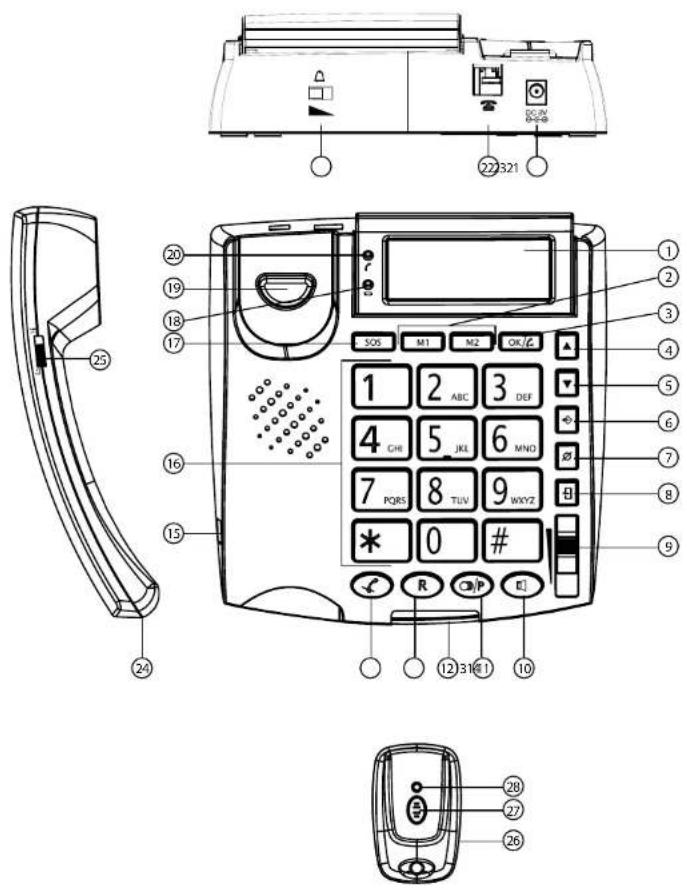
Handset volume switch
-
Curi cord connection (RJ9)
-
Power adapter convection
-
Line connection (RJ1)
-
Binder volume switch
20 to use I ED
-
Low battery/No battery LED
-
SOS KEY
-
Numeric keypad
-
Curi cord connector (RJ9)
-
Mute key
-
Flash key
-
Binger LEF
-
Redial/Pause = k€
10 Handsfree key
(2) 10.3.1. (2)
(1) 1.0.1.2.3.4.5.6.7.8.9.10.11.12.13.14.15.16.17.18.19.20.21.22.23.24.25.26.27.28.29.30.31.32.33.34.35.36.37.38.39.40.41.42.43.44.45.46.47.48.49.50.51.52.53.54.55.56.57.58.59.60.61.62.63.64.65.66.67.68.69.70.71.72.73.74.75.76.77.78.79.80.81.82.83.84.85.86.87.88.89.90.91.92.93.94.95.96.97.98.99.100
of regulation key
s. DOWN KEY
-
up key
-
OK/dial key
-
Direct memory keys M1, M2
-
LCD display
5 Buttons / connections
your area.
need more information on the collection points in
Please contact your local authorities in case you
protection of the environment
some plans of law members how ahead proud
you bring them to a recovering point. By re-using
Some of the product materials can be re-used if
indicate this.
symbol on the product, user guide and/or box
The Ground Truth image displays a single, solid horizontal line. According to Rule 2 (UNDERSCORE & LINE RULES), this is a stylistic or background line, not a placeholder underscore. Therefore, the OCR result must ignore it and output nothing or only meaningful text. The provided OCR content is "____", which consists of four underscores. This is an incorrect interpretation of the line as a placeholder, violating the rule that stylistic lines must be ignored. The OCR has hallucinated underscores where none should exist based on the GT's visual context. Hence, the OCR result is inconsistent with the Ground Truth.
but bring the product to a collection
and you know how to have
At the end of the product recycle,
(environment)
4 Disposal of the device
socket.
at the back panel and to an available power
Connect the power adapter to the connection
the backside of the telephone. Telephone line wall socket and the other end to
- Connect one end of the line cord to the
- Close the battery compartment.
• Insert 4 Aikaiine AA (LRO6, 1.5V) batteries.
screw first.
• Open the battery compartment at the bottom of the unit. Use a screw driver to remove the
activate the display :
Put batteries in the battery compartment to
6 | n s t a l | a t ! o n
-
Pendant transmission LED
-
Wireless pendant
Solgić A831
ENGLISH
6 Soloqic A831
| 7.5 Set the area codeWhen you have a subscription to the Caller IDservice it can be necessary in some countries enter your area code. When the telephonereceivies a Caller ID it will remove the entered areacode from the incoming number.You can set up to 5 digits for the area code.P r e s• P r e s• Press 1 x to select “LOCAL AREACODE”. |
| 7.6 Set the dial mode – Pulse or Tone(DTMF)The Soloqic A831 can dial in Tone (DTMF) orPulse mode. By default the telephone is set toTone (DTMF) mode.• Press 3 x to select “SET DIAL MODE”.• Press 2x to select “SET FLASH TIME”.• Press 4 x to select “SET FLASH TIME”.• Press 1x to select “SET FLASH TIME”.• Press 10x to select “SET FLASH TIME”.• Press 10x to select “SET FLASH TIME”.• Press 10x to select “SET FLASH TIME”.• Press 10x to select “SET FLASH TIME”.• Press 10x to select “SET FLASH TIME”.• Press 10x to select “SET FLASH TIME”.• Press 10x to select “SET FLASH TIME”.• Press 10x to select “SET FLASH TIME”. • Press 10x to select “SET FLASH TIME”.• Press 10x to select “SET FLASH TIME”.• Press 10x to select “SET FLASH TIME”.• Press 10x to select “SET FLASH TIME”.• Press 10x to select “SET FLASH TIME”.• Press 10x to select “SET FLASH TIME”.• Press 10x to select “SET FLASH TIME”.• Press 10x to select “Set FLASH TIME”.• Press 10x to select “SET FLASH TIME”.• Press 10x to select “SET FLASH TIME”.• Press 10x to select “SET FLASH TIME”.• Press 10x to select “SET FLASH TIME”.• Press 10x to select “SET FLASH TIME”.• Press 10x to select “SET FLASH TIME”.• Press 10x to select “SET FLASH TIME”.• Press 10k to select “SET FLASH TIME”.• Press 10k to select “SET FLASH TIME”.• Press 10k to select “SET FLASH TIME”.• Press 10k to select “SET FLASH TIME”.• Press 10k to select “SET FLASH TIME”.• Press 10k to select “SET FLASH TIME”.• Press 10k to select “SET FLASH TIME”.• Press 10k to select “SET FLASH TIME”.•Press 10k to select “SET FLASH TIME”.• Press 10k to select “SET FLASH TIME”.• Press 10k to select “SET FLASH TIME”.• Press 10k to select “SET FLASH TIME”.• Press 10k to select “SET FLASH TIME”.• Press 10k to select “SET FLASH TIME”.• Press 10k to select “SET FLASH TIME”.• Press 10k to select “SET Flash Time”.• Press 10k to select “SET FLASH TIME”.• Press 10k to select “SET FLASH TIME”.• Press 10k to select “SET FLASH TIME”.• Press 10k to select “SET FLASH TIME”.• Press 10k to select “SET FLASH TIME”.• Press 10k to select “SET FLASH TIME”.• Press 10k to select “SET FLASH TIME”.• Press 10k to Select “SET FLASH TIME”.• Press 10k to select “SET FLASH TIME”.• Press 10k to select “SET FLASH TIME”.• Press 10k to select “SET FLASH TIME”.• Press 10k to select “SET FLASH TIME”.• Press 10k to select “SET FLASH TIME”.• Press 10k to select “SET FLASH TIME”.• Press 10k to select “SET FLASH TIME”.• Press 2x to select “SET FLASH TIME”.• Press 2x to select “SET FLASH TIME”.• Press 2x to select “SET FLASH TIME”.• Press 2x to select “SET FLASH TIME”.• Press 2x to select “SET FLASH TIME”.• Press 2x to select “SET FLASH TIME”.• Press 2x to select “SET FLASH TIME”.• Press 2x to select “SET FLASH TIME”.• Press 2x to select “Set FLASH TIME”.• Press 2x to select “SET FLASH TIME”.• Press 2x to select “SET FLASH TIME”.• Press 2x to select “SET FLASH TIME”.• Press 2x to select “SET FLASH TIME”.• Press 2x to select “SET FLASH TIME”.• Press 2x to select “SET FLASH TIME”.• Press 2x to select “SET FLASH TIME”.• Press 2x to select “SET FLASH TIME”. |
| 7.7 Set the flash timeThe R-key (flash) is used for services like, Callwailing (if this service is provided by yourtelangphone company) or to transfer calls when thetelephone is connected to a PBX-system.Depending on the country, this flash-time can bedifferent. The telephone supports 3 possibilities :100, 300, 600 msec.Depending on the country, this flash-time can bedifferent. The telephone supports 3 possibilities :100, 300, 600 msec.Depending on the country, this flash-time can bedifferent. The telephone supports 3 possibilities :100, 300, 600 msec.Depending on the country, this flash-time can bedifferent. The telephone supports 3 possibilities :100, 300, 6O0 msec.Depending on the country, this flash-time can bedifferent. The telephone supports 3 possibilities :100, 300, 600 msec.Depending on the country, this flash-time can bedifferent. The telephone supports 3 possibilities :100, 300, 600 msec.Depending on the country, this flash-time can bedifferent. The telephone supports 3 possibilities :100, 300,600 msec.Depending on the country, this flash-time can bedifferent. The telephone supports 3 possibilities :100, 300,600 msec.Depending on the country, this flash-time can bedifferent. The telephone supports 3 possibilities :100, 300,600 msec.Depending on the country, this flash-time can bedifferent. The telephone supports 3 possibilities :100, 300, 600 msec.Depending on the country, this flash-time can bedifferent. The telephone supports 3 possibilities :100, 300, 600 msec.Depending on the country, this flash-time can bedifferent. The telephone supports 3 possibilities :100, 30O, 600 msec.Depending on the country, this flash-time can bedifferent. The telephone supports 3 possibilities :100, 300, 600 msec.Depending on the country, this flash-time can bedifferent. The telephone supports 3 possibilities :100, 300, 600 msec.Depending on the country, this flash-time can bedifferent. The telephone supports 3 possibilities :100, 200, 600 msec.Depending on the country, this flash-time can bedifferent. The telephone supports 3 possibilities :100, 200, 600 msec.Depending on the country, this flash-time can bedifferent. The telephone supports 3 possibilities :100, 200, 600 msec.Depending on the country, this flash-time can bedifferent. The telephone supports 3 possibilities :100. |
| 7.8 Store telephone numbers7.8.1 Store phonebook numbersYou can store up to 30 phone numbers/names in the Sologic A831. Each number can be set as an emergency number.Press.Press 2 x ▲select "STORE NUMBER".Press ☐ offer.Now enter the telephone number to be stored. Press ☑ delete a wrong entered digit.Use ▲ and to move back and forward through the number.Press ☐ confirm.Now enter the name using characters on the numeric keypad. Press ☑ delete a wrong entered character. Use ▲ and to move back and forward through the entered characters.Press ☐ confirm.Now select "EMERGENCY OFF" or "EMERGENCY ON".In case of "EMERGENCY ON" you need to select the position of this number.- Use ▲ to select the position.- Press ☐ confirm.In case you want to overwrite an existing position you will have to confirm "OVERWRITE?" by pressing OK/☐"MEMORY FULL" will appear when the maximum of 30 records has been reached.When the number is saved the menu will automatically go to "NAME RECORDING"Press and hold OK/Wait for the beep.After the beep, please say the name of the stored contact.Now release the OK/On to finish the recording.Press □ leave the menu.The maximum length of this recording is 3 seconds. | 7.8.2 Store a number in the direct memory keys (M1, M2)P r e s .Press 2 x ▲select "STORE NUMBER".Press ☐ offer.Now enter the telephone number to be stored. Press ☐ delete a wrong entered digit. Use ▲ and to move back and forward through the number.Press ☐ confirm.Press M1 or M2.Press ☐ offer.Press □ leave the menu.7.9 Name recordingOnce a number/name is stored in the Sologic A831 you can record the name.You can change the name you have recorded while storing a number/name in previous chapterP r e s .Press 3 x ▲select "NAME RECORDING".Press ☐ offer.Now use ▲ to navigate through all stored numbers/names.You will hear the recorded name while navigating through the stored contacts.Press ☐ erase the recording.When you have selected the contact, press and hold OK/Wait for the beep.After the beep, please say the name of the stored contact.Now release the OK/On to finish the recording.Press □ leave the menu.The maximum length of this recording is 3 seconds. |
8 Soloqic A831
„DONE“ will appear if the pairing is successful.
Now press the button on the pendant.
- Press digital the pairing process.
Rooks/S+
PENDANT.
- Press 2 x to select "PAIR NEW
• Press
To pair a pendant:
[Non-Text]
the Sologic A831.
telephone. The pe
can be necessary to register the pendant to the
its ID code. In case of repair or other reasons it
The pendant is registered in the Sologic A831 by
7.12 Pair new pendant / Remove pendant
playback.
To erase the recording, press during
(No text)
- Press to leave the menu.
message.
• Press zoom to the recorded
crss 5 x to select "CHECK MESSAGE"
- Press
can be verted.
The message you recorded in previous chapter
7.11 Check message
ACCEPT THIS CALL PRESS ZERO"
“THIS IS AN EMERGENCY CALL, TO
The default message is :
[EMPTY]
20 seconds.
The maximum length of this recording is
- Press to leave the menu.
recording.
Now release the Option to finish the
After the deep, please say the message.
- Press and hold and wait for the bed.
MESSAGE.
• Press 4 x to select "RECORO"
• Prees
record your own message
standard pre-recorded message unless you
For SOS calls, the Soloqic A831 will broadcast a
/10 Record message
Sologic A831
The call duration timer will start in the display 4 seconds after the number was dialed.
isopnd n ioue 21 /m. secu
Press P/E to offer a purchase
Example 1. No 012345678
and pucco + pucuca6 una suad
propo can generate a 4 second pause
a pause after the RFX access code. The
in case the telephone is connected to a PRX system it might be necessary to add
using the volume button (9)
The hands-free volume can be adapted
and hanging up the handset.
can switch to hands-free by pressing
During a call made with the handset you
(No text)
HI or LO by using switch 25
make a hands-free call.
• Pick up the handset or press OK/Go
• Press to delete a wrongly entered digit.
• Enter the telephone number.
8.1 Making a cell
8 Using the Soloqic A831
[Non-Text]
• Press to leave the menu.
• Press 0/4/24 ate the pendant.
• Press to select DELIEF?
• P r eOK/s,
PENDAINT
• Press 2 X to select "PAIR NEW
s. 521 d.
10 remove a pendant;
- Press to leave the menu.
to leave the menu.
| 8.2 Receiving a callWhen a call comes in, the phone will ring and the ringer LED will blink.Pick up the handset or press the pendant button to take the call hands-free.Use switch set the ringer volume.A call that has been accepted by use of the pendant button can also be terminated by pressing the pendant button again. | 8.5.3 Delete a number from the caller ID listSelect a number from the caller ID list.Preas “DELETE?” will appear display.Press and hold 4 seconds. The number will be deleted. |
| 8.3 Deactivating the microphoneDuring a call you can deactivate the microphone and talk freely without the caller hearing you.Press and hold mute the microphone. | |
| 8.4 Last number redialThe Sologic A831 will remember the last dialed number.Pickup the handset or press hands-free.Now press edial last number. | |
| 8.5 Incoming Caller ID listThe Sologic A831 can store up to 64 calls in the caller ID list.To review the incoming calls, press make sure “CLIP” is displayed next to the date.The display will show the number of total calls and the number of new calls.Use and navigate through the incoming calls. | |
| 8.5.1 Making a call from the caller ID listSelect a number from the caller ID list.Press ok/ the number. | |
| 8.5.2 Copy a number from the caller ID list to the phonebookSelect a number from the caller ID list.Press and hold 3 seconds. “COPY TO MEMORY” will be displayed.Press ok/te the number. |
9 The SOS function Please read carefully how works in chapter "1.1 Inten
works in chapter "1.1 Intended purpose".
Flash-time : 100/300/600 ms
[Non-Text]
Please read carefully how the SOS scenario
Dialing mode : Tone dial (DTMF)
/ Pulse dial
Please read carefully how the SOS scenario
Please read carefully how the SOS scenario
Please read carefully how the SOS scenario
Please read carefully how the SOS scenario
Please read carefully how the SOS scenario
Please read carefully how the SOS scenario
Please read carefully how the SOS scenario
Please read carefully how the SOS scenario
Please read carefully how the SOS scenario
Please read carefully how the SOS scenario
Please read carefully how the SOS scenario
Please read carefully how the SOS scenario
Please read carefully how the SOS scenario
Please read carefully how the SOS scenario
Please read carefully how the SOS scenario
Please read carefully how the SOS scenario
Please read carefully how the SOS scenario
Please read carefully how the SOS scenario
Please read carefully how the SOS scenario
Please read carefully how the SOS scenario
Please read carefully how the SOS scenario
Please read carefully how the SOS scenario
Please read carefully how the SOS scenario
Please read carefully how the SOS scenario
Please read carefully how the SOS scenario
Please read carefully how the SOS scenario
Please read carefully how the SOS scenario
Please read carefully how the SOS scenario
Please read carefully how the SOS scenario
Please read carefully how the SOS scenario
Please read carefully how the SOS scenario
Please read carefully how the SOS scenario
Please read carefully how the SOS scenario
Please read carefully how the SOS scenario
Please read carefully how the SOS scenario
Please read carefully how the SOS scenario
Please read carefully how the SOS scenario
Please read carefully how the SOS scenario
Please read carefully how the SOS scenario
Please read carefully how the SOS scenario
Please read carefully how the SOS scenario
Please read carefully how the SOS scenario
Please read carefully how the SOS scenario
Please read carefully how the SOS scenario
Please read carefully how the SOS scenario
Please read carefully how the SOS scenario
Please read carefully how the SOS scenario
9 The SOS function
Sologic A831 11
• 11 mogellike DISPLAYATEN : Engels, Netherlands, Evans, Duits, Spanns, Italians
- I've got a great deal of the company.
• 11 mogellike DISPLAYATEN : Engels, Netherlands, Frans, Duits, Spanns, Italians
- Druck 6 x op ▲ kies "TAL (LCD
- Selecteer "NOOD OPR UT (EMERGENCY OFF)" of "NOOD OPR AAN (EMERGENCY ON)".
• Arrivalz sur, our quarter is
Impulsion on Tonalite (DTMF)
no anything to sort sea courses per la
The Ground Truth image displays a single, solid horizontal line. According to Rule 2 (UNDERSCORE & LINE RULES), this is a stylistic or background line, not a placeholder underscore. Therefore, the OCR result must ignore it and output nothing or only meaningful text. The provided OCR content is "____", which consists of four underscores. This is an incorrect interpretation of the line as a placeholder, violating the rule that stylistic lines must be ignored. The OCR has hallucinated underscores where none should exist based on the GT's visual context. Hence, the OCR result is inconsistent with the Ground Truth.

• Paneling is complex in Excel work on
disconsortely
verdecken
The Ground Truth image displays a single, solid horizontal line, which is a stylistic or background element (like a rule line on paper). According to Rule 2, such lines must be ignored by the OCR result. The provided OCR content is "____", which consists of underscores. Underscores are not equivalent to a solid line and are not permitted under the “Stylistic/Background Lines (Ignore)” rule. Outputting underscores for a stylistic line is incorrect because it misinterprets the line as a placeholder fill-in-the-blank area. Since the OCR output incorrectly rendered a stylistic line as underscores (which should be ignored), this violates the rule. Therefore, the OCR result is inconsistent with the Ground Truth.
Teleport's asphalten and fuel starchen
She kupon das Mikroton w/
electronics. Asl to indica el
Bare solutions are idiomar, size less
polaco y portugues.
sueco, hoides, italiano, finlandes, danes,
• Instead 4 pillars elections AA (1 Bog 1.5 V)
The following text in the source image is a non-textual, stylized graphic and does not contain any legible characters or punctuation. According to Rule 4 (Edge Noise Strategy), since no text is clearly present, the OCR result must be empty.
[No text detected]
(maximo de 30 programas)
(Applacera «MEMORIA LLENA»)
v1/No cpound
publico OK/6
«ESCRIBE ENGMA» (OVER)
• A continuation, pulse pulse viver a
- Tryck for at stanga menyun.
Om du inte vill ha rostvagleding kan du vella „INGEN ROST“ („VOICE NO“).
7 Installinagar for Sologic A831
Dun maste dara ur telefonstadsen innan du oppar batteriuckani;
The following table is a simple formula:
• Tryck can for all and are married.
• Bekrafta genom ait tvoka. OK/€
• Tryck cam for andra minuterna
PAUSTID" (SET FLASH TIME")
- Tryck 4 x for att vallia „STALL IN
.
eller 600 ms.
Pausiden kan variera berende pa land. Telefonen har stood for the affinity : 100, 300
7.7 Stella in paustiden
• Tryck did at stanga menyin.
• Avyand, qib, for an Fairfaxa blend
URWBS RULIRIUR HOO IRWBS LIRIUR BIRIO 120
Potato, a metal catalyst of an antler, v.a. catalyst
депрет
for all forская and "CLIP" visas bradvid
• For all arangska ikommande semtal tvck
number resolution of the
Soliris A831 kan larga hip fill 64 sep
incomplete sample
8.5 UNimperesentationslista for
numreet.
SOS visas transform Korean I DISPLAY for nodnumber.
telefonboken.
• Anvand cohn for a vavigera i
material) actively requires SOS functioning
forlanga samplet med vitrillage 3
in repaulants, can pencil turnages the om
with, app, park by Pennsylvania
Solgić A831 har 11 DISPLAYPOG : engelek, fransk, tvsk, spansk, svensk, hollandsk, italiensk, finsk, dansk, polsk og portugisisk.
7.1 Sprongindstillinger 7.2
Telefonlinjen skal vare abrupt, inden batterlummet abesel
• Sult strømadapteren til silkret på bagpanelet og til en sitkontakt.
☐ for at foretage et handpit opkaid.
-oft teleforent, eller tryk pa giler/pa
• Tryk pa 04 at slette forkert indastede citre.
• indast telefonnummer
8.1 Sådan foretager du et opkald
8 Sadan annedes Sologic A831
[Non-Text]
• Tryk pa at forade menuen.
• Tryk pa OK/site pen-daten.
• Think pa enter for a visible “SLEET?” (DELETE?)
vises.
• Tryk pa. OMLMELDER (PAIRING)
• Tryk pa 2 x for at vazige, KOBL NY PENDANT (PARR NEW PENDANT).
• Tryk pa.
Sadan férmes pendanten :
二、补充
[UK] 2017. 45
or what
„TIL-MELDT (DOENE)“ visas, hiss, hisi. Tryk nu pa knappen pa pendanten.
timeldingprocessen.
- Tryk pa OK starne
Sologic A831
☐ for at foretage et handpit opkaid.
-oft teleforent, eller tryk pa giler/pa
Tyrk pa at siste forken indtastede citre.
ndtast telefonnummeret
1 Sådan foretager du et opkald
Sadan annedes Sologic A831
[Non-Text]
Tyrk pa for at torlade menuen.
Tyrk pa OKal silete pendanten.
(DELETE?)
「lyk pa' eller for a value, "SLET?
vises.
Tyrk pa. OMLMELDER (PAIRING)
PENDAINT (PARR NEW PENDANT).
「ryk pa.
Tyrk pa OK at starne
The Ground Truth image displays a single, solid horizontal line. According to Rule 2 (UNDERSCORE & LINE RULES), this is a stylistic or background line, not a placeholder underscore. Therefore, the OCR result must ignore it and output nothing or only meaningful text. The provided OCR content is "____", which consists of four underscores. This is an incorrect interpretation of the line as a placeholder, violating the rule that stylistic lines must be ignored. The OCR has hallucinated placeholder underscores where none should exist in the GT. This violates the rule that stylistic lines must be ignored. Therefore, the OCR result is inconsistent with the Ground Truth.
The Ground Truth image displays a single, solid horizontal line. According to Rule 2 (UNDERSCORE & LINE RULES), this is a stylistic or background line, not a placeholder underscore. Therefore, the OCR result must ignore it and output nothing or only meaningful text. The provided OCR content is "____", which consists of four underscores. This is an incorrect interpretation of the line as a placeholder, violating the rule that stylistic lines must be ignored. The OCR has hallucinated placeholder underscores where none should exist in the GT. This violates the rule that stylistic lines must be ignored. Therefore, the OCR result is inconsistent with the Ground Truth.
Sologic A831 63
8.5.2 Kopyering at get number fra okpaldislisten • Valig et nummer fra okpaldissten. • Tryk pa-Tag slip forest enter 3 sekunderr "KOP T TIL HUKOMM (COPY TO MEMORY) vises.
8.5 Little over number for independence
igen.
Consulting of capital "7.9 Cleveland's corporate" area
gravar um nome
Torpo Elsfs: 100/300/600 ms
Modo de marcagao; marcagao por tons (UJIM
The Ground Truth image displays a single, solid horizontal line, which is a stylistic or background element (like a ruled paper line or separator), not a placeholder for text. According to Rule 2, such stylistic/background lines must be ignored by the OCR result. The OCR content provided is "", which consists of no characters. This correctly represents the line in the GT by ignoring it entirely. Since the OCR output includes no underscores for this line, this complies with the “Stylistic/Background Lines (Ignore)” rule. Therefore, the OCR result is consistent with the Ground Truth.
«La Mérrez, quada, seb 6,5,6,7,8,9,10,11,12,13,14,15,16,17,18,19,20,21,22,23,24,25,26,27,28,29,30,31,32,33,34,35,36,37,38,39,40,41,42,43,44,45,46,47,48,49,50,51,52,53,54,55,56,57,58,59,60,61,62,63,64,65,66,67,68,69,70,71,72,73,74,75,76,77,78,79,80,81,82,83,84,85,86,87,88,89,90
• N a c ! 9k m a c
(VOICE).
• Narsing x, by wyrac, dzwic
i, b, u, n, N
S e d ! S e N ·
Hawman on asfot (in' abusiony
(1) 2017年1月1日
The following table is provided in the image.



- ROOKS/S
- PENDANT
- PRESS 2 X TO SELECT "PAIR NEW
- PRESS
- TO PAIR A PENDANT
- [NON-TEXT]
- THE SOLOGIC A831
- TELEPHONE. THE PE
- PLAYBACK
- TO ERASE THE RECORDING, PRESS DURING
- (NO TEXT)
- CRSS 5 X TO SELECT "CHECK MESSAGE
- 7.11 CHECK MESSAGE
- ACCEPT THIS CALL PRESS ZERO
- THIS IS AN EMERGENCY CALL, TO
- THE DEFAULT MESSAGE IS
- [EMPTY]
- 20 SECONDS
- THE MAXIMUM LENGTH OF THIS RECORDING IS
- PRESS TO LEAVE THE MENU
- MESSAGE
- PRESS 4 X TO SELECT "RECORO
- PREES
- 10 RECORD MESSAGE
- 8.1 MAKING A CELL
- 8 USING THE SOLOQIC A831
- P R EOK/S
- PENDAINT
- 9 THE SOS FUNCTION PLEASE READ CAREFULLY HOW WORKS IN CHAPTER "1.1 INTEN
- 9 THE SOS FUNCTION
Brand : TOPCOM
Model : Sologic A831
Category : Telephone