EasyManual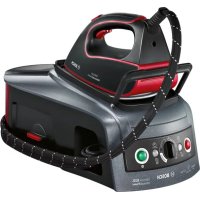
Sensixx B22L UltimatePower TDS2250 - Iron BOSCH - Free user manual and instructions
Find the device manual for free Sensixx B22L UltimatePower TDS2250 BOSCH in PDF.


User questions about Sensixx B22L UltimatePower TDS2250 BOSCH
0 question about this device. Answer the ones you know or ask your own.
Ask a new question about this device
Download the instructions for your Iron in PDF format for free! Find your manual Sensixx B22L UltimatePower TDS2250 - BOSCH and take your electronic device back in hand. On this page are published all the documents necessary for the use of your device. Sensixx B22L UltimatePower TDS2250 by BOSCH.
USER MANUAL Sensixx B22L UltimatePower TDS2250 BOSCH
natural_image
Black Bosch air fryer with control panel and brand logo (no visible text or symbols on device body)Sensixx B22L UltimatePower

BOSCH
natural_image
Close-up of a white steam iron with a black handle and side panel, showing a curved arrow indicating rotation (no text or symbols visible)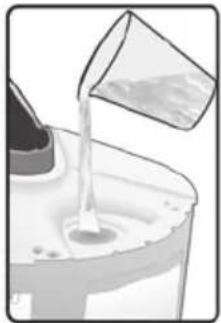
natural_image
Illustration of a container pouring liquid into a glass container (no text or symbols)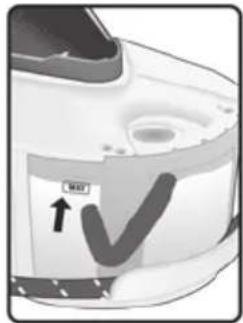
text_image
MAX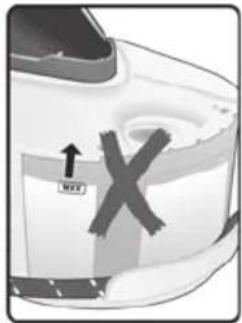
text_image
↑ Move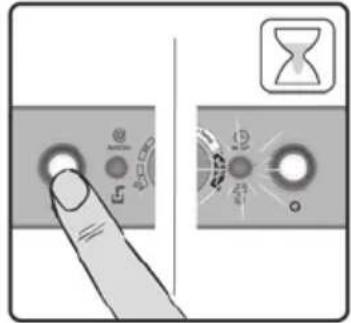
text_image
Diagram showing a finger pressing a button with icons and a hourglass symbol, alongside a close-up of the button's dial.B
text_image
Anti Secure Intensities 0/1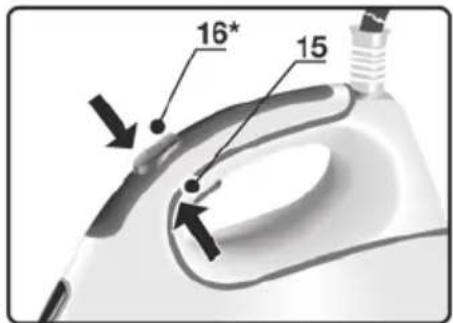
text_image
16* 15C
text_image
i-Temp antiShine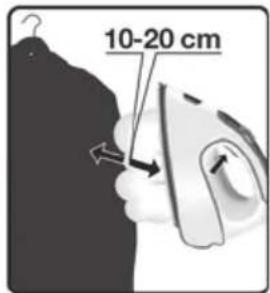
text_image
10-20 cmD
natural_image
Illustration of a hand using a steam iron to lift a cup, showing three sequential steps (no text or symbols)E Calc'n'Clean Advanced
text_image
1 -2 h.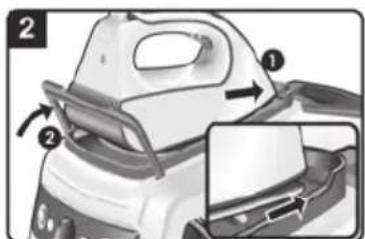
text_image
Diagram showing a car interior with labeled parts and directional arrows indicating movement or assembly.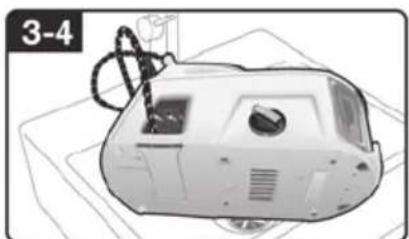
natural_image
Illustration of a mechanical device with a labeled section '3-4' (no text or symbols on the device itself)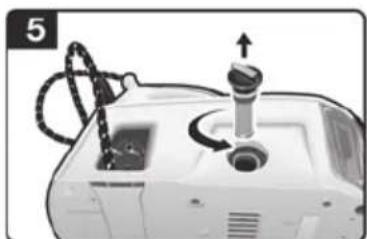
natural_image
Close-up of a mechanical device with a knob and connecting wires (no visible text or symbols)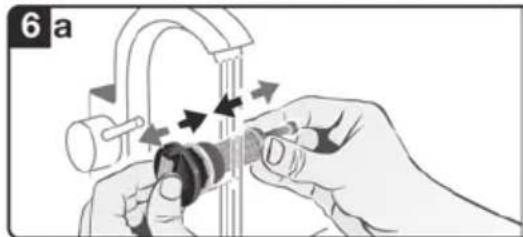
natural_image
Illustration of hands adjusting a mechanical component with arrows indicating motion (no text or symbols)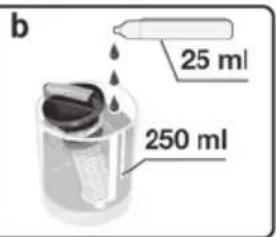
text_image
b 25 ml 250 ml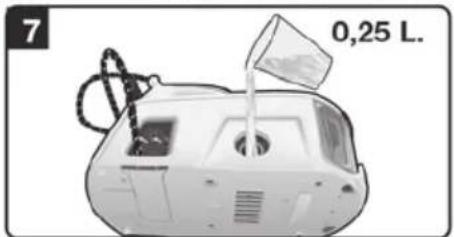
natural_image
Exterior view of a vehicle's front bumper with water being poured into it (no text or symbols visible)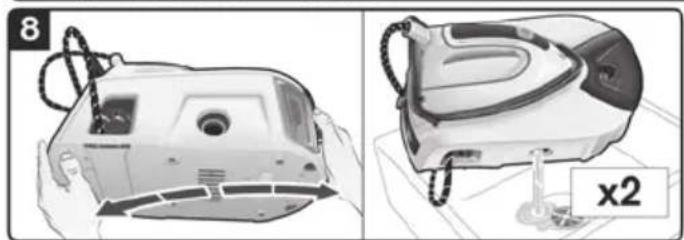
natural_image
Technical illustration of a mechanical device with two views: front view and side view, showing internal components and a labeled component 'x2' (no text or symbols on the device itself)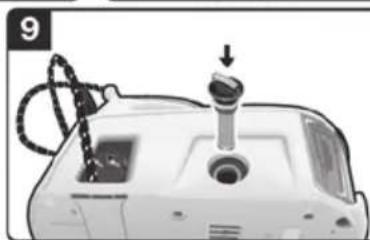
natural_image
Close-up of a medical device with a mechanical component and a downward arrow indicator (no text or symbols visible)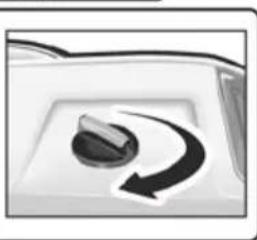
natural_image
Close-up of a rotary knob with a curved arrow indicating rotation (no text or symbols)F
text_image
Diagram of a steam iron with labeled parts and directional arrows indicating motion or assembly steps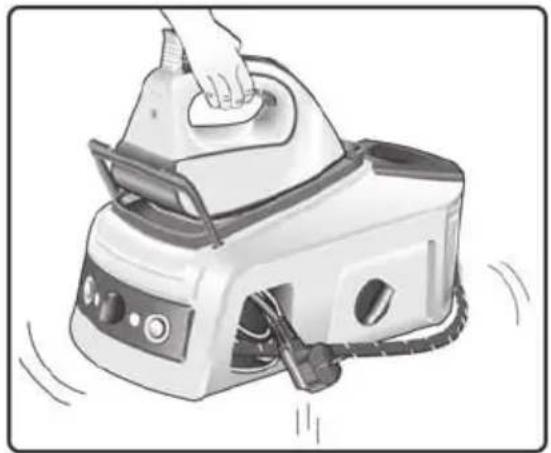
natural_image
Illustration of a hand using a steam iron on a small appliance, with motion lines indicating vibration or movement (no text or symbols)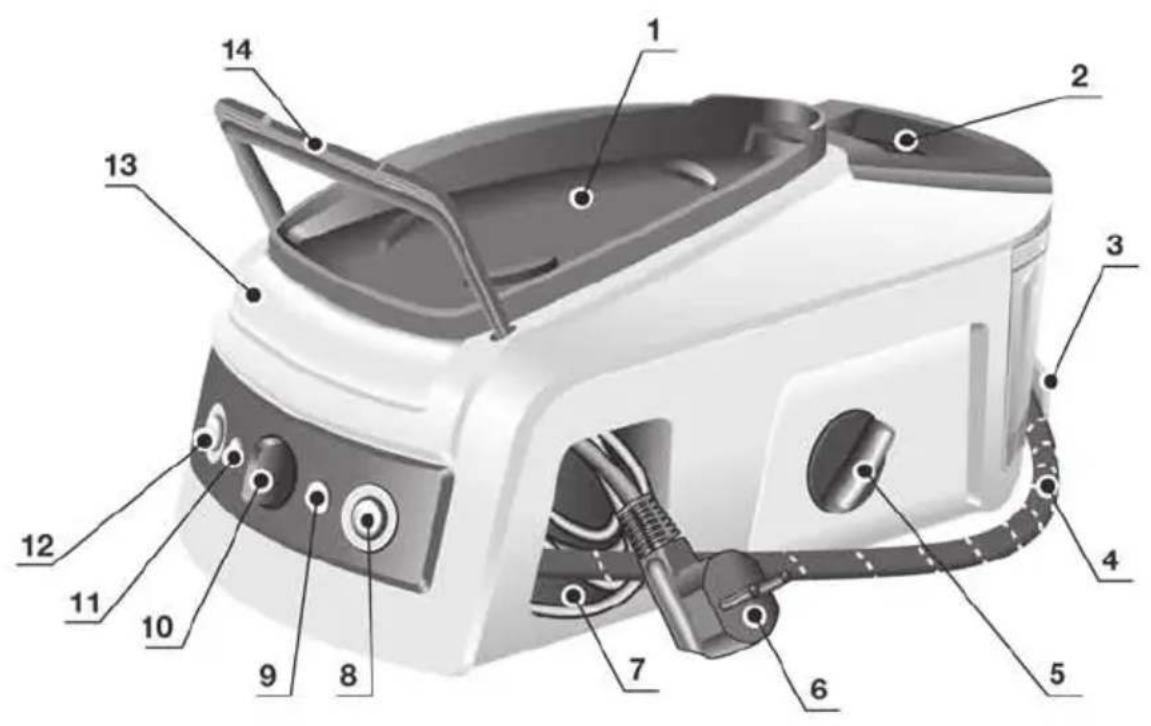
text_image
Labeled diagram of a portable electric stove with numbered parts for identification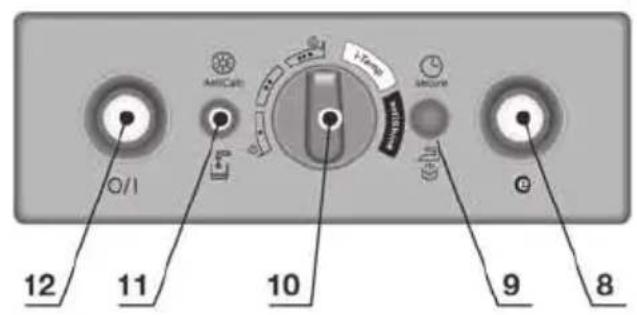
text_image
12 11 10 9 8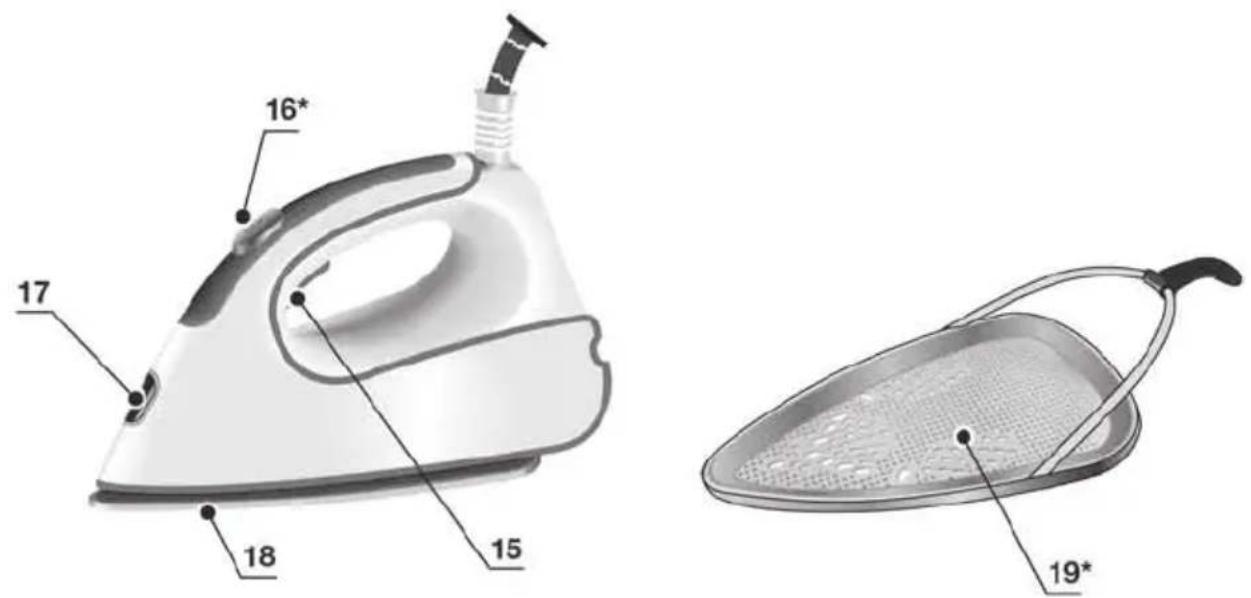
text_image
16* 17 18 15 19*Index
DEUTSCH 6
ENGLISH 14
FRANÇAISE 21
ITALIANO 29
NEDERLANDS 37
DANSK 45
NORSK 52
SVENSKA 59
SUOMI 66
ESPAÑOL 73
PORTUGUÊS 81
ΕΛΛΗΝΙΚΑ 89
TURKÇE 97
POLSKI 104
MAGYAR 112
УКРАЇНСЬКА 119
РУССКИЙ 127
ROMÂN 135
العربية 149
Thank you for buying the Sensixx B22L steam station, the new steam-ironing system from Bosch.
Carefully read through the operating instructions for the appliance and safeguard them for future reference.
Introduction
These instructions for use contain valuable information about the unique features of this system and some hints to make ironing easier for you. We hope that you enjoy ironing with this steam station.
Important
Open out the first page of the booklet, this will help you to understand how the appliance works. This appliance complies with international safety standards.
This appliance has been designed exclusively for domestic use and must not be used for industrial purposes.
This appliance must be used only for the purposes for which it was designed, i.e. as an iron. Any other use will be considered improper and consequently dangerous. The manufacturer will not be held responsible for any damage arising from misuse or improper use.
General safety instructions
- The iron must not be left unattended while it is connected to the supply mains.
- Remove the plug from the socket before filling the appliance with water or before pouring out the remaining water after use.
- The appliance must be used and placed on a stable surface.
- When placed on its stand, make sure that the surface on which the stand is placed is stable.
- The iron should not be used if it has been dropped, if there are visible signs of damage or if it is leaking water. It must be checked by an authorized Technical Service Centre before it can be used again.
- With the aim of avoiding dangerous situations, any work or repair that the appliance may need, e.g. replacing a faulty mains cable, must only be carried out by qualified personnel from an Authorised Technical Service Centre.
- This appliance can be used by children aged from 8 years and above and persons with reduced physical, sensory or mental capabilities or lack of experience and knowledge if they have been given supervision or instruction concerning use of the appliance in a safe way and understand the hazards involved. Children shall not play with the appliance. Cleaning and user maintenance shall not be made by children without supervision.
-
Keep the iron and its cord out of reach of children less than 8 years of age when it is energized or cooling down.
• CAUTION. Hot surface. Surface is liable to get hot during use. -
This appliance is to be connected and used in accordance with the information stated on its characteristics plate.
- This appliance must be connected to an earthed socket. If it is absolutely necessary to use an extension cable, make sure that it is suitable for 16A and has a socket with an earth connection.
- If the safety fuse fitted in the appliance blows, the appliance will be rendered inoperative. To restore normal operation the appliance will have to be taken to an authorised Technical Service Centre.
- In order to avoid that, under unfavourable mains conditions, phenomena like transient voltage drops or lighting fluctuations can happen, it is recommended that the iron is connected to a power supply system with a maximum impedance of 0.35Ω. If necessary, the user can ask the public power supply company for the system impedance at the interface point.
- The appliance must never be placed directly under the tap to fill the water tank.
- Unplug the appliance from the mains supply after each use, or if a fault is suspected.
- The electrical plug must not be removed from the socket by pulling the cable.
- Never immerse the iron in water or any other fluid.
- Do not leave the appliance exposed to weather conditions (rain, sun, frost, etc.)
Important:
- This appliance reaches high temperatures and produces steam during use, this could cause scalds or burns if not used properly.
- The steam hose, base station, metal plate at the bottom of the removable iron pad (1) and in particular the iron can get hot when used. This is normal.
- Never aim the steam at people or animals.
- Do not allow the power cable to come into contact with the soleplate when it is hot.
- Be aware that the system can keep on steaming for a short additional time after releasing the steam trigger. This is a normal function.
Description
- Removable iron pad
- Water tank
- Steam hose storage fixing
- Steam hose
- "Calc'n'Clean Advanced" scale collector
- Mains cable
- Mains cable storage compartment
- "Energy Saving" button *
-
"Steam ready" / "Auto shut-off" pilot light
-
Setting selector
-
"Refill water tank" / "Clean warning" pilot light
- Illuminated main power button (0/I)
- Housing with internal steam generator
- Iron fixation system "SecureLock"
- Steam release button
- Steam shot button "PulseSteam" *
- Iron lamp
- Soleplate
- Fabric-protection soleplate cover*
* Model dependent
A Preparations
- Release the iron from its lock system (14) by pulling the lever located at the heel of the iron backwards.
- Remove any label or protective covering from the soleplate.
- Place the appliance horizontally on a solid, stable surface. You may remove the iron pad from the appliance and place the iron on it on another solid, stable, horizontal surface.
- Fill the water tank (2), making sure not to pass the level mark.
- Unwind the mains cable (6) fully and plug it into an earthed socket.
- Set the main power button (12) to the on position (illuminated in red).
- The "Steam ready" indicator lamp (9) will light up after several minutes, indicating that the appliance is ready to use.
The steam generator will take more time to reach “Steam ready” state only upon the initial heating up, or after performing the de-scaling operation (Calc’n’Clean).
When water is already present in the steam generator during regular use, heat up time to reach the operating temperature will be faster. - This appliance has a built-in water level sensor. The "refill water tank" indicator (11) will light when the water tank is empty.
Important:
- Normal tap water can be used. To prolong the optimum steam function, mix tap water with distilled water 1:1. If the tap water in your district is very hard, mix tap water with distilled water 1:2.
You can inquire about the water hardness with your local water supplier.
- The water tank can be filled at any time while using the appliance.
- To avoid damage and/or contamination of the water tank and the boiler, do not put perfume, vinegar, starch, descaling agents, additives or any other type of chemical product into the water tank.
Any damage caused by the use of the aforementioned products, will make the guarantee void.
- The iron is not designed to rest on its heal. Please always position it horizontally on the iron pad (1).
- The iron pad can be placed into the specially designed recess on the appliance or somewhere suitable alongside the ironing area.
Never rest the iron on the appliance without the iron pad!.
- During it first use the iron may produce certain vapours and odours, along with white particles on the soleplate, this is normal and it will stop after a few minutes
- While the steam release button is pressed, the water tank may produce a pumping sound, this is normal, indicating that water is being pumped to the steam tank.
“i-Temp” function
(Model dependent)
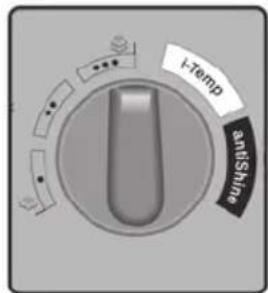
This steam station has a unique “i-Temp” function. If this function is selected, an appropriate combination of temperature and steam is set, which is suitable for all fabrics that can be ironed.
The “i-Temp” function prevents clothes from being damaged due to an unsuitable temperature being selected.
The “i-Temp” function does not apply to fabrics that cannot be ironed. Please check the garment care label for details or try ironing on a part of the cloth not visible normally.
"AntiShine" function
(Model dependent)
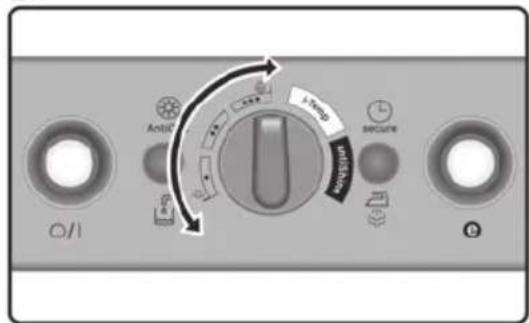
This steam station has a unique “AntiShine” function. If this function is selected and the steam release button (15) is regularly pressed, the risk of shiny marks on the garment due to the ironing is reduced.
B
Setting the temperature and steam amount

-
Check the ironing instruction label on the garment to determine the correct ironing temperature.
-
Choose one of the following settings :
| Temperature | Steam setting | Suitable for |
| ● | Synthetics | |
| ●● | Silk – Wool | |
| ●●● | Cotton – Linen |
- The indicator lamp (17) will remain lit while the iron is heating and go out as soon as the iron has reached the selected temperature.
- The "steam ready" indicator lamp (9) will light up after several minutes, indicating that steam is ready to be released.
- Press the steam release button (15-16*) to release steam.
Tips:
- Sort your garments out based on their cleaning symbol labels, always starting with clothes that have to be ironed at the lowest temperatures.
- If you are not sure what the garment is made of then begin ironing at a low temperature and decide on the correct temperature by ironing a small section not usually seen when worn
- At the beginning of each use, it is possible that drops of water will be dispensed alongside steam.
Therefore, it is advisable to try the iron on the ironing board or a piece of cloth to start with.
"PulseSteam" function

This appliance has a special function for tackling difficult creases.
The "PulseSteam" function helps soften stubborn garments like jeans or linen faster.
When the steam release button is activated, the steam generator will release three powerful shots
of steam so that the steam reaches even deeper into the fabrics.
- Set the setting selector (10) on “• •”
- Briefly press the steam shot button (16*) on the top of the handle.
or (model dependent)
Press the steam release button (15) on the bottom of the handle two times in quick succession (double-click).
Remarks:
- It is possible to stop the shots of steam by quickly pressing the steam button again.
- Some water drops may appear when you use the "PulseSteam" function for the first time.
The water drops will disappear after you have used the function for some time.
"Intelligent steam" function
(Model dependent)
This system has intelligent steam control, which, after releasing the steam release button (15), provides a small amount of additional steam.
The additional steam can always be stopped by briefly pressing the steam release button once again.
Ironing without steam

Begin ironing but without pressing the steam release button.

Vertical steam

This can be used to remove creases from hanging clothes, curtains etc.
Warning!:

Never direct the steam jet at garments that are being worn.
Never aim the steam at people or animals.
- Set the temperature to the “••” setting.
- Hold the iron in an upright position 15 cm away from the garment being steamed.
- You can steam iron curtains and hanging garments (jackets, suits, coats...) by placing the iron in a vertical position and pressing the steam release button (15 or 16 ^* ).
Energy saving "eco" button

(model dependent)
If the "Energy saving" button (8) is switched on, you can save up to 25% of the energy and 40% of the water consumption (*), and still achieve good results when ironing most of your garments. It is advisable to use the normal energy setting only for thick and very wrinkled fabrics. (*) In comparison to the maximum setting.
Note: If you work with the “Energy saving” function, the variable steam regulation and temperature regulation can still be used as recommended.
Auto shut-off

(Model dependent)
If during ironing, the steam release button (15-16*) on the iron handle is not pressed for a certain length of time (8 minutes), the steam station will automatically switch off.
The “auto shut-off” pilot lamp (9) will flash when auto shut-off has been activated.
To switch the steam station back on, press the steam release button again.

Fabric protection soleplate cover

(Model dependent)
The fabric-protection soleplate cover (19*) is used for steam-ironing delicate garments at maximum temperature without damaging them. Use of the soleplate cover also does away with the need for a cloth to prevent shine on dark materials.
It is advisable to first iron a small section on the inside of the garment to see if it is suitable.
To attach the soleplate cover to the iron, place the tip of the iron into the end of the soleplate cover and pull the elastic strap over the lower rear of the iron until it fits tightly. To release the soleplate cover, pull the elastic strap and remove the iron.
The fabric-protection soleplate cover may be purchased from our customer service or from our website
Accessory code (After-sales)
Name of accessory (online shop)
571510 TZ20450
E Calc'n'Clean Advanced
Cleaning the Boiler
To extend the life of your steam generator and to prevent any build up of scale, it is essential that you rinse out the filter (5) and the boiler after several hours of use. If the water is hard, increase the frequency.
Do not use descaling agents for rinsing out the boiler, as they could damage it.
Automatic clean warning
Pilot light (11) will flash indicating that boiler must be rinsed.
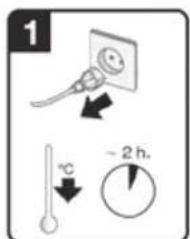
- Check carefully that the appliance is cold and unplugged for more than 2 hours, and that the water tank (2) is empty.
-
Fix the iron to the stand by inserting the tip of the iron into the front slot and moving the fixation lever (14) against the heel of the iron.
-
Place your appliance over a sink or bucket.
-
Lean the appliance on the opposite side of the filter opening.
-
Unscrew the filter (5) and take it out.
-
(model dependent)
To wash the filter, you may:
a. Place the filter under the water tap and wash it up until calc residues are removed. Squeeze the filter as indicated in the picture E.
b. Immerse the filter in tap water (250 ml) mixed with a measure (25 ml) of descaling fluid.
The descaling fluid can be obtained from our After-sales service or from our website.
Accessory code
(After-sales)
Name of accessory
(Online shop)
311144 TZ11001
- Holding your steam generator in the lateral position and using a jug, fill the boiler with 1/4 litre of water and replace the filter.
- Shake the base unit for a few moments, unscrew the filter again and empty the boiler completely over a sink or bucket.
For best results, we recommend that this operation is performed twice.
Important: before re-closing, make sure no water remains in the boiler. - Replace and tighten up the filter.
To reset the “Calc’n’Clean” counter, switch the steam station off twice, keeping it off for at least 30 seconds each time.
(on → 30s off → on → 30s off → on)
Cleaning & Maintenance


Attention! Risk of burns! ays unplug the appliance from the mains supply before carrying out any cleaning or maintenance operation on it.
- After ironing, pull out the plug and allow the appliance to cool down before cleaning.
- Wipe the housing, handle and iron body with a damp cotton cloth.
- If the soleplate is soiled with dirt or scale, clean it with a damp cotton cloth.
- If the cloth is synthetic, it may melt due to the high temperature on the soleplate (18). Switch off the steam and rub off any residue immediately with a thickly folded, dry cotton cloth.
- Never use abrasive products or solvents. To keep the soleplate smooth, you should avoid hard contact with metal objects. Never use a scouring pad, or chemicals to clean the soleplate.
F Storing the appliance
- Always allow the appliance to cool down before storing it.
- Set the main power button to the "0" position (the red light will go off) and disconnect the mains cable.
- Empty the water tank.
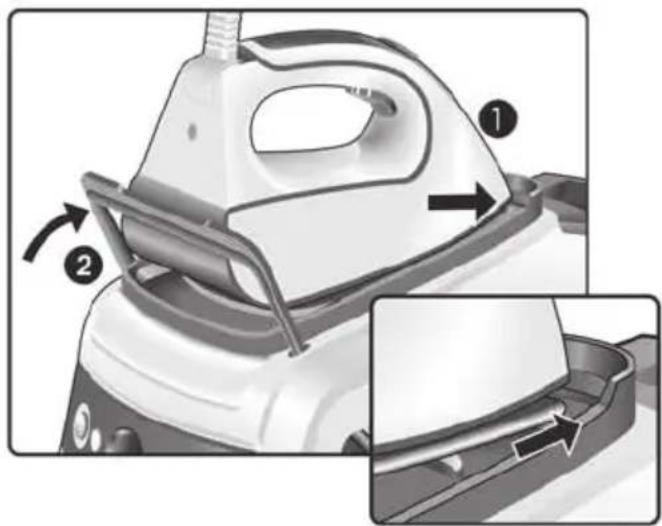
- Place the iron on the iron pad (1), standing on the soleplate, and fix it by inserting the tip of the iron into the front slot and moving the lock lever (14) against the heel of the iron.
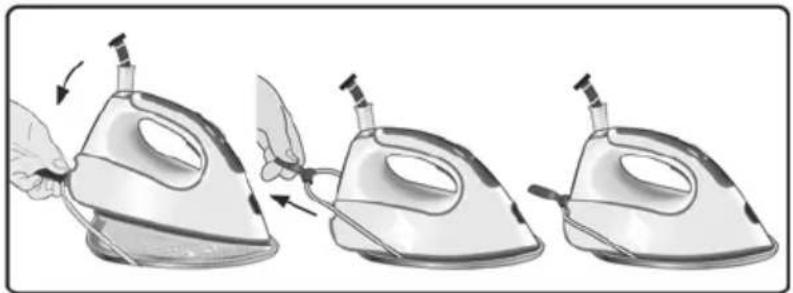
- Store the mains cable in the storage compartment (7) and the steam hose in the storage fixing (3). Do not wrap the cords too tight.
- Use the iron's handle when moving the appliance, as shown in figure F.
Advice on disposal
Our goods come in optimised packaging. This basically consists in using non-contaminating materials which should be handed over to the local waste disposal service as secondary raw materials. Your local town council can give you information about how to dispose of obsolete appliances.
This appliance is labelled in accordance with European Directive 2012/19/EU concerning used electrical and electronic appliances (waste electrical and electronic equipment -WEEE).
The guideline determines the framework for the return and recycling of used appliances as applicable throughout the EU.
Tips to help you save energy

Steam production consumes the most energy. To help minimise the energy used, follow the advice below:
- Start by ironing the fabrics that require the lowest ironing temperature.
Check the recommended ironing temperature in the label on the garment. - Regulate the steam according to the selected ironing temperature, following the instructions in this manual.
- Try to Iron the fabrics while they are still damp and reduce the steam setting. Steam will be generated from the fabrics rather than the iron. If you tumble dry your fabrics before ironing them, set the tumble drier on the ‘iron dry’ programme.
- If the fabrics are damp enough, turn off the steam regulator completely.
Trouble shooting
If the above does not solve the problem, get in touch with an authorised technical service.
Problem Possible causes Solution
| Pilot light (11) flashes | • Boiler and filter must be rinsed. | • Rinse the filter and the boiler according to the cleaning instructions in this manual (see section E). |
| The steam generator does not come on. | • There is a connection problem.• The main power button is not switched on. | • Check the mains cable (6), the plug and the socket.• Set the main power button (12) to the “I” position (illuminated in red). |
| The iron does not heat up. | • The main power button is not switched on.• The temperature is set to a low position. | • Set the main power button (12) to the “I” position (illuminated in red).• Set the temperature to the desired position. |
| The iron begins to smoke when switched on. | • During first use: certain components on the appliance have been lightly greased at the factory and may produce a little smoke when initially heated.• During subsequent use: the soleplate may be soiled. | • This is completely normal and will stop after a short while.• Clean the soleplate according to the cleaning instructions in this manual. |
| Water flows through the holes on the soleplate. | • The steam function is being used before it has reached the correct temperature.• The water is condensing inside the pipes because steam is being used for the first time or has not been used for a long time. | • Reduce the steam flow when ironing at low temperatures.• Point the iron away from the ironing area and press the steam release button until steam is produced. |
| Problem Possible causes Solution | ||
| Dirt comes out through the soleplate. | ·There is a build up of scale or minerals in the steam tank. | ·Use tap water mixed 50% with distilled or demineralised water. To prolong the optimum steam function, mix tap water with distilled water 1:1. If the tap water in your district is very hard, mix tap water with distilled water 1:2. ·Clean the soleplate with a damp cloth. ·Never add products to the water. |
| ·Chemical products or additives have been used. | ||
| The iron does not produce any steam. | ·The boiler is not switched on or the water tank is empty. | ·Set the main power button (12) to the “I” position (illuminated in red), and/or fill the water tank. ·Increase the steam flow (see section B). |
| ·The steam regulation is set to the minimum position. | ||
| The ironed garment turns dark and/or sticks to the soleplate. | ·The selected temperature is too high and has damaged the garment. | ·Select a suitable temperature for the material being ironed and clean the soleplate with a damp cloth. |
| The soleplate turns brown. | ·This is a regular consequence of continued use over a long period of time. | ·Clean the soleplate with a damp cloth. |
| The appliance makes a pumping sound. | ·Water is being pumped into the steam tank. ·The sound will not stop. | ·This is normal. ·If the sound will not stop, do not use the steam generator and contact an authorised technical service centre. |
| Loss of pressure during ironing. | ·Steam release button has been activated for too long a period of time, that is, it has been pressed too frequently. | ·Use the steam release button at intervals. This improves the ironing result as the textiles will be steamed, dried and ironed properly. |
| Water spots appear on the garment during ironing. | ·May be caused by steam condensed on the ironing board. | ·Wipe the textile cover of the ironing board, and iron any water drops to dry them. |
| Water spots appear on the garment during use of the “PulseSteam” function. | ·Water spots are caused by steam condensation in the hose when cooling down after use. | ·Water drops stop coming out of the soleplate after using the “PulseSteam” function for some time. |
| The hose gets hot during use. | ·This is normal. It is caused by the steam passing through the hose during steam ironing. | ·Place the hose on the opposite side so that you cannot touch the hose during ironing. |
| Water leakage from the boiler. | ·Filter (5) located at the side of the appliance is loose. | Tighten up the filter. |
| The iron does not stop steaming after placing it on the pad (1). | ·“PulseSteam” function has been activated by double click. | ·Just press the trigger once again and the iron will stop steaming at once. |
You can download this manual from the local homepages of Bosch.
Loddrett dampstryking