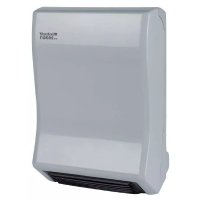
BH 20001 - Heating EINHELL - Free user manual and instructions
Find the device manual for free BH 20001 EINHELL in PDF.



| Brand | Einhell |
| Model | BH 20001 |
| Product type | Wall-mounted bathroom heater |
| Protection category | I |
| Protection rating (IP) | IP24 |
| Installation type | Vertical wall mounting |
| Power supply | 230 V ~ 50 Hz |
| Heating modes | Comfort, ECO, Frost protection |
| Number of preset programs | 7 (P1 to P7) |
| Adjustable temperature range | 15 °C to 35 °C (manual mode) |
| Timer | 0 h 30 to 24 h 00, adjustable in 30 min steps |
| Open window function | Yes, automatic shutdown in case of sudden temperature drop |
| Child lock | Yes, activates after 1 minute without operation |
| Integrated towel warmer | Yes, maximum load 2 kg |
| Display | Digital, backlit |
| Overheat protection | Yes, automatic shutdown |
| Minimum safety distance | Sides 25 cm, top 20 cm, bottom 150 cm, front 100 cm |
| Recommended use | Enclosed, dry, and well-insulated rooms |
| Cleaning | Damp cloth, vacuum cleaner for dust |
| Maintenance | By a qualified professional |
| Spare parts | Available on order (references: type, article no., identification no., part no.) |
| Warranty | According to the warranty conditions provided |
| Recycling | Do not dispose of with household waste, take to a collection center |
Frequently Asked Questions - BH 20001 EINHELL
User questions about BH 20001 EINHELL
0 question about this device. Answer the ones you know or ask your own.
Ask a new question about this device
Download the instructions for your Heating in PDF format for free! Find your manual BH 20001 - EINHELL and take your electronic device back in hand. On this page are published all the documents necessary for the use of your device. BH 20001 by EINHELL.
USER MANUAL BH 20001 EINHELL
GB Original operating instructions Bath Heater
This product is only suitable for well insulated spaces or occasional use.
When using the equipment, a few safety precautions must be observed to avoid injuries and damage. Please read the complete operating instructions and safety regulations with due care. Keep this manual in a safe place, so that the information is available at all times. If you give the equipment to any other person, hand over these operating instructions and safety regulations as well. We cannot accept any liability for damage or accidents which arise due to a failure to follow these instructions and the safety instructions.
1. Safety regulations
Danger!
Read all safety regulations and instructions.
Any errors made in following the safety regulations and instructions may result in an electric shock, fire and/or serious injury.
Keep all safety regulations and instructions in a safe place for future use.
- Check that the equipment has been delivered in perfect condition. If it has suffered any damage, do not connect the equipment to the power supply.
- Position the power cable so that there is no danger of tripping over it.
- Do not pass the power cable over hot parts of the equipment during operation.
- Never use the power cable to pull the power plug out of the socket-outlet! Never use the power cable to carry the equipment or try to move the equipment by pulling the power cable.
- Never wind the power cable around the fan heater.
- Never jam the power cable between objects or pull the cable over sharp edges or position the cable over hot plates or open flames.
Use the equipment in enclosed, dry areas only. - Do not use this heater in the immediate vicinity of a bath, shower or swimming pool.
- Never immerse the equipment in water - danger of fatal accident!
- Never use the equipment with wet hands.
- Never open the equipment or touch live parts - danger of fatal accident!
- Position the equipment in such a way that the power plug is accessible at all times.
If the equipment is not used for a lengthy
period of time, disconnect it from the power supply.
- Do not position the equipment directly below a socket.
If the equipment is used for a lengthy time, the housing can become very hot. Position the equipment in such a way as to prevent accidental touching.
- Do not use the equipment in rooms in which inflammable materials (for example solvents, etc.) or gases are used or stored.
- Keep highly inflammable substances and gases away from the equipment.
- Do not use in areas where there is a fire risk (for example wooden sheds).
Only use the heater with its power lead fully extended.
- Do not insert any foreign objects into the equipment's openings - danger of electric shock and damage to the equipment.
- Keep children and people on medication or under the influence of alcohol away from the equipment.
- Warning: Do not cover the heater. If you fail to observe this point, the heater may suffer from overheating. Risk of fire! Pay attention to the symbol on the equipment (Fig. 8).
- Maintenance and repair work may only be carried out by authorized trained personnel.
- Check the power cable at regular intervals for signs of defects or damage. A damaged power cable may be replaced only by an electrician or ISC GmbH in compliance with the relevant regulations.
- For electrical safety purposes we recommend that you install a residual current device circuit-breaker (RCD).
- Connect the equipment to an earthed socket outlet only.
- According to VDE 0100 Part 701, the installation or mobile operation of the equipment is not allowed within protection zones (0, 1, 2) (Fig. 9).
- Do not place the equipment near wet rooms or wet areas (bath, shower, swimming pool etc.). The heater must be installed such that it is impossible for the switches and controls to be touched by a person in the bathtub or shower.
- Not suitable for permanent installation (direct connection) with electric cables.
- When installing the equipment in a bathroom, be sure to observe the safety clearances stipulated in your country.
- Warning: To prevent danger for very young
GB
children it is recommended to install this equipment such that the bottom bar is at least 600mm above the floor.
- This equipment can be used by children of 8 years and older and by people with limited physical, sensory or mental capacities or those with no experience and knowledge if they are supervised or have received instruction in how to use the equipment safely and understand the dangers which result from such use. Children are not allowed to play with the equipment. Unless supervised, children are not allowed to clean the equipment or carry out user-level maintenance work.
Children younger than 3 years must be kept away unless they are continuously supervised.
Children of 3 years and younger than 8 years are allowed to use the equipment only if they are supervised or have received instruction in how to use the equipment safely and understand the dangers which result from such use, provided that the equipment is positioned or installed in its normal place of use. Children of 3 years and younger than 8 years are not allowed to insert the plug into the socket, regulate the equipment, clean the equipment and/or perform the maintenance which a user is expected to perform.
- Caution - Some parts of the product can become very hot and cause burns. Special care is required when children and persons in need of protection are present.
2. Layout and items supplied
2.1 Layout (Fig. 1)
- Display
- List of parts
- Air outlet grille
- Towel holders
2.2 Items supplied
Please check that the article is complete as specified in the scope of delivery. If parts are missing, please contact our service center or the sales outlet where you made your purchase at the latest within 5 working days after purchasing the product and upon presentation of a valid bill of purchase. Also, refer to the warranty table in the service information at the end of the operating instructions.
- Open the packaging and take out the equipment with care.
- Remove the packaging material and any packaging and/or transportation braces (if available).
- Check to see if all items are supplied.
- Inspect the equipment and accessories for transport damage.
If possible, please keep the packaging until the end of the guarantee period.
Danger!
The equipment and packaging material are not toys. Do not let children play with plastic bags, foils or small parts. There is a danger of swallowing or suffocating!
A. Bath Heater
5 Narrow holding bar
6 Wide holding bar
7 Wall holder for holding bars
8 Plastic cover
9 Assembly material
3. Proper use
The equipment is designed for use as a wall-mounted heater for heating room air in well-insulated, enclosed rooms. It is designed for vertical wall-mounting only (comply with all specified minimum distances). Operate the equipment only when it is completely assembled and hanging vertically on a wall. Never mount the equipment on a wall which is not capable of bearing the load or which is combustible, on angled surfaces, or on the ceiling.
The equipment is to be used only for its prescribed purpose. Any other use is deemed to be a case of misuse. The user / operator and not the manufacturer will be liable for any damage or injuries of any kind caused as a result of this.
Please note that our equipment has not been designed for use in commercial, trade or industrial applications. Our warranty will be voided if the machine is used in commercial, trade or industrial businesses or for equivalent purposes.
GB
4. Technical data
Rated voltage: 230 V ~ 50 Hz
Heat output: 2000 W
Thermostat control: 15^ - 35^
Protection class: 11回
Protection type: IP 24
5. Before starting the equipment
5.1 Assembly
The equipment can be mounted on a wall. The minimum clearances must be observed. The equipment is allowed to be used only when it is completely assembled and in a vertical position. Observe section 3.
Important! Make sure that there are no electric cables or other installations (for example water pipes) near the drill holes. Ensure that the equipment is secured firmly and horizontally to the wall. Use only suitable fastening material on a wall capable of bearing the load.
The supplied dowels and screws are suitable for the following: Concrete, natural stone with a dense structure, solid brick, solid limestone bricks, solid lightweight concrete bricks and aerated concrete.
Ensure that a minimum distance of 25~cm to the sides, 20~cm to the top, 150~cm to the bottom and 100~cm to the front of the equipment are maintained Fig.3).Observe point 1 - Safety information.
If you want to mount the supplied towel holder below the bath heater, follow the installation instructions for the bath heater but mark all the drill holes for the towel holder before mounting the bath heater on the wall.
5.1.1 Mounting the bath heater on the wall (Fig. 4a - 4d)
- Mark the positions of the drill holes (0 6 mm, height from the floor at least 182cm ) for mounting the equipment on the wall. Note: The drill holes are arranged 170mm apart horizontally.
- Then drill the holes in the wall, insert the dowels and drive in the screws. The distance between the screw head and the wall should be approx. 3mm
- Hang the heater on the screws on the wall.
Push the heater to the left as far as the stop and pull it down as far as the stop.
4. Turn the safety latch on the bottom of the heater down and fasten this as well in the same way as described above. The heater is now mounted on the wall.
5.1.2 Mounting the towel holder on the wall (Fig. 5-6)
- Mark the bottom holding hole in the middle for the wall holder (7). Be sure to observe the vertical hole distance (650mm) in relation to the two mounting holes for the bath heater and the central position. Drill the mounting hole (06mm) .
- Mark and drill the two holes at the top. Be sure to observe the horizontal distance of 25 mm relative to each other. The vertical distance to the hole drilled beforehand must be 150 mm.
- Now screw the holding bars to the wall holder (7) as described in 5.1.3 (Fig. 6).
- Then insert all the wall plugs and screw the wall holder securely to the wall.
- Press the plastic cover (Fig. 2 / Item 8) to the wall holder.
5.1.3 Screwing the holding bars to the wall holder (Fig. 6)
- Push the two holding bars (5/6) into the slots provided in the wall holder (7).
- Secure the holding bars (5 / 6) to the wall holder (7) with the short screws (a).
6. Operation
Warning! Before using the equipment for the first time, check that the voltage supply is the same as the voltage details set out on the rating plate.
Read the safety regulations in section 1. When the equipment is used for the first time or after a long period of rest, it may emit an odor for a short time. This is not a fault.
Explanation of the control panel (Fig. 7a)
11=ON/OFF button
12 = + button
13 = - button
14 = C/M button
15 = P/PRO button
16 = Unlock / Windows open button
GB
Explanation of the display (Fig. 7b)
A = Hour
B = Minute
C = Day
D = On
E = Locked
F = Heating
G = Program number
H = Windows open
K=Program
L = Timer
M = Temperature
N = Comfort mode
P = ECO mode
R = Frost protection mode
S = Bar for set comfort mode
T = Bar for set ECO mode
U = Time for set comfort / ECO mode
Note: Every press of a button is confirmed by a short audio signal.
The equipment will be locked to prevent changes to settings if no operation is performed within one minute when the equipment is switched on. The "locked" symbol (E) will appear on the screen and the backlighting of the display will go out. Press button (16) and then press it again for 3 seconds. The equipment is now unlocked. The "locked" symbol (E) will go out and the display will be illuminated.
6.1 Switching the equipment on and off
Press the On/Off button (11). The equipment comes on and the display will be activated. To switch off, press the On/Off switch (11) again.
6.2 Manual operation
"Fr" is shown in the display. The equipment will heat with the maximum heat setting, so long as the equipment temperature exceeds the set desired temperature. The S, T and F symbols will be shown (Fig. 7b).
6.2.1 Setting the current day and time
- Switch on the equipment as previously described in 6.1.
- Hour (A): Press the C/M button. Set the current hour using the + and - buttons.
- Minute (B): Press the C/M button again to set the current minutes using the + and - buttons.
Day (C): Press the C/M button again to set the current day using the + and - buttons. The digit 1 corresponds to Monday, 2 = Tuesday, etc.
If you do not press a button for approx. 10 seconds, the last setting you made will be saved.
6.2.2 Setting the desired temperature
Note: The desired temperature to be set corresponds to the equipment temperature measured on the integrated temperature sensor and shown on the display. This may vary slightly from the actual room temperature. If the temperature exceeds the set desired temperature, the heating function switches off. If the temperature falls below the set desired temperature, the heating function switches on again.
- Switch on the equipment as previously described in 6.1.
- Press the + or - buttons. The temperature (M) will be increased or decreased by 1^ each time.
Note: A desired temperature between 15^ and 35^ can be set.
6.2.3 Setting the timer (ON time)
- Switch on the equipment as previously described in 6.1.
Press the C/M button for 3 seconds; the hour (A) and minutes displays (B) will flash. Use the + and - buttons to adjust the timer in 30 minute intervals.
If you do not press a button for approx. 5 seconds, the last setting you made will be saved. The display for the timer setting (L) will appear.
To switch off the timer, press the C/M button again for 3 seconds. The display for the timer setting (L) will go out.
Note: The ON time can be programmed to between 00.30 h and 24.00 h.
6.3 Preprogrammed heating programs
Note: Seven different preprogrammed heating programs (P1 - P7) are available.
Three different settings (modes) are available in these heating programs.
a) Comfort mode (N)
If the equipment temperature which is measured at the integrated temperature sensor and shown on the display falls below 10^ , the heater switches on automatically. If the equipment temperature which is measured at the integrated temperature sensor and shown on the display rises above 35^ , the heater switches off automatically. The equipment will heat with its maximum heat output.
GB
b) ECO mode (P)
If the equipment temperature which is measured at the integrated temperature sensor and shown on the display falls below 7^ , the heater switches on automatically. If the equipment temperature which is measured at the integrated temperature sensor and shown on the display rises above 35^ , the heater switches off automatically. The equipment will heat with its minimum heat output.
c) Frost protection mode (R)
If the equipment temperature which is measured at the integrated temperature sensor and shown on the display falls below 7^ , the heater switches on automatically. If the equipment temperature which is measured at the integrated temperature sensor and shown on the display rises above 9^ , the heater switches off automatically.
To switch the equipment to the P1-P7 heating programs when it is switched on, press the "P/ PRO" button. "Fr" will flash in the display. To then select the heating programs, repeatedly press the + or - buttons. The selected heating program will be shown in the display (G).
The switch-off temperature in comfort and ECO mode can be adjusted to suit your needs (see 6.3.1). If the equipment has switched off automatically, "--" appears in the display (G).
Comfort mode (N) and ECO mode (P) is shown by a bar (S / T) with 24 individual segments on the display in each case. Each individual segment represents 1 hour. These bars are shown on the display in dependency on the set time (see section 6.2.1) and the heating program. If no bar is shown, this means that the equipment is in frost protection mode.
6.3.1 Changing the heating programs
The preprogrammed P1 - P7 heating programs can be changed to suit your individual needs, starting with the current day, when the equipment is switched on.
To perform the setting, proceed as follows:
- Press the P/PRO button and then the + or - button until the P1-P7 program you want flashes.
The following example used to describe how to adjust the settings is based on the selected program P1.
- Press the P/PRO button for 3 seconds while P1 is flashing, until PROG and 00:00 (time) appear in the display. Press the C/M button once or several times to select the desired comfort / ECO / frost protection mode or Off for this time. Press the + or - button to select the desired temperature in comfort or ECO mode.
Note: The temperature in frost protection mode is a fixed setting (7^)
If you have selected Off, -- appears in the display.
To program for 01:00 (time), press the P/PRO button and repeat the programming procedure as described above for 00:00 (time). If you want to use the same mode for the following hour, press the P/PRO button again, etc.
6.4 Setting the daily program (AU mode)
In AU mode it is possible to assign a P1 - P7 program for each separate day.
To do so, proceed as follows:
a) Press the P/PRO button; P1 will flash on the display (G).
b) Press ^+ or- until AU appears in the display (G)
c) Press the P/PRO button for 3 seconds until PROG appears in the display (K) and one of the P1-P7 programs fl ashes in the display (G).
d) Press the C/M button; the day display (C) will flash. Press the C/M button again to select a day for which you want the program to apply.
e) Press the + or - buttons until the desired program number (G) appears.
f) Wait for 5 seconds. The day (C) will have been saved with the desired program number (G).
g) Repeat steps c) - f) for the rest of the days.
6.5 "Windows open" function
The Item 16 button allows you to switch the function on and off. If the temperature drops considerably within a short time while the heating function is switched on, the equipment switches off automatically.
GB
6.6 Towel holders
You can pre-warm and dry towels on the towel holders. Please make sure that the air outlet at the bottom of the heater housing is not obstructed. Do not overload the towel holders. They are designed for a maximum load of 2kg each.
6.7 Overheating guard
In case of excessive heating, the heat output or the equipment will shut down automatically. If this occurs, turn off the equipment, disconnect the mains plug and wait a few minutes for the equipment to cool. After eliminating the cause (e.g. a covered air grille), the equipment can be switched on again. If the overheating guard triggers repeatedly, please contact ISC GmbH.
7. Cleaning, maintenance and ordering of spare parts
Danger!
7.1 Cleaning
Before carrying out any cleaning and maintenance work the equipment must be turned off, disconnected from the power supply and cooled down.
- Maintenance and repair work may only be carried out by an authorized electrical servicing contractor or ISC GmbH.
- Check the power cable at regular intervals for signs of defects or damage. A damaged power cable may be replaced only by an electrician or ISC GmbH in compliance with the relevant regulations.
Use a damp cloth to clean the casing.
- Remove dust with a vacuum cleaner.
7.2 Maintenance
There are no parts inside the equipment which require additional maintenance.
7.3 Ordering replacement parts:
Please quote the following data when ordering replacement parts:
Type of machine
Article number of the machine
Identification number of the machine
- Replacement part number of the part required For our latest prices and information please go to www.isc-gmbh.info
GB
10. Troubleshooting
If the equipment is operated properly you should experience no problems with malfunctions or faults. In the event of any malfunctions or faults, please check the following before you contact your customer services.
| Problem Possible cause Remedy | ||
| No operation / no heating | - The power plug is not connected- Equipment in standby- The thermostat is set too low- “Timer” has switched off the equipment- The equipment has been switched off by the heating program | - Connect the power plug- Press the On/Off button- Increase the temperature- Change the selected time- Change the heating program |
| The equipment does not react | - The equipment is locked to prevent changes to settings | - To unlock it, press the button (Fig. 7a/Item 16) |

For EU countries only
Never place any electric power tools in your household refuse.
To comply with European Directive 2012/19/EC concerning old electric and electronic equipment and its implementation in national laws, old electric power tools have to be separated from other waste and disposed of in an environment-friendly fashion, e.g. by taking to a recycling depot.
Recycling alternative to the return request:
As an alternative to returning the equipment to the manufacturer, the owner of the electrical equipment must make sure that the equipment is properly disposed of if he no longer wants to keep the equipment. The old equipment can be returned to a suitable collection point that will dispose of the equipment in accordance with the national recycling and waste disposal regulations. This does not apply to any accessories or aids without electrical components supplied with the old equipment.
The reprinting or reproduction by any other means, in whole or in part, of documentation and papers accompanying products is permitted only with the express consent of the iSC GmbH.
Subject to technical changes
11. Information requirements for electric local space heaters
| Model identifier(s): BH 2000/1 H | ||||||
| Item Symbol Value Unit Item Unit | ||||||
| Heat output | Type of heat input, for electric storage local space heaters only (select one) | |||||
| Nominal heat output | Pnom | 2.0 kW | manual | heat charge control, with Integrated thermostat - | ||
| Minimum heat output (indicative) | Pmin | 1.0 kW | manual heat charge control with room and/or outdoor temperature feedback | - | ||
| Maximum continuous heat output | Pmax,c | 2.0 kW | electronic heat charge control with room and/or outdoor temperature feedback | - | ||
| Auxiliary electricity consumption | fan assisted heat output - | |||||
| At nominal heat output | eImax | 1.942 kW | Type of heat output/room temperature control (select one) | |||
| At minimum heat output | eimin | 0.979 kW | single stage heat output and no room tempera-ture control | no | ||
| In standby mode | eIsb | 0.0 kW | Two or more manual stages, no room tempera-ture control | no | ||
| with mechanic thermostat room temperature control | no | |||||
| with electronic room temperature control no | ||||||
| electronic room temperature control plus day timer | no | |||||
| electronic room temperature control plus week timer | yes | |||||
| Other control options (multiple selections possible) | ||||||
| room temperature control, with presence detection | no | |||||
| room temperature control, with open window detection | yes | |||||
| with distance control option no | ||||||
| with adaptive start control | no | |||||
| with working time limitation | yes | |||||
| with black bulb sensor | no | |||||
| Contact details | ISC GmbH, Eschenstr. 6, D-94405 Landau/lsar | |||||
GB
Warranty certificate
Dear Customer:
All of our products undergo strict quality checks to ensure that they reach you in perfect condition. In the unlikely event that your device develops a fault, please contact our service department at the address shown on this guarantee card. You can also contact us by telephone using the service number shown. Please note the following terms under which guarantee claims can be made:
- These guarantee terms apply to consumers only, i.e. natural persons intending to use this product neither for their commercial activities nor for any other self-employed activities. These warranty terms regulate additional warranty services, which the manufacturer mentioned below promises to buyers of its new products in addition to their statutory rights of guarantee. Your statutory guarantee claims are not affected by this guarantee. Our guarantee is free of charge to you.
- The warranty services cover only defects due to material or manufacturing faults on a product which you have bought from the manufacturer mentioned below and are limited to either the rectification of said defects on the product or the replacement of the product, whichever we prefer. Please note that our devices are not designed for use in commercial, trade or professional applications. A guarantee contract will not be created if the device has been used by commercial, trade or industrial business or has been exposed to similar stresses during the guarantee period.
-
The following are not covered by our guarantee:
-
Damage to the device caused by a failure to follow the assembly instructions or due to incorrect installation, a failure to follow the operating instructions (for example connecting it to an incorrect mains voltage or current type) or a failure to follow the maintenance and safety instructions or by exposing the device to abnormal environmental conditions or by lack of care and maintenance.
- Damage to the device caused by abuse or incorrect use (for example overloading the device or the use or unapproved tools or accessories), ingress of foreign bodies into the device (such as sand, stones or dust, transport damage), the use of force or damage caused by external forces (for example by dropping it).
-
Damage to the device or parts of the device caused by normal or natural wear or tear or by normal use of the device.
-
The guarantee is valid for a period of 24 months starting from the purchase date of the device. Guarantee claims should be submitted before the end of the guarantee period within two weeks of the defect being noticed. No guarantee claims will be accepted after the end of the guarantee period. The original guarantee period remains applicable to the device even if repairs are carried out or parts are replaced. In such cases, the work performed or parts fitted will not result in an extension of the guarantee period, and no new guarantee will become active for the work performed or parts fitted. This also applies if an on-site service is used.
-
To make a claim under the guarantee, please register the defective device at: www.isc-gmbh.info. Please keep your bill of purchase or other proof of purchase for the new device. Devices that are returned without proof of purchase or without a rating plate shall not be covered by the guarantee, because appropriate identification will not be possible. If the defect is covered by our guarantee, then the item in question will either be repaired immediately and returned to you or we will send you a new replacement.
Of course, we are also happy offer a chargeable repair service for any defects which are not covered by the scope of this guarantee or for units which are no longer covered. To take advantage of this service, please send the device to our service address.
Also refer to the restrictions of this warranty concerning wear parts, consumables and missing parts as set out in the service information in these operating instructions.
F
Danger!
Chere cliente, cher client,
Termostatskeregulator: 15^ - 35^
GB explains the following conformity according to EU directives and norms for the following product
Noise: measured L_w = dB(A) guaranteed L_w = dB(A)
P=KW;L0=cm
Notified Body:
2012/46/EU-(EU)2016/1628
Emission No.:
Standard references: EN 60335-1; EN 60335-2-30; EN 60335-2-43; EN 62233;
EN 55014-1; EN 55014-2; EN 61000-3-2; EN 61000-3-3
Subject to change without notice
Archive-File/Record: NAPR018174
Documents registrar: Landauer Josef
Wiesenweg 22, D-94405 Landau/Isar
EH 01/2019 (01)

- GB Original operating instructions Bath Heater
- Safety regulations
- Danger!
- Read all safety regulations and instructions.
- Keep all safety regulations and instructions in a safe place for future use.
- GB
- Layout and items supplied
- Layout (Fig. 1)
- Items supplied
- Proper use
- Technical data
- Before starting the equipment
- Assembly
- Mounting the bath heater on the wall (Fig. 4a - 4d)
- Mounting the towel holder on the wall (Fig. 5-6)
- Screwing the holding bars to the wall holder (Fig. 6)
- Operation
- Explanation of the control panel (Fig. 7a)
- Explanation of the display (Fig. 7b)
- Switching the equipment on and off
- Manual operation
- Setting the current day and time
- Setting the desired temperature
- Setting the timer (ON time)
- Preprogrammed heating programs
- b) ECO mode (P)
- c) Frost protection mode (R)
- Changing the heating programs
- Setting the daily program (AU mode)
- "Windows open" function
- Towel holders
- Overheating guard
- Cleaning, maintenance and ordering of spare parts
- Cleaning
- Maintenance
- Ordering replacement parts:
- Troubleshooting
- Information requirements for electric local space heaters
- Warranty certificate
- Dear Customer:
- F
Brand : EINHELL
Model : BH 20001
Category : Heating