Trevi Digital - Coffee machine SPIDEM - Free user manual and instructions
Find the device manual for free Trevi Digital SPIDEM in PDF.



| Product type | Espresso coffee machine with built-in grinder |
| Brand | Spidem |
| Model | Trevi Digital |
| Dimensions (W x H x D) | 337 x 325 x 377 mm |
| Weight | 8.5 kg |
| Power supply | See rating plate (voltage and rated power) |
| Cord length | 1.2 m |
| Water tank capacity | 1.7 L |
| Bean hopper capacity | 350 g |
| Pump pressure | 13-15 bars |
| Heaters | 2 aluminum |
| Safety devices | Safety valve, 2 safety thermostats |
| Body material | Thermoplastic |
| Control panel | Front with digital display and buttons |
| Main functions | Long coffee, normal coffee, espresso 1 or 2 cups; steam for cappuccino; hot water; programming via menu |
| Grind type | Adjustable (13 levels) with fineness selector |
| Coffee dose | Adjustable via selector |
| Maintenance and cleaning | Weekly cleaning of the brew group; regular descaling (manual or automatic); automatic rinse at startup |
| Safety | Automatic shutdown in case of malfunction; burn protection; main switch |
| Spare parts and repairability | Repairs only by an authorized service center; removable brew group; cleaning key provided |
| General information | Domestic use; compliant with European directive 89/336/EEC |
Frequently Asked Questions - Trevi Digital SPIDEM
User questions about Trevi Digital SPIDEM
0 question about this device. Answer the ones you know or ask your own.
Ask a new question about this device
Download the instructions for your Coffee machine in PDF format for free! Find your manual Trevi Digital - SPIDEM and take your electronic device back in hand. On this page are published all the documents necessary for the use of your device. Trevi Digital by SPIDEM.
USER MANUAL Trevi Digital SPIDEM
Congratulations on choosing this top-quality espresso machine and many thanks for your confidence in our products. Before operating the machine, we recommend you read the following instructions thoroughly which explain how to use, clean and maintain the machine. For any other information, please contact the retailer or our company directly. We will be glad to provide you with any explanations you may need.
Felicitations!
D
misure in millimetre
E
3 NORME DI SICUREZZA

Con这对于 the Italian people, I have to say that it is very difficult for me to understand what you mean.
7 HOT WATER 32
8 CLEANING AND MAINTENANCE 32
9 DESCALING 33
10 PROGRAMMING 34
11 LEGAL INFORMATION 37
12 DISPOSAL OF THE APPLIANCE 38
PROBLEMS - CAUSES - REMEDIES 39
Read these operating instructions carefully before using the machine
1 GENERAL INFORMATION
This coffee machine is ideal for preparing espresso coffee using whole coffee beans only and is provided with a device for dispensing steam and hot water.
The elegantly styled machine is designed and suitable for normal home use only.
Important. The manufacturer accepts no liability for damage or injury caused by:
- improper use outside the defined operating parameters;
- repairs carried out by anyone other than authorized service centers;
- tampering with the power cable;
- tampering with any component of the machine;
- use of non-original spare parts and accessories.
In such cases the warranty will lose all validity.
1.1 To facilitate interpretation

A warning triangle indicates all the instructions that are important for user safety. Follow these directions carefully to avoid serious injury!
2
Illustrations, parts of the machine and control functions are referred to by number or letter, e.g. illustration 2 in this paragraph.
i
This symbol identifies the most important information for ensuring optimal use of the machine.
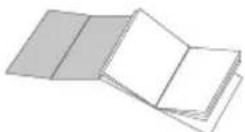
The illustrations corresponding to the text may be found on the inside cover flap. Keep this page open while reading the operating instructions.
1.2 How to use these operating instructions
Keep these operating instructions in a safe place and make them available to anyone else who should use the coffee machine.
If you require any further information or meet with any problems not completely or sufficiently explained in these instructions, contact the experts.
2 TECHNICAL SPECIFICATIONS
| Voltage rating See rating plate on machine | |
| Power rating See rating plate on machine | |
| Casing material Thermoplastic | |
| Size (w x h x d) (mm) 337 x 325 x 377 | |
| Weight (Kg) 8.5 | |
| Cable length (mm) 1200 | |
| Control panel Front | |
| Water container Extractible | |
| Power supply See rating plate on machine | |
| Water container capacity (lt.) 1.7 | |
| Coffee container capacity (gr) | 350 of coffee beans |
| Pump pressure (bars) | 13-15 |
| Boilers | 2 in Aluminium |
| Safety features | Boiler pressure safety valve, 2 safety thermostats. |
The manufacturer reserves the right to change the machine's specifications in line with technological progress.
The machine conforms to European Directive 89/336/EEC (Legislative Decree 476 of 04/12/92), regarding the elimination of radio-television interference.
A
B
C
D
E
sizes in millimeter
3 SAFETY RULES

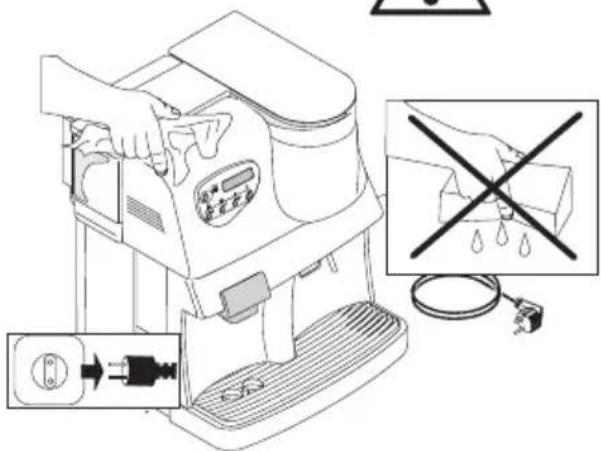
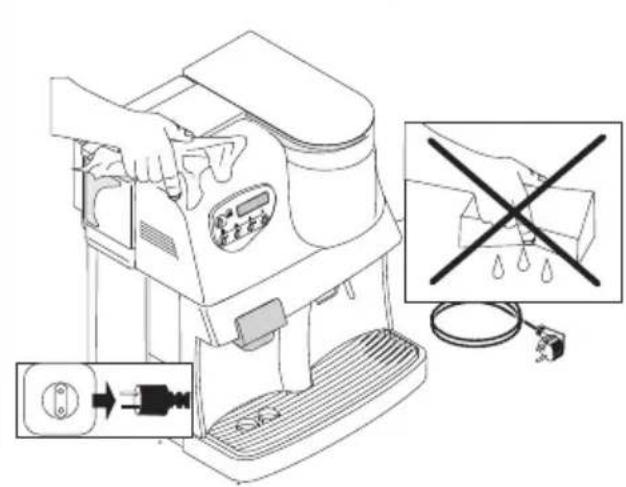
Never place electrical parts in contact with water: danger of short circuit! The superheated steam and hot water may cause scalding! Never aim the steam or hot water flow towards parts of your body, use caution when touching the steam / hot water nozzle: danger of scalding!
Intended use
The coffee machine is designed for home use only.
To avoid risks, do not make any technical changes or use the machine for purposes other than those stated!
The coffee machine must be used exclusively by adults.
The machine must not be used by children.
Power supply
Plug the coffee machine into a suitable electrical outlet.
The voltage must correspond to the value indicated on the rating plate.
A Power cable
Never use the coffee machine if the power cable is defective.
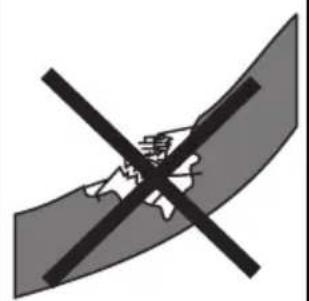
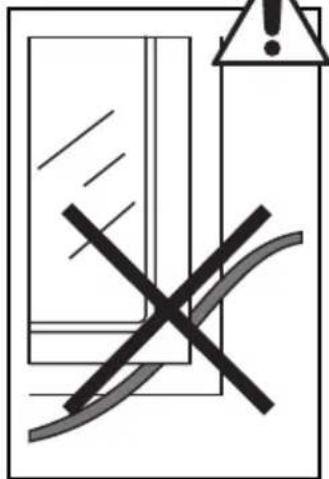
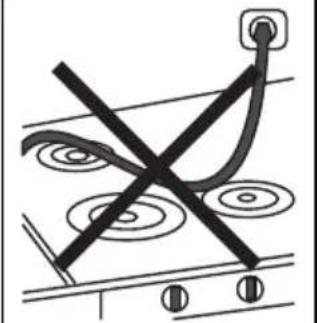
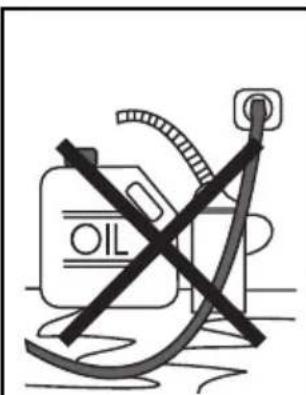
You should have any defective cables or plugs immediately replaced by an Authorized Service Center. Do not pass the cable around corners, over sharp edges or over hot objects and keep it away from oil. Do not use the cable to carry or pull the coffee machine. Do not remove the plug by tugging on the cable or touch it with wet hands. Make sure the cable cannot drop freely from tables or shelves.
B Protecting others
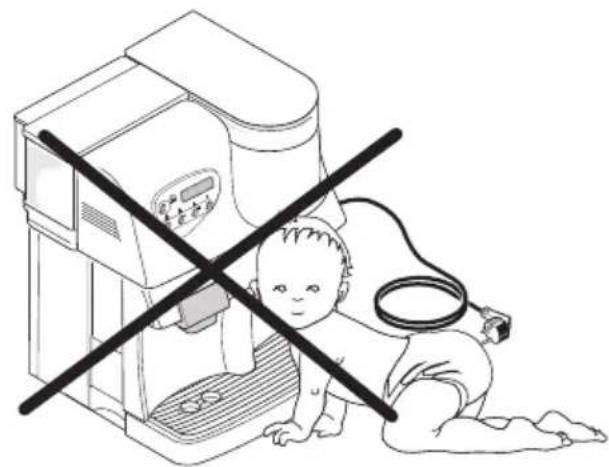
Do not allow children to play with the coffee machine. Children are not aware of the dangers connected with household appliances.
Danger of burns
Avoid aiming the superheated steam and/or hot water flow at yourself and/or at others: Danger of scalding!
Always use the handles or knobs provided.
D Siting
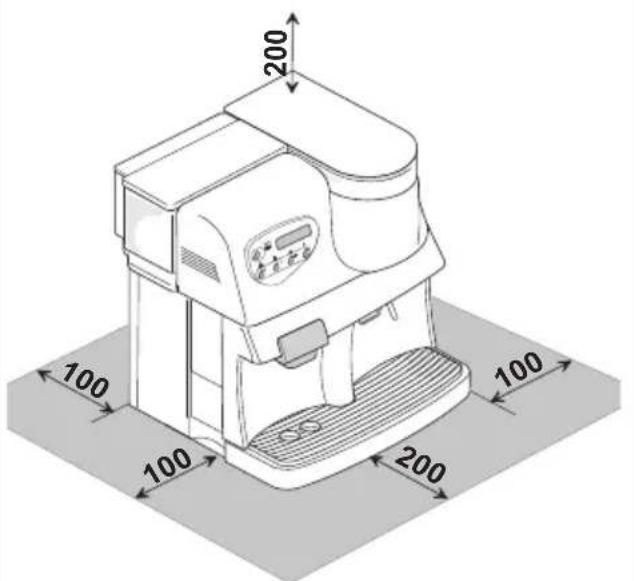
Place the coffee machine in a safe place where no one can tip it over or be injured by it. Do not use the coffee machine outdoors. To prevent melting or damage to the casing, do not rest the machine on very hot surfaces or near open flames.
E Cleaning
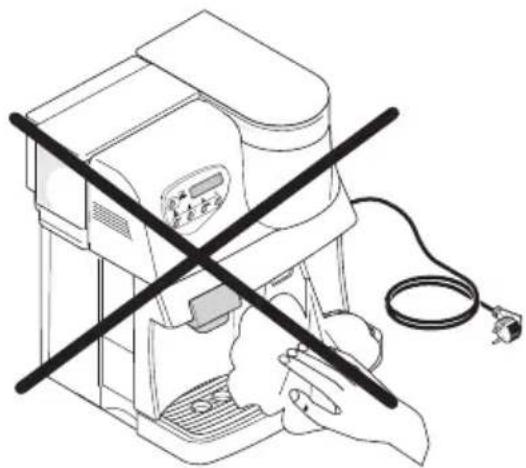
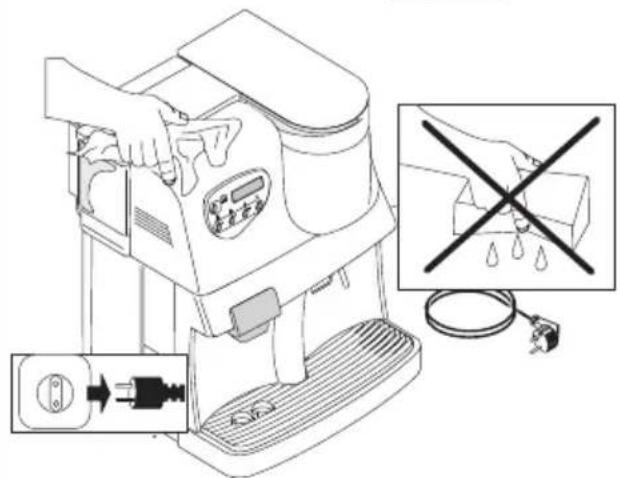
Before cleaning the machine, it is imperative to turn the button (16) to OFF and remove the plug from the electrical outlet. Also wait for the machine to cool down. Never immerse the machine in water! Never tamper with internal machine parts. Tampering with internal parts will void the manufacture's warranty.
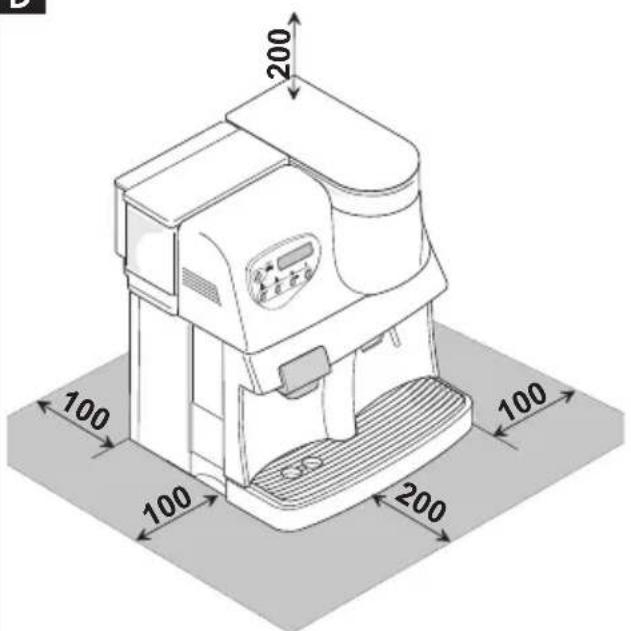
D Space for use and maintenance
To ensure that the coffee machine works properly and efficiently, you are advised to:
- Rest it on a perfectly level surface;
- Place it in an adequately lit, hygienic site with an electrical outlet within easy reach;
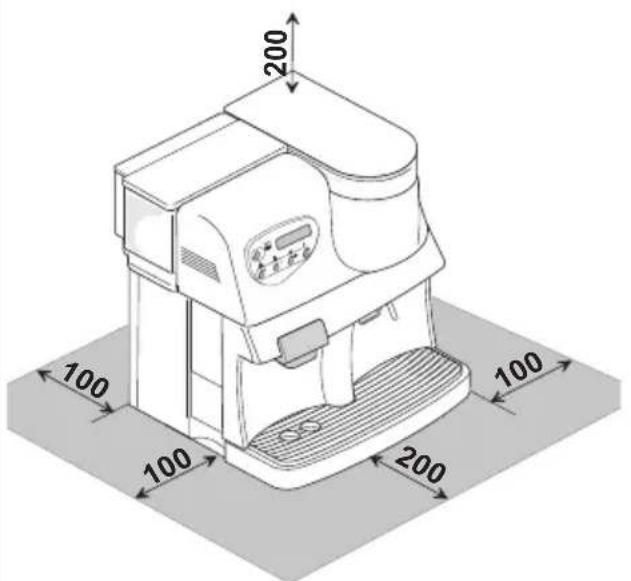
- Ensure a minimum clearance between the machine and the walls as shown in the figure.
Storing the machine
If the machine is to remain out of use for a lengthy period, turn it off and pull out the plug. Store it in a dry place out of children's reach. Keep it away from dust and dirt. Do not expose machine to freezing temperatures. Damage to internal components will occur.
Servicing/Maintenance
In the event of a breakdown, fault or suspected damage after a fall, immediately unplug the machine. Never operate a faulty
machine. Maintenance and repairs are to be carried out exclusively by Authorized Service Centers. The manufacturer will accept no liability for any damage caused by unauthorized servicing.
Fire safety
In the event of fire, use carbon dioxide (CO_2) extinguishers. Do not use water or powder extinguishers.
Machine components key
1Dump box
2 Drip tray
3 Drip tray grill
4 Coffee dispenser
5 Steam/hot water wand
6 Steam/hot water knob
7 Water container
8 Water container lid
9 Coffee bean container
10 Coffee bean container lid
11 Grind adjustment knob
12 Ground coffee dose adjustment
13 Front door
14 Brew group
15 Power cable
16 Main switch
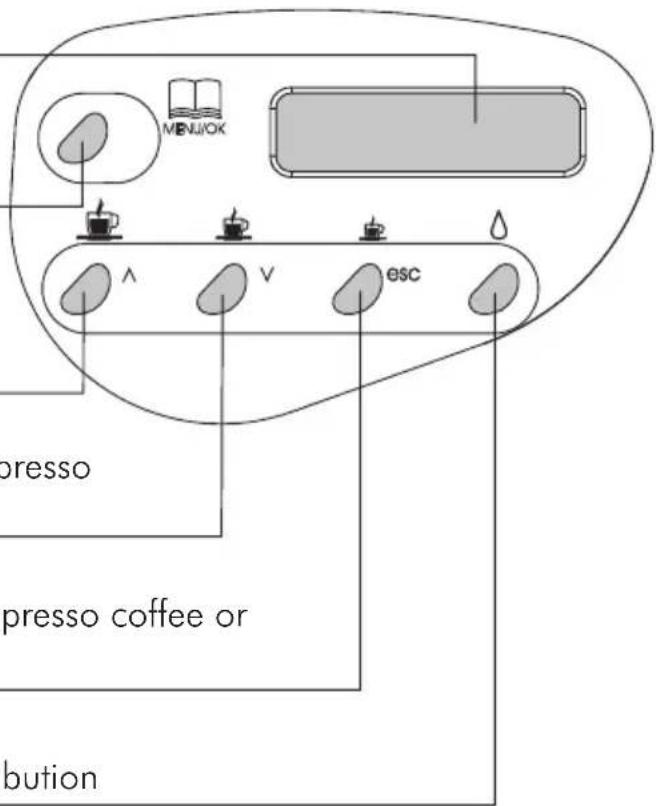
Control panel
22 Digital display
17 Energy saving key or MENU/OK key in the programming mode
18 Selection key for 1 or 2 cups of café americano or key in the programming mode
19 Selection key for 1 or 2 cups of long espresso or key v in the programming mode
20 Selection key for 1 or 2 cups of short espresso coffee or key ESC in the programming mode
21 Button to select/deselect hot water distribution
4 INSTALLATION
For your own safety and the safety of others, you must strictly comply with the "Safety Rules" described in chap.3
4.1 Package
The original packaging was designed and made to protect the machine during shipping. We recommend keeping it for future transport purposes.
4.2 Preliminary operations
- Remove the packet containing the lid, the key for the brew group and the cleaning brush from the packing materials.
- Take the coffee machine out of its packaging and position it in a suitable place conforming to the requisites described in the safety rules (chap.3.)
- Fit the coffee container lid (10) onto the coffee container (9); store the brew group key and cleaning brush in a safe place.
- Make sure that the tray (2) with grill, the dump box (1) and the brew group (14) are correctly fitted and that the front door (13) is closed.
- Before plugging the machine into the mains, make sure the button (16) is on OFF.
4.3 Turning on for the first time
- 28 out the water container (7) and remove the lid (8). Rinse it out and fill it with fresh drinking water, making sure you do not overfill it. Lower the container back into place inside the machine and replace the lid.

Fill the container (7) only with cool, fresh water. Hot water
or other liquids may damage the container and/or the machine.
Always make sure there is enough water inside the container before starting the machine.
- 27e off the lid (10) and fill the container with whole coffee beans (9).
- Fit the lid of the coffee container back into place.

Fill the container (9) with whole coffee beans only. Ground or
freeze-dried coffee or any other objects will damage the machine.
- Insert the plug (15) into a suitable outlet.
- The button (16) is positioned on OFF. Simply press the button (16) to turn on the machine.
- Press the button (6); the machine will start heating up. The message
RIN SING WARMINGUP
will appear on the
display.
It will take the machine about 2 minutes to heat up.
As soon as it reaches the right temperature it will perform a cleaning cycle.
At the end of the cycle the message
SELECT PRODUCT READY FOR USE
will appear on the
display.
4.4 Priming
- 30 tion the steam wand (5) over the drip tray.
- Press the button (21) to switch the machine over to the hot water dispensing function; the messages
SELECT P R O D U C T
READY FOR USE
HOT WATER READY FOR USE
will be displayed in turn.
- Turn the knob (6) counterclockwise and wait until water flows smoothly from the steam wand; to cut off flow, turn the knob (6) clockwise.
Note: Prime the machine before starting up for the first time, or if the machine has been inoperative for a lengthy period or the water container has been completely emptied, it is advisable to load the circuit. The machine should also be primed whenever the message
VENTILATE
display.
appears on the
- Press the button (21) again.
- Once the above operations have been completed, the machine is ready to be used. When the machine has reached the operating temperature the display will
show the message: SELECT PRODUCT READY FOR USE
To dispense coffee or steam and use the machine properly, you should carefully follow the instructions below.
5 PREPARED COFFEE
The machine is ready for use as soon as
the message SELECT PRODUCT READY FOR USE appears on the display.
- The coffee dispenser may be adjusted to the desired height. This allows you to use cups of various sizes and the machine may be adapted to individual needs. After use, set the dispenser back in the original position.
- 29 ce one or two cups on the drip tray (3) and press the button for making the type of coffee preferred (18, 19, or 20).
5.1 Coffee grinder

Warning! The grinder adjustment knob inside the
coffee container must be turned only while the coffee grinder is operating. Do not introduce ground and/or freeze-dried coffee in the coffee bean container.
Do not introduce any material other than coffee beans. Inside the coffee grinder there are moving parts that may be dangerous; do not place your fingers and/or other objects inside the grinder. Before performing any kind of operation inside the coffee container, switch off the machine and unplug it. Do not introduce coffee beans while the grinder is operating.
The quality and flavor of your coffee will depend not only on the blend you use but also on how finely you grind it. The machine has a knob (11) for adjusting the grind. To adjust the grind, turn the graduated knob while the grinder is operating; the numbers on the knob indicate the fineness of the grind. Every machine is factory-regulated to a medium-sized grind; turn the knob to lower numbers to obtain a coarser grind, turn the knob to higher numbers to obtain a finer grind. The variation in the fineness of the grind will be noted only after three or four coffees have been dispensed.
i Use blends of coffee beans for espresso machines. Avoid using extreme grind settings (e.g. 1-16); in these cases use different blends of coffee. Store coffee in an airtight container in a cool, dry place.
You should adjust the grind setting when the coffee is not dispensed properly: Coffee pours out too fast = excessively coarse grind > set knob on a finer grind; Coffee drips out slowly and/or not at all = excessively fine grind > set knob on coarser grind.
5.2 Dose adjustment
27 The machine allows you to adjust the amount of coffee (dose) to be ground according to your requirements. The manufacturer has set a standard dose that satisfies most needs: notch (A) corresponding to the point of reference (B). Turn the knob (12) inside the coffee container counterclockwise to increase the dose of ground coffee; turn it clockwise to reduce the dose of ground coffee.
You must carry out the dose adjustment before pressing the button to dispense coffee. This system makes it possible to achieve optimal coffee making with all types of coffee commercially available.
5.3 Coffee dose per cup
The machine has been programmed for 3 types of coffee: American-style, medium-strength or espresso.
To adapt the programmed amounts to the cup size, place the cup beneath the dispenser, press the button for making the type of coffee desired (18, 19, or 20) and keep it pressed. In the digital field the
message COFFEE PROGR.QUANTITY will appear.
When the cup has been filled to the desired level, release the button.
Important: keep the button (18, 19, or 20) pressed down for the whole duration of the process.
5.4 Single or double shots (1 or 2 cups)
-
When you press the coffee-making button (18, 19, or 20) the machine will prepare one cup of coffee. To make two cups or a double shot of espresso, press the button twice.
-
You may stop dispensing at any time by briefly pressing the same button (18, 19, or 20)
Important: the machine is equipped with an automatic pre-brewing system. The coffee blend is first moistened, the flow of coffee is briefly interrupted, and then the actual brewing process starts; the message
PREBREWING
appears on the display.
6 DISPENSING STEAM/ PREPARING CAPPUCCINO
The steam may be used to froth milk for cappuccino and to heat up beverages. The machine requires no pre-heating.
Danger of scalding! The steam may be preceded by brief sprays of hot water. The steam wand can reach very high temperatures: avoid touching it directly with your hands.
- 30 When the machine is ready to dispense coffee, position the steam wand (5) over the drip tray (2), open the "hot water/steam" knob (6) for a few seconds to discharge residual water from the steam wand; in short time only steam will issue from the wand. The display will show
STEM
- Close the knob (6).
- Fill the receptacle you want to use for making cappuccino to 1/3 with cold milk.
i Use only cold milk to ensure the best results when making cappuccino.
- Place the tip of the steam wand in the milk to be heated and open the knob (6); slowly raise the receptacle, with gentle rotating movements, to obtain a uniform layer of foam.
After dispensing the amount of steam desired, close the knob (6).
The same procedure may be used to heat other beverages.
After this operation, wipe the steam wand clean with a damp cloth.
7 H O T W A T

Danger of scalding!
The steam may be preceded by
brief sprays of hot water. The steam wand can reach very high temperatures: avoid touching it directly with your hands.
31 When the machine is ready to dispense coffee, proceed as follows:
- Place a cup and/or receptacle under the hot water/steam wand (5);
- Press the button (21) to switch the machine over to the hot water dispensing function. The messages
SELECT PRODUCT READY FOR USE
HOT WATER
READY FOR USE
will be displayed in turn.
- Turn the knob (6) counterclockwise; the
display will show
HOT WATER
- Dispense the desired amount of hot water; to cut off the flow of hot water turn the knob (6) clockwise.
- Press the button (21) again.
- The machine will return to the normal operating status; the display shows:
SELECT PRODUCT READY FOR USE
8 CLEANING AND MAINTENANCE
8.1 Basic cleaning
- Maintenance and cleaning may be
carried out only when the machine is cold and disconnected from the power supply.
- Do not immerse the machine in water and do not place any of its components in a dishwasher.
- Do not use sharp objects or aggressive chemical products (solvents) for cleaning.
- It is recommended that you clean the water container daily; fill the container with fresh drinking water.
- Clean out the coffee bean container before refilling it.
- Use a soft cloth moistened with water to clean the machine.
- Do not dry the machine and/or its components in a microwave and/or conventional oven.
- Clean the machine compartment and the brew group, we recommend emptying out the dump box every day (1).
- The coffee dispenser (4) may be removed for cleaning. Pull it out and thoroughly rinse the dispensing channels with hot water.
8.2 Brew group
- The brew group (14) must be cleaned every time you fill the coffee bean container or, in any case, at least once a week.
- Turn off the machine and pull out the plug.
- 37 Remove the dump box (1) and drip tray (2), then open the service door (13).
- 35 Take out the brew group (14), holding it by the handle and pushing the "PRESS" button. Use hot water only, without detergents, to clean the brew group.
- 36 Make sure that there are no coffee residues on the two steel filters. You may remove the upper filter by unscrewing the plastic pin with the key provided.
- Thoroughly wash and dry all the parts of
thebrew group.
-
Replace the filter and use the key provided to tighten the plastic pin firmly into place. Do not over tighten.
Thoroughly clean the machine compartment. -
38 without pressing the "PRESS" button and holding the brew group by its handle, fit it back securely into place inside the compartment.
- Then close the door and set the dump box and drip tray back into place.
9 DESCALING
Scale forms due to mineral content in the water. Descaling is necessary to remove lime scale from all surfaces and holes, thus ensuring a perfect operation of valves, heating controls and other important parts.
Note: due to the complexity of the coffee machine's hydraulic circuit, the following descaling cycles do not allow the descending of tubes.
In fact, easily accessible components such as the brew group (14) and its plastic connection are excluded.
The machine must be descaled every 3-4 months, according to the water hardness degree.
A more frequent descending is recommended wherever the water hardness degree is very high.
In case of hard water, a filter should be used both to improve the coffee quality and to protect the machine, thus reducing the descaling frequency.

Note: for this purpose, use a descending product suitable for machines.
Never use vinegar to clean the machine; it might damage it.
To facilitate the above operation, the machine displays a message whenever it needs descending:
DECALCY
READY FOR USE
The machine will continue to dispense coffee, but should be descaled as soon as possible.
9.1 Automatic descending
- Before starting the integrated descaling program, prepare the descaling solution in a proportion of 1:1 according to the directions on the package and pour it into the water container.
- Press the "MENU/OK" key. With the
or v key, select the DESCALING function and activate it with the "MENU/OK" key.
- Place a large container (min. 1 litre capacity) under the steam/hot water nozzle and slowly turn the knob (6). The
message RCHINE S will be
displayed to indicate that the automatic.
descaling cycle has begun.
It will be carried out at intervals until the
message DESCALING FIM ISHED appears.
- Again turn the knob (6) and press the "MENU/OK" key. The message
RIN SEMACHINE
will appear.
Now you must thoroughly rinse out the water container, fill it with fresh water and place it back in the machine.
Once again, place a large container under the steam/hot water nozzle and slightly turn the steam/hot water knob. Allow the entire contents of the water container to flow out slowly through the nozzle until the message
RIM SINGFINSHED
is displayed. Close
the knob (6).
- At the end of the descending operation, exit the program by pressing the "MENU/OK" key.
The message will appear.
i Note: the duration of the.
descaling and rinse cycle is about
40 minutes.
i Important: regular descending of the machine protects it from damage that may be costly to repair.
The warranty does not cover any faults caused by failure to descale the machine, improper use or noncompliance with the operating instructions.
10 PROGRAMMING
10.1 MENU/OK key
To switch over to the programming mode, press the "MENU/OK" key when the machine is ready for use. To select the function desired, press to go up or to go down one item in the display. To exit programming, press "ESC"
10.2 Selecting individual functions
Select the function desired with the or key. Activate the function desired with the "MENU/OK" key; use the or key to go through the variables that may be selected; press "MENU/OK" to memorize the variable selected.
i Note: by pressing "ESC" you may interrupt programming at any time without memorizing the changes;
to memorize changes you must first press the "MENU/OK" key.
10.3 Description of programmable functions
ENERGY SAVING
When the machine is used infrequently, it may be switched over into the standby position. This function allows you to save on energy costs. However, we recommend turning off the machine completely by pressing the main switch (16) if it is to remain out of use for a long time. When the machine is turned back on, it only takes two minutes to heat up.
- Press the "MENU/OK" key. Select the
ENERGYSAVING
function with the ±b or
v key and activate it with the "MENU/
OK" key; the word
ENERGYSAVING
be displayed. To disable the
ENERGYSAVING
function, press the
"MENU/OK" key.
RINSING
Immediately after being turned on, the machine automatically eliminates the residual water left in the circuit so as to ensure that the coffee will be made with fresh water
only. The function is already programmed by the manufacturer.
To disable this function, press the "MENU/OK" key. Use the or v key to select the RIN SING function and activate it with the "MENU/OK" key. The
words
RIN SING OFF
or
RIN SING
OM
will be displayed. Now
use the or key to select the desired position and memorize it with the "MENU/OK" key. We recommend
selecting the RIN SING function.
LANGUAGE
This function allows you to change the language of the display. You can choose among Italian, German, Dutch, Portuguese, Spanish, English and French. The machine is usually programmed on the language of the country where it is to be sold.
- Press the "MENU/OK" key. Use the or
key to choose the LAM GURGE function
and then activate it with the "MENU/OK"
key. The words L AN GURGE EN GLISH will
appear. Use the or key to select the language desired and memorize it with the "MENU/OK" key.
WATER HARDNESS
Tap water may be harder or softer depending on the region. For this reason, the machine may be adjusted according to the hardness of the tap water in the place where it is to be used; the degree of hardness is expressed on a scale of 1 to 4. The machine is already programmed on an average value (hardness 3). The hardness of the water in the machine should be adjusted according to the amount of lime and the degree of water hardness. Briefly dip (1 second) the strip provided in water and gently shake it. After a minute the test result is visible on the strip.
- Press the "MENU/OK" key. Use the
or v key to select the
WATER HARD
function and then activate it with the "MENU/OK" key.
- The display will show "WATER HARDNESS 1", "Hardness 2", "Hardness 3" or "Hardness 4".
- Select the correct water hardness with the or key and memorize it with the "MENU/OK" key.
Important:descale the machine when it has reached the amount of water set for the degree of
hardness. The word DECALEFFY
will appear on the display.
TEMPERATURE
To obtain hotter or less hot coffee, adjust the water temperature (Minimum, low, medium, high and maximum).
- First use the or key to select the
TEMPERATURE
function and then
activate it with the "MENU/OK" key. An indication of the temperature will appear,
e.g. TEMPERATURE MEDIUM
- Press the "MENU/OK" key. Use the or key to select the temperature desired and memorize it with the "MENU/OK" key.
PRE-BREWING
With the pre-brewing process, the coffee is slightly moistened before actual brewing. This brings out the full flavour of the coffee, lending it an excellent taste.
- Press the "MENU/OK" key. Use the
or v key to select the PREBREWING function and then activate it with the "MENU/OK" key. The words

PREBREWING G OFF will appear on the display.
- Use the or key to select the setting desired and memorize it with the "MENU/OK" key.
PRE-GRINDING
With the pre-grinding process, the machine grinds twice: the first time for the type of coffee selected, the second time for the subsequent coffee (not yet selected). This function is useful only if you have to make several different cups of coffee at the same time (e.g. during a dinner party).
- Press the "MENU/OK" key.
- Use the or key to select the
PREGIN DING function and then activate it with the "MENU/OK" key. The

PREGIN DING OFF
display. Use the or key to select the setting desired and memorize it with the "MENU/OK" key.
TOTAL COFFEEES
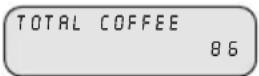
This function allows you to count how many coffees the machine has already made.
- Press the "MENU/OK" key. Use the or v key to select the TOTAL COFFEE
function and then activate it with the "MENU/OK" key. The total number of coffees will be displayed, e.g.
DESCALING
This function allows you to descale the machine using the integrated program. Once the amount of water set for the degree of hardness is reached, the message DESCALING will appear on the display. The machine should be descaled no later than at this time.
- Press the "MENU/OK" key. Use the
or v key to select the
function and then activate it with the "MENU/OK" key. The word
DESCALING will be displayed.
Important: before starting the
descaling cycle, carefully read
the directions on "Dscaling" par.9.
Never descale the brew group.
That is to say, never press the coffeemaking buttons (18, 19 or 20), whenever there is a descaling agent in the water container. You may cause damage to the brew group.
DESCALING INDICATOR
The machine indicates after how many litres of water (remaining quantity) it will need descaling.
- Press the "MENU/OK" key. Use the or key to select the SIGN AL DESCAL
function and activate it with the "MENU/OK" key. Two messages will be
displayed in turn: QUANTITY WATER NOT REACHED and,
for example, LFT QUANTITY 130
- Again press the "MENU/OK" key. The
message reset DESCALING yes will be
displayed. By pressing the "MENU/OK" key again, you will clear the meter.
Note: if you do not wish to clear the meter, press "ESC".
i Important: it is recommended to clear the scale meter each time after descending so that you will not forget to descale the machine.
TIMER
It is possible to program the machine to switch over automatically from the
READY FOR USE
function to the
ENERGYSAVIING
after a certain time has
lapsed. It is initially set at 0 hours but may be adjusted from 0 to 12 hours, with 15-minute intervals.
The timer goes back to zero after every dispensing operation.
The setting of "0:00" means that the timer is off.
- Press the "MENU/OK" key. Use the
or v key to select the
TINER
function and activate it with the "MENU/OK" key. The indication
STAN DBY
AFTER: 0:00
will be displayed.
- Use the or key to select the time desired and memorize it by pressing the "MENU/OK" key.
CLEANING CYCLE
This function allows you to execute a cleaning cycle in which all the coffee-dispensing parts are cleaned with water.
During the cleaning cycle it is advisable for someone to be present to supervise the operation.
- To start the cleaning cycle press the "MENU/OK" key and use the or
key to select the RIN SING CYCLE function;press the"MENU/OK"key to access the function.Press the"MENU/ OK"key again to start the cleaning cycle
- When the cleaning cycle has been completed, the message
FILL WATERTAN K
appears on the
display. At this point, fill the water container and the machine will automatically return to the normal
operatingsatus. SELECTPRODUCT REAOYFORUSE appear on the display.
11 LEGAL INFORMATION
These instructions include information on how to use the machine correctly, its functions and its maintenance.
-
If these instructions are followed closely no risks should be run in using the appliance and all necessary safety requirements regarding function and maintenance should be upheld. If more information is required or if a particular problem not dealt with or insufficiently explained in these instructions should arise, the customer should contact his/her local dealer or the manufacturer directly.
-
We would also like to bring to the
customer's attention that these instructions are not part of any previous or existing convention, agreement or legal contract and hence have no legal bearing.
- The obligations of the manufacturer are based on the relative contract of sale which includes the complete and exclusive regulation regarding guarantee requirements.
- The terms of the guarantee are in no way affected by these instructions.
The instructions contain information protected by copyright laws. - The instructions may not be photocopied or translated into a foreign language without the manufacturer's written permission.
12 DISPOSAL OF THE APPLIANCE
- An appliance that is no longer in use must be rendered unworkable.
- Remove the plug and cut the mains cable at the base.
- Take unused appliances to a qualified disposal centre.
| Problems | Causes Remedies | |
| The machine does not turn on | The machine is not connected to the electricity mains | Connect the machine to an operating electrical outlet |
| The service door is open | Close the door | |
| The automatic coffee brewing does not start | BR EU UN IT N ISS | Insert and lock the brew group |
| BR EU UN IT BLOCK | Clean the brew group | |
| FILL WATERTAN K | Fill with water or coffee beans and restart the cycle | |
| COF. BEAN S EMPTY | ||
| DREGORAW. MISS | Fit the dump box container properly | |
| GRIN DER BLOCKED | Clean the grinder | |
| The coffee is not hot enough | The cups are cold | Pre-Heat the cups |
| No hot water or steam dispensed | isThe opening of the steam wand is clogged | Clean the opening of the steam wand with a pin |
| No coffee is dispensed | Brew group is dirty | Clean the brew group (Par.8.2) |
| Coffee drips out slowly | Coffee ground too finely | Change the coffee blend or adjust the grinder as directed in par.5.1 Reduce the dose par.5.2 |
| Brew group dirty | Clean the brew group (Par.8.2) | |
| The coffee is not creamy on the surface | The blend is not suitable or the coffee is not freshly roasted or is ground either too finely or in too coarsely. | Change the coffee blend or adjust the grinder as directed in par.5.1 Increase the dose par.5.2 |
| Coffee leaks outside the brew group | Brew group clogged | Clean the brew group and its outlets |
| The machine takes too long to heat up or the quantity of water dispensed from the wand is limited | The machine circuit is clogged by scale | Descale the machine |
| The brew group cannot be taken out | Brew group out of place | Turn on the machine. Close the service door. The brew group will automatically go back into place. |
| Dump box still in place | Remove the dump box before taking out the brew group | |
If you have a problem that is not dealt with in the above table or is not resolved by any of these solutions please contact an authorized service center.
TABLE DES MATIÈRES
1 GENERALITES 42
2 CHARACTERISTIQUES TECHNIQUES 43
3 NORMES DE SECURITE 45
4 INSTALLATION 47
5 PREPARATION DU CAFE 48
6 DISTRIBUTION DE VAPEUR/ PREPARATION DU CAPPUCCINO 49
7 EAU CHAUBE 50
8 NETTOYAGE ET MAINTENANCE 50
9 DETARTRAGE 51
10 PROGRAMMATION 52
11 INFORMATIONS A CARACTERE JURIDIQUE 56
12 MISE à LA DECHARGE 56
PROBLEMES - CAUSES - REMÉDES 57
SELECT PRODUIT MACHINE PRETE
ERU CHAUBE
MACHINE PRETE
SELECT PRODUIT MACHINE PRETE
SELECT PRODUIT MACHINE E PRETE
SELECT PRODUIT MACHINE E PRETE
EAU CHAUBE MACHINE PRETE
MACHINENEEMDETARTRANT
SELECT PRODUIT MACHINE PRETE
11 INFORMATIONSÀ CARACTERE JURIDIQUE
D
MaBe in Milimeter
E
A这其中 is a very good idea to do the same for all of the cases.
FORN ECIM AGUR PRONTOAUSO
DESCRcific. PRonto AO L
APPARAT WORDT ONKTALKT.