KM 25 R - Coffee machine TEAM - Free user manual and instructions
Find the device manual for free KM 25 R TEAM in PDF.



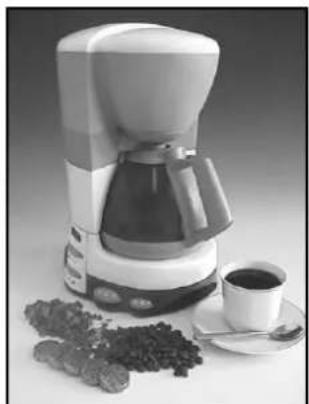
| Product type | Coffee machine with built-in radio |
| Brand | Team |
| Model | KM 25 R |
| Water tank capacity | 1.4 L (max) |
| Coffee type | Ground coffee, 1x4 paper filter |
| Main functions | Manual use (coffee, radio, combined); Programmed start (coffee, radio, combined) |
| Timer | Programmable up to 24 hours (start time setting) |
| Automatic shut-off | After 1 hour 45 minutes of operation |
| Radio | AM/FM with antenna, band and frequency selector, volume control |
| Power supply | 220-240 V ~ 50/60 Hz |
| Display type | Digital clock (12-hour) |
| Drip-stop valve | Yes, automatically closes when carafe is removed |
| Keep warm | Hot plate until manual or automatic shut-off |
| Materials | Plastic, glass (carafe) |
| Care and cleaning | Descale with vinegar or specific product; clean with damp cloth; do not immerse; do not put carafe in dishwasher |
| Safety | Automatic shut-off, overheating protection, drip-stop valve |
| Included accessories | Glass carafe, removable filter holder |
| Country of manufacture | Not specified |
Frequently Asked Questions - KM 25 R TEAM
User questions about KM 25 R TEAM
0 question about this device. Answer the ones you know or ask your own.
Ask a new question about this device
Download the instructions for your Coffee machine in PDF format for free! Find your manual KM 25 R - TEAM and take your electronic device back in hand. On this page are published all the documents necessary for the use of your device. KM 25 R by TEAM.
USER MANUAL KM 25 R TEAM
Generated by Unregistered Batch DOC TO PDF Converter 2011.3.804.1511, please register!
Copies of the I/B. Please reproduce them without any changes except under special instruction from Team International BELGIUM. The page must reproduced and folded in order to obtain a mini booklet B5 (+ / - 150mm width x 210~mm height). The page must be folded in order to keep the good numbering when you turn the page of the I/B. Don't change the page numbering. Keep the languages integrity.

CE
I/B Version
010104
TEAM KM 25 R
230 V ~ 1000 W
2

Fax +32 23599550
Generated by Unregistered Batch DOC TO PDF Converter 2011.3.804.1511, please register!
Copies of the I/B. Please reproduce them without any changes except under special instruction from Team International BELGIUM. The page must reproduced and folded in order to obtain a mini booklet B5 (+ / - 150mm width x 210~mm height). The page must be folded in order to keep the good numbering when you turn the page of the I/B. Don't change the page numbering. Keep the languages integrity.

Fax +32 23599550
Generated by Unregistered Batch DOC TO PDF Converter 2011.3.804.1511, please register!
Copies of the I/B. Please reproduce them without any changes except under special instruction from Team International BELGIUM. The page must reproduced and folded in order to obtain a mini booklet B5 (+ / - 150mm width x 210~mm height). The page must be folded in order to keep the good numbering when you turn the page of the I/B. Don't change the page numbering. Keep the languages integrity.
D
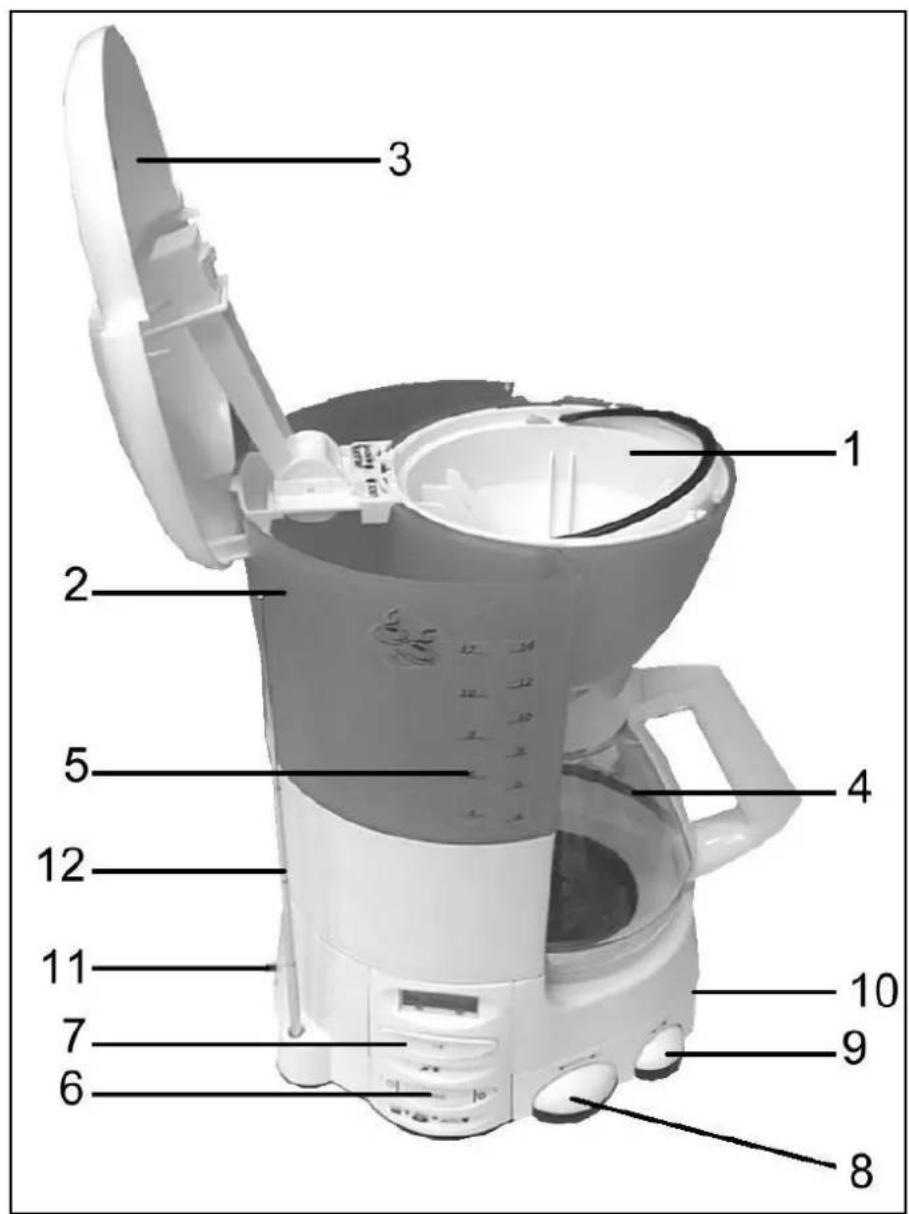
- Coffee Filter Holder
- Water Reservoir
- Water Reservoir Cover
- Coffee Carafe
- Water Level indicator
- Mode button, set clock button, set auto on time button
- On/Off switch, marked I/O
- Tuning dial
- Volume control
- Speaker
- AM/FM switch
- Antenna
F
Generated by Unregistered Batch DOC TO PDF Converter 2011.3.804.1511, please register!
Copies of the I/B. Please reproduce them without any changes except under special instruction from Team International BELGIUM. The page must reproduced and folded in order to obtain a mini booklet B5 (+ / - 150mm width x 210mm height). The page must be folded in order to keep the good numbering when you turn the page of the I/B. Don't change the page numbering. Keep the languages integrity.
SP
Generated by Unregistered Batch DOC TO PDF Converter 2011.3.804.1511, please register!
Copies of the I/B. Please reproduce them without any changes except under special instruction from Team International BELGIUM. The page must reproduced and folded in order to obtain a mini booklet B5 (+ / - 150mm width x 210mm height). The page must be folded in order to keep the good numbering when you turn the page of the I/B. Don't change the page numbering. Keep the languages integrity.
Generated by Unregistered Batch DOC TO PDF Converter 2011.3.804.1511, please register!
Copies of the I/B. Please reproduce them without any changes except under special instruction from Team International BELGIUM. The page must reproduced and folded in order to obtain a mini booklet B5 (+ / - 150mm width x 210mm height). The page must be folded in order to keep the good numbering when you turn the page of the I/B. Don't change the page numbering. Keep the languages integrity.
Please read these instructions carefully before using the appliance.
Check that your mains voltage corresponds to that stated on the appliance.
Do not leave the appliance unsupervised when in use. Keep out of reach of children or incompetent persons.
From time to time check the cord for damage. Do not use the appliance if cord or appliance show any signs of damage.
Only use the appliance for domestic purposes and in the way indicated in these instructions.
Do not immerse the appliance in water or any other liquid for any reason whatsoever. Do not place it into the dishwasher.
Do not use the appliance near hot surfaces.
Should the cord be damaged, it must be replaced by a competent qualified service engineer (unless it is of a detachable type. In that case it can be replaced by the user himself. You will find similar cords in domestic appliances stores. Be sure to replace it with a cord of the same type.
Before cleaning, always unplug the appliance from the power supply.
All repairs should be made by a competent qualified service engineer*
Do not use the appliance outside and always place it in a dry environment.
Do not use accessories which are not recommended by the producer. They could constitute a danger to the user and risk of damage to the appliance.
Do not move the appliance by pulling the cord. Make sure the cord cannot get caught in any way. Do not wind the cord around the appliance and do not bend it.
Stand the appliance on a table or flat surface.
Only use fresh, cold water. Do not use water contained in bathtubs, washbasins or other containers.
Do not use the appliance if the carafe shows any signs of cracks. Only use the carafe with this appliance. Handle with care as the glass is very fragile.
Make sure the appliance has cooled down before cleaning, storing or filling it. The appliance has to be switched off before filling it with water.
Make sure you do not overfill the coffeemaker.
Make sure the cord does not come into contact with the hot parts of the appliance.
Do not touch the hot parts of the appliance, including the hotplate, only touch the plastic parts and lift the carafe by the handle.
Be careful not to get burned by the steam evaporating from the coffee filter.
- When removing lime scale, only use vinegar or a special product for the removal of lime scale.
- Do not use ammonia or any other substance that might damage your health.
Only put ground coffee in the filter.
Do not use your coffee machine without water in it. If you have a programmable coffee machine, make sure you fill it with water before programming it.
Do not place the empty (or almost empty) carafe on the hotplate when the coffee machine is switched on, or on any other hot surfaces.
Do not forget that the coffee is hot. Handle your carafe carefully to avoid any risk of splashes.
Do not place the carafe in a microwave.

Fax +32 23599550
Generated by Unregistered Batch DOC TO PDF Converter 2011.3.804.1511, please register!
Copies of the I/B. Please reproduce them without any changes except under special instruction from Team International BELGIUM. The page must reproduced and folded in order to obtain a mini booklet B5 (+ / - 150mm width x 210~mm height). The page must be folded in order to keep the good numbering when you turn the page of the I/B. Don't change the page numbering. Keep the languages integrity.

Fax +32 23599550
Generated by Unregistered Batch DOC TO PDF Converter 2011.3.804.1511, please register!
Copies of the I/B. Please reproduce them without any changes except under special instruction from Team International BELGIUM. The page must reproduced and folded in order to obtain a mini booklet B5 (+ / - 150mm width x 210mm height). The page must be folded in order to keep the good numbering when you turn the page of the I/B. Don't change the page numbering. Keep the languages integrity.
UK STYLE PLUG WIRING INSTRUCTIONS (IN THE UK ONLY)
This product must only be used from a 13 amp power socket. If a BS1363 approved 13 amp plug is used, it should be fitted with a 13 amp fuse. The wires on the power cord are colour coded: blue = neutral, brown = live, green or green & yellow = earth. The blue wire must be connected to the terminal marked N or coloured in black. The brown wire must be connected to the terminal marked L or coloured in red. The green (& yellow) wire must be connected to the terminal marked E or coloured in green (& yellow).
INITIAL OPERATION
Before using for the first time, run your coffeemaker two or three times with water only.
Each time all the water has passed through, switch the appliance off and let it cool down for 5 minutes before using again.
SETTING THE CLOCK (STANDBY MODE)
Plug in your coffeemaker. The time "12:00" will be shown on the display of the electronic digital clock.
To set the current time, press and hold the button. The time will roll forward slowly at first. After 5 seconds, the time will roll forward more quickly.
- When the current time is reached, release the button.
- The coffeemaker is now in Standby mode and the clock will continue to function even when the coffeemaker is switched off. If the coffeemaker is unplugged, the clock will switch off and will need to be reset when the coffeemaker is plugged in again
- This coffee maker has 7 modes of operation. When you switch on the coffee maker, it is in standby mode. You can tell it is in standby mode as no lights will be illuminated and the time will be shown on the display panel
To select the chosen operation mode of your coffeemaker, press the Mode button, until the correct mode is reached. You can check this by looking at the illuminated lights on the control panel.
The modes of operation are:
| MODE | HOW TO FIND THE REQUIRED MODE | |
| STANDBY MODE | Switch on or press “MODE” button 7 times | ○ ○ ○ |
| MANUAL COFFEEMAKER MODE | Press MODE button 1 time after switch on | ○ ● ○ |
| MANUAL RADIO MODE | Press MODE button 2 times after switch on | ● ○ ○ |
| MANUAL RADIO & COFFEE MAKER MODE | Press MODE button 3 times after switch on | ● ● ○ |
| AUTO COFFEEMAKER MODE | Press MODE button 4 times after switch on | ○ ● ● |
| AUTO RADIO MODE | Press MODE button 5 times after switch on | ● ○ ● |
| AUTO RADIO & COFFEE MAKER MODE | Press MODE button 6 times after switch on |
MANUAL COFFEEMAKER
- From Standby, select the mode by pressing the MODE button once. The middle light on the control panel will illuminate Yellow.
Pour the desired volume of water into the water reservoir. The number of cups can be read on the water level indicator. - Insert filter paper (1x4) in the filter holder and add the desired quantity of ground coffee. Replace the filter cone and rotate until the arrow shows it is in the position marked
- Make sure the carafe is placed correctly on the hotplate.
- Select mode. The centre light on the display panel will light up Yellow.
- To switch on, press the on/off (I/O) button. The red pilot light will come to indicate that the coffeemaker is switched on and that brewing has started.
Wait until the brewing process is finished and the filter is empty. - When you remove the carafe from this appliance, a non-drip valve will automatically operate to stop any drops of coffee dripping onto the hotplate. Replacement of the carafe automatically opens the non-drip valve and allows any remaining coffee to filter through into the carafe.
To switch off the coffee machine, press the on/off (I/O) button, the red pilot light will go off to indicate that the coffeemaker has been switched off. - When the coffeemaker is switched off, Standby mode is automatically selected.
The appliance switches off automatically after 1 hour 45 minutes.
At any time the appliance can be turned off by pressing the On/Off (I/O) button.
MANUAL RADIO
- From Standby, select mode by pressing the MODE button twice. The left hand light on the control panel will illuminate Yellow.
- Switch on the radio, by pressing the On/Off (I/O) button. The red pilot light will come to indicate that the unit is operating.
- Extend the antenna.
- Select the band by switching the band button, marked AM/FM on the back of the coffeemaker.
- Rotate the tuning dial to select the radio station of your choice.
- Rotate the volume control to adjust the volume to the desired level.
To improve broadcast reception For FM - re-orientate the antenna For AM - re-orientate the coffeemaker itself.
To switch off the radio, press the On/Off (I/O) button at any time. - When the radio is switched off, Standby mode is automatically selected.
MANUAL RADIO AND COFFEEMAKER
- From Standby, select mode by pressing the MODE button three times. The left hand light and the middle light on the control panel will illuminate Yellow.
- To switch on, press the on/off (I/O) button. The red pilot light will come to indicate that the coffeemaker and radio are working. To make coffee, please follow the section MANUAL COFFEE MAKER. To operate the radio, please follow the section MANUAL RADIO.
At any time the appliance can be turned off by pressing the On/Off (I/O) button.
The appliance switches off automatically after 1 hour 45 minutes
- When the appliance is switched off, Standby mode is automatically selected.
NOTE-In Manual Radio mode, the unit does not switch off automatically.
- From Standby, select mode by pressing the MODE button four times. The middle light on the control panel will illuminate Yellow and the right hand light will illuminate green.
- Fill the water tank with up to 1.4l of cold water and put the desired amount of ground coffee in a filter paper in the filter cone. Replace the filter cone and rotate until the arrow shows it is in the position marked
- Set the time when you want the coffee machine to start by holding down on the button. The Auto on time will roll forward slowly at first. After 5 seconds, the Auto on time will roll forward more quickly.
- Release the button when the correct time is displayed.
- When the Auto on time is reached, the coffeemaker will switch on and the red pilot light will come on.
- The coffecmaker will switch off after 1 hour and 45 minutes.
- At any time, the coffeemaker can be turned off manually by pressing the On/Off (I/O) button. The unit will revert to standby mode.
If you wish to switch on the coffeemaker before the Auto on time is reached, press the On/Off (I/O) button. The coffeemaker will revert to Manual Coffeemaker mode.
If at any time you want to check the time for which the Auto on time is set, press down the button for about 1 second and the Auto on time will be displayed.
AUTOMATIC RADIO
- From Standby, select mode by pressing the MODE button five times. The left hand light will illuminate Yellow and the right hand light on the control panel will illuminate green.
- Set the time when you want the radio to come on by holding down on the button. The Auto on time will roll forward slowly at first. After 5 seconds, the Auto on time will roll forward more quickly.
- Release the button when the correct time is displayed.
- When the Auto on time is reached, the radio will switch on and the red pilot light will come on to show that it is working.
To operate the radio, please follow the section MANUAL RADIO.
The appliance switches off automatically after 1 hour 45 minutes - At any time the appliance can be turned off manually by pressing the On/Off (I/O) button. The unit will revert to standby mode.
- If you wish to switch on the radio before the Auto on time is reached, press the On/Off (I/O) button. The unit will revert to Manual Radio mode.
- When the appliance is switched off, Standby mode is automatically selected.
- If at any time you want to check the time for which the Auto on time is set, press down the button for about 1 second and the Auto on time will be displayed.
AUTOMATIC RADIO AND COFFEEMAKER

Fax +32 23599550
Generated by Unregistered Batch DOC TO PDF Converter 2011.3.804.1511, please register!
Copies of the I/B. Please reproduce them without any changes except under special instruction from Team International BELGIUM. The page must reproduced and folded in order to obtain a mini booklet B5 (+ / - 150mm width x 210~mm height). The page must be folded in order to keep the good numbering when you turn the page of the I/B. Don't change the page numbering. Keep the languages integrity.
- From Standby, select mode by pressing the MODE button six times. The left hand light and the middle light on the control panel will illuminate Yellow, while the right hand light will illuminate green.
-
Set the time when you want the appliance to come on by holding down on the button. The Auto on time will roll forward slowly at first. After 5 seconds, the Auto on time will roll forward more quickly.
-
Release the button when the correct time is displayed.
- Prepare the coffeemaker as described in MANUAL COFFEE MAKER.
- When the Auto on time is reached, the appliance will switch on and the red pilot light will come on.
- To operate the radio, please follow the section MANUAL RADIO.
The appliance will switch off after 1 hour and 45 minutes. - At any time the appliance can be turned off by pressing the On/Off (I/O) button. The unit will revert to standby mode.
- If you wish to switch on the radio and coffee maker before the Auto on time is reached, press the On/Off (I/O) button. The unit will revert to Manual Radio and Coffee Maker mode.
- When the appliance is switched off, Standby mode is automatically selected
KEEPING THE COFFEE HOT
- The carafe can remain on the hotplate, which begins to heat up as soon as the coffeemaker is switched on
- The hotplate will keep the coffee hot until the coffeemaker is switched off (red pilot light goes off), or for up to 1 hour 45 minutes after which time, the coffee maker will switch off automatically (except in Manual Radio mode).
DECALCIFICATION
- Decalcifying the coffee machine prolongs its life span. For decalcification, only use products especially made for decalcification of coffee machines. Always follow the instructions on the packet.
Make sure the coffee machine and the carafe cool down before cleaning.
Make sure the coffee machine and the carafe cool down before filling them with fresh water.
CLEANING
Always unplug the unit before cleaning.
- Allow the appliance to completely cool before cleaning.
Clean the main housing by wiping the surface gently with a moist cloth.
To clean the carafe, gently wash in warm soapy water and dry thoroughly.
- Do not use a dishwasher to clean the carafe.
The inner filter cone can be removed and washed in warm soapy water. Dry thoroughly before re-using
RADIO SPECIFICATION
FM 87.6-107 MHz
AM 531-1602 KHz
AERIALS
16

Fax +32 23599550
Generated by Unregistered Batch DOC TO PDF Converter 2011.3.804.1511, please register!
Copies of the I/B. Please reproduce them without any changes except under special instruction from Team International BELGIUM. The page must reproduced and folded in order to obtain a mini booklet B5 (+ / - 150mm width x 210~mm height). The page must be folded in order to keep the good numbering when you turn the page of the I/B. Don't change the page numbering. Keep the languages integrity.
FM Telescopic aerial
AM Built in ferrite bar aerial
This product has been approved to the Low Voltage and the Electromagnetic Compatibility Directives of the European Union

MODE D'EMPLOI
POUR VOTRE SÉCURITÉ
Generated by Unregistered Batch DOC TO PDF Converter 2011.3.804.1511, please register!
Copies of the I/B. Please reproduce them without any changes except under special instruction from Team International BELGIUM. The page must reproduced and folded in order to obtain a mini booklet B5 (+ / - 150mm width x 210~mm height). The page must be folded in order to keep the good numbering when you turn the page of the I/B. Don't change the page numbering. Keep the languages integrity.
Generated by Unregistered Batch DOC TO PDF Converter 2011.3.804.1511, please register!
Copies of the I/B. Please reproduce them without any changes except under special instruction from Team International BELGIUM. The page must reproduced and folded in order to obtain a mini booklet B5 (+ / - 150mm width x 210mm height). The page must be folded in order to keep the good numbering when you turn the page of the I/B. Don't change the page numbering. Keep the languages integrity.
Generated by Unregistered Batch DOC TO PDF Converter 2011.3.804.1511, please register!
Copies of the I/B. Please reproduce them without any changes except under special instruction from Team International BELGIUM. The page must reproduced and folded in order to obtain a mini booklet B5 (+ / - 150mm width x 210~mm height). The page must be folded in order to keep the good numbering when you turn the page of the I/B. Don't change the page numbering. Keep the languages integrity.
Generated by Unregistered Batch DOC TO PDF Converter 2011.3.804.1511, please register!
Copies of the I/B. Please reproduce them without any changes except under special instruction from Team International BELGIUM. The page must reproduced and folded in order to obtain a mini booklet B5 (+ / - 150mm width x 210~mm height). The page must be folded in order to keep the good numbering when you turn the page of the I/B. Don't change the page numbering. Keep the languages integrity.
DETAILS RADIO
FM 87.6-107 MHz
AM 531-1602 KHz
ANTENNES
FM Antenne telescopique
AM Antenne integree a ferrite
Generated by Unregistered Batch DOC TO PDF Converter 2011.3.804.1511, please register!
Copies of the I/B. Please reproduce them without any changes except under special instruction from Team International BELGIUM. The page must reproduced and folded in order to obtain a mini booklet B5 (+ / - 150mm width x 210mm height). The page must be folded in order to keep the good numbering when you turn the page of the I/B. Don't change the page numbering. Keep the languages integrity.
Generated by Unregistered Batch DOC TO PDF Converter 2011.3.804.1511, please register!
Copies of the I/B. Please reproduce them without any changes except under special instruction from Team International BELGIUM. The page must reproduced and folded in order to obtain a mini booklet B5 (+ / - 150mm width x 210~mm height). The page must be folded in order to keep the good numbering when you turn the page of the I/B. Don't change the page numbering. Keep the languages integrity.
Generated by Unregistered Batch DOC TO PDF Converter 2011.3.804.1511, please register!
Copies of the I/B. Please reproduce them without any changes except under special instruction from Team International BELGIUM. The page must reproduced and folded in order to obtain a mini booklet B5 (+ / - 150mm width x 210~mm height). The page must be folded in order to keep the good numbering when you turn the page of the I/B. Don't change the page numbering. Keep the languages integrity.
DETAILS RADIO
FM 87.6-107 MHz
AM 531-1602 KHz
ANTENNES
Generated by Unregistered Batch DOC TO PDF Converter 2011.3.804.1511, please register!
Copies of the I/B. Please reproduce them without any changes except under special instruction from Team International BELGIUM. The page must reproduced and folded in order to obtain a mini booklet B5 (+ / - 150mm width x 210~mm height). The page must be folded in order to keep the good numbering when you turn the page of the I/B. Don't change the page numbering. Keep the languages integrity.
Generated by Unregistered Batch DOC TO PDF Converter 2011.3.804.1511, please register!
Copies of the I/B. Please reproduce them without any changes except under special instruction from Team International BELGIUM. The page must reproduced and folded in order to obtain a mini booklet B5 (+ / - 150mm width x 210~mm height). The page must be folded in order to keep the good numbering when you turn the page of the I/B. Don't change the page numbering. Keep the languages integrity.
Generated by Unregistered Batch DOC TO PDF Converter 2011.3.804.1511, please register!
Copies of the I/B. Please reproduce them without any changes except under special instruction from Team International BELGIUM. The page must reproduced and folded in order to obtain a mini booklet B5 (+ / - 150mm width x 210~mm height). The page must be folded in order to keep the good numbering when you turn the page of the I/B. Don't change the page numbering. Keep the languages integrity.
Generated by Unregistered Batch DOC TO PDF Converter 2011.3.804.1511, please register!
Copies of the I/B. Please reproduce them without any changes except under special instruction from Team International BELGIUM. The page must reproduced and folded in order to obtain a mini booklet B5 (+ / - 150mm width x 210~mm height). The page must be folded in order to keep the good numbering when you turn the page of the I/B. Don't change the page numbering. Keep the languages integrity.
AM Antena integrada
Generated by Unregistered Batch DOC TO PDF Converter 2011.3.804.1511, please register!
Copies of the I/B. Please reproduce them without any changes except under special instruction from Team International BELGIUM. The page must reproduced and folded in order to obtain a mini booklet B5 (+ / - 150mm width x 210~mm height). The page must be folded in order to keep the good numbering when you turn the page of the I/B. Don't change the page numbering. Keep the languages integrity.

Fax +32 23599550
Generated by Unregistered Batch DOC TO PDF Converter 2011.3.804.1511, please register!
Copies of the I/B. Please reproduce them without any changes except under special instruction from Team International BELGIUM. The page must reproduced and folded in order to obtain a mini booklet B5 (+ / - 150mm width × 210mm height). The page must be folded in order to keep the good numbering when you turn the page of the I/B. Don't change the page numbering. Keep the languages integrity.
COMO REGULAR O RELOGIO
Generated by Unregistered Batch DOC TO PDF Converter 2011.3.804.1511, please register!
Copies of the I/B. Please reproduce them without any changes except under special instruction from Team International BELGIUM. The page must reproduced and folded in order to obtain a mini booklet B5 (+ / - 150mm width x 210~mm height). The page must be folded in order to keep the good numbering when you turn the page of the I/B. Don't change the page numbering. Keep the languages integrity.
Generated by Unregistered Batch DOC TO PDF Converter 2011.3.804.1511, please register!
Copies of the I/B. Please reproduce them without any changes except under special instruction from Team International BELGIUM. The page must reproduced and folded in order to obtain a mini booklet B5 (+ / - 150mm width x 210~mm height). The page must be folded in order to keep the good numbering when you turn the page of the I/B. Don't change the page numbering. Keep the languages integrity.
Generated by Unregistered Batch DOC TO PDF Converter 2011.3.804.1511, please register!
Copies of the I/B. Please reproduce them without any changes except under special instruction from Team International BELGIUM. The page must reproduced and folded in order to obtain a mini booklet B5 (+ / - 150mm width x 210~mm height). The page must be folded in order to keep the good numbering when you turn the page of the I/B. Don't change the page numbering. Keep the languages integrity.
Generated by Unregistered Batch DOC TO PDF Converter 2011.3.804.1511, please register!
Copies of the I/B. Please reproduce them without any changes except under special instruction from Team International BELGIUM. The page must reproduced and folded in order to obtain a mini booklet B5 (+ / - 150mm width x 210~mm height). The page must be folded in order to keep the good numbering when you turn the page of the I/B. Don't change the page numbering. Keep the languages integrity.

Fax +32 23599550
Generated by Unregistered Batch DOC TO PDF Converter 2011.3.804.1511, please register!
Copies of the I/B. Please reproduce them without any changes except under special instruction from Team International BELGIUM. The page must reproduced and folded in order to obtain a mini booklet B5 (+ / - 150mm width x 210~mm height). The page must be folded in order to keep the good numbering when you turn the page of the I/B. Don't change the page numbering. Keep the languages integrity.
USOMANUALECAFFETTIERA
Generated by Unregistered Batch DOC TO PDF Converter 2011.3.804.1511, please register!
Copies of the I/B. Please reproduce them without any changes except under special instruction from Team International BELGIUM. The page must reproduced and folded in order to obtain a mini booklet B5 (+ / - 150mm width x 210mm height). The page must be folded in order to keep the good numbering when you turn the page of the I/B. Don't change the page numbering. Keep the languages integrity.
Generated by Unregistered Batch DOC TO PDF Converter 2011.3.804.1511, please register!
Copies of the I/B. Please reproduce them without any changes except under special instruction from Team International BELGIUM. The page must reproduced and folded in order to obtain a mini booklet B5 (+ / - 150mm width x 210~mm height). The page must be folded in order to keep the good numbering when you turn the page of the I/B. Don't change the page numbering. Keep the languages integrity.
DETTAGLI RADIO
FM 87.6-107 MHz
AM 531-1602 KHz
ANTENNE
FM Antenna telescopica
AM Antenna integrata a ferrite
- D
- F
- SP
- UK STYLE PLUG WIRING INSTRUCTIONS (IN THE UK ONLY)
- INITIAL OPERATION
- SETTING THE CLOCK (STANDBY MODE)
- MANUAL COFFEEMAKER
- MANUAL RADIO
- MANUAL RADIO AND COFFEEMAKER
- AUTOMATIC RADIO
- AUTOMATIC RADIO AND COFFEEMAKER
- KEEPING THE COFFEE HOT
- DECALCIFICATION
- CLEANING
- RADIO SPECIFICATION
- AERIALS
- MODE D'EMPLOI
- POUR VOTRE SÉCURITÉ
- DETAILS RADIO
- ANTENNES
- AM Antena integrada
- COMO REGULAR O RELOGIO
- USOMANUALECAFFETTIERA
- DETTAGLI RADIO
- ANTENNE
Brand : TEAM
Model : KM 25 R
Category : Coffee machine