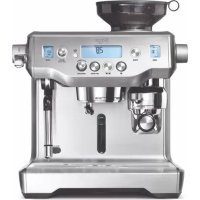
The Oracle BES980 - Coffee machine SAGE - Free user manual and instructions
Find the device manual for free The Oracle BES980 SAGE in PDF.



| Product Type | Built-in grinder espresso machine |
| Brand | Sage |
| Model | The Oracle BES980 |
| Supply Voltage | 220-240 V ~50-60 Hz |
| Power | 2000-2400 W |
| Water Tank Capacity | 2.5 L |
| Grinder | Conical stainless steel, 45 grind settings |
| Extraction System | 58 mm heated infusion group, low-pressure pre-infusion |
| Milk Frother | Automatic and manual, cool-touch steam wand |
| Programmable Functions | Volume, temperature, clock, auto start, tamping, pre-infusion, customizable Long Black |
| Display | Main LCD and dedicated grind and steam displays |
| Safety | Auto shut-off after 30 min, hopper lock, burn protection |
| Maintenance | Cleaning cycle with tablets, guided descaling, burr and steam wand cleaning |
| Included Accessories | Milk jug, 1 and 2 cup filter baskets, water filter, cleaning disc, brushes, cleaning powder, tablets, Allen key, water hardness test strip |
| Warranty | 2-year limited |
| Dimensions (approx.) | 35 x 30 x 40 cm |
| Weight (approx.) | 12 kg |
| Bean Hopper Capacity | Approx. 250 g |
| Usage Type | Household only |
| Heating | Dual boiler with adjustable temperature for espresso and steam |
| Cup Warming Tray | Yes |
Frequently Asked Questions - The Oracle BES980 SAGE
User questions about The Oracle BES980 SAGE
0 question about this device. Answer the ones you know or ask your own.
Ask a new question about this device
Download the instructions for your Coffee machine in PDF format for free! Find your manual The Oracle BES980 - SAGE and take your electronic device back in hand. On this page are published all the documents necessary for the use of your device. The Oracle BES980 by SAGE.
USER MANUAL The Oracle BES980 SAGE
2 Sage® Recommends Safety First 6 Know Your New Appliance 8 Operating Your New Appliance 18 Care & Cleaning 24 Troubleshooting 29 Guarantee
SAGE® RECOMMENDS SAFETY FIRST
At Sage® we are very safety conscious. We design and manufacture appliances with your safety foremost in mind. We also ask that you exercise a degree of care when using any electrical appliance and adhere to the following precautions.
READ ALL INSTRUCTIONS BEFORE USE AND SAVE FOR FUTURE REFERENCE
- A downloadable version of this document is also available at sageappliances.com
- Before using for the first time, please ensure that your electricity supply is the same as shown on the rating label on the underside of the appliance. If you have any concerns please contact your local electricity company.
- The installation of a residual current safety switch is recommended to provide additional safety when using all electrical appliances. Safety switches with a rated operating current not more than 30mA are recommended. Consult an electrician for professional advice.
WE RECOMMEND SAFETY FIRST
- Remove and discard any packaging materials safely, before first use.
- To eliminate a choking hazard for young children, discard the protective cover fitted to the power plug safely.
- Ensure the product is properly assembled before first use.
- This appliance is for household use only. Do not use the appliance for anything other than its intended purpose. Do not use in moving vehicles or boats. Do not use outdoors. Misuse may cause injury.
- Position the appliance on a stable, heat resistant, level, dry surface away from the counter edge, and do not operate on or near a heat source such as a hot plate, oven or gas hob.
- Fully unwind the power cord before operating.
- Do not let the power cord hang over the edge of a counter or table. Do not let the power cord touch hot surfaces or become knotted.
- Do not leave the appliance unattended when in use.
- If the appliance is to be:
- left unattended
- cleaned
- moved
- assembled; or
- stored Always switch off the espresso machine by pressing the POWER button to OFF.
Switch off and unplug from the power outlet.
- Regularly inspect the power cord, plug and actual appliance for any damage. If found to be damaged in any way, immediately cease use of the appliance and return the entire appliance to the nearest authorised Sage Service Centre for examination, replacement or repair.
- Keep the appliance and accessories clean. Follow the cleaning instructions provided in this book. Any procedure not listed in this instruction booklet should be performed at an authorised Sage Service Centre.
- The appliance can be used by children aged 8 or older and persons with reduced physical, sensory or mental capabilities or a lack of experience and knowledge, only if they have been given supervision or instruction concerning use of the appliance in a safe way and understand the hazards involved.
• Children should not play with the appliance.
- Cleaning of the appliance should not be carried out by children unless they are 8 years or older and under adult supervision.
The appliance and its cord should be kept out of reach of children aged 8 years and younger.
- Do not use attachments other than those provided with the appliances.
- Do not attempt to operate the appliance by any method other than those described in this booklet.
- Do not move the appliance whilst in operation.
- Do not use any other liquid apart from cold mains/town water. We do not recommend the use of highly filtered, de-mineralised or distilled water as this may affect the taste of the coffee and how the espresso machine is designed to function.
- Never use the appliance without water in the water tank.
- Ensure the portafilter is firmly inserted and secured into the brewing head before using the machine.
- Never remove the portafilter during the brewing operation as the machine is under pressure.
- Do not place anything, other than cups for warming, on top of the appliance.
- Use caution when operating machine as metal surfaces are liable to get hot during use.
- Do not touch hot surfaces. Allow the product to cool down before moving or cleaning any parts. • Heating element surface is subject to residual heat after use.
- Always ensure the appliance is turned OFF, unplugged at the power outlet and has been allowed to cool before cleaning, attempting to move or storing.
- The appliance is not intended to be operated by means of an external timer or separate remote-control system.
- The use of attachments not sold or recommended by Sage may cause fire, electric shock or injury. • Always turn the appliance to the off position, switch off at the power outlet and unplug at the power outlet when the appliance is not in use.
- Any maintenance other than cleaning should be performed by an authorised Sage® service centre.
- Do not use the appliance on a sink drain board.
- Do not operate the appliance if it is in an enclosed space, or within a cupboard.
- Use caution when descaling as hot steam may be released. Before descaling, ensure drip tray is empty and inserted. Refer to ‘Care & Cleaning’ for further instructions.
- Do not operate the grinder without the hopper lid in position. Keep fingers, hands, hair, clothing and utensils away from the hopper during operation.
- Use caution after milk texturing as the ‘Auto Purge’ function may purge hot steam when the steam wand is lowered.
NOTICE TO CUSTOMERS REGARDING MEMORY STORAGE
Please note that in order to better serve our customers, internal memory storage has been imbedded into your appliance. This memory storage consists of a small chip to collect certain information about your appliance including the frequency of use of the appliance and the manner in which your appliance is being used. In the event your appliance is returned for service, the information collected from the chip enables us to quickly and efficiently service your appliance.
The information collected also serves as a valuable resource in developing future appliances to better serve the needs of our consumers. The chip does not collect any information regarding the individuals who use the product or the household where the product is used. If you have any questions regarding the memory storage chip please contact us at privacy@sageappliances.com
SPECIFIC INSTRUCTIONS FOR WATER FILTER
- Filter cartridge should be kept out of reach of children.
- Store filter cartridges in a dry place in the original packaging.
- Protect cartridges from heat and direct sunlight.
- Do not use damaged filter cartridges.
- Do not open filter cartridges.
- If you are absent for a prolonged period of time, empty the water tank and replace the cartridge.
The symbol shown indicates that this appliance should not be disposed of in normal household waste.
It should be taken to a local authority waste collection centre designated for this purpose or to a dealer providing this service. For more information, please contact your local council office.

To protect against electric shock, do not immerse the power cord, power plug or appliance in water or any other liquid.
FOR HOUSEHOLD USE ONLY SAVE THESE INSTRUCTIONS
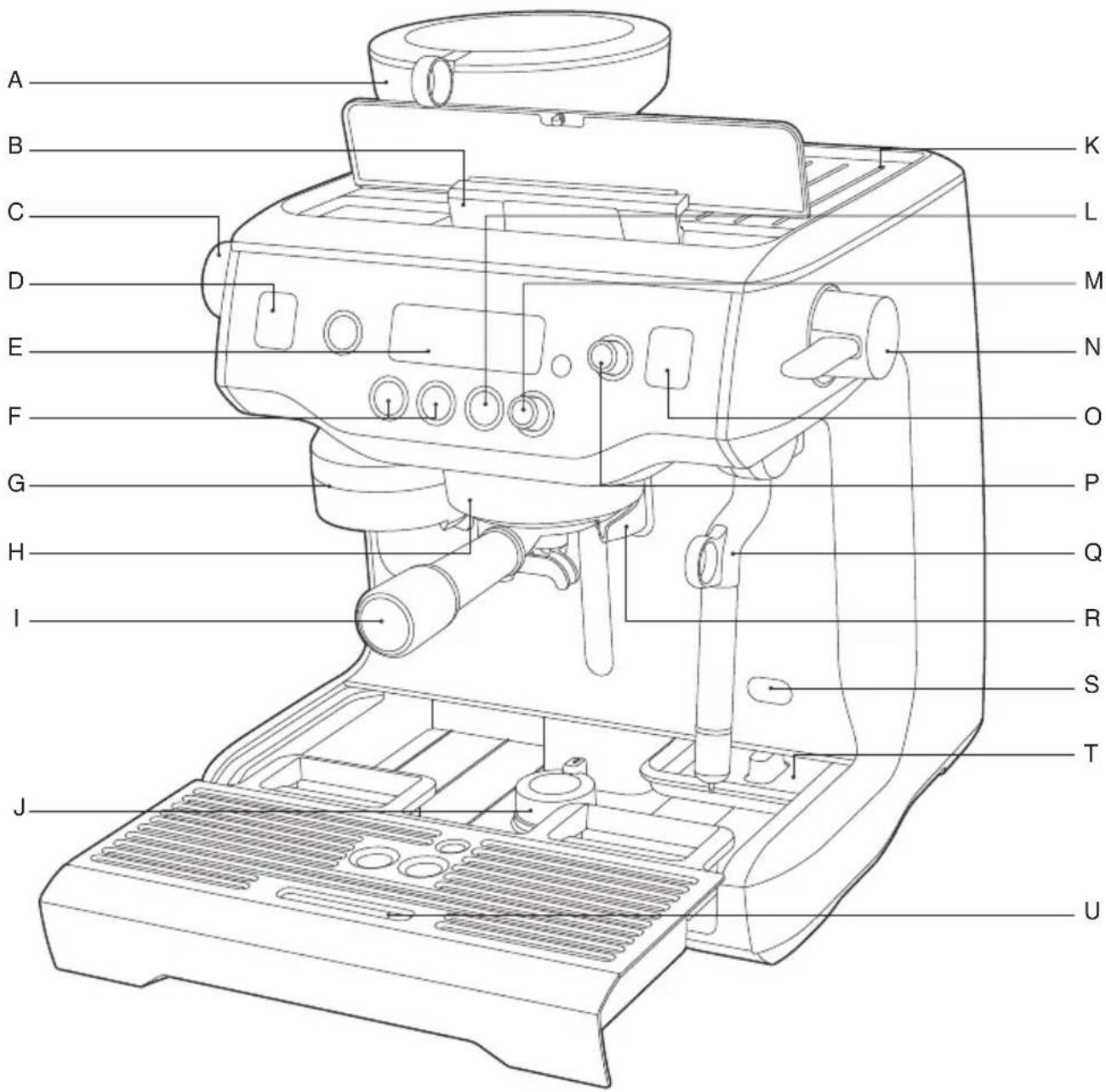
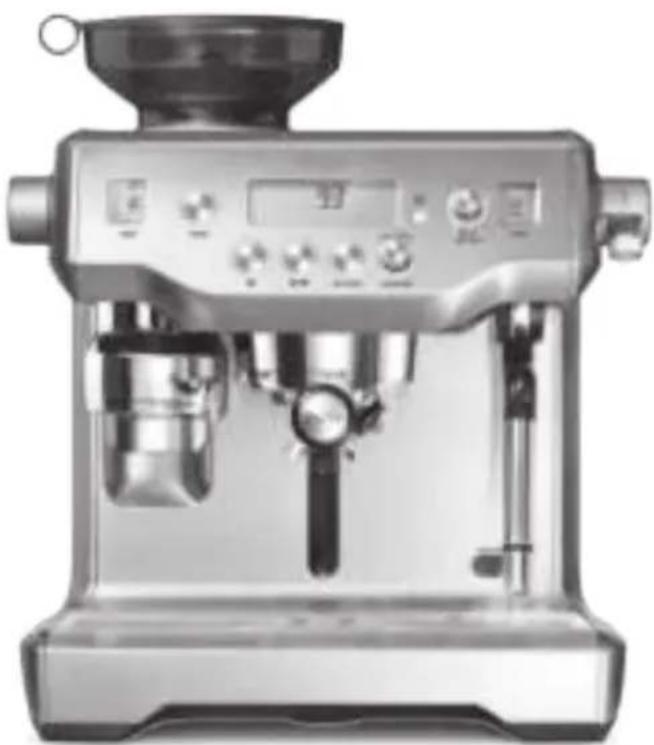
A. Integrated conical burr grinder B. Top-fill 2.5L removable water tank C. Grind Size dial D. Grind LCD E. Main LCD F. 1 CUP and 2 CUP buttons G. Grind outlet H. Heated 58mm group head with I. 58mm full stainless steel portafilter J. Drop down swivel foot K. Heated cup warming tray
L. HOT WATER button M. LONG BLACK dial N. Steam lever O. Steam LCD P. SELECT dial Q. Cool touch steam wand R. Dedicated hot water outlet S. Descale access point T. Tool storage tray U. Removable drip tray
KNOW YOUR NEW APPLIANCE
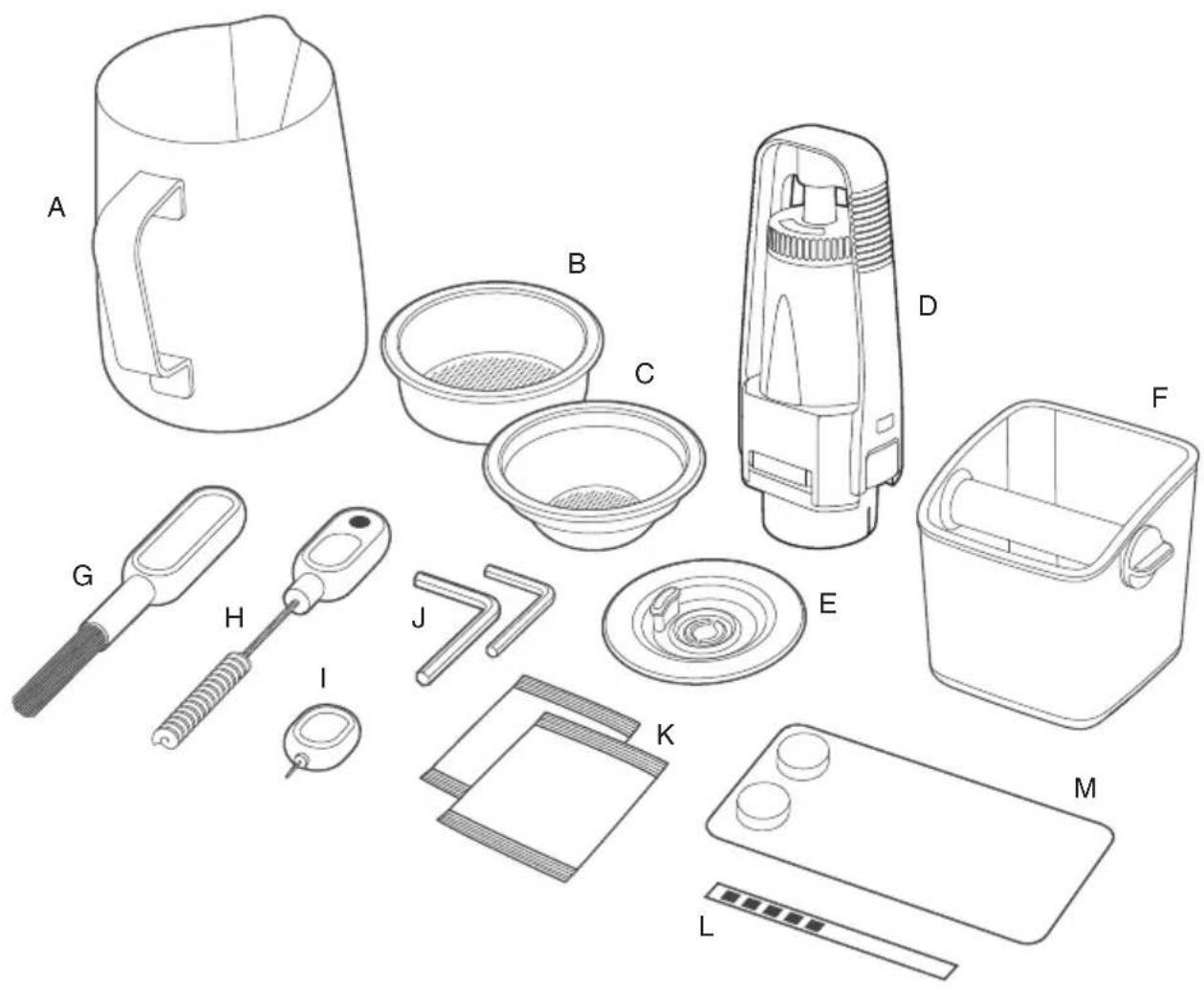
ACCESSORIES
A. Stainless steel milk jug B. 2 cup filter basket C. 1 cup filter basket D. Water filter holder with filter E. Cleaning disc F. Mini grinds bin G. Burr brush
H. Grind outlet brush & tamp removal magnet I. Cleaning tool for steam wand tip J. Allen key K. Steam wand cleaning powder L. Water hardness test strip M. Espresso cleaning tablets
OPERATING YOUR NEW APPLIANCE
BEFORE FIRST USE
Machine Preparation
Remove and discard all labels and packaging materials attached to your espresso machine. Ensure you have removed all parts and accessories before discarding the packaging.
Clean parts and accessories (water tank, portafilter, filter basket, jug) using warm water and a gentle dish washing liquid. Rinse well then dry thoroughly.
TIP
To easily manoeuvre your machine, use the drop down swivel foot located under the drip tray.
INSTALLING THE WATER FILTER
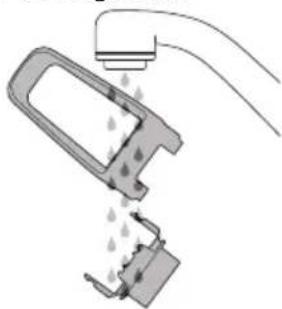
- Remove the water filter and water filter holder from the plastic bag.
- Soak the filter in cold water for 5 minutes.
- Wash the filter holder with cold water.
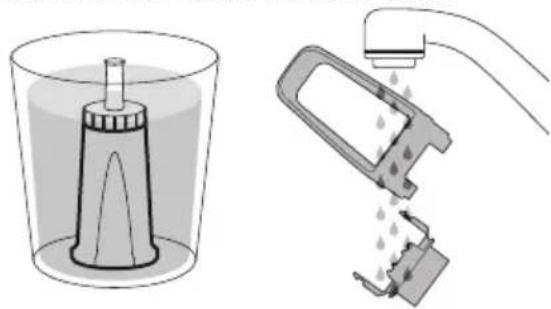
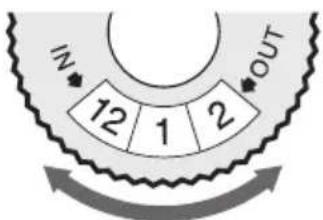
- Set the reminder for next month of replacement. We recommend to replace the filter after 3 months.
- Insert the filter into the two parts of the filter holder.
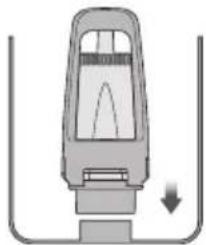
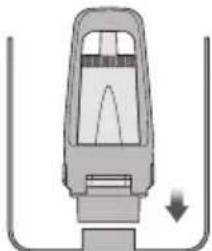
- To install the assembled filter holder into the water tank, align the base of the filter holder with the adapter inside the water tank. Push down to lock into place.
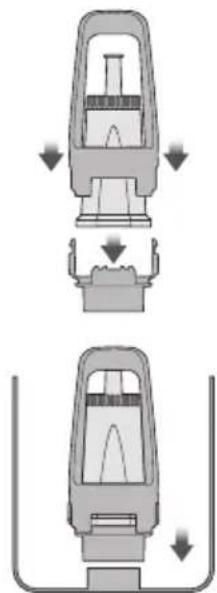
- Fill the water tank with cold water before sliding back into position at the back of the machine and locking into place.
FIRST USE
- Ensure tank is filled with cold water.
- Press POWER button to turn machine on.
- The main LCD will display 'Hrd3', prompting you to set the water hardness level.
Setting Water Hardness
- Dip the test strip into a sample of the water you have filled the tank with. Wait for one minute. The water hardness setting is indicated by the number of red squares displayed on the test strip.
- Rotate SELECT dial to the required setting from 'Hrd1' (softest water) to 'Hrd5' (hardest water). Press SELECT dial to set.
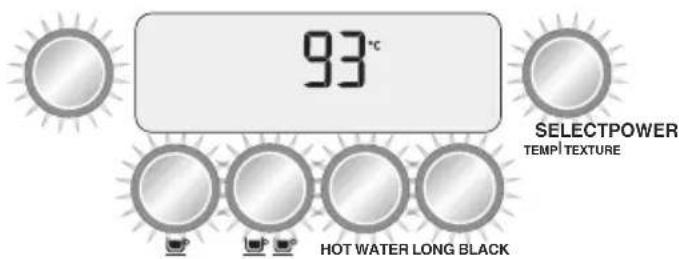
- After approximately 5 minutes, the machine will reach the default operating temperature 93°C and all 6 buttons will illuminate. The machine is now in STANDBY mode.
OPERATING YOUR NEW APPLIANCE
Flushing The Machine
When the machine has reached STANDBY mode:
- Press 2 CUP button to run water through the group head for 30 seconds.
- Press HOT WATER button to run water through the hot water outlet. After 30 seconds, press HOT WATER button again to stop the flow of water.
- Lift steam lever to the MANUAL position to release steam through the steam wand. After 30 seconds, lower the steam lever to the centre OFF position.
- Repeat steps 1–3 twice.
MANUAL will flash on LCD
The machine will not reach operating temperature (STANDBY mode) if the steam lever is in the MANUAL position. The steam LCD will display 'MANUAL'. Lower the steam lever to the centre OFF position.
Steam operation is ready when the SELECT dial illuminates.
NOTE
You will not be able to select the 1 CUP, 2 CUP or LONG BLACK functions; or access the cleaning cycle in the menu options until the machine has reached operating temperature (STANDBY mode).
GRINDING OPERATION
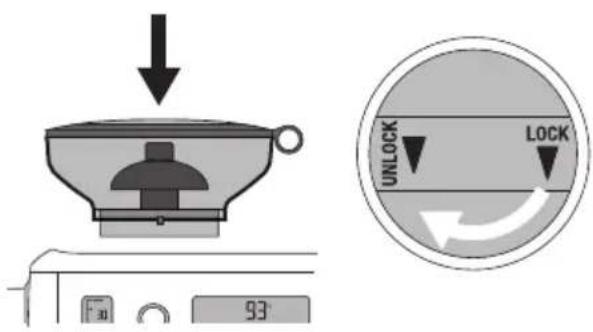
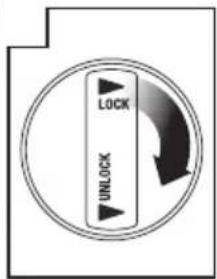
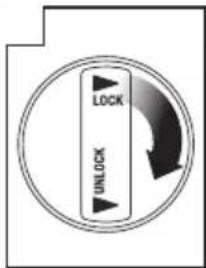
Insert bean hopper into position on top of the machine. Turn knob to lock into place. Fill hopper with fresh beans.
SELECTING GRIND SIZE
There are 45 espresso grind size settings (No. 1 – finest, No. 45 – coarsest) to enable you to select the right grind size for your coffee beans and achieve the perfect espresso extraction.
We recommend you start at No. 30 and adjust as required to control espresso flow rate.
SELECT YOUR FILTER BASKET
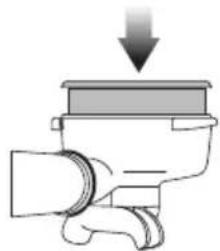
Use the 1 Cup Filter Basket for making a single cup or a weaker tasting espresso.
Use the 2 Cup Filter Basket for making 2 cups or a stronger tasting espresso, usually for mugs or larger cups.
AUTO GRIND DOSE & TAMP
Align portafilter handle with the INSERT position on the grind outlet. Lift to insert portafilter into the grind outlet and rotate to the centre position.
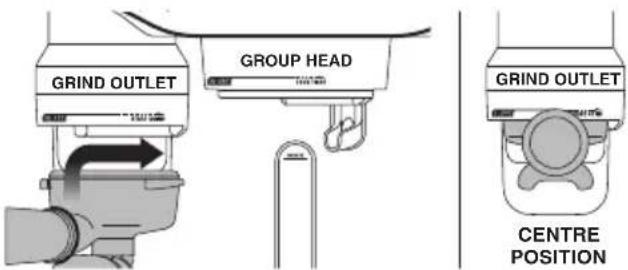
To start the auto grind, dose & tamp function, rotate the portafilter to the right then gently guide back to the centre position. Grinding will commence.
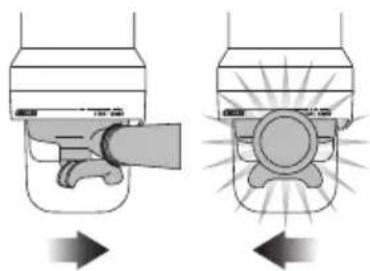
When the auto grind, dose & tamp function is complete, rotate the portafilter handle to the INSERT position and lower to remove.
OPERATING YOUR NEW APPLIANCE
ESPRESSO EXTRACTION
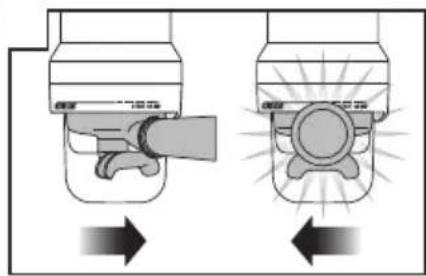
Align portafilter handle with the INSERT position on the group head. Lift to insert portafilter into the group head and rotate towards the LOCK TIGHT position until resistance is felt.
EXTRACTION GUIDE
The 1 CUP button and 2 CUP button use duration to control espresso volume. The duration times are preset, but can be reprogrammed.
1 CUP BUTTON
Press 1 CUP button once to extract a single shot of espresso.

2 CUP BUTTON
Press 2 CUP button once to extract a double shot of espresso.

The machine will stop after 2 CUP duration has been extracted and will return to STANDBY mode.
| EXTRACTION TYPES | GRIND | SHOT DURATION |
| OVER-EXTRACTED (bitter • astringent) | Too Fine | Over 45secs |
| BALANCED | Optimum | Between 15-40secs |
| UNDER-EXTRACTED (underdeveloped • sour) | Too Coarse | Less than 15secs |
MANUAL OVERRIDE
Press and hold either the 1 CUP or 2 CUP button to commence pre-infusion. When the required pre-infusion duration is met, release the button to begin full pump pressure.
Press the button again to stop the pour when required duration has been achieved.
TEXTURING MILK
The SELECT dial is used to select milk temperature and texture. Press the dial to toggle between milk temperature and texture.
ADJUSTING MILK TEMPERATURE
Press the SELECT dial until the milk temperature flashes. Rotate the dial to increase or decrease milk temperature.

ADJUSTING MILK TEXTURE
Press the SELECT dial until the milk texture triangle flashes. Rotate dial towards 'CAPP' for more texture or 'LATTE' for less texture.
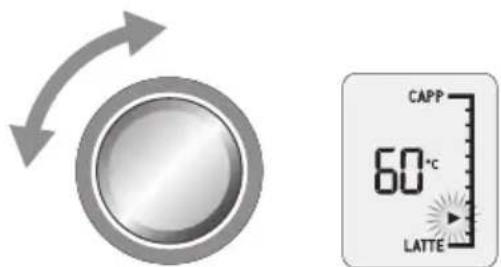
STEAMSELECTSELECTSELECT TEMP| TEXTURETEMP TEXTURETEMP TEXTURE
NOTE
Prior to texturing milk, always purge steam wand by momentarily pressing down the steam lever.
OPERATING YOUR NEW APPLIANCE
AUTO MILK TEXTURING
Start with fresh cold milk. Fill milk jug to below the spout position. Lift steam wand and insert into milk jug. Lower steam wand, ensuring it is fully down. The milk jug should rest on the drip tray and milk should cover the steam wand seal.
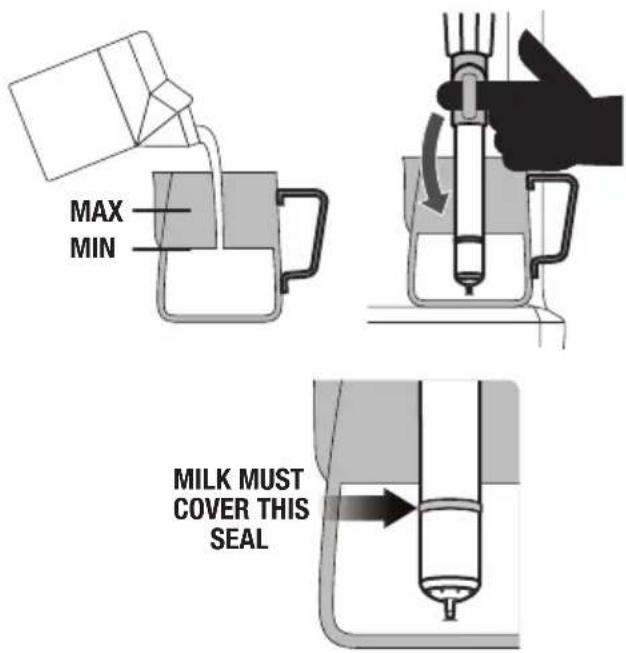
To start, press down and release steam lever. Milk texturing will stop automatically when the selected milk temperature is reached. Lift steam wand to remove milk jug. Wipe the wand and tip with a damp cloth. Lower steam wand to the down position and the wand will automatically purge.
MANUAL MILK TEXTURING
Auto milk texturing and auto shut-off are disabled during manual milk texturing mode.
Insert steam wand into milk jug. Lift steam lever to activate manual steam mode. Once the desired milk texture and temperature are achieved, lower the steam lever to the centre OFF position. Wipe the wand and tip with a damp cloth. Lower steam wand to the down position and the wand will automatically purge.

CAUTION: BURN HAZARD
Pressurised steam can still be released, even after machine has been switched off.
Children must always be supervised.
NOTE
If the machine is run continuously for 30 minutes, allow it to cool for 5 minutes before each use.
PRESET LONG BLACK
There are 3 preset Long Black settings – small, medium and large. To use one of these settings:
- Insert the 2 Cup Filter Basket into the Portafilter.
- Fill the portafilter using the auto grind, dose & tamp function.
- Insert the portafilter into the group head.
- Position your cup so the portafilter spouts and hot water outlet are directed inside the cup.
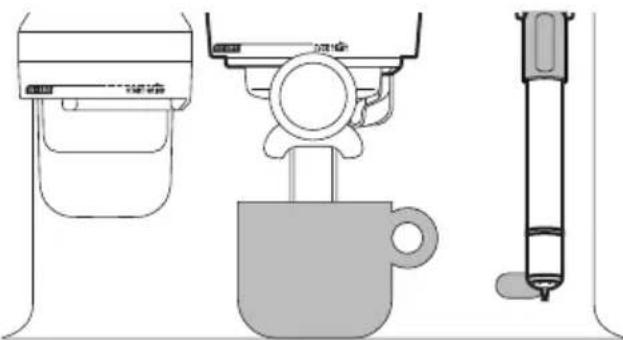
- Rotate the LONG BLACK dial to the desired cup size.
| PRESET CUP SIZE AMOUNT BREWED | |
| Small Approx. 180ml | |
| Medium Approx. 240ml | |
| Large Approx. 355ml |
The brewed amounts are approximate only. Actual amounts may vary due to the coffee bean roast, blend and freshness as well as the selected grind size. These factors affect extraction rate and shot volume.
- To start extraction, press the LONG BLACK dial. Espresso will extract from the portafilter spouts, followed by hot water from the hot water outlet.
MANUAL LONG BLACK
This allows you total control over the Long Black process: pre-infusion duration, espresso volume and hot water volume. During manual Long Black mode, the LCD will show a moving cup icon.
Press and hold LONG BLACK dial to activate pre-infusion. Release LONG BLACK dial to commence espresso pour.
The HOT WATER button can be used to pre-heat cups or add hot water manually.
To stop and start the pour of hot water, press the HOT WATER button.

NOTE
You cannot run hot water and extract espresso at the same time.
PROGRAMMABLE FUNCTIONS
To enter program mode, press the MENU button. Rotate SELECT dial to the desired function.
Program mode allows you to program:
- Shot Volume
- Shot Temperature
- Clean Cycle
- Set Clock
- Auto Start
- Tamp Set
- Pre-Infusion
- Long Black Adjust
To exit program mode, press MENU button.
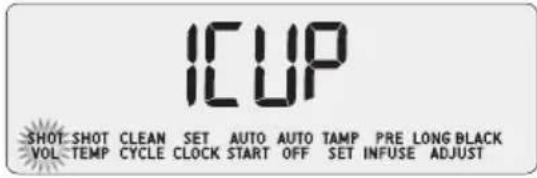
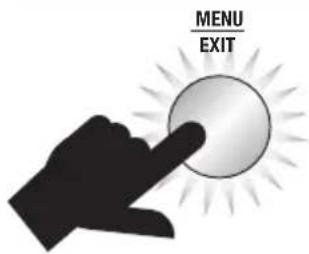
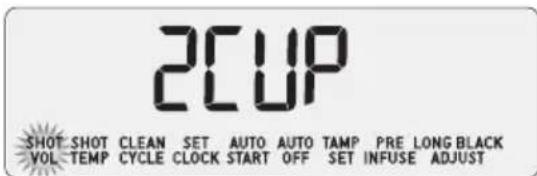
PROGRAMMING SHOT VOLUME / DURATION
Fill the portafilter using the auto grind, dose & tamp function. Insert the portafilter into the group head.
While 'SHOT VOL' is displayed on the LCD, rotate the SELECT dial to '1 CUP' to reprogram the 1 CUP button, or '2 CUP' to reprogram the 2 CUP button. Press the SELECT dial to start espresso extraction. When required espresso volume / duration has been extracted, press SELECT dial to stop extraction. Machine will beep once to confirm the new volume / duration.

OPERATING YOUR NEW APPLIANCE
SHOT TEMPERATURE
Turn the SELECT dial to required temperature then press SELECT dial to set.
93°C
SHOT SHOT CLEAN SET AUTO AUTO TAMP PRE LONG BLACK VOL TEMP CYCLE CLOCK START OFF SET INFUSE ADJUST

SELECTSELECTSELECT TEMP | TEXTURETEMP TEXTURETEMP TEXTURE
CLEANING CYCLE
The cleaning cycle cleans the shower screen and back-flushes the group head. Select this feature when the LCD displays 'CLEAN ME!' Refer to 'Cleaning Cycle', page 18.
PUSH
SHOT SHOT CLEAN SET AUTO AUTO TAMP PRE LONG BLACK VOL TEMP CYCLE CLOCK START OFF SET INFUSE ADJUST

SELECTSELECTSELECT TEMP | TEXTURETEMP TEXTURETEMP TEXTURE
SET CLOCK
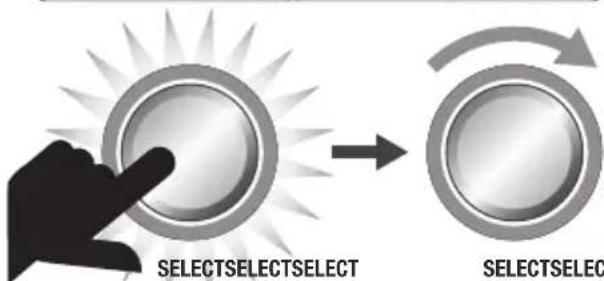
Setting the clock is optional. While 'SET CLOCK' is displayed on the LCD, press the SELECT dial.
12:00 AM
SHOT SHOT CLEAN SET AUTO AUTO TAMP PRE LONG BLACK VOL TEMP CYCLE CLOCK START OFF SET INFUSE ADJUST

SELECTSELECTSELECT TEMP|TEXTURETEMP TEXTURETEMP TEXTURE
AUTO START
Auto Start allows you to program the specific time when the machine will automatically turn on. By programming your machine, you will not have to wait for it to pre-heat.
While 'AUTO START' is displayed on the LCD, press the SELECT dial. Turn the SELECT dial to 'On' or 'Off'. Press SELECT dial to set.
12:00 AM
SHOT SHOT CLEAN SET AUTO AUTO TAMP PRE LONG BLACK VOL. TEMP CYCLE CLOCK START OFF SET INFUSE ADJUST
TEMP|TEXTURETEMP TEXTURETEMP TEXTURE SELECTSELECTSELECT TEMP|TEXTURETEMP TEXTURETEMP TEXTUR
②
8:00 AM
SHOT SHOT CLEAN SET AUTO AUTO TAMP PRE LONG BLACK VOL TEMP CYCLE CLOCK START OFF SET INFUSE ADJUST
AUTO OFF MODE
The machine automatically switches to AUTO OFF mode after 30 minutes.
TAMP SET
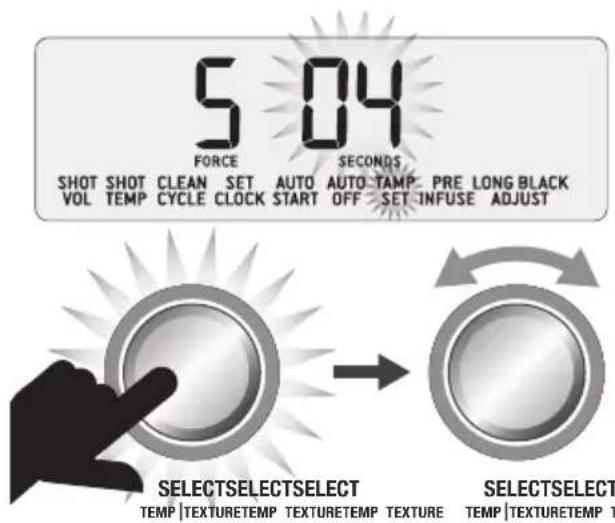
Adjusting tamp parameters allows for fine tuning of coffee tamping force and polishing duration. While 'TAMP SET' is displayed on the LCD, press the SELECT dial. The tamp force setting will flash.
PRE-INFUSION
Low pressure pre-infusion allows you to control the pressure and duration of the pre-infusion phase of the espresso extraction. While 'PRE INFUSE' is displayed on the LCD, press the SELECT dial. The pump power setting will flash. Turn SELECT dial to increase or decrease the pre-infusion pressure. Press SELECT dial to set and pre-infusion duration will flash. Turn SELECT dial to adjust seconds.
![graph LR A["5 04 FORCE"] --> B["SELECTSELECTSELECT TEMP|TEXTURETEMP TEXTURETEMP TEXTURE"] C["60 7 POWER"] --> D["SELECTSELECTSELECT TEMP|TEXTURETEMP TEXTURETEMP TEXTURE"] E["SELECTSELECTSELECT TEMP|TEXTURETEMP TEXTURETEMP TEXTURE"] --> F["SELECTSELECTSELECT TEMP|TEXTURETEMP TEXTURETEMP TEXTURE"]](/content/2026/02/387193/images/58a788e94599f7dc787b058488977ef5f9469379c0e738ccc7d45a16d2eeb0f1.jpg)
LONG BLACK ADJUST - PROGRAMMING CUSTOM SETTINGS
There are 6 custom Long Black settings for you to program to suit your cup size and strength preferences. To program your custom setting:
- Fill the portafilter using the auto grind, dose & tamp function.
- Insert the portafilter into the group head.
- Position your cup so the portafilter spouts and hot water outlet are directed inside the cup.
- Press the MENU button. Rotate the SELECT dial to 'LONG BLACK ADJUST' then press the SELECT dial.
SET 1
SHOT SHOT CLEAN SET AUTO AUTO TAMP PRE LONG BLACK VOL TEMP CYCLE CLOCK START OFF SET INFUSE ADJUST
OPERATING YOUR NEW APPLIANCE
- Rotate the SELECT dial to the custom setting you'd like to program - 'Set 1' to 'Set 6'. Settings that have already been programmed will display a cup icon.
SET 1
LONG BLACK ADJUST
NOT PROGRAMMED
SET 1

LONG BLACK ADJUST
PROGRAMMED
- To start programming, press the SELECT dial. The LCD will show a moving cup icon and espresso will extract from the portafilter spouts. When the required amount has been extracted, press the SELECT dial to stop the flow of espresso and start the flow of hot water. When the required amount of water has poured, press the SELECT dial to stop the flow of hot water.
SET 1

LONG BLACK ADJUST
PROGRAMMED
- To use your custom Long Black setting, rotate the LONG BLACK dial. Your programmed custom Long Black setting will appear after the preset small, medium and large settings. Press the LONG BLACK dial and your programmed Long Black setting will dispense.
ADVANCED FEATURES
These features should only be accessed by experienced users.
To access Advanced Features, with the machine turned off, press and hold the 1 CUP button, then press and hold the POWER button together for 3 seconds.
Rotate the SELECT dial to the desired feature. Press SELECT dial to access feature settings.
Press the MENU button at any time to exit Advanced Features.

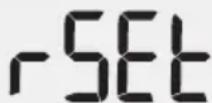
Reset Default Settings (rSEt)
Use this function to reset all programmable values back to the default settings. The machine has the following default settings:
- Shot Temperature: 93°C
- Low Pressure Pre-infusion: PP60, PT07 seconds
- Milk Temperature: 60°C
- Auto Start: OFF (8:00am)
- Auto Off: 20 min
- Clock: 12:00am
- 1 CUP Button Shot Duration: 25 seconds
- 2 CUP Button Shot Duration: 30 seconds
While 'rSEt' is displayed on the LCD, press the SELECT dial to reset all settings to factory defaults.
rSET
OPERATING YOUR NEW APPLIANCE
'Hrd3' will flash on screen. Machine is now in Water Hardness mode. See 'Water Hardness (Hrd3)' to set.
Descale (dESc)
Select this feature to access the step by step descale procedure on the LCD.
Water Hardness (Hrd3)
Rotate SELECT dial to the required setting from 'Hrd1' (softest water) to 'Hrd5' (hardest water). Press SELECT dial to set. Machine will beep once to confirm selection.
Units (SEt)
Set units to metric or imperial.
LCD Backlight (Lcd)
Adjust the LCD brightness / contrast.
Spotlights (SPOt)
Adjust the brightness of the LEDS lighting the drip tray area. Rotate SELECT dial to the desired brightness. Press SELECT dial to set.
Steam Temperature (StEA)
Adjust the steam boiler temperature, which in turn controls steam pressure. Rotate SELECT dial to the desired temperature. The default is 130°C. Press SELECT dial to set.
Air Pump Delay (Air)
Delay the operation of the air pump during automatic milk texturing. Rotate SELECT dial to the desired delay time.
Sound (Snd)
Adjust the audible alerts. Rotate SELECT dial to the desired setting. Select between off (OFF), low (Lo) or high (Hi). Press SELECT dial to set.
Fan Control (FAn)
Adjust the speed of the internal cooling fan. Rotate SELECT dial to the desired fan speed. Select between Silent (SILt), Standard (StNd) or cool (CooL). Press SELECT dial to set.
Disable Clean Me! Alert (Cln)
Disables the 'CLEAN ME!' alert. Rotate SELECT dial to on (On) or off (OFF). The default setting is on. Press SELECT dial to set.
12h or 24h Clock (CLoC)
Display time in 12h or 24h format. Rotate SELECT dial to the desired unit. Press SELECT dial to set.
Flow Measurement Method (VoL)
Select between volume based (FLo) or time based (SEc) method for espresso dose measurement. Rotate SELECT dial to the desired method. Press SELECT dial to set.
ALERTS
MANUAL will flash on steam LCD
The machine will not reach operating temperature (STANDBY mode) if the steam lever is in the MANUAL position. The steam LCD will display 'MANUAL'. Lower the steam lever to the centre OFF position.
Steam operation is ready when the SELECT dial illuminates.
Fill Tank
The machine will detect a low water level. The LCD will display 'FILL TANK'.

93°C
Clean Me!
Indicates when 200 extractions have been carried out since the last cleaning cycle.
The cleaning cycle cleans the shower screen and back-flushes the group head.
CLEAN ME!
93°C
OPERATING YOUR NEW APPLIANCE
Heating
Indicates when the machine is heating up or if the temperature drops excessively during use.
Lock Hopper
Indicates if the bean hopper has not been properly inserted and locked into position.
Overheat Please Wait
Indicates if the grinder is used excessively and needs time to cool.
Change Filter
Indicates when the water filter in the water tank needs to be replaced.
The regularity of this alert is determined by the water hardness setting (Hrd1-Hrd5) selected.
TRANSPORTING AND STORING
We recommend draining both boilers completely before transporting the machine or storing for an extended period of time.
This procedure is also intended as an anti-freeze measure in the event the machine is exposed to extreme cold temperatures.
CLEANING CYCLE
- CLEAN ME! will be displayed on the LCD to indicate when a cleaning cycle is required (after approx. 200 shots). The cleaning cycle cleans the shower screen and back-flushes the group head.
CLEAN ME!
93°C
- Insert the supplied grey silicone cleaning disc, followed by 1 cleaning tablet into the filter basket.
- Lock the portafilter into the group head.
- Ensure the water tank is filled with cold water and the drip tray is empty.
- Press the MENU button and rotate SELECT dial until 'CLEAN CYCLE' and 'PUSH' are displayed on the LCD.
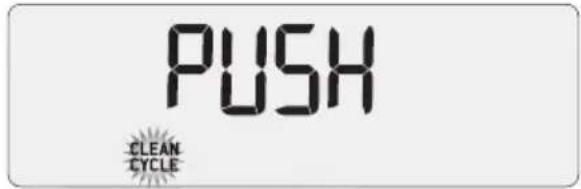
![graph LR A["MENU EXIT"] --> B["SELECT SELECT SELECT"] style A fill:#f9f,stroke:#333 style B fill:#bbf,stroke:#333](/content/2026/02/387193/images/aa4013a28c20d9bb09953023e82bb079c9d1fee69b8424262b224a06264be407.jpg)
- Press the SELECT dial to start the cleaning cycle.
- The LCD will display a countdown timer showing remaining time for the cleaning cycle in seconds.
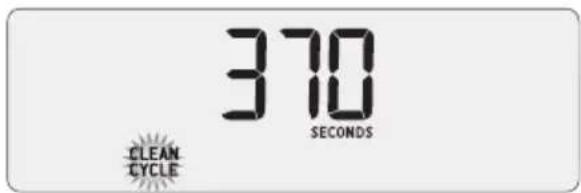
- When the cleaning cycle has finished, remove the portafilter and ensure the tablet has completely dissolved. If the tablet has not dissolved, repeat these steps, without inserting a new tablet.
- Rinse the filter basket and portafilter thoroughly before use.
- Extract an espresso to "season" the machine and purge the system of any remaining cleaner.
INSTALLING THE WATER FILTER
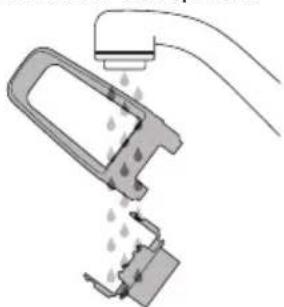
- Discard the used water filter. Soak a new filter in a cup of water for 5 minutes, then rinse under cold running water.
- Wash the filter holder with cold water.
- Insert the filter into the two parts of the filter holder.
- To install the assembled filter holder into the water tank, align the base of the filter holder with the adapter inside the water tank. Push down to lock into place.
- Fill the water tank with cold water before sliding back into position at the back of the machine and locking into place.
- Replacing the water filter after three months or 40L will reduce the need to descale the machine. The limitation of 40L is based on water hardness level 4. If you are in level 2 area, you can increase this to 60L.
CARE & CLEANING
CLEANING CONICAL BURRS
Regular cleaning helps the burrs achieve consistent grinding results which is especially important when grinding for espresso.
Unlock hopper
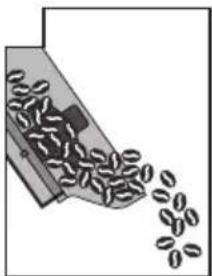
Remove beans
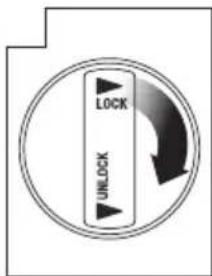
Replace and lock empty hopper
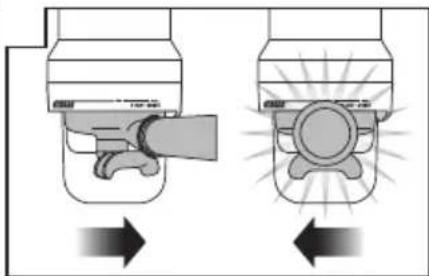
Empty Unlock &
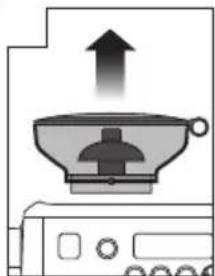
Remove hopper
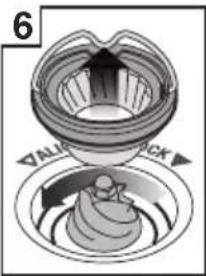
Remove upper burr
7 8 9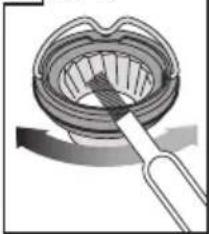
Clean upper burr with burr brush
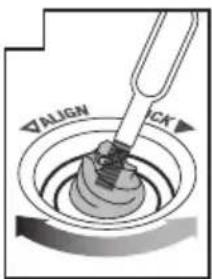
Clean lower burr with burr brush
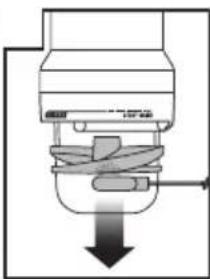
Remove tamping fan with tamp removal magnet
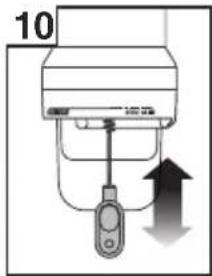
Clean grind outlet with grind outlet brush
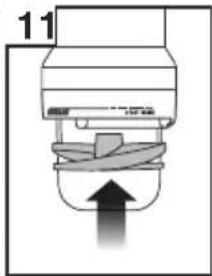
Replace tamping fan by hand
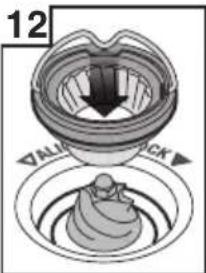
Push upper burr firmly into position
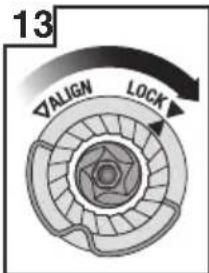
Lock upper burr
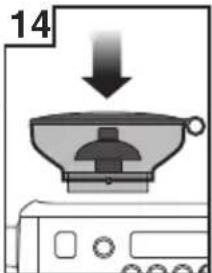
Insert hopper
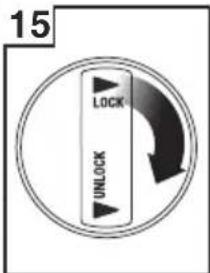
Lock hopper
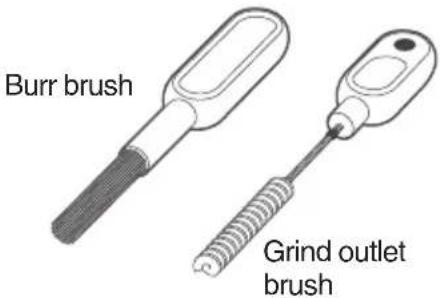
Tamp removal magnet
CLEANING THE STEAM WAND

IMPORTANT
After every use, thoroughly wipe the steam wand and tip with a damp cloth and purge immediately. Failure to clean the steam wand may affect the milk texturing performance.
- If any of the holes in the tip of the steam wand become blocked, ensure the steam lever is in the center OFF position and unblock using the steam tip cleaning tool. Even partially blocked holes may affect the ability of the steam wand to produce sufficient foam volume.
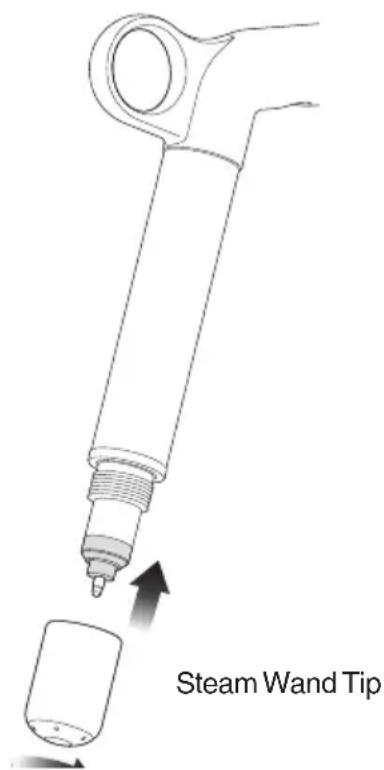
- If the steam wand remains blocked, remove the tip and soak it together with the steam wand using the provided steam wand cleaning powder (instructions below). Screw the tip back onto the steam wand after rinsing.
- The steam wand can be left immersed in the milk jug filled with water when not in use to reduce the risk of blockages.
Steam Wand Cleaning Powder
- Add 1 packet into an empty milk jug.
- Add 1 cup (240ml) hot water into the milk jug.
- Remove the steam tip and place it with the steam wand into the jug.
- Leave to soak for 20 minutes.
- Clean, rinse, and replace the steam tip. Place the wand back into the jug and activate steam for 10 seconds.
- Allow to soak for 5 minutes.
- Activate steam several times to purge the steam wand, then rinse the wand thoroughly.
- Wipe the steam wand dry with a clean cloth.
- Discard solution & rinse jug thoroughly.
NOTE
If an alternative cleaning solution is used, please follow the instructions specified.
Please ensure the cleaning solution is food safe and suitable for stainless steel and silicon products.
Please ensure the steam wand tip is tightly fastened after cleaning to avoid temp sensing error.
CLEANING THE FILTER BASKET AND PORTAFILTER
- The filter basket and portafilter should be rinsed under hot water after each coffee making session to remove all residual coffee oils.
- If the holes in the filter basket become blocked, dissolve a cleaning tablet in hot water and soak filter basket and portafilter in solution for approx. 20 minutes. Rinse thoroughly.
CARE & CLEANING
CLEAR WATER BACKFLUSH
- After each coffee making session we recommend doing a clear water backflush before you turn off the machine. Empty drip tray. Insert the cleaning disc into the filter basket then insert the portafilter into the group head. Press the 2 CUP button and allow pressure to build for 20secs, then press to stop and release pressure. Repeat this 5 times to purge any fine coffee grounds and residual coffee oils from the brew water paths.
- The group head interior and shower screen should be wiped with a damp cloth to remove any ground coffee particles.
- Periodically, run hot water through the group head with the filter basket and portafilter in place, but without ground coffee. This will remove any residual ground coffee particles from the shower screen.
CLEANING THE DRIP TRAY & STORAGE TRAY
- The drip tray should be removed, emptied and cleaned after each use or when the drip tray indicator is showing Empty Me!
- Remove grill from the drip tray. Wash the drip tray in warm soapy water. The Empty Me! indicator can also be removed from the drip tray.
- The storage tray can be removed and cleaned with a soft, damp cloth (do not use abrasive cleansers, pads or cloths which can scratch the surface).
CLEANING THE OUTER HOUSING & CUP WARMING TRAY
- The outer housing and cup warming tray can be cleaned with a soft, damp cloth. Polish with a soft, dry cloth. Do not use abrasive cleansers, pads or cloths which can scratch the surface.
NOTE
Do not clean any of the parts or accessories in the dishwasher.
DESCALE (dESc)
NOTE
Even if you used the provided water filter, we recommend you to descale if there is scale build-up in the water tank.
Only descale via the descale menu.
1 – Prepare for Descale
a. Empty the drip tray and insert into position. b. Turn the machine off and allow to cool for at least 4 hours. With the machine off, press and hold the 1 CUP button, then press and hold the POWER button together for 3 seconds. rSEt will appear on the LCD.
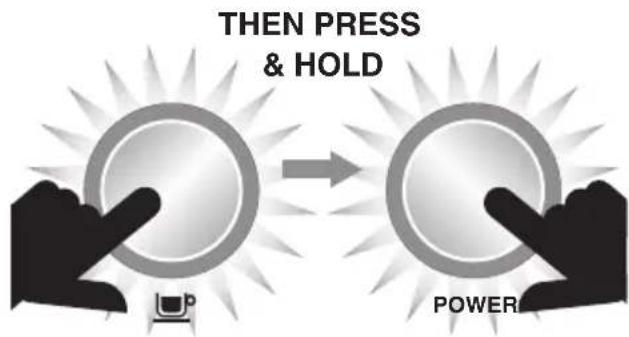
c. Rotate SELECT dial until 'dESC" appears on LCD and press the dial to confirm.
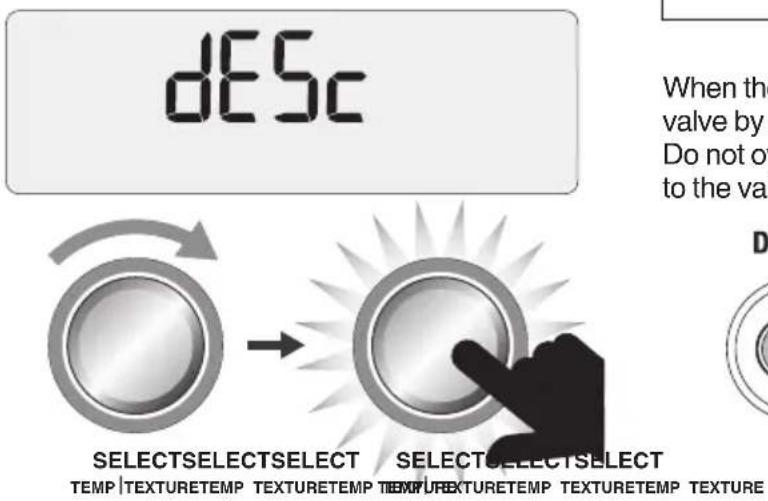
2 - Empty Boilers
a. Remove the grey silicone cover on the lower front panel marked DESCALE ACCESS.
![graph LR A["REMOVE"] --> B["DESCALE ACCESS"] B --> C["Warning Symbol: No/Yes/No/Inverter"]](/content/2026/02/387193/images/9ca74de83c7f942c8960406bb17bc03278f23de97efa08f959f84e83b49cc508.jpg)
c. Place a cloth over the drip tray to prevent steam escaping.
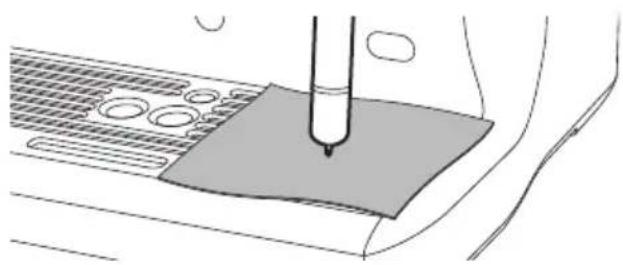
e. Use a flat head screwdriver to rotate the right valve counter-clockwise SLOWLY until fully open. As the valve opens, steam may be released.
NOTE
If there's no water released into the drip tray, press and hold the 1 CUP button for 3 seconds. This will release water from the boiler.
When the water is completely empty, close the valve by rotating screws clockwise until seated. Do not overtighten screws to avoid damage to the valves.
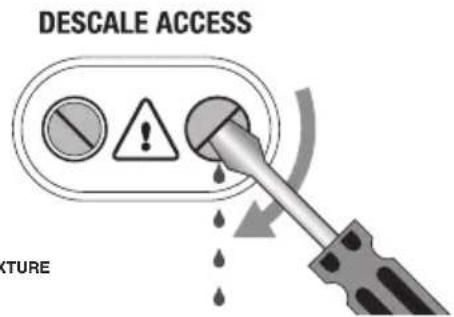
CARE & CLEANING
f. Repeat the above process on the left valve. g. Empty the drip tray, use caution as the drip tray may be hot. h. Empty water tank, remove water filter. i. Dissolve 1 sachet of Sage® Descaler™ into 1 litre of warm water. Pour solution into the water tank.
NOTE
If water tank has not been removed, replaced or is empty, "FILL TANK" will appear on the LCD.
3 – Begin Descale
a. Press 1 Cup button and the LCD screen will show countdown time (20 minutes).
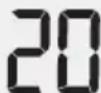
During this time, the machine will fill boilers with descale solution and heat to temperature. There may be some water flow through the group head during this time.
Allow the countdown timer to reach 0 as this allows solution sufficient time to dissolve scale build up. However you can proceed to the next step at any time by pressing the 1 Cup button.
a. Place a cloth over the drip tray to stop steam escaping. b. Empty boilers by repeating steps 2c and 2d. c. Empty drip tray and insert back to place. d. Empty water tank then rinse and fill with clean water to the MAX line. Lock water tank back into position.
4 - Flush Boilers
a. Press the 1 Cup button and the LCD screen will show a countdown time (20 minutes).

During this time, the machine will fill the boilers with fresh clean water and heat to temperature. You can proceed to the next step at any time by pressing the 1 Cup button.
b. Place a cloth over the drip tray to stop steam escaping. c. Empty boilers by repeating steps 2c and 2d. d. Empty drip tray and insert back to place. e. Empty water tank then rinse and fill with clean water to the MAX line. Lock water tank back into position.
5 – Repeat Step 4 Flush Boilers
We recommend flushing the boilers again to ensure any residual descale solution is released from the boilers.
Press the POWER button to exit the Descale mode. The descale process is now complete and the machine is ready to use.
TROUBLESHOOTING
| PROBLEM POSSIBLE CAUSE WHAT TO DO | ||
| Motor starts but no ground coffee coming from grind outlet | No coffee beans in bean hopper.Grinder / bean hopper is blocked.Coffee bean may have become stuck in hopper. | Fill bean hopper with fresh coffee beans.Remove bean hopper.Inspect bean hopper and grinding burrs for blockage.Replace parts and try again. |
| Motor starts but operates with a loud ‘racket’ noise | Grinder is blocked with foreign item or chute is blocked.Moisture clogging grinder. | Remove bean hopper, inspect burrs & remove any foreign body.Clean the burrs and grind outlet, see page 19.Leave burrs to dry thoroughly before re-assembling. It is possible to use a hair dryer to blow air into the burr area to quicken the drying process. |
| Unable to lock bean hopper into position | Coffee beans obstructing bean hopper locking device. | Remove bean hopper.Clear coffee beans from top of burrs. Re-lock bean hopper into position. |
| Portafilter overfills | Tamping fan was removed for cleaning and not replaced. | Check that the tamping fan is in position and mounted correctly to the drive shaft, page 19. |
| Emergency stop? | Rotate the portafilter to the left to stop the auto grind, dose & tamp function.Unplug power cord from power outlet. | |
| There is an alert on the LCD eg. 'OVERHEAT PLEASE WAIT', 'HEATING' etc. | See page 16 for list of alerts. If problem persists, contact Sage®Customer Service Centre or visit www.sageappliances.com | |
TROUBLESHOOTING
| PROBLEM POSSIBLE CAUSE WHAT TO DO | ||
| Grinder running continuously | No beans in hopper. Fill hopper with beans.Rotate the portafilter to the left to stop the auto grind, dose & tamp function. | |
| Tamping fan has been removed. | Check that the tamping fan is in position and mounted correctly to the drive shaft, page 19. | |
| Espresso runs out around the edge of the portafilterand / orPortafilter comes out of the group head during an extraction | Portafilter not inserted in the group head correctly. | Ensure portafilter is rotated to the right until the handle is past the centre and is securely locked in place. Rotating past the centre will not damage the silicone seal. |
| There are coffee grounds around the filter basket rim. | Clean excess coffee from the rim of the filter basket after grinding to ensure a proper seal in group head. | |
| Filter basket rim is wet or underside of portafilter lugs are wet. Wet surfaces reduce the friction required to hold the portafilter in place whilst under pressure during an extraction. | Always ensure filter basket and portafilter are dried thoroughly before filling with coffee, tamping and inserting into the group head. | |
| Issues with the Auto Start feature | Clock not set or clock is set with incorrect time. | Check that the clock and Auto Start time have been programmed correctly. The LCD will display a clock icon when the Auto Start time is programmed. |
| ERR error message on LCD | A major fault has occurred and machine cannot operate. | Contact Sage® Customer Service Centre or visit www.sageappliances.com |
TROUBLESHOOTING
| PROBLEM POSSIBLE CAUSE WHAT TO DO | ||
| Pumps continue to operate / Steam is very wet / Hot water outlet leaks | · Using highly filtered, demineralised or distilled water which is affecting how the machine is designed to function. | · We recommend using cold, filtered water. We do not recommend using water with no / low mineral content such as highly filtered, demineralised or distilled water. If the problem persists, contact Sage® Customer Service Centre. |
| Water does not flow from the group head | · Machine has not reached operating temperature. | · Allow time for the machine to reach operating temperature. The POWER button will stop flashing when machine is ready. |
| · Water tank is empty. · Fill tank | Prime the system by:1) Pressing 2 CUP button to run water through the group head for 30 seconds.2) Pressing HOT WATER button to run water through the hot water outlet for 30 seconds. | |
| · Water tank not fully inserted and locked. | · Push water tank in fully and lock latch closed. | |
| FILL TANK on LCD but water tank is full | · Water tank not fully inserted and locked. | · Push water tank in fully and lock latch closed. |
| No steam or hot water | · Machine is not turned on or up to operating temperature. | · Ensure the machine is plugged in and the POWER button is illuminated but not flashing. |
| No hot water | · Water tank is empty. · Fill water tank. | |
| No steam | · Steam wand is blocked. · Refer to 'Cleaning the Steam Wand', page 20. | |
TROUBLESHOOTING
| PROBLEM POSSIBLE CAUSES WHAT TO DO | |
| The machine is ‘On’ but ceases to operate | |
| Steam pouring out of group head | |
| Espresso only drips from the portafilter spouts, restricted flow | Coffee is ground too finely. |
| Espresso flows out too quickly | The coffee is ground too coarsely.Coffee beans are stale. |
| Coffee not hot enough | Cups not pre-heated.Rinse cups under hot water outlet and place on cup warming tray. |
| Milk not hot enough (if making a cappuccino or latté etc). | |
| No crema | Coffee beans are stale.Use freshly roasted coffee beans with a 'Roasted On' date and consume between 5-20 days after that date. |
| Not enough milk texture | Steam wand is blocked.Refer to 'Cleaning the Steam Wand', page 20. |
TROUBLESHOOTING
| PROBLEM POSSIBLE CAUSES WHAT TO DO | ||
| Too much coffee extracted | Coffee is ground too coarsely.Shot duration / volume needs to be reprogrammed. | Adjust the grind size to a lower number to make the grind size slightly finer.Reprogram the shot duration / volume. Refer to 'Programming Shot Volume / Duration', page 12. |
| Not enough coffee extracted | Coffee is ground too finely.Shot duration / volume needs to be reprogrammed. | Adjust the grind size to a higher number to make the grind size slightly coarser.Reprogram the shot duration / volume. Refer to 'Programming Shot Volume / Duration', page 12. |
| Amount of coffee extracted has changed, but all settings are the same. | As coffee beans age, the extraction rate changes and can affect the shot volume. | Adjust the grind size to a lower number to make the grind size slightly finer.Reprogram the shot duration / volume. Refer to 'Programming Shot Volume / Duration', page 12.Use freshly roasted coffee beans with a 'Roasted-On' date and consume between 5–20 days after that date. |
GUARANTEE
2 YEAR LIMITED GUARANTEE
Sage Appliances guarantees this product for domestic use in specified territories for 2 years from the date of purchase against defects caused by faulty workmanship and materials. During this guarantee period Sage Appliances will repair, replace, or refund any defective product (at the sole discretion of Sage Appliances).
All legal warranty rights under applicable national legislation will be respected and will not be impaired by our guarantee. For full terms and conditions on the guarantee, as well as instructions on how to make a claim, please visit www.sageappliances.com.
NOTE
the Oracle™
DE
QUICK GUIDE
Sage®
CONTENTS
ACCESSORIES
SELECTING THE GRIND SIZE
2 CUP BUTTON
NOTE
TEMP | TEXTURE TEMP | TEXTURE TEMP | TEXTURE TEMP | TEXTURE
SELECT SELECT SELECT
8:00 AM
SHOT SHOT CLEAN SET AUTO AUTO TAMP PRE LONG BLACK VOL TEMP CYCLE CLOCK START OFF SET INFUSE ADJUST
AUTO SHUT-OFF
While 'rSEt' is displayed on the LCD, press the SELECT dial to reset all settings to factory defaults.
FR
QUICK GUIDE
Sage®
TABLE OF CONTENTS
ACCESSORIES
SELECTING THE GRIND SIZE
OPERATING YOUR NEW APPLIANCE
2 CUP BUTTON
MANUAL MILK FROTHING
NOTE
TEMP | TEXTURE TEMP TEXTURE TEMP TEXTURE
CLEANING CYCLE
SELECT TEMP | TEXTURE
CLOCK SETTING
Overheat Please Wait
(Overheating, please wait)
Remove beans
MAINTENANCE AND CLEANING
IT QUICK GUIDE
Sage®
TABLE OF CONTENTS
ACCESSORIES
USING THE NEW APPLIANCE
2 CUP BUTTON
TEMP| TEXTURE
STEAM SELECT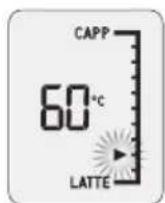
NOTE
NOTE
CLEANING CYCLE
SELECT SELECT SELECT TEMP | TEXTURE TEMP TEXTURE TEMP TEXTURE
AUTO START

QUICK START GUIDE
Sage®
CONTENTS
ACCESSORIES
SELECTING GRIND SIZE
2 CUP BUTTON
NOTE
SELECT SELECT SELECT TEMP | TEXTURE TEMP TEXTURE TEMP TEXTURE
CLEANING CYCLE
SELECT SELECT SELECT TEMP|TEXTURE TEMP TEXTURE TEMP TEXTURE
AUTOMATIC START
![graph LR A["MENU EXIT"] --> B["SELECT SELECT SELECT"] style A fill:#f9f,stroke:#333 style B fill:#bbf,stroke:#333](/content/2026/02/387193/images/43e723f34c6915aaf417d9d56f913cc061d8215264bf099405df4c5e4308e5a6.jpg)
Remove the beans
RINSE WITH CLEAN WATER
MAINTENANCE AND CLEANING
ES
QUICK GUIDE
Sage®
INDEX
ACCESSORIES
2 CUP BUTTON
NOTE
SELECT SELECT SELECT TEMP | TEXTURE TEMP TEXTURE TEMP TEXTURE
SET THE CLOCK
SELECT SELECT SELECT TEMP|TEXTURE TEMP TEXTURE TEMP TEXTURE
AUTOMATIC START
Overheat Please Wait
Remove the beans

Place and secure the hopper
CARE AND CLEANING

QUICK MANUAL
Sage®
INDEX
ACCESSORIES
2 CUPS BUTTON
NOTE
TEMP | TEXTURE TEMP TEXTURE TEMP TEXTURE
CLEANING CYCLE
SELECT SELECT SELECT TEMP|TEXTURE TEMP TEXTURE TEMP TEXTURE
SELECT SELECT SELECT TEMP|TEXTURE TEMP TEXTURE TEMP TEXTURE
AUTO START
![graph LR A["MENU EXIT"] --> B["SELECT SELECT"] style A fill:#f9f,stroke:#333 style B fill:#bbf,stroke:#333](/content/2026/02/387193/images/eae230a4ad634419109b6316d34e2525aabf910716c64fb3dc1b9da9d1196766.jpg)
BRG Appliances Limited
Unit 3.2, Power Road Studios, 114 Power
Road, London, W4 5PY
UK Landline: 0808 178 1650
Mobile (National Rate): 0333 0142 970
DEU
Sage Appliances France SAS
www.sageappliances.com
Registered in England & Wales No. 8223512
Registered in Germany No. HRB 81309 (AG Düsseldorf)
Registered in France No. 879 449 866 RCS
Due to continued product improvement, the products illustrated or photographed in this document may vary slightly from the actual product.

- SAGE® RECOMMENDS SAFETY FIRST
- READ ALL INSTRUCTIONS BEFORE USE AND SAVE FOR FUTURE REFERENCE
- WE RECOMMEND SAFETY FIRST
- NOTICE TO CUSTOMERS REGARDING MEMORY STORAGE
- SPECIFIC INSTRUCTIONS FOR WATER FILTER
- FOR HOUSEHOLD USE ONLY SAVE THESE INSTRUCTIONS
- KNOW YOUR NEW APPLIANCE
- ACCESSORIES
- OPERATING YOUR NEW APPLIANCE
- BEFORE FIRST USE
- MACHINE PREPARATION
- TIP
- INSTALLING THE WATER FILTER
- FIRST USE
- SETTING WATER HARDNESS
- FLUSHING THE MACHINE
- MANUAL WILL FLASH ON LCD
- NOTE
- GRINDING OPERATION
- SELECTING GRIND SIZE
- SELECT YOUR FILTER BASKET
- AUTO GRIND DOSE & TAMP
- ESPRESSO EXTRACTION
- EXTRACTION GUIDE
- 1 CUP BUTTON
- 2 CUP BUTTON
- MANUAL OVERRIDE
- TEXTURING MILK
- ADJUSTING MILK TEMPERATURE
- ADJUSTING MILK TEXTURE
- AUTO MILK TEXTURING
- MANUAL MILK TEXTURING
- CAUTION: BURN HAZARD
- PRESET LONG BLACK
- MANUAL LONG BLACK
- PROGRAMMABLE FUNCTIONS
- PROGRAMMING SHOT VOLUME / DURATION
- SHOT TEMPERATURE
- CLEANING CYCLE
- SET CLOCK
- AUTO START
- AUTO OFF MODE
- TAMP SET
- PRE-INFUSION
- LONG BLACK ADJUST - PROGRAMMING CUSTOM SETTINGS
- PROGRAMMED
- ADVANCED FEATURES
- RESET DEFAULT SETTINGS (RSET)
- DESCALE (DESC)
- WATER HARDNESS (HRD3)
- UNITS (SET)
- LCD BACKLIGHT (LCD)
- SPOTLIGHTS (SPOT)
- STEAM TEMPERATURE (STEA)
- AIR PUMP DELAY (AIR)
- SOUND (SND)
- FAN CONTROL (FAN)
- DISABLE CLEAN ME! ALERT (CLN)
- 12H OR 24H CLOCK (CLOC)
- FLOW MEASUREMENT METHOD (VOL)
- ALERTS
- MANUAL WILL FLASH ON STEAM LCD
- FILL TANK
- CLEAN ME
- HEATING
- LOCK HOPPER
- OVERHEAT PLEASE WAIT
- CHANGE FILTER
- TRANSPORTING AND STORING
- CARE & CLEANING
- CLEANING CONICAL BURRS
- CLEANING THE STEAM WAND
- IMPORTANT
- STEAM WAND CLEANING POWDER
- CLEANING THE FILTER BASKET AND PORTAFILTER
- CLEAR WATER BACKFLUSH
- CLEANING THE DRIP TRAY & STORAGE TRAY
- CLEANING THE OUTER HOUSING & CUP WARMING TRAY
- PREPARE FOR DESCALE
- EMPTY BOILERS
- BEGIN DESCALE
- FLUSH BOILERS
- REPEAT STEP 4 FLUSH BOILERS
- TROUBLESHOOTING
- GUARANTEE
- 2 YEAR LIMITED GUARANTEE
- THE ORACLE™
- CONTENTS
- SELECTING THE GRIND SIZE
- AUTO SHUT-OFF
- TABLE OF CONTENTS
- MANUAL MILK FROTHING
- CLOCK SETTING
- (OVERHEATING, PLEASE WAIT)
- MAINTENANCE AND CLEANING
- USING THE NEW APPLIANCE
- AUTOMATIC START
- RINSE WITH CLEAN WATER
- INDEX
- SET THE CLOCK
- CARE AND CLEANING
- 2 CUPS BUTTON
- DEU
Brand : SAGE
Model : The Oracle BES980
Category : Coffee machine