 EasyManual
Tab 785 Dual - Tablet Sunstech - Free user manual and instructions
Find the device manual for free Tab 785 Dual Sunstech in PDF.



User questions about Tab 785 Dual Sunstech
0 question about this device. Answer the ones you know or ask your own.
Ask a new question about this device
Download the instructions for your Tablet in PDF format for free! Find your manual Tab 785 Dual - Sunstech and take your electronic device back in hand. On this page are published all the documents necessary for the use of your device. Tab 785 Dual by Sunstech.
USER MANUAL Tab 785 Dual Sunstech
natural_image
Exterior and back view of a Sunitech tablet device showing front, top, and side views (no readable text or symbols)Device description
text_image
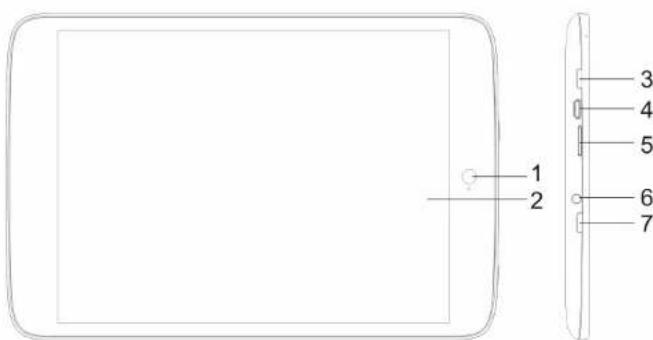
1 2 3 4 5 6 7① Front Camera: You can take photos and videos etc.
② You can click and drag in the touch screen.
③ Press for more then 2 seconds to turn ON/OFF. Press once to turn on screen from sleep mode.
④ Micro USB / OTG, charging
⑤ Micro SD card slot.
⑥ Earphone jack: 3.5mm standard earphone jack.
⑦ HOME
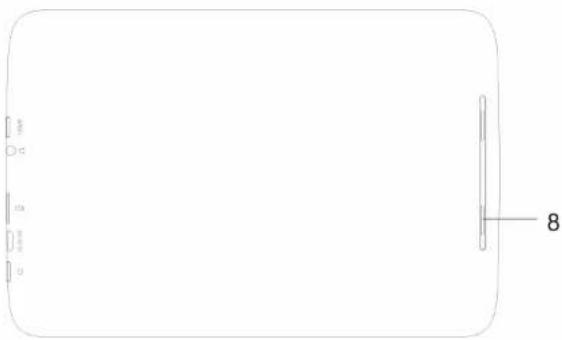
⑧ Speakers
natural_image
Blank rounded rectangle with a vertical line and small rectangular markers on the left side, labeled '8' at the bottom right (no text or symbols within the diagram itself)【TIPS】:
-
When the battery is low, it will power off automatically.
-
When you restart, device will scan and repair the disk. The screen will display the progress bar for a short time
-
Definition of "Press":
Short Press: Press the button less than 2 seconds.
Long Press: Press the button more than 3 seconds.
Setting up for the first time
◆ Charging your device:
For first-time use, you need to charge the device for six hours.
After that you can recharge the device as needed.
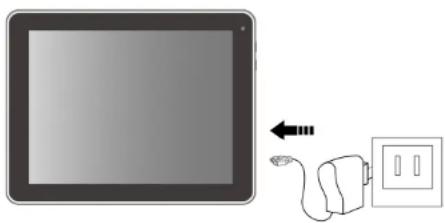
Connect the DC-in jack to your device and plug the AC adapter into any AC outlet.
Also, you can charge the unit through of the micro USB.
【TIPS】:
- This device adopts built-in polymer battery. Only the specified charger should be used.
- It is normal for the device's surface to become warm during charging or long periods of use.
- If you do not use this set for a long time, please charge/release it once one month to avoid deep discharge.
natural_image
Illustration of a tablet connected to a wall-mounted power strip and a plug (no text or symbols)System Settings
◆ Wireless & Network:
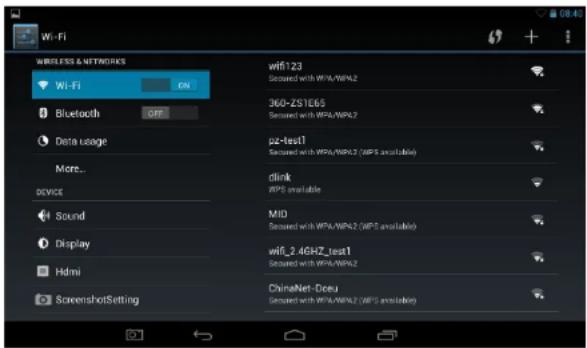
Wi-Fi-: Press Wi-Fi to turn ON/OFF
Wi-Fi settings:
Press Wi-Fi settings, then the device will automatically search the available Wi-Fi signals.
Select the network you want to connect with.
text_image
Wi-Fi WIRELESS & NETWORKS Wi-Fi ON Bluetooth OFF Data usage More... device Sound Display Hdmi ScreenshotSetting wifi123 Secured with WPA/WPA.2 360-ZS1E65 Secured with WPA/WPA.2 pz-text1 Secured with WPA/WPA.2 (WPS available) dlink WPS available MID Secured with WPA/WPA.2 (WPS available) wifi_2.46HZ_test1 Secured with WPA/WPA.2 ChinaNet-Dceu Secured with WPA/WPA.2 (WPS available)◆ Display:
Rotate screen setting:
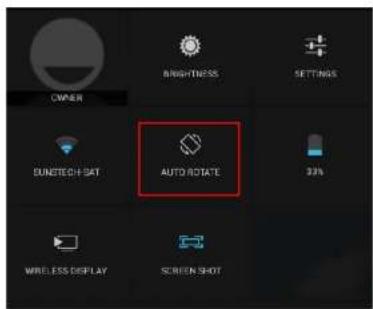
In the upper right of the screen, press and slide down.
Shows in the screen some direct settings.
Select enable /disable Auto Rotate screen.
text_image
OWNER BRIGHTNESS SETTINGS DUNTECH SAT AUTO ROTATE 33% WIRELESS DISPLAY SCREEN SHOT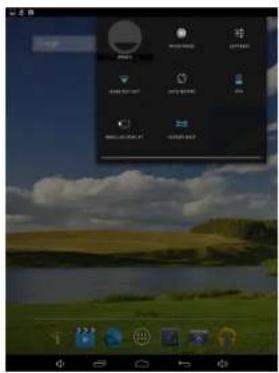
text_image
Screenshot of a desktop application interface with Chinese menu options and a landscape backgroundStorage
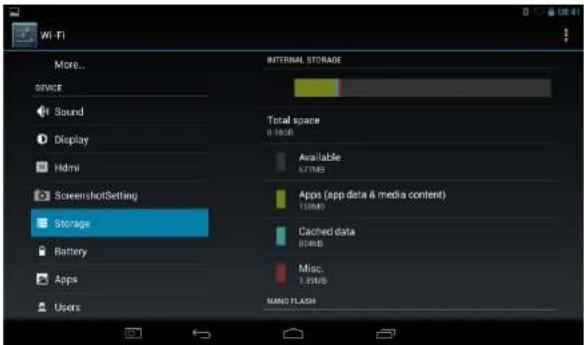
Check device memory and microSD card memory.
text_image
Wi-Fi More... ONCE Sound Display Hdmi ScreenshotSetting Storage Battery Apps Users INTERNAL STORAGE Total space 0 KB Available 67MB Apps (app data & media content) 15MB Cached data 8MB Misc. 1.5MB MAND FLASH◆ Apps
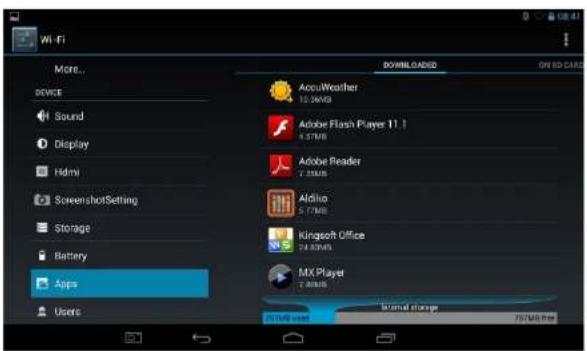
Manage and listing of downloaded or running applications.
text_image
Wi-Fi More... device Sound Display Hidmi ScreenshotSetting Storage Battery Apps Users Downloaded ON E-CARD AccuWeather 15.24MB Adobe Flash Player 11.1 4.37MB Adobe Reader 7.89MB Aldiso 5.17MB Kingsoft Office 24.80MB MX Player 7.89MB Internal storage 25 MB free 75 MB free◆ Language & input:
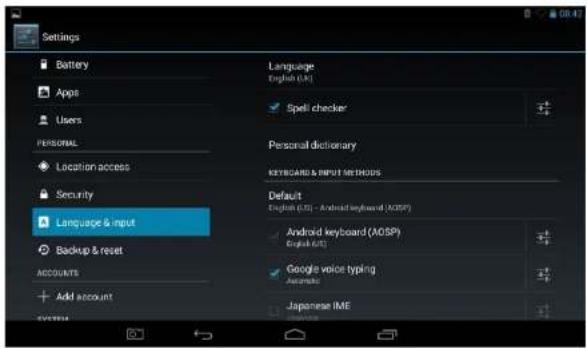
- Language: Users can choose OSD Languages.
- KEYBOARD & INPUT METHODS: select language method.
【Remark】: In this state, users can switch the input method.
◆ Date & time: when the internet is connected, turn on "Automatic date & time"
the device can obtain the actual date and time from the internet.
text_image
Settings Battery Apps Users PERSONAL Location access Security Language & input Backup & reset ACCOUNTS Add account SYSTEM Language English (UK) Spell checker Personal dictionary KEYBOARD & INPUT METHODS Default English (US) - Android keyboard (MOSP) Android keyboard (MOSP) English (US) Google voice typing Automatic Japanese IME
Camera
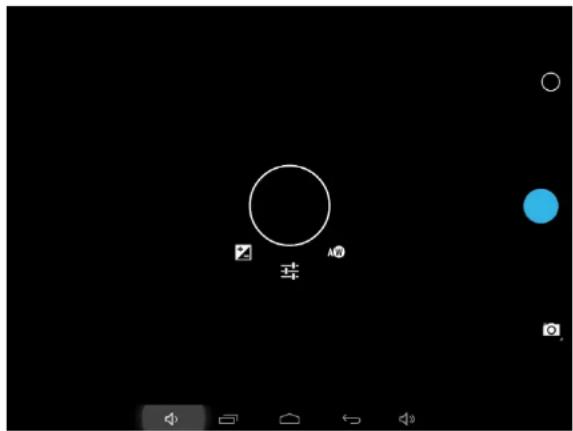
Click "Camera" in the main interface.
If the cursor is at position, the device is in Camera mode.
Click to take picture.
Click ☐ enter the setting interface
Click to set white balance.
Click enter the mode select interface
If the cursor is in this position, the device is at DV mode.
Click to take picture.
text_image
环 A0Recovery mode for TAB785DUAL 4GB
-
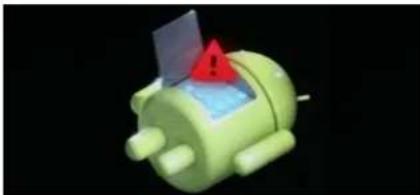
In power off mode, keep holding the HOME and POWER key simultaneously till the following icon appear.
-
Press HOME key to select wipe data/factory and press the POWER key to select.
-
Press the HOME key to select YES-DELETE ALL USER DATA and POWER key to confirm delete all user data.
natural_image
3D rendered green robot with a red warning sign and blue interior (no text or symbols)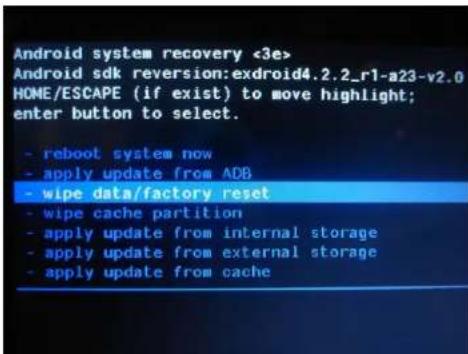
text_image
Android system recovery <3e> Android sdk reversion:exdroid4.2.2_r1-a23-v2.0 HOME/ESCAPE (if exist) to move highlight; enter button to select. - reboot system now - apply update from ADB - wipe data/factory reset - wipe cache partition - apply update from internal storage - apply update from external storage - apply update from cache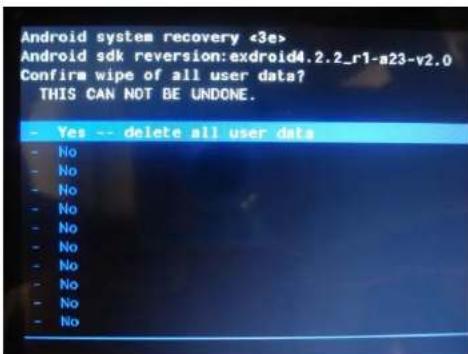
text_image
Android system recovery «3e> Android sdk reversion: exdroid4.2.2_r1-a23-v2.0 Confirm wipe of all user data? THIS CAN NOT BE UNDONE. - Yes -- delete all user data - No - No - No - No - No - No - No - No - No - No4-The screen will show some data. Please wait.
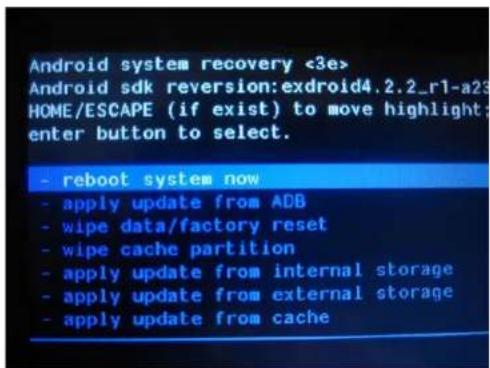
5- Then it show "Reboot system now", press the POWER key and the unit will start doing the recovery.
Please, be patient.
It will be loading data.
Troubleshooting:
- Can not power on:
--Connect the power cable to charge to the device, after a while you can try again.
--If it still can not power on, please contact with our distributor or service centre.
- Strange noises:
--Check if the music file is damaged.
--If the music files are damaged, it may cause serious noise and the sound can be affected.
- Can not download or copy:
--Check if the connection between the device and the Pc is correct.
--Check the spare space of the memory.
--Check the USB cable.
- USB error:
--Make sure that the USB device is securely connected to the USB jack.
--Check if the USB device or cable is damaged.
text_image
Android system recovery <3e> Android sdk reversion: exdroid4.2.2_r1-a23 HOME/ESCAPE (if exist) to move highlight: enter button to select. - reboot system now - apply update from ADB - wipe data/factory reset - wipe cache partition - apply update from internal storage - apply update from external storage - apply update from cache--If the USB device is connected via a USB hub, connect the USB device directly to the device.
- Cannot connect the device to the wireless LAN router:
--Check if the wireless LAN router is on.
--Depending on the surrounding environment, such as the wall material, radio wave receiving condition, or obstacles between the device and the wireless LAN router, the communication distance is lower. Move the device and the wireless LAN router closer to each other.
--Devices that use a 2.4GHz frequency band, such as a microwave, Bluetooth, or digital cordless device, may interrupt the communication. Move the device away from such devices, or turn off such devices.
◆ Resetting the device:
You may have to perform a reset if your device, doesn't respond correctly.
If your device does not respond through touch panel or is blocked.
You can do the recovery mode the device.
How to download the software using the unit.
IMPORTANT: When you download the software, all data will be deleted such as photos, videos and Apps that you have installed.
Do not interrupt this process, please make sure the battery is fully charged.
Please, follow these steps.
1- Open browser and search and open this link: http://www.sunstech.es/download/
2- Select the model of the tablet that you have and download the software.(This software is installed on the INTERNAL SD).
3- When the download is finished, select the App "Sunstech Update" in your unit.
4- Select "Local Update" and after select "Download".
5- In the download paragraph, select the software and wait until the process is finished.
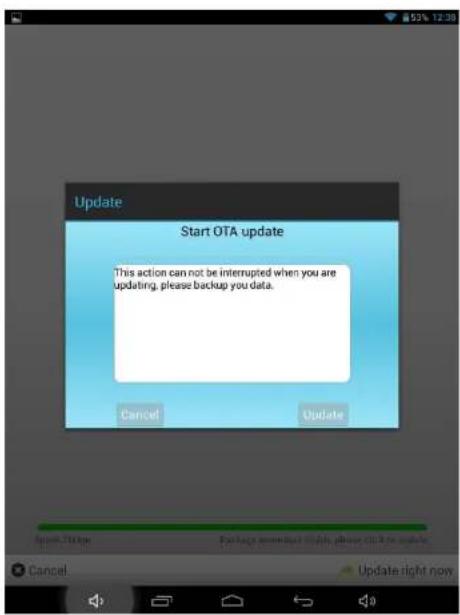
6- After appears the follow image
text_image
Update Start OTA update This action can not be interrupted when you are updating, please backup you data. Cancel Update English: TMMap Package: www.mcp.0048, please click to update. Cancel Update right now7- Select "Update" to install the update.
The unit will start with the installation process.
"PLEASE WAIT, THIS PROCESS MAY LAST FOR A FEW MINUTES"
You may receive a message automatic upgrade or also can to know if exist an automatic update
How to use the automatic update "OTA".
1- If receive an automatic update, follow these steps.

Discover a new version!
2- In top left press and slide down and will see a drop down with the upgrade.

Update
Discover a new version!
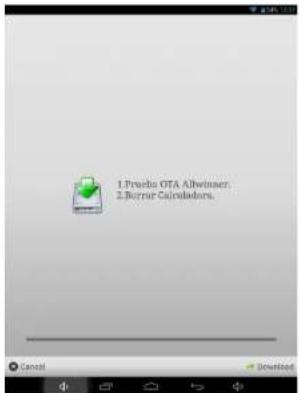
3- After select the Update warning appears this new image.
text_image
1. Prueba OTA Allwinner. 2. Borrur Calculadora.4- To update select Download or exit if you want not update.

Cancel

Download
5- To update select Download.
When it reaches the end of the bar indicator means that the software this downloaded in the unit.
Speed:21kbps
Package download finish, please click to update.
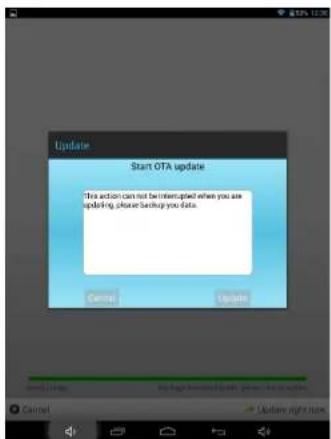
6- Select Update right now and appears the follow image.

Update right now
text_image
Update Start OTA update This action can not be interrupted when you are updating, please backup your date.7- Select "Update" to install the update.
The unit will start with the installation process.
"PLEASE WAIT, THIS PROCESS MAY LAST FOR A FEW MINUTES"
How to use the manual update "OTA".
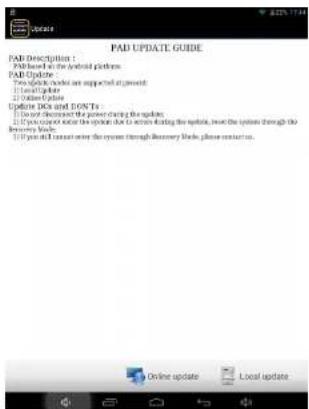
1-Select the icon "Sunstech update" installed on the tablet and appear the follow image.
text_image
PAB UPDATE GUIDE PAD Description : PAD based on the portable platform PAD Update Two updates include an supported update: 1. Get up a folder 2. Get down a folder Update DCs and DONTS : 1. Do not decrease the power charging the updates. 2. If you can enter the system due to access during the update, I need the system through the recovery mode. 3. If you can enter the system through Recovery mode, please contact us.
2-Select Online Update to see if there is any upgrade.
3-In case of exist an update follow the steps in the section "How to use the automatic update "OTA" from step 3.
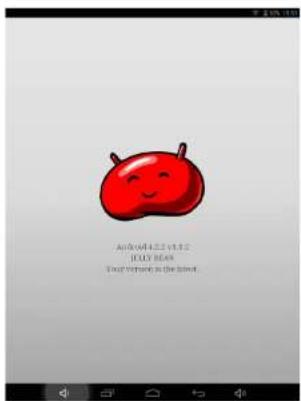
4-In case doesn't exist any update appears the follow image.
text_image
Android 4.2.2 vs 12 #EYES BEANS You're very nice as the latestProduct Specification
| OS | Android 4.2.2 |
| CPU | Allwinner A23 Cortex-A7 Dual-core 1.2G(MAX1.5G) + Mali400 |
| System RAM 512MB DDRIII | |
| Memory 4GB NAND Flash + | SD up to 32GB |
| LCD 7.85" 1024*768 LED-Backlight panel | |
| Battery 3200 mAh | |
| Touch Panel Multi-point Capacitive touch screen | |
| WIFI 802.11 b/g/n | |
| Ethernet LAN Yes (USB dongle) | |
| Multiuser Yes | |
| Gravity 3D gravity sensor | |
| Camera Front 0.3 MBpixels | |
| Music format | MP3,WMA,MP2,OGG,AAC,M4A,MA4,FLAC,APE,3GP,WAV |
| Video format | AVI (H.264, DIVX, DIVX, XVID, rm, rmvb, MKV (H.264, DIVX, DIVX, XVID), WMV, MOV, MP4 (H.264, MPEG, DIVX, XVID), MPEG, MPG, FLV (H.263, H.264) |
| Picture format JPEG, BMP, GIF,PNG | |
Made in China
Specifications are for reference, to prevail in kind
EUROPEAN WARRANTY
1. General
This warranty is granted without prejudice and in addition to the recognized rights for the consumer vis-à-vis the seller provided in the Royal Legislative Decree of 16 November, approving the restated text of the General Law for the Protection of Consumers and Users and other complementary legislation. Therefore, the recognized legal rights for the consumer are not limited or excluded according to the relevant Regional, National or European legislation.
This warranty shall be valid in all the European Union Member States with the limitations that legally correspond in the country in which they are intended to be implemented in accordance with their implementing legislation.
Notwithstanding the foregoing, SUNSTECH shall respect the rights and limitations related to the product warranty that legally correspond in each of the States listed in the Attachment in accordance with their implementing legislation for any product provided that it is intended for the EU market and has been purchased or used by the consumer or user within the EEA.
2. Legal Warranty
This SUSTECH product has a two (2) year warranty counting from the date of delivery and/or purchase. During the above timeframe, SUNSTECH shall be held responsible for any lack of conformity of the product in relation to the contract in accordance with the provisions of the Law for the Protection of Consumers and Users, that shall entitle the consumer to request the repair or replacement of the product, unless one of these options is objectively impossible or disproportionate.
Accordingly, the remedy (i.e. the repair or replacement) shall be deemed to be disproportionate if it imposes unreasonable costs on the seller. In order to determine this, the following shall be considered: (i) the value of the product if there were no lack of conformity; (ii) the relevance of the lack of conformity; and (iii) if the other form of remedy could be carried out without major inconvenience to the consumer and user.
To determine whether the costs are unreasonable, the costs incurred by one form of remedy must be significantly higher than the costs corresponding to the other form of remedy.
In addition, the consumer may choose between requesting a reduction in the price or terminating the contract, if he is not entitled to demand the repair or replacement of the product and whenever these actions would not be completed within a reasonable timeframe and would cause more inconvenience to the consumer and user. However, the termination shall not take place where the lack of conformity is minor.
Both the repair and the replacement of the product as result of the product's lack of conformity shall be free of charge for the consumer and user, including labour and materials.
In any case, repairs under warranty shall be carried out by SUNSTECH's Official Technical Assistance Service or its authorized distributors.
3. Conditions for the warranty to be exercised
To exercise the legal and commercial warranty, it is necessary to submit documentary evidence showing the delivery and/or purchase date of the product, whether the invoice, receipt, delivery slip or sealed and dated warranty card. Documents which have been tampered with or falsified will not be accepted.
The consumer shall contact SUNSTECH's Customer Service Team using the website (under the support section) and will be informed about what action to take. At that time, the consumer shall have to provide a clear description of the malfunction or the lack of conformity of the product with the contract.
In any case, repairs under the warranty shall be carried out by SUNSTECH's Official Technical Assistance Services or its authorized distributors so that SUNSTECH can be held responsible under the legal and/or commercial warranty.
4. Exceptions
The warranty does not foresee or include periodic maintenance or product installation revisions.
In addition, the product will not be considered as lacking conformity in relation to the contract and therefore, it will not be covered by the legal or commercial warranty when:
- The lack of conformity corresponds to a discrepancy with the safety standards or the local or national techniques of a different country to the one it was originally designed and produced in;
- This product or any of its identification features (number of series, etc.) have been partially or completely opened, assembled, unassembled, handled and/or repaired by a person not part of SUNSTECH's Official Technical Assistance Services team or its authorized distributors
-
The lack of conformity is a result of an incorrect installation (except if the installation has been carried out by one of SUNSTECH's authorized sellers or under its responsibility, or by the consumer following SUNSTECH's installation instructions) or an abusive or inadequate use of the product, including but not limited to, a usage that is not in accordance to the normal purpose of the product or the directions for use and maintenance, as defined by SUNSTECH;
-
The lack of conformity has been caused by a computer virus, an action or a manipulation of passwords, software installation, manipulation or reinstallation, etc.;
- The lack of conformity is due to the use of accessories, chargers or consumables that are not SUNSTECH originals and therefore are not designed for that product;
- The lack of conformity is due to the use of any third party software or application that modifies, changes or adapts the software that was approved and/or included by SUNSTECH in the product;
- The lack of conformity is a result of downloading or using third party multimedia services and/or contents available or accessible through the product;
- Damages in or through the battery, which are due to it being overcharged, are produced;
• Any of the box seals or battery cells have been damaged, or there is clear evidence that shows these were handled; and/or - The product damages are caused by any unforeseeable or force majeur circumstances, especially, lightning, water, fire, applying incorrect voltage or any other cause that is not due to the product manufacturing or design.
Under no circumstances will SUNSTECH be held responsible for the loss of any data stored in the product. The consumer will be held responsible for any back-up copies and the protection of any data from loss, damage or destruction.
None of the warranties included here cover the replacement of parts, due to ware or rupture of mechanisms, rubber, boxes and/or plastic, as well as any aesthetic damage resulting from the normal use of the product, for example, if the screen loses its shine with the use of the product. In the same way, the warranties do not cover any type of damage produced during the transportation of the product (including but not limited to aesthetic damage, blows, lines, scratches, stains, dents, etc.) in which case the applicable provisions under SUNSTECH's general contract conditions will apply.
For further information go to www.sunstech.es
You can also contact:
AFEX SUNS, S.A.
Pallars, 189-191
08005 BARCELONA
SAFETY AND PRECAUTION WARNINGS

www.sar-tick.com
This product can be adjusted to the SAR national limits of 2 W/Kg. The specific SAR maximum values are in the information section of this guide.
When you hold the product or use it on your body, maintain a distance of 1.5 cm from your body to ensure the radiofrequency exposure standards.
This device offers communication and entertainment services that follow SUNSTECH's high standards and technological experience.
- The content may differ from the final product of the software provided by the suppliers of services or transmitters and it is subject to alteration without prior notice.
- The elements that come with the device and any available accessory may vary according to the region or supplier of the services.
- The elements provided are designed uniquely for this device and may not be compatible with other devices.
• You may purchase additional accessories at your local SUNSTECH distributor. Ensure that they are compatible with the device before you purchase them. - Other accessories may not be compatible with the device.
- SUNSTECH is not held responsible for problems of insufficient return or any change to the operating system's software. Any attempt to personalize the operating system may cause the device or the applications to function incorrectly.
Instruction icons


Warning: Situations that can cause injuries to yourself or third parties.
Precaution: Situations that can cause damages to the device or other equipment.
Note: Notes, recommendations of use or additional information.
Copyright
Copyright ©2013 Afex suns, S. A.
This guide is protected by international copyright laws.
Reproduction, distribution, translation or transmission of any part of this guide is not allowed under any circumstances or through any means, be it electronic or mechanic. This includes photocopies, records or storage in any information retrieval and storage systems, without previous written authorization from Afex Suns, S. A.
Safety information
This section contains safety information for mobile devices. Some of the content may not apply to your device. In order to avoid injury to yourself or third parties or damage to the device, read the device's safety information before you use it.

Warning
If you do not comply with these safety regulations and warnings, you may suffer serious injury or even death.
Do not use damaged power cords or connectors or loose sockets.
Unsafe connections may cause an electric discharge or a fire.
Do not touch the power cord if your hands are wet and do not pull the cord to disconnect the charger.
If you do so, you may be electrocuted.
Do not bend or damage the power cord.
If you so do, this may cause an electric discharge.
Do not cause a short-circuit in the charger or the device.
If you do so, this may cause an electric discharge or the device may not function correctly.
Use batteries, chargers, accessories and supplies that have been approved by the manufacturer.
- The use of generic batteries or chargers may shorten the useful life of the device or cause incorrect functioning. It may also cause a fire or the battery may explode.
- Only use batteries or chargers that have been approved by SUNSTECH, specifically designed for the device. Any non compatible batteries and chargers may cause serious physical injuries or damage the device.
• SUNSTECH will not be held responsible for the safety of the user whenever accessories or supplies that have not been approved by the brand are used.
Do not cut or drop the charger or the device.
When handling or disposing of the device and charger do so with caution.
- Never throw the battery or the device into the fire. Never place the battery or the device on any sources of heat, such as, ovens, microwaves, glasshouses or radiators, etc. If it overheats, the device may explode. Follow all local regulations with regards to disposing of the used battery or device.
- Do not squash the device or make holes in it.
- Avoid exposing the device to high pressure because this may cause an internal short-circuit and overheating.
Protect the device, battery and charger in order to stop them from getting damaged.
- Avoid exposing the device and battery to very high or very low temperatures.
• Extreme temperatures may damage the device and reduce the charging capacity and the duration of the device and battery. - Avoid the battery entering into contact with metal objects because this may cause a connection between the positive and negative terminals of the battery and damage it temporarily or permanently.
- Never use damaged chargers or batteries.
Do not store the device in or near heaters, microwaves, heated kitchen equipment or high pressure containers.
• The battery may have leakages.
- The device may overheat and cause a fire.
Do not use or store the device in places with a lot of dust or material transported by air.
Dust or foreign materials may cause the device to malfunction and may result in a fire or an electric discharge.
Safety information
Do not bite or suck the device or the battery.
- This may damage the device or cause an explosion or a fire.
• Children and animals may choke on small pieces. - When children use the device, ensure that they do so correctly.
Do not insert the device or the accessories provided into your eyes, ears or mouth.
If you do so, you make choke or suffer serious injuries.
Do not handle damaged lithium-ion batteries or batteries that show evidence of leakage.
To dispose of lithium-ion batteries safely, contact your closest authorized service centre.
PLUGGABLE EQUIPMENT: the socket-outlet shall be installed near the equipment and shall be easily accessible.

Precaution
If you do not comply with these regulations and warnings, you may suffer injuries or cause material damage.
Do not use the device near other electronic devices.
- Most electronic devices use radiofrequency signals. The device may interfere with other electronic devices.
- If you use a LTE data connection, this may cause an interference with other devices, such as audio equipment and telephones.
Do not use the device in a hospital, plane or car that may be affected by interference caused by radiofrequency.
• If possible, avoid using the device at any distance lower than 15 cm from a pacemaker, because the device may cause interferences with it.
- To minimize any possible interference with a pacemaker, use the device only on the opposite side of the body in relation to the position of the pacemaker.
- If you use medical equipment, contact the manufacturer of the equipment before using the device in order to ascertain whether the equipment will be affected by the radiofrequency emitted by the device.
- If electronic devices are used on a plane, these may interfere with the electronic navigation instruments. Ensure that the device is turned off during take-off and landing. After take-off you may use the device on "airplane mode" as long as this is allowed by the cabin crew.
• The electronic devices in your car may malfunction due to the radio interference of the device. Contact the manufacturer for further information.
Do not expose the device to smoke or strong emanations.
If you do so, you may damage the outside part of the device or cause its malfunctioning.
If you use hearing devices, contact the manufacturer for further information about radio interference.
The radiofrequency that the device emits may interfere with some hearing devices. Before using the device, contact the manufacturer in order to ascertain whether the hearing device will be affected by the radiofrequency emitted by the device.
Do not use the device near other devices or apparatuses that emit radiofrequency, such as sound systems or radio towers.
Radiofrequency may cause the malfunctioning of the device.
Turn off the device in potentially explosive atmospheres.
• Turn off the device instead of removing the battery in potentially explosive atmospheres.
• Always respect the standards, instructions and warning signs in potentially explosive atmospheres.
- Do not use the device in petrol stations or near fuel or chemicals or in demolition areas.
- Do not store or transport flammable liquids, gases or explosive material in the same compartment in which the device, its parts or accessories are.
If you become aware of the device or the battery letting off strange odours or sounds or if you see smoke or liquid coming out of the device or battery, stop using the device immediately and take it to an authorized service Centre.
If you do not do so, this may cause a fire or an explosion.
Comply with all the safety regulations and warnings related to the use of mobile devices when driving a vehicle.
When driving, your main responsibility is to control the vehicle safely. If the law does not allow mobile phone use when driving, do not use the mobile device. For your and others' safety use your common sense and remember the following advice:
- Get to know the device and its operating functions, like speed dialling and recall system. These functions allow the time necessary to make and receive calls to be reduced.
- Put the device in a place where it is easy to reach. Make sure that you can access the wireless device without taking your eyes off the road. If you receive a telephone call at an inconvenient time, let voice-mail answer it.
- Stop phone calls when there is heavy traffic or when there are adverse climate conditions. Rain, sleet, snow, ice and heavy traffic can be very dangerous.
- Do not jot down or look for telephone numbers. Jotting down a task or looking at your calendar may distract you from your main responsibility, which is to drive safely.
- Dial carefully and assess the state of the traffic. Make phone calls when you are not moving or before hitting traffic. Try to schedule phone calls when the car is parked.
- Do not have very stressful or emotional phone calls that may distract you. Tell the person that you are speaking to that you are driving and end any conversations that may take away your attention from the road.
Correct use and maintenance of the mobile device.
Keep the device dry.
• Humidity and liquids may damage the parts or the electronic circuits of the device.
- Do not turn on the device if it is wet. If it is already turned on, turn it off and take the battery out immediately (if you cannot turn it off or take the battery out, just leave it as it is). After this, dry the device with a towel and take it to the service centre.
- Liquids will change the colour of the label which indicates the damage caused by the water inside the device. The damage caused by the water in the device may cancel the manufacturer's warranty.
Place the device only on flat surfaces.
If it drops, the device may get damaged.
Do not store the device in very hot or cold places. It is recommended that you use the device at temperatures between 5° and 35°.
- Do not store the device in places with very high temperatures, such as inside a car in the summer. If you do so, you may cause the screen to malfunction, the device may get damaged or the battery may explode.
- Do not expose the device to direct sunlight for long periods of time (for example, on the dashboard of a car).
- Store the battery at temperatures between 0^ and 45^ .
Do not store the device with metal objects, such as coins, keys and necklaces.
- The device may get scratches or stop working properly.
- If the battery terminals come into contact with metal objects, a fire may occur.
Do not store the device near magnetic fields.
- It is possible for the device to start malfunctioning and for the battery to lose power due to being exposed to these fields.
- Cards with magnetic stripe, such as credit cards, telephone cards, travel passes may get damaged due to the magnetic fields.
If the device overheats, stop using it and its applications for a while.
Prolonged skin exposure to a hot device may cause symptoms of burning with low temperature, such as red spots and pigmentation.
Do not use the device if the back cover is not in place.
The battery may come out of the device, which can cause damage or malfunctioning.
If the device has a lamp or a camera flash, do not use it near people's or animal's eyes.
This may cause a temporary loss of vision or damage the eyes.
Be careful when exposing yourself to intermittent light.
- When you use the device, leave some lights turned on in the bedroom and do not have the screen too close to your eyes.
- Convulsions or fainting may occur due to exposure to intermittent light when looking at videos or playing games with intermittent lights for prolonged periods of time. If you feel unwell, stop using the device immediately.
• If anyone close to you suffered from convulsions or fainting when using a similar device, visit a doctor before using the device.
• If you feel discomfort, such as muscle cramps or you feel disoriented, stop using the device immediately and visit a doctor.
• To avoid eye fatigue, have frequents breaks when using the device.
Reduce the risk of injury caused by repetitive movements.
When you carry out repeated actions, such as pressing keys, drawing characters on the touch screen or playing a game, you may feel discomfort in your hands, neck, shoulders or other parts of the body. When you use the device during prolonged periods of time, hold it with relaxed hands, touch the keys lightly and rest frequently. If you continue feeling discomfort during or after taking these steps, stop using the device and visit a doctor.
When you use earphones, protect your hearing and your ears.

- Excessive exposure to loud sounds can cause damage to hearing.
-
Exposure to loud sounds while you are walking may distract you and cause an accident.
-
Always lower the sound before connecting the earphones to an audio source and use the minimum amount of volume necessary to listen to music or have a conversation.
- In dry environments, static electricity may accumulate in the earphones. Avoid using earphones in dry environments or touch metal objects to discharge the static electricity before connecting the earphones to the device.
- Do not use an earphone while you are driving or riding a vehicle. If you do so you may get distracted and cause an accident or you may be subject to legal action, depending on the area where you are driving.
Use the device with caution while you are walking or moving.
• Always pay attention to what is happening around you to avoid physical injury to yourself and others.
• Make sure the earphone cord does not get entangled round your arms or nearby objects.
Do not take devices in your front pockets or round your waist.
You may get injured or damage the device if it falls.
Do not paint your device or put any stickers on it.
- Paint and stickers can obstruct the mobile parts and stop the device from working properly.
- If you are allergic to paint or to the metal parts of the device, you may get a stingy feeling, eczema or swelling. If this happens, stop using the device and visit a doctor.
Do not use the device if the screen is cracked or broken.
The broken glass can cause hand and face injuries. Take the device to an authorized service centre to get it repaired.
Install the mobile devices and the equipment with caution.
• Make sure that the whole mobile device or related equipment that is installed in your vehicle is assembled safely.
- Avoid placing the device and the accessories where the airbag is or next to it. Any wireless equipment installed incorrectly can cause serious injuries when the airbags inflate quickly.
Do not allow the product to fall or to be subject to strong impacts.
• The device may get damaged or malfunction.
• If you bend or deform it the device may get damaged and its parts may malfunction.
Guarantee of the maximum duration of the battery and charger.
- Avoid charging the device for over a week, because overcharging can reduce the battery's service life.
- With time, the device will run out of battery (even when it is not being used) and you will need to recharge it to use it again.
- Disconnect the charger from the power sources when it is not being used.
• Use the battery only for the purpose for which it was designed. - If you do not use the battery for a long time, you may reduce its service life and performance. You may also cause the malfunctioning or explosion of the battery or a fire.
- Follow all the instructions in this manual to guarantee the longest service life possible for your device and battery. Any damage or operating problems caused by not complying with the warnings and instructions may cancel the manufacturer's warranty.
- With time, the device may wear out. Some parts and repairs are covered under the warranty during the validity period; however, the damages or deterioration caused by the use of accessories not approved by the brand are not covered.
Take the following information into account when using the device.
• Use it in a vertical position, as you would a traditional telephone.
- Speak directly into the microphone.
- Do not cover the antenna area with your hands or other objects. This may cause connection problems or cause the battery to run down.
Do not unassembled, change or repair the device.
- Any alteration or change to the device may cancel the manufacturer's warranty. If you need to repair the device, take it to an authorized service centre.
- Do not disassemble or make holes in the battery, this may cause an explosion or a fire.
- Turn off the device before removing the battery. If you remove the battery while the device is still turned on, this may cause malfunctioning.
Take the following information into account when cleaning the device.
• Use a towel or a rubber cloth to clean the device and the charger.
- Clean the battery terminals with cotton or with a towel.
- Do not use chemical substances or detergents. If you do so, you may cause discoloration or corrosion of the outside part of the device or you may cause an electric discharge or a fire.
Do not use it for any other purpose other than the one it was designed for.
The device may malfunction.
When you use the device in public, try not to disturb others.
Only allow qualified professionals to carry out the maintenance of your device.
It is possible for damages to occur and the manufacturer's warranty is cancelled if you allow non qualified personnel to carry out the maintenance of the device.
Be careful when handling SIM cards, memory cards or cables.
- When inserting a card or connecting a cable to the device, make sure the card is inserted correctly or that the cable is connected on the right side.
- Do not take the card out when the device is transferring information or it has access to it, because you may lose data and damage the card or the device.
- Protect the cards from strong discharges, static electricity and noise generated from other electronic devices.
- Do not touch the contacts or the gold terminals with your fingers or with metal objects. If the card is dirty clean it with a soft cloth.
• If you insert a card or connect a cable forcefully or incorrectly you may cause damage to the multifunctional socket or other parts of the device.
Make sure you have access to emergency services.
It is possible that in some areas or circumstances you may not be able to make emergency phone calls. Before travelling to remote areas or developing countries, plan an alternative form of communicating with the emergency services.
Protect your personal data and avoid confidential information from being spread or used incorrectly.
- When you use the device, make sure you make back-up copies of important data. SUNSTECH will not be held responsible for any loss of data.
- When you dispose of the device, make a back-up copy of all the data and after re-establish the device to avoid personal information from being used inappropriately.
- Read the licenses screen carefully when you download applications. Be especially careful with applications that have access to various functions or a significant amount of your personal information.
- Control your accounts frequently to avoid any suspicious or non-authorized use. If you find any indication of your personal information not being used appropriately, contact your services supplier to delete or change the information in your account.
- If you lose the device or it is stolen, change the passwords of your accounts to protect your personal information.
- Avoid using applications from unknown sources and block the device with a pattern, a password or a PIN.
Do not distribute material protected with copyright.
Do not distribute material protected with copyright without the authorization of the content owners. If you do so, you may violate copyright laws. The manufacturer will not be held responsible for any legal problem caused by illegal use of material protected by the user.
Malware and virus
Follow these suggestions to protect the device against malware and virus. If you do not do so, you may cause damages or loss of data that may not be covered under the warranty.
- Do not download unknown applications.
- Do not use unreliable websites.
-
Delete any suspicious text messages or emails from unknown senders.
-
Create a password and change it regularly.
- Deactivate the wireless functions, such as Bluetooth, when you are not using them.
- If the device behaves strangely, execute an antivirus program to detect a possible infection.
• Execute an antivirus program on the device before starting applications and files that you just downloaded.
• Install anti-virus programs on your computer and execute them regularly to detect any possible infections. - Do not edit the registration adjustments or change the device's operating system.
Information about the certification of the Specific Absorption Rate (SAR).
THIS DEVICE FOLLOWS INTERNATIONAL STANDARDS OF EXPOSURE TO RADIO WAVES.
Your mobile device is a radio transmitter and receiver. It was designed to not exceed the limits of exposure to radio waves (electromagnetic fields of radiofrequency) recommended by international standards. The standards were developed by an independent scientific organization (ICNIRP) and include a substantial safety margin designed to ensure the safety of all people, regardless of their age or state of health.
The exposure to radio wave standards use a measurement unit known as the Specific Absorption Rate, SAR. The SAR limit for mobile devices is 2 W/Kg. The SAR tests are carried out using standard operation positions with the device transmitting at its maximum certified energy level in all frequency bands. The highest SAR amounts under the ICNIRP standards for this device model are:
| Maximum SAR for this model and conditions under which it registered | |
| SAR for positions near the head. | 0.285 W/Kg |
| SAR for positions near the body. | 0.0399 W/Kg |
During the use, the real SAR values for this device are usually a lot lower from the values indicated previously. This is due to maximizing the system's efficiency and to minimize the interference with the network, the operation capacity of your mobile device reduces automatically when the maximum power is not needed for the call. The lower the amount of energy leaving the device, the lower the SAR amount will be.
A SAR test was carried out with the device on the body with a distance of 1.5 cm. To comply with the radiofrequency exposure requirements, while using the device on the body, the device shall have to be at least 1.5 cm away from the body.
Some organizations, like the World Health Organization or the Food and Drug Administration of the United States suggest that if users want to reduce exposure, they can use a hands free accessory to main the wireless device far away from the head and body when in use, or reduce the amount of time spent using the device.
Correct disposal of this product.
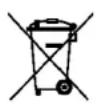
(Electronic device waste)
(This applies in countries where recollection systems happen separately).
The presence of this symbol on the product, accessories or information material indicates that neither the product nor its electronic accessories (such as, the charger, helmets, USB cable) should be disposed of with other household waste.
To avoid any possible damage to the environment or human health caused by uncontrolled disposal of waste, separate these products from other waste and recycle them. This way, you are promoting the sustainable reuse of material resources.
Individual users can contact the establishment where they purchased the product or the relevant local authorities to get information about where and when they can take it in order to submit it to ecological and safe recycling.
Business users can contact their supplier and check the purchase contract conditions. This product and its electronic accessories should not be disposed of with other commercial waste.
Correct disposal of this product's batteries

(This applies in countries where recollection systems happen separately).
The presence of this mark on the batteries, manual or product packaging indicates that when the service life of the batteries has ended they should not be disposed of with other household waste. The chemical symbols Hg, Cd and Pb indicate that the battery has mercury, cadmium or lead at levels a lot higher than the reference values admitted by the 2006/6 Directive of the European Union.
If the batteries are not disposed of correctly, these substances may cause personal injury or damage the environment.
To protect natural resources and promote recycling, separate the batteries from other waste and recycle them through the free collection service in your area.
Exemption from responsibility clause
Part of the content and services to which you obtain access through this device belong to third parties and are protected under copyright, patent, registered trademark and/or other intellectual property laws. This content and services are only for personal use and not commercial use. It is possible that the content or the services cannot be used if not authorized by the content owner or the supplier of the services. Without prejudice to the aforementioned information, except when expressly authorized by the content owner or service supplier, you cannot change, copy, reedit, charge, publish, transmit, translate, sell, create derivative works, explore or distribute in any way or by any means the content or the services shown through this device.
"THE CONTENT AND THE SERVICES OF THIRD PARTIES ARE PROVIDED "AS IS". SUNSTECH DOES NOT GUARANTEE THE CONTENT OR THE SERVICES PROVIDED, EITHER EXPRESSLY OR IMPLICITLY, FOR NO PURPOSE. SUNSTECH EXPRESSLY RENOUNCES ANY IMPLICIT GUARANTEES, INCLUDING BUT NOT LIMITED TO, MERCHANTABILITY OR SUITABILITY GUARANTEES FOR A PURPOSE IN PARTICULAR. SUNSTECH DOES NOT GUARANTEE THE VERACITY, VALIDITY, REPRODUCTION, LEGALITY OR INTEGRITY OF ANY TYPE OF CONTENT OR SERVICE PROVIDED THROUGH THIS DEVICE AND UNDER NO CIRCUMSTANCES, INCLUDING NEGLIGENCE, WILL SUNSTECH BE HELD RESPONSIBLE. BOTH IN TERMS OF CONTRACT OR PREJUDICE TO ANY DIRECT OR INDIRECT, ACCIDENTAL, SPECIAL OR CONSEQUENTIAL DAMAGES, LAWYERS' FEES, EXPENSES OR ANY OTHER TYPE OF DAMAGE FROM OR IN RELATION TO ANY TYPE OF INFORMATION INCLUDED IN OR AS A RESULT OF THE USE OF ANY TYPE OF CONTENT OR SERVICE BY YOURSELF OR A THIRD PARTY, THE POSSIBILITY OF THE REFERRED DAMAGES IS KNOWN."
The services of third parties may cease or be interrupted at any time and SUNSTECH does not carry out representations or guarantees in relation to the availability of content or service for any period of time. The content and services are transmitted by third parties through networks and transmission locations over which SUNSTECH has no control. Without limiting the generality of this clause, SUNSTECH expressly renounces any responsibility for any interruption or suspension of content or service provided through this device.
SUNSTECH is not responsible for customer service regarding content and services. Any question or request for service regarding content or services should be sent directly to the services and content suppliers.
DECLARATION OF CONFORMITY
Council Directive(s) to which conformity is declared:
Directive (1999/5/EC) - R & TTE
Directive (2004/108/EC) - EMC
Directive (2006/95/EC) - LVD
Directive (2011/65/EU recasting 2002/95/EC) - RoHS
Application of the Standards: EN 60950-1: 2006 + A11: 2009 + A1: 2010+A12: 2011
EN 55022: 2010 ETSI EN 300 328 V1.7.1 (2006-10) EN 55024: 2010 ETSI EN 301 489-1 V1.9.2 (2011-09) EN 61000-3-2: 2006+A1: 2009+A2: 2009 ETSI EN 301 489-17 V2.2.1 (2012-09) EN 61000-3-3: 2008 IEC 62321: 2008 EN 62479: 2010
Manufacturer's name: AFEX SUNS, S.A.
Manufacturer's address: C/Pallars 189, 08005 Barcelona
Type of equipment: Tablet
Trade: SUNSTECH
Model no.: TAB785DUAL
We, the undersigned, hereby declare under our sole responsibility that the specified equipment is in conformity with the above Directive(s) and Standard(s)
(Signature)
Víctor Planas Bas (Full name)
General Manager (Position)
Place: Barcelona
Date: 12 - April - 2014
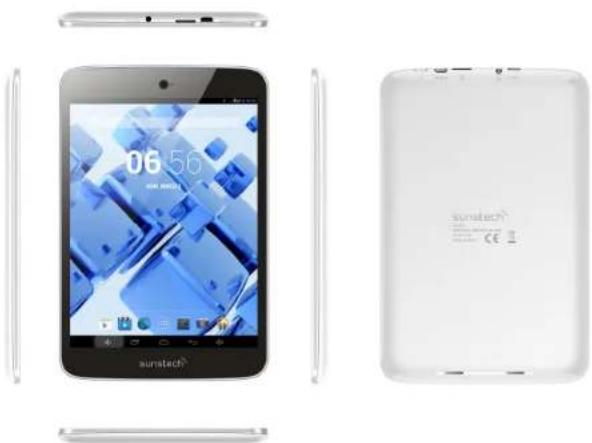
sunstech ^12
TAB785DUAL 4GB
Manual de usuario
natural_image
Exterior and back view of a Sunitech tablet device showing app interface, battery cover, and front panel (no text or symbols on device body)natural_image
Simple line drawing of a rectangular object with a vertical line and numbered label '8' (no text or symbols on the object itself)【CONSEJOS】
natural_image
Illustration of a tablet connected to a power cord and a wall socket (no text or symbols)【SUGERENCIAS】:
text_image
Wi-Fi WIRELESS & NETWORKS Wi-Fi Bluetooth Data usage More... device Sound Display HDMI ScreenshotSetting wifi23 Secured with WPA/WPA.2 360-ZS1665 Secured with WPA/WPA.2 pz-test1 Secured with WPA/WPA.2 (MP3 available) dlink WPA available MID Secured with WPA/WPA.2 (MP3 available) wifi.2.4GHz_test1 Secured with WPA/WPA.2 ChinaNet-Doou Secured with WPA/WPA.2 (MP3 available)◆ Pantalla:
text_image
Screenshot of a desktop computer interface with Chinese menu options and a landscape backgroundAlmacenamiento
text_image
Wi-Fi More... DEVICE Sound Display Hidmi ScreenshotSetting Storage Battery Apps Users INTERNAL STORAGE Total space 0 KB/MB Available 67 KB/ Apps (app data & media content) 15KB/ Cached data 50KB/ Misc. 1.8M/s RAND FLASH◆ Apps
text_image
Settings Battery Apps Users PERSONAL Location access Security Language & input Backup & reset ACCOUNTS Add account Language English (UK) Spell checker Personal dictionary KEYBOARD & INPUT METHODS Default English (US) - Android keyboard (ADSP) Android keyboard (ADSP) English (US) Google voice typing Automatic Japanese IME
Cámara
natural_image
3D rendered green robot with a red triangular component on top, against a black background (no text or symbols)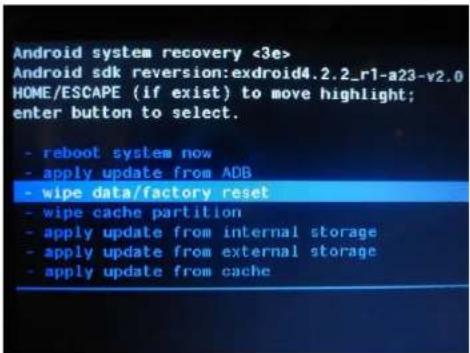
text_image
Android system recovery <3e> Android sdk reversion:exdroid4.2.2_r1-a23-v2.0 HOME/ESCAPE (if exist) to move highlight; enter button to select. - reboot system now - apply update from ADB - wipe data/factory reset - wipe cache partition - apply update from internal storage - apply update from external storage - apply update from cache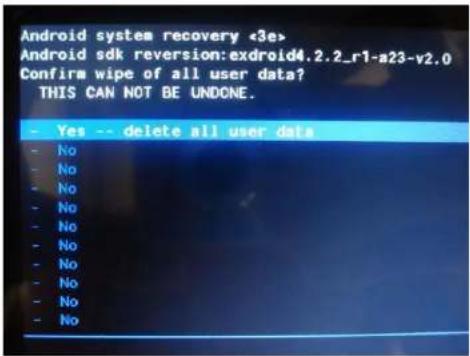
text_image
Android system recovery <3e> Android sdk reversion:exdroid4.2.2_r1-a23-v2.0 Confirm wipe of all user data? THIS CAN NOT BE UNDONE.text_image
Android system recovery <3e> Android sdk reversion:exdroid4.2.2_r1-a23 HOME/ESCAPE (if exist) to move highlight: enter button to select. - reboot system now - apply update from ADB - wipe data/factory reset - wipe cache partition - apply update from internal storage - apply update from external storage - apply update from cacheEspere.
text_image
Update Start OTA update This action can not be interrupted when you are updating, please backup you data. Cancel Update Your Edition Settings: Immuneal Event, please click in spring Cancel Update right nowPackage download finish, please click to update.
text_image
Update Start OTA update This action can not be detected when you are updating, please backup you data. Cancel Update Cancel AutoCAD software: www.103.com/103.com AutoCAD software: www.103.com/103.comtext_image
PAD UPDATE GUIDE PAD Description: PAD Board All the optional platform. PAD Update: This update mode are supported at present. □ Local Update □ Follow Update Update IDs and DOWTS: □ Yes or decreased the power charging the update. □ If you cannot enter the system due to write during the update, over the system through the Recovery Mode. □ If you will enter the system through Recovery Mode, please continue.
text_image
Android iOS version 1.0.2 JULY READ Your Version is the book.Copyright ©2013 Afex suns, S. A.
Directiva (1999/5/EC) - R & TTE
Directiva (2004/108/EC) - EMC
Directiva (2006/95/EC) - LVD
natural_image
Exterior and front views of a Sunitech 5G tablet device (no visible text or symbols on the device body)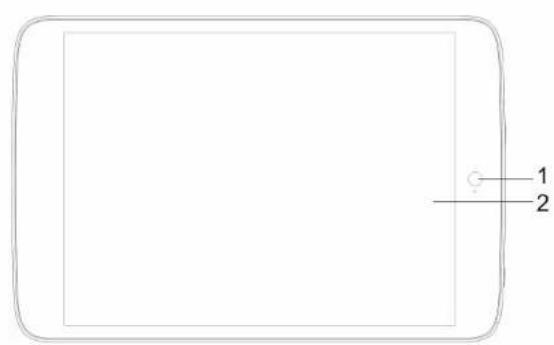
text_image
1 2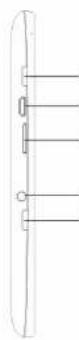
3
natural_image
Simple line drawing of a rectangular object with internal vertical lines and a numbered label '8' on the right side (no text or symbols on the object itself)【CONSEILS】:
natural_image
Illustration of a tablet connected to a wall-mounted power strip and cable (no text or symbols)【CONSEILS】:
text_image
Wi-Fi WIRELESS & NETWORKS Wi-Fi ON Bluetooth OFF Data usage More... DEVICE Sound Display HDMI Screenshot Setting wifi123 Secured with WPA/WPA2 360-2S1E65 Secured with WPA/WPA2 pz-test1 Secured with WPA/WPA2 (WPS available) dlink WPS available MID Secured with WPA/WPA2 (WPS available) wifi_2.4GHZ_test1 Secured with WPA/WPA2 ChinaNet-Dceu Secured with WPA/WPA2 (WPS available)◆ Affichage :
text_image
Screenshot of a desktop computer interface with Chinese UI elements and a landscape background◆ Stockage
text_image
Wi-Fi More... DEVICE Sound Display HDMI Screenshot/Setting Storage Battery Apps Users INTERNAL STORAGE Total space 0.9MB Available 62.7MB Apps (app data & media content) 11.8MB Cached data 30.4MB Misp 1.3MB RANGE FLASH◆ Apps
text_image
Settings Battery Apps Users PERSONAL Location access Security Language & input Backup & reset ACCOUNTS Add account EWSERS Language English (UK) Spell checker Personal dictionary NETWORKS & INPUT METHODS Default English (US) - Android keyboard (AOSP) Android keyboard (AOSP) English (US) Google voice typing Add accounts Japanese IME◆ Camera [Caméra)
natural_image
3D rendered green Android robot with a red warning sign on its body (no text or symbols)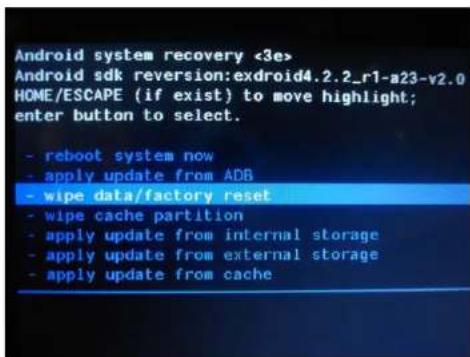
text_image
Android system recovery <3e> Android sdk reversion:exdroid4.2.2_r1-a23-v2.0 HOME/ESCAPE (if exist) to move highlight; enter button to select. - reboot system now - apply update from ADR - wipe data/factory reset - wipe cache partition - apply update from internal storage - apply update from external storage - apply update from cache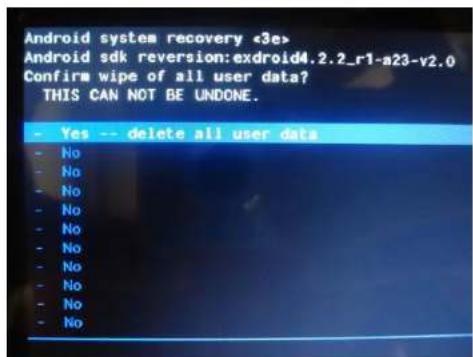
text_image
Android system recovery <3e> Android sdk reversion: exdroid4.2.2_r1-a23-v2.0 Confirm wipe of all user data? THIS CAN NOT BE UNDONE. - Yes -- delete all user data - No - No - No - No - No - No - No - No - Notext_image
Android system recovery <3e> Android sdk reversion:exdroid4.2.2_r1-a23 HOME/ESCAPE (if exist) to move highlight: enter button to select. - reboot system now - apply update from ADB - wipe data/factory reset - wipe cache partition - apply update from internal storage - apply update from external storage - apply update from cacheDépannage :
text_image
Start OTA update This action can not be interrupted when you are updating, please backup you data.text_image
Speed:21kbps Package download finish, please click to update.text_image
Update Start OTA update This action can not be interrupted when you are updating, please backup you data.text_image
PAD UPDATE GUIDE PAD Description: PAD Based on the Android platforms PAD Update: Free Update Guide are important at present In Local Update In Online Update Update DOs and DNTs: 1. From Connection to the power driving the update; 2. If you cannot enter the system due to errors during the update, then the system through the Recovery Node. 3. If you will continue to enter the system through recovery node, please contact us.
text_image
Apple will 1.2.2 vs 1.2 JH137 00:59 Your version is the latest.VOTRE VERSION EST LA PLUS RÉCENTE
Copyright ©2013 Afex suns, S. A.
DÉCLARATION DE CONFORMITÉ
Directive (1999/5/EC) - R & TTE
Directive (2004/108/EC) - EMC
Directive (2006/95/EC) - LVD
Directive (2011/65/EU recasting 2002/95/EC) - RoHS
natural_image
Exterior and back view of a Sunitech tablet device showing app interface, battery cover, and front panel (no text or symbols on device body)natural_image
Simple line drawing of a rectangular object with internal vertical lines and a labeled dimension '8' (no text or symbols beyond basic markings)【DICAS】
natural_image
Illustration of a tablet connected to an electrical outlet with a cable, showing connection arrows (no text or symbols)【DICAS】:
text_image
Wi-Fi WIRELESS & NETRINKES Wi-Fi Bluetooth Data usage More... device Sound Display HDMI ScreenshotSetting wifi123 Seated with WTA/WPA.2 360-ZS1665 Seated with WTA/WPA.2 pz-text1 Seated with WTA/WPA.2 (WiFi available) dlink WiFi available MID Seated with WTA/WPA.2 (WiFi available) wifi, 2.4GHz.text1 Seated with WTA/WPA.2 ChinaNet-Deou Seated with WTA/WPA.2 (WiFi available)◆ Visor:
text_image
Screenshot of a mobile app interface with Chinese UI elements and a landscape backgroundEspaço
text_image
Wi-Fi More... device Sound Display HDMI ScreenshotSetting Storage Battery Apps Users INTERNAL STORAGE Total space 0 KB/MB Available 0.7 KB Apps (app data & media content) 15 KB Cached data 6 KB Mpc. 1.8 KB RNG FLASHAplicações
text_image
Settings Battery Apps Users PERSONAL Location access Security Language & input Backup & reset ACCOUNTS Add account SYSTEM Language English (UK) Spell checker Personal dictionary KEYBOARD & INPUT METHODS Default English (US) - Android keyboard (AOSP) Android keyboard (AOSP) English (US) Google voice typing ADMINISER Japanese IMECâmara
natural_image
3D rendered green Android robot with a red warning sign on its body (no text or symbols)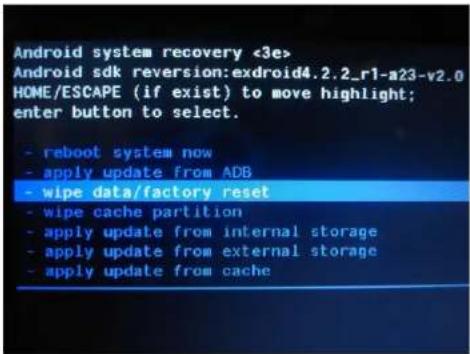
text_image
Android system recovery <3e> Android sdk reversion:exdroid4.2.2_r1-a23-v2.0 HOME/ESCAPE (if exist) to move highlight; enter button to select. - reboot system now - apply update from ADB - wipe data/factory reset - wipe cache partition - apply update from internal storage - apply update from external storage - apply update from cache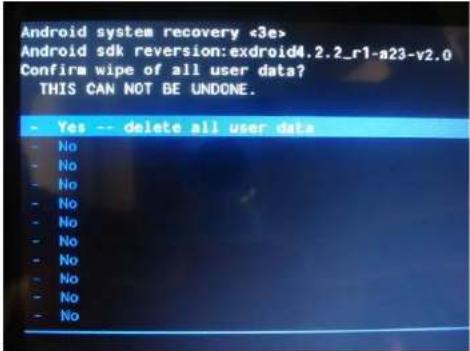
text_image
Android system recovery «3e> Android sdk reversion: exdroid4.2.2_r1-a23-v2.0 Confirm wipe of all user data? THIS CAN NOT BE UNDONE. - Yes -- delete all user data - No - No - No - No - No - No - No - No - Notext_image
Android system recovery <3e> Android sdk reversion: exdroid4.2.2_r1-a23 HOME/ESCAPE (if exist) to move highlight: enter button to select. - reboot system now - apply update from ADB - wipe data/factory reset - wipe cache partition - apply update from internal storage - apply update from external storage - apply update from cachetext_image
Start OTA update This action can not be interrupted when you are updating, please backup you data.text_image
Speed:21kbps Package download finish, please click to update.text_image
Update Start OTA update This action can not be interrupted when you are updating, please backup you data.text_image
PAD UPDATE GUIDE PAD Description: PAD based on the Android platform PAD Update: Pre-Update mode are supported at current. 1. Localify Mode 2. Localify Update Update DOs and DON'Ts. 3. Do not discount the power during the update. 4. If you cannot enter the system due to access during the update, reset the system through the memory mode. 5. If you can return the system through the memory mode, please return it.
text_image
Android iOS 1.0.2.1 VLS. JULY REACH Your version is the latest.Copyright ©2013 Afex suns, S. A.