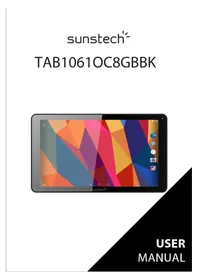
Tab 1061 OC - Tablet Sunstech - Free user manual and instructions
Find the device manual for free Tab 1061 OC Sunstech in PDF.



| Product type | Touchscreen tablet |
| Brand | Sunstech |
| Model | Tab 1061 OC |
| Screen size | 10.1 inches |
| Screen type | 5-point capacitive |
| Resolution | 1024 × 600 pixels |
| Processor | Allwinner A83 Octa-core |
| Operating system | Android 5.1.1 (Lollipop) |
| Internal memory | 8 GB (model 8GBBK) |
| Memory expansion | MicroSD up to 32 GB |
| Front camera | 2.0 megapixels |
| Rear camera | 5.0 megapixels |
| Wi-Fi connectivity | 802.11 b/g/n |
| USB port | USB 2.0 (micro-USB) |
| Battery | 5000 mAh (Lithium-ion) |
| Battery life | Up to 6 hours (estimated mixed use) |
| Supported audio formats | MP3, MP2, APE, WMA, WAV, FLAC, OGG, AAC, 3GP |
| Supported video formats | RMVB, MKV, WMV, MOV, MP4, PMP, MPG, FLV, 3GP, H.264 |
| Supported image formats | JPEG, JPG, BMP, GIF, PNG |
| Power supply | 5V power adapter (included), USB charging |
| Care and cleaning | Soft, dry cloth; avoid moisture and chemicals |
| Safety | DAS max 2 W/kg; keep at 1.5 cm from body |
| Repairability | Repair by authorized center only; do not disassemble |
| Warranty | 2 years (European) |
| Country of manufacture | China |
Frequently Asked Questions - Tab 1061 OC Sunstech
User questions about Tab 1061 OC Sunstech
0 question about this device. Answer the ones you know or ask your own.
Ask a new question about this device
Download the instructions for your Tablet in PDF format for free! Find your manual Tab 1061 OC - Sunstech and take your electronic device back in hand. On this page are published all the documents necessary for the use of your device. Tab 1061 OC by Sunstech.
USER MANUAL Tab 1061 OC Sunstech
DECLARATIONOFCONFORMITY 28
SAFETYPRECAUTIONS
Readthesesimpleguiderlines.Notfollowingthemmaybedangerousorillegal.
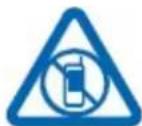
Switchoffinrestrictedareas
SwitchthedeviceweoffwhenmobileTAB1061OC8GBBKuseisnotallowedorwhen itmaycauseinterferenceordanger,forexample,inaircraft,inhospitalsornear medicalequipment,fuel,chemicals,orblastingareas.Obeyallinstructionsin restrictedareas.
Roadsafetycomesfirst

Obeyalllocatedlaws.Alwayskeepyourhandsfreetooperatethevehiclewhile driving.Yourfirstconsiderationwhiledrivingsshouldberoadsafety.
Interference

Allwirelessdevicesmaybesusceptibletointerference,whichcouldaffect performance
Qualifiedservice

Onlyqualifiedpersonnelmayinstallorrepairthisproduct.

Batteries, chargers, and other accessories
Useonlybatteries,chargers,andotheraccessoriesapprovedbyS805Gforusewith this device.Third-partychargersthatcomplywiththeIEC/EN62684standard,andthat canconnecttoyourdevicemicroUSBconnector,maybecompitable.Donot
connectincompatibleproducts.
Keepyourdeviceredry

Yourdeviceisnotwater-resistant.Kepitdry.
Glasspart
Thedevicescreenismadeofglass.Thisglasscanbreakifthedevicewisdroppedon
ahardsurfaceorreceivesasubstantialimpact.If the glassbreaks, donot glasspartsofthedevicereattempttoremovethebrokenglassfromthedevic.
Stopusingthedevicetimehtheglassisreplacedbyqualifiedservicepersonnel.
SAFETYANDPRECAUTIONWARNINGS

www.sar-tick.com
ThisproductcanbeadjustedtotheSARnationallimitsof2 W/Kg.ThespecificSARmaximumvaluesareinthe informationsectionofthisguide.
Whenyouholdtheproductoruseitonyourbody,maintainadistanceof1.5cmfromyourbodytoensuretheradiofrequencyexposuresstandards.
This device offers communication and entertainment services that follow SUNSTECH's high standards and technological experience.
- Thecontentmaydifferfromthefinalproductofthesoftwareprovidedbythesuppliersof servicesortransmittersanditissubjecttoalterationwithoutpriornotice.
- The elements that come with the device and any available accessory may vary according to the regionorsupplieroftheservices.
- Theelementsprovidedaredesigneduniquelyforthisdeviceandmaynotbecomppatible withotherdevices.
- YoumaypurchaseadditionalaccessoriesatyourlocalSUNSTECHdistributor.Ensurethat theyarecompatiblewiththedevicebeforeyoupurchasethem.
- Other accessories may not be compatible with the device.
- SUNSTECH is no the operation system's software. Any attempt to personalize the operating system may cause the device or the application's function incorrectly.
Instructionicons

Warning: Situations that can cause injuries to your third parties.
Precaution: Situations that can cause damages deviceorotherquipment.
Note: Notes,recommendationsofuseoradditional information.
Copyright
Copyright © 2013Afexsuns,S.A.
Thisguideisprotectedbyinternationalcopyrightlaws.
Reproduction,distribution,translationortransmissionofanypartofthisguideisnotallowed under any circumstances or through any means, be it electronic or mechanic. This includes photocopies, records or storage in any information retrieval and storage systems, without previouswrittenauthorizationfromAfexSuns,S.A.
Safetyinformation
Thissectioncontainssafetyinformationformobiledevices.Someofthecontentmay notapplytoyourdevice.Inordertoavoidinjurytoyourselforthirdpartiesordamage tothedevicereadthedevicestssafetyinformationbeforeyouseit.

Warning
If youdonot comply with thesesafetyregulationsand warnings, you maysufferserious injuryorevenge.
Donotusedamagedpowercordsorconnectororloosesockets.
Unsafecomnnectionsmaycauseanelectricdischargeorafire.
Donottouchthepowercordifyourhandsarewetanddonotpullthecordto disconnectthecharger.
If youdoso, you may beelectrocuted.
Donotbendordamagethepowercord.
If yousodo, this may cause anelectric discharge.
Donotcauseashort-circuitinthechargerorthedevic.
If youdoso, this may cause anelectric discharge or the device may not function correctly.
Usebatteries, chargers, accessories and suppliessthathavebeenapprovedby the manufacturer.
- Theuseofgenericbatteriesorchargersmayshortentheusefullifeofthedevicere causeincorrectfunctioning.ltmayalsocauseafireorthothebatterymayexplode.
- OnlyusebatteriesorchargersthathavebeenapprovedbySUNSTECH,specifically designedforthedevicEnAnynoncompatiblebatteriesandchargersmaycauseserious physicalinjuriesordamagethedevice.
- SUNSTECH will not be held responsible for the safety of the userwheneveraccessories or suppliesthaventbeenapprovedbythebrandareused.
Donotcutordropthechargerothedevic.
Whenhandlingordisposingofthedevicandchargerdosowithcaution.
- Neverthrowthebatterytheredevicetothefire.Neverplacethebatteryorthedeviconanysourcesofheat,suchas,ovens,microwaves,glasshousesorradiators,etc.lfitoverheats,thedevicemayexplode.Followallocalregulationswithregardstodisposingoftheusedbatteryordevice.
- Donotsquashthedevicereormakeholesinit.
- Avoid exposing the device to high pressure because this may cause an internal short-circuit and overheating.
Protectthedevic,batteryandchargerinordertostopthemfromgettingdamaged.
- Avoid exposing the device and battery to very high or very low temperatures.
- Extremetemperaturesmaydamagethedeviceandreducethechargingcapacityand thedurationofthedevicelandbattery.
- Avoid the batteryentering into contact with metal objects because this may cause a connection between the positive and negative terminals. Also, the battery and damage it temporarily or permanently.
- Neverusedamagedchargersorbatteries.
Do not store the device in or near heaters, microwaves, heated kitchen equipment or highpressurecontainers.
The battery may have leakages.
- Thedevicemayoverheatandcauseafire.
Donotuseorstorethedeviceinplaceswithalotofdustormaterialtransportedbyair. Dustorforeignmaterialsmaycausethedevicetomalfunctionandmayresultinafireoran electricdischarge.
Safetyinformation
Donotbiteorsuckthedeviceorthoebattery.
This may damage the device or cause an explosion or a fire.
Childrenandanimalsmaychokeonsmallpieces.
- Whenchildrenusethedevicere,ensurethattheydosocorrectly.
Donotinsertthedevicetheaccessoriesprovidedintoyoureyes,earsormouth. Ifyoudoso,youmakechokeorsufferseriousinjuries.
Donothandledamagedlithium-ionbatteriesorbatteriesthatshowevidenceof leakage.
Todisposeoflithium-ionbatteriessafely,contactyourclosestauthorizedservicecentre.
PLUGGABLE EQUIPMENT: the socket-outlet shall be installed near the equipment and shall be easily accessible.

Precaution
If youdonotcomplywiththeseregulationsand warnings,youmaysuffer injuriesorcause material damage.
Donotusethedevicenearotherelectronicdevices.
- Mostelectronicdevicesuseradiofrequencysignals.Thedevicemayinterferewith otherelectronicdevices.
- IfyouuseaLTEdataconnection, this may cause an interference with other devices, such as audio equipment and telephones.
Donotusethedeviceinahospital,planeorcarthatmaybeaffectedbyinterference causedbyradiofrequency.
- If possible, avoid using the device at any distance lower than 15cm from a pacemaker, because the device may cause interference within it.
- Tominimize anypossibleinterferencewithapacemaker,usethedevicemonlyonthe oppositesideofthebodyinrelationtothepositionofthepacemaker.
- If you use medical equipment, contact the manufacturer of the equipment before using the device in order to ascertain whether the equipment will be affected by the radiofrequency emitted by the device.
- Ifelectronicdevicesareusedonaplane,thesemayinterferewiththeelectronic navigationinstruments. Ensurethatthedevicesturnedoffduringtake-offand landing.Aftertake-offyoumayusethedevicemon"airplanemode"aslongasthis allowedbythecabincrew.
- Theelectronicdevicesinyourcarmaymalfunctionduetotheradiointerferenceofthedevice.Contactthemanufacurerforfurtherinformation.
Donotexposethedevicetos smokeorstrongemanations.
If youdoso, you may damage the outside part of the device or cause its malfunctioning.
If you use hearing devices, contact them manufacturer for further information about radio interference.
Theradiofrequencythatthedevicememitsmayinterferewithsomehearingdevices.Before usingthedevic,contactthemanufacurinordertoascertainwhetherthearingdevice willbeaffectedbytheradiofrequencyemittedbythedevic.
Donotusethedeviceneartherdevicesorapparatusesthemittradiofrequency,such assoundsystemssorrradiotowers.
Radiofrequencymaycausethemalfunctioningofthedevic.
Turnoffthedevicepinpotentiallyexplosiveatmospheres.
- Turnoffthedevicesteenthadofremovingthebatteryinpotentiallyyexplosive atmospheres.
- Alwaysrespectthestandards,instructionsandwarningsignsinpotentiallyexplosive atmospheres.
- Donotusethedevicepinpetrolstationsornearfuelorchemicalsorindemolitionareas.
- Donotstoreortransportflammableliquids, gasesorexplosivematerialinthesame compartmentinwhicheverdevice,itspartsoraccessoriesare.
If you become aware of the device or the battery letting off strange odours sound for if you see smoke or liquid coming out of the device or battery, stop using the device immediately and take it to an authorized service centre.
If youdonotdoso, this may cause a fire or an explosion.
Complywithalthesafetyregulationsand warningsrelatedtotheuseofmobiledevices whendrivingvehicle.
Whendriving,yourmainresponsibilityistocontrolthevehiclesafely.lfthelawdoesnotallow
mobilephoneusewhendriving,donotusethemobiledevice.Foryourandothers'safetyuse yourcommonsenseandrememberthefollowingadvice:
- Gettoknownthedevicelanditsoperatingfunctions,likespeededdiallingandrecall system.Thesefunctionsallowthetimenecessaryarytomakeandreceivecallstobereduced.
- Putthedeviceinaplacewhereitiseasytoreach.Makesurethatyoucanaccesssthe wirelessdevicewithouttakingyoureyesofftheroad.Ifyoureceiveatelephonecallat aninconvenienttime,letvoice-mailanswerit.
- Stop phone calls when there is heavy traffic or when there are adverse climate conditions. Rain, sleet, snow, ice and heavy traffic can be very dangerous.
- Donotjotdownorlookfortelephonenumbers.Jottingdownatakorlookingatyour calendarmaydistractyoufromyourmainresponsibility,whichistodrivesafely.
- Dialcarefully andassessthestateofthetraffic.Makephonecallswhenyouarenot movingorbeforehittingtraffic.Trytoschedulephonecallswhenthecarisparked.
- Do not have very stressful or emotional phone calls that may distract you. Tell the personthatyouarespeakingtothatyouaredrivingandendanyconversationsthat maytakeawayyourattentionfromtheroad.
Correctuseandmaintenanceofthemobiledevice. Keepthedevicedry.
- Humidityandliquidsmaydamagethepartsortheelectroniccircuitsofthedevic.
- Donotturnonthedevicif if it is wet. If it is already turned on, turn it off and take the batteryoutimmediately(ifyoucannotturnitoffortakethebatteryout,justleaveitas itis).Afterthis,drythedevicewithatowelandtakeitttotheservicecentre.
- Liquidswillchangethecolourofthelabelwhichindicateshedamagecausedbythe waterinsidethedevicemanycancelthe manufacturer'swarranty.
Placethedevicemonlyonflatsurfaces.
Ifitdrops, the devicemaygetdamaged.
Donotstorethedeviceinverhotorcoldplaces.Itisrecommendedthatyouusethe deviceattemperaturesbetween 5^ and 35^ .
- Donotstorethedevicelineplaceswithveryhightemperatures,suchasinsideacarin thesummer.Ifyoudoso,youmaycausethescreentomalfunction,thedevicemayget damagedorthebatterymayexplode.
- Do not expose the device to direct sunlight for long periods of time(foreexample,on thedashboardofacar).
- Storethebatteryattemperaturesbetween 0^ and 45^ .
Donotstorethedevicewithmetalobjects,suchascoins,keysandnecklaces.
The device may get scratches or stop working properly.
- Ifthebatteryterminalscomeintocontactwithmetalobjects,afiremayoccur.
Donotstorethedevicenearmagneticfields.
- It is possible for the device to start malfunctioning and for the battery to lose power duetobeing exposedtothesesefields.
- Cardswithmagneticstripe, such as credit cards, telephone cards, travelpasses may get damaged duetothemagnetic fields.
Ifthedevicereoverheats,stopusingitanditsapplicationsfor awhile.
Prolonged skinexposuretoahotdevicemaycausesymptomsofburningwithlow temperature,suchasredspotsandpigmentation.
Donotusethedevicefifthebackcoverisnotinplace.
Thebattery may come out of the device, which can cause damage or malfunctioning.
Ifthedevicehasalamporacameraflash,donotuseitnearpeople'soranimal'seyes.
This may cause atemporary loss of visionordamagetheyes.
Becarefulwhenexposingyourselftointermittentlight.
- Whenyouusethedevic,leavesomelightsturnedoninthebedroommanddonothave thescreentooclosetoyoureyes.
- Convulsions or fainting may occur due to exposure to intermittent light when looking at videosorplayinggames with intermittent lights for prolonged periodsoftime.If youfeelunwell,stopusingthedeviceimmediately.
- Ifanyoneclosetoyousufferedfromconvulsionsorfaintingwhenusingasimilar device, visitadoctorbeforeusingthedevic.
- Ifyoufeeldiscomfort,suchasmusclecrampsoryoufeeldisoriented,stopusingthe deviceimmediatelyandvisitadoctor.
- To avoid eye fatigue, have frequents breaks when using the device.
Reducetheriskofinjurycausedbyrepetitivemovements.
When you carry out repeated actions, such as pressing keys, drawing characters on touch screen or playing a game, you may feel discomfort in your hands, neck, shoulders or other part of the body. When you use the device during prolonged periods of time, hold it with relaxed hands, touch the keys slightly and rest frequently. If you continue feeling discomfort during or after taking these steps, stop using the device and visit a doctor.
When you useearphones,protectyourhearingandyourears.
- Excessiveexposuretoloudsoundscancausedamageto hearing.
-
Exposure to loud sounds while you are walking may distract you and cause an accident.
-
Always lower the sound before connecting the earphones to an audio source and use theminimumamountofvolumenecessaryyrolistentomusicorhaveaconversation.
-
Indryenvironments,staticelectricitymayaccumulateinthearphones.Avoidusing earphonesindryenvironmentsortouchmetalobjectstodischargethestatic electricitybeforeconnectingthearphonestothedevic.
- Do not use an earphone while you are driving or riding a vehicle. If you do so you may get distracted and cause an accident. You may be subject to legal action, depending on the area where you are driving.
Usethedevicewithcautionwhileyouarewalkingormoving.
- Alwayspayattentiontowhatishappeningaroundyouavoidphysicalinjuryto yourselfandothers.
- Makesuretheearphonecorddoesn'tgetentangledroundyourarmsnearby objects.
Donottakedevicesinyourfrontpocketsorroundyourwaist.
Youmaygetinjuredordamagethedevicifitfalls.
Donotpaintyourdeviceorputanystickersonit.
- Paintandstickerscanobstructthemobilepartsandstopthedevicefromworking properly.
Ifyouareallergictopaintortothemetalpartsofthedevic,youmaygetastingy feeling,eczemaorswelling.Ifthishappens,stopusingthedevicandvisitadoctor.
Donotusethedevicefithescreeniscrackedorbroken.
Thebrokenglasscancausehandandfaceinjuries.Takethedevicetoanaauthorizedservice centretogitetreated.
Installthemobiledevicesandthequipmentwithcaution.
- Make sure that the whole mobile device or related equipment that is installed in your vehicleisassembled safely.
- Avoid placing the device and the accessories where the airbag is or next to it. Any wireless equipment installed incorrectly can cause serious injuries when the airbags inflate quickly.
Donotallowtheproducttofallortobesubjecttostrongimpacts.
- Thedevicemaygetdamagedormalfunction.
If you bend or deform it the device may get damaged and its parts may malfunction.
Guaranteeofthemaximumdurationofthebatteryandcharger.
- Avoidcharging the device for overawEEK, because overcharging can reduce the battery's servicelife.
-
Withtime, the device will runout of battery (even when it is not being used) and you will need to recharge it out again.
-
Disconnectthechargerfromthepowersourceswhenitisnotbeingused.
- Use the battery only for the purpose for which it was designed.
- Ifyoudonotusethebatteryforalongtime,youmayreduceitssservicelifeand performance.Youmayalsocausethemalfunctioningorexplosionofthebatteryora fire.
- Follow all the instructions in this manual to guarantee the longest service life possible for your device and battery. Any damage or operating problems caused by not complying with the warnings and instructions may cancel the manufacturer's warranty.
- With time, the device may wear out. Some parts and repairs are covered under the warranty during the validity period; however, the damagesordeterioration caused by the useofaccessoriesnotapprovedbythebrandarenotcovered.
Take the following information into account when using the device.
- Use it in a vertical position, as you would a traditional telephone.
- Speakdirectlyintothemicrophone.
- Do not cover the antenna area with your hands or other objects. This may cause connectionproblemsorcausethebatterytorundown.
Donotunassembled,changeorrepairthedevic.
- Anyalterationorchangetothedevicemaycancelthemanufacturer'swarranty.Ifyou needtorepairthedevicetakeittoanaauthorizedservicecentre.
- Donotdisassembleormakeholesinthebattery, this maycauseanexplosionorafire.
- Turn off the device before removing the battery. If you remove the battery while the deviceisstillturnedon, this maycausemalfunctioning.
Take the following information into account when cleaning the device.
Useatowelarurubberclothtocleanthedeviceandthecharger.
Clean the battery terminals with cotton or with a towel.
- Do not use chemical substances or detergents. If you do so, you may cause discoloration or corrosion of the outside part of the device or you may cause an electric discharge or fire.
Donotuseitforanyotherpurposeotherthantheoneitwasdesignedfor.
Thedevicemaymalfunction.
Whenyouusethedevicepublic,trynottodisturbothers.
Onlyallowqualifiedprofessionalstocarryoutthemaintenanceofyourdevice.
Itispossiblefordamagestooccurandthemanufacturer'swarrantyiscancelledifyouallow nonqualifiedpersonneltocarryoutthemaintenanceofthedevic.
BecarefulwhenhandlingSIMcards,memorycardsorcables.
- When inserting acardorconnecting acabletothe device, makesurethecard is inserted correctly or the cable is connected on the right side.
- Do not take the card out when the device is transferring information or it has access to it, because you may lose data and damagethecardorthedevic.
- Protecttthecardsfromstrongdischarges,staticelectricityandnoisegeneratedfrom otherelectronicdevices.
- Donottouchthecontactsorthegoldterminalswithyourfingersorwithmetalobjects. Ifthecardisdirtycleanitwithasoftcloth.
- Ifyouinsertacardorconnectacableforcefullyorincorrectlyyoumaycausedamage tothemultifunctionalsockettorotherpartsofthedevice.
Makesureyouhaveaccessstoemergencyservices.
Itispossiblethatinsomeareasorcircumstancesyoumaynotbeabletomakeemergency phonecalls. Before travelling to remoteareasordeveloping countries, plan an alternative formofcommunicating with the emergency services.
Protectyourpersonaldataandavoidconfidentialinformationfrombeingspreador usedincorrectly.
- Whenyouusethedevicemakesureyoumakeback-upcopiesofimportantdata. SUNSTECHwillnotbeheldresponsibleforanylossofdata.
- Whenyoudisposethedevice,makeaback-upcopy of allthedataandafter re-establishthedevicetoavoidpersonalinformationfrombeingusedinappropriately.
- Readthelicensesscreencarefullywhenyoudownloadapplications.Beespecially carefulwithapplicationsthathaveaccessstovariousfunctionors asignificantamount ofyourpersonalinformation.
- Controlyouraccountsfrequentlytoavoidanysuspiciousornon-authorizeduse.Ifyou findanyindicationofyourpersonalinformationnotbeingusedappropriately,contact yourservicessuppliertodeleteorchangetheinformationinyouraccount.
- If you lose the device or it is stolen, change the passwords of your accountstoprotect yourpersonalinformation.
- Avoid using applications from unknown sources and block the device with a pattern, a passwordoraPIN.
Donotdistributematerialprotectedwithcopyright.
Donotdistributematerialprotectedwithcopyrightwithouttheauthorizationofthecontent owners.Ifyoudoso,youmayviolatecopyrightlaws.Themanufacturererwillnotbeheld responsibleforanylegalproblemcausedbyillegaluseofmaterialprotectedbytheuser.
Malwareandvirus
Followthesesuggestionstoprotectthedevicegagainstmwareandvirus.Ifyoudonot doso,youmaycauseddamagesorlossofdatathatmaynotbecoveredunderthe warranty.
- Donotdownloadunknownnapplications.
-
Donotuseunreliablewebsites.
-
Deleteanysuspicioustextmessagesiremailsfromunknownssenders.
- Create a password and change it regularly.
- Deactivatethewirelessfunctions,suchasBluetooth,whenyouarenotusingthem.
- Ifthedevicbehavesstrangely,executeantivirusprogramtodetectapossible infection.
- Executeanantivirusprogramonthedevicebeforestartingapplicationsandfilesthat youjustdownloaded.
- Install anti-virus programs on your computer and execute them regularly to detect any possible infections.
- Do not edit the registration adjustments or change the device's operating system.
InformationaboutthecertificationoftheSpecificAbsorptionRate(SAR).
THISDEVICEFOLLOWSSINTERNATIONALSTANDARDSOFEXPOSURETORADIOWAVES.
Yourmobiliedevicisearadiotransmitterandreceiver.Itwasdesignedtonotexceedthelimits ofexposuretoradiowaves(electromagneticfieldsofradiofrequency)recommendedby internationalstandards.Thestandardsweredevelopedbayanindependentscientific organization(ICNIRP)andincludeasubstantialsaftymargindesigntoensurethesafetyof allpeople,regardlesstheirageorstateofhealth.
TheexposuretoradiowaveststandardsuseameasurementunitknownasheSpecific AbsorptionRate,SAR.TheSARlimitformobiledevicesis2W/Kg.TheSARtestsarecarriedout usingstandardoperationpositionswiththedevicetransmittingatitsmaximumcertified energylevelinalfrequencybands.ThehighestSARamountsundertheICNIRPstandardsfor thisdevicemodelare:
| MaximumSARforthismodelandconditionsunderwhichitregistered | |
| SARforpositionsnearthehead. | 0.285W/Kg |
| SARforpositionsnearthebody. | 0.0399W/Kg |
During the use, the real SAR values for this device are usually a lot lower from the values indicated previously. This is due to maximizing the system's efficiency and to minimize the interference with the network, the operation capacity of your mobile device reduces automatically when the maximum power is not needed forthcall. The lower the amount of energy leaving the device, the lower the SAR amount will be.
A SAR test was carried out with the device on the body with a distance of 1.5cm . To comply with theradiofrequencyexposurerelquirements, while using the device on the body, the devices shall have at least 1.5cm away from the body.
Someorganizations,liketheWorldHealthOrganizationortheFoodandDrugAdministration oftheUnitedStatessuggeststhatifuserswanttoreduceexposure,theycanuseahandsfree accessorytomainthewirelessdevicefarawayfromtheheadandbodywheninuse,orreduce theamountoftimespentusingthedevic.
Correctdisposalthisproduct.
(Electronicdevicewaste)
(Thisappliesin countrieswhererecollectionsystemshappen separately).
Thepresenceofthissymbolontheproduct,accessoriesorinformation materialindicatesthatneithertheproductnoritselectronic accessories(suchas,thecharger,helmets,USBcable)shouldbe disposedofwithotherhouseholdwaste.
Toavoidanypossibledamagetothenvvironmentalhealthcausedbyuncontrolled disposalofwaste,separatetheseproductsfromotherwasteandrecyclethem.Thisway,you arepromotingthesustainablereseuseofmaterialresources.
Individualuserscancontacttheestablishmentwheretheypurchasedtheproductorthe relevantlocalauthoritiestogetinformationaboutwhereandwhentheycantakeitinorderto submitittoecologicalandsaferecycling.
Businessuserscancontacttheirsupplierandcheckthepurchasecontractconditions.This productanditselectronicaccessoriesshouldnotbedisposedofwithothercommercialwaste.
Correctdisposalthisproduct'sbatteries
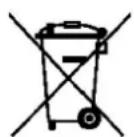
(This applies in countries where recollection systems happen separately).
The presence of thisismonthebatteries,manualorproduct packagingindicatesthatwhentheservice lifeofthebatterieshas endedtheyshouldnotbedispersedofwithotherhouseholdwaste.
Thechemicalsymbolshg,CdandPbindicatethatthebatteryhas mercury,cadmiumorleadatlevelsaltohigherthanthereference valuesadmittedbythe2006/6DirectiveoftheEuropeanUnion.
If the batteries are not disposed of correctly, these substances may cause personal injury or damage the environment.
To protect natural resources and promote recycling, separate the batteries from other waste andrecyclethemthroughthefreecollectionserviceinyourarea.
Exemptionfromresponsibilityclause
Partofthecontentandservicesostwhichyouobtainaccessthroughthisdevicebelongto thirdpartiesandareprotectedundercopyright,patent,registeredtrademarkand/orother intellectual property laws. This content and services are only for personal use and not commercialuse.Itispossiblethatcontentortheservicescannotbeusedifnotauthorized bythecontentownerorthesupplieroftheservices.Withoutprejudicetotheaforementioned information, except when expressly authorized by the content owner or service supplier, you cannot change, copy, reedit, charge, publish, transmit, translate, sell, create derivative works, explore or distribute in any way or by any means the content or the services shown through thisdevice.
"THECONTENTANDTHESERVICESOFTHIRDPARTIESARE PROVIDED"ASIS".SUNSTECHDOES NOT GUARANTEE THE CONTENT OR THE SERVICES PROVIDED, EITHER EXPRESSLY OR IMPLICITLY, FOR NO PURPOSE. SUNSTECH EXPRESSLY RENOUNCES ANY IMPLICIT GUARANTEES, INCLUDING BUT NOT LIMITED TO, MERCHANTABILITY OR SUITABILITY
GUARANTEESFORAPURPOSEINPARTICULAR.SUNSTECHDOESNOTGUARANTEETHE VERACITY,VALIDITY,REPRODUCTION,LEGALITYORINTEGRITYOFANYTYPEOFCONTENTOR SERVICEPROVIDEDTHROUGHTTHISDEVICEANDUNDERNOCIRCUMSTANCES,INCLUDING NEGLIGENCE,WILL SUNSTECHBEHILDRESPONSIBLE.BOTHINTERMSOFCONTRACTOR PREJUDICETOANYDIRECTORINDIRECT,ACCIDENTAL,SPECIALORCONSEQUENTIAL DAMAGES, LAWYERS'FEES,EXPENSESORANYOTHERTYPEOFDAMAGEFROMORIN RELATIONTOANYTYPEOFINFORMATIONINCLUDEDNORASARESULTOTHEUSEOFANY TYPEOFCONTENTORSERVICE BY YOURSELFFORATHIRDPARTY,THEPOSSIBILITYOFTHE REFERREDDAMAGESIKnown."
TheservicesofthirdpartiesmayceaseorbeinterruptedatanytimeandSUNSTECHdoesnot carry out representations or guarantees in relation to the availability of content or service for anyperiodoftime.Thecontentandservicesaretransmittedbythirdpartiesthrough networksandtransmissionlocationsoverwhichSUNSTECHhasnocontrol.Withoutlimiting thegeneralityofthisclause,SUNSTECHexpresslyrenouncesanyresponsibilityforany interruptionorsuspensionofcontentorserviceprovidedthroughthisdevice.
SUNSTECH is not responsible for customer service regarding content and services. Any question or request for service regarding content or services should be sent directly to the servicesandcontentsuppliers.
INTRODUCTION
PackageContent
Before use your new device, check that the content of the package and make sure that is the same as the followingitems:
TAB1061OC8GBBK
- PowerAdapter
USBCable
WarrantyCard
InstructionManual
KeysandParts
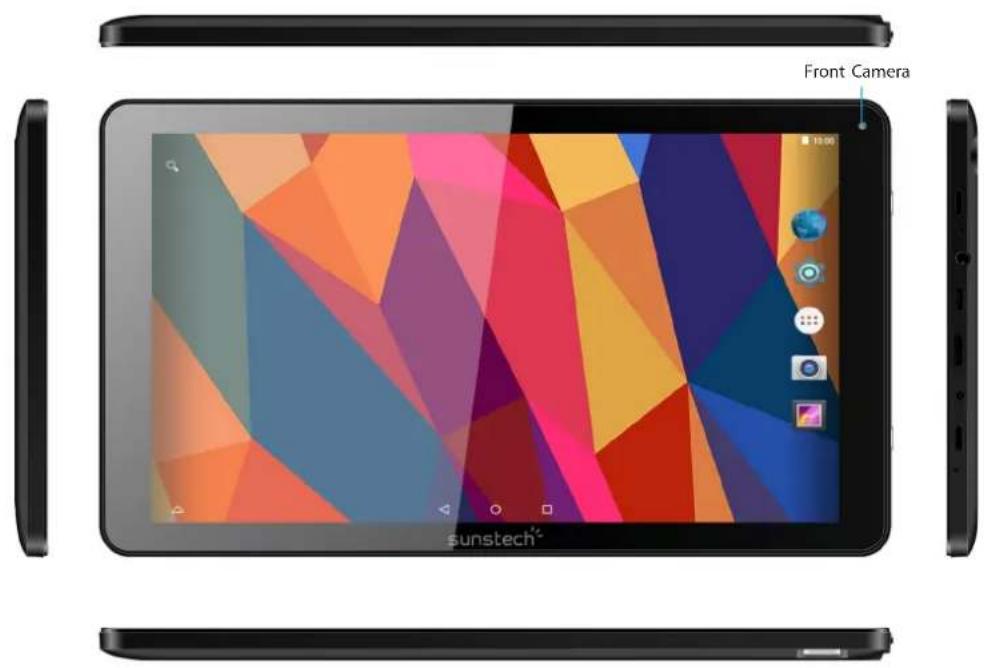
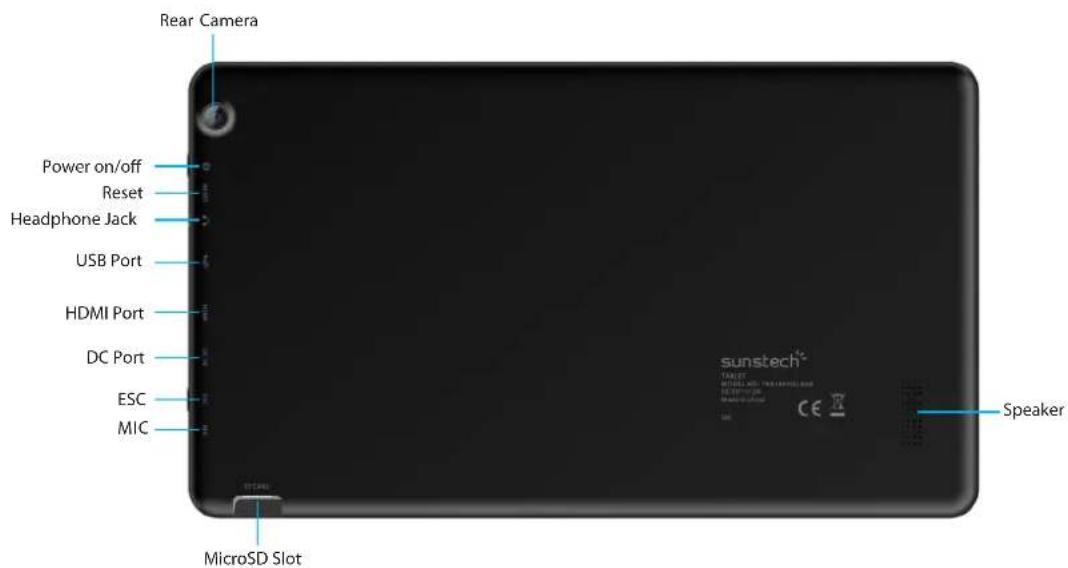
GETSTARTED
ChargeyourTAB1061OC8BBK
Yourbatteryhasbeenpartiallychargedatthefactory, butyoumayneedtorechargeitbeforeyoucanswitchtheTAB1061OC8GBBKonforthefirsttime.
MakesureyouusetheoriginalUSBchargertochargeyourTAB1061OC8GBBKoranychargertotally compatible(sameconnector,VandmA).
- FirstconnecttheUSBcabletothecharger, and plug the charger into a wall outlet, and then connect the micro-USBendofthecable toyourTAB1061OC8GBBK.
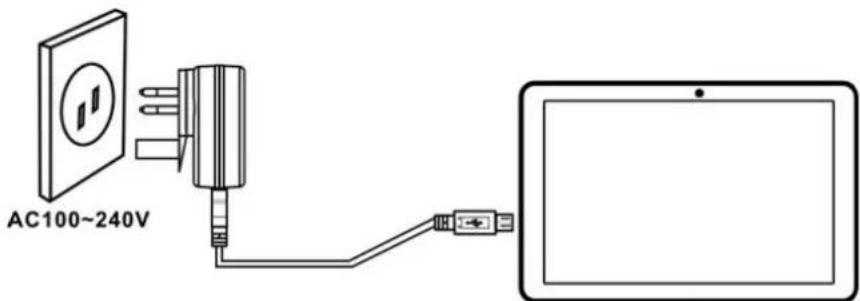
- Whenthebatteryisfull,disconnectthechargerfromtheTAB1061OC8BBK,thenfromthewalloutlet.
Youdon'tneedtochargethebatteryforaspecificlengthoftime, andyoucanusetheTAB1061OC8GBBK whileit'scharging.
If the battery is completely discharged, it may need to charge for up to 20 minutes before you can use your TAB1061OC8GBBK.Thechargingindicatormaynotbedisplayedinthisime.
Firststartup
PowerOn
PressandholdthePOWERbuttonduring5secapproximatelyandthedisplaywillpoweronandshowth SUNSTECHLogo.
PowerOff
Pressandholdthepowerkeyuntilthefunctionoffwillappear,thenselectOKtoconfirm.
Firstinstallation
OnthefirstPOWERONaeasystepbystepofconfigurationwillappear.Onlyfollowthe instructionsthatwillappearinthedisplayinordertoccompletetheconfigurationofyournew device.
LockScreen
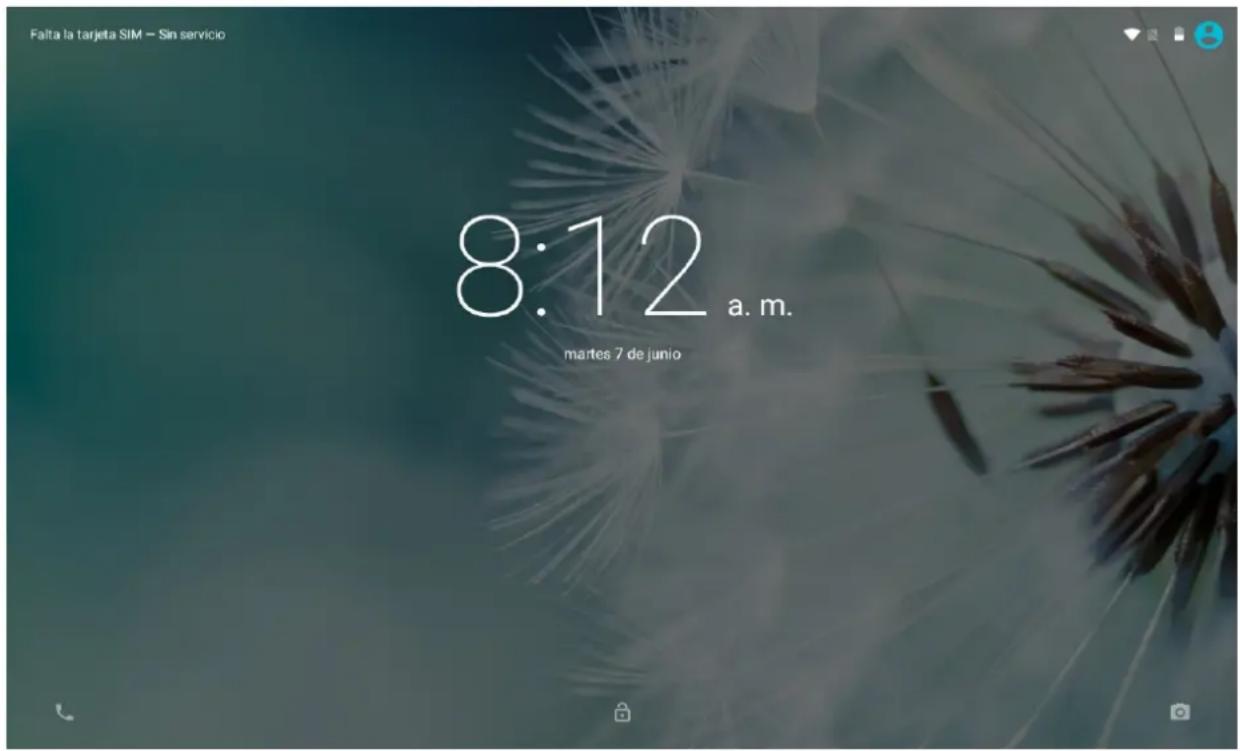
Inordertounlockthescreenyouonlyhavetodragupthepadlock.Also,inthisscreenyouwillseethe notificationsthatyouhavereceivedfromyourinstalledapps,andthetime-date.
HomeScreen
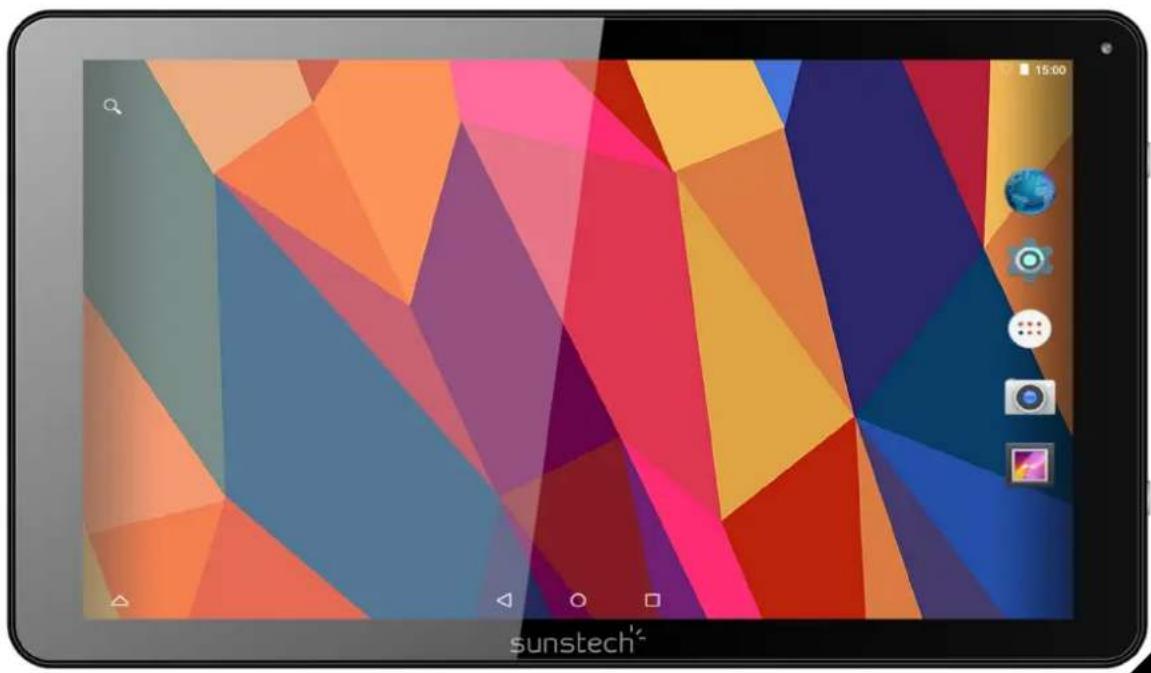
TheHomescreenwilllooksimilartothepicturebelow.Itisactuallyfivescreens,eachofwhich canhaveadifferentlayoutoficons.Toswitchbetweenscreens,simplyslideyourfingerleftor rightacrosssthedisplay.
Thestatusbarandnavigationbuttonsarealwaysvisible,nomatterwhichHomescreenyou cancurrentlyviewing.
TheDesktopcontainsshortcutstoyourmost-usedapplicationsandwidgets TouchthescreenicontoquicklysearchtheWorldWideWebusingGoogle.
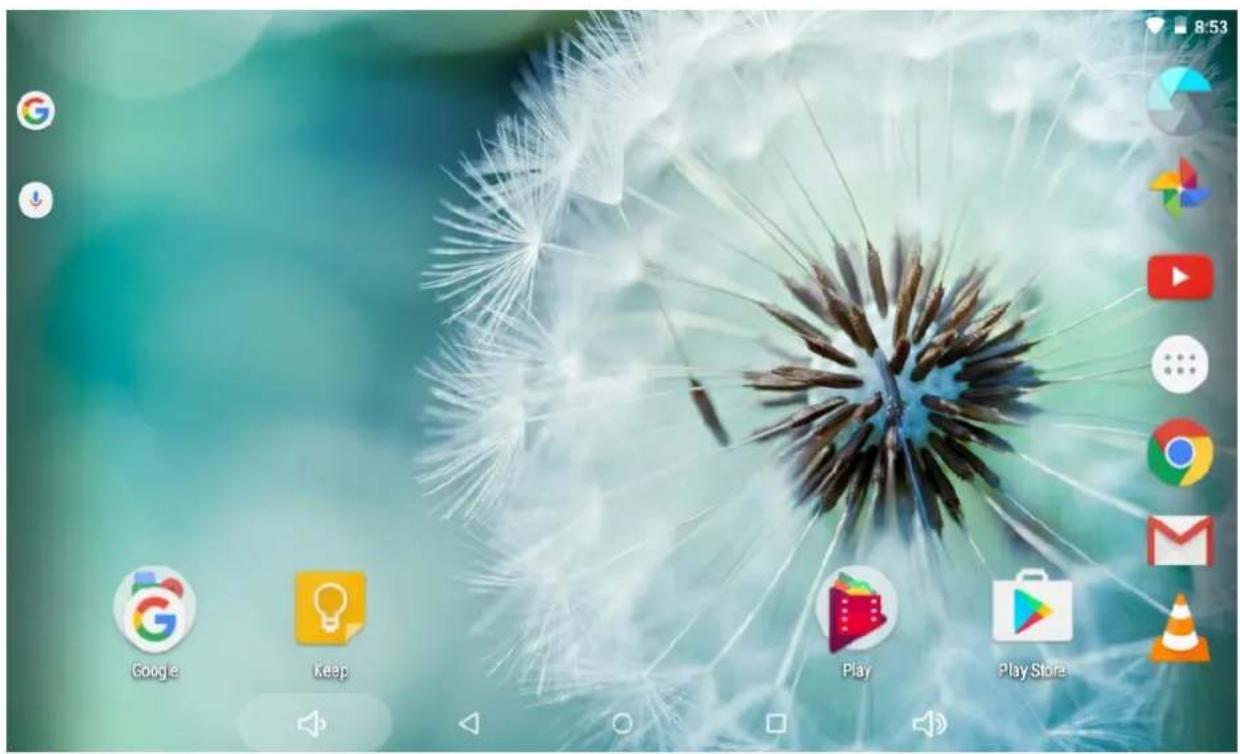
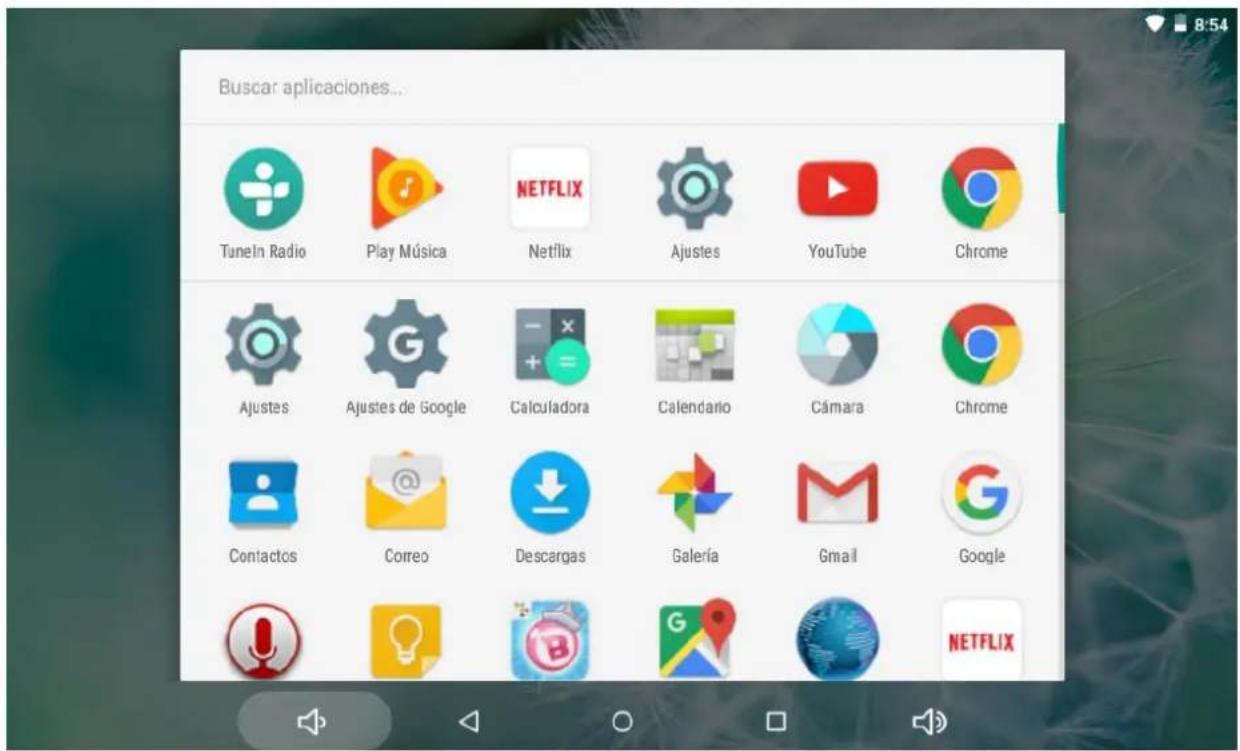
TheiconwilllaunchtheApplicationmenu.
Thestatusbardisplayssysteminformation,suchascurrenttime,wirelessconnectivityand battery.Touchtoexpandthestatusbarformedetailedinformation.
The button moves back onestepto the previous menu/page.
The buttonsreturnsimmediatelytotheAndroiddesktop.
The buttonshowsamenuofrecentlyopenedapplications.
SettingsMenu
ThesettingsmenuallowsyoutoadjustTabletsystemconfiguration.Tochangesettings:
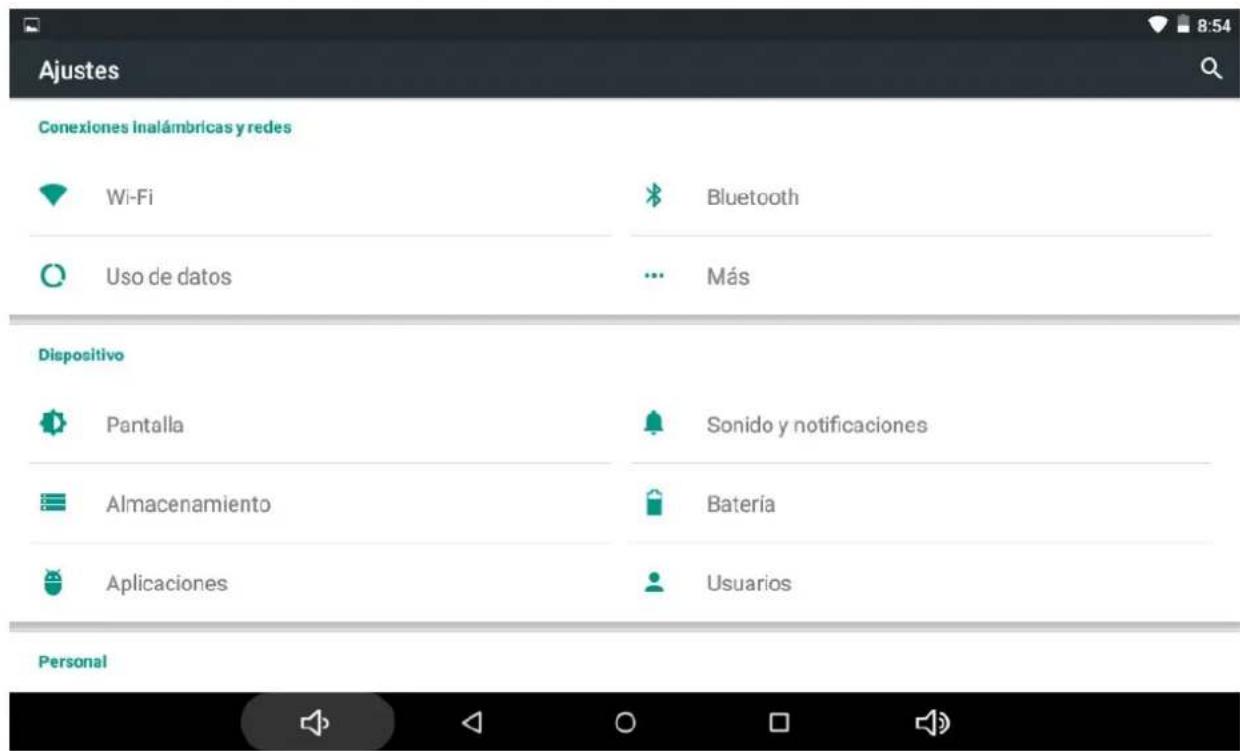
- Touch the "Settings" menu icon on the Application menu. The Settings menu will open.
- Guide your fingerupordowntheleftside of the screentos scroll through the listof available categories.
- Touchacategorytitleoviewfurtheroptionsontherightsideofthescreen.
Wi-Fi- Connectto/disconnectfromwirelessnetworks,viewconnection statusDatausage-Enable/disabledmobiledata,viewcurrentusage,setmobiledatalimit (note:thisfunctionisavailableonlyondevicessuppliedwith3Gcard)Sound-Changevolume, touchsound,screenlocksoundsetc
Display-Changebrightness,wallpaper,sleepsettings,fontsizeetc
Storage-ManageNANDandMicroSDcard,viewavailablecapacitetyetc
Battery-Seebatterystatusandpowered-ontimeApps-Manageapplications,ru servicesetcAccounts-Manageaccountsetc
Apps- Manage applications, running servicesetc
USERS&PROFILES -Tocreateanewuserandprofiles.
Accounts&sync -Switchsynchronizaton/off,manageaccountsetc
Locationservices -Changeapproximatelocationdetection,improvesearchresults
Security-Changescreenlocktype,encryption,…,password,credentialstorageetc Language& input Selectlanguage,addtothedictionary,editonscreenkeyboardsettings,vocalsearch, etc
Backup&reset - Backup & restoredata,performfactoryreset,etc
Date&time -Setdate, timezone, time, clockformatetc
Accessibility-Setuplargetext,auto-rotatescreen,speakpasswordetc
Abouttablet - Information about your Android device
HowtoUseTFcard
1.InserttheTFcardintotheTFcardslot.GentlypushTFcardintoslotuntilitclicksintoplace.
2.Apromptwillbeseenonthescreensaying"PreparingSDcard"
RemovingTFcard
1.CloseallapplicationsanddocumentswhichhavebeenopenedfromtheTFcard.
2.Select"Setting"andfind"Storage"thenclick"UnmountSDcard".
3.Apromptwillbeseenonthescreensaying"SDcardsafetoremove"
4.GentlypresstheTFcardremoveandpullouttheTFcard.
Note:InserttheTFcardincorrectposition;otherwiseitwilldamagethecardandtheslot.
Howtoconnectwithcomputer
1.UseUSBcabletoconnectwiththecomputer_SystemwillnoticeUSBconnectedonbottom ofscreen.
2. Press USB connected on the top bar, then select Turnon USB storage, select OK.
3.ThentheUSBconnectionhasbeensuccessfully.
Note:TurnonyourTabletbeforeconnecttheTablettoPCbyUSBcable.
ConnectionInternet
Wireless:
1.Select"Settings"
2.Select"Wi-Fi"andslideOFFtoONstatus.


- All detected wireless networksintheareawillbelisted, Clicktoselectdesiredwireless connection.
- Enter WEPkeyornetworkkeyifnecessary.
5.Onceconnectedtoawirelessnetwork,settingswillbesaved
6.Wirelessiconwillappearonthetaskbarwhenconnectedsuccessfully.
Note:whenthetabletdetectstthesamewirelessnetworkinthefuture,thedisvicewillconnect tothenetworkautomaticallywithsamepasswordrecord.
WebBrowsing
Connecttotheinternetandlaunchthebrowser.

- Touch the icon in the middleletotakephoto
2.Slidefromlefttorighttochangetocamerarecording mode.
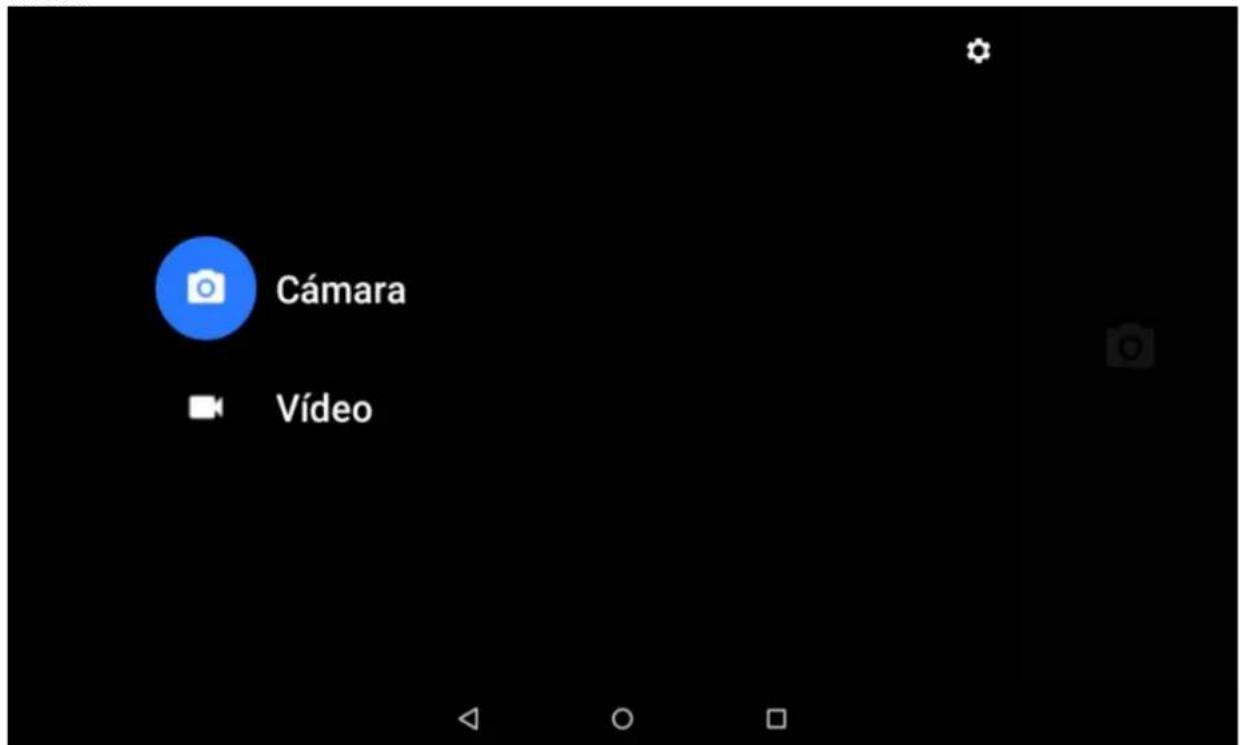
3.UsetheappPhotostoseeimagesandphotos.
TROUBLESHOTTING
CloseApplication
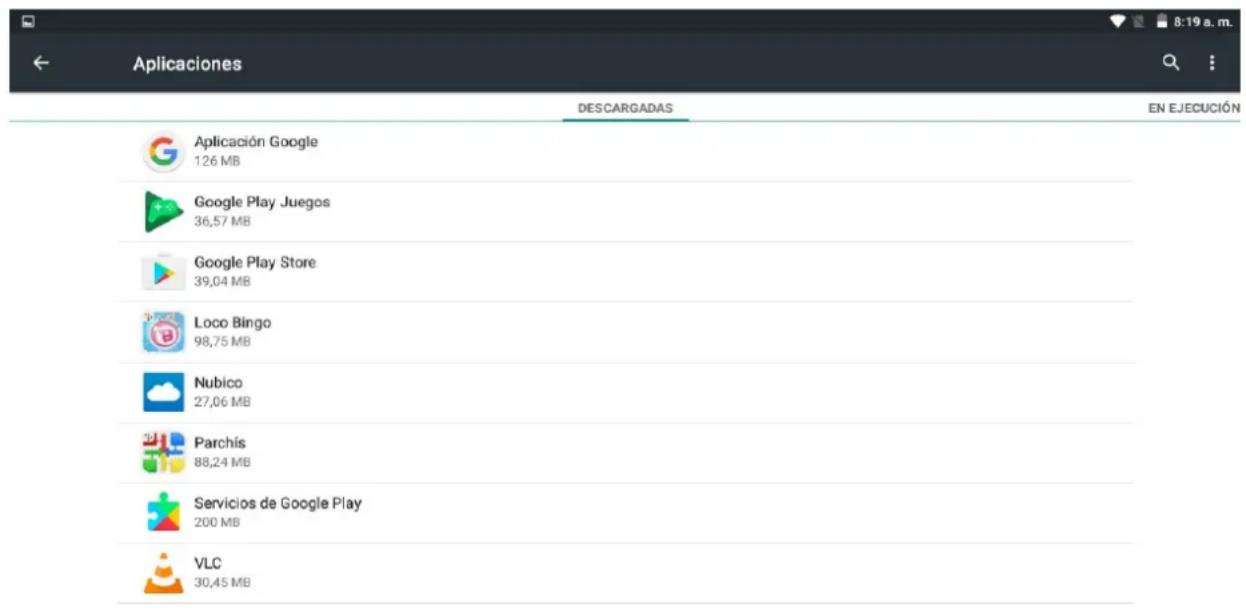
Allrunningapplicationstakeupsystemmemoryandwillsslowdownsystemresponse.Please shutdown all idleapplications toreleasememory andgetthesystemspeedbacktonormal.
Toclosetheapplication, click the icon on the shortcutbartoenterthesystem configurationinterface.Selectthe Application Runningservices and the interface is shown as follows:

MandatoryPoweroff
Pressandholdthepowerbuttonfor8secondsandthedevicewillbepoweredoff.
RestoreDefaultSettings
If you want to reset the factory setting and erase all materials, please press Settings BackupandReset Factorydatareset.
**Warning:Factorydatasetsettingwilldeleteyourdataandconfigurationofsystem andapplicationsfromdownloading.
Howtoenterinrecoverymode
Poweroffthedevic
Longpres"ESC"keyand"POWER"keyatthesametimeuntiltherecoverymodehas appeared.
Afterthenewmenuwillappear, you must SWIPEDOWN using the touch panel to select "wipe data/factoryreset", then press "power".
SWIPEDOWNtoselect"Yesdeletealluserdata"andconfirmwith"power"key
Whentheprocesswillfinish,select"rebootsystemnow"andpress"power"key.Theunitwill restartandrestoreitselfbydefault.
SPECIFICATIONS
Touchpanel: 10.1 "capacitive5points
CPU: A83Oct-core
OS:Android5.1.1
Resolution: 1024*600
Storage: 8GBNandflash+1GBDDRIII
MicrocardreaderMax: 32GB
USBport2.0
Digitalcamera 0,3MPfront,2.0MPrearcamera
WIFI 802,11b/g/n
Supportedformatst:
Picturefile.jpeg.jpg.bmp.gif.png
Audiomp3,mp2,ape,wma,wav,flac,ogg,aac,3gp
Video rmvb, mkv, wmv, mov, mp4, pmp, mpg, flv, 3gp, mpg, h, 264
Battery: 5000mAh
TAKECAREOFYOURDEVICE
Handleyourdevice,battery,chargerandaccessorieswithcare.Thefollowingsuggestionsshelpyou keepyourdeviceoperational.
- Keep the device dry. Precipitation, humidity, and all types of liquids sormoisture canco that corrode electronic circuits. If your device gets wet, let the device dry.
- Donotuseorstorethedeviceindustyordirtyareas.
- Donotstorethedevicinhightemperatures.Hightemperaturesmaydamagethedevil
- Donotstorethe device incoldtemperatures. Whenthe device warms toits normal temp moisturecanforminsidethedevicelanddamageit.
- Donotopenthe device otherthanasinstructedintheuserguide.
- Unauthorized modifications may damage the device and violate regulations governing
- Donotdrop, knock, or shakethedevicereoughhandlingcanbreakit.
-Onlyuseasoft,clean,dryclothtocleanthesurfaceofthe device. - Donotpaintthedevicepaintcanpreventproperoperation.
-Keepthedeviceawayfrommagnetsormagneticfields.
MadeinChina
WARRANTYCARD
EUROPEANWARRANTY
1.General
This warrantyis granted without prejudice andin addition to the recognized rights for the consumer vis-à-vistheseller provided in the Royal Legislate Decreef of 16 November, approving therestated textofthe General Lawforthe Protection of ConsumersandUsersandothercomplementarylegislation.Therefore,therecognized legalrightsfortheconsumerarenotlimitedoreexcludedaccordiingtotherelevant Regional,NationalorEuropeanlegislation.
Thiswarranty shall be valid in all the European Union Member States with the limitations that legally correspond in the country in which they are intended to be implemented in accordance with their implementation legislation.
Notwithstanding the foregoing, SUNSTECH shall respect other rights and limitations related to the product warranty that legally corresponds to the States listed in the Attachment in accordance with their implementation legislation for any product provided that it is intended for the Umarket and has been purchased or used by the consumer or user within the EEA.
2.LegalWarranty
ThisSUSTECHproducthasatwo(2)yearwarrantycountingfromthedateofdelivery and/orpurchase.Duringtheabove timeframe,SUNSTECHshallbeheldresponsiblefor anylackofconformityoftheproductinrelationtothecontractinaccordancewiththe provisionsoftheLawfortheProtectionofConsumersandUsers,thatshallentitlethe consumertorequesttherepairorreplacementoftheproduct,unless thereof these optionsisobjectivelyimpossibleordisproportionate.
Accordingly, the remedy (i.e. the repair or replacement) shall be deemed to be disproportionate if it imposes unreasonable costs on the seller. In order to determine this, the following shall be considered: (i) the value of the product if there were no lack of conformity; (ii) there is a relevance of the lack of conformity; and (iii) if there was another form of remedy could be carried out without major inconvenience to the consumer and user.
Todetermine whether the costs are unreasonable, the costs incurred by one form of remedymust besignificantly higher than the costs corresponding to the other form of remedy.
Inaddition, the consumer may choose between requesting a reduction in the price or terminating the contract, if he is not entitled to demand thereupon replacement of the product and whenever these actions would not be completed within reasonable timeframe and would cause more inconvenience to the consumer and user. However, the termination shall not take place where the lack of conformity is minor.
Both the repair and the replacement of the product as a result of the product's lack of conformity shall be free of charge for the consumer and user, including labour and materials.
In any case, repairs under warranty shall be carried out by SUNSTECH's Official Technical Assistance Serviceoritsauthorizedistributors.
3 CONDITIONSforthewarrantytobee exercised
Toexercisethelegalandcommercialwarranty,itisnecessarytosubmitdocumentary evidenceshowingthedeliveryand/orpurchasedateoftheproduct,whetherthe invoice,receipt,deliverysliporsealedandddatedwarrantycard.Documentswith which havebeenamperedwithorfalsifiedwillnotbeaccepted.
TheconsumershallcontactSUNSTECH'sCustomerServiceTeamusingthewebsite (underthesupportsection)andwillbeinformedaboutwhatactiontotake.Atthat time,theconsumershallhavetoprovideacleardescriptionofthemalfunctionorthe lackofconformityoftheproductwiththecontract.
In any case, repairs under the warranty shall be carried out by SUNSTECH's Official Technical Assistance Servicesoritsauthorizeddistributorssothat SUNSTECH can be heldresponsibleunderthelegaland/orcommercialwarranty.
4.+eictions
Thewarrantydoesn'tforeseeorincludeperiodicmaintenanceorproductinstallation revisions.
In addition, the product will not be considered as lacking conformity in relation to the contract and therefore, it will not becomed bythelegorcommercialwarranty when:
- Thelackofconformitycorrespondstoadiscrepancywiththesafetystandardsor thelocalornationaltechniquesofadifferentcountrytotheoneitwasoriginally designedandproducedin;
- Thisproductoranyofitsidentificationfeatures(numberofseries,etc.)havebeen partiallyorcompletelyopened,assembled,unassembled,handledand/orrepaired byapersonnotpartofSUNSTECH'sOfficialTechnicalAssistanceServicesteamor itsauthorizeddistributors
- Thelack of conformityisresult of anincorrectinstallation(except if the installationhasbeencarriedoutbyoneofSUNSTECH'saauthorizedsellerorsunder its responsibility, or by the consumer following SUNSTECH's installation instructions)oranabusiveorinadequate useoftheproduct,includingbutnot limitedto,ausagethatisnotinaccordancetothenormalpurposeoftheproduct orthedirectionsforuseandmaintenance,asdefinedbySUNSTECH;
- The lack of conformity has been caused by a computer virus, an action or a manipulationofpasswords,softwareinstallation,manipulationorreinstallation, etc.;
- Thelack of conformityisduetotheuse of accessories,chargersorconsumables thatarenotSUNSTECHoriginalsandthereforeanotdesignedforthatproduct;
- Thelackofconformityisduetotheuseofanythirdpartysoftwareorapplication thatmodifies,changesoradaptstthesoftwarethatwasapprovedand/orincluded bySUNSTECHintheproduct;
- Thelackofconformityisaresultof downloadingorusingthirdpartymultimedia servicesand/orcontentsavailableoraccessiblethroughtheproduct;
- Damages in or through the battery, which are due to it being overcharged, are produced;
-
Anyoftheboxsealsorbatterycellshavebeendamaged,orthereislecarevidence thatshowsthesewerehandled;and/or
-
Theproductdamagesarecausedbyanyunforeseeableorforcemajeur circumstances,especially,lightning,water,fire,applyingincorrectvoltageorany othercausethatisnotduetotheproductmanufacturingordesign.
UndernocircumstanceswillSUNSTECHbeheldresponsibleforthelossofanydatastored in theproduct.Theconsumerwillbeheldresponsibleforanyback-upcopiesandtheprotection ofanydatafromloss,damageordestruction.
Noneofthewarrantiesincludedherecoverthereplacementofparts,duetowareorrupture ofmechanisms,rubber,boxesand/orplastic,aswellasanyaestheticdamageresultingfrom thenormaluseoftheproduct,forexample,ifthescirenlosesitsshinewiththeuseofthe product.Inthesameway,thewarrantiesdonotcoveranytypeofdamageproducedduring thetransportationoftheproduct(includingbutnotlimitedtoaestheticdamage,blows,lines, scratches,stains,dents,etc.)inwhichcasetheapplicableprovisionsunderSUNSTECH's generalcontractconditionswillapply.
Forfurtherinformationgotowww.sunstech.es
You can also contact: AFEXSUNS,S.A. Metall,6-8 08110MontcadaiReixac
DECLARATIONOFCONFORMITY
CouncilDirective(s)towhichconformityisdeclared:
Directive(1999/5/EC)-R&TTE
Directive(2014/53/EU)-EMC
Directive(2011/65/EU)-RoHS
ApplicationoftheStandards:
EN300328V1.9.1
EN301489-1V1.9.2
EN301489-17V2.2.1
EN62479:2010
EN60950-1:2006+A11:2009+A12:2011+A1:2010+A2:2013
Manufacturer'sname:
AFEXSUNS,S.A.
Manufacturer'saddress:
c/Metall6-8,08110,MontcadaiReixac
Typeofequipment:
TABLET
Trade:
SUNSTECH
Modelno.:
TAB1061OC
(Serail number range:160600001-160601010)
We, the undersigned, hereby declare under our sole responsibility that the specified equipment is in conformity with the above Directive(s) and Standard(s)
Place:Barcelona
(Signature)
VICTOR Planas Bas
(Full name)
Date:15-June-2016
General Manager
(Position)
sunstech
TAB1061OC8GBBK
MANUAL
DE USUARIO
CONTENIDODELMANUALDEUSUARIO
DECLARATIONOFCONFORMITY 26
CONSIGNESDESECURITE
Lisezcessimpllessignes.Nepass'yconformerestunactedangereuxouillégal.
Eteindredansleszonesd'accesrestreint
Stockage: 8G o N A N D F l a s h +1 G o D D R I I I
FecharaAplicacao 0000000000000000000000000000000000000000000000000000000000
DesligamentoObrigatorio 100000000000000000000000000000000000000000000000000000000
Restaurasdefiniçõespadrao 1000000000000000000000000000000000000000000000000000
Comoentrarnomodederecuperacao 23
Copyright © 2013Afexsuns,S.A.
Directiva(1999/5/EC)-R&TTE
Directiva(2014/53/EU)-EMC
Directiva(2011/65/EU)-RoHS
Aplicações Normas:
EN300328V1.9.1
EN301489-1V1.9.2
EN301489-17V2.2.1
EN62479:2010
EN60950-1:2006+A11:2009+A12:2011+A1:2010+A2:2013
Nomedofabricante:
AFEXSUNS,S.A.


- DECLARATIONOFCONFORMITY 28
- SAFETYPRECAUTIONS
- Switchoffinrestrictedareas
- Roadsafetycomesfirst
- Interference
- Qualifiedservice
- Batteries, chargers, and other accessories
- Keepyourdeviceredry
- Glasspart
- SAFETYANDPRECAUTIONWARNINGS
- Instructionicons
- Copyright
- Safetyinformation
- Warning
- Donotcutordropthechargerothedevic.
- Whenhandlingordisposingofthedevicandchargerdosowithcaution.
- Precaution
- Donotusethedeviceinahospital,planeorcarthatmaybeaffectedbyinterference causedbyradiofrequency.
- Donotexposethedevicetos smokeorstrongemanations.
- If you use hearing devices, contact them manufacturer for further information about radio interference.
- Donotusethedeviceneartherdevicesorapparatusesthemittradiofrequency,such assoundsystemssorrradiotowers.
- Turnoffthedevicepinpotentiallyexplosiveatmospheres.
- If you become aware of the device or the battery letting off strange odours sound for if you see smoke or liquid coming out of the device or battery, stop using the device immediately and take it to an authorized service centre.
- Complywithalthesafetyregulationsand warningsrelatedtotheuseofmobiledevices whendrivingvehicle.
- Correctuseandmaintenanceofthemobiledevice. Keepthedevicedry.
- Placethedevicemonlyonflatsurfaces.
- Donotstorethedeviceinverhotorcoldplaces.Itisrecommendedthatyouusethe deviceattemperaturesbetween 5° and 35° .
- Donotstorethedevicewithmetalobjects,suchascoins,keysandnecklaces.
- Donotstorethedevicenearmagneticfields.
- Ifthedevicereoverheats,stopusingitanditsapplicationsfor awhile.
- Donotusethedevicefifthebackcoverisnotinplace.
- Ifthedevicehasalamporacameraflash,donotuseitnearpeople'soranimal'seyes.
- Becarefulwhenexposingyourselftointermittentlight.
- Reducetheriskofinjurycausedbyrepetitivemovements.
- When you useearphones,protectyourhearingandyourears.
- Usethedevicewithcautionwhileyouarewalkingormoving.
- Donottakedevicesinyourfrontpocketsorroundyourwaist.
- Donotpaintyourdeviceorputanystickersonit.
- Donotusethedevicefithescreeniscrackedorbroken.
- Installthemobiledevicesandthequipmentwithcaution.
- Donotallowtheproducttofallortobesubjecttostrongimpacts.
- Guaranteeofthemaximumdurationofthebatteryandcharger.
- Donotunassembled,changeorrepairthedevic.
- Take the following information into account when cleaning the device.
- Donotuseitforanyotherpurposeotherthantheoneitwasdesignedfor.
- Whenyouusethedevicepublic,trynottodisturbothers.
- Onlyallowqualifiedprofessionalstocarryoutthemaintenanceofyourdevice.
- BecarefulwhenhandlingSIMcards,memorycardsorcables.
- Makesureyouhaveaccessstoemergencyservices.
- Protectyourpersonaldataandavoidconfidentialinformationfrombeingspreador usedincorrectly.
- Donotdistributematerialprotectedwithcopyright.
- Malwareandvirus
- Followthesesuggestionstoprotectthedevicegagainstmwareandvirus.Ifyoudonot doso,youmaycauseddamagesorlossofdatathatmaynotbecoveredunderthe warranty.
- InformationaboutthecertificationoftheSpecificAbsorptionRate(SAR).
- THISDEVICEFOLLOWSSINTERNATIONALSTANDARDSOFEXPOSURETORADIOWAVES.
- Correctdisposalthisproduct.
- Correctdisposalthisproduct'sbatteries
- Exemptionfromresponsibilityclause
- INTRODUCTION
- PackageContent
- KeysandParts
- GETSTARTED
- ChargeyourTAB1061OC8BBK
- Firststartup
- PowerOn
- PowerOff
- Firstinstallation
- LockScreen
- HomeScreen
- SettingsMenu
- HowtoUseTFcard
- RemovingTFcard
- Howtoconnectwithcomputer
- ConnectionInternet
- Wireless:
- WebBrowsing
- TROUBLESHOTTING
- CloseApplication
- MandatoryPoweroff
- RestoreDefaultSettings
- Howtoenterinrecoverymode
- SPECIFICATIONS
- TAKECAREOFYOURDEVICE
- MadeinChina
- WARRANTYCARD
- EUROPEANWARRANTY
- 1.General
- 2.LegalWarranty
- CONDITIONSforthewarrantytobee exercised
- 4.+eictions
- DECLARATIONOFCONFORMITY
- sunstech
- TAB1061OC8GBBK
- CONTENIDODELMANUALDEUSUARIO
- DECLARATIONOFCONFORMITY 26
- CONSIGNESDESECURITE
- Eteindredansleszonesd'accesrestreint
Brand : Sunstech
Model : Tab 1061 OC
Category : Tablet