
TAB1051QCBT - Tablet Sunstech - Free user manual and instructions
Find the device manual for free TAB1051QCBT Sunstech in PDF.


| Product type | Touchscreen tablet |
| Brand | Sunstech |
| Model | TAB1051QCBT |
| Operating system | Android 5.0 |
| Screen size | 10.1 inches (25.6 cm) |
| Screen resolution | 1024 x 600 pixels (IPS) |
| Processor | Allwinner A33 Octa-Core |
| Memory (RAM) | 1 GB (estimated) |
| Internal storage | 8 GB or 16 GB (estimated) |
| Expandable storage | microSD card up to 32 GB |
| Wi-Fi connectivity | 802.11 b/g/n |
| Bluetooth | 4.0 |
| Front camera | 0.3 Megapixels |
| Rear camera | 2.0 Megapixels |
| Battery | Lithium-ion 5500 mAh |
| Power supply | AC adapter 5V, 2A (USB) |
| Ports | USB 2.0 (OTG supported) |
| Supported audio formats | MP3, WMA, FLAC, AAC, OGG, WAV, APE, 3GP |
| Supported video formats | MP4, AVI, MKV, RMVB, MOV, FLV, 3GP, MPG |
| Supported image formats | JPEG, PNG, BMP, GIF |
| Approximate weight | 550 g |
| Approximate dimensions | 260 x 170 x 10 mm |
| Warranty | 2 years (European) |
| Included accessories | Charger, USB cable, user manual |
Frequently Asked Questions - TAB1051QCBT Sunstech
User questions about TAB1051QCBT Sunstech
0 question about this device. Answer the ones you know or ask your own.
Ask a new question about this device
Download the instructions for your Tablet in PDF format for free! Find your manual TAB1051QCBT - Sunstech and take your electronic device back in hand. On this page are published all the documents necessary for the use of your device. TAB1051QCBT by Sunstech.
USER MANUAL TAB1051QCBT Sunstech
Safety Instructions.... 1
Main Functions.... 12
Basic Operations.... 13
Home screen.... 14
Install the APK application.... 15
Uninstall the APK application.... 15
Movies.16....
Camera.... 17
Music.... 18
Regular Settings.... 19
21Connect Com
Common Issues.... 22
SAR
www.sar-tick.com
ThisproductcanbeadjustedtotheSARnationallimitsof2W/Kg.The specificSARmaximumvaluesareintheinformationsectionofthis guide.
When you hold the product or use it on your body, maintain a distance of 1.5 cm from your body to ensure that radio frequency exposure standards.
This device offers communication and entertainment services that follow SUNSTECH technologicalexperience.
'shighstandardsand
- Thecontentmaydifferfromthefinalproductofthesoftwareprovidedbythesuppliersofservicesor transmittersanditissubjecttoalterationwithoutpriornotice.
- Theelementsthatcomewiththedeviceandanyavailableaccessorymayvaryaccordingtotheregionorsupplieroftheservices.
- Theelementsprovidedaredesigneduniquelyforthisdeviceandmaynotbecompatiblewithotherdevices.
- YoumaypurchaseadditionalaccessoriesatyourlocalSUNSTECHdistributor.Ensurethattheyarecompatible withthedevicebeforeyoupurchasethem.
- Otheraccessoriesmaynotbecompatiblewiththedevice.
- SUNSTECHisnotheldresponsibleforproblemsofinsufficientreturnoranychangetotheoperatingsystem software.Anyattempttopersonalizetheoperatingsystemmaycausethedeviceortheapplicationsto functionincorrectly.
InstructionIcons
 | Warning Situation that causinjury is yourself third parties. |
 | Precaution:Situationsthatcancausedamagestothedeviceor otherequipment. |
 | Note:Notes,recommendationsofuseoradditionalinformation. |
Copyright
Copyright © 2013Afexsuns,S.A.
Thisguide is protected by international copyright laws.
Reproduction, distribution, translation or transmission of any part of this guide is not allowed under any circumstances through an amounts, beitelectronic or mechanic. This includes photocopies, records or storage in any information retrieval and storages systems, without previous written authorization from Afex Suns, S.A.
Safetyinformation
This section contains safety information for mobile devices. Some of the content may not apply to your device. In order to avoid injury to yourself or third parties or damage to the device, read the device's safety information before you use it.

Warning
If you do not comply with these safety regulations and warnings, you may suffer serious injury or even death.
Do not use damaged power cords or connectors or loose sockets.
Unsafeconnectionsmaycauseanelectricdischargeorafire.
Do not touch the power cord iff your hands are well and do not pull the cord to disconnect the changer. If you doso, you maybe electrocuted.
Don't bend or damage the power cond.
Ifyousodo, this may cause an electric discharge.
Don't cause a short-circuit in the changer or the device.
If youdoso, this may cause an electric discharge or the device may not function correctly.
Use batteries, chargers, accessories and supplies that have been approved by the manufacturer.
- Theuseofgenericbatteriesorchargersmayshortentheusefullifeofthedeviceorcauseincorrect functioning.Itmayalsocauseafireorthebatterymayexplode.
- OnlyusebatteriesorchargersthathavebeenapprovedbySUNSTECH,specificallydesignedforthe device.Anynoncompatiblebatteriesandchargersmaycauseseriousphysicalinjuriesordamagethe device.
- SUNSTECHwillnotbeheldresponsibleforthesafetyoftheuserwheneveraccessoriesorsuppliesthat havenotbeenapprovedbythebrandareused.
Donnott out or drop the changer or the device.
When handling or disposing of the device and changer does so with caution.
- Neverthrowthebatteryorthedeviceintothefire.Neverplacethebatteryorthedeviceonanysources ofheat,suchas,ovens,microwaves,glasshousesorradiators,etc.lfitoverheats,thedevicemayexplode. Followalllocalregulationswithregardstodisposingoftheusedbatteryordevice.
- Donotsquashthedeviceormakeholesinit.
- Avoidexposingthedevicetohighpressurebecausethismaycauseaninternalshort-circuitand overheating.
Protect the device, battery and charger in order to stop them from getting damaged.
- Avoidexposingthedeviceandbatterytoveryhighorverylowtemperatures.
- Extremetemperaturesmaydamagethedeviceandreducethechargingcapacityandthedurationofthe
deviceandbattery.
- Avoidthebatteryenteringintocontactwithmetalobjectsbecausethismaycauseaconnection between the positive and negative terminal so the battery and damage it temporarily or permanently.
- Neverusedamagedchargersorbatteries.
Do not store the device in or near heaters, microwaves, heated kitchen equipment or high pressure containers.
•Thebatterymayhaveleakages.
•Thedevicemayoverheatandcauseafire.
Do not use or store the device in places with a dot off dust or material transported by air.
Dustorforeignmaterialsmaycausethedevicetomalfunctionandmayresultinafireoranelectricdischarge.
Safetyinformation
Donnott dotte or ssuck the obexice or thne boattery.
- Thismaydamagethedeviceorcauseanexplosionorafire.
•Childrenandanimalsmaychokeonsmallpieces. - Whenchildrenusethedevice,ensurethattheydosocorrectly.
Do not insert the device or the accessories provided into your eyes, ears or mouth.
If youdoso, you make chokeors suffer serious injuries.
Do not handle damaged lithium-ion batteries or batteries that show evidence off leakage.
To disposeoflithium-ionbatteriessafely,contactyourclosestauthorizedservicecentre.

PLUGGABLEEQUIPMENT: the socket outlets shall be installed near the equipment and shall be easily accessible.

Precaution
If you do not comply with these regulations and warnings, you may suffer injuries or cause material damage.
Do not use the device near other electronic devices.
- Mostelectronicdevicesuseradiofrequencysignals. Thedevicemayinterferewithotherelectronic devices.
- Ifyouusea LTE dataconnection, this may cause an interference with other devices, such as audio equipment and telephones.
Do not use the device in a hospital, plane or card that may be affected by interference caused by radio frequency.
- If possible, avoid using the device at any distance lower than 15 cm from apacemaker, because the
devicemaycauseinterferenceswithit.
- To minimize any possible interference with a pacemaker, used the device only on the oppositeside of the body in relation to the position of the pacemaker.
- If you use medicale equipment, contact the manufacturer of the equipment before using the device in orderto ascertain whether the equipment will be affected by the radio frequency emitted by the device.
- Ifelectronicdevicesareusedonaplane,thesemayinterferewiththeelectronicnavigationinstruments. Ensurethatthedeviceisturnedoffduringtake-offandlanding.Aftertake-offyoumayusethedeviceon "airplanemode" aslongasthisisallowedbythecabincrew.
- Theelectronicdevicesinyourcarmaymalfunctionduetotheradiointerferenceofthedevice.Contact themanufacturerforfurtherinformation.
Do not express the device too smoke or strong eemanatians.
Ifyoudoso,youmaydamagetheoutsidepartofthedeviceorcauseitsmalfunctioning.
If you use linearing devices, contact the manufacturer for further information about radio interference.
Theradiofrequencythatthedeviceemitsmayinterferewithsomehearingdevices.Beforeusingthedevice, contactthemanufacturerinordertoascertainwhetherthehearingdevicewillbeaffectedbytheradiofrequency emittedbythedevice.
Domortusset the device near other devices or apparatus set that emit radio frequency, such as sound systems or radiotowers.
Radiofrequency may cause them malfunctioning of the device.
Turn off the device imp potentially explosive atmosphere.
- Turnoffthedeviceinsteadofremovingthebatteryinpotentiallyexplosiveatmospheres.
- Alwaysrespectthestandards,instructionsandwarningsignsinpotentiallyexplosiveatmospheres.
- Donotusethedeviceinpetrolstationsornearfuelorchemicalsorindemolitionareas.
- Donotstoreortransportflammableliquids, gasesorexplosivematerialinthesamecompartmentin whichthedevice,itspartsoraccessoriesare.
If you become aware of the device or the battery, letting off strange colours sounds so if you assess smoke or liquid coming out of the device or battery, stop using the device immediately and take it to an authorized service centre.
If you donotdoso, this may cause a fire or an explosion.
Comply with all the safety regulations and warnings related to the use of mobile devices when driving a vehicle.
Whendriving, your main responsibility to control the vehicles safely. If the law does not allow mobile phone use when driving, donot usethemobile device. For your and others 'safety use your commonsense and remember the following advice:
- Gettoknowthedeviceanditsoperatingfunctions,likespeeddiallingandrecallsystem.Thesefunctions allowthetimenecessarytomakeandreceivecallstobereduced.
-
Putthedeviceinaplacewhereitiseasytoreach.Makesurethatyoucanaccessthewirelessdevice withouttakingyoureyesofftheroad.Ifyoureceiveatelephonecallataninconvenienttime,let voice-mailanswerit.
-
Stopphonecallswhenthereisheavytrafficorwhenthereareadverseclimateconditions.Rain,sleet, snow,iceandheavytrafficcanbeverydangerous.
- Donotjotdownorlookfortelephonenumbers.Jottingdownataskorlookingatyourcalendarmay distractyoufromyourmainresponsibility,whichistodrivesafely.
- Dialcarefully and assess the state of the traffic. Make phone calls when you are not moving or before hitting traffic. Try to schedule phone calls when the car is parked.
- Donothaveverystressfuloremotionalphonecallsthatmaydistractyou.Tellthepersonthatyouare speakingtothatyouaredrivingandendanyconversationsthatmaytakeawayyourattentionfromthe road.
Correct use and maintenance of the mobile device.
Keep the device each.
- Humidityandliquidsmaydamagethepartsortheelectronccircuitsofthedevice.
- Donotturnonthedeviceifitiswet.lfitisalreadyturnedon,turnitoffandtakethebatteryout immediately(ifyoucannotturnitoffortakethebatteryout,justleaveitasitis).Afterthis,drythedevice withatowelandtakeittotheservicecentre.
- Liquidswillchangethecolourofthelabelwhichindicatethedamagecausedbythewaterinsidethe device. Thedamagecausedbythewaterinthedevicemaycancelthemanufacturer 'swarranty.
Placetthe device only com flett sunffaccess.
Ifitdrops, the devicemaygetdamaged.
Do not store the device in very hot or cold places. It is recommended that you use the device at temperatures between 5% and 35%.
- Donotstorethedeviceinplaceswithveryhightemperatures,suchasinsideacarinthesummer.Ifyou doso,youmaycausethescreentomalfunction,thedevicemaygetdamagedorthebatterymay explode.
- Donotexposethedevicetodirectsunlightforlongperiodsoftime(forexample,onthedashboardofacar).
- Storethebatteryattemperaturesbetween0°and45°.
Do not store the device with metal objects, such as coins, keys and necklaces.
- Thedevicemaygetscratchesorstopworkingproperly.
- Ifthebatteryterminalscome intocontactwithmetalobjects,afiremayoccur.
Do not store the device near magnetic fields.
- Itispossibleforthedevicetostartmalfunctioningandforthebatterytolosepowerduetobeing exposedtothesefields.
- Cardswithmagneticstripe,suchascreditcards,telephonecards,travelpassesmaygetdamageddueto themagneticfields.
If the device cover heats, stop using it and its applications fona a while.
Prolongedskinexposuretoahotdevicemaycausesymptomsofburningwithlowtemperature,suchasred spotsandpigmentation.
Don't use the device if the back cover is not in place.
The battery may come out of the device, which can cause damage or malfunctioning.
If the device has a lamp cona camena afflash, do not use it mean people's or animal's eyes.
Thismaycauseatemporarylossofvisionordamagetheeyes.
Becausefull when expressing yourself to implement entitlement light.
- Whenyouusethedevice, leavesomelightsturnedoninthebedroomanddonothavethescreentoo closetoyoureyes.
- Convulsionsorfaintingmayoccurduetoexposureointermittentlightwhenlookingatvideosor playinggameswithintermittentlightsforprolongedperiodsoftime.Ifyoufeelunwell,stopusingthe deviceimmediately.
- Ifanyoneclosetoyousufferedfromconvulsionsorfaintingwhenusingasimilardevice,visitadoctor beforeusingthedevice.
- If you feel discomfort, such as muscle crampsory you feel disoriented, stop using the device immediately and visit a doctor.
• To avoideyefatigue, havefrequentsbreakswhenusingthedevice.
Reduce the risk off injury caused by repetitive movements.
Whenyoucarryoutrepeatedactions,suchaspressingkeys,drawingcharactersonthetouchscreenorplayinga game,youmayfeeldiscomfortinyourhands,neck,shouldersorotherpartsofthebody.Whenyouusethe deviceduringprolongedperiodsoftime,holditwithrelaxedhands,touchthekeyslightlyandrestfrequently.If youcontinuefeelingdiscomfortduringoraftertakingthesesteps,stopusingthedeviceandvisitadoctor.
When you use earphones, protect your hearing and your ears.
| Excessiveexposureoloudsoundscancausedamagetohearing.Exposuretoloudsoundswhileyouarewalkingmaydistractyouand causeanaccident. |
•Alwayslowerthesoundbeforeconnectingthearphonestoanaudiosourceandusetheminimum amountofvolumenecessarytolistentomusicorhaveaconversation.
- Indryenvironments,staticelectricitymayaccumulateintheearphones.Avoidusingearphonesindry environmentsortouchmetalobjectstodischargethestaticelectricitybeforeconnectingthearphones tothedevice.
- Donotuseanearphonewhileyouaredrivingorridingvehicle.Ifyoudosoyoumaygetdistractedand causeanaccidentoryoumaybesubjecttolegalaction,dependingontheareawhereyouaredriving.
- Alwayspayattentiontowhatishappeningaroundyoutoavoidphysicalinjurytoyourselfandothers.
- Makesuretheearphonecorddoesnotgetentangledroundyourarmsornearbyobjects.
Do not take devices in your front pockets or round your waist.
Youmaygetinjuredordamagethedeviceifitfalls.
Do not paint your device or put army stickens com iit.
- Paintandstickerscanobstructthemobilepartsandstopthedevicefromworkingproperly.
- If you are allergict opaintortothemetal part so the device, you may get a tingly feeling, eczema or swelling. If this happens, stop using the device and visit a doctor.
Do not use the device if the screen is cracked or broken.
Thebrokenglasscancausehandandfaceinjuries. Takethedevicetoanauthorizedservicecentretogetit repaired.
Install the mobile devices and the equipment with caution.
- Makesurethatthewholemobiledeviceorrelatedequipmentthatisinstalledinyourvehicleis assembledsafely.
- Avoidplacingthedeviceandtheaccessorieswheretheairbagisornexttoit.Anywirelessequipment installedincorrectlycancauseseriousinjurieswhentheairbagsinflatequickly.
Do not allow the product to fall on to be subject to strong impacts.
•Thedevicemaygetdamagedormalfunction.
- Ifyoubendordeformitthedevicemaygetdamagedanditspartsmaymalfunction.
Guarantee of the maximum duration of the battery and charger.
- Avoidchargingthedeviceforoveraweek,becauseoverchargingcanreducethebattery 'sservicelife.
- Withtime, the device will run out of battery (even when it is not being used) and you will need to recharge it to use it again.
- Disconnectthechargerfromthepowersourceswhenitisnotbeingused.
- Usethebatteryonlyforthepurposeforwhichitwasdesigned.
- If you donot us the battery for a long time, you may reduce its service life and performance. You may also cause them malfunctioning explosion of the battery or a fire.
- Followalltheinstructionsinthismanualtoguaranteethelongestservicelifepossibleforyourdevice andbattery.Anydamageoroperatingproblemscausedbynotcomplyingwiththe warningsand instructionsmaycancelthemanufacturer 'swarranty.
- Withtime, the devicemaywearout. Some parts and repairs are recovered under the warranty during the validity period; however, the damages or deterioration caused by the use of accessories not approved by the brand are not covered.
Takethefollowinginformationintoaccountwhenusingthedevice.
- Useitinaverticalposition,asyouwouldatraditionaltelephone.
- Speakdirectlyintothemicrophone.
- Donotcovertheantennaareawithyourhandsorotherobjects.Thismaycauseconnectionproblemsor causethebatterytorundown.
Donnott unassembled, change or repair the device.
- Anyalterationorchangetothedevicemaycancelthemanufacturer 'swarranty.Ifyouneedtorepairthe device,takeittoanauthorizedservicecentre.
- Donotdisassembleormakeholesinthebattery, this may cause an explosion or a fire.
- Turnoffthedevicebeforeremovingthebattery.Ifyouremovethebatterywhilethedeviceisstillturned on,thismaycausemalfunctioning.
Take the following information into account when cleaning the device.
- Useatowelorarubberclothtocleanthedeviceandthecharger.
- Cleanthebatteryterminalswithcottonorwithatowel.
- Donotusechemicalsubstancesordetergents.Ifyoudoso,youmaycausediscolorationorcorrosionoftheoutsidepartofthedeviceoryoumaycauseanelectricdischargeorafire.
Don't use it for any other purpose other than the one it was designed for.
Thedevicemaymalfunction.
When you use the device in public, try most to disturb others.
Only allow qualified professionals to carry out the maintenance of your device.
Itispossiblefordamageooccurandthemanufacturer personneltocarryoutthemaintenanceofthedevice.
'swarrantyiscancelledifyouallownonqualified
Becausefull when Handbilling SIMI cards, memory cards or cables.
- When inserting acardor connecting a cable to the device, makes sure the card is inserted correctly or that the cable is connected on the right side.
- Donottakethecardoutwhenthedeviceistransferringinformationorithasaccesstoit,becauseyou maylosedataanddamagethecardorthedevice.
- Protect the cards from strong discharges, static electricity and noise generated from other electronic devices.
- Donottouchthecontactsorthegoldterminalswithyourfingersorwithmetalobjects.Ifthecardis dirtycleanitwithasoftcloth.
- If you insert a cardor connect a forcefully or incorrectly you may cause damage to the multifunctional socket or other part of the device.
Make sure you have access to emergency services.
Itispossiblethatinsomeareasorcircumstancesyoumaynotbeabletomakeemergencyphonecalls.Before travellingtoremoteareasordevelopingcountries,plananalternativeformofcommunicatingwiththe emergencyservices.
Protect your personal data and avoid confidential information from being spread or used incorrectly.
- Whenyouusethedevice, makesureyoumakeback-upcopiesofimportantdata.SUNSTECHwillnotbe heldresponsibleforanylossofdata.
- When you dispose of the device, make a back-up copy of all the data and after re-establish the device to avoid personal information from being used in appropriately.
- Readthelicensesscreencarefullywhenyoudownloadapplications.Beespeciallycarefulwith applicationsthathaveaccesstovariousfunctionsorasignificantamountofyourpersonalinformation.
- Controlyouraccountsfrequentlytoavoidanysuspiciousornon-authorizeduse.Ifyoufindany indicationofyourpersonalinformationnotbeingusedappropriately,contactyourservicessupplierto deleteorchangetheinformationinyouraccount.
- If you losethedeviceoritisstolen, changethepasswordsofyouraccountstoprotectyourpersonal information.
- Avoidusingapplicationsfromunknownsourcesandblockthedevicewithapattern,apasswordora PIN.
Donnott distributte material protected with copyright.
Donotdistributematerialprotectedwithcopyrightwithouttheauthorizationofthecontentowners.Ifyoudoso, youmayviolatecopyrightlaws.Themanufacturerwillnotbeheldresponsibleforanylegalproblemcausedbyillegaluseofmaterialprotectedbytheuser.
Malware and winus
Follow these suggestions to protect the device against malware and virus. If you do not do so, you may cause damages or loss of data that may not be covered under the warranty.
- Donotdownloadunknownapplications.
- Donotuseunreliablewebsites.
- Deleteanysuspicioustextmessagesoremailsfromunknownsenders.
- Createapasswordandchangeitregularly.
- Deactivatethewirelessfunctions,suchasBluetooth,whenyouarenotusingthem.
- If the device behaves strangely, execute an antivirus program to detect a possible infection.
- Executeanantivirusprogramonthedevicebeforestartingapplicationsandfilesthatyoujust downloaded.
- Installanti-virusprogramsonyourcomputerandexecutethemregularlytodetectanpossible infections.
- Donotedittheregistrationadjustmentsorchangethedevice 'soperatingsystem.
Information about the certification of the Specific Absorption Rate (SAR).
THIS DEVICE FOLLOWS INTERNATIONAL STANDARDS OF EXPOSURE TO RADIO WAXES.
Yourmobiledeviceisaradiotransmitterandreceiver. Itwasdesignedtonotexceedthelimitsofexposureto radiowaves(electromagneticfieldsofradiofrequency)recommendedbyinternationalstandards.Thestandards weredeveloped byindependent scientific organization (CNIRP) and include substantial safety margin
designedtoensurethesafetyofallpeople,regardlessoftheirageorstateofhealth.
TheexposuretoradiowavesstandardsuseameasurementunitknownastheSpecificAbsorptionRate,SAR.The SARlimitformobiledevicesis2W/Kg.TheSARtestsarecarriedoutusingstandardoperationpositionswiththe devicetransmittingatitsmaximumcertifiedenergylevelinallfrequencybands.ThehighestSARamountsunder theICNIRPstandardsforthisdevicemodelare:
| MaximumSARforthismodelandconditionsunderwhichitregistered | |
| SARfor positions near the head.0.285W/Kg | |
| SARfor positions near the body.0.0399W/Kg | |
During the use, there is SAR values for this device are usually a lot lower from the values indicated previously. This is dueto maximizing the system 'sefficiency and to minimize the interference with the network, the operation capacity of your mobile device reduces automatically when the maximum power is not needed for the call. The lower the amount of energy leaving the device, the lower the SAR amount will be.
ASARtestwascarriedoutwiththedeviceonthebodywithadistanceof1.5cm.
To complywiththe
radiofrequencyexposurerequirements,whileusingthedeviceonthebody,thedeviceshallhavetobeatleast 1.5cmawayfromthebody.
Some organizations, liketheWorldHealthOrganizationortheFoodandDrugAdministrationoftheUnitedStates suggest that if users want to reduce exposure, they can use ahandsfreeaccessory to main the wireless device far away from the head and body when in use, or reduce the amount of times spent using the device.
Correct disposals of this product.
| (Electronicdevicewaste)(Thisappliesincountrieswhererecollectionsystemshappenseparately).Thepresenceofthissymbolontheproduct,accessoriesorinformationmaterialindicatesthatneithertheproductnoritselectronicaccessories(suchas,thecharger,helmets,USBcable)shouldbedisposedofwithotherhouseholdwaste. |
To avoid any possible damage to the environment or human health caused by uncontrolled disposals of waste, separate these products from other waste and recycle them. This way, you are promoting the sustainable reuse of material resources.
Individualuserscancontacttheestablishmentwheretheypurchasedtheproductortherelevantlocalauthoritiestogetinformationaboutwhereandwhentheycantakeitinordertosubmitittoecologicalandsaferecycling.
BusinessuserscancontacttheirsupplierandcheckthepurchasecontractconditionsThisproductandits electronicaccessoriesshouldnotbedisposedofwithothercommercialwaste.
| (Thisappliesincountrieswhererecollectionsystemshappenseparately). Thepresenceofthismarkonthebatteries,manualorproductpackaging indicatesthatwhentheservicelifeofthebatterieshasendedtheyshouldnotbe disposedofwithotherhouseholdwaste.ThechemicalsymbolsHg,CdandPb indicatethathebatteryhasmercury,cadmiumorleadatlevelsalothigherthan thereferencevaluesadmittedbythe2006/6DirectiveoftheEuropeanUnion. |
If the batteries are not disposed of correctly, these substances may cause personal injury or damage the environment.
To protect natural resources and promoterecycling, separate the batteries from other waste and recycle them through the free collection service in your area.
Exemption from responsibility clause
Partofthecontentandservicestowwhichyouobtainaccessthroughthisdevicebelongtothirdpartiesandare protectedundercopyright,patent,registeredtrademarkand/orotherintellectualpropertylaws.Thiscontent andservicesareonlyforpersonaluseandnotcommercialuse.Itispossiblethatthecontentortheservices cannotbeusedifnotaauthorizedbythecontentownerorthesupplieroftheservices.Withoutprejudicetothe aforementionedinformation,exceptwhenexpresslyauthorizedbythecontentownerorservicesupplier,you cannotchange,copy,reedit,charge,publish,transmit,translate,sell,createderivativeworks,exploreordistribute inanywayorbyanymeansthecontentortheservicesshownthroughthisdevice.
"THECONTENTANDTHESERVICESOFTHIRDPARTIESAREPROVIDED "ASS ".SUNSTECHDOESNOTGUARANTEE THECONTENTORTHESERVICESPROVIDED,EITHEREXPRESSLYORIMPLICITLY,FORNOPURPOSE.SUNSTECH EXPRESSLYRENOUNCESANYIMPLICITGUARANTEES,INCLUDINGBUTNOTLIMITEDTO,MERCHANTABILITYOR SUITABILITYGUARANTEESORPURPOSENPARTICULARSUNSTECHDOESNOTGUARANTEETHVERACITY, VALIDITY,REPRODUCTION,LEGALITYORINTEGRITYOFANYTYPEOFCONTENTORSERVICEPROVIDEDTHROUGH THISDEVICEANDUNDERNOCIRCUMSTANCES,INCLUDINGNEGLIGENCE,WILLSUNSTECHBEHELDRESPONSIBLE. BOTHTERMSECONTRACORREJUDICEANDIRECORNDIRECTACCIDENTASPECIAOR CONSEQUENTIALDAMAGES,LAWYERS ' FEES,EXPENSESORANYOTHERTYPEOFDAMAGEFROMORINRELATION TOANYTYPEOFINFORMATIONINCLUDEDINORASARESULTOFTHEUSEOFANYTYPEOFCONTENTOR SERVICEBYYOURSELFORATHIRDPARTY,THEPOSSIBILITYOFTHREFERREDDAMAGESSKOWN."
TheservicesofthirdpartiesmayceaseorbeinterruptedatanytimeandSUNSTECHdoesnotcarryout representationsorguaranteesinrelationtotheavailabilityofcontentorserviceforanyperiodoftime.The contentandservicesaretransmittedbythirdpartiesthroughnetworksandtransmissionlocationsoverwhich SUNSTECHhasnocontrol.Withoutlimitingthegeneralityofthisclause,SUNSTECHexpresslyrenouncesany responsibilityforanyinterruptionorsuspensionofcontentorserviceprovidedthroughthisdevice.
SUNSTECHis notresponsibleforcustomerserviceregardingcontentandservices.Anyquestionorrequestfor serviceregardingcontentorservicesshouldbesentdirectlytotheservicesandcontentsuppliers.
Main Functions
● With WIFI for mobile internet browsing
OS: Android 5.0
● Supports multiple audio and video formats
● Built-in microphone, super long time recording
● Free set of energy-saving settings, display brightness, the
- interface background
● Support E-book reading bookmarks,
automatically browsing, horizontal and vertical screen switching function
● Support TF card and OTG function
Appearance:
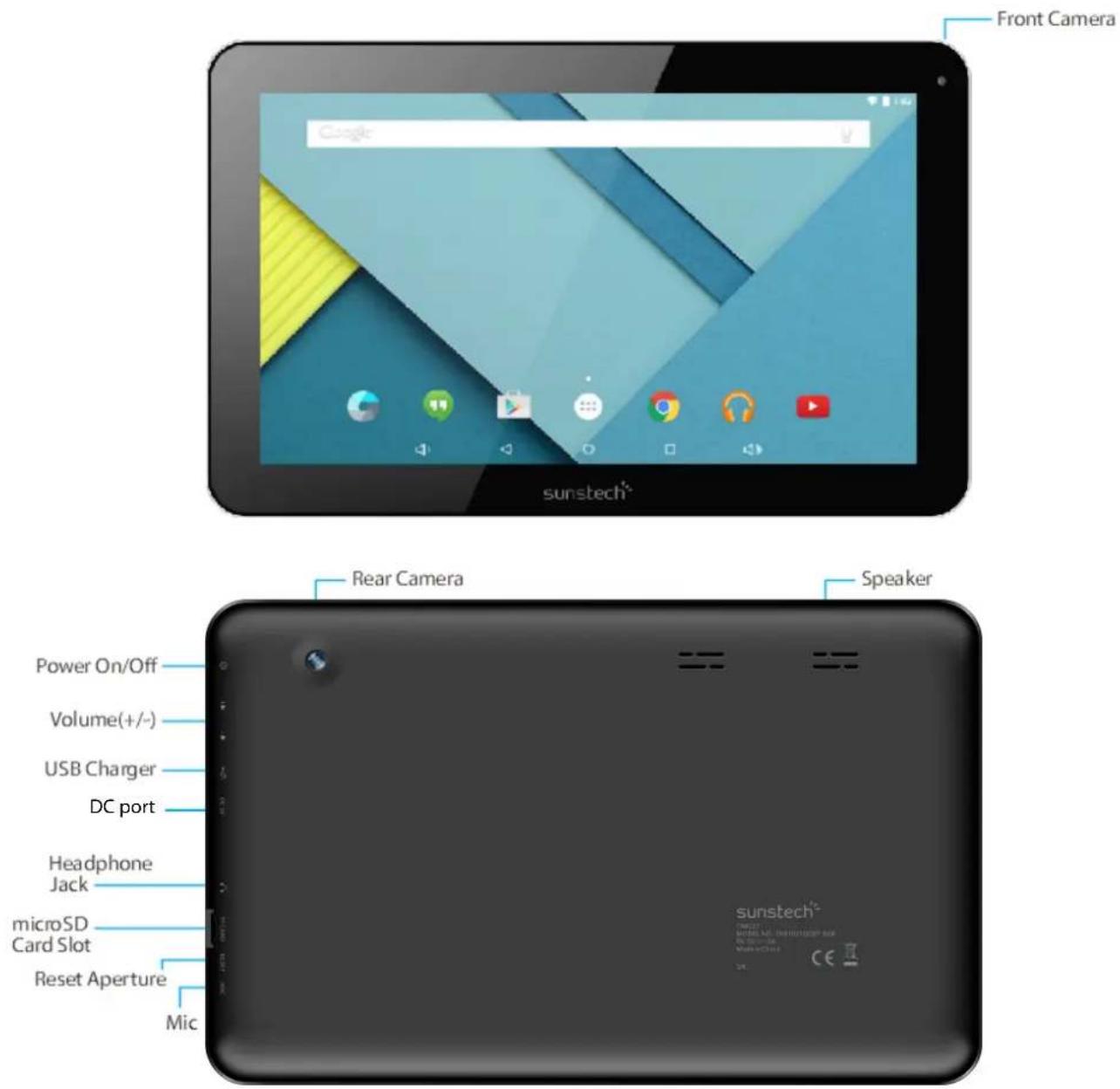
Basic Operations
1.Turnom
Alongpressonthepowerbottomturnsonthedevice
2.Tummoff
Inthenormalstate,longpressthepowerbuttontoshutdown,select"OK"whenpopupwhethertoshutdowntheinquirybox.
- Power Reset
CrashesmaybeoccurredintheprocessofusingduetoSmartoperatingsystem.TaptheRESETbuttontoforce shutdownandthenrebootifoccurred.
4.Screen Saver
Pressthepowerbutton,turnoffthescreenintothescreensaverstate,ifyouwanttoactivatescreen,pressthe powerbuttonagaintoenterthescreenlockstate,thenslidethelockbuttontounlock.
- Back to the desktop
Tapthebottomlowerleftsideofthescreen,Homeicon"

'canreturntothedesktopunderanyinterface
- Back to the previous interface
TaptheBackicon"

"lowerleftsideofthescreenbottomcanreturntothepreviousdesktopunderany
interface
7.Sedtings

Tapthe" "icontoaccesstotheapplicationlist,tapthe"Settings"iconintothesetmenulistinterface
8.Charging
PlugtheDCconnectorofadapterintotheDC-inofdevice.PlugtheadapterintoACpowersocket.Whilecharging, thedevicemayheatup.Thisisnormalandshouldnotaffectyourdevice 'slifespanorperformance.Whenthe batteryisfullycharged(thechargingiconisnolongermoving),unplugtheadapter,driverfromthedeviceand thenfromthepowersocket.
9-Winehesss & Inletwork:
Wi-Fi-:PressWi-FitoturnON/OFF
Wi-Fisettings:
PressWi-Fisettings, thenthedevicewillautomaticallysearchtheavailable
Wi-Fisignals.
Selectthenetworkyouwanttoconnectwith.
10-Connection Bluetooth:
-Select"settings"
-SelectBluettothandslideON/OFF
-AlldetectedBluetoothdeviceinareawillbelisted,taptoselectthedeviceconnection.
TOHELPINSUREAHEALTHYBATTERY.
*.Makesurethemachineonasinglechargeonceamonthandthenshutdownbeforestoringit
Withoutlonguseafterfullycharged.
Tips: using authorized accessories can enjoy adequate security to guarantee them in tenances services.
Beforeusing the device for the first time, you should charge the battery. The power adapter (charger) is a key component of the device and plays a vital role in protecting it work properly and yours safety.
Unauthorizedchargerscancausebatteriestoexplodeordamageyourdevice.Anydamagecausedbymisuseis notcoveredbywarranty.
Homesc screen
- Bydefault, the homescreencanopen multiple pages, Sliding left/right canswitch desktop display.

- Sett wall pepper
Longpresstheblankspaceofthehomescreenandthenappear"Selectwallpaperfromyoulikeaswallpaper.
',tochooseanimageas

- Display all applications
Allinstalledapplicationswillbedisplayediftap"

"icon.
- Notification door
Underthemaininterface,tapthestatusbaricon,suchasUSBconnectionintothenotificationspanel,whichcan displaythecurrentstatusoftheUSB,TFcardstatusandtherunningapplicationandstatus.
- Moove D Desktopi icom
Underthehomescreen,longpresstheapplicationicononthehomescreen,thenyoucanmovetheselected iconaftertheiconisselected.
6. Delete the desktopi.com
Underthehomescreen,longpresstheapplicationicononthehomescreen,movetheselectedicontothe deleteicon "X",thenstoppressing,thedesktopiconcanbedeleted.
Install the APK application
-
CopytheneededAPKformatapplicationintothedeviceorTFcard.
-
Tap "FileManager" to find the APK format application you want to install.
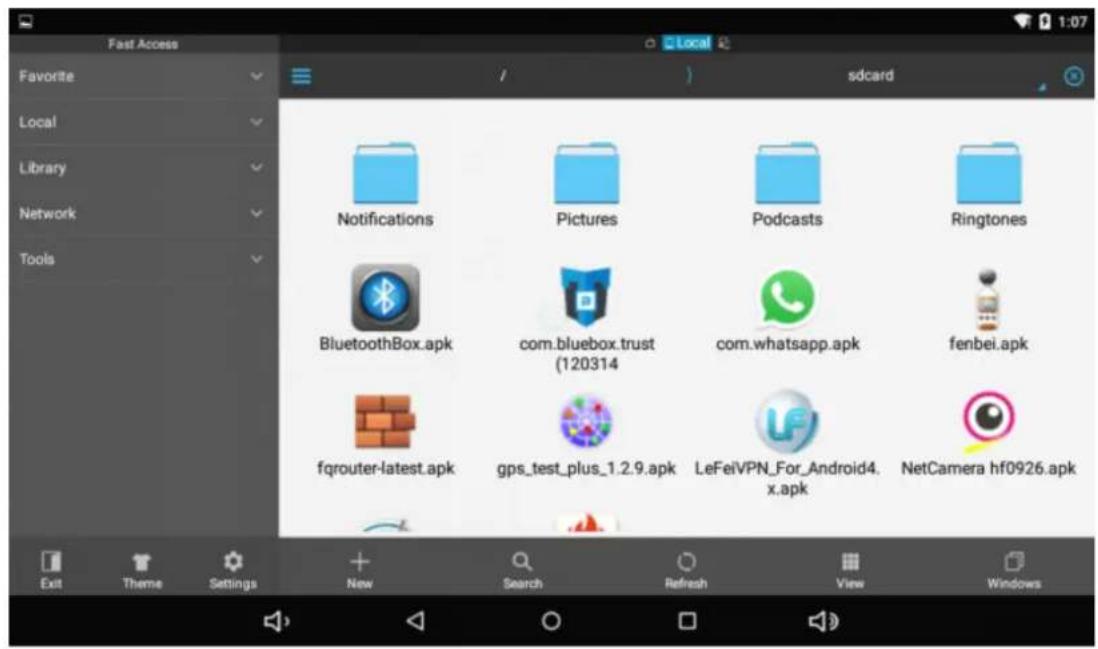
3.TaptheAPKformatapplicationyouwanttoinstallthenappear"Doyouwanttoinstallthisapplication?"

- Tap "Install" to begin the installation of APK application
Uninstall ARK application

1.Tap" controlstap"SettingsIntoSettingsmenuthentap"Apps"anddisplayinstalledapplicationdist.


- Taptheapplicationyouwanttouninstallapopuppromptuninstallboxes

Pictures and Movies
- Tap "Gallery" in the homescreen to access to media interface.

2.Thentapabovethevideoyouwanttowatch
Camera
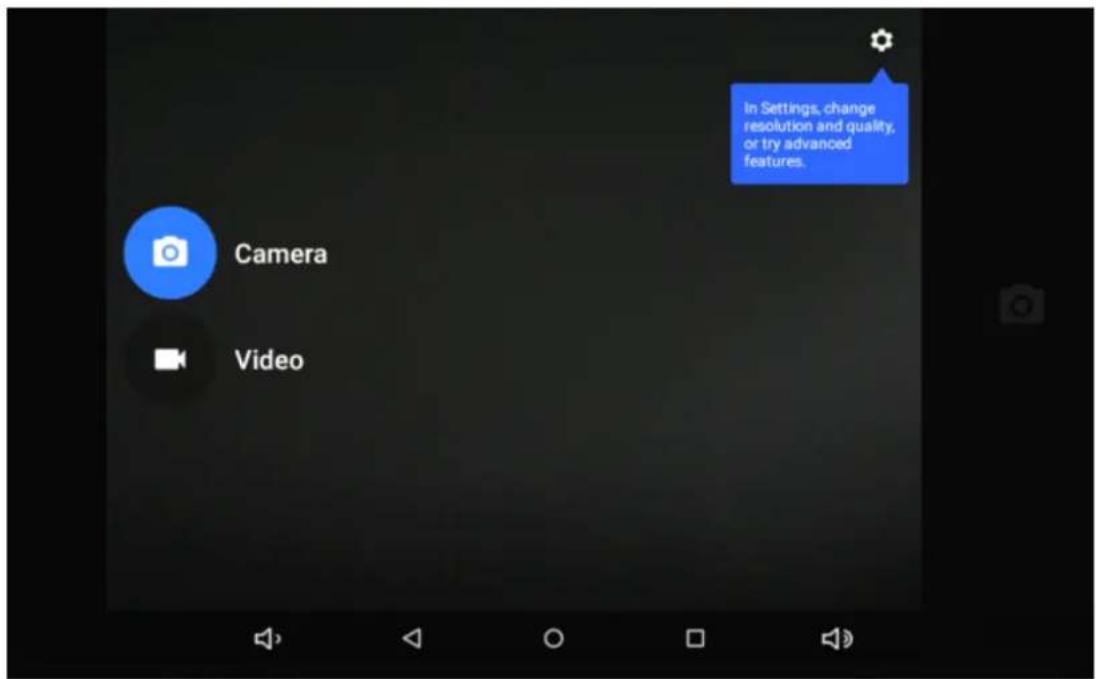
- Built-incameratotakephotosandvideo
Tap"camera" totakephotosandvideo,"isstatusoftakingphotos,tapittotakephotosand preserveautomatically,"sandingvideo,tapittostart.

Music
- Tap "Playmusic"

apktoaccesstomusicfilelistscreen.

○Files:Taphemusicyouselectedandplaymusic
○Tapb tohomescreen,taptogoback previousscreen.
Regular Settings
- Select"settings"afteraccessintoapplicationbartosetlistinterface.
2.WIRELESS&NETWORKS
Wi-Fifunctiononoroff
Bluetoothfunctiononoroff
Datausage: Showingapksusage
- Display
Brightness:Setthebrightnessofthedisplay.
Wallpaper: Selectwallpaperforthehomescreen
Auto-rotatescreen:viewinginportraitorlandscape,adjustingautomaticallytofittheneworientation
Sleep:setsleepingtime
FontSize:setthesizeofthefont
Accelerometercoordinatesystem:settheaccelerometercoordinatesystem
Screenadaptation:usedtoadjustpartofgames'screensize.
- Sound & modification
Volume: adjust the volume level for call ringtones, music and videos, alarm ringtones, devicesystem, and notifications.
DefaultNotification:Selecttheapplicationwhichyouwantdefaultnotice.
Touchsounds:Setthedevicetosoundwhenyouunlockthetouchscreen.
Screenlocksounds:Setthedevicetosoundwhenyoulockthetouchscreen.
- Storage
DisplaysthememorycardandUSBstoragesettingsofavailablestoragespace
- Battery
Displaysthebatterylevelorchargingstatus
Caution: Riskofexplosionifbatteryisreplacedbyanincorrecttype.Disposeofusedbatteriesaccordingtothe instructions
- Apps
View"DOWNLOADED","ONSDCARD","RUNNING"and "ALL" applicationslist,etc.
- Location
Settousethe"GoogleLocationreportingtogatherandusedatebasedonyourlocation
- Security
Screenlock: setscreenlockway and owner information which candisplay on the lock screen
Encrypttablet:setapasswordwhichrequiredapasswordwhenyoupowerontablet.
Passwords:makepasswordsvisibleorinvisible
Device administrators: viewordeactivated device administrators
Unknownsources: allow installation of app from unknown sources
Verifyapps:Disalloworwarnbeforeinstallationofappsthatmaycauseharm
Trustedcredentials:displaytrustedCAcertificates
Storagetype:softwareonly
InstallfromSDcard:InstallcertificatesfromSDcard
Clearcredentials:removeallcertificates
-
Accounts: Setting email accounts
-
Language & i mputt
Language: Selectadisplaylanguageforallmenusandapplications.
Personaldictionary: AddawordbytouchingtheAdd(+)button
KEYBOARD&INPUTMETHODS:setkeyboardandinputmethods
SPEECH:Setthevoicesearchandtext-to-Speech(TTS)output
MOUSE/TRACKPAD:setpointerspeed
12. Backup and reset
BackupmydatatoGoogleservers.
Factorydatareset: Erasesalldataontabletandrestoretofactorydefault
Systemupgrade:RebootintothesysteminRecoveryModecanclearthedataorsystemupgrade
13.Datte & time
Setdateandtime
14. Accessibility
TalkBack:Setturnon/offTalkBack
Largetext:displaylargetext
Auto-rotatescreen
Touch&holddelay:setthetimeoftouchandholddelay
Installwebscripts:setwhetherallowtheinstallationofwebscripts.
15.P fainting: supportcloudprint
16. DeDevelopers options
USBDebugging: debugmodewhenUSBisconnected
DevelopmentdeviceId:displaydevelopmentdeviceId
Stayawake:screenwillnotsleepwhilecharging
Allowmocklocations
HDCPchecking:useHDCPcheckingforDRMcontentonly
Desktopbackuppassword:Setthefulldesktopbackuppassword.
Strictmode enabled flash screen when apps operating long operations or main thread
Pointerlocation:screenoverlayshowingcurrenttouchdata
Showtouches:showvisualfeedbackfortouches
Showscreenupdates:flashareasofscreenwhentheyupdate
ShowCPUusage:screenoverlayshowingcurrentCPUusage
ForceGPUrendering:Use2Dhardwareaccelerationinapplications
Windowanimationscale:animationscale1x
Transitionanimationscale:animationscale1x
Don't keep activities: Close all activities as soon as the user leaves it
Backgroundprocesslimit:standardlimit
ShowallANRs:showAppNotRespondingdialogforbackgroundapps
17. Aboutttablet
Touchpanel10.1"capacitive5points
CPU:A33Quadcore
OS:Android5.0
Resolution:1024*600
Storage:8GBNandflash/1GBRAM
MicrocardreaderMax:32GB
USBport2.0
Digitalcamera0,3MPfront,2.0MPrearcamera
Bluetooth:V4.0
WIFI802,11b/g/n
Supportedformats:
Picturefilejpeg,jpg,bmp,gif,png
Audiomp3,mp2,ape,wma,wav,flac,ogg,aac,3gp
Videormvb,mkv,wmv,mov,mp4,pmp,mpeg,mpg,flv,3gp,mpg,h,264
Battery:5500mAh
Accessoriesincluded
MainadaptorAC240V/DC5V2A
Usermanual
Connectcomputer
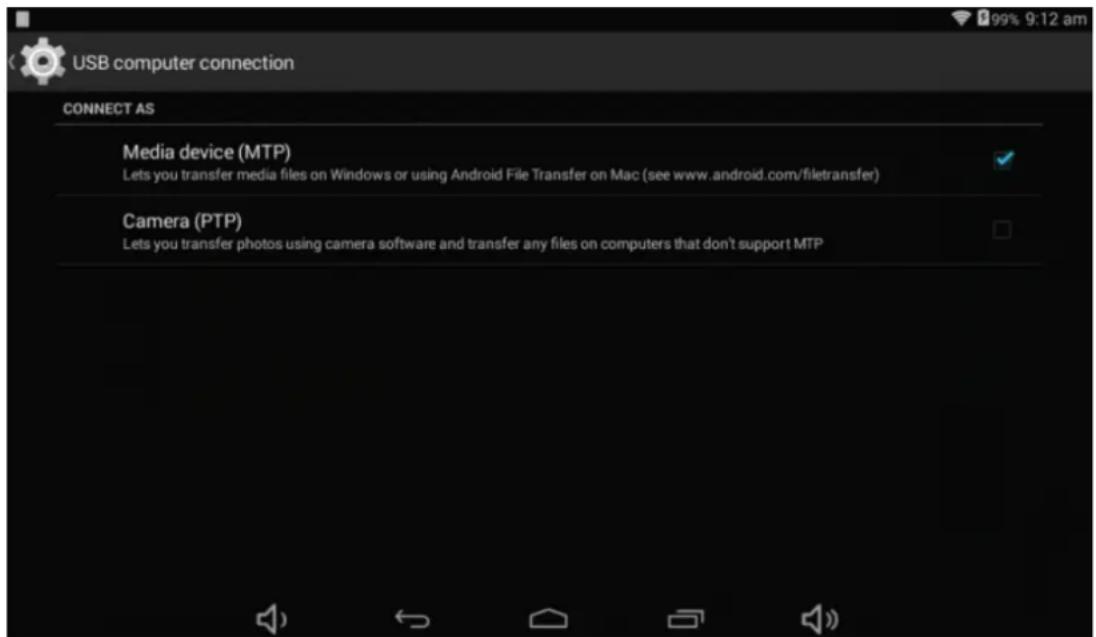
The device can connect to PC via USB wire for data copy and delete.
- Connected the device to PC port via USB wire, "USB connected" on PC screen will be shown.
- Tap "USBconnected" option, select "openUSBstoragesetting", then you can seem movable hardware icon which can be operated like using USB.

Common Issues
1. The unit doesn't neppond.
Checkthebatteriestoseewhetheritneedstobechargedornot.
Checktoseeifthepoweradapterisconnected.
Checkingaftergetconnectedtothepoweradapter.
Ifitstillcannotturnonaftercharging,pleasecontactthecustomerservicecenter.
2. No noise in the earphone
Makesurethevolumeisnotturneddownalltheway
Unplugtheheadsetandthenplugitinagain.Makesureyoupushconnectorallthewayin.
3.C6haggiggiissues
Pleasemakesurethesettingofthechargerisaccordingwiththedevice.
Pleasedon'tusethefrontUSBportsforcharging
4. Download issues
MakesureitconnectedtothePCproperly.
It'sbetternottousethefrontUSBporttoconnecttoPC.
5. Why some of download videos can not play normally?
The device is compatible with most of video file format, but there still has some differences in format, encoded mode, Resolution and coderate etc. It could result that some of the videos cannot play or have play issues. Our suggestionist that useth third party adapters software to transforming in the PC thencopy to the device.
6. Device crashed or can't turn on
Oncedevicecrashedduringtherunningtime,itcanberestartedviataptheRESETbuttonatthesideofdevice.
Madein China
-Recovery module Function.
Howto to enterterin in recovery mode.
Pleasefollowthesesteps.
1-To enterintherecoverymodefirstyoushouldpoweroffthedevice, Thenlong-pressthe"ONDOFF" keyand"WOL+" keyatthesametimeuntiltheAndroiddollhasappeared.
2-With "vol="keyselect" swipe data//factoryreset" thenpress "Power" andthenselect "Yesdelete all user data" with the "vol-" key.
3-Thenpress"power" again. The unit will then begin there recovery mode.
4-Whenitfinishesselect"reboot system now" pressthe "power" buttonandtheunitwillre-startitself.(this processmaylastforafewminutes)
How to download the software using the unit.
IMPORTANT: When you download the software, all data will be deleted as photo, video and Apps that you have been installed.
Donotinterruptthisprocesspleasemakesurethebatteryisfullycharged.
Please, followthesesteps.
1-Openbrowserandsearchandopenthislink: www.sunstech.es/download/
2-Selectthemodelofthetabletthatyouhaveanddownloadthesoftware.(ThissoftwareisinstalledIntheINTERNALSD).
3=Whenitfinishedthedownload,selecttheApp"SunstSunstechupdate"inyourunit.
4-Select"LocalUpdate", "download".
5-Selectthesoftwareandwaituntiltheprocessisfinished.
WARRANTY CARD
EUROPEANWARRARANTY
1.General
This warranty is granted without prejudice and in addition to the recognized rights for the consumer vis-à-vistheseller provided in the Royal Legislative Decree of 16 November, approving the restated text of the General Law for the Protection of Consumers and Users and other complementary legislation. Therefore, there is a legal rights for the consumer are not limited to excluded according to the relevant Regional, National or European legislation.
This warranty shall be validated all the European Union Member States with the limitation that legally correspond in the country in which they are intended to be implemented in accordance with their implementing legislation.
Notwithstanding the foregoing, SUNSTECH shall respect therights and limitations related to the product warranty that legally correspond each of the States listed in the Attachment in accordance with their implementing legislation for any product provided that it is intended for the EU market and has been purchased or used by the consumer or user within the EEA.
2. Legal Warranty
ThisSUSTECHproducthasatwo(2)yearwarrantycountingfromthedateofdeliveryand/orpurchase. Duringtheabovetimeframe,SUNSTECHshallbeheldresponsibleforanylackofconformityofthe productinrelationtothecontractinaccordancewiththeprovisionsoftheLawfortheProtectionof ConsumersandUsers,thatshallentitletheconsumertorequesttherepairorreplacementoftheproduct, unlessoneoftheseoptionsisobjectivelyimpossibleordisproportionate.
Accordingly, theremedy (i.e. therepairor replacement) shall be deemed to be disproportionate if it imposes unreasonable cost on the seller. In order to determine this, the following shall be considered: (i) the value of the product if there were no lack of conformity; (ii) there relevance of the lack of conformity; and (iii) if the other form of remedycould be carried out without major in convenience to the consumer and user.
To determinewhetherthecostsareunreasonable, thecostsincurredbyoneformofremedymustbe significantlyhigherthanthecostscorrespondingtotheotherformofremedy.
Inaddition, the consumer may choose between requesting reduction in the price or terminating the contract, if he is not entitled to demand therepair or replacement of the product and whenever these actions would not be completed within a reasonable timeframe and would cause more inconvenience to the consumer and user. However, the terminations shall not take place where the lack of conformity is minor.
Boththerepairandthereplacementoftheproductasresultoftheproduct freeofchargefortheconsumeranduser,includinglabourandmaterials.
'slackofconformityshallbe
Inanycase, repairs under warranty shall be carried out by SUNSTECH Service or its authorized distributors.
'sOfficialTechnicalAssistance
3. Conditions forthewarrantytobeexercised
To exercisethelegalandcommercialwarranty,itisnecessarytosubmitdocumentaryevidencesshowing thedeliveryand/orpurchasedateoftheproduct,whethertheinvoice,receipt,deliverysliporsealedand datedwarrantycard.Documentswhichhavebeenamperedwithorfalsifiedwillnotbeaccepted.
TheconsumershallcontactSUNSTECH 'sCustomerServiceTeamusingthewebsite(underthesupport section)andwillbeinformedaboutwhatactiontotake.Atthattime,theconsumershallhavetoprovide acleardescriptionofthemalfunctionorthelackofconformityoftheproductwiththecontract.
Inanycase, repairs under the warranty shall be carried out by SUNSTECH 's Official Technical Assistance Services or its authorized distributors so that SUNSTECH can be held responsible under the legal and/or commercial warranty.
4.Exceptions
Thewarrantydoesnotforeseeorincludeperiodicmaintenanceorproductinstallationrevisions.
Inaddition, the product will not be considered as lacking conformity in relation to the contract and therefore, it will not be covered by the legal or commercial warranty when:
- Thelackofconformitycorrespondstoadiscrepancywiththesafetystandardsorthelocalornational techniquesofadifferentcountrytotheoneitwasoriginallydesignedandproducedin;
- Thisproductoranyofitsidentificationfeatures(numberofseries,etc.)havebeenpartiallyor completelyopened,assembled,unassembled,handled/orrepairedbyapersonnotpartof SUNSTECH'sOfficialTechnicalAssistanceServicesteamoritsauthorizeddistributors
- Thelackofconformityisaresultofanincorrectinstallation(exceptiftheinstallationhasbeen carriedoutbyoneofSUNSTECH 'sauthorizedsellorsorunderitsresponsibility,orbytheconsumer followingSUNSTECH 'installationinstructions)oranabusiveorinadequateuseoftheproduct, includingbutnotlimitedto,ausagethatisnotinaccordancetothenormalpurposeoftheproduct orthedirectionsforuseandmaintenance,asdefinedbySUNSTECH;
- Thelackofconformityhasbeencausedbyacomputervirus,anactionoramanipulationof passwords,softwareinstallation,manipulationorreinstallation,etc.;
- Thelackofconformityisduetotheuseofaccessories,chargersorconsumablesthatarenot SUNSTECHoriginalsandthereforearenotdesignedforthatproduct;
- Thelackofconformityisduetotheuseofanythirdpartysoftwareorapplicationthatmodifies, changesoradaptsthesoftwarethatwasapprovedand/orincludedbySUNSTECHintheproduct;
- Thelackofconformityisresultofdownloadingorusingthirdpartymultimediaservicesand/orcontentsavailableoraccessiblethroughtheproduct;
- Damagesinorthroughthebattery,whichareduetoitbeingovercharged,areproduced;
- Anyoftheboxsealsorbatterycellshavebeendamaged,orthereisclearevidencethatshowsthesewerehandled;and/or
•Theproductdamagesarecausedbyanyunforeseeableorforcemajeurcircumstances,especially, lightning,water,fire,applyingincorrectvoltageoranyothercausethatisnotduetotheproduct manufacturingordesign.
UndernocircumstanceswillSUNSTECHbeheldresponsibleforthelossofanydatastoredintheproduct.The consumerwillbeheldresponsibleforanyback-upcopiesandtheprotectionofanydatafromloss,damageor destruction.
Noneofthewarrantiesincludedherecoverthereplacementofparts,duetowareorruptureofmechanisms, rubber,boxesand/orplastic,aswellasanyaestheticdamageresultingfromthenormaluseoftheproduct,for example,ifthescreenlosesitsshinewiththeuseoftheproduct.Inthesameway,thewarrantiesdonotcover anytypeofdamageproducedduringthetransportationoftheproduct(includingbutnotlimitedtoaesthetic damage,blows,lines,scratches,stains,dents,etc.)inwhichcasetheapplicableprovisionsunderSUNSTECH generalcontractconditionswillapply.
Forfurtherinformationgotowww.sunstech.es
Youcanalsocontact:
AFEXSUNS,S.A.
Pallars,189-191
08005BARCELONA
DECLARATIONOFCONFORMITY
CouncilDirective(s) to which conformity is declared:
Directive(1999/5/EC)-R&TTE/EMC/LVD
Directive(2011/65/EU)-RoHS
ApplicationoftheStandards:
EN60950-1:2006+A11:2009+A1:2010+A12:2011
Manufacturer'saddress:
C/Pallars189,08005Barcelona
Typeofequipment:
TABLET
Trade:
SUNSTECH
Modelno.:
TAB1051QCBT
We, the undersigned, hereby declare under our sole responsibility that the specified equipment is in conformity with the above Directive(s) and Standard(s)
Place:Barcelona

(Signature)
Víctor Planas Bas
(Full name)
Date:17-June-2015
General Manager
(Position)
sunstech ^1/2
TAB1051QCBT
Manual de usuario

GUÍA DE USUARIO
Directorio
Iconosinstructiveness
Copyright © 2013Afexsuns,S.A.

Música
TalkBack: Configurarconectar/desconectarTalkBack

Cuestiones comunes
Directive(1999/5/EC)-R&TTE/EMC/LVD Directive(2011/65/EU)-RoHS
natural_image
Simple line drawing of a wall socket and a downward arrow on a flat surface (no text or symbols)PlugtheDCconnectorofadapterintotheDC-inofdevice.PlugtheadapterintoACpowersocket.Whilecharging, thedevicemayheatup.Thisisnormalandshouldnotaffectyourdevice 'slifespanorperformance.Whenthe batteryisfullycharged(thechargingiconisnolongermoving),unplugtheadapter,driverfromthedevice and thenfromthepowersocket.
9-Wineless & Network:
Wi-Fi-:PressWi-FitoturnON/OFF
Wi-Fisettings:
PressWi-Fisettings, thenthedevicewillautomaticallysearchtheavailable Wi-Fisignals.
Selectthenetworkyouwanttoconnectwith.
10-Connection Bluetooth:
-Select"settings"
-SelectBluettothandslideON/OFF
-AlldetectedBluetoothdeviceinareawillbelisted,taptoselectthedeviceconnection.
8Change
3 Affricheerrouttess less applications
Touteslesapplicationsinstalléesafficherontsitaperl'icône"

4 Bannee dte motifificatiom
Installerune application APPK
1Copiezl'applicationdeformatAPKvouluedansl'appareiloulacartemicroSD.
3Tapezsurl'applicationdeformatAPKquevousvoulezinstaller,unmessages'afficheradisant"Voulez-vous installercetteapplication?"

Désinstallerume application APPK

2Tapezsurl'applicationquevousvoulezdésinstaller.Unpopupapparaitra.

Images et Vidéos

Musique
4.Sson&mottification
- Impression: preproblem charge of impression on class I be bound
Stockage:8GoNandFlash/RAM:1Go

Problèmes courants
DÉCLARATIONDECONFORMITÉ
Directive(1999/5/EC)-R&TTE/EMC/LVD
Directive(2011/65/EU)-RoHS
Applicationdesnormes:
EN60950-1:2006+A11:2009+A1:2010+A12:2011
Copyright © 2013Afexsuns,S.A.


Música
Câmaradigital0.3MPfrontal,2.0MPcâmaratraseira
Bluetooth:4.0
WIFI802,11b/g/n
FormatosSuportados:

Questões comuns
Directive(1999/5/EC)-R&TTE/EMC/LVD
Directive(2011/65/EU)-RoHS
AplicaçãodasNormas:
EN60950-1:2006+A11:2009+A1:2010+A12:2011


- SAR
- Copyright
- Safetyinformation
- Warning
- Precaution
- Correct use and maintenance of the mobile device.
- Becausefull when expressing yourself to implement entitlement light.
- Reduce the risk off injury caused by repetitive movements.
- When you use earphones, protect your hearing and your ears.
- Do not take devices in your front pockets or round your waist.
- Do not paint your device or put army stickens com iit.
- Do not use the device if the screen is cracked or broken.
- Install the mobile devices and the equipment with caution.
- Do not allow the product to fall on to be subject to strong impacts.
- Guarantee of the maximum duration of the battery and charger.
- Protect your personal data and avoid confidential information from being spread or used incorrectly.
- Donnott distributte material protected with copyright.
- Malware and winus
- Correct disposals of this product.
- Exemption from responsibility clause
- Main Functions
- Basic Operations
- Homesc screen
- Delete the desktopi.com
- Install the APK application
- Pictures and Movies
- Camera
- Music
- Regular Settings
- Backup and reset
- 13.Datte & time
- Accessibility
- 15.P fainting: supportcloudprint
- DeDevelopers options
- Aboutttablet
- Connectcomputer
- Common Issues
- The unit doesn't neppond.
- No noise in the earphone
- 3.C6haggiggiissues
- Download issues
- Why some of download videos can not play normally?
- Device crashed or can't turn on
- WARRANTY CARD
- EUROPEANWARRARANTY
- 1.General
- Legal Warranty
- Conditions forthewarrantytobeexercised
- 4.Exceptions
- DECLARATIONOFCONFORMITY
- Directive(1999/5/EC)-R&TTE/EMC/LVD
- Directive(2011/65/EU)-RoHS
- We, the undersigned, hereby declare under our sole responsibility that the specified equipment is in conformity with the above Directive(s) and Standard(s)
- sunstech 1/2
- TAB1051QCBT
- Manual de usuario
- GUÍA DE USUARIO
- Música
- Cuestiones comunes
- Directive(1999/5/EC)-R&TTE/EMC/LVD Directive(2011/65/EU)-RoHS
- 9-Wineless & Network:
- 10-Connection Bluetooth:
- 8Change
- Affricheerrouttess less applications
- Bannee dte motifificatiom
- Installerune application APPK
- Désinstallerume application APPK
- Images et Vidéos
- Musique
- 4.Sson&mottification
- Problèmes courants
- DÉCLARATIONDECONFORMITÉ
- Questões comuns
Brand : Sunstech
Model : TAB1051QCBT
Category : Tablet