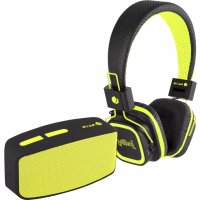
Glitter Yellow - Earphones NGS - Free user manual and instructions
Find the device manual for free Glitter Yellow NGS in PDF.



| Product Type | Bluetooth wireless headset |
| Brand | NGS |
| Model | Glitter Yellow |
| Bluetooth Version | V2.1 with A2DP, AVRCP, hands-free |
| Music Playback Time | 5 hours |
| Standby Time | 150 hours |
| Charging Time | 2 hours (first charge: 3 hours) |
| Battery Type | Built-in rechargeable lithium |
| Charging Connector | Micro USB |
| Audio Input | 3.5mm jack |
| Music Playback | Bluetooth, micro SD card, line input |
| Supported Formats | MP3 (via micro SD card) |
| Phone Functions | Hands-free (answer/hang up) |
| Controls | Multifunction button, volume +/-, next/previous track |
| LED Indicators | Red (charging), blue (connection) |
| Package Contents | Headset, USB cable, manual |
| Care and Cleaning | Wipe with a soft, dry cloth. Do not use abrasive products. |
| Safety | Do not expose to water or extreme temperatures. Non-replaceable battery. |
| Warranty | 2 years (battery: 12 months) |
Frequently Asked Questions - Glitter Yellow NGS
User questions about Glitter Yellow NGS
0 question about this device. Answer the ones you know or ask your own.
Ask a new question about this device
Download the instructions for your Earphones in PDF format for free! Find your manual Glitter Yellow - NGS and take your electronic device back in hand. On this page are published all the documents necessary for the use of your device. Glitter Yellow by NGS.
USER MANUAL Glitter Yellow NGS
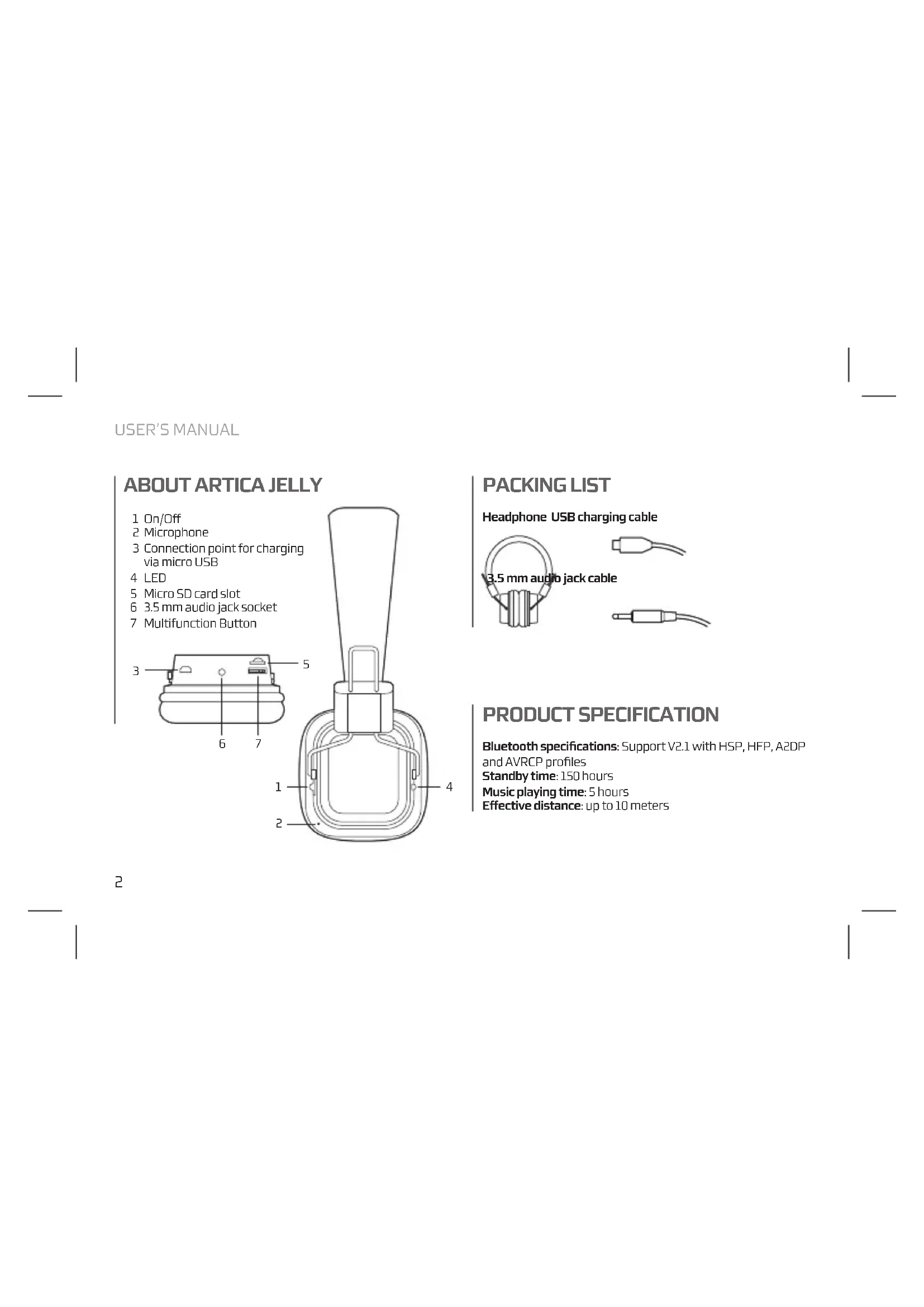
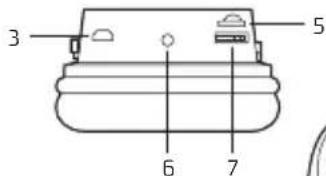
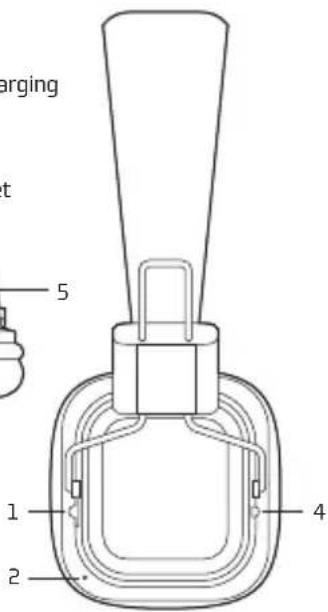
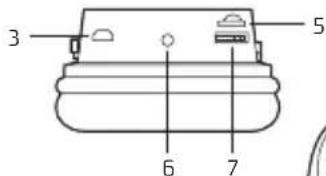
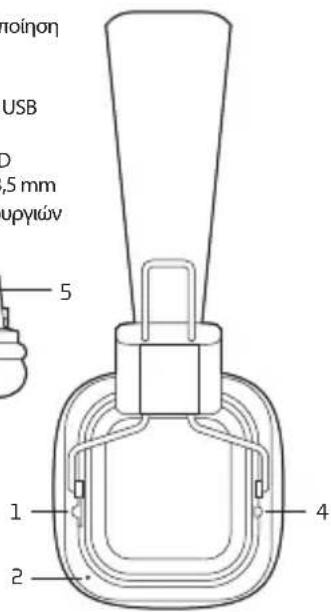
1 On/Off
2 Microphone
3 Connection point for charging via micro USB
4 LED
5 Micro SD card slot
6 3.5 mm audio jack socket
7 Multifunction Button
PACKING LIST
Headphone USB charging cable
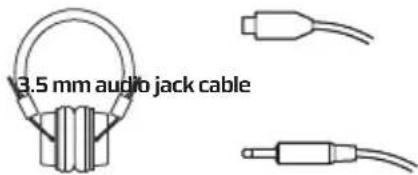
PRODUCT SPECIFICATION
Bluetooth specifications: Support V2.1 with HSP, HFP, A2DP and AVRCP profiles
Standby time: 150 hours
Music playing time: 5 hours
Effective distance: up to 10 meters
EARPHONE CHARGING
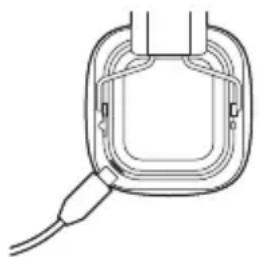
- Built-in rechargeable Lithium battery.
- It must take 3 hours for the first time charging.
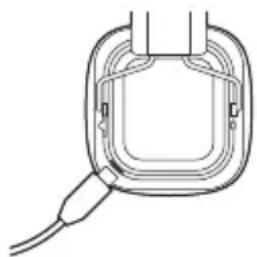
- Connect the charger cable to the charger connector. The Red indicator light is displayed during charging. Charging the battery fully may take about 2 hours.
- When the battery is fully charged, the red indicator light becomes dimmer until it almost off. Disconnect the charger from the headset and the outlet. The headset is ready to use.
PAIR THE HEADSET
If your phone supports the A2DP Bluetooth profile and has a music player feature, you can use the phone to make and receive calls, and to play music with the headset.
- Ensure that your phone or music device is on and the headset is off.
- Switch the power switch to the ON position. The blue light will flash.
- Activate the Bluetooth feature on your phone or music player, and set it to search for Bluetooth devices.
- Select the headset NGS ARTICA JELLY from the list of founded devices on your phone or music player.
- When the headset is connected to your device and is ready for use, the Blue indicator light will flash every 5 seconds.
USER'S MANUAL
To listen to music, pair and connect the headset to a device that supports the A2DP Bluetooth profile. (See "Pair the headset"). To play music, use the playback controls on the connected device. If you answer or make a call while listening to the music, the music will pause until you end the call.
Function Description
Play or Short press the Play/Pause key Pause
Music Press and hold the Volume (+) button to volume increase the volume
Press and hold the Volume (-) button to decrease the volume
Next Short press Volume (+)
Previous Short press Volume(-)
LISTEN TO MUSIC VIA MICROSD CARD
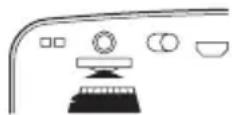
- Insert a micro SD card with MP3 music in the slot using the correct position.
- The music on the card will begin playing automatically.
- To switch to Bluetooth mode (when you have a card connected) press the play/pause button for 2 seconds.
- To switch to card mode again, press the play/pause button for 2 seconds.
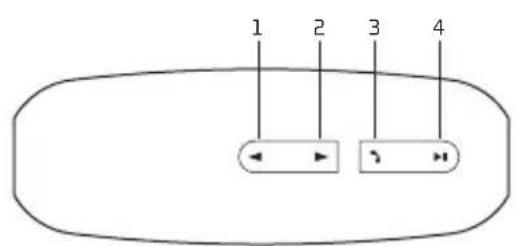
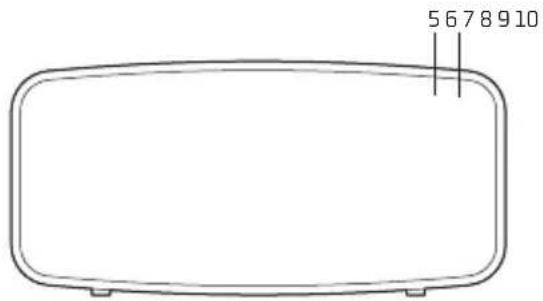
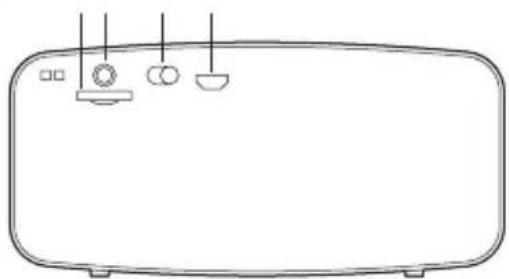
ABOUT ROLLER FUN
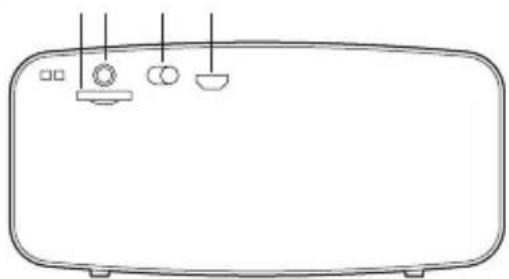
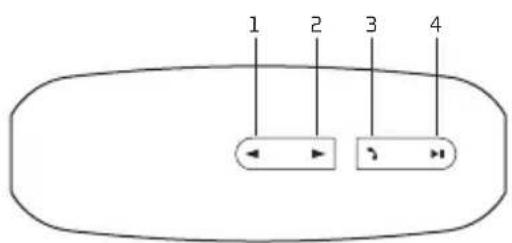
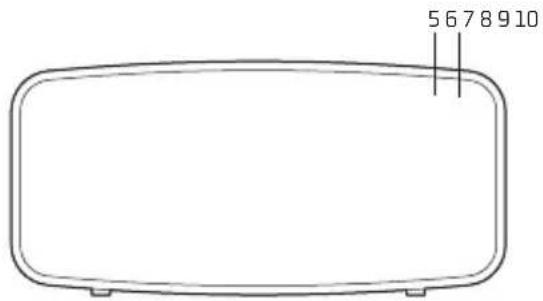
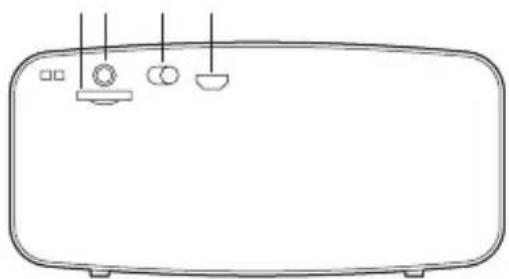
1 Volume + / FWD 6 Connected LED
2 Volume-/REW 7 Micro SD card slot
3 button 8 3.5 mm audio jack socket
4 Play/Pause button 9 On/Off
5 Charging LED 10 Connection point for charging via micro USB
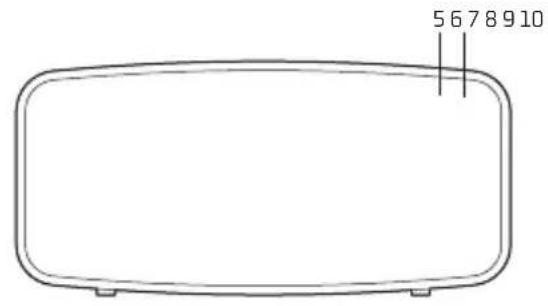
USER'S MANUAL
CHARGING THE BLUETOOTH SPEAKER
- Connect the Bluetooth speaker's micro USB socket with the computer's USB port through USB cable.
- The charging LED will turn ON in red light; the rechargeable battery is in charging.
- The charging LED red light will turn OFF when the rechargeable battery is fully charged.
- Disconnect the USB cable.
BLUETOOTH SPEAKER PAIRING / RECONNECTING
- Move the switch to the ON position, a message sound; "beep" will announce from speaker and the mode LED will blinking in blue; the device is turned ON and goes into searching / paring / reconnect mode for pair.
- Now, turn ON the Bluetooth function on your mobile phone.
- Search for "NGS ROLLER FUN" and select it to pair (for first time pairing or pairing a new mobile device).
- The Bluetooth speaker will be reconnecting automatically if your mobile phone has been paired (Depend on the of mobile phone's type and configuration, manual reconnection may require on some devices).
- If pairing is successful, a message sound; "beep" will announce from speaker and the mode LED light will keep turn on.
MODES
BLUETOOTH / LINE IN / FM RADIO / MICROSD CARD
To switch between modes, hold down the button for 2 seconds. If no cable or SD card is connected to the device, it will ignore these modes.
BLUETOOTH SPEAKER CONTROL FUNCTION
- In playing music, press button to pause music, press it once again to play.
- Press and hold the button to increases the volume level.
- Press and hold the button to decreases the volume level.
- Press the button to play next music file.
- Press the button to play previous music file.
HAND FREE FUNCTION
BLUETOOTH MODE ONLY
When there is an incoming call;
- The ringing sound will up and the playing music will pause automatically.
- Press button to pick up the call if you want.
- Now you have hand free function with the Bluetooth speaker.
- Hold down the button for 2 seconds to hand up the call when finished. And,
- The paused music will start to play automatically.
USER'S MANUAL
LINE IN MODE
- Connect the audio source to the speaker via a 3.5 mm audio jack cable.
- Play music from external audio source.
Note: Not all functions are available in LINE IN mode. Only the play/pause and volume functions are available.
FM MODE
- Hold down the 1 button for 2 seconds. It will cycle between modes until you hear the message "FM TUNER".
- Press the button for automatic channel search. Once the search is finished, skip between channels by pressing the and buttons.
MICRO SD CARD MODE
- Insert the micro SD card into the slot.
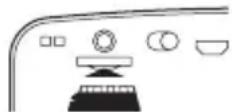
- The device will automatically play any music in MP3 format on the card.
WARRANTY
Limited warranty. NGS warrants that any hardware products accompanying this documentation shall be free from significant defects in material and workmanship for a period of two (2) years, three (3) years or five (5) years from the date of purchase. NGS's limited warranty is non-transferable and is limited to the original purchaser. This warranty gives you specific legal rights, and you may also have other rights, which vary under local laws.
Battery warranty. The battery is a consumer product, and as such it is under warranty for 12 months.
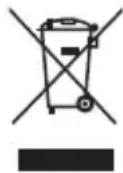
If at any time in the future you should need to dispose of this product please note that: Waste electrical products should not be disposed of with household waste. Please recycle where facilities exist.
Check with your Local Authority or retailer for
recycling advice.
(Waste Electrical and Electronic Equipment
Directive)

HEREBY, LURBE GRUP S.A, DECLARES THAT THIS PRODUCT IS IN COMPLIANCE WITH THE ESSENTIAL REQUIREMENTS AND OTHER RELEVANT PROVISIONS OF DIRECTIVE 1999/5/EC.
MANUEL DE L'UTILISATEUR
CHARACTERISTIQUES DU PRODUIT
Distance effective: plus de 10 metres
CHARGEUR DE BATTERIE
4 Bouton lecture/pause
9 Allumé/étéint
5 LED de charge
10 Connexion charge micro USB
MANUEL DE L'UTILISATEUR
CHARGEMENT DU HAUT-PARLEUR BLUETOOTH
ORAZ POZOSTALYMI STOSOWNYMI
POSTANOWIENIAM DYREKTYWY 1999/5/EC
O△HΓIEΣXPH∑H∑
1 Evpyooinon / AnEvpyooinon (On/Off)
2 Mikofovo
3 Luvseon ooptwanc micro USB
4 LED
5 EayEe Tny Kapta micro SD
6 EioofoacakouotikouJack3,5mm
7ππktpo nλaannaw λeoupyiw
INAKA Σ ΠEPIXOMENΩNΞTΙΚΑ METHN ARTI
Akouotiká
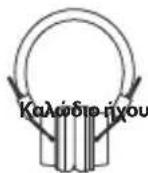
USB kaλδιo φόρτιος
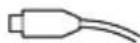
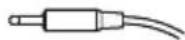
KaijiojiyouJack3,5mm
Xpovoc avanapaywync mouaiikic: 5 wpc
Anoteeepaikn anootaan: 10
AKOYETIKA ZE FOPTIH
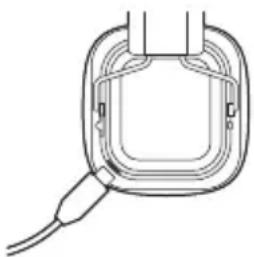
- Enavaopnpzoeynmuataiaaiounepaabavetai
- Hπρωτη φόρτη πρεπειν διαρκεοει 3 ωρες.
- SuVSeTe To kalwio Tou oopTOn TnV unOdoyn oopTionc, H Kokiv EvdeikTuK Luyvia eivai avumuVN kata n oopTion. H Pn np oopTion Tnc mntaplac, mtopei va diapkeoei nepinou 3 wpc
- Otav n unatapia opptiote i npwc, n xapnnc evtaonc, kokkivn Evkeikni luxvia mevei akoun oxedov obnqevn.AIOouvdeTe Tov popti anio to akoutkoai yalte tov ano npica.Ta akoutika elvai etoiqa yia xpnoi.
ΣYΓXPONIΞMOΞ AKOYΞTIKΩN
Eav to thépuvo aac unoortpiéi to pnpil Bluetooth A2DP
Kai diahele ielloupyia avanapaywync houokn,cmuopeite va
xpooiotnoeTe to thépuvo yia va kavete nva dextheta Knaoeic
kai avanapaywnuoknnc me akouotiká.
- BeaiwTei oTo tnEepWvOacn n ouakeun avanapayync Mouiknc oac Bioketal OE eitoupyia kAI OTI TO akoutiko Eivai EKTOLEIOUPYIAc
- BalaTov biakomn avapaleEnc/tpoopdoocic otn thon ON.To mIe wCt a apxioe va avaooBriVe.
- Evpyoioiote nI aeoupyia Bluetooth tou nIeawou oac nTnv avatapaywyn mouiknc kai puoiote nV avzntn yauakeuec Bluetooth.
- Eπετε Σακουσικό NGS ARTICA JELLY απο τη λίστα των συκεύμιν ποῦ βρεθηκαν στο τηλέρωνο ἡν συκεύμιν αναταρayωγής μουακίκε.
- Otav to akouotikó éival ouvdeδejevo otn ouakeun oac kal eivai etoiyo ia xphon, n mIae evdeiktikn luxvia avaBooBnei Kahe 5 deutepeAenT.
O△HΓIEΣXPH∑H∑
AKOYETEMOYZIKH MEZQTHZ BLUETOOTH
Tia va akouoete Mauokn, ouvodote to akouotko 1mu ouakeun nou uootnpiei to npopia Bluetooth A2DP. (AvatpeEe otyn evotna "Suvoean Tou akouotikou"). Tia thy avantapaywn mouakic, xpoaiontoiote ta otoyeia exyou avantapaywn c onn ouvdejeiv ouakeun. Av anavtnote n npayatotoioe tia khan, otav akoute muokn, nuoukni 0ta ataattne iexpi va oloknpwei khan.
Aetoupyia Neipyapn
Avapaywn n Pnntote ev ouvtoula to nktpo Play/Pause naon
Evtaon mouoknc kpatnote natnevo to nAnktpo Evtaonc Hxou (+) ia va auEnoeTe Tnv Kpatnote natnevo to nAnktpo Evtaonc Hxou (-) ia va meiwoete Tnv Evtaon Tou hXou deutepoAenTt
EnoEvOnntoteEvouvtia tonktoEvtaon (+)
Ppoyoumeo Pntote Ev ouvtouia to nIktpo Evtaon (-)
AKOYETEMOYIKHMEZQTHKAPTA MICRO SD
- Tonothe note ia kapta micro SD e mouakn MP3 otn katalnnu nn todoxn kal otn owtn thc
2.Hmuouikn, nou nepiéxei n kápta, thα Εeivnoei autóμata va naiei. - Tia va μεταβειτε σελειουργλa Bluetooth (otav unápxει μia ouvδδεμενη καρτα), παποτε to πλικτρο avanapaywγπc/ παύσης για 2 δευτερόλεπτα.
- Ia va metaeite eva niow, otn aeoupyia tnc kaptac nntne ta to nktpo avatapaywyc / naoc yia 2 deutepeetta
ΣXETIKA ME THN ROLLER FUN
1 'Evraon ^+ /FWD
6 LED ouvδεοη
2 Evtaon-/REW
9 EvpyoioiOn / AteevpyoioiOn (On/Off)
5 LED φφρτησς
10Σvδεη φρτωng micro USB
O△HΓIEΣXPH∑H∑
ΦOPTI ζH TOY HXEIOY BLUETOOTH
- Suvse Te nvo doxmyo USB tou nxeiou Bluetooth oT hupa USBtou uOLOyOTn oac xnpaouoiWvTac to kawio USB.
- H kókkivn luxvia φopπiç, LED aváβe i yia va δεiεi oτι η επλανροπιόμενη μιπατρία φορτιζειαι.
- H kokkivn luxvia LED opoptionc oBnye otav n enavaoppticouevn matapia eivai npwoc opptioevn.
- ATOOUVδEOTe TO KAλωδIO USB.
SYTXPONI\SMO /ENANA\SYN E HXEIOY BLUETOOTH
- BálatevodiaikonotnθeON.AkouyetaiEvnayntiko mnuopa ano to nxeio kai avaboBnevi n mLeuxviaLEDyia vaeieEoi otuokeun eivai evepyoinuevN kai piokeTai OEaetoupyia avahtnonc /ovxpvioaou /enavaovdeltaoc yia thnoupyia ouvdeonc
- Tupa evepyonoTne t naitoupyia Bluetooth tou kivntou oac tnAeupovou.
- Ipaayatotoinote aavahtnoyia to "NGS ROLLER FUN"kai emAETo yia va npayatotoine i ouyypovoiouc (yia npwtn opa n ia va ouypovioeTe ia veda ouakeun).
- To nxeio Bluetooth θε εηλασυνδθει αυτόματα αν το KIVNTO ας ηλέφυνο ἐχει συγχρονίαι (αναλογα με TOV TUTO KAI TIC, υμθμειεις TOUT KIVNTOU ηλέφωνου, ενδέχεια οε Μρισμένες, συκΕύες, να πρείιειν κετελέσετε θερορίνιπα TIV έλασανύνδεόη).
- Eav o ouyxpoviaoc eivai etituxic, eva nyntikó mnuja aanto to nxel kai n luxvia LED napaevei avmuevn.
AEITOYPRIEZ
BLUETOOTH / YIIOAOXH ΣYΣKEYHΣ HXOY (LINE IN) / PAIIOΦΩNO FM / KAPTA MICROSD
Tia va metabetae ano to eva meo oTo dAio, kpatnote natneveo to pntpo 11 yia 2 deutepoAenra. Eav n ouokeun dev diaBetei auvdeon me kalwdo in ouvdesevn kappa TSD, ayonote autec tic Aetoupyiec.
XEPII\SMO\S TOY HXEIOY BLUETOOTH
- Kata tN diapkeia tnc avanapaywync houaikn, nntote to nAhtpo yia va otauatnoein nuoakn, nntote EaVa yia va ouvexioete.
- KpatnoTe naiuEvo to nAikto po ia va auognoTe TIV evtaon.
- KpatnoTe pannuevo to nAnkto Pya va uEwOeTe Tnv Evtaon.
- Nnto To koumia va va uetakivtheite oTo enoevo apxio mouaiknc
- Patrato To Koumuia va maetakivnthei eTo nponyouevo apxioouikic.
AEITOYPTIA HANDSFREE
AEIOTOYPITAMONONOTABLUETOOTH
'otav dexeote kantoia eepxoevn khan:
- O nxc k hongduwauowei kai mouokn otajata autoujata.
- Av etuie va anavtoe ot nV kion, nntote to koumi
- Πλέον τηχείο Bluetooth προσφέρει τη δυνατότητα λεπουρίας handsfree.
- KpatnoTe natnuevo yia 2 deutepoAenTa to nAnktpo yia va Kaiaote otav n kAnon tepuariotei, kal
- Houaikn n onoia eixe otaiatnoei o ouvexioi va avanapayeta autouata.
O△HΓIEΣXPH∑H∑
AEITOYPTIA LINE IN
- Suovseote e eva kaawio nou Jack 3,5 mm tynnntou nxoue to nyieo.
- Avanapayuyn tnc mouokicnc aio eWtepkin nyin xou.
Enmuoi: OAc oI aeitoupyie cEv eivai diaedaeiuec otN aeitoupyia LINE IN. H aeitoupyia (LINE IN) diaTei movo tic, aeitoupyiec play / pause kai xou.
AEITOYPTIA FM
- Patrjote To njkto Myia 2 deutepoAeTTa. YaeTe meoa oe oLec Tic diapopec, aeouyie, xepi va akouoete to mnuja "AEKTHF FM (FM TUNER)".
- Pnntote To nIhKtpo Ima Tnu autouatn avachton twv Kavaiuov. Moic Tealewaei navaChtnon, nathote Ta nnktpa Kai via va nate anio kavai oe kavai.
AEITOYPFIA KAPTAZ MICRO SD
- TonotheTneTyn kapta micro SD otn katdaan unooxyn
- H ouokun 8a avanapayi autómuata TnV nuokn MP3 oynkapra.
ETYHsH
NGS eyywvta nva anoula onuavtkov
eatauwvceon me ta uikai kai kataokeun oawv twv
npoivtwv hardware nou auovdeovv nny napouoa tekunpiowan
yia xpvioki diaoeta duo (2) etuv, (3) etuv (5) etn (avaoya me to
npoiov), aio ano thnu npouviya ayopac, H npiopipieevn yuywn
tnc NGS eiva metaBiaoun kai nepiopicetai orov apxiko ayopaatn.
H napouaa eyywnan dev biyei ta dikaiuata tou exei o katavaawntc
oukpwa me tic diataecic tou npovtoc vouou.
Eyyunon mntatapiac; H mntatapia eivai avalwaiu, kai wc teToia, n napexouevn Eyyunon elvaio yia 12 prvec.
Av oIeov npaotei avaykn anoppinc tou Poiovtoc,lambdae unoyn:
Piuc ta anoBlaTn aeKtpovikuV npoiovTu6v EeItpenetai va atoppittovtai maJiE ta oikiaka atopplmuata. Avakukwote to tC diaheaiec Eykataotadoeic.
AnotaBeite otic apo6iec Tonikec Apxec n oToV eTnopiK oavipooWto yia npopopoe cxtik a Tnv avakukwon.
(Odyia πeipantoppiuHεKtpovikwKaI HεKtpiKwΣoKEUw)

AIA TOY IAPONTO H LURBE GRUP S.A. HAQNEI IO TO AKOYSTKA TAHPOI TIE STOIXEIOAEIS POIAI PADEZ KAI THPEI KAOE AANH IATAEH OY TIETAI EEOAPMOH'H OPIZETAI TOHN
OADHIA 1999/5/EK.



NGS
electronics
TECHNICAL SUPPORT: WWW.NGS.EU/SUPPORT
WWW.NGS.EU


- PACKING LIST
- PRODUCT SPECIFICATION
- EARPHONE CHARGING
- PAIR THE HEADSET
- USER'S MANUAL
- Function Description
- LISTEN TO MUSIC VIA MICROSD CARD
- ABOUT ROLLER FUN
- CHARGING THE BLUETOOTH SPEAKER
- BLUETOOTH SPEAKER PAIRING / RECONNECTING
- MODES
- BLUETOOTH SPEAKER CONTROL FUNCTION
- HAND FREE FUNCTION
- LINE IN MODE
- FM MODE
- MICRO SD CARD MODE
- WARRANTY
- MANUEL DE L'UTILISATEUR
- CHARACTERISTIQUES DU PRODUIT
- CHARGEUR DE BATTERIE
- CHARGEMENT DU HAUT-PARLEUR BLUETOOTH
- O△HΓIEΣXPH∑H∑
- INAKA Σ ΠEPIXOMENΩNΞTΙΚΑ METHN ARTI
- AKOYETIKA ZE FOPTIH
- ΣYΓXPONIΞMOΞ AKOYΞTIKΩN
- AKOYETEMOYZIKH MEZQTHZ BLUETOOTH
- Aetoupyia Neipyapn
- AKOYETEMOYIKHMEZQTHKAPTA MICRO SD
- ΣXETIKA ME THN ROLLER FUN
- ΦOPTI ζH TOY HXEIOY BLUETOOTH
- SYTXPONI\SMO /ENANA\SYN E HXEIOY BLUETOOTH
- AEITOYPRIEZ
- XEPII\SMO\S TOY HXEIOY BLUETOOTH
- AEITOYPTIA HANDSFREE
- AEITOYPTIA LINE IN
- AEITOYPTIA FM
- AEITOYPFIA KAPTAZ MICRO SD
- ETYHsH
- NGS
Brand : NGS
Model : Glitter Yellow
Category : Earphones