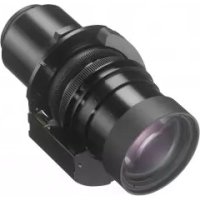
VPLLZ3032 - Projector Accessory SONY - Free user manual and instructions
Find the device manual for free VPLLZ3032 SONY in PDF.



| Product type | Projection lens |
| Brand | Sony |
| Model | VPLL-Z3032 |
| Category | Projector accessory |
| Compatibility | Sony projectors (compatible models) |
| Focus | Electric (via remote control or control panel) |
| Zoom | Electric (via remote control or control panel) |
| Projected image size | 40" to 600" (1.02 m to 15.24 m) |
| Dimensions (L × H × D) | 97 × 105 × 177 mm |
| Weight | Approx. 1.2 kg |
| Supplied accessories | Instruction manual |
| Peripheral focus | Corner correction via Lens Corner Correction |
| Lens removal | Press LENS RELEASE, turn counterclockwise |
| Lens installation | Insert straight, turn clockwise until it clicks |
| Condensation precaution | Leave the projector on for 2 hours before use in case of condensation |
| EMC warning | Compliant with CISPR 32 Class A, may cause radio interference |
| Medical precautions | Contains magnets, do not place near medical devices |
| Cleaning | Avoid touching the surface, do not drop |
| Warranty | See terms on Sony website (depending on country) |
Frequently Asked Questions - VPLLZ3032 SONY
User questions about VPLLZ3032 SONY
0 question about this device. Answer the ones you know or ask your own.
Ask a new question about this device
Download the instructions for your Projector Accessory in PDF format for free! Find your manual VPLLZ3032 - SONY and take your electronic device back in hand. On this page are published all the documents necessary for the use of your device. VPLLZ3032 by SONY.
USER MANUAL VPLLZ3032 SONY
Operating Instructions GB
Mode d'emploi R
VPLL-Z3010/Z3024/Z3032
也買上(い)的たきあがうさい。

VPLL-Z3010/Z3024/Z3032

日本語
Before operating the unit, please read this manual thoroughly and retain it for future reference.
This lens is designed for use with the Sony Projector.
For details concerning compatible models, consult with qualified Sony personnel.
For the customers in Europe, Australia and New Zealand (VPLL-Z3010/VPLL-Z3024/VPLL-Z3032 only)
WARNING
This equipment is compliant with Class A of CISPR 32. In a residential environment this equipment may cause radio interference.
For the customers in Europe (VPLL-Z3010/VPLL-Z3024/VPLL-Z3032 only)
This apparatus shall not be used in the residential area.
If the room temperature where the projector is installed changes rapidly, or if the projector is moved suddenly from a cold to a warm place, condensation in the projector may occur. As the condensation may cause malfunction, be careful in adjusting temperature settings of the air conditioner. If condensation occurs, leave the projector turned on for about two hours before use.
Do not place this product close to medical devices
This product (including accessories) has magnet(s) which may interfere with pacemakers, programmable shunt valves for hydrocephalus treatment, or other medical devices. Do not place this product close to persons who use such medical devices. Consult your doctor before using this product if you use any such medical device. (VPLL-Z3010/Z3024/Z3032)
Notes
-
Always verify that the unit is operating properly before use. SONY WILL NOT BE LIABLE FOR DAMAGES OF ANY KIND INCLUDING, BUT NOT LIMITED TO, COMPENSATION OR REIMBURSEMENT ON ACCOUNT OF THE LOSS OF PRESENT OR PROSPECTIVE PROFITS DUE TO FAILURE OF THIS UNIT, Either DURING THE WARRANTY PERIOD OR AFTER EXPIRATION OF THE WARRANTY, OR FOR ANY OTHER REASON WHATSOEVER.
-
SONY WILL NOT BE LIABLE FOR CLAIMS OF ANY KIND MADE BY USERS OF THIS UNIT OR MADE BY THIRD PARTIES.
-
SONY WILL NOT BE LIABLE FOR THE TERMINATION OR DISCONTINUATION OF ANY SERVICES RELATED TO THIS UNIT THAT MAY RESULT DUE TO CIRCUMSTANCES OF ANY KIND.
For the customers in the U.S.A.
SONY LIMITED WARRANTY - Please visit http://www.sony.com/psa/warranty for important information and complete terms and conditions of Sony's limited warranty applicable to this product.
For the customers in Canada SONY LIMITED WARRANTY - Please visit http://www.onybiz.ca/pro/lang/en/ ca/article/resources-warranty for important information and complete terms and conditions of Sony's limited warranty applicable to this product.
For the customers in Europe
Sony Professional Solutions Europe - Standard Warranty and Exceptions on Standard Warranty. Please visit https://pro.sony/support-services/primesupport/support-professional-solutions-europe-standard-product-warranty for important information and complete terms and conditions.
For the customers in Korea SONY LIMITED WARRANTY - Please visit http://bpeng.sony.co.kr/handler/ BPAS-Start for important information and complete terms and conditions of Sony's limited warranty applicable to this product.
Supplied accessory
Operating Instructions (1)
Specifications
VPLL-3007
Manual focus,
Projected image size:
60^ to 300^ (1.52 m to 7.62 m),
Maximum external dimensions
(W× H× D)
150× 150× 222mm
(5^29 / 32'' × 5^29 / 32'' × 8^3 / _4'')
Mass: Approx. 1.7kg (3.7 lb 60 oz)
VPLL-Z3009
Manual focus/zoom,
Projected image size:
60^ to 300^ (1.52 m to 7.62 m)
Maximum external dimensions
(W× H× D)
150× 150× 217mm
(5^29 / 32'' × 5^29 / 32'' × 8^19 / _32'')
Mass: Approx. 1.7kg (3.7 lb 60 oz)
VPLL-Z3010
Electric focus/zoom, (when attaching to the projector),
Projected image size:
60^ to 300^ (1.52 m to 7.62 m)
Maximum external dimensions
(W× H× D)
150× 150× 227mm
(5^29 / 32'' × 5^29 / 32'' × 9'')
Mass: Approx. 2.0kg (4 lb 6.5 oz)
VPLL-Z3024
Electric focus/zoom, (when attaching to the projector),
Projected image size:
40" to 600" (1.02 m to 15.24 m)
Maximum external dimensions
(W× H× D)
97× 105× 177mm
(3 ^13 / 16^ × 4^9 / 64^ × 6^31 / _32^ )
Mass: Approx. 1.2kg (2.6 lb 42 oz)
VPLL-Z3032
Electric focus/zoom, (when attaching to the projector),
Projected image size:
40" to 600" (1.02 m to 15.24 m)
Maximum external dimensions
(W× H× D)
97× 105× 177mm
(3^13 / 16^ × 4^9 / 64^ × 6^31 / _32^ )
Mass: Approx. 1.2kg (2.6 lb 42 oz)
Note
The values for mass and dimensions are approximate.
Replacing the Projection Lens
Notes
- Be careful not to drop the projection lens.
- Avoid touching the lens surface.
- Lenses can be scratched easily. When handling lenses, always place them gently on a stable, level surface in a horizontal position.
The illustration of VPL-FHZ65 is used for the explanations.
Removing
1 Return the projection lens to the center position.
While the projector is turned on, press the LENS SHIFT button on the Remote Commander, then press the RESET button on it. The projection lens returns to the center position.
Note
The projection lens cannot be removed unless it has returned to the center position.
2 Turn off the projector, then unplug the AC power cord from the wall outlet.
Caution
When replacing the lens, your eyes may be damaged if a strong light accidentally gets into your eyes. Before replacing the lens, turn off the projector and then unplug the AC power cord.
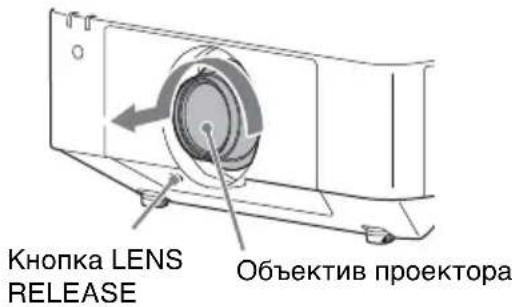
3 While pressing and holding down the LENS RELEASE button, rotate the projection lens counterclockwise to pull out the lens straight.
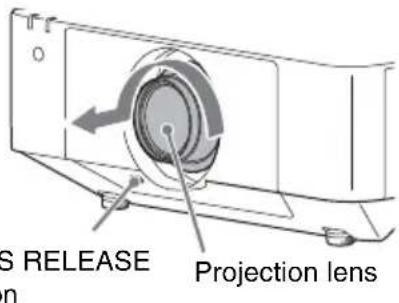
Note
For the location of the LENS RELEASE button, refer to the Operating Instructions of the projector. The location of the button is different depending on the model.
Attaching
1 Fully insert the projection lens with the index on the lens facing toward the top surface of the projector.
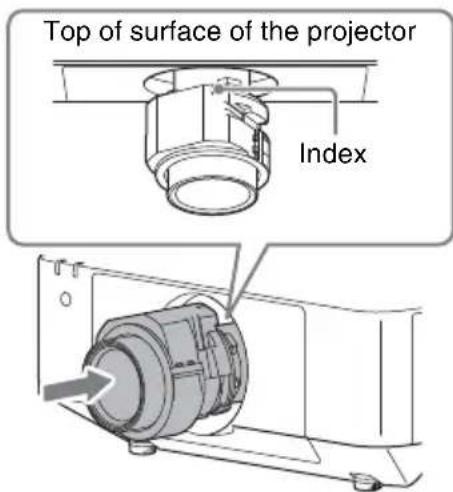
2 Rotate the lens clockwise until it clicks.
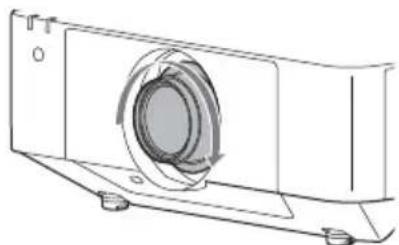
Note
When attaching the projection lens, do not press the LENS RELEASE button.
Adjusting the Projection Lens
| Focus | Peripheral focus (Corner Correction) | Size (Zoom) | |
| VPLL-Z3024/ Z3032 | Press the FOCUS button on the Remote Commander or the control panel of the projector once, and adjust with ↑/↓/←/→ on the Lens Focus adjustment screen. | - | Press the ZOOM button on the Remote Commander or the control panel of the projector, and adjust with ↑/↓/←/→. |
| VPLL-Z3010 | Press the FOCUS button on the Remote Commander or the control panel of the projector once, and adjust with ↑/↓/←/→ on the Lens Focus adjustment screen. | on the Remote Commander or the control panel of the projector twice, and adjust with ↑/↓/←/→ on the Lens Corner Correction adjustment screen. | |
| VPLL-3007/ Z3009 | Turn the focus lever to adjust the focus. Focus lever | Turn the peripheral focus ring to adjust the focus. | Turn the zoom lever to adjust the size. Zoom lever |
Français
(Nur VPLL-Z3010/VPLL-Z3024/VPLL-Z3032)
WARNING
(Nur VPLL-Z3010/VPLL-Z3024/VPLL-Z3032)
Manueller Fokus/Zoom,
Projektnsbildgrobe:
Per i clienti in Europa, Australia e Nuova Zelanda (Solo VPLL-Z3010/VPLL-Z3024/VPLL-Z3032)
AVVERTENZA
Per i clienti in Europa (Solo VPLL-Z3010/VPLL-Z3024/VPLL-Z3032)
ObbeKTHB IpoeKTopa VPLL-3007/Z3009/Z3010/Z3024/Z3032
IpeiHcIOJIb3OBaHNem yctpoCTBa BHHMaTeJIbHO IIPOuHTaHTe HAcTOrIeepyKOBoDCTBO H COxpaHHTe eRO IJIa IIOJyuHeHn HeO6XOnmO HOpMaIIH B 6yDyIeM.
TOT o6bekTNB IpeHa3HaueH JIJI
HCIOJIb3OBaHHc IIPOeKTopOM Sony.
JIJI IOJIyueHHN IOIOJINHTeJbHOJ
HHΦOpMaIIHN O COBMecTHMbIX MOJeJIAX
O6paHTtecb K KBaJIHΦHnPObaHHbIM
pa6OTHKam KOMIIaHHN Sony.
ToIbKO MoJeNb VPLL-Z3010/VPLL-Z3024/VPLL-Z3032
PPEyPPEXDEHNE
3TO o6OpyIOBaHHe COOTBeTcTByeT KJIaccy A cTaHJaP Ta CISPR 32. B KJIIOI 3OHe 3TO o6OpyIOBaHHe MoKeT BBI3BaTb paIHOIIOMexH.
SONY
CoHH KopnopeHIN
1-7-1 KoHaH MnHaTo-Ky TokNo, 108-0075 YIOHHa
CJeJiaHOB JIOHIN
IMnOpTeP Ha TeppHTOpHn cTpaH TaMOxKeHHOro coHO3a AO «CoH N 3JIeKTPoHnKc》,PoCCnA, 123103,MocKBa,KapambIWeBckn IIpoe3I,6
IaTa H3rOToBJIeHn yKa3aHa Ha H3JeJIHH nYIIaKOBKe Ha 3TNKeTKe CO IITpNXKOJOM B cJIeIyIOIeM fOpMaTe:YYYY-MM, rIe MM-Mecra, YYYYY- roI N3rOToBJIeHn.
OKohdeHcaun
IIpn6bICTpOM H3MeHeHH TeMIIepaTpyB I NOMEIeHH, B KOTOpOM yCTaHOBJeH IIPOeKTop, INI INP 6bICTpOM IIpeMeIeHH IIPOeKTopa IN3 XOJIIOHOrO B TeIIIOe MeCTO BHYTpN HeTO MOKeT
6pa3OBaTbca KOHJeHcAt. TaK KaK KOHJeHcAT MOKeT IIpNBecTn K HeHCIIpaBHOCTN, CO6JIIOJaTe OCTOPOXHOCTb IIpi I3MeHeHH HaCTPOeK TeMIIePaTypbI KOHINIOHOpeA. IIpi 6pa3OBaHHK KOHJeHcata IIpeJ INIOJB3OBAHHem IIpoEKTopa OCTaBBTe eRO BKJIIOueHHbIM IIp6JIIN3HTeJIbHO Ha IBa Yaca.
He pa3meuTe daHoe n3eJne B6n3m MeunHcknx yctpoCTB
JaHHoe H3JeJIe (BKJIOUa aKceccyapbl) OCHaIeHO MaHHTOM(aMn), KOTOpbIMoKet BJIInrTb Ha pa6Oty KapINOCTHMyJIrTOPOB, IPOrpaMMNpyEmbIX IIyHTnpyIOIIHX KJIaHaHOB IJIaJIeYHeHraIIN HJI INIpyTRX MeINIHcKHX ycTPOIcTB. He pa3MeIaIte JaHHoe H3JeJIne B6JIIN3H JINII, IIOJIb3YIOIIHXc TaKHM NMeINIHckHMn ycTPOIcTBaMn. IPOkOHcyJIbTIpyITecb c BpaHom Ipei NcIOJIb3OBaHNem DaHHORo H3JeJIIn, ecJIIN BBI IOJIb3YeTeCb JIO6bIM MeINIHckHM ycTPOIcTBOM. (VPLL-Z3010/Z3024/ Z3032)
PpHMeaHnHa
- BcerIa IIpoBepnIte HcIIpaBHOCTb yctpOcnTba, IIpeXJIe Yem ero IcIOJIb3OBaTb. KOMIIAHN ASONY HE HECET OTBETCTBEHHOCTN 3A KAKoI bblTO Hn BblIO YIIEPb, BKJIIOUyA, B YACTHOCTN, KOMIIEHCAUIO NJIN BO3MEIIEHN E YbBITKOB B CB3N C UTPATOH NJIN HEIOIOJLYUEHNEM IPIIBJIEN N3-3A HEPA6OTOCIOCOBHOCTN 3TOFO OBOPUYIOBAHNA, KAK HA IIPOTJKEHNI TAPAHNTHNO HOIIEPNODA, TAK INIOCSJE NCTEYEHN IAPAHTNHO T OPOKA, A TAKXE BCJIEDCTBNEJIIOBbIX INHBIX BO3MOJXHbIX IPINUH.
KOMIIAHNASONYHE HECET OTBETCTBEHHOCTN3A IPIPETEH3HJIOBOFOPOJA, IPIPEBJAEHHBIE IOJIb3OBATEJIAMN 3TOFO IPIPIBOPA NJIN TPETbIMN JINICAMN.
KOMIIAHNASONYHE HECET OTBETCTBEHHOCTN3A IPEKPAIIEHNE NJIN IPIPNOCTAHOBKY IPEIOCTABJIEHNA KAKNX-JINBO YCJYT,CB83AHHBIX C 3TIM IPIPBOPOM,BHE 3ABNCMOCTNOT OBCTOAREJBCTB.
PpnilaraembIe npHaIeJXHOCTN
HctpyKuHn no 3KcIIyaTaun (1)
TexHnueckne xapaKTepeNCTnKN
VPLL-3007
Puyna qokycnpobka,
Pa3Mep npoeu npyeMoTo n3o6paXeHn: oT 60 IO 300 IOHMOB (OT 1,52-7,62 M)
MaKcHMaJIbHbIe BHeIHHne rAbapHTbI
(III× B× )
150× 150× 222MM
Macca: 1,7 K
VPLL-Z3009
PyuHaΦOKycnpoBka/yBeJIuYeHne,
Pa3Mep npoeu npyeMoRo H3o6paKeHnra: oT 60 nO 300 nIOHMOB (oT 1,52-7,62 M)
MaKcHMaJIbHbIe BHeIIHHe rα6apHTbI
(III× B× )
150× 150× 217 MM
Macca: 1,7 Kr
VPLL-Z3010
3JIeKtpnueckaФOKycnpoBka/ yBeJIuYeHne, (IpycTaHOBKe Ha InpoeKTOp),
Pa3Mep IIpoeIuPyemOro I3o6paJKeHn:OT 60 IO 300 IOHMOB (OT 1,52-7,62 M)
MaKcHMaJIbHbIe BHeIIHHe Ra6apHTbI
(× × )
150× 150× 227MM
Macca: 2,0K
VPLL-Z3024
3JIeKTPnueckaФOKycnpoBka/ yBeJIInHeHne, (IpyuCTaHOBKe Ha IpioEKTOp),
Pa3Mep npoeuHpyeMoTo n3o6paJxHnra:OT 40 JIo 600 IIOHMOB
(OT 1,02 - 15,24 M)
MaKcHMaJIbHbIe BHeIIHHe Ra6apHTbI
(III× B× )
97× 105× 177MM
Macca: 1,2 Kr
VPLL-Z3032
3JIeKtpnuecka OKycnpoBka/ yBeJIInHeHne, (IpycTaHOBKe Ha IIOeKTop),
Pa3mep IIpoeInpyeMOro H3O6paXeHnA:OT40JIO600IIOHMOB
(ot 1,02 - 15,24 M)
MaKcHMaJIbHbIe BHeIIHHe Ra6apHTbI
(× × )
97× 105× 177MM
Macca: 1,2 Kr
Ppimechane
JIMMaccbI npa3MePOB yKa3aHbI IIN6JIIN3HTeJIbHbIe 3HaueHHa.
3aMeHa 06BeKtNbA npoeKTopa
PpmeaHn
- ByIbTe aKKypaTHbI, YTo6bI He ypoHHTb O6bekTnB IPOeKTopa.
He npKacaiTecb K JINH3e 06bekTnBa. - O6bekTnBbl oyeH JeRKO IIOuapaIaTb.
Iprno 6paueHH c 6bekTHBaMH BceIa
ocTopoXHO KJIaINTe Hx Ha yCTOnyHBYIO
POBHyIO IOBcpxHOCtB B ROpH3OHTaJIbHOM
IIIOJIOKeHH.
-IIIIOHcEHNIINPHBOIDITcN3O6paXeHHeMoJeJINVPL-FHZ65.
CHaTne
1BepHnTe 06bckTnB IIpoeKTopa B IeHTpaJIbHOe IOJIOKeHHe. IIpn BkJIIOueHHOM IIpoeKTope HaKMITE KHOIIky LENS SHIFT Ha IIyIbTe INCTaHIIOHOHOrO yIIpaBJeHn,3aTeM HaKMITE KHOIIKy RESET Ha HEM.O6bekTNB IIpoeKTopa BepHeTcB IIeHTpaJIbHOe IOJIOKeHne.
PnmuMeaHne
O6bekTHB HeBO3MOXHO CHrTb,IOKa OH He BepHyJcB IeHTpaJIbHoe IOJOxKeHHe.
2 BbIKJIOHTe IPOeKTop, a 3aTeM OTcoeINHITe Ka6eJIb INHTaHnI IIEpeMeHHOro TOka OT HAcTeHHOH PO3eTKN.
OctopoxHo
Ipn 3aMeHe 06bekTHBa BO3MOxHo
HOnaJaHne npKOro CBeta B rJa3a, YTO
MoXeT IOBpeHTb 3peHne. IpeJ
3aMeHOJ 06bekTHBa BBIKIOuHTe
IpoEeKTop HOTcoeHHTe Ka6JIb
HHTaHHI NepemEHoro TOka.
3 Haxab uyepeKbary KhoNky LENS RELEASE,IOBepHnTe 6bekTb IIpoeKTopa IIpOTNb YacOBOn cTpeJIKN, IN BbIHbTe eO 6e3 IpeKeoca.
PpmeaHne
YTo6bI y3HaTb, rHe HaxoHTcK HONKa LENS RELEASE, o6paTHTeCb K INCTpyKuH N O 3KcNJIyatauH IIpoEKTopa. PaIOJIOXeHne KHOIKM MoKeT OTJINaTbC, B 3aBHCIMOCTH OT MOJeJH.
YCTaHOBka
1 IIOJIHOCTbIO BCTaBBTe O6BeKTHB IIPOeKTOpa, HApBaNB MeTKy Ha O6BeKTHBe B CTOPOHy BepXHeI IOBepXHOCTH IIPOeKTOpa.
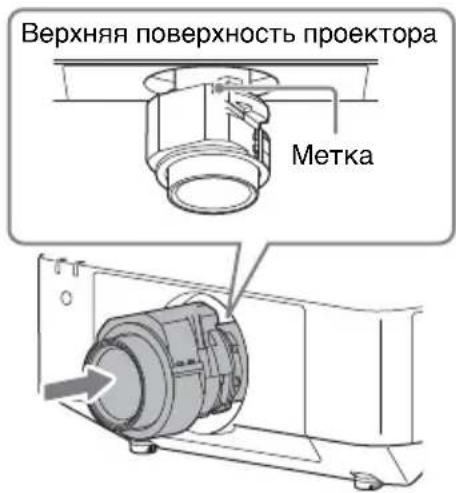
2 IOBepHHTe o6bekTINB IO yacOBOn CTpeJIke IIO IIeJIYka.
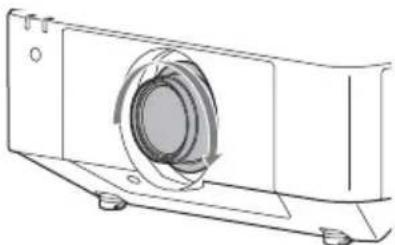
PpmeaHne
Pn yTaHOBKe 06BeKTHBa He HaXHMaHTe Ha KhoNky LENS RELEASE.
Hactpoika obbeKTnBa npoeKTopa


- 日本語
- WARNING
- Do not place this product close to medical devices
- Notes
- Supplied accessory
- Specifications
- VPLL-3007
- VPLL-Z3009
- VPLL-Z3010
- VPLL-Z3024
- VPLL-Z3032
- Note
- Replacing the Projection Lens
- Removing
- Caution
- Attaching
- Adjusting the Projection Lens
- Français
- AVVERTENZA
- ObbeKTHB IpoeKTopa VPLL-3007/Z3009/Z3010/Z3024/Z3032
- ToIbKO MoJeNb VPLL-Z3010/VPLL-Z3024/VPLL-Z3032
- PPEyPPEXDEHNE
- OKohdeHcaun
- He pa3meuTe daHoe n3eJne B6n3m MeunHcknx yctpoCTB
- PpHMeaHnHa
- PpnilaraembIe npHaIeJXHOCTN
- TexHnueckne xapaKTepeNCTnKN
- Ppimechane
- 3aMeHa 06BeKtNbA npoeKTopa
- PpmeaHn
- CHaTne
- PnmuMeaHne
- OctopoxHo
- PpmeaHne
- YCTaHOBka
- Hactpoika obbeKTnBa npoeKTopa
Brand : SONY
Model : VPLLZ3032
Category : Projector Accessory