1LD3322 IAN 72143 - Smartwatch CRIVIT - Free user manual and instructions
Find the device manual for free 1LD3322 IAN 72143 CRIVIT in PDF.



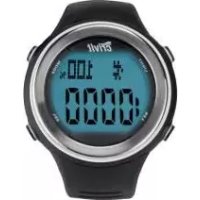
| Product type | Connected heart rate monitor watch with chest strap |
| Brand | Crivit |
| Model | 1LD3322 IAN 72143 |
| Watch dimensions (without strap) | 4.4 x 5.0 cm |
| Screen dimensions | 2.4 x 1.8 cm |
| Watch weight | 31 g |
| Chest strap weight | 51 g |
| Temperature measurement range | 0 °C to 50 °C |
| Transmission frequency | 110 kHz |
| Watch power supply | 1 CR2032 battery (included) |
| Chest strap power supply | 1 CR2032 battery (included) |
| Approximate watch battery life | Approx. 1 year depending on use |
| Watch water resistance | Waterproof up to 3 bar (DIN8310 test) |
| Chest strap water resistance | IPX7 compliant (30 minutes at 1 meter) |
| Main functions | Heart rate monitor, stopwatch, counter, alarm clock, second time zone, backlight, BMI calculation, calories and fat burned, fitness, memory |
| Heart rate training zones | Health (50-65%), Fitness (60-80%), Performance (80-95%), or custom |
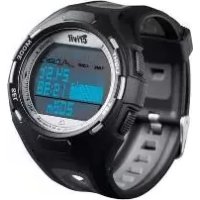
| Display | Digital with backlight |
| Warranty | 3 years from date of purchase |
| After-sales service | CH 0800 543862 |
| Cleaning and maintenance | Clean with a soft lint-free cloth; do not immerse the watch for more than 30 minutes |
| Used batteries | Do not dispose of with household waste; deposit in a designated container |
Frequently Asked Questions - 1LD3322 IAN 72143 CRIVIT
User questions about 1LD3322 IAN 72143 CRIVIT
0 question about this device. Answer the ones you know or ask your own.
Ask a new question about this device
Download the instructions for your Smartwatch in PDF format for free! Find your manual 1LD3322 IAN 72143 - CRIVIT and take your electronic device back in hand. On this page are published all the documents necessary for the use of your device. 1LD3322 IAN 72143 by CRIVIT.
USER MANUAL 1LD3322 IAN 72143 CRIVIT
Usage and safety instructions
IAN 72143
CH
| Color/Marker/Cond.104-151 | |
| IMPERIAL | M |
| IMPERIAL | P |
CHIME STIDALARM SIGN HOR HORA AL
| 3 BAR | √ | × | × | × |
| 5 BAR | √ | √ | × | × |
| 10 BAR | √ | √ | √ | × |
| 20 BAR | √ | √ | √ | √ |
-30 FR CH
IMPERIAL M-IB M-IB M-IB
CHIME | STDALARM | SIGN HOR | HORA AL
OFF/ALG/INACTIF/APAGADO-signal housing ineutil
- P.O. 20, 325 kcal, diastolic serum creatinine of male hemoglobin
(2) 1980, 1984, 1985. The following table includes the annual income of the company from the year ended December 31, 1986.
| TXBELTLO BAT | TXGURTBATT | SNOLTXFILE. | TXBCINBAT BA |
-42
FR CH
| 3 BAR | √ | × | × | × |
| 5 BAR | √ | √ | × | × |
| 10 BAR | √ | √ | √ | × |
| 20 BAR | √ | √ | √ | √ |
Superficie di contratto
even how is a feeling-conscious in
albhipspotakisionaldeh Subtiming

- Batteries
| 3 BAR | √ | × | × | × |
| 5 BAR | √ | √ | × | × |
| 10 BAR | √ | √ | √ | × |
| 20 BAR | √ | √ | √ | √ |
-64
IT CH
Coded transmission 84
Troubleshooting 85
Replacing the heart rate monitor battery - 85 -
Battery low indicator -85
Water resistance of the heart rate monitor 86
Water resistance of the chest belt.... - 86
Cleaning instructions....66
Disposal of the electronic appliance....-86-
Disposal of the batteries.... 67
Declaration of conformity....87
digi-tech gmbh warranty 87
Warranty conditions 67
Warranty period and defects liability - 88 -
Scope of the warranty....-88-
Warranty claim procedure....- 86 -
Service -89-
Supplier 89
-70. GB
E-mail support@inter-quartz.de
Telefono: 00800 5515 6616

CH 0800 563862

2143

Fornitore
Please read the instruction manual before using the product for the first time, even if you are experienced at using electronic equipment. Please take special care when reading the chapter "Important safety information". Keep this instruction manual so you may use it a reference material in the future. If you sell or give this product to someone else it is very important to also include this manual.
Intended use
This electronic appliance is intended for time display and the described additional features. Any other use or modification of the electronic appliance does not comply with the intended uses. The manufacturer is not liable for damages caused by improper use or misuse. The device is not intended for commercial use.
Scope of delivery
Please note: Check with a copy of following: after /pmphobased. Because not that all parts are included and undamaged all parts are included and undamaged.
• Wrist watch incl. battery (CR2032)
- Chest ball incl. battery (CR2032)
- Bicycle bolder
Technical specifications
Whistwatch
| Operating temperature | 0-50°C |
| Dimensions | 4.6 x 3.3 x 1.6 cm |
| Display | 2.9 x 1.9 cm |
| Weight | 51g |
-71- GB
GB Usage and safety instructions Usage and safety instructions
Table of contents
Table of contents -69-
Preliminary note....-71-
Intended use....71
Scope of delivery....-71-
Technical specifications....71
Features 72
Important safety information - 73
Setup of the heart rate monitor 74
Important notes on the operation of the wrist watch....-76-
Light -76-
Time and basic settings....-77-
Alarm -78-
Timer (max. 23:59:00)....-79-
Stop watch 79
Memory feature....- 80 -
Heart rate measurement 80
Warning light 91
Time-91
Memory feature 82
Target heart rate 82
.69. GB
Chest belt
| Operating temperature | 0-50°C |
| Dimensions | 7 x 3,3 x 1,2 cm |
| Frequency | 110 kHz |
| Weight | 51g |
Features
- Alarm for maximum heart rate
• Target heart rate training with timer and alarm
[Health, Fitness, Performance and user defined]
■ Max. heart rate, min. heart rate and average heart rate
- Warning light for high heart rate
©colonief bae
• Calories and fat burned during training
- BMI-calculation
■ Fitness Level
Steps watch
1/100 seconds with 99 lap times
Growthoverline
Time/b chuatus
Time
- Calendar
• Alarm with snooze
• Hourly chime
Second time zone
-72. GB
OtherOther
- Book light
Important safety information
ATTENTION: Consult your doctor before you begin any ATTENTION: Consult your doctor before you begin any training program. Your doctor can help you choose the training program. Your doctor can help you choose the proper training intensity and heart rate guidelines for proper training, intensity and heart rate guidelines for your exercises, your exercises.
This heart rate wrst watch is not a medical device and this heart rate wrist watch is not a medical device or should only be used as a guide for your training, should only be used as a guide for your training.
- Batteries Batteries
Insert the batteries/rechargeable batteries in the correct polarity. Don't try to recharge non-rechargeable batteries and under no circumstances throw them into fire. Danger of explosion.
Do not use unequal batteries [old and new, Alkaline and carbon, etc.] simultaneously. If you will not use the device for a long time, remove the batteries and store the device in a dry and dust-free place. Improper use of batteries may cause an explosion or leakage. If the batteries have leaked, use gloves and clean the appliance thoroughly with a dry cloth.
- Electrical devices should not be in the hands of children. Electrical devices should Never let children use electrical devices unsupervised. Children can't always recognize the possible dangers properly. Batteries/rechargeable batteries can be life threatening when swallowed. Store the batteries where they cannot be reached by small children. If a battery is swallowed, medical aid must be sought immediately.
Also keep the packaging foils away from children. Danger of suffocation.
-73 -
GB
The maximum range of 70cm between the wrist watch and the chest belt should not be extended.
Important notes on the operation of the wrist watch
The watch has 3 different Modes of Operation
Press MODE to select the mode of operation of the watch. The order of the modes is as follows:
time and basic settings
| TIME | ZEIT | TEMPS | HORA |
stop watch
| CHRONO | ST-UHR | CHRONO | CRONO |
| heart rate | |||
| HRM | PULS | FC | PULSO |
Each mode of operation may have several subfeatures.
The subfeatures can always be accessed by pressing SET.
spaced setting
When setting numerical values, press and hold SEL to use the speed setting feature.
Light
Briefly press LIGHT to temporarily activate the light.
-76
GB
Setup of the heart rate monitor
Use a coin to obscure the battery cover on the back side of the chest belt and insert the 3V battery with the (+) sign facing up. Screw the battery compartment cover back into the case.
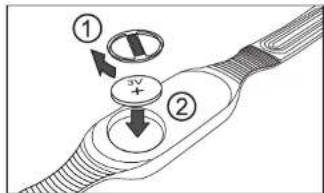
Remove the protective film from the display and press MODE, SET or SET
Now select English, German, French or Spanish language by pressing SEL and confirm your setting by pressing SET.
Select the unit KM-KG
| METRIC | KM - KG | KM - KG | KM - KG |
| or Miles/pounds | |||
| IMPERIAL | M - LD | M - LD | M - LD |
in the same way. Complete the setting procedure by pressing MODE. The watch can be reset by pressing and holding SET and SET together. Only after resetting the watch the other language can be selected.
-74-
GB
Time and basic settings
| TIME | ZEIT | TEMPS | HURA |
The subfeatures of the time mode can be accessed by pressing SEL.
itimmodbbasicsetings
| TIME | ZEIT | TEMPS | HORA |
| alarmalarm | |||
| ALARM | ALARM | ALARM | ALARMA |
| Timer | |||
| TIMER | TIMER | COMPTE | TIMER |
Press and hold SET for 3 seconds to access setting mode.
The display will show
| HOLD TO SET | HALTEN= EINST. | MAINT= REGLER | MANT= AJUST |
and the 12 or 24 hour selection will blink on the display. Press SET to select a setting and confirm your setting by pressing SET. Set the seconds, minutes, hours, year, month and day in the same way.
| BIRTHDAY | GEB-TAG | DATNAISS | CUMPL-AN |
Press SEL to set the year and press SET to confirm your setting. Set the month and day in the same way.
Now the weight will appear
| WEIGHT | GEWICHT | POIDS | PESO |
Set the digits of your weight by pressing SEL and confirm each digit by pressing SET.
77
GB
Wearingthe sheet belt
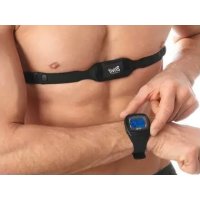
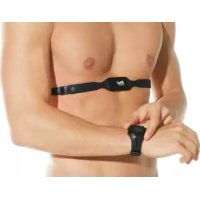
Adjust the chest belt so that it fits snugly directly below the chest muscles. Moisten the contact areas with water or ECG gel (ECG gel can be purchased at a pharmacy). Ensure that the contact areas constantly remain in skin contact.
Position the chest belt as per the following illustration.
Please ensure that the chest belt is seated properly. When you have exhaled completely the chest belt should still have very slight tension pressing it to your chest.
High voltage power lines. Trains or moving vehicular traffic may interfere with the heart rate measurement. Please consider this when planning your exercise route.
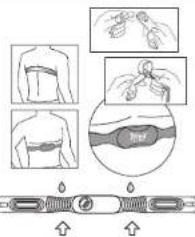
contact areas
Using the bicycle wheel,
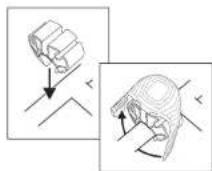
The included bicycle holder can be used to attach the wrist watch to the handlebar of a bicycle. Press the bicycle holder onto the top of the handlebar. Handlebars with an especially large diameter may require the use of additional force to snap on the bicycle holder. The heart rate monitor can now be attached to the bicycle holder in the same way that you would attach it to your wrist.
-75
GB
Now the height display will appear
| HEIGHT | GROESSE | TAILLE | TAMANO |
Set each digit of your height by pressing SET and confirm each digit by pressing SET.
Ex selling mode by praxing MODE
The source image is illegible due to extreme pixelation and distortion. No characters, symbols, or punctuation can be reliably identified. Therefore, no valid OCR text can be generated that matches the visual content of the source image.
Press and hold SEL for 3 seconds. The watch will switch to the second time zone display and T2 will appear on the display. Setting the second time zone can be accomplished in the same way as described in the previous paragraph. Press and hold SEL for 3 seconds to return to normal time mode.
Alarm
| ALARM | ALARM | ALARM | ALARMA |
Press and hold SET for 3 seconds to enter setting mode.
*AL* will appear on the display and the minutes of the alarm time will blink. Press SEL to set the minutes and press SET to confirm your setting. Set the hours in the same way.
You may optionally set the month and day as well. If neither month nor day one set the alarm will sound daily. If the day is set, the alarm will sound monthly. If both the month and the day are set the alarm will sound only at the set date.
The hourly chima setting will now appear on the display
| CHIME | STDALARM | SIGN HOR | HORA AL |
Press SET to select a setting and confirm your setting by pressing SET
if the chime is activated, the bell symbol will appear and the watch will chime at the beginning of every hour.
Exit setting mode by pressing MODE. The alarm can be activated or deactivated by pressing SET. If the alarm is activated the alarm symbol will appear.
78
GB
When the alarm sounds, press SET, SEL or MODE to stop the alarm.
Snooze feature Snooze feature
If no button is pressed when the alarm sounds, the alarm will shut off after 30 seconds and the symbol will blink on the display. The alarm will stop and will resume after sounding after 2 minutes. The process will repeat itself 5 times.
Timer (max. 23:59:00)
| TIMER TIMER COMPTE TIMER |
Press and hold SET for 3 seconds to enter setting mode.
The minutes of the timer time will blink on the display.
Press SET to set minutes of the timer time and confirm your setting by pressing SET.
Set the hours in the same way.
Now the additional settings for the timer will follow. Press SEL to select the desired mode:
Cal. After reaching 0:00 the timer will count the set time again.
Cal U After reaching 0:00 the timer will count forward
Col 5 After reaching 0:00 the timer will stop
Exit setting mode by pressing MODE
The timer can be started or stopped by pressing SET.
Press and hold SET to reset the timer.
After the time time is up on alarm will sound.
Stop watch
| CHRONO GT-UHR CHRONO CRONO |
Press SET to start or stop the stop watch. Press SET while the stop watch is running to record a lap time. Up to 99 laps can be recorded.
Press and hold set to read the step watch.
-79 -
GB
Memory feature
| MEMORY | SPEICHER | MEMOIRE | MEMORIA |
The stored values are shown in the bottom row of the display.
maximum heart rate during training
| HI | H | FO | AL |
| minimum heart rate during training | |||
| LO | N | FA | DA |
| average heart rate during training | |||
| AV | D | MO | FR |
Press and hold SET to reset the stored values.
Target heart rate
| ZONE | BE | REICH | ZONE | ZONA |
The bottom row of the display will show the lower and upper limit value of the target zone.
The selected training type is shown on the top row of the display.
L-U user defined
L-1 Health (50-65% of maximum heart rate)
L-2 Fitness (65-80% of maximum heart rate)
L-3 Performance (80-95% of maximum heart rate)
Press and hold SET for 3 seconds to enter setting mode.
Select the training type by pressing SEL. H "U" is selected [user defined], the lower and upper limits can be set. Press SET. The display will show the lower limit. Set the value by pressing SEL and confirm your setting by pressing SET. Set the upper limit in the same way.
-02
GB
Memory feature
| DATA RECALL | ANSIGHT DATEN | APPEL DONNEES | RECUP DATOS |
Press SET while the stop watch is stopped to display the latest lap on the display. Press SET to display the other lap times.
Please note: The memory feature can only be used if at least one lap time was recorded.
Heart rate measurement
| HRM PULS FC PULSQ |
The subfeatures of the heart rate measurement can only be used when the chest belt is connected.
Press SEL to access the subfeatures of the heart rate watch.
Timer Timer
| TIMER | TIMER | COMPTE | TEMPORIZADOR |
| MEMORY | SPEICHER | MEMOIRE | MEMORIA |
| ZONE | BREICH ZONE | ZONA |
| CALORIE | KALORIEN | CALORIES | CALORIAS |
| FITNESSLEVEL | FITNESSLEVEL | NIV FORMPHYSIQ | NIVELFIT |
In the middle row of the display the heart rate is shown while wearing the chest belt. If the signal is received from the chest belt the heart symbol will flash. To the
-BO-
G8
Exit setting mode by pressing MODE. Press and hold SEL to activate the heart rate alarm. When the heart rate alarm is activated, the alarm symbol will appear on and on alarm will sound when the measured heart rate is not within the set zone "BEEP-BEEP...BEEP-BEEP...BEEP-BEEP".
If the measured heart rate is at or above 99% of the maximum heart rate the max. heart rate alarm will sound "BEEP-BEEP-BEEP-BEEP-BEEP-BEEP". The max. heart alarm is independent of the training zone and the heart rate alarm of the training zone.
Calories, fat burn and BMI
| CALORIE | KALORIEN | CALORIES | CALORIAS |
The lower row will show the burned calories.
| CALORIE | KALORIEN | CALORIES | CALORIAS |
| Press SET to switch to the display of fat burn in gram | |||
| FAT BURN | FETT | COMSGRAISSES | GRASA |
| be to the display of your BMI | ||||
| BMI | BMI | IMC | IMC | |
In the display for coloris burn or fat burn the values can be reset by pressing and holding SET.
Note: To increase the accuracy of the colscis and fat burs displays your age and weight must be set correctly.
Note: The counter for fat burn is only activated while your heart rate is above 120 beats per minute.
Notes committee EOMI
The GMI is a statistical measurement that can be used to judge a persons weight. For adults, a value between 18.5 and 25 is considered normal. Values below
-0.2
GB
right of the heart rate the heart rate in percent of the maximum heart rate is shown. The maximum heart rate is calculated by evaluating your age, weight and height.
Warning light
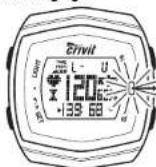
If your heart rate reaches or exceeds 99% of your maximum heart rate, or your heart rate exceeds the target zone values (see target zone) the red warning light will blink.
Timer
| TIMER | TIMER | COMPTE | TEMPORIZADOR |
The bottom row of the display will show the elapsed training time. The middle row will show your heart rate and the heart rate in percent of the maximum heart rate. The timer will start automatically when the chest belt starts measuring the heart rate. The timer will continue counting the time if the feature mode of the watch is changed.
Press SET to select the timer mode:
TIMER total training time
training time in heart rate target zone
▲ training time with heart rate over target zone
training time with heart rate below target zone
Press and hold SET to reset the training time.
-81
GB
18.5 are considered "underweight". Values above 25 are considered
"overweight". Values above 30 are considered "Obese". The BMI is only a coarse guideline because it does not take a persons body type and body composition into consideration.
Fitness
| FITNESS LEVEL | FITNESS LEVEL | NIV FORM PHYSIQ | NIVEL FIT |
After your training, immediately press SET. A 5 minute countdown will start (cool down phase).
The bar will show the remaining time. On the left side of the display the heart rate at the beginning of cool down is shown. On the right side of the display the current heart rate is shown. The countdown time is shown on the bottom row of the display.
After 5 minutes your fitness level will appear.
| Fitness level | Heart rate |
| 6 | >130 |
| 5 | 130-120 |
| 4 | 120-110 |
| 3 | 110-105 |
| 2 | 105-100 |
| 1 | <100 |
Coded transmission
The chest belt's transmissions are digitally coded to prevent interference if you are training with a training partner who is using an identical watch and chest belt. When using the chest belt for the first time, a random channel is selected automatically. The channel is briefly displayed at the top of the display upon entering the heart rate display mode. The available channels are CH10, CH11, CH12, CH13 and CH14.
-84
GB
The channel can be changed by briefly removing the battery from the chest best and reinserting it. The chest belt will randomly select a channel and offer approx. 1 minute the heart rate and the new channel will appear on the display of the watch.
Troubleshooting
The heart rate is not shown or is shown incorrectly. The heart rate is not shown or is shown incorrectly. Make sure the chest belt is positioned correctly and fits well.
The contact areas can be slightly moistened to improve function.
Electromagnetic interference may have an adverse effect on reception.
The distance between watch and chest ball must be under 70cm.
Other hard rate measuring devices within a 2m range may also cause interference.
Wireless hardware computers may cause interference.
The batteries may be low and require replacing.
The display is unreadable / the light does not work. The display is unreadable / the light does not work. Replace the batteries.
Replacing the heart rate monitor battery
Battery replacements must be performed by an expert to avoid damaging the case or gaskets.
Battery low indicator
If the battery voltage on the chest belt battery drops below the voltage required for normal operation,
| TXBELTLO BAT | TXGURTBATT | SNGLTXPILE | TXECINBAT BA |
will appear on the display. Replace the battery of the chest belt as described in the chapter "Chest belt".
-85
GB
Warranty period and defects liability
The warranty period is not increased by the defect liability. This also applies to repaired or replaced parts. If defects are noticed at the time of purchase they must be reported immediately upon unpacking the item. Paid repair may be available after the end of the warranty period.
Scope of the warranty
The heart rate monitor was manufactured according to strict quality guidelines and was carefully inspected before delivery. The warranty does not include parts that experience normal wear and tear and can thus be seen as wear parts or fragile parts that are damaged. Examples include Switches, Batteries or parts made of glass.
This warranty becomes void if the heart rate monitor is damaged, is not used in the recommended way or is improperly repaired.
For proper use of the heart rate monitor all instructions in this manual must be adhered to exactly. Use of the heart rate monitor in a way that is discouraged in the manual must be avoided.
The heart rate monitor not intended for commercial use. Abusive or improper use, excessive force and changes that are made by non-authorized repair centers will void the warranty.
Warranty claim procedure
To ensure that your call is processed in a fast and efficient manner please note the following directions:
• Have your receipt [as proof of purchase] and the article number (72143)
handy.
- The article number can be found on the type label, an engraving, the front page of the manual (bottom left) or a sticker on the back side or bottom side of the case.
- In case defects occur, please first contact the service center (see below) by first contact the service center [see below] by phone or email, phone or email.
-66
GB
Water resistance of the heart rate monitor
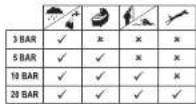
Water resistant up to 3 bar. The bar value specifies the atmospheric overpressure which is applied during testing (DIN 8310).
Water resistance of the chest belt
Water resistance according to IEC 60529 IPx7.30m
Cleaning instructions
Clean the product with a soft, dry and lint-free cloth. A glasser cleaning cloth is ideal.
Disposal of the electronic appliance
This electronic appliance may not be disposed of with normal household waste. Dispose of the unit or an approved disposal facility or at your local recycling centre. Please observe the current rules and regulations when disposing of the appliance. Contact the disposal system if in doubt.
-86-
G8

Visit www.idl-service.com to download this and many other manuals, product videos and software.
Service
Name: inter-sportz GmbH
Email: support@inter-quartz.de
Based in: Germany

CH 0800 563862
IAN72143

Supplier
Please note that the following address is not a service address. Please first contact the service address (see above)
Name: digi-tech gmbh
Sternel: Yuherwenz 27A
Tow: Eppslan 6.5817
Country: Germany
GB
Disposal of the batteries

Please dispose of your batteries properly in containers especially set up at retailers. Batteries do not belong in household waste. Dispose of the batteries at an approved disposal facility or at your local recycling centre. Contact the disposal system if in doubt.
Declaration of conformity
It used as intended this product conforms to the basic standards of § 3 and the other relevant provisions of the FTEG (Section 3 of the R&TTE directive). You can request the declaration of conformity here: conformity@digi-tech-gmbh.com
digi-tech gmbh warranty
This watch includes a 3-year warranty starting on the day of purchase. In case of defects of this heart rate monitor you have, by law, certain rights regarding the vendor of the heart rate monitor. These rights are not changed by the warranty which is described in the following paragraphs.
Warranty conditions
The warranty duration starts on the date of purchase. Please keep the original receipt in a safe place. The receipt is needed as a proof of purchase. If it defect occurs in the heart rate monitor within 3 years, the heart rate monitor will be repaired or replaced (according to our choice) loss of charge. This warranty requires that, within the 3 year warranty period, the watch and the receipt can be made available to us along with a short written description of the detect and when it occurred. If the detect is covered by the warranty, you will receive the repaired heart rate monitor or a new heart rate monitor. Repair or replacement does not cause the warranty period to restart.
-87-
GB
digi-tech gmbh Vallorweg 27A D-65817 Eppstein
Stand dei informazioni · Version des informations Edizione del loglio di informazioni · Last information update: 2/2012 · Art.-Nr.: 1-1D3322
IAN 72143
CH
- Fornitore
- Intended use
- Scope of delivery
- Table of contents
- Features
- ©colonief bae
- Steps watch
- Growthoverline
- Time/b chuatus
- Important safety information
- Important notes on the operation of the wrist watch
- Setup of the heart rate monitor
- Wearingthe sheet belt
- Using the bicycle wheel,
- The source image is illegible due to extreme pixelation and distortion. No characters, symbols, or punctuation can be reliably identified. Therefore, no valid OCR text can be generated that matches the visual content of the source image.
- Snooze feature Snooze feature
- Notes committee EOMI
- Coded transmission
- Troubleshooting
- Replacing the heart rate monitor battery
- Battery low indicator
- Warranty period and defects liability
- Scope of the warranty
- Warranty claim procedure
- Water resistance of the heart rate monitor
- Water resistance of the chest belt
- Cleaning instructions
- Disposal of the electronic appliance
- Service
- Supplier
- Disposal of the batteries
- Declaration of conformity
- digi-tech gmbh warranty
- Warranty conditions
Brand : CRIVIT
Model : 1LD3322 IAN 72143
Category : Smartwatch