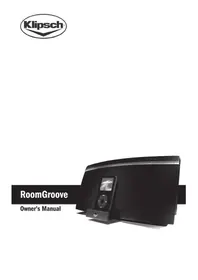
Roomgroove 5V - Speaker KLIPSCH - Free user manual and instructions
Find the device manual for free Roomgroove 5V KLIPSCH in PDF.



| Product type | Wireless stereo speaker with iPod docking station |
| Brand | Klipsch |
| Model | RoomGroove 5V |
| Power supply | AC adapter 100-240 V~, 50/60 Hz; device 15 V = 3 A |
| Wireless technology | KlipschCast™ for CD-quality audio transmission and reception |
| Main functions | Local iPod and auxiliary source listening, multi-room broadcasting, reception from other KlipschCast devices |
| Docking station | Retractable dock with universal Apple adapters, built-in iPod charging |
| Auxiliary input | 3.5 mm stereo jack at the back |
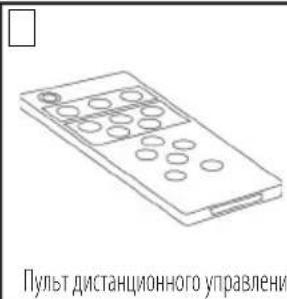
| Remote control | Wireless, CR2025 3 V battery included |
| Speakers | 2 x long-throw woofers + 2 x MicroTractrix™ horn tweeters |
| Safety | Polarized plug, do not expose to water or heat, unplug during storms |
| Maintenance and cleaning | Clean with a dry cloth only |
| Operating temperature | 35 °C maximum |
| Warranty | 1 year (US and Canada); varies by country |
Frequently Asked Questions - Roomgroove 5V KLIPSCH
User questions about Roomgroove 5V KLIPSCH
0 question about this device. Answer the ones you know or ask your own.
Ask a new question about this device
Download the instructions for your Speaker in PDF format for free! Find your manual Roomgroove 5V - KLIPSCH and take your electronic device back in hand. On this page are published all the documents necessary for the use of your device. Roomgroove 5V by KLIPSCH.
USER MANUAL Roomgroove 5V KLIPSCH
- READ these instructions.
- KEEP these instructions.
- HEED all warnings.
- FOLLOW all instructions.
- DO NOT use this apparatus near water.
- CLEAN ONLY with dry cloth.
- DO NOT block any ventilation openings. Install in accordance with the manufacturer's instructions.
- DO NOT install near any heat sources such as radiators, heat registers, stoves, or other apparatus (including amplifiers) that produce heat.
- DO NOT defeat the safety purpose of the polarized or grounding type plug. A polarized plug has two blades with one wider than the other. A grounding type plug has two blades and a third grounding prong. The wider blade or the third prong is provided for your safety. If the provided plug does not fit into your outlet, consult an electrician for replacement of the obsolete outlet.
- PROTECT the power cord from being walked on or pinched, particularly at plugs, convenience receptacles, and the point where they exit from the apparatus.
- ONLY USE attachments/accessories specified by the manufacturer.
- USE only with a cart, stand, tripod, bracket, or table specified by the manufacturer, or sold with the apparatus. When a cart is used, use caution when moving the cart/apparatus combination to avoid injury from tip-over.
- UNPLUG this apparatus during lightning storms or when unused for long periods of time.
- REFER all servicing to qualified service personnel. Servicing is required when the apparatus has been damaged in any way, such as power-supply cord or plug is damaged, liquid has been spilled, objects have fallen into the apparatus, the apparatus has been exposed to rain or moisture, does not operate normally, or has been dropped.
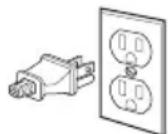
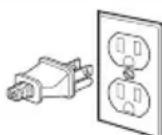
This picture is for illustration, the plug may differ from country to country
For Your Safety: The AC power plug is polarized (one blade is wider than the other) and only fits into an AC power outlet one way. If the plug won't go into the outlet completely, turn the plug over and try to insert it the other way. If it still won't fit, contact a qualified electrician to change the outlet, or use a different one. Do not attempt to bypass this safety feature.
- DO NOT expose this apparatus to dripping or splashing and ensure that no objects filled with liquids, such as vases, are placed on the apparatus.
- To completely disconnect this apparatus from the AC Mains, disconnect the power supply cord plug from the AC receptacle.
- The mains plug of the power supply cord shall remain readily operable.

The exclamation point, within an equilateral triangle, is intended to alert the user to the presence of important operating and maintenance (servicing) instructions in the literature accompanying the product.

The lightning flash with arrowhead symbol within an equilateral triangle, is intended to alert the user to the presence of uninsulated "dangerous voltage" within the product's enclosure that may be of sufficient magnitude to constitute a risk of electrical shock to persons.
WARNING: To reduce the risk of fire or electrical shock, do not expose this apparatus to rain or moisture.
WARNING: Batteries (battery pack or batteries installed) shall not be exposed to excessive heat such as sunshine, fire or the like.
WARNING: No naked flame sources - such as candles - should be placed on the product.

WARNING
RISK OF ELECTRIC SHOCK. DO NOT OPEN.

WARNING: Do Not Open! Risk of Electrical Shock. Voltages in this equipment are hazardous to life. No user-serviceable parts inside. Refer all servicing to qualified service personnel.
WARNING: This product is intended to be operated ONLY from the AC Voltages listed on the back panel or included power supply of the product. Operation from voltages other than those indicated may cause irreversible damage to the product and void the products warranty. The use of AC Plug Adapters is cautioned because it can allow the product to be plugged into voltages in which the product was not designed to operate. If the product is equipped with a detachable power cord, use only the type provided with your product or by your local distributor and/or retailer. If you are unsure of the correct operational voltage, please contact your local distributor and/or retailer.
CAUTION: Place the equipment near a main power supply outlet and make sure that you can easily access the power breaker switch.
ADS-48R-12-2-1545
Adaptor I/P: 100-240VAC, 50/60Hz
Unit I/P: 15VDC, 3A
Ambient Temperature: 35^
Thank You
Congratulations on your purchase of the Klipsch RoomGroove music center. The RoomGroove is a wireless transceiver utilizing Wireless KlipschCast™ Technology to transmit and receive CD-quality audio signals to and from other KlipschCast components. The RoomGroove features an iPod® dock and auxiliary input for connecting your favorite components and enjoying them locally or transmitting them throughout your home.
The RoomGroove is a true two-way, stereo sound system incorporating two long-throw woofers and two MicroTractrix™ Horn-loaded tweeters in a ported enclosure. This system provides the accuracy, detail and output that will bring your music to life as only Klipsch can.
Unpack the Box
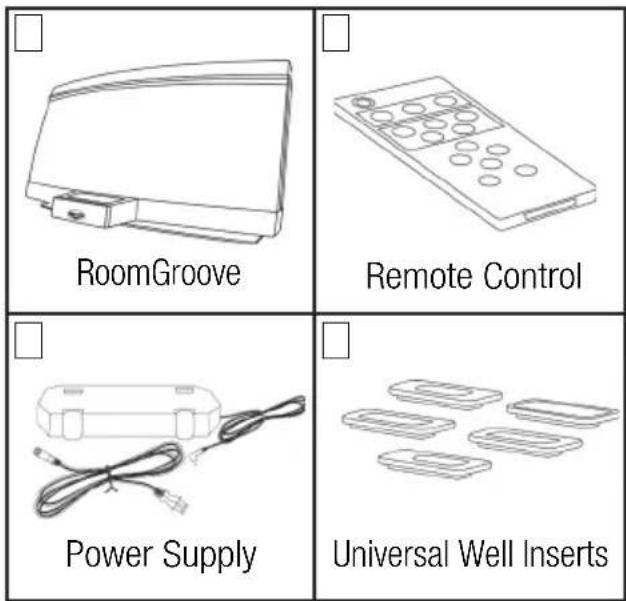
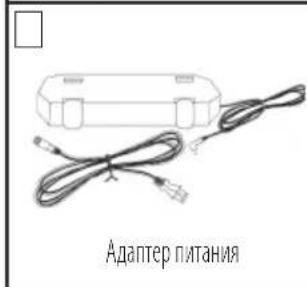
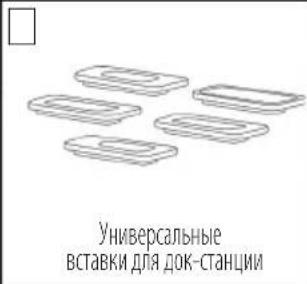
Unpack the entire contents of the shipping box and make sure you have the following items.
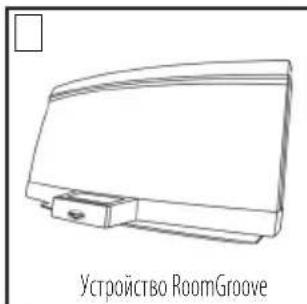
Place the RoomGroove on a sturdy surface. Plug the power cord into the rear of the RoomGroove and then into a standard wall outlet. The RoomGroove is now ready to listen to any source being transmitted with wireless KlipschCast Technology.
Docking and Listening to an iPod
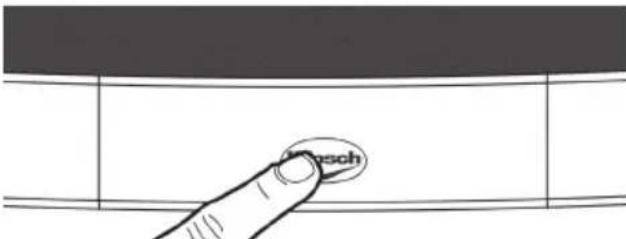
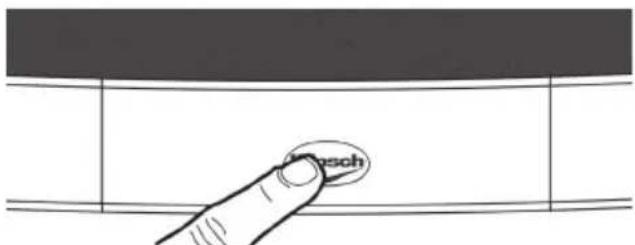
The RoomGroove is intelligently designed to easily accommodate all iPods. Touching the Klipsch logo on the front of the RoomGroove will reveal the retractable iPod dock. The RoomGroove must be powered on for the drawer to open and close. When the dock is extended, touching the dock again will cause it to retract. The dock will not move when an iPod is docked. The dock will automatically retract when no iPod is present and the RoomGroove is in standby mode (the power LED will be red).
The RoomGroove is designed to work with Apple universal well inserts. Several inserts are supplied with your RoomGroove system. If your iPod came with an insert, it can also be used in the RoomGroove. To configure the RoomGroove for your specific iPod, select the appropriate well insert and place it in the universal well as shown in the diagram. Now you are ready to dock your iPod. While your iPod is docked, its battery is charging (until it is fully charged).

To listen to the docked iPod, press the "Listen" button on the RoomGroove or the remote until the "Listen" light becomes blue and you hear the iPod. The iPod can be directly accessed by pressing the "iPod" button on the RoomGroove's remote control.
Connecting an Auxiliary Source
The RoomGroove offers a 3.5mm stereo auxiliary input on the rear of the device. To connect an auxiliary device, simply plug the audio output of the device into the "Aux Input" on the rear of the RoomGroove. You must use a 3.5mm stereo cable.
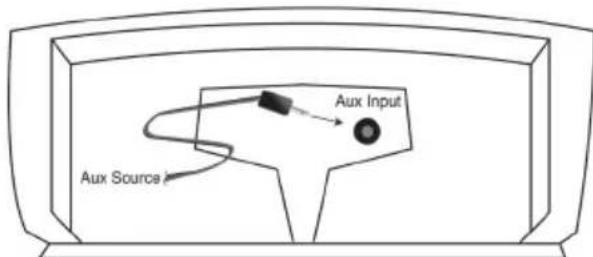
To listen to the auxiliary source, press the "Listen" button on the RoomGroove or the remote until the "Listen" light becomes blue and you hear the auxiliary device. This can also be done by pressing the "Aux" button on the RoomGroove's remote control.
Note: The "Listen" light will be blue when listening to either a local iPod or a device connected to the local auxiliary input. If both inputs are in use, the "Listen" button will go from the Aux to the iPod in that order.
Transmitting Audio from the RoomGroove
The RoomGroove is designed to allow you to transmit the iPod or the auxiliary source so that it can be received and played by other KlipschCast components. To transmit from the RoomGroove, simply select the source you wish to transmit by pressing the "Listen" button, or the desired source on the remote (iPod or Aux), and then press the "Transmit" button. The selected source is now being transmitted throughout your home and is available to other KlipschCast-enabled products.
Note: If a RoomGroove is transmitting and a second RoomGroove is told to transmit, the second RoomGroove will bump the first RoomGroove and occupy that wireless channel. If you wish to configure your wireless multi-room system to allow two RoomGrooves to simultaneously transmit, see the "Transmitting Audio from Two RoomGrooves" section of this manual.
Listening to Other KlipschCast Devices with Your RoomGroove
The RoomGroove is designed to allow you to listen to sources connected to, or integrated into, other KlipschCast components such as another RoomGroove or the CS-700 DVD Entertainment System.
To listen to a source being transmitted by another KlipschCast device, simply press the "Listen" button to access the transmitted source. The "Listen" light becomes red (or purple for a second wireless source) when a wireless source is received and played. A flashing color indicates no source is available on that channel.
Sources and Colors of the "Listen" Light
Blue always indicates a local source. Red and purple indicate wireless channels. If the color is flashing, the source or wireless channel is not available.
For systems transmitting from a CS-700 system and RoomGroove
| Local source (iPod or Aux) = blue |
| Transmitted Cinema System source = red |
| Transmitted RoomGroove source = purple |
For systems transmitting from two RoomGrooves
| Local source (iPod or Aux) = blue |
| 1st Transmitted RoomGroove source = red |
| 2nd Transmitted RoomGroove source = purple |
Transmitting Audio from the CS-700
In a multi-room system incorporating a CS-700 cinema system (sold separately), the RoomGroove remote can be used to directly select sources from the CS-700 once the CS-700 has been selected by the RoomGroove's "Listen" button. The CS-700 will default to transmit its local source (the source selected for listening/viewing on the CS-700 system) until another source is selected. See the "Remote Control" section of this manual for details on the remote's functionality.
Transmitting Audio from Two RoomGrooves
In systems not incorporating a CS-700 system (or if the cinema system in not intended to be part of the wireless multi-room system), two RoomGrooves can transmit simultaneously. To enable this feature, all components of the wireless multi-room system must be assigned to a home code from 5 to 9. Selecting a home code from 5 to 9 will allow a second RoomGroove to occupy the wireless channel which was previously assigned to the CS-700. (See "Setting the Home Code" for more detailed information.)
If two RoomGrooves are transmitting and you wish to transmit from a third and control which wireless channel will be used for the new transmission, you must first select the broadcast you wish to terminate by pressing the "Listen" button until that source is heard. Then press transmit and the new source will occupy that wireless channel and stop the transmission of the other source. You should now hear the new source in all the locations in which the previous source was playing. The new source should now be available to all active listeners.
Note: All devices in the wireless multi-room system must be set to the same home code in order for transmissions to take place.
Setting the Home Code
The home code dial on the rear of your RoomGroove allows you to select a code specific to all of your KlipschCast components to avoid interference from neighboring systems. The home code numbers range from 0 to 9 with 0 set as the default. All of your KlipschCast components will initially be set to 0 and allow one wireless channel to broadcast audio from a cinema system and the second wireless channel to broadcast wireless audio from a RoomGroove. The home code number should only be changed for one of two reasons:
1) There is interference from a neighboring system - If a neighboring system in interfering with your wireless system, simply change all KlipschCast components to another home code. KlipschCast components will only transmit and receive audio from components on the same home code. Home codes 0 through 4 can be used for systems transmitting audio from a cinema system and a RoomGroove (home codes 5 through 9 are reserved for systems transmitting from two separate RoomGrooves and no cinema system).
2) You wish to transmit audio from two RoomGrooves (not a cinema system) - If you wish to transmit audio from two separate RoomGrooves and not a cinema system, simply choose a home code from 5 to 9 and change all KlipschCast components to that home code. KlipschCast components will only transmit and receive audio from components on the same home code.
Once the home code has been changed, you must disconnect and reconnect the power cord from the wall outlet for the change to be made. This will change the home code and allow the component to talk to other KlipschCast components set to the same home code.
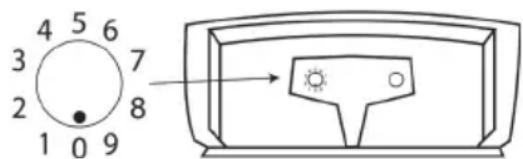
Note: All devices in the wireless multi-room system must be set to the same home code in order for transmissions to take place.
Remote Control
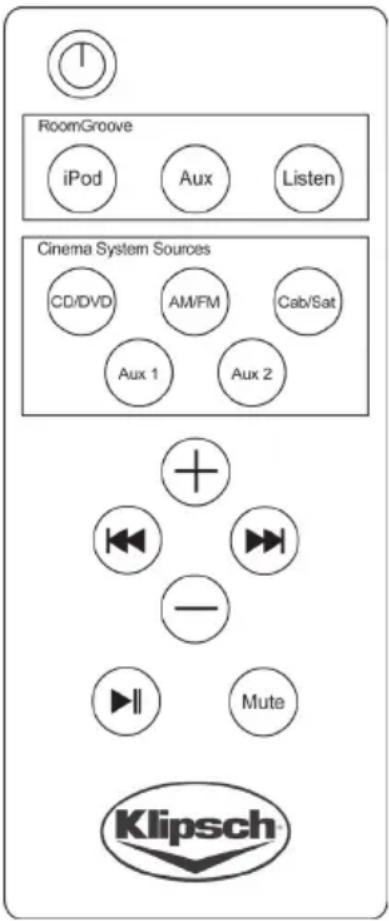
The wireless remote control allows interaction with the RoomGroove and iPod as well as other transmitting devices such as other RoomGrooves and Klipsch cinema systems such as the CS-700.

Note: This remote must be pointed at the RoomGroove for proper interaction.
Buttons
Power Press to turn the RoomGroove "On". Press again to put the RoomGroove into "Standby" mode.
RoomGroove
iPod Selects the iPod docked in the local RoomGroove.
Aux Selects the audio device connected to the local RoomGroove (the audio device must be playing to be heard).
Listen Toggles through available sources both local and wireless.
Cinema System Sources
CD/DVD Accesses the CD/DVD drive of the cinema system connected to the KlipschCast network.
AM/FM Accesses the AM/FM tuner of the cinema system connected to the KlipschCast network.
Cab/Sat Accesses audio from the device connected to the cinema system's Cab/Sat input connected to the KlipschCast network. The device must be delivering audio to the cinema system to be heard on the RoomGroove.
Aux 1 Accesses audio from the device connected to the cinema system's Aux 1 input connected to the KlipschCast network. The device must be delivering audio to the cinema system to be heard on the RoomGroove.
Aux 2 Accesses audio from the device connected to the cinema system's Aux 2 input connected to the KlipschCast network. The device must be delivering audio to the cinema system to be heard on the RoomGroove.
Track Selection ( and ) These buttons enable control of several different sources:
- When controlling the local iPod, press and to move to the previous or next track; press and hold to reverse or fast-forward through the current track.
- When controlling a transmitted iPod docked in another RoomGroove, press and to move to the previous or next track.
- When controlling the CD/DVD cinema system source, press and to move to the previous or next track/chapter.
- When controlling the AM/FM cinema system source, press and to move to the previous or next preset station (if no stations have been preset, these buttons will not function).
- When controlling the Cab/Sat cinema system source, press and to move to the previous or next channel.
- These buttons are non-functional when listening to the transmitted Aux 1 or Aux 2 sources of a cinema system.
Play/Pause Press once to "Pause" play; press again to resume play.
Volume Press + or - to increase or decrease the RoomGroove volume level (local RoomGroove only).
Mute Decreases the volume of the local RoomGroove to a zero level (no sound).
Changing the Remote Control Battery
The remote control battery will need to be changed when it stops working or when its performance is noticeably reduced. To remove the battery, simply pull the battery housing tab from the remote control (as shown in the diagram) and remove the battery. Replace only with a 3-volt CR2025 lithium battery.
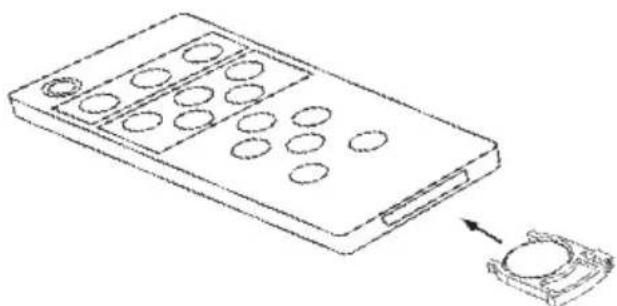
Note: Lighting and other room conditions can reduce remote performance.
Cable Management System and Mounting the Power Supply
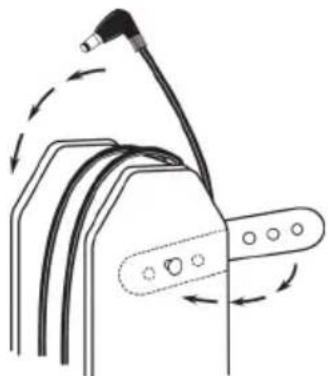
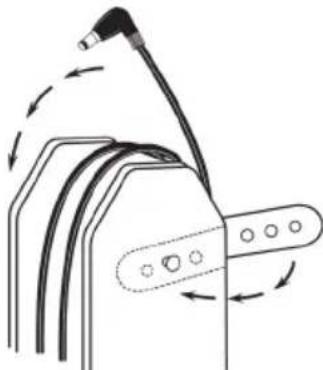
The RoomGroove's power supply has an integrated cable management system. Excess cable length can be wrapped around the power supply and secured with the rubber straps as shown in the diagram.
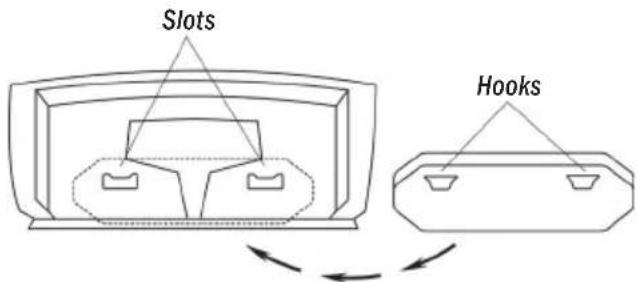
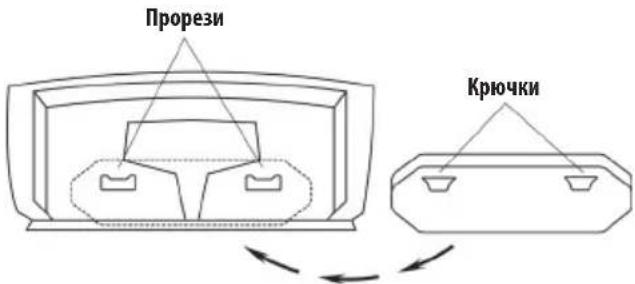
The RoomGroove's power supply can be conveniently mounted on the rear of the RoomGroove. To mount the power supply simply position the hooks on the side of the power supply into the slots on the rear of the RoomGroove as show in the diagram.
Optional Wall Mount Bracket
Your RoomGroove can be wall mounted with the optional wall mount bracket available at Klipsch.com. Visit Klipsch.com or call 1.800.KLIPSCH (554.7724) for more details.
We Klipsch Group Incorporated
Of 3502 Woodview Trace, Suite 200 Indianapolis, IN 46268 USA
Declare that
Equipment: iPOD Audio System with Wireless Transmitter/Receiver
Model Name: Klipsch RoomGroove
In accordance with the following Directives:
1999/5/EC R&TTE Directive : Radio Equipment and
Telecommunications Terminal Equipment
2004/108/EC The Electromagnetic Compatibility Directive
and its amending Directives
has been designed and manufactured to comply with the following specifications:
EN300440-1 V1.3.1 EN300440-2 V1.1.2
EN301489-1 V1.5.1 EN301489-3 V1.4.1
EN50371
I hereby declare that the equipment named above has been designed to comply with the relative sections of the above reference specifications. The unit complies with all essential requirements of the Directives.
Signature: clint Brawn.
Name: Clinton Bradley
Position: Certification Engineer
Klipsch Audio Technologies
3502 Woodview Trace, Suite 200
Done At: Indianapolis, IN 46268 USA
On date: 12/12/07
KLIPSCH GROUP INCORPORATED
3502 WOODVIEWTRACE
INDIANAPOLIS, IN 46268 USA
KLIPSCH EUROPEBV
INDUSTRIESTRAAT 1
7041 GD 's-HEERENBERG, NETHERLANDS

Warranty - U.S. and Canada
Klipsch warrants to the original retail purchaser that this product is to be free from defective materials and workmanship for a period of one (1) year, from the date of purchase, if it is properly used and maintained. If this product proves defective in either material or workmanship, Klipsch, at its option, will (a) repair the product, or (b) replace the product, at no charge for parts or labor. If the product model is no longer available and cannot be repaired effectively or replaced with an identical model, Klipsch at its sole option may replace the unit with a current model of equal or greater value. In some cases, modification to the mounting surface may be required where a new model is substituted. Klipsch assumes no responsibility or liability for such modification. To obtain a repair or replacement under the terms of this warranty, please contact our customer service group at 1-800-KLIPSCH. You will be required to submit a copy of the original receipt via fax or email. The receipt must reflect that you are the original purchaser, the product was bought from an authorized Klipsch retailer, and the product is still within warranty. You will be issued a return authorization number (RA#) and asked to ship the defective product, together with proof of purchase and RA#, prepaid insured to the address set forth Klipsch 137 Heampstead #278 Hope, AR 71801. Freight collect shipments will be refused. Risk of loss or damage in transit is to be borne by the purchaser. Once Klipsch receives the defective product, a repair or replacement order will be initiated.
Limitations:
- This limited warranty does not cover failure of the product resulting from improper installation, misuse, abuse, accident, neglect, mishandling, or wear from ordinary use or environmental deterioration.
- This limited warranty does not cover cosmetic damage, including paint damage, or consequential damage to other components or premises which may result for any reason from the failure of the product.
- This limited warranty is null and void for products not used in accordance with Klipsch's instructions.
- This limited warranty is null and void for products with altered or missing serial numbers and for products not purchased from an authorized dealer.
- This limited warranty terminates if you sell or otherwise transfer this product to another party.
THIS WARRANTY GIVES YOU SPECIFIC LEGAL RIGHTS, AND YOU MAY ALSO HAVE OTHER RIGHTS WHICH VARY FROM STATE TO STATE, JURISDICTION TO JURISDICTION OR COUNTRY TO COUNTRY. KLIPSCH'S RESPONSIBILITY FOR MALFUNCTIONS AND DEFECTS IN HARDWARE IS LIMITED TO REPLACEMENT OR REPAIR AS SET FORTH IN THIS WARRANTY STATEMENT. FOR CANADIAN CUSTOMERS, KLIPSCH DISCLAIMS ALL OTHER WARRANTYES AND CONDITIONS, EXPRESS OR IMPLIED, STATUTORY OR OTHERWISE, FOR THE PRODUCT. FOR U.S. CUSTOMERS, ALL EXPRESS AND IMPLIED WARRANTYES FOR THE PRODUCT, INCLUDING BUT NOT LIMITED TO ANY IMPLIED WARRANTYES OF MERCHANTABILITY AND FITNESS FOR A PARTICULAR PURPOSE ARE LIMITED IN TIME TO THE TERM OF THIS WARRANTY. SOME STATES, JURISDICTIONS OR COUNTRIES DO NOT ALLOW THE EXCLUSION OF CERTAIN IMPLIED WARRANTYES OR CONDITIONS, OR LIMITATIONS ON HOW LONG AN IMPLIED WARRANTY OR CONDITIONS LASTS, SO THIS LIMITATION MAY NOT APPLY TO YOU. KLIPSCH DOES NOT ACCEPT LIABILITY FOR SPECIAL, INDIRECT, CONSEQUENTIAL OR INCIDENTAL DAMAGES, INCLUDING WITHOUT LIMITATION, ANY LIABILITY FOR THIRD PARTY CLAIMS AGAINST YOU FOR DAMAGES OR FOR PRODUCTS NOT BEING AVAILABLE FOR USE. THE MAXIMUM LIABILITY FOR WHICH KLIPSCH MAY BE RESPONSIBLE WILL BE NO MORE THAN THE AMOUNT YOU PAID FOR THE PRODUCT THAT IS THE SUBJECT OF THE CLAIM. SOME STATES, JURISDICTIONS OR COUNTRIES DO NOT ALLOW THE EXCLUSION OR LIMITATION OF SPECIAL, INDIRECT, INCIDENTAL OR CONSEQUENTIAL DAMAGES, SO THE ABOVE LIMITATION OR EXCLUSION MAY NOT APPLY TO YOU.
Warranty Outside the United States and Canada
The Warranty on this product if it is sold to a consumer outside of the United States and Canada shall comply with applicable law. To obtain any applicable warranty service, please contact the dealer from which you purchased this product, or the distributor that supplied this product.
FCC Information
This device complies with Part 15 of the FCC Rules. Operation is subject to the following two: (1) This device may not cause harmful interference, and (2) this device must accept any interference received, including interference that may cause undesired operation.
This equipment has been tested and found to comply with the limits for a Class B digital device, pursuant to Part 15 of the FCC Rules. These limits are designed to provide reasonable protection against harmful interference in a residential installation. This equipment generates, uses and radiates radio frequency energy and, if not installed and used in accordance with the instruction, may cause harmful interference to radio communications. However, there is no guarantee that interference will not occur in a particular installation. In accordance with FCC requirements, changes or modifications not expressly approved by Klipsch could void the user's authority to operate this product.
This device generates and uses radio frequency (RF) energy, and if not installed and used properly, this equipment may cause interference to radio and television reception.
If this equipment does cause interference to radio or television reception (which you can determine by unplugging the unit), try to correct the interference by one or more of the following measures:
- Re-orient the receiving antenna (that is, the antenna for the radio or television that is "receiving" the interference).
- Move the unit away from the equipment that is receiving interference.
- Plug the unit into a different wall outlet so that the unit and the equipment receiving interference are on different branch circuits.
If these measures do not eliminate the interference, please consult your dealer or an experienced radio/television technician for additional suggestions.
Also, the Federal Communications Commission has prepared a helpful booklet, "How To Identify and Resolve Radio TV Interference Problems." This booklet is available from the U.S. Government Printing Office, Washington, DC 20402. Please specify stock number 004-000-00345-4 when ordering copies.
This product complies with DHHS Rules 21 CFR Subchapter J. Applicable at the date of manufacture.
FCC Declaration Of Conformity
Trade Name: Klipsch Audio Technologies
Product Name: Audio Speaker System
Model Number: RoomGroove
Responsible Party
Manufacturer: Klipsch Audio Technologies
Address: 3502 Woodview Trace, Suite 200
Indianapolis, IN 46268
Telephone: 317-860-8100
Date: 1/15/2006
These devices were tested and found to comply with Part 15 of the FCC Rules. Operation is subject to the following conditions: The devices may not cause harmful interference, and the devices must accept any interference received, including interference that may cause undesired operation.
LIPLIPSCH AUDIO TECHNOLOGIES
RoomGroove

Tested To Comply With FCC Standards
FOR HOME OR OFFICE USE
Cinema System Sources
Tested To Comply With FCC Standards
FOR HOME OR OFFICE USE
Tested To Comply With FCC Standards
FOR HOME OR OFFICE USE
(Setting the Home Code)
Tested To Comply With FCC Standards
FOR HOME OR OFFICE USE
- INPOHTNTETMHNHCTpykUN
- COXPAHATE 3T M NHTpyKUHN
- OBPATTE BHIMAHME Ha BCE npedoctepekeHn
4.CobIOJDAIIE BCE HNCTpyKUIM. - HE VCNOIb3YITE tty cTcEmy pAnom CBoIOJ.
- UCTKY YCTPOINCTBA BbnoHnHnTe TOnbKO cyxO tpanoouKo.
- HE BLOKIPYI TE KAKOE-IMBO BEHTMIAUHOHbIX OTBepCTMI. YcTaHaBnBaIte yCTPOICTBO B COOTBeTCTBM C HHCPTpyKUMN mpon3BOIITEN.
- HEYCTAHABNBAIHTE yctpoiCTBO B6n3n IIO6bIX NcTOOHKOB TEnIIa, TaKHX KaPdmaTOpBb, oObrpeBaTeH, neHnn DpyVte YcToiCTBa (BKIOUyA yCINHTeH), n3nyauoue TEIIO.
9.Buenix 630nacnoHTNHE PNEHEBPFTAENBNIKONnapnOBAHHORI NIN 3a3emnHnro Tnna. NpnpnA Bnka IMeET DBA KOHTAKTA, OINN IN KOTopbIX nipe npyoro. BNkA 3a3emnHnro Tnna IMeET DBA KOHTAKTA INptm 3a3emnHOuNnblpek. WnpOKn KOHTAKTINpTeHnblpek npedycmptchnDnIb oecneueHnBaUeV 630nacnoCTN.Ecnn npnanaemaBnKA He IPOXoNTK Baew po3eTke, ObpaNTecb K 3eKTPNKC uenbIO 3aMeHbPi03TKYCTapeBwero Tnna. - 0EFCNEyBTE 3aIHTy Hypa NTaHb NTaHa HcTaYnHa Ha Hcero n 3aIeMJIeHb, B OCO6eHHoCTN B6NJ3a BnOK, 3NeKTPuuecknx pO3eTOK NnB MeCTe, rDe 5Hyp BbIXoNT H3 yCtpoiCTBa.
- NIOJIb3YIe TOJIbKO Te BCNOmOraTeNbHbIe npNCIOcO6JIeHnKU 06OpyDObaHHe, KOToBle peKoMeHDoBaHbI npON3BOuNTeNeM.
- NCIIOJIb3yIHTeToJIbKOcTeENeKoI, KOHcONbIO, TpeHOrO, KpENeXHoN cKo60I IIN CTOJOM, KOTOpBIE peKOMeHIOBAHbI IPOIN3BOOInTEJIEM IIN PPOaIOCTBMeCTC YoCTPOnCTBOM. IIN MCIOJIb3OBAHIM TeENeKKI, 6yIbTe OCToPOKHbI IIN NepEmeUeHN yCTpoINCTBa Ha TEENeKKe IN CnIeNTe 3a TEM, UTObI OHa HE ONpOKMHyNaCb, BO I36eKaHHe cepBe3HO TpaBMbl.
13.OTKIOHHTE yCTPOIcTB0 OT cTeB BpEmr rpo3blnncnHO He nCNOb3yETcB TceHeN DInTEbHOro BpeMeHN - JIa TeXnueckoro 06cnyKbAHmOBPAAANTECb K KBaHnHnpoBaHHOMy 06cnyKbAHouemy nepcohany。OcbnyKbAHme Heo6xOmmno npn IIObom NOBpeKdEHN yCTpOHTBA, HApOIMep, pN IOBpeKdEHN UHpya NHTAHM ININ BUNKN, nONaJANHM BHyTpB yCTpOHTBA XIKKOCTN INN NOCTOPOHHX INPeDMTOB, INP AekUHYatauYn yCTpOHTBA IOn DOxDEM INN BYCIOBNX NOBblHeHNO BlAnKHO, B Tom CNYae, ECNI yCTpOHTBO He paBoTaET HopMaJIbHo INN erO yPOHIn.
BTOPTPACYHK CNYKNTJHJNMAEETCCTPAHILBBNARMYOTbTBAHVAVBAABABBHCMOCTHTCP2H
BcIeXbocceHnBaewbeoNacOCTaOTHOCHTcTohko K CIIu H KaHae: Bnka nntaHra cet ctnnepeMeHHoro ToKa ABnReTeNoNpHNO (OgHn3Ee KcHTAKTOB 1wpeApyrTo)
tAKAMOBpaOM OHa NoXoXoM P KOteRc TcBOK BoHCM
PONOHKeHM. LcIM BnKA NoNocHbTo b He axoRbT B POsetK,
POeepHte e N NObTaITbcBBeCTe E B pTyROM NOnoKeHM.
EcN OHa No-PrexHemy He zaoQdT B POsetK, oBpatuteK
KBaHKnLippoaAHHOxy hckPikpy K cIbHbZamChb poSetK
knnnoPpOBye npryy poSetKy. He nphebperaTe 3toMpeo
beoNacOHT.
15.3AUNIATNEYCTPOINCTBOOTPOHKNHOBENHJAKKOCTNHECTABTe HaYCTPOINCTBOHNKAIAEEMKOCTCBOOJ,HaPIMeP,Ba3bl.
16.ДЯ NOHOrO OTKNKeHnY yCTpoAeTBA oT cTeN,OTcoEaHHe TBkKy UHypaNTaHaNOroTPOsEKN.
17. Bnka hnpa nntna HdoJHKBa Cderda cierKcTbIO bblAmTaBCN3 po3eTKA

BCKMnIaTeNbHb3Nk BpaBHOCTOpOHm TpeYToBbHMke
yKa3aHdToro, 706bl npEuyPepNTb NtB3ObaTeN O
HaNNuBaKbHex HcTpyKzni No EKcNlyatauN INTexHueckomy
oCbNyKbBaHMo (peMOHTy) B pykoBocCTBe, pInnoKeHHOM K
ycTpoHCTBy.

3HAK MOJHM CO TpeJIKO B pABHOCTOPOHHE TMeyTOLHMEK YKa3AH DnI PteyIpEeKHeH NOnb3ObaTeN O HAIHNH HEM3OJIINPOBaHHo BOBCKOFO HOHpaKeHn BHYTpN KOxya yCTPOHCTBA, KOTOpoe MoKet 6bTb DOCTAOH0 BbICOMM DnI CO3DAHn PnCKA NoPAKeHn 3NEKTpueckm TOKOM.
BHIMAHHE!IymyeHbWeHnpyCKa npaxKeHn3NeKTPueckm TKOM He CneYET 3KcHMyATPOBAtb yCTPOJCTBO NOI DOXJEM NBI BycNOBAX BBICOKO BIAxHOCTN.
BHIMAHHE! Batapei (KOMNNEKT Batapei mYcTaHOBHeHbE 6batape) He doJNKHbIOBepraTbca Bo3deCTBmIO HbIToOHrTO Tnla, HanpMmep, npMOrO coHeHORo CBeta, OTKpbIToro ORHaTnT.
PPEYIPKDEHNEI CyueCTByeT OAnchocb B3pbBa,ecIN batapeyIyIbTa
mctaHMOHO ynpabHeHa 3aMeHeHa HnpepAIBHo. CnyeYt 3aMeHb 3Ty
baTapeIO ToBko BaTapeAA TnA CR2025 M IN KMBaNEHTbMM
PNEyIpyEKDEHME! He CTabTe Ha yCTpoCTBO VCTOHHK NKTpBTO TnAmeHN, Hapmep, CBeH.

PTEUYTPEJKEHNE!
PACKIIOPAKHEHNRJNEIKTPYUECKIMTOKOM HEOTKPbIBATb!

BHMAHAF! He 0KpBbA!PCKNopakHeEeNekTPOeckmTOKOM.HanpaKeHn BOTOM
O6cypoBaHnONACNOJKNH. BHyTpKOxyHaETdAeN, KOTopeMOrY6bHt
OTpeMOHTPOBaHbI NOh3OBaTeMe. JNA TExNHcKTOOcbNyXMaHn PemOnTa CneSyet
O6paHbTaCR KBAAMUPOBaHHn CnE1MaNCTAn.
BHIMAHHE! DAnHoe yCTPOJCTBA paccHTaHO Ha NtAHHe TOJIbKO ot HappKeHHI nepemehHOTo ToKAa3AHbIX Ha 3aHne HaHEIN, INOIT PnUHaEMOr KOyCTPOJCTBy aAnTepa NtAHNIA. NtAHHe O T dpyHX HOMHaNoB HappKeHHI, KpOme Yka3AHbIX, MoKet NpOBcTeN K HeOpBaTMOMMy NOBpeKdHIO yCTPOJCTBA m AHHynPobAHHIO rapaHTM. CnEyET npoABnATb OCTopoXHOCTb PnN HCNOJIb30BAHm WHTeNCJIbHbIX aAnTepoB NpemEHHO ToKa, NOTOMY cTO 3TO N3BOIMN IOKnIOueHene YCTPOJCTBA K HApPKeHHAM, Ha paOby C KOTOpBMM OHO He paccHTaHO. Ecm YCTPOJCTBO OCHaSeHO CBemHBM IUnypOM IUnTAHIN, CnEyET NcIOJIb30BaT bTOLkBO TaKoI TAN UHPa, KOTpbI npuHaTaETCR K BAlWeMу YCTPOJCTBY HIn MMeETCa BY BaWero MeCTHORO DnCTPNb6bTOpa M/INu PO3HVHOrO nPoDaBua. Ecm Bv He YBepeHb I PpaBnHOM paoQeM HappKeHHI NtAHNA, NoKaayIcTa, o6paTNTecb K BAlWeMу MeCTHOMy DnCTPNb6bOTopy M/INu K PO3HVHOMy IpOdaBu.
PPEYIPKDEHNE!YCTAHOBNTYeCTPOBTHBOHNOCPeDCTBEHHON6JIN3OCTNOKCHOBHPO3eTKAIOEChyTeJeKmIOCTyN KcTeBOMByBbIKNoaTeNo.
ADS-48R-12-2-1545
Pa6oee HappaXeHHe Ha BXOe aanTepa nTahn: 100-240 B nepeMeHHOrToKa, 50/60
Pabooee HapraeHHe Ha BXOde yCTaHOBKn: 15 BnocToHHOro ToKa,3A Pabooay Okpykaoua TaMeNepaTypa: 35^
Mbl 6narodapumBac!
IosdpabnemBacCnpno6peTHeMMybikalhoro ceHtpa RoomGroove fmpbl Klipsch.RoomGroove npedctablanetcoobbecpnoBolonuHn pmeonepaTuk, ochoBaHHbHaTexHONorWirelessKlipschCast"Technology,dna nepeaun m pmeMa BbICOKOKAeCTBeHHbIX ayDmOCHTAHOB (CAKeCTBOB 3ByuHAN KOMNAKT- DnCKA)KdpYIMNOTDPyIMXKOMNOHETOB KlipschCast.RoomGrove BKIOHauet B c6BaDK-CTAHUINDAIPoAHCNOATBEHbN BXODnPOKnIOUeHBAaHX IIOHMbIX KOMNOHETOB CUEbIO npocnyIMBAHINx HENOCPECTBEHHO bHUNOCTO tYCTPOINCTBA,aTAKKE dln TpaCHLcunn IN ayDmOCHTAHOB NO BCEI TeppHTOPM BAIEROLOMA.
RoomGroove 3to HactoAaBdyxnoocha CtepeoHnueckar CTcTeMa, BkIouaOuaaB Ce6Ba DAnHHHOxOobbX Byepa nDba FpMneHbXpynpHbX BbcKocayctoTHbIX rPOMKOROBOpTEna Tna MicroTractriY, yTaHOBnEHbE bFa0OHHeBPopax.3ta CNTema oBeceuHBAeT ToHOCb BocPONBBeEHn Co BCEMN HkaHcAmn MOnuHObt, KToTopbE BDOxHT XN3Hb B BAUY My3bky, YTO MOKHO DoCTHb TOBko CakcyTnecko CNTEmoF npMbki Klipsch!
PacnakyTe Kopo6Ky
Pacnakyte Bce coepxmoye npkoBouho Kopo6kn ybeHntcB,TO BCE HXKCPNECHHbke KOMIOHEHTb IMeOTCB HANHIM
PacnoKte yctpoictBO RoomGroove Ha npouHoi NoepxHcTn. NocoeHHte
IHyp ntaHn K3aHei naHem RoomGroove, a 3aTeM noCoeHHte erO npyro
KoHeu K cetEBo POeTEke. Iocne 3TOr YoCTPOCTBO RoomGrove 6ydt Rotob
npHHMaTb CmHaBt OTIObO rOCTOHkA, TpaHCINpyEmble pN NOMOUI
6ecnpoBDHOH TxHONOrn KlipschCast.
YcTaHOBb B DoK-CTaHmIO u npocnyuBaHne iPod-a
Kohctpyu yctpoCTBa RoomGroove bIaXopoO npOdyMaHa cUeBbNerKoro
noKnouHnK He BcTAnoIPod-OB.PnIKCHOBEHMe KmObnE KlipsHa
nepeHnNaHn RoomGroove OTKpoEt BblBkHyIOK-CTAnuMOIINPipOD-a.
RoomGroove DOnxHO bTB BkIOUeHO dI TORO, YoBb BblBnKnA IOK-CTAnuM
MorTA OTKpblBatcB 3AkPbBatcBc.KoJaDOK-CTAnuBBNHTa, PnIKCHOBEHHe
KHeBbIOBET eBtBAHHe.Dok-CTAnuHE ByetDBNATcBc,ecn IPod
yctAHOBnEH He. DOK-CTAnuABToMaTuCKEN BTHeTc,ecn H He HET IPoD-a, n
RoomGroove nepeBoNTCA B pexM OKnDaHn (NHmKaToPbHb CBeToMD NITAHn
Zaropitc KaCpHbIM UBeTom).
UCTPOCTBO RoomGroove paccunatoHa paoboty cyHvBepcAubHM BCTBAKAMn
DnI DOK-CTAHmNphiMbApApple. HeckoJIbKO BCTABOK npnnaTACKa K BAWei
CCTMEO RoomGroove.EcnK BAuEmy IPod-y npnnaTae TBCABKa, OHa MOxET
HIOJIb30BaTbcCyCTPOIECBOM RoomGroove. DnI KOHmYPapOaAHnY CTOPOCTBA
RoomGroove noB BauS CNEUOneCKn IPod, BBcpeTte COOTBcTBHyO BCTABKy M
BNOXITE ee BYHvBepcaIbHyO DOK-CTAHIO,KaYkazAnHO Ha PcyHke. Nocle 3tOrO
BblMOxTe BCTABNTB Bau IPod B DOK-CTAHIO.Bce Bpema, NOKA BAUI IPoD HaxoHTCA
BDOK-CTAHmN,eroBatape 3apXaetra (do nonHoi ee 3apAdKn).
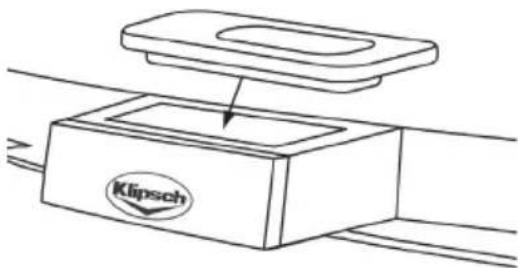
IINPpOcHbAHIOiPOd-a,yCTaHOJIeHOrO BIOK-CTAHU,HAxIMMaTe Ha KIONkypocHyBAAHIA("Listen") HA yCTpoJIcTBe RoormGroove HnHa npJbTe INTAHMOHHOYnpABHeHNO IO Tex NOp, NOKAHDAKaTOp pOcNyBAMHA Hte 3aRopITc TOny6bM CBETOM M BBy HE yCbIaTE BAu iPOd.MoKHO nONyHTb HnOncpeCTBeHHbIOOCTyN iPOd-ynyTEM HxATNA KHONK“IPoD”Ha npJbTe IINCTAHMOHHOYnpABHeHRAyCTPoJIcTBA RoormGroove.
IopKnloueHne BcnoMoraTeNbHoro nctouHnka 3BykoBOrO CnHaHa
Ha 3aJHn Hn Hn yCTPOBCTBA RoomGroove paCnoNoKeH 3,5-MnHmMetpoBbI CTepeofoHuecknn pa3bem nA BcNOMoratEnbHor HO tOHTnKa 3BykoBOr CmHana. DnIOKnHOeHHn BcNOMoratEnbHor OYCTPOBCTBa CIEyE IpocTo NIOKNOHHT bero 3ByKOBoBn BExD K BCNOMoratEnbHomy BxOdy ("Aux Input", paCNONoKeHHomy Ha 3aJHn Hn Hn yCTPOBCTBA RoomGroove. HeobXoHMo AONb3oBaTb Kabenb c 3,5-MnHmmetPoBBim MmHnatOpBbIM CTepeoHouHecknn LTekePOM.
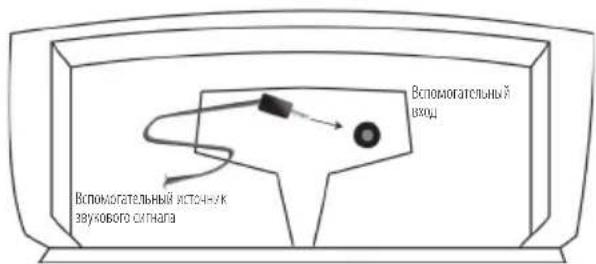
Длпрсушьань BCNOMORATENBHOr HO NCTOCHINA HAXMMAITE Ha KONKY пocушьань ("Listen") Ha yctpoiCtBe RoomGroove Mn Ha NyIbTe ДИСТAHUMOHOrO YIpaBHeHnNo Do Tex Nop, IOKa MнДКaTOp IPOcUySHBaHnHa НЗАТОПСТЯБYбIM CBETOM N Bbl He YCbMbITe aKCTUHECKN CMHAI OT BCNOMORATeNBHO VrOCTOCHINA. 3Ty ΦHyHKUINO MOXHO TAKKe BbINONHbT NYTeM HaxkTNHa HA KONKY BCNOMORATENBHO IVCTOCHINA ("Aux") Ha NpyIbTe ДИСТAHUMOHOrO YnpaBHeHnRmRoomGroove.
Ipumueaue: Hdukamop npocnyuuaan (Listen) 6ydom zopemb 2onybim uBemom kak npu npocnyuuaan noka hno ycmanohneHoo iPod-a, maU ycmpoucmea, nodknquehno Knokalhomy BCnmozamenbHom yxOy. Ecu oba bxoda uCnolb3yUOM, mo KhoNka npocnyuuaan (Listen) 6ydem nooepedno nepeKnouamb Mexdy BCnmozamenbHbIM ucmouhukom u iPod-om.
Ipepa akyctnueckoro cunhana n3 yctpoiCTBa RoomGroove
yctpoiTBO RoomGroove cOKHCTpypOBAHO TAK, yTO6bI NO3BONITB BAMpePABAT b
akyCTMecK CmHAn OT Pod-a NnOT BCNOMOTATENBORO yCTPOCTBA TAKIM.OBpa30M,
yTO6bI OH MOI bTB IPINH I BOCIPONB3BeH DPYMM KOMIOHEHTAMK LipschCast. YTO6bI PONMBCTNIpePAny IVCPTPOCTBA RoomGroove, HADIO pOCTo BB6pTa HCTOHNK CHHana,
KOTOBBI KOTME PePAbT, PyTEM HAXATNA HA KHONKY pOcNpyUHMBAHMA ("Listen"), IMN Xe
Bb6pTa JENIAEMBI WTOHKN CmHANA HA IIyIbTE DcIaTHAUHOHO YpRAPBENHK ("IPod") MM "Aux"), a 3aTEM HAXATb KHOKN pePAnu ("Transmit"). Iocne 3rTO Bb6pAHBBNtXCTOHNK
CMHana nepePaTeTNO BCMeY MoM y MOKET bTB pINHAT DpyTNMM YCTPOCTBAHMI,
pabotAOuNNM No cACTe ME KlipschCast.
Ipumueaue: Ecu ycmpoicmbo RoomGroove haxodumc 6 pejume nepedau, u emopoe ycmpoicmbo RoomGroove noluyuno komahoy nepedabamb, mo emopoe ycmpoicmbo RoomGrove 3aznyuum nepoe ycmpoicmbo u 3aumem kanan nepedau. Ecu bby jenaeme ckhouypupobam bauy becnpoboohnyu mno2okomhamhyu cuimemyak, umb no30bnmnb 03mojknocmb odnopemenho nepedau dna deyx ycmpoicmbe RoorGrove, obpamumeck pa3dene "Pepeda akycmueckoz zuhana u3 deyx ycmpoicme RoorGrove" hacmonzeo pykoobcdma.
IpocnyuBahne npyHX KOMnoHENTOB,pa6oTaOux Ha 6a3e KlipschCast, npn nomou Baawero yctpoCTBa RoomGroove
YCTOHTBO RoomGrove cOKHcTpypOBaHO TAKM O6P3OM, YTObblIOBOMBI BAM IPOCNIIMBAHKe
ACTOHMKOB AkyCTKecKO CTHANA, NOCDWHeHHBX KApyTM KOMNOHHTAM NIN BCTPOeHHBX B
Dpytme KOMIOHEHb KlipschCast, TAKME KAKIpyrOe yCtpoBBO RoomGrove IM pa3BNEkATEHBnAH
CMTeMa CuaPpObM. BAdoeDMCKOM TINa CS-700.
Jn npocnyuBHaHn ATOUHnKa CMHana, nepeabaeVoro DpyTMM yctpoNCTBOv, pabotaoHm no pnmHnny KlipschCast,Hxkyho npcoTo HaxaTb HA KONky npocnyuBAAHn (Listen) Jn Bbopa npedabaeVoro NTOUHnKa. HmHKATOp npocnyuBAAHn (Listen) 3aropmtc KpaCHm UCBOTOM (mM xOeIeTOBbIM B CNYue BTOPOrO BEcnpBOLOHOrO ATOUHnKA),KorDa CMHnX3 BeCpOBOnOHo NTOUHnKA PpMHn BOCpOxBODITCR. MMiaoum ZEB O3HaAeT,TOH XOIN M XTOUHKnOB He pinnHMAeTc Ha DAHHo KaHane.
UBeTa HnDnKaTopa npocnyuBAnna ("Listen") B 3aBnCnMoCTn OT nctOuyHKnOB akyctNueckoro CnHaHa
TnyoBn CBT BcTaYyKa3bBAeT Ha MeCTHbN MTOUHNK CMTHana. KpaChbN m
fnoIeOBb yBaTe YA k3bBAIoT HcMHaJIb, NOCTyNAIOUneYepe3 BeCpOBOIOUHOHe
kaHAnb. MraOuIN CBet ROBOpVT 06OTCYCTBmN MTOUHN KaNNBeCnpOBIOUHOro
kAHana.
Ecnu cTeMa, nepeaouaay akcytueckn ciHan, Aynetcra CteMoCS-700nn npyum yctpoiCTBOM RoomGroove
MeTbMbMCToHcKcHana(IPoMmBnOMoratEnbMbNcToHk)-ronyboi
EINMCTOHQMKBBIFETCACTemaDOMaHHeFoKHOHTeaTpa-KpaCHbI
ECN MCTOHMKON ABETCApyrOe yctpoCTBO RoomGroove - monetobbl
ДяссTeM,ВКIoUaIoUnxпeрадуOTДБуx yctpoIcTB RoomGroove
MeTHbIK ACTOHKK CHTHAPA (Pod Wm BcNOMorATEbHbIK ACTOHKK) - rOyboa
VICTOHUM CHHHLA, KOtOpB MABIEETCA 1-e yctpOCTBO RoomGroove - KpaCHN
VICTHMH CTHHATA, KOtOpbM RAeTAeTCA 2-EyTOPOCTBO RoormGIOOve - fHOJETOBH
IpepaayakcyteckoroCnHaiau3cnTeMbCS-700
BMHOKOMHAtOH CNTEMB, BKNUOaOUe CNTTEMy DOMaHIero KINHOtePaTnA CS-700 (npdaetc OTdJIbHO), nyIb TnCTaHmOHOro ynpabHeHHra RoomGroove MoXeT bbl NcNlO3BOAH dHr HENOCpeCTBeHHOro Bblopa NTOuHKOB CnHana, NOCTaNaOeTo OT CNTEmb CS-700, nocLe TOrO KAK CNTema CS-700 bblbBpaHa npn NMOHN KONKn IpocnyuBaHHa ("Listen"). No ymonHaHIO, CNTema CS-700 6byET npedeabatCBoM MeChTB NCTOuHK CnHana (NCTOuHK, KOtOpBb 6bl Bb6paH dHn PocNyuBaHHa/NpocMoTa Ha CNTeMe CS-700) Do TOrO, noka He 6byET Bb6paH dpyTOn HcTOuHK. OpaTneBc K paZdEny "PyIb TnCTaHmOHHO rypabHeHHa (Dy) HactoJeO pykoBoDCTBa dHnNoDpoBHOro 03hakomHeHHa c 0yHKUHOHaNb HbIM Bo3MOxHOCTAM NylbTa DY.
Ipepa akyctnueckoro cunhana n3 dByx yctpoiCTB RoomGroove
B CNTeMaX, KOTOpBie HE BKNIOHAOBT B Ce6B CNCTeMy CS-700 (NIM ECIN CNCTeMa DOMaUHeR KOHOTPeTAP He IpeHa3HAueHa 6bIt TaCtBu6 BeCIPoBOJIOHOH MHOKOMHATOH CNTeMb), DBa YCTPOIcTBa RoomGroove MOrY TnepeDaBaT OHOBpemEHNO. IInI PEPoOCTABnEHN 3ToB BO3MOKHOCTB BCEM KOMIOHENTAM BeCIPoBOJIOHOH MHOKOMHATOH CNCTeMb DOJIHXHb 6bIt NPiRCBOEHb KOIOBbE HOMepa ot 5 Do 9. Bb6op KOIOBORHOH eMeP aT 5 Do 9 No3BOHIT BTOPOMy YCTPOIcTBy RoomGroove 3aHTb BEcIPoBOJIOHb KaHAn, KOtOpB IO TOrO 6bl OTBeEN DIA CNCTeMb CS-700. (Dn8 Boonee noDPo6HOH MHΦOpMaunm CMOTpnte pa3dEn "YCTAHOBKa KOIOBOrO HOmePa".)
ECIN DBA yCTpoCTBa RoomGroove HaxoTcB B pexHMe nepeDAMn B BiXOTNE pepeDABt C TpeTbeO YoCTBa N Bb6paT, KaKoi KaHai byeT nCIOB30BaTcBdIHOBOI nepeDAMn, PpeXe BCero, Bbl DoJKNbBi B6paT bpeDApUy KOTOPUY BxOTNE ppekpatNTy, NyTeMa HaxaTn HA KHONky npocnyuHBANHIA ("Listen") DoTexnop, NOKA 3TOI hCTOHNK He 6yET cBlueH. 3aTeMa HaxmITE Ha KHONKY pepeDAAu, NOCE YERHOBB MIOCTOHNK 3aMomet 3TOI KAHAI, INpeDAAu OT dpyrTOI MCTOHNKA ppekpatNTc. Noce 3TOI Bbl DoJKNbClbuaTb HOBB MIOCTOHNK BO BCEMctax, Ige Do 3TOI BOCpOnH3BOUHAcB IpOrpAmMa npeDbUYeToE MCTOHNA. HOBB MIOCTOHNK AkyCTNuEcKOro CmHaIa 6yET DoCTyneH dna BCex aKTMBhix npHHMAOuXy CTPOCTB.
IpumueaHue: Bce ycmpoicmba 6ecnpoBOnouHOu MHOZOKOMHAMHO cucmeMbdoXkbb6bmbycaMaHOBneHbHe meKe camble Kodobble Homepa dnoeocneHu nepeau.
yctaHObKa KoIOBbIX HOMePOB
Ufepbnat Koobhix Hmoebp, Haxoaynnc Ha 3aehne naHemBaWero
ycptnbra RoomGroove, No3BONET BAM Bb6op Koga, KOtOpBb6ydt
cneuHnecknn IINBce BAAIX KOMnoHcTOB KlipschCast, Cienbbo
npodTbpaueHHN NOMEXOT COeHNX CNCTEM. KoOBoBE Hmepa NMeIOT
mnana30n OH 0 Do9, npMey O yctahabnBaetc n yMOunAHIO. KoB Cbx BaAUX
KOMnoHcTOB KlipschCast bytepnOHaauJIbHO yctaHOBHeH aO, tTO no3BOiNT
06ecneHTb HANmE OOnHO 6ecPiPoBOUChOHO KaHAnI INepeDaH 3ByKOBO
COPBOXdHn OT DmauHero KAHOteApA NT BTOPO 6ecPBONoOHoro KaHana
dI nepeaAkyCTnckoro CMHlA cYcToPcTBA RoomGroove. KoobBb Hmep
doJKeH MeHbC TOnkO NO OOnH N3 DByHX HmKeEyKa3aHHbX PmUHH:
1)HaHnne Nomex OT CooeHHe CNCTEmb. Ecm NoceHnna CnCTema co3daet
nomExBaueBecnpoBOuOHnCnCTEme,To cndyET npOCTO 3MmEHnB KOD
BcEXKOMIOHETOB KlipschCast Ha DpyrO HOMep.KOMIOHEtB KlipschCast
bdyT nepeDaBaTB n pnnHMaTb AkyCTNueCKMe CnHbIb ToIbKO T KOMIOHETOB
COINHAKOBIM KOIOBBIM HOMepOM.KoIOBbie Homepa O 0do4 MOYr
NCIOB3OBAbCA DnA nepeDau kAcYCTNueCKnx CnHANOB OT CnCTEmb DOMAUHero
KHOHTaPn OYTPOChTBa RoomGroove (KOIOBBe HOMepa ot 5 do 9
3ape3epBnpoBaHb DnA CnCTEm, BKNIOUacXuX nepeDauy OT DBxv OTdEBhIX
ycPoINCTB RoomGroove He MeIeoux DoMAUHero KNHOteTaPa).
2) EINB bby XOTNE nepedaBbAkyCTNueCKMe CnHbIOT DByx yCtpoiCB RoomGroove (63 HAIIMNA CNTeMbIDOMaHHeR KInHOteTaP).ECIN BxXOTNE nepedaBb AkyCTNueCKMe CnHbIOT DByx OTdEBHbX yCtpoiCB RoomGroove 63 HAIIMNA CNTeMbIDOMaHHeR KInHOteTaP, HADIO pOcTO BbOpBaT KoIObbI Homep O5 Do9 N IMeHHTb KOIOBBI HOMep BCEX KOMNOHErTO KlipschCast Ha To Jce Camoe YNCNo. KOMNOHETbKlipschCast 6ydy TpepaBAt n PmHHMaTb akyCTNueCKMe CnHbIOT KOIMNOHErTO CTEM Xe CaMlbIMKOIOBBIM Hoomepom.
Iocne IM3MeHEHMA KOIOBOHO HOMepa CnDyET OTOeINHHTb N CHOBa NOOcEOHNHTB HYP NITAHM KPO3EKE, YTO6bTaKoE IM3MeHEHME npAKTNUeCKM OCUyecTBNIOC. 3TO DECTBNE PNPBEeT KIM3MeHEHMO KOIOBOHO HOMepa N N03BOJNT BCM KOMNOHENTAM CBA3BbAeBCrC DpyTMN KOMNOHENTAM KlipschCast, yCTaHOBNEHHbIM HA TO TKe CaMb KODOBH HOMep.
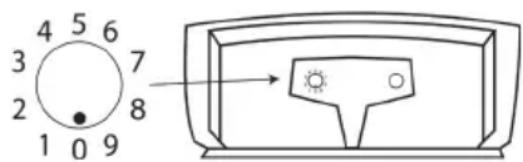
Ipumuehue: Iyraocuuecmnneu nepeauyce ycmpoucma 8 becpnoBOnOuH MHOZOKOMHamHou cuimeme doJXnb6bmb ycmanOBHeHbHa meKe camble Kodobbie Homepa.
IyIbT nIcTaHnOHHOro ynpaBneHn
beCnpoBOIOHbIyIbI MTCTAHUONHOHO yIpaBneHnIO3BOJHeT OcYIeCTBJIaB 83AAMOeJeCTBME MEXdy yCTpoNCTBOOMGrove m Pod-OM, a TAKKe MEXdy DpyIMM nepeAoIOHM yCTpoNCTBaMM, TaKIMM KAK DononHInTeBHOye CTCPOCTBO RoomGrove n CNTembl DoMaHIIero KNHOteTaPp ombl Klipsch, HApmep, cmtema CS-700.
IpuemueaHue:Ja oecneueHue npabunbHO 03aumoeicmbu cedyem Hanpabum nylbm ducmanuohno ynpaBnHeu6 cmopony RoomGroove.
KhONK
KhONKa BKnOChEnHa Haxatme Ha KhoNkIy BknIOaEt yCTPOCTBO RoomGroove. NoBtropHoe Haxatme IpeBoDnIT PNTAHmra("Power") RoomGroove B peKM OXIAADHNA.

RoomGroove
iPod Bb6paet iPod,yctahOBnCHBBBDOK-CTAHUMNOKaJIbHOrO yCTPOIcTBa RoormGroove.
BcnoMOratenbHoe BbIpaet akcyTneckoe yCTpoiCTBO, noIOcoeMHHeHoe K JIOKaNbHomy RoomGroove (akcyTneckoe yCTpoiCTBO DOJNHO HaxOHTbcR B PEXnme BOCpOn3BeDeHnR, YTO6bl ero MOxHb 6blno ycbluAtb).
IpcnyuBaHne Ipeeknoaet MeKdy IMeIOUIMCA B HAnuMn AkyCTNueCKMm NCTOHNKaM, KaI NOkAnbHbIMn TAK N BeCnpoBDoHbIMn.
Akyctnueckne nctouhkn Domawhero KInhoTeaTpa("Cinema System Sources")
CD/DVD Ipeoctabnaet doctyn KIOCKOBOy KOAMnKT-IMcKa NIOPOBOro BnEOncka CNTeMbI DOMAHIero KINHOtePa,IOIOcoeMHeHHK cetn KlipschCast.
AM/FM IpeoctabnetaDocTyk AM/UM-THOepy CNTeMbdoMaHero KINHOteaTa, noCoeHNHeHHoK cetn KlipschCast.
Ka6ebnHoe/ Ipeoctabnnet DocTyn K akyCTNueckomy CmHaIy, noCtynAioeMy OYcTPOCTBA, cyTNKOBoe nokkIOuEHNO KO BXOyD "Ka6ebnHO/cnyTHNKOBoe TeneBnDEHe" ("Cab/Sat") cCTEmbl TeBnEHe (Cab/Sat) dOMaHIero KInHOtePa, nOcEOJIHHHO K cETn KlipschCast. YcTPOCTBO DOLJHO nOJaBaTB aKcYtueckm CmHaI Ha CNTeMy dOMaHIero KInHOtePa, 4TOb6 b6Tb yCbIaAHbIM Hepe3 RoomGroove.
BcnomoratenbHn Pnpocctabniet doctyn k akcyteckomy CnHany, noctynaoemy ot yctpoHCTBA, nokknueHHoro K"BCnomoratbnHOMy BxOy 1" cTcEmbl dmoaHero KNHOeTaPa, nocoeMHHeHHo K cetn KlipschCast. YcToaCTBO DOJNXHO NOdaBaT b akcyteckm CnHAn B CNTeMy DmoaHero KNIHOTeaPta, YTOb6blYcNbHaHHM Ha RoomGroove.
BcnomoratenbHn Bxod 2 ("Aux 2") PpOCTabNtEt NoCTyn K akCTuueckomy CnHany, NoCTynaIeMy OT yCTpoiCTBa, NOKNIeHHOro K BCnOMoratEnbHomy BXoY 2" CNTEmbl DomaHero KNHOteaTpa, NOCoEHNHeHHo K cTe N KlipschCast. YcTPOCTBO DOJNXIO NODaBAt aKCTUeCKn CnHAn B CNTeMy DomaHero KNHOteaTpa, YTOb6 bTbYCNbHaHHM Ha RoomGroove.
Bb60ptpeka(|)3nKHOIKNIO3BOJAKOTynpaBnTbHECKOJIbKMpa3NNUHbIMnAkyCTNueckmM
IpynpaBHeHHIOkaJIbHbIMIPod-OMHaKMMteHaIIMIIIINpeKNIIOeHHaIpeBduuHIMINIOcNEyIOUHTpeKHaKMMTeNyeepKaBaHTeINIB6bICTPOINpOKpyTKN3aIDINBIpePeIOBOcPOn3BODMOMY TpeKy.
IpynpaBHeHnepeDaaEBMbIM Pod-OM,yCTaHOBHeHHbIM BOK-CTAHm DpyrTOOyCTPOHCTBa RoomGroove,HaKMMTe Ha IINII INN
Pn ynpabHnKOMaKT-dNcKOMuINΦpOBbIMBaEO-dNcKOMCCTEMblDomaHHeOKNHOtePa HaxMeTaHaIIMIN Dnna nepeKnUeHnHa npeBdyuMmNocneDuuTpeK/pa3dE.
PnynpabneHHAM/IM-TKHePOMCCTeMbIDomauHeroKHOHTaPaHaKMMTe HaI<NNI DnI nepeKnIOueHnHa npdeBdyuOyMnNocElyuOynpdeBaPntelHoHAcTpoEHyO CTAUHO (ecmctAHm He 6bnn npdeBaPteBHO HAcTPOeHb,3TN KHOKNFyHKUHOHPOBaTB He 6byT).
- PnHyPnabHeHHM NCTOCHNKOM Ka6eBHLo HIN CYTHKOBORO TeneBUNEN HAHXMTe HaI IINI DnA nepeKnIOueHn HA npebduynm mnnocneDkyuunn KaHaI.
3TN KONKHe 6bIyT FyHKMOHPOBaT bPn PPOCNYIMBAHH AkyCTHECKHX ATOOHKOB, NOJABaEMbIX uee3 BCNOMORATEJIbHbI BxOdbI 1 2 CNTeMbl DOMaUHrero KHOHTeTaPa.
Bocnpon3BeDenHe/nay3a("Play/Pause")

Pomkoctb ("Volume")

HaxMMte OuH pa3 nnpepeoBa B pexMM nay3b; HaxMMte eue pa3 nnpoONKeHnBocnoN3BeEHn.
HaXMMATE Ha + mI - IIOBBWHeH NIM yMeHbWeHn rPoMKoCT3ByKa yCTPOIBCTBA RoomGroove (Tolko nloNokalhoro yCTPOIBCTBA RoomGroove).
PexMM MonuHnra ("Mute") yEmhbaaet ypoBeHb 3Byka loKaIbHoro yTpoiCTBa RoomGroove do HynEboro ypoBHa (nonHoe OTCyTCTBne 3Byka).
3aMeHa 6aTapen nylbTa ductaHnOHHO npapBlenna
Ecm nybI nepeaetabotabm er o fyHKuHNOHPOBAHMe 3aMeHO yxuaetc, TO cneyET 3amchntb e0 bataepo. TObbl BnBnueb 6batapeo, Hxkyno pOto nToaHTb 3a 3bukOKOTcKa6batae (Kak yka3aHO Ha pcyHKe) n3Ble4b 6bataepo. batapae DIOJKA 6bbl 3aMeHeHa 10bko HA 3-BONTOByoNITNEByo 6bataepo Tnna CR2025.
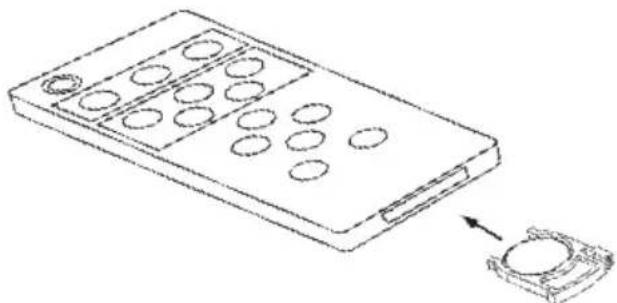
Ppumuehue:Oceuehue u dpyzue KOMhamhhe ycnoa Mozym ydyuumbpaobmynyla ma ducmahuonhozoynpaenneu
CucTeMa 3akpenIeHn Ihypa n aanTepa nTuHn
AanTep nIaTHaYcTPOcTBa RoomGroove IMeET BCTpoEHyO CmTeMy 3akpenneHnHypa. HImuuek hHpya MoKet 6bMbToB O6MToH BOKpyr aanTepa u 3akpennepeMHOBbMM peMeWKAM, KAKyKa3aHO Ha pmyHke.
Aadantep nIaTHnma yCTpoiCTBa RoomGroove MoKet 6bTy yOboHO 3akpeHH Ha er0 3aHne HaneHH. Ia 3akpeHH aadantepa nHTAHn CNeDyET NMeCtNTb KpOHK, paCNOKeHHHe No bOKAM aADTepa, B npopeHa 3aHne NaHn yCTpoiCTBa, KaK pokaHa Ho HA pcuYHe.
DOnonHnTeIbHbI KpOHuTeH IJIa HAcTeHHoro KpennenHn
Baue ycpoucIbO RoomGroove MoXe 6blb3akpeIeHO Ha cIteH npI IIOOMUHN He BxOaJIeero BV KOMIIeK TEPKaTeN, KOtOpB MOnHO 3aKa3aTb UpeEz Be6caIT Klipsch.com. NocTeAte Be6caIT Klipsch.com MnNo3BOHnTe No TenePhOy1.800. KLIPSCH (554.7724) (OINHOCTC TOIbKO K CUA IN KaHaJe) DIn IaIBHeuien HOpMaun.
TapaNTna 3a npedeJAMn CUSA n KaHabbl
IrapaHTHnHa 3to o6opyoBaHne,ecm OHO npOdaHo nOtpe6bTeHIO 3a nppeJeMaM C7A nn KaHabbl,doXHa yDobNeTBoprTa COOTBETCTByIOUeMy 3akoHy. IpaN OpTuyeHn COOTBETCTByIOUeIraPapHTHnHoro 0ocnyKbHaHn, noKaanycta opaTntc b K dInepy, y KOtopoBO Bbl npOboPem 3to o6opyoBaHne kN kNCTpv6bKToTpOy, KOtopb ero Bam IOCTABHII.
HΦopmaJFCC(ΦeepaJIbHOI KOMmccn CBA3n CIIJA)
JaHHe o6bpyoBaHHe co0tBcTBye Tpe6oBaHm pa3dena 15 PpaBn FCC.
KcKnpyataa HOnkHa yDObNtBOPaTb CneHyOuM DBym ycNoBAM: (1) JaHHe
yCTpoiCTBO He DoJIKHO Bbl3bBAbTB BpeDbxI NOMex, (2) daHHoe yCTpoiCTBO
doJIKHO pInHMaTb IIIO6yIO NOMExy, BKIOHAR IOmExy, KOTOPA MOKET Bbl3BaTb
HexenateNBbHpexiam pa60Tb.
JaHnOe OobpyoBaHnE 6bIIO NCbITaHO, B pe3yIbTaTe Yero 6bIIO BBaBNEHO, 4TO OHO COOTBETCTByET ORpAHueHNAM UΦPOBbIX yCTpoiCTB Knacca B, B COOTBETCBM C Tpe6oBaHnMM pa3Dena 15 PabIM FCC. 3Tm ORpAHueHNAM pa3pa6oTaHbI DnA ObecneHnMA COOTBETCTByUcN 3auNTbI OT BpcNbIX NOMEX B XINbIX NOMIEHNAX.
JaHnOe OobpyoBaHnE Co3JAEt NIOJIb3yET N3Jyuaet PaNIOaCTOHTHy EHePnIO H B CNYae, ECNI OHO He YCTaHOBNeH IO HE NCIOnb3yeTCA BOOTBETCBM C INHCtpKUNMIA, 3TO MOKeT pINBeCTM K BpeNJbIM NOMexAm Dn PAINOCBA3N. BMeCeT CTem, Het rapaHTIW TOMy, 4TO NOMExN He BO3HKnHY Prn ONpeDeNEHHY cTAHOBKe OobpyoBaHnIA.
BcoTBeCTBmCtpe6oBaHnMMFCC,IMMeHeHHMIMMOJIMVKAaMM,KOTOpBEABHOIΦOpME He bIMCaHKUHOHPOBaHbIΦpMoI Klipsch,MOryAHHyNPOBaTbpaoNoB3ObaTeNAKcNpyATPOBaTb DaHHOe O6OpDobAHme.
JaHnHOy yCTPOIcTBo C03aET MNCNOb3yET paIIOuOACTOTHy 3HeprHIO, HCCNI OHO He yCTAOHBIOHE H E KCIpyATmpyeTc HADJIEXAAMM O6pa3OM, OHO MOKeT Bbl3BaTb NOMExnPnnpHEme pAdIO N TEENBUNOHNNBx CMTHAOB.
EcmTOyCTPOCTBOBb3bBAETOMEXnPnnpMe paMIOIINTEBmOHbIX CMHANOB(BYcEMBbMOXeTeYbEHNbC,OTKIOUHByCTPOCTBOOTcTN),NONpOByIe NORACATb NOMExCNOMOIIbIO pNHHaONHOHNECKoNkx yKa3AHbIX HAKe MEP:
NoBepHnTe npHHMaIOyO aHTEHy (T.e., aHTEHy padmo NIN TeneB30pa, KOtopa "npHHMaET" NOMEXN).
IepemectyeyctpoiCTBO noanbweOTobopyoBaHnKOTOpoe IpVHMaET NOMEXM.
NoCoEHNHTeYCTPOHCTBOKpyrOpo3eKcIeBbYTO6blyyCTPOHCTBOM npHHMaIOoee NOMEXNOBOPyDobHHe HxOIMINcHa pa3HbIXpacnpedENTbHbIX cTAX.
Ecm3nMepbHeyCTpaHNOITNOMEXHINOKaJIyCTaIPOKOHcyIbTmpyTeCbBaUM
DInePOM INn CONbIThBM PaIOHO/TeNEB3MOHHBM TEXHKOM O DOnOJIHTeBHyX
npedNoKeHNx.
Kpome 3tOrO, FepaBnHn KOMnCnB CBAu CCoCTABnI None3Hy06poHOpy "KaK BbAIBTb npa3peWHTb npoBneMb paNDnN THeBnHOHHbx Nomex". 3Ta 6poUkp aMeETCB HAnmMn B PpaBntEhCTBeHNH TINIOrPapm CIIa No apcyc: U.S.Govemment Printing Office, Washington, DC 20402. Pnp oofpmeHn Baka3a npocmBac yka3aTb HBeHTapbnH homep 004-000-00345-4.
JaHnHOeOBpyOBAHHe HAXoDITcB COOTBCTBmC POnpa3dEmoJ CBoja
feepaJIbHbIX HopMaTHbIX AKTOB》,IpaBnIO 21 MInHcTePcTBa 3dpBOOxApeHn
H coUmaNbHorO o6ceNeHm CUA (DHHS Rules 21 CF Subchapter J),deCTBtEnbHo
Ha DaTy I3rTOBnEHHo OBpyOBAHn.
JaHHoe uHpOBoe yCTpoCTBO KNaCCa B COOTBeCTByET Tpe6oBaHm KaHaDCKOrO CTAndapTa ICES-003.
Ajpec: 3502 Woodview Trace
Indianapolis, IN 46268
TeneoH: 317-860-8100
图:15甲乙图2006r
3TAYCTBBA6bHnPBOBepHBnHnHcH0,HTOONCOOTBCTByePa3deny15Piabm FCC.3KcNpyataaJIOJHKncooTBeCTBOBATbCedeYUIMyCNOBAM.YCTPOCTBaHE 10JKNHbBb3bIbATb BpeHbIX NOMEXHOHN DQNKHpINHMAbTIbObyIO NOCTyNBUYIO NOMEXY,B TOM HNCNE NOMEXY,KOTOPARMOEETNHPBECTKHEKEnaTeBHOMy peKMMy paobtbl.
KLIPSCH AUDIO TECHNOLOGIES
RoomGroove

Tested To Comply
With FCC Standards
FOR HOME OR OFFICE USE
Ooovoiδaik Enttpon Eikovoviv (FCC)
H ouokeun oumuopowvetai e To Ap8po 15 Tuv KavoviouW FCC.H
Leioupyia unoketial otouc Enc duo opouc: (1) H oukeun dev noioupyei
enbetaic napeBoles kai 2) nookeun npenei va avtEe ie oonoiadntote
napeBoan dextei, aupeiaauvovewtuvapeBolwouu npoeiv a
pokaleoovn eithounth aeitoupyia.
H npaooau oukeun exei dokiaotei kai diamiotwne 0ti oumuopowetai
te ta opia nou npoBxenei to Appo 15 twv Kavoviauw FCC yia tic
psiapiec oukeuc Klaonc B. Ta opia exouv oxediaotei yia va napexouw
loyiknpoataia ano etiabaeic napeboace otnv oikiaek eykataotaan.
H oukeun npadyei, xnpoionoiei kai eknepei evepyia paioooyotntwv,
kai eav n eykataotaan kai npoiipoinon tnc oukeunc dev yiovuv
oupuva me toc oynyic, unapxei kivovoc etiabaw npaeboaw otn
padoenikoivwia. Oto60, dev npexetai eyyuonotdewtua npaeouv
tuov npaeboace cKaioia eykataotaan.
Umuwa u touk kavovioouc ncc FCC, tuxov aalayec rtponnoiraeic nnyekpivcnc ano tv Klipsch npoei va apaipeouv ao toxptn todeltaiawa va xnpaionoi to npov.
H napo0a oukeun npayei kai xpnnooiie evpeyia paioouxovtow (RF),kai eav n eykataotaon kai xponn tnc dev yivei oupwa ie tic oyniec, unapxei kivouoc n ouokeun va npokaolei npapeuboalec otn anpsi npaoopwikw kai tnleonttkw onnatw.
Tested To Comply With FCC Standards
FOR HOME OR OFFICE USE
For over 60 years, we've made speakers for people who are as passionate about great sound as we are. That's why every Klipsch speaker is horn-loaded to create a remarkably accurate listening experience for your music and movies. From our smallest satellites to our acclaimed professional theater installations, our speakers deliver sound that's so lifelike, you have to feel it to believe it.
THE ULTIMATE SOUND EXPERIENCE
- WARNING
- Thank You
- Unpack the Box
- Docking and Listening to an iPod
- Connecting an Auxiliary Source
- Transmitting Audio from the RoomGroove
- Listening to Other KlipschCast Devices with Your RoomGroove
- Sources and Colors of the "Listen" Light
- For systems transmitting from a CS-700 system and RoomGroove
- For systems transmitting from two RoomGrooves
- Transmitting Audio from the CS-700
- Transmitting Audio from Two RoomGrooves
- Setting the Home Code
- Remote Control
- Buttons
- RoomGroove
- Cinema System Sources
- Changing the Remote Control Battery
- Cable Management System and Mounting the Power Supply
- Optional Wall Mount Bracket
- Warranty - U.S. and Canada
- Limitations:
- Warranty Outside the United States and Canada
- FCC Information
- FCC Declaration Of Conformity
- (Setting the Home Code)
- PTEUYTPEJKEHNE!
- ADS-48R-12-2-1545
- Mbl 6narodapumBac!
- PacnakyTe Kopo6Ky
- YcTaHOBb B DoK-CTaHmIO u npocnyuBaHne iPod-a
- IopKnloueHne BcnoMoraTeNbHoro nctouHnka 3BykoBOrO CnHaHa
- Ipepa akyctnueckoro cunhana n3 yctpoiCTBa RoomGroove
- IpocnyuBahne npyHX KOMnoHENTOB,pa6oTaOux Ha 6a3e KlipschCast, npn nomou Baawero yctpoCTBa RoomGroove
- UBeTa HnDnKaTopa npocnyuBAnna ("Listen") B 3aBnCnMoCTn OT nctOuyHKnOB akyctNueckoro CnHaHa
- Ecnu cTeMa, nepeaouaay akcytueckn ciHan, Aynetcra CteMoCS-700nn npyum yctpoiCTBOM RoomGroove
- ДяссTeM,ВКIoUaIoUnxпeрадуOTДБуx yctpoIcTB RoomGroove
- IpepaayakcyteckoroCnHaiau3cnTeMbCS-700
- Ipepa akyctnueckoro cunhana n3 dByx yctpoiCTB RoomGroove
- IpumueaHue: Bce ycmpoicmba 6ecnpoBOnouHOu MHOZOKOMHAMHO cucmeMbdoXkbb6bmbycaMaHOBneHbHe meKe camble Kodobble Homepa dnoeocneHu nepeau.
- yctaHObKa KoIOBbIX HOMePOB
- IyIbT nIcTaHnOHHOro ynpaBneHn
- KhONK
- Akyctnueckne nctouhkn Domawhero KInhoTeaTpa("Cinema System Sources")
- 3aMeHa 6aTapen nylbTa ductaHnOHHO npapBlenna
- CucTeMa 3akpenIeHn Ihypa n aanTepa nTuHn
- DOnonHnTeIbHbI KpOHuTeH IJIa HAcTeHHoro KpennenHn
- TapaNTna 3a npedeJAMn CUSA n KaHabbl
- HΦopmaJFCC(ΦeepaJIbHOI KOMmccn CBA3n CIIJA)
- Ooovoiδaik Enttpon Eikovoviv (FCC)
Brand : KLIPSCH
Model : Roomgroove 5V
Category : Speaker