Tango X2 - Speaker XTREMEMAC - Free user manual and instructions
Find the device manual for free Tango X2 XTREMEMAC in PDF.


User questions about Tango X2 XTREMEMAC
0 question about this device. Answer the ones you know or ask your own.
Ask a new question about this device
Download the instructions for your Speaker in PDF format for free! Find your manual Tango X2 - XTREMEMAC and take your electronic device back in hand. On this page are published all the documents necessary for the use of your device. Tango X2 by XTREMEMAC.
USER MANUAL Tango X2 XTREMEMAC
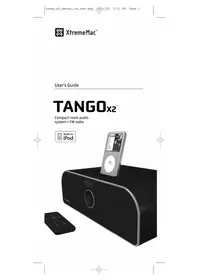
Compact room audio system + FM radio

Table of contents
English | 01
Française | 09
Italiano | 17
Deutsch | 25
Espanol | 34
Congratulations on your purchase!
Thank you for purchasing Tango X2, a 2.1 speaker system made for your iPod. The following pages explain the features and operation of Tango, so please take a few moments to read through this manual.
Package Contents
Tango X2 Speaker System
Advanced Remote Control
- AC Power Supply
FM Antenna
AM Antenna
-User Manual
IMPORTANT
Please read all safety instructions before proceeding. The answers to most set up and performance questions can be found in this manual or in the Trouble Shooting Tips. If you have any further questions about the operation or use of this product please contact our consumer care team for assistance before returning it to the place of purchase.
CUSTOMER SERVICE
Email: support@xtrememac.com
Telephone: 1-866-392-9800 (Toll free within the United States)
Hours of operation: Monday through Friday, 9am-6pm EST
PRODUCT SAFETY
When used in the directed manner, this unit has been designed and manufactured to ensure your personal safety. However, improper use can result in potential electrical shock or fire hazards. Please read all safety and operating instructions carefully before installation and use, and keep these instructions handy for future reference.

XtremeMac
The lightning flash with arrowhead, within an equilateral triangle, is intended to alert the user to the presence of uninsulated "dangerous voltage" within the product's enclosure that may be of sufficient magnitude to constitute a risk of electric shock to persons.
Caution: To prevent the risk of electric shock, do not remove cover (or back). No user-serviceable parts inside. Refer servicing to qualified service personnel.

The exclamation point within an equilateral triangle is intended to alert the user to the presence of important operating and maintenance (servicing) instructions in the literature accompanying the appliance.
CAUTION: To prevent electric shock do not use this (polarized) plug with an extension cord, receptacle or other outlet unless the blades can be fully inserted to prevent blade exposure.
WARNING: To reduce the risk of fire or electric shock, do not expose this appliance to rain or moisture.
IMPORTANT SAFETY INSTRUCTIONS
- Read these instructions.
- Keep these instructions.
- Heed all warnings.
- Follow all instructions.
- Do not use this apparatus near water - This apparatus shall not be exposed to dripping or splashing, and no objects filled with liquids, such as vases, shall be placed on the apparatus.
- Clean only with dry cloth.
- Do not block any ventilation openings. Install in accordance with the manufacturer's instructions. The apparatus should not be situated on a bed, sofa, rug or similar surface that may block the ventilation openings.
- Do not install near any heat sources such as radiators, heat registers, stoves, or other apparatus (including amplifiers) that produce heat.
- No naked flame sources, such as lighted candles, should be placed on the apparatus.
- Protect the power cord from being walked on or pinched—particularly at plugs, convenience receptacles, and the point where they exit from the apparatus.
- Do not install in an area which impedes the access to the power plug. Disconnecting the power plug is the only way to completely remove power to the product and must be readily accessible at all times.

XtremeMac
- Power source—Use only the power supply that is included with this unit. Do not substitute with any other power supply.
- Unplug this apparatus during lightning storms or when unused for long periods of time.
- Refer all servicing to qualified service personnel. Servicing is required when the apparatus has been damaged in any way, such as power-supply cord or plug is damaged, liquid has been spilled or objects have fallen into the apparatus, the apparatus has been exposed to rain or moisture, does not operate normally, or has been dropped. For service, refer to qualified service personnel, return to the dealer, or call the XtremeMac service line for assistance.

Federal Communication Commission: Verified to comply with FCC Rules for Radiated and Conducted Emission, Part 15, Subpart B, for Class B Equipment.
This device complies with Part 15 of the FCC Rules. Operation is subject to the following two conditions: This device may not cause harmful interference. This device must accept any interference received, including interference that may cause undesired operation. Note that FCC regulations provide that changes or modifications not expressly approved by XtremeMac could void your authority to operate this equipment.

CE Compliance for Europe: Verified to comply with EN55013, for RF Emissions and EN55020 for Immunity as applicable.

C-Tick Compliance for Australia: Verified to comply with AS/NZ1053 for RF Emissions as required by the Australian Communications Authority.

The use of this symbol indicates that this product may not be treated as household waste. By ensuring this product is disposed of correctly, you will help prevent potential negative consequences for the environment and human health, which could otherwise be caused by inappropriate waste handling of this product. For more detailed information about recycling of this product, please contact your local city office, your household waste disposal service or the shop where you purchased this product.

"Made for iPod" means that an electronic accessory has been designed to connect specifically to iPod and has been certified by the developer to meet Apple performance standards. Apple is not responsible for the operation of this device or its compliance with safety and regulatory standards.
Copyright © 2008 Xtreme Accessories, LLC. XtremeMac, Tango X2 and the "X" logo are trademarks of Xtreme Accessories, LLC. Designed in the USA. Made in China. For customer service and warranty information visit our website at www.XtremeMac.com, or call toll-free in the USA: 1-866-392-9800. iPod is a trademark of Apple Inc., registered in the U.S. and other countries. iPhone is a trademark of Apple, Inc.

XtremeMac
Warranty Information
What Does The Warranty Cover?
XtremeMac warrants that its products shall be free from defects in materials or workmanship, with the exceptions stated below.
What Is The Period Of Coverage?
This warranty runs for 90 days from the date of purchase.
What Does The Warranty Not Cover?
This warranty does not cover any defect, malfunction or failure that occurs as a result of: misuse or failure to follow the product directions; abuse; or use with improper, unintended or faulty equipment. Also, consequential and incidental damages are not recoverable under this warranty. Further, opening up the unit or removing any pieces from the product will immediately render your warranty null and void.
What Will XtremeMac Do To Correct The Problem?
XtremeMac will, at its option, repair or replace any product that proves to be defective in material or workmanship. If your product is no longer being manufactured, or is out of stock, at its option, XtremeMac may replace your product with a similar or better XtremeMac product.
How To Get Warranty Service?
To get a covered product repaired or replaced, you must contact XtremeMac during the warranty period by either calling (866) 392-9800 if you are in the U.S., or by e-mail (support@xtrememac.com). If you email XtremeMac, you must include your name, address, email address, telephone number, date of purchase and a complete description of the problem you are experiencing. If the problem appears to be related to a defect in material or workmanship, XtremeMac will provide you a return authorization and instructions for return shipment. Return shipments shall be at the customer's expense, and the return must be accompanied by the original proof of purchase and in the original packaging. You should insure the shipment as appropriate because you are responsible for the product until it arrives at XtremeMac.
The above limited warranties and remedies do not extend to the iPod used with the product.
Unpacking and Initial Setup
- Remove Tango X2 from the box and remove foam and protective plastic. Keep original packaging for 90 days and then properly dispose.
- Place Tango X2 on a level surface following the precautions listed in the safety warnings. For best sound, make sure to leave some room between the back of the unit and a back wall so that air can pass through the bass port.
- Remove AC adapter, remote and AM/FM antennas from the packaging.
- Read and review manual and safety warnings
- Connect the AC adapter into the jack on the back of Tango X2 labeled "18V DC", then plug the AC adapter into the wall outlet.
- Connect the FM antenna into the "FM" jack on the back of the unit. Untie and extend the antenna.
- Connect the AM antenna into the "AM" jack on the back of the unit
Listening to your iPod
- Remove the plastic cover protecting the dock connector and dispose of properly.
- Use the insert that came with your iPod and gently press it into the universal dock well.
- Carefully place your iPod into the dock well
- Press the control wheel on the front of the unit or press power on the included remote to turn on the power. The display will light "iPod" to indicate the unit is powered up and an iPod is properly docked. The display will turn off after 10 seconds.
- Press play on the top of the unit, on the iPod or on the remote
- Turn the control wheel on the front of the unit or use the volume controls on the remote to adjust the volume to the desired level.
- Use the controls on the top of the unit or the remote to play/pause and for next/previous track. For more advanced functions, use the iPod controls.
- Press and hold the control wheel on the front of the unit for 2 seconds to turn off the power. To conserve energy, the unit will automatically power off if no audio is detected after 7 minutes.
Note: If you dock a playing iPod, the unit will automatically switch to iPod mode and start playing. If you dock an iPod that is not playing, it will automatically switch to iPod mode, but you will have to press play on the unit, the remote or the iPod itself.

XtremeMac
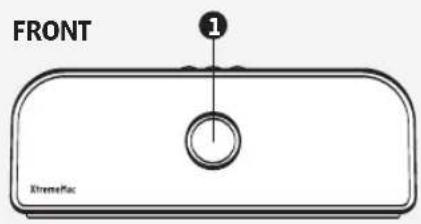
- Control wheel (p power on/off, source, v o lume)
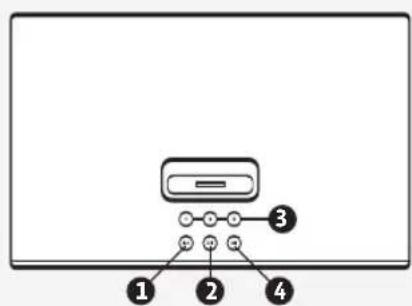
TOP
1.Previous track (iPod) D o w tuning (Radio)
2. Play/pause (iPod)
3.AM/FM presets (1-3)
4. Next track (iPod) U p tuning (Radio)
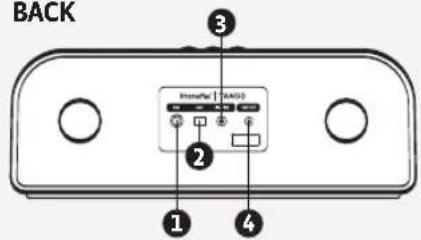
BACK
- FM antenna jack
2.AM antenna jack - Line-in jack
4.18V DC power jack
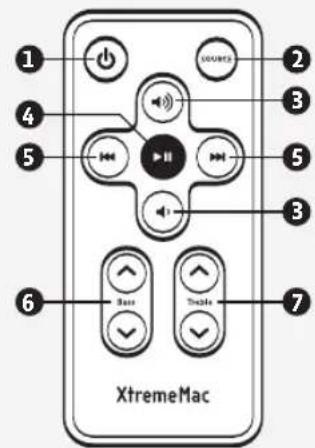
REMOTE
- Power on/off
- Source selection
- Volume up/down
- Play/pause (iPod)
- Track selection/ R a dtuning
- Bass up/down
- Treble up/down
Listening to the radio
- Press the control wheel on the front of the unit until either AM or FM frequency is displayed depending on your choice (FM frequencies have a decimal point before the last number). The display will turn off after 10 seconds.
- Use the tuning controls on the top of the unit or on the remote to tune to the desired frequency. Holding down the tuning controls will scroll quickly through the frequencies.
- Turn the control wheel on the front of the unit or use the volume controls on the remote to adjust the volume to the desired level.
Note: To ensure quality radio reception, Tango X2 will not charge a docked iPod while FM or AM radio is selected as the source.
Setting the radio presets
- Tune to the desired AM or FM frequency. You can set 3 presets AM frequencies and 3 presets for FM frequencies.
- Press and hold one of the three buttons on the top of the unit until the display flashes with the desired frequency. This preset is now set for the current frequency.
- Repeat process to program remaining presets.
Listening to an auxiliary source
- Connect the device to the "Line-in" jack on the back of the unit with an auxiliary 3.5mm cable (cable not included).
- Press the control wheel on the front of the unit until the display shows "Aux" as the source. The display will turn off after 10 seconds.
- Press play on the device.
- Turn the control wheel on the front of the unit or use the volume controls on the remote to adjust the volume to the desired level.
Note: To control functions other than volume on a device connected through the line-in, you must control through the device itself.

XtremeMac
Trouble Shooting Tips
NO POWER
Check AC adapter connection
Connect the AC adapter into the jack in the back of Tango X2 labeled "18V DC" and then plug the AC adapter into the wall outlet.
Check wall outlet function
Plug another device into the same outlet to confirm the outlet is working.
Check unit power
Press the power button on the top of the unit or on the remote. To conserve energy, the unit will automatically power off if no audio is detected after 7 minutes.
Push the source button on the top of the unit or on the remote to select the desired audio source.
Check volume level
Use the volume controls on the top of the unit or on the remote to increase the volume.
Check iPod connection
Remove your iPod from the dock well and re-dock to make sure it is properly connected.
REMOTE CONTROL DOES NOT WORK
Check remote battery
Open the battery door located on the bottom of the remote and replace with a new lithium battery. Make sure to place the battery with the positive side “+” facing up.
Check remote sensor "aim"
Make sure the remote control is pointed toward the front of the unit within 15 feet. The IR sensor is located above the control wheel behind the grill.
POOR AM OR FM RECEPTION
Check FM antenna
Check the connection on the back of the unit and make sure it is properly connected. Untie and extend the antenna. Position the antenna above the unit for best results.
Check the AM antenna
Check the connection on the back of the unit and make sure that it is properly connected. Position the loop antenna on a flat surface.
8|Tango X2 User's Guide