
Incharge Mobile ipp-im4-11 - Phone charger XTREMEMAC - Free user manual and instructions
Find the device manual for free Incharge Mobile ipp-im4-11 XTREMEMAC in PDF.


| Product type | Mobile phone charger (external battery) |
| Brand | Xtrememac |
| Model | Incharge Mobile ipp-im4-11 |
| Battery capacity | 10000 mAh |
| Dimensions | 150 x 70 x 15 mm |
| Weight | 200 g |
| Input power | Micro USB 5V / 2A |
| Output(s) | 1 port USB-A 5V / 2.1A |
| Main functions | Recharging smartphones, tablets and other USB devices |
| Charge indicator | Battery level LED |
| Built-in protection | Against overvoltages, overcurrents and short circuits |
| Material | Impact-resistant ABS plastic |
| Color | Black (typical) |
| Maintenance and cleaning | Wipe with a dry, soft cloth. Do not use abrasive products. |
| Operating temperature | 0 °C to 45 °C |
| Storage temperature | -20 °C to 60 °C |
| Safety | Do not expose to water, fire or excessive heat. |
| Spare parts and repairability | Battery not replaceable by user. Contact customer service. |
| Package contents | 1 external battery, 1 micro USB cable, 1 quick start guide |
| Warranty | 2 years (according to applicable legislation) |
| Certifications | CE, RoHS |
Frequently Asked Questions - Incharge Mobile ipp-im4-11 XTREMEMAC
User questions about Incharge Mobile ipp-im4-11 XTREMEMAC
0 question about this device. Answer the ones you know or ask your own.
Ask a new question about this device
Download the instructions for your Phone charger in PDF format for free! Find your manual Incharge Mobile ipp-im4-11 - XTREMEMAC and take your electronic device back in hand. On this page are published all the documents necessary for the use of your device. Incharge Mobile ipp-im4-11 by XTREMEMAC.
USER MANUAL Incharge Mobile ipp-im4-11 XTREMEMAC

XtremeMac™
INCHARGE ™ MOBILE
USER'S GUIDE
GUIDE DE L'UTILISATEUR
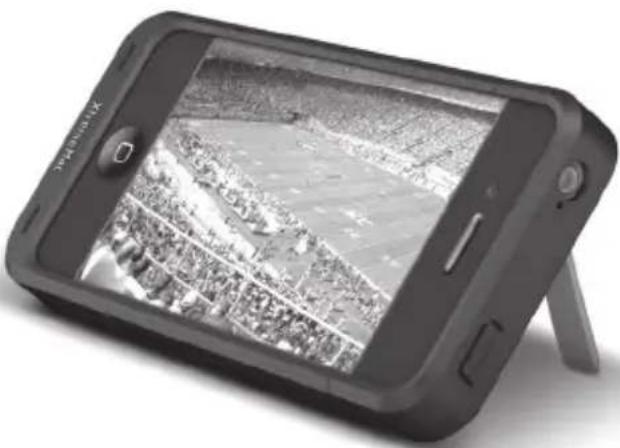


IPP-IM4-11
IPP-IM4-13

Made for
iPhone


XtremeMac
Congratulations on your purchase!
Thank you for purchasing InCharge Mobile - the rechargeable battery case with viewing stand for iPhone 4. The following pages explain the features and operation of InCharge Mobile, so please take a few moments to read through this instruction manual
PACKAGE CONTENTS:
• InCharge Mobile battery pack
- Removable cap
- Micro-USB charging cable
• Instruction manual
- Warranty card
IMPORTANT
Please read all safety instructions before proceeding. The answers to most set up and performance questions can be found in this manual. If you have any further questions about the operation or use of this product, please contact our consumer care team for assistance before returning it to the place of purchase.
CUSTOMER SERVICE
Email:
support@xtrememac.com
Telephone number:
1-866-392-9800 (Toll free within the United States)
Hours of operation:
Monday through Friday, 12pm - 9pm EST
2

XtremeMac™
IMPORTANT SAFETY INSTRUCTIONS
Read all instructions and warnings prior to using this product. Improper use of this product may result in a reduced battery performance or damage to your device.
- Do not attempt to disassemble product or replace any part of this battery
- Store and operate between 0° - 40° C
- Do not allow this product to contact liquids
- Do not place this product near a heat source or flame source
- Do not throw or shake this product violently
- Do not operate this battery pack if it has been subject to shock or damage
- Do not crush or puncture the battery
- Recharge the battery every 3 months when not in use
- Use soft cloth to clean the exterior. Do not use harsh chemicals or strong cleaning solvents
- Dispose of this product properly and in accordance to local disposal regulations

This equipment has been tested and found to comply with the limits for a Class B digital device, pursuant to Part 15 of the FCC Rules. These limits are designed to provide reasonable protection against harmful interference in a residential installation. This equipment generates, uses and can radiate radio frequency energy and, if not installed and used in accordance with the instructions, may cause harmful interference to radio communications. However, there is no guarantee that interference will not occur in a particular installation. If this equipment does cause harmful interference to radio or television reception, which can be determined by turning the equipment off and on, the user is encouraged to try to correct the interference by one or more of the following measures:
- Reorient or relocate the receiving antenna.
- Increase the separation between the equipment and receiver.
- Connect the equipment into an outlet on a circuit different from that to which the receiver is connected.
- Consult the dealer or an experienced radio/TV technician for help.
This class B digital apparatus complies with Canadian ICES-003


XtremeMac
GETTING STARTED
InCharge Mobile can be used right out of the package, but for best results it is recommended that you fully charge the internal battery. Please see "Charging InCharge Mobile" for further instructions.
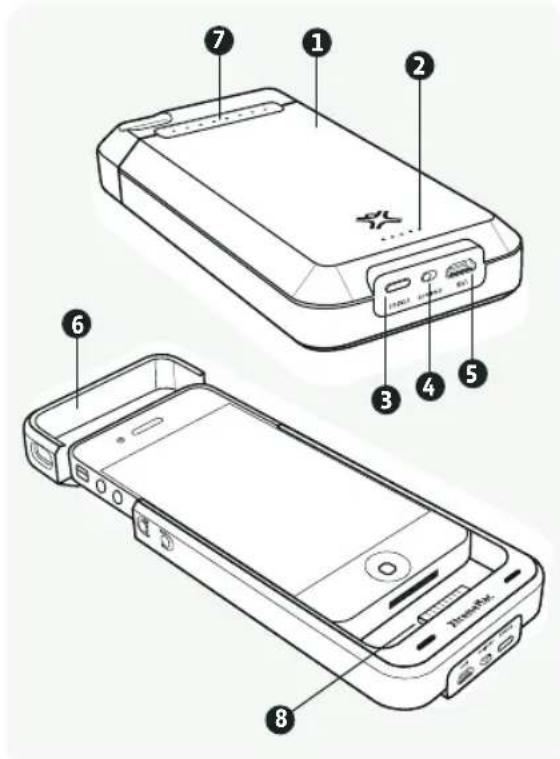
Battery configuration:
- Battery pack
- Battery status indicators
- Battery status button
- On/off switch
- Micro-USB jack
- Removable cap
- Viewing stand
- iPhone Connector
4


XtremeMac™
INCHARGE MOBILE PROVIDES UP TO THE FOLLOWING ADDITIONAL HOURS: *
Talk Time
Up to 7 hours on 3G
Up to 14 hours on 2G
Internet Use
Up to 6 hours on 3G
Up to 10 hours on wi-fi
Audio Playback
Up to 40 hours
Video Playback
Up to 10 hours
Standby Time
Up to 300 hours
* Additional hours will vary with device usage
USING INCHARGE MOBILE TO CHARGE/POWER YOUR IPHONE 4
- Remove any case or accessory that may be on or connected to your iPhone.
- Remove the cap on InCharge Mobile and slide the iPhone into the battery pack until the bottom of the iPhone is connected to the dock connector.
- Switch the button on the bottom of the unit to "on" to turn on the battery pack. The battery symbol on the iPhone will appear and the LED status indicators on the back of the unit will illuminate for 2 seconds to show level of charge.
- Slide InCharge Mobile's cap over the top of the iPhone until it locks into place with the battery pack. Your iPhone will operate normally.
Note: If your device is fully charged, InCharge Mobile will start supplying power from its internal battery first to preserve the battery on your device.
5



XtremeMac
SWITCHING INCHARGE MOBILE TO STANDBY MODE
If you would like to keep InCharge Mobile on your iPhone, but not use its internal battery, simply switch the button on the bottom of the unit to "off" for stand by mode. The LEDs on the back of the unit will light up and then quickly turn off and your iPhone will no longer show the battery symbol.
USING THE INTEGRATED STAND FOR HORIZONTAL VIEWING
- Remove the cap of InCharge Mobile and gently lift the metallic view stand out from under the camera hole.
- Replace the cap by sliding it on top of the unit until it locks into place.
- Place on a flat surface with the tip of the viewing stand resting on the surface.
- To replace the viewing stand, simply slide off the cap and gently push the metallic stand back into the battery pack. Replace the cap by sliding it back onto the case until it locks into place.
CHARGING INCHARGE MOBILE
Connect the micro-USB end of the included cable into the unit and then connect the USB end into the USB port on your computer or USB charger. The unit will automatically turn on and the LED indicators will show the charge level. The indicators will blink at each level until the battery pack reaches the charge for that level and then the LED will stay illuminated. All five LED indicators will illuminate when the unit is fully charged. After a short time, all the LEDs will turn off and InCharge Mobile will enter stand by mode. Please see "Checking the battery status of InCharge Mobile" for more information.
Note: If you are charging InCharge Mobile with the iPhone in the unit, the unit will charge the iPhone battery and the InCharge Mobile battery with charging preference given to the iPhone. This means your iPhone may be fully charged before InCharge Mobile is fully charged.



XtremeMac™
SYNCING AN IPHONE WHILE CONNECTED TO INCHARGE MOBILE
InCharge Mobile will sync your iPhone with iTunes through the micro-USB port on the unit. Simply connect the micro-USB end of the included cable into the unit and then connect the other end into the USB port of a computer with iTunes installed and follow the iTunes instructions for syncing.
CHECKING THE BATTERY STATUS OF INCHARGE MOBILE
Pressing the "status" button on the bottom of InCharge Mobile at any time will show the current status of the internal battery. The LEDs will be lit in sequence starting from the left of the unit to the right. The number of LEDs lit will indicate the level of charge by percentage:
1 LED: 0-19% Charged
2 LEDs: 20% - 39%
3 LEDs: 40% - 59%
4 LEDs: 60% - 79%
5 LEDs: 80% - Fully Charged
Note: If the charge level of InCharge Mobile is less than 10%, the first LED will blink to indicate that the unit needs charging.
TO KEEP YOUR INCHARGE MOBILE RUNNING AT ITS FULLEST POTENTIAL, MAKE SURE TO DO THE FOLLOWING:
- Keep your InCharge Mobile dry and away from moisture and corrosive materials.
- Do not wash it with harsh chemicals, soaps or detergents. Just wipe the case with a soft, water-dampened cloth. Wipe the pins gently with a soft, dry cloth.
- Re-charge your InCharge Mobile once every three months when not in use.


XtremeMac
Félicitations!
1011

INCHARGE MOBILE FOURNIT LES TEMPS D'AUTONOMIE SUPPLÉMENTAIRES MAXIMUMS SUIVANTS : *
1617


XtremeMac™
INCHARGE MOBILE FORNISCE AL MASSIMO LE SEGUENTI ORE SUPPLEMENTARI: *
Conversazione
2223


XtremeMac™
2829


XtremeMac™
INCHARGE MOBILE PROPORCIONA HASTA ESTAS HORAS ADICIONALES: *
Conversación
Hasta 7 horas en 3G
O INCHARGE MOBILE FORNECE ATÉ AS SEGUINTES HORAS ADICIONAIS: *

XtremeMac™


XtremeMac.com

Made in China | Fabriqué en Chine. Designed in the USA. © Imation Corp. XtremeMac, InCharge and the "X" logo are trademarks of Imation Corp. "Made for iPhone" means that an electronic accessory has been designed to connect specifically to iPhone, and has been certified by the developer to meet Apple performance standards. Apple is not responsible for the operation of this device or its compliance with safety and regulatory standards. iPhone is a trademark of Apple Inc., registered in the U.S. and other countries. Distributed by Imation Enterprises Corp., Oakdale, MN, USA. Imation Europe B.V. - Siriusdreef 46-52, 2132 WT Hoofddorp, The Netherlands. Imation shall not be liable for any lost data or incidental or consequential damages related to this product.
PRINTED IN CHINA • 23951083 C

- XTREMEMAC™
- INCHARGE ™ MOBILE
- USER'S GUIDE
- GUIDE DE L'UTILISATEUR
- XTREMEMAC
- CONGRATULATIONS ON YOUR PURCHASE
- PACKAGE CONTENTS
- IMPORTANT
- CUSTOMER SERVICE
- IMPORTANT SAFETY INSTRUCTIONS
- GETTING STARTED
- BATTERY CONFIGURATION
- INCHARGE MOBILE PROVIDES UP TO THE FOLLOWING ADDITIONAL HOURS
- TALK TIME
- INTERNET USE
- AUDIO PLAYBACK
- VIDEO PLAYBACK
- STANDBY TIME
- USING INCHARGE MOBILE TO CHARGE/POWER YOUR IPHONE 4
- SWITCHING INCHARGE MOBILE TO STANDBY MODE
- USING THE INTEGRATED STAND FOR HORIZONTAL VIEWING
- CHARGING INCHARGE MOBILE
- SYNCING AN IPHONE WHILE CONNECTED TO INCHARGE MOBILE
- CHECKING THE BATTERY STATUS OF INCHARGE MOBILE
- TO KEEP YOUR INCHARGE MOBILE RUNNING AT ITS FULLEST POTENTIAL, MAKE SURE TO DO THE FOLLOWING
- FÉLICITATIONS
- INCHARGE MOBILE FOURNIT LES TEMPS D'AUTONOMIE SUPPLÉMENTAIRES MAXIMUMS SUIVANTS
- INCHARGE MOBILE FORNISCE AL MASSIMO LE SEGUENTI ORE SUPPLEMENTARI
- CONVERSAZIONE
- INCHARGE MOBILE PROPORCIONA HASTA ESTAS HORAS ADICIONALES
- CONVERSACIÓN
- O INCHARGE MOBILE FORNECE ATÉ AS SEGUINTES HORAS ADICIONAIS
- XTREMEMAC.COM
Brand : XTREMEMAC
Model : Incharge Mobile ipp-im4-11
Category : Phone charger